
• Home
  • Insight
  • Blog
  • Business
  • Entertainment
  • Health
  • Politics
  • Shop
    • Gift Shop
    • Value Shop
    • Store
    • Bargain Shop
    • Discount
  • Sports
  • Tech
  • Travel
  • USA
  • Video
  • World
    • Asia
    • Africa
    • South America
    • North America
    • Europe
    • Oceania
Saturday, October 17, 2026
No Result
View All Result
Subscribe Now
  • Home
  • Insight
  • Blog
  • Business
  • Entertainment
  • Health
  • Politics
  • Shop
    • Gift Shop
    • Value Shop
    • Store
    • Bargain Shop
    • Discount
  • Sports
  • Tech
  • Travel
  • USA

    Arcadia surrogacy mansion mom previously fled U.S., prosecutors allege

    Crowds throng New Delhi and wave Indian flags amid escalating protests : NPR

    Jerry Seinfeld mocks pro-Palestinian protesters at Chicago Theatre

    Reflecting on the Trump Era

    California can’t make ICE wear ID, federal appeals court rules

    Pope Leo XIV diagnosed with cancer

    WATCH: Runaway goat finds love, forever home

    China Puts Border City on Alert over Russia Suspected Plague Case

    Ben Affleck says political ‘hypocrisy, corruption and failure’ left him ‘disillusioned’

  • Video
  • World
    • Asia
    • Africa
    • South America
    • North America
    • Europe
    • Oceania
The Insight Post
  • Home
  • Insight
  • Blog
  • Business
  • Entertainment
  • Health
  • Politics
  • Shop
    • Gift Shop
    • Value Shop
    • Store
    • Bargain Shop
    • Discount
  • Sports
  • Tech
  • Travel
  • USA

    Arcadia surrogacy mansion mom previously fled U.S., prosecutors allege

    Crowds throng New Delhi and wave Indian flags amid escalating protests : NPR

    Jerry Seinfeld mocks pro-Palestinian protesters at Chicago Theatre

    Reflecting on the Trump Era

    California can’t make ICE wear ID, federal appeals court rules

    Pope Leo XIV diagnosed with cancer

    WATCH: Runaway goat finds love, forever home

    China Puts Border City on Alert over Russia Suspected Plague Case

    Ben Affleck says political ‘hypocrisy, corruption and failure’ left him ‘disillusioned’

  • Video
  • World
    • Asia
    • Africa
    • South America
    • North America
    • Europe
    • Oceania
No Result
View All Result
No Result
View All Result
Home Mobile

Touch ID not working for you? Here’s how to fix it!

by Theinsightpost
December 17, 2022
in Mobile
0 0
0
Touch ID not working for you? Here’s how to fix it!


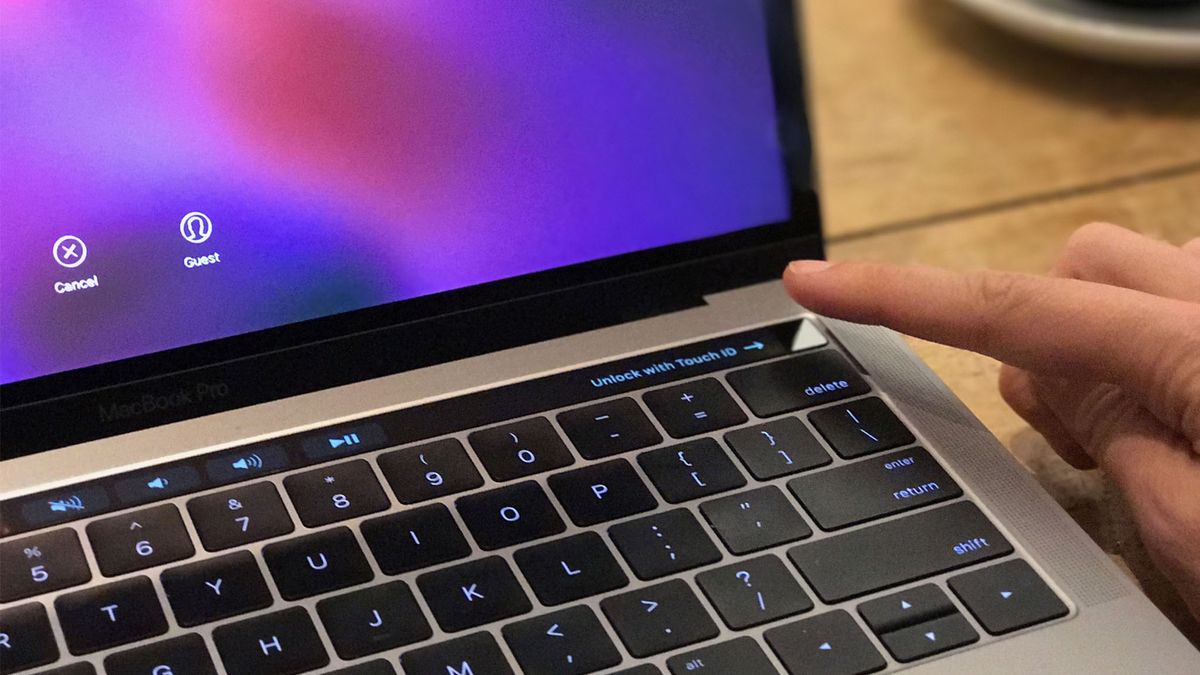
Touch ID is Apple’s fingerprint identity sensor. It allows you to unlock your device, log in to apps, use Apple Pay, and make purchases from the App Store by touching and briefly holding your finger against the sensor. When it works, it’s magical and you want it everywhere — your car, your house, your yacht, your one-person rocket to Mars — but when it doesn’t, you want to throw your iPhone (or Mac) across the room.

What can make Touch ID failures even more frustrating is figuring out why it’s failing in the first place. From the outside, it seems like the stereotypical black box. A fingerprint goes in and then it either works or doesn’t, and if it doesn’t, there’s no way for us to see what went wrong, why, or how to fix it. Maddening.

There are, however, some things you can do to make it work better and more often.

How does Touch ID work?

(Image credit: iMore)

On a supported Apple mobile device such as the iPhone SE (2020), there’s a capacitive ring around the Touch ID sensor; on select Macs, the entire Touch ID sensor is capacitive. When the sensor detects a finger, it triggers a high-resolution image capture. That image is converted into a mathematical representation, which is then sent through the hardware channel to a secure enclave.

If the representation matches what’s stored in the enclave, a “yes” token is released, and the Touch ID action is authenticated. If not, a “no” token is released, and all you get is a digital head shake. Every time Touch ID scans a finger and recognizes it, more detail gets added to the representation, theoretically to make it register even faster and better in the future.

Troubleshooting trippy Touch ID authentication

Here are a few tips and tricks to try if you’re experiencing Touch ID issues:

  • During the registration process, make sure you move your finger around enough that the entire surface gets scanned during the first stage, and that every edge gets scanned during the second phase.
  • Any sweat or liquid on your finger at all can interfere with the scan. Wipe both your finger and the Home button off and dry them completely before using Touch ID.
  • The sequential improvement process can sometimes go off-track (i.e., instead of getting better, an error can occur, and it can get worse). When that starts to happen, delete the fingerprint and re-register.
  • On a supported iPhone or iPad, make sure your finger touches the capacitive metal ring and the Home button.
  • Touch ID is super fast these days, but you should still refrain from lifting your finger too quickly.
  • Try to keep your finger in one place when you’re authenticating — you don’t want to move your finger around too much.
  • If you’re rockin’ a screen protector or case, you don’t want it to cover up the capacitive ring or the Home button — that could cause errors with Touch ID authentication.
  • If all else fails, it’s time to head to the Apple Store (opens in new tab) for one-on-one support.

How to delete and re-add your Touch ID fingerprints

Sometimes you have to burn it to the ground and start anew. Here’s how to re-add your Touch ID fingerprints on your Mac and supported mobile devices.

How to delete and re-add your Touch ID fingerprints on Mac

Follow these steps to delete your Touch ID fingerprints on any of the best Macs that support it.

  1. Click on the Apple menu icon in the upper left corner of your Mac’s screen.
  2. Select System Preferences from the drop-down menu.
  3. Choose Touch ID.

To delete and re-add your Touch ID fingerprints on Mac, click on the Apple menu at the top left, then select System Preferences from the drop down menu. Select Touch ID.

(Image credit: iMac)
  1. Hover over the fingerprint icon you wish to delete until you see the X in the upper left corner, then click on it.
  2. Enter your password.
  3. Press Delete to confirm.

To delete and re-add your Touch ID fingerprints, hover over the fingerprint you wish to delete and click on the X. Enter your password then confirm that you want to delete the Touch ID.

(Image credit: iMore)

Follow these steps to add your Touch ID fingerprints on Mac:

  1. Click on the Apple menu icon in the upper left corner of your Mac’s screen.
  2. Select System Preferences from the drop-down menu.
  3. Select Touch ID.
  4. Click on Add a fingerprint.
  5. Enter your user password and follow the on-screen instructions.

To add your Touch ID fingerprints on a supported app, click on the Apple menu, then select System Preferences from the pull down menu. Select Touch ID. Click Add a fingerprint and add your user password and follow the on-screen instructions.

(Image credit: iMore)

How to delete and re-add your Touch ID fingerprints on iPhone or iPad.

If you’re having trouble with Touch ID on an iPhone or iPad, here’s how you wipe the slate clean and start again!

  1. Launch the Settings app.
  2. Tap on Touch ID & Passcode.
  3. Type in your Passcode when prompted.
  4. Tap on any fingerprint.

To delete and re-add your Touch ID fingerprints on iPhone or iPad, launch the Settings app, then choose Touch ID & Passcode. Type in your Passcode, then tap on any fingerprint.

(Image credit: iMore)
  1. Tap on Delete Fingerprint. Repeat this until all your fingerprints are removed.
  2. Select Add a Fingerprint…
  3. Follow the on-screen prompts to set up a new fingerprint.

To delete and re-add your Touch ID fingerprints on iPhone or iPad , tap on Delete Fingerprint. Repeat until every fingerprint has been removed. Select Add Fingerprint, then follow the on-screen prompts to set up a new fingerprint.

(Image credit: iMore)

Back in-touch

Touch ID remains an efficient authentication option on select mobile devices and Macs. But when you encounter some trouble with it, you can always delete and reactivate your Touch ID with ease. And if you’d like to upgrade to Face ID, try the latest iPhone. 

Updated December 2022: Updated for the latest version of macOS.


Source link

ShareTweetSend
Previous Post

Fire Razes Down Kitisuru Homes, Leaves 116 Residents Homeless

Next Post

OECD adopts Declaration on government access to personal data held by the private sector

Related News

Mobile

YouTube just got a major Instagram-inspired upgrade

October 16, 2026
Mobile

The new Apple Watch Series 10 bands will work with older Apple Watch models

October 15, 2026
Mobile

New ways to drive smarter discovery, deeper engagement, and business growth on Google Play

October 14, 2026
Mobile

Struggling with calls and connectivity on your Pixel? The latest Android beta has tools for you

October 14, 2026
Next Post
OECD adopts Declaration on government access to personal data held by the private sector

OECD adopts Declaration on government access to personal data held by the private sector

Discussion about this post

Subscribe To Our Newsletters

    Customer Support


    1251 Wilcrest Drive
    Houston, Texas
    77042 USA
    Call-832.795.1420
    e-mail – news@theinsightpost.com

    Subscribe To Our Newsletters

      Categories

      • Africa
      • Africa-East
      • African Sports
      • American Sports
      • Arts
      • Asia
      • Australia
      • Business
      • Business Asia
      • Business- Africa
      • Canada
      • Defense
      • Education
      • Egypt
      • Energy
      • Entertainment
      • Europe
      • European Soccer
      • Finance
      • Germany
      • Ghana
      • Health
      • Insight
      • International
      • Investing
      • Japan
      • Latest Headlines
      • Life & Living
      • Markets
      • Mobile
      • Movies
      • New Zealand
      • Nigeria
      • Politics
      • Scholarships
      • Science
      • South Africa
      • South America
      • Sports
      • Tech
      • Travel
      • UK
      • USA
      • Weather
      • World
      No Result
      View All Result

      Recent News

      Legal Aid Commission engages inmates of Sekondi Central Prison

      October 17, 2026

      Super Eagles Stars Set for Showdowns in England and Turkey

      October 17, 2026

      Encryption Is Getting Squeezed From All Sides

      October 17, 2026

      KPA steps up Mombasa port expansion as cargo volumes surge

      October 17, 2026
      • Home
      • Advertise With Us
      • About Us
      • Corporate
      • Consumer Rewards
      • Forum
      • Privacy Policy
      • Social Trends

      Theinsightpost ©2026 | All Rights Reserved. Theinsightpost is an Elnegy LLC company, registered in Texas, USA

      Welcome Back!

      Login to your account below

      Forgotten Password?

      Retrieve your password

      Please enter your username or email address to reset your password.

      Log In

      Add New Playlist

      We are using cookies to give you the best experience on our website.

      You can find out more about which cookies we are using or switch them off in .

      No Result
      View All Result
      • Home
      • Insight
      • Blog
      • Business
      • Entertainment
      • Health
      • Politics
      • Shop
        • Gift Shop
        • Value Shop
        • Store
        • Bargain Shop
        • Discount
      • Sports
      • Tech
      • Travel
      • USA
      • Video
      • World
        • Asia
        • Africa
        • South America
        • North America
        • Europe
        • Oceania

      Theinsightpost ©2026 | All Rights Reserved. Theinsightpost is an Elnegy LLC company, registered in Texas, USA

      The Insight Post
      Powered by  GDPR Cookie Compliance
      Privacy Overview

      This website uses cookies so that we can provide you with the best user experience possible. Cookie information is stored in your browser and performs functions such as recognising you when you return to our website and helping our team to understand which sections of the website you find most interesting and useful.

      Strictly Necessary Cookies

      Strictly Necessary Cookie should be enabled at all times so that we can save your preferences for cookie settings.

      Cookie Policy

      More information about our Cookie Policy

      Clear examples do more than decorate an explanation: they show how an idea behaves under recognizable conditions. In education and software documentation alike, strong illustrations begin with a defined goal, then reveal the steps, assumptions, and result without unnecessary detail. A practical test example should state the input, expected output, and boundary condition, because these elements show whether a rule works beyond the simplest case. Including a contrasting case also helps readers distinguish a valid application from a tempting but incorrect one, while concise notes explain why the outcomes differ. When examples are updated with current data and checked against the underlying rule, they remain useful across classrooms, product guides, and professional training.
      Bij toegang tot Belgische casino’s via een tablet kunnen spelers accountgegevens, spelvoorwaarden en betaalopties overzichtelijk raadplegen, terwijl informatie over casinos zonder cruks aanvullende context biedt bij het beoordelen van beschikbare toegangsregels. Een stabiele mobiele verbinding en goed leesbare beveiligingsfuncties zijn daarbij belangrijk voor leeftijdscontrole, accountbeheer en verantwoord spelen.