
Posted by Dave Burke, VP of Engineering
Today, we’re releasing the second Developer Preview of Android 14, building on the work of the first developer preview of Android 14 from last month with additional enhancements to privacy, security, performance, developer productivity, and user customization while continuing to refine the large-screen device experience on tablets, foldables, and more.
Android delivers enhancements and new features year-round, and your feedback on the Android 14 developer preview and Quarterly Platform Release (QPR) beta program plays a key role in helping Android continuously improve. The Android 14 developer site has lots more information about the preview, including downloads for Pixel and the release timeline. We’re looking forward to hearing what you think, and thank you in advance for your continued help in making Android a platform that works for everyone.
Working across form factors
Android 14 builds on the work done in Android 12L and 13 to support tablets and foldable form factors. See get started with building for large screens and learn about foldables for a quick jumpstart on how to get your apps ready. Our app quality guidance for large screens contains detailed checklists to review your app. We’ve also recently released libraries supporting low latency stylus and motion prediction.
The large screen gallery contains design inspiration for social and communications, media, productivity, shopping, and reading app experiences.
Privacy and security
Privacy and security have always been a core part of Android’s mission, built on the foundation of app sandboxing, open source code, and open app development. In Android 14, we’re building the highest quality platform for all by providing a safer device environment and giving users more controls to protect their information.
Selected photos access
We recommend that you use the Photo Picker if your app needs to access media that the user selects; it provides a permissionless experience on devices running Android 4.4 onwards, using a combination of core platform features, Google Play system updates, and Google Play services.

In the new dialog, the permission choices will be:
- Allow access to all photos: the full library of all on-device photos & videos is available
- Select photos: only the user’s selection of photos & videos will be temporarily available via MediaStore
- Don’t allow: access to all photos and videos is denied
Apps can prompt users to select media again by requesting the media permissions again and having the READ_MEDIA_VISUAL_USER_SELECTED permission declared in their app manifest.
Please test this new behavior with your apps and adapt your UX to handle the new permission and the media file reselection flow.
Credential manager
Android 14 adds Credential Manager as a platform API, and we’re supporting it back to Android 4.4 (API level 19) devices through a Jetpack Library with a Google Play services implementation. It aims to make sign-in easier for users with APIs that retrieve and store credentials with user-configured credential providers. In addition to supporting passwords, the API allows your app to sign-in using passkeys, the new industry standard for passwordless sign-in. Passkeys are built on industry standards, can work across different operating systems and browser ecosystems, and can be used with both websites and apps. Developer Preview 2 features improvements in the UI styling for the account selector, along with changes to the API based upon feedback from Developer Preview 1. Learn more here.
Safer implicit intents
For apps targeting Android 14, creating a mutable pending intent with an implicit intent will throw an exception, preventing them from being able to be used to trigger unexpected code paths. Apps need to either make the pending intent immutable or make the intent explicit. Learn more here.
Background activity launching
Android 10 (API level 29) and higher place restrictions on when apps can start activities when the app is running in the background. These restrictions help minimize interruptions for the user and keep them more in control of what’s shown on their screen. To further reduce instances of unexpected interruptions, Android 14 gives foreground apps more control over the ability of apps they interact with to start activities. Specifically, apps targeting Android 14 need to grant privileges to start activities in the background when sending a PendingIntent or when binding a Service.
Streamlining background work
Android 14 continues our effort to optimize the way apps work together, improve system health and battery life, and polish the end-user experience.
Background optimizations
Developer Preview 2 includes optimizations to Android’s memory management system to improve resource usage while applications are running in the background. Several seconds after an app goes into the cached state, background work is disallowed outside of conventional Android app lifecycle APIs such as foreground services, JobScheduler, or WorkManager. Background work is disallowed an order of magnitude faster than on Android 13.
Fewer non-dismissible notifications
Notifications on Android 14 containing FLAG_ONGOING_EVENT will be user dismissible on unlocked handheld devices. Notifications will stay non-dismissible when the device is locked, and notification listeners will not be able to dismiss these notifications. Notifications that are important to device functionality, like system and device policy notifications, will remain fully non-dismissible.
Improved App Store Experiences
Android 14 introduces several new PackageInstaller APIs which allow app stores to improve their user experience, including the requestUserPreapproval() method that allows the download of APKs to be deferred until after the installation has been approved, the setRequestUpdateOwnership() method that allows an installer to indicate that it is responsible for future updates to an app it is installing, and the setDontKillApp() method that can seamlessly install optional features of an app through split APKs while the app is in use. Also, the InstallConstraints API gives installers a way to ensure that app updates happen at an opportune moment, such as when an app is no longer in use.
If you develop an app store, please give these APIs a try and let us know what you think!
Personalization

Regional Preferences
Regional preferences enable users to personalize temperature units, the first day of the week, and numbering systems. A European living in the United States might prefer temperature units to be in Celsius rather than Fahrenheit and for apps to treat Monday as the beginning of the week instead of the US default of Sunday.
App compatibility
We’re working to make updates faster and smoother with each platform release by prioritizing app compatibility. In Android 14 we’ve made most app-facing changes opt-in to give you more time to make any necessary app changes, and we’ve updated our tools and processes to help you get ready sooner.
Developer Preview 2 is in the period where we’re looking for input on our APIs, along with details on how platform changes affect your apps, so now is the time to try new features and give us your feedback.
It’s also a good time to start your compatibility testing and identify any work you’ll need to do. You can test some of them without changing your app’s targetSdkVersion using the behavior change toggles in Developer Options. This will help you get a preliminary idea of how your app might be affected by opt-in changes in Android 14.
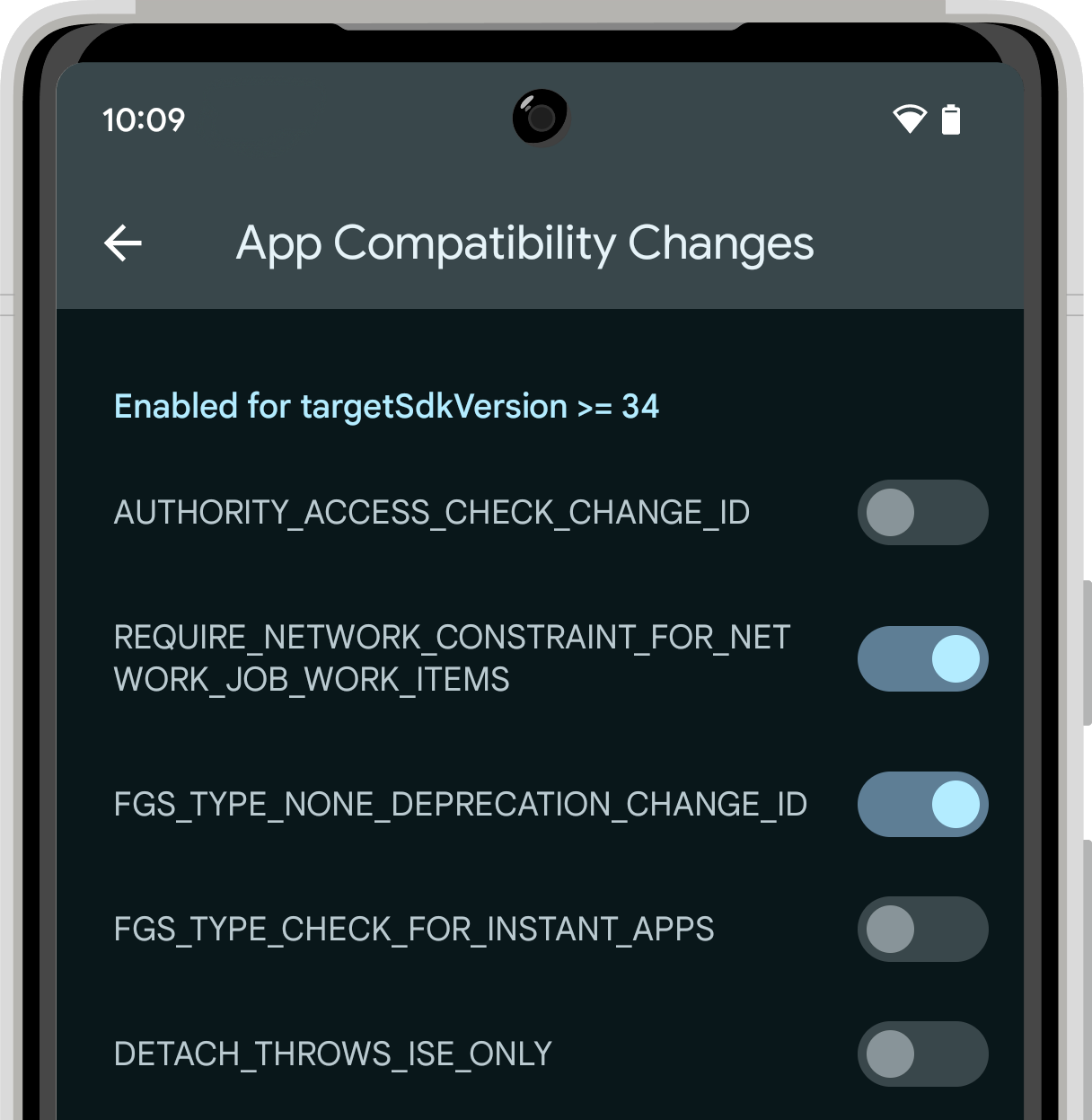 |
| App compatibility toggles in Developer Options. |
Platform Stability is when we’ll deliver final SDK/NDK APIs and app-facing system behaviors. We’re expecting to reach Platform Stability in June 2023, and from that time you’ll have several weeks before the official release to do your final testing. The release timeline details are here.
For the best development experience with Android 14, we recommend that you use the latest preview of Android Studio Giraffe (or more recent Giraffe+ versions). Once you’re set up, here are some of the things you should do:
- Try the new features and APIs – your feedback is critical during the early part of the developer preview. Report issues in our tracker on the feedback page.
- Test your current app for compatibility – learn whether your app is affected by default behavior changes in Android 14; install your app onto a device or emulator running Android 14 and extensively test it.
- Test your app with opt-in changes – Android 14 has opt-in behavior changes that only affect your app when it’s targeting the new platform. It’s important to understand and assess these changes early. To make it easier to test, you can toggle the changes on and off individually.
We’ll update the preview system images and SDK regularly throughout the Android 14 release cycle. This preview release is for developers only and not intended for daily or consumer use, so it will only available by manual download for new Android 14 developer preview users. Once you’ve manually installed a preview build, you’ll automatically get future updates over-the-air for all later previews and Betas. Read more here.
If you intend to move from the Android 13 QPR Beta program to the Android 14 Developer Preview program and don’t want to have to wipe your device, we recommend that you move to Developer Preview 2 now. Otherwise, you may run into time periods where the Android 13 Beta will have a more recent build date which will prevent you from going directly to the Android 14 Developer Preview without doing a data wipe.
As we reach our Beta releases, we’ll be inviting consumers to try Android 14 as well, and we’ll open up enrollment for the Android 14 Beta program at that time. For now, please note that the Android Beta program is not yet available for Android 14.
For complete information, visit the Android 14 developer site.
Java and OpenJDK are trademarks or registered trademarks of Oracle and/or its affiliates.


Discussion about this post