• Home
  • Insight
  • Blog
  • Business
  • Entertainment
  • Health
  • Politics
  • Shop
    • Gift Shop
    • Value Shop
    • Store
    • Bargain Shop
    • Discount
  • Sports
  • Tech
  • Travel
  • USA
  • Video
  • World
    • Asia
    • Africa
    • South America
    • North America
    • Europe
    • Oceania
Friday, October 23, 2026
No Result
View All Result
Subscribe Now
  • Home
  • Insight
  • Blog
  • Business
  • Entertainment
  • Health
  • Politics
  • Shop
    • Gift Shop
    • Value Shop
    • Store
    • Bargain Shop
    • Discount
  • Sports
  • Tech
  • Travel
  • USA

    Clash between Inglewood and SoFi Stadium operators hits ballot

    Tom Skerritt, who starred in ‘Picket Fences,’ ‘Alien’ and ‘Top Gun’ has died : NPR

    Kansas Senate rivals clash over Trump, party loyalty in heated debate

    Is Rabies Making a Comeback?

    Kohen Wiley’s Family Says Investigators Didn’t Contact Them Before Concluding Cops Did No Wrong

    Peralta, Caminero, Diaz lead Rays to win over Guardians and a trip to the World Series

    What “Once Upon a Time in Harlem” can teach us about arguing over Black art

    4 dead, 39 injured in explosion at Canadian military training base

    Texas Man Found with Pipe Bombs, Guns, Three Illegal Aliens near Border

  • Video
  • World
    • Asia
    • Africa
    • South America
    • North America
    • Europe
    • Oceania
The Insight Post
  • Home
  • Insight
  • Blog
  • Business
  • Entertainment
  • Health
  • Politics
  • Shop
    • Gift Shop
    • Value Shop
    • Store
    • Bargain Shop
    • Discount
  • Sports
  • Tech
  • Travel
  • USA

    Clash between Inglewood and SoFi Stadium operators hits ballot

    Tom Skerritt, who starred in ‘Picket Fences,’ ‘Alien’ and ‘Top Gun’ has died : NPR

    Kansas Senate rivals clash over Trump, party loyalty in heated debate

    Is Rabies Making a Comeback?

    Kohen Wiley’s Family Says Investigators Didn’t Contact Them Before Concluding Cops Did No Wrong

    Peralta, Caminero, Diaz lead Rays to win over Guardians and a trip to the World Series

    What “Once Upon a Time in Harlem” can teach us about arguing over Black art

    4 dead, 39 injured in explosion at Canadian military training base

    Texas Man Found with Pipe Bombs, Guns, Three Illegal Aliens near Border

  • Video
  • World
    • Asia
    • Africa
    • South America
    • North America
    • Europe
    • Oceania
No Result
View All Result
No Result
View All Result
Home Africa-East

How to Create a Dev Environment in Windows 10: Part 1

by Theinsightpost
July 13, 2023
in Africa-East
0 0
0
How to Create a Dev Environment in Windows 10: Part 1

Hi, guys? Long time, huh? Hope you are all doing great! and you are all safe and sound. Today i would like to help you create a development/hacking environment in Windows 10. So let’s get started with Part 1: First Installation.

First you’ll need to make sure you have a Windows 10, updated to 10th May 202 version(Windows 10, Version 2004, Build 19041 or higher).

Now i would like you to install the Windows Subsystem for Linux v1 and 2.

Here’s the installation:

WSL1

Before installing any Linux distributions on Windows, you must enable the “Windows Subsystem for Linux” optional feature.

Open PowerShell as Administrator and run:

dism.exe /online /enable-feature /featurename:Microsoft-Windows-Subsystem-Linux /all /norestart

To only install WSL 1, you should now restart your machine and move on to Install your Linux distribution of choice
, otherwise wait to restart and move on to update to WSL 2. Read more about Comparing WSL 2 and WSL 1
.

WSL2

To update to WSL 2, you must meet the following criteria:

Enable the ‘Virtual Machine Platform’ optional component

Before installing WSL 2, you must enable the “Virtual Machine Platform” optional feature.

Open PowerShell as Administrator and run: PowerShell

dism.exe /online /enable-feature /featurename:VirtualMachinePlatform /all /norestart

Restart your machine to complete the WSL install and update to WSL 2.

Set WSL 2 as your default version

Run the following command in PowerShell to set WSL 2 as the default version when installing a new Linux distribution: PowerShell

wsl --set-default-version 2

You might see this message after running that command: WSL 2 requires an update to its kernel component. For information please visithttps://aka.ms/wsl2kernel
. Please follow the link (
https://aka.ms/wsl2kernel
) and install the MSI from that page on our documentation to install a Linux kernel on your machine for WSL 2 to use. Once you have the kernel installed, please run the command again and it should complete successfully without showing the message.

Note

The update from WSL 1 to WSL 2 may take several minutes to complete depending on the size of your targeted distribution. If you are running an older (legacy) installation of WSL 1 from Windows 10 Anniversary Update or Creators Update, you may encounter an update error. Follow these instructions to uninstall and remove any legacy distributions
.

If wsl --set-default-version results as an invalid command, enter wsl --help. If the --set-default-version is not listed, it means that your OS doesn’t support it and you need to update to version 2004, Build 19041 or higher.

Install your Linux distribution of choice

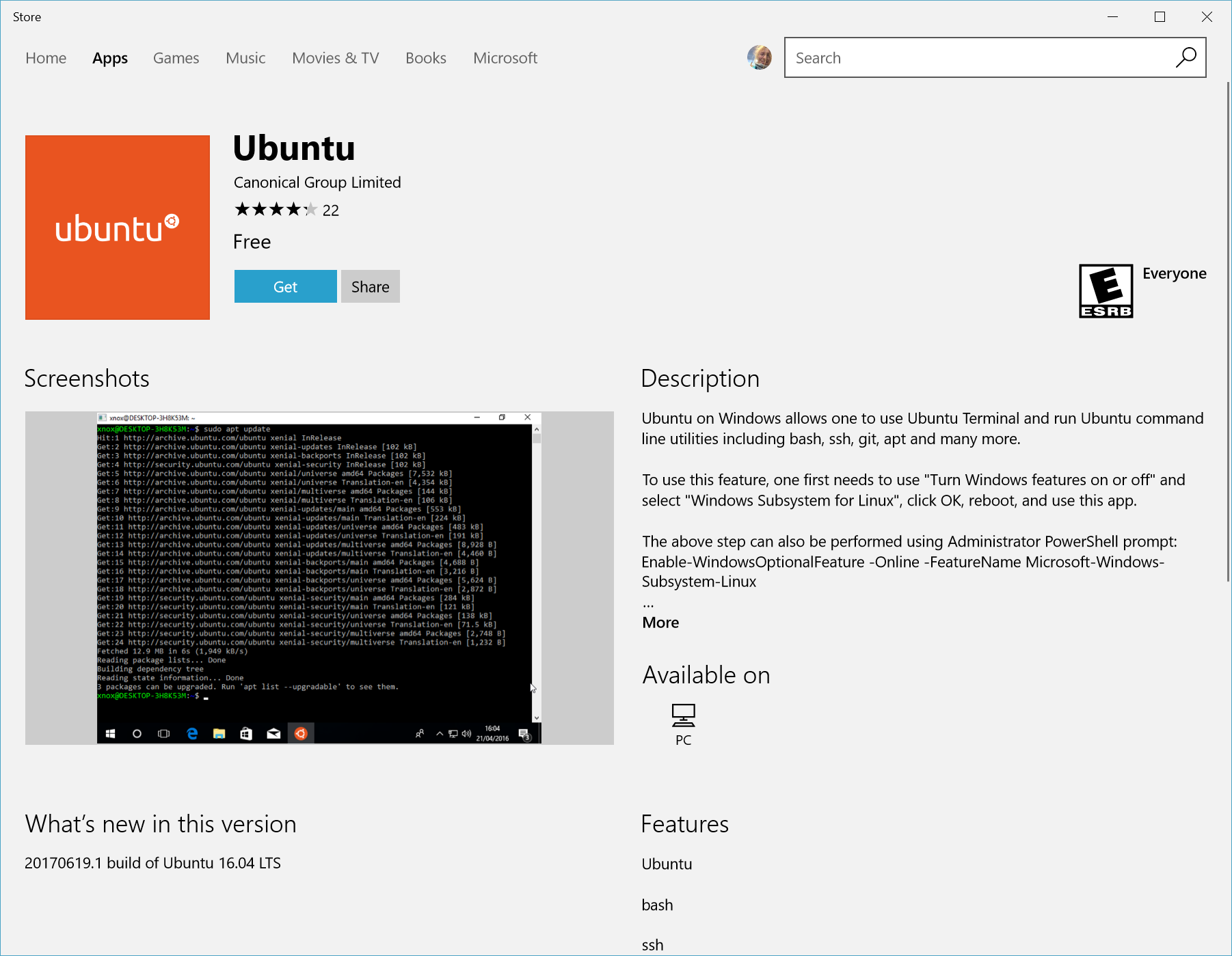
  1. Open the Microsoft Store
    and select your favorite Linux distribution. The following links will open the Microsoft store page for each distribution:

For a development environment i recommend Ubuntu
and for Hacking i recommend Kali Linux
. But feel free to choose any you like. Linux is linux and we will be working mostly on the terminal.

  1. From the distribution’s page, select “Get”. Linux distributions in the Microsoft store

Set up a new distribution

The first time you launch a newly installed Linux distribution, a console window will open and you’ll be asked to wait for a minute or two for files to de-compress and be stored on your PC. All future launches should take less than a second.

You will then need to create a user account and password for your new Linux distribution
.

Ubuntu unpacking in the Windows console

Set your distribution version to WSL 1 or WSL 2

You can check the WSL version assigned to each of the Linux distributions you have installed by opening the PowerShell command line and entering the command (only available in Windows Build 19041 or higher
): wsl -l -v PowerShell

wsl --list --verbose

To set a distribution to be backed by either version of WSL please run: PowerShell

wsl --set-version  

Make sure to replace with the actual name of your distribution and with the number ‘1’ or ‘2’. You can change back to WSL 1 at anytime by running the same command as above but replacing the ‘2’ with a ‘1’.

Additionally, if you want to make WSL 2 your default architecture you can do so with this command: PowerShell

wsl --set-default-version 2

This will set the version of any new distribution installed to WSL 2.

Now we need a good terminal emulator application to manage the OS you’ve installed. I recommend Hyper
and Windows Terminal
. I use Hyper.

If you are a beginner go over here to learn about basic terminal commands: Terminal Commands
.

That’s the end of part 1. Part 2: Coming Soon

See Also

ShareTweetSend
Previous Post

Delta Air Lines (DAL) 2Q23 earnings

Next Post

Is Temu safe, legit, or dangerous: Perspective from an app developer

Related News

Africa-East

Forex News, Technical Analysis & Trading Tools

June 10, 2024
Loyangalani Camel Safaris: Unveiling the Wonders of Northern Kenya
Africa-East

Loyangalani Camel Safaris: Unveiling the Wonders of Northern Kenya

April 19, 2024
Zanzibar Honeymoon Bliss: Romantic and Unforgettable Experiences
Africa-East

Zanzibar Honeymoon Bliss: Romantic and Unforgettable Experiences

April 18, 2024
East Africa’s Diverse Wildlife Beyond the Big Five
Africa-East

East Africa’s Diverse Wildlife Beyond the Big Five

April 18, 2024
Next Post
Is Temu safe, legit, or dangerous: Perspective from an app developer

Is Temu safe, legit, or dangerous: Perspective from an app developer

Discussion about this post

Subscribe To Our Newsletters

    Customer Support


    1251 Wilcrest Drive
    Houston, Texas
    77042 USA
    Call-832.795.1420
    e-mail – news@theinsightpost.com

    Subscribe To Our Newsletters

      Categories

      • Africa
      • Africa-East
      • African Sports
      • American Sports
      • Arts
      • Asia
      • Australia
      • Business
      • Business Asia
      • Business- Africa
      • Canada
      • Defense
      • Education
      • Egypt
      • Energy
      • Entertainment
      • Europe
      • European Soccer
      • Finance
      • Germany
      • Ghana
      • Health
      • Insight
      • International
      • Investing
      • Japan
      • Latest Headlines
      • Life & Living
      • Markets
      • Mobile
      • Movies
      • New Zealand
      • Nigeria
      • Politics
      • Scholarships
      • Science
      • South Africa
      • South America
      • Sports
      • Tech
      • Travel
      • UK
      • USA
      • Weather
      • World
      No Result
      View All Result

      Recent News

      Absa Place earns IFC’s EDGE Advanced green building certification

      October 23, 2026

      Spurs latest: De Zerbi speaks ahead of Chelsea trip

      October 23, 2026

      Bose acquires Skullcandy in surprise deal as it looks to attract younger headphone buyers

      October 23, 2026

      Clash between Inglewood and SoFi Stadium operators hits ballot

      October 23, 2026
      • Home
      • Advertise With Us
      • About Us
      • Corporate
      • Consumer Rewards
      • Forum
      • Privacy Policy
      • Social Trends

      Theinsightpost ©2026 | All Rights Reserved. Theinsightpost is an Elnegy LLC company, registered in Texas, USA

      Welcome Back!

      Login to your account below

      Forgotten Password?

      Retrieve your password

      Please enter your username or email address to reset your password.

      Log In

      Add New Playlist

      We are using cookies to give you the best experience on our website.

      You can find out more about which cookies we are using or switch them off in .

      No Result
      View All Result
      • Home
      • Insight
      • Blog
      • Business
      • Entertainment
      • Health
      • Politics
      • Shop
        • Gift Shop
        • Value Shop
        • Store
        • Bargain Shop
        • Discount
      • Sports
      • Tech
      • Travel
      • USA
      • Video
      • World
        • Asia
        • Africa
        • South America
        • North America
        • Europe
        • Oceania

      Theinsightpost ©2026 | All Rights Reserved. Theinsightpost is an Elnegy LLC company, registered in Texas, USA

      The Insight Post
      Powered by  GDPR Cookie Compliance
      Privacy Overview

      This website uses cookies so that we can provide you with the best user experience possible. Cookie information is stored in your browser and performs functions such as recognising you when you return to our website and helping our team to understand which sections of the website you find most interesting and useful.

      Strictly Necessary Cookies

      Strictly Necessary Cookie should be enabled at all times so that we can save your preferences for cookie settings.

      Cookie Policy

      More information about our Cookie Policy

      Clear examples do more than decorate an explanation: they show how an idea behaves under recognizable conditions. In education and software documentation alike, strong illustrations begin with a defined goal, then reveal the steps, assumptions, and result without unnecessary detail. A practical test example should state the input, expected output, and boundary condition, because these elements show whether a rule works beyond the simplest case. Including a contrasting case also helps readers distinguish a valid application from a tempting but incorrect one, while concise notes explain why the outcomes differ. When examples are updated with current data and checked against the underlying rule, they remain useful across classrooms, product guides, and professional training.
      Bij toegang tot Belgische casino’s via een tablet kunnen spelers accountgegevens, spelvoorwaarden en betaalopties overzichtelijk raadplegen, terwijl informatie over casinos zonder cruks aanvullende context biedt bij het beoordelen van beschikbare toegangsregels. Een stabiele mobiele verbinding en goed leesbare beveiligingsfuncties zijn daarbij belangrijk voor leeftijdscontrole, accountbeheer en verantwoord spelen.