










The Peloton Guide, which retails for $295, is the latest fitness gadget from Peloton, the fitness brand that made its name with the “It” indoor cycling bike to own. If you’re familiar with smart home gyms such as Mirror, Tempo or Tonal, then you know they can be expensive and require an amount of space that isn’t always feasible. That’s why Peloton created a cheaper, smaller device that uses a camera with AI technology to track your movements during class, so you can get the benefits of having a smart home gym without needing a lot of room.
More specifically, the Peloton Guide is intended to be used with Peloton’s strength training classes; it allows you to monitor your form and performance during the sessions. The original Peloton was a pioneer in the world of interactive home workout equipment, but how does the Guide fare as a smart fitness device? I took the Peloton Guide for a spin and had a lot of thoughts about it. Read on to learn about my experience with Peloton’s newest gadget.
Like
- Compact enough to fit in small spaces
- On the affordable end of Peloton products
- A helpful way to follow a strength training program
Don’t Like
- Software doesn’t always detect movement
- Doesn’t correct your form or count reps
- Peloton Guide is an additional cost, which may alienate existing Peloton users who don’t want to pay for another device
- Can’t be accessed through Peloton Digital app, Peloton bike or Tread touchscreen
How we tested
Smart home gyms are still fairly new even though many different brands have come out with their own versions over the last several years. I’ve tested other smart fitness equipment, but I knew I had to view the Peloton Guide as its own entity since I hadn’t tried a device like it before. It’s not a traditional smart home gym, since it’s so compact and consists only of the camera and AI.
To test the Peloton Guide I looked at these important features:
Setup: Is it easy to set up just by using the instruction manual? Does it work on all TVs? Does a strong Wi-Fi signal matter?
Space: Does the device take up a lot of room? Can you use it in a small space? Can this device capture people of different heights in frame?
Feedback: What unique feedback does this device provide that other smart home gyms can’t? Does the feedback seem accurate?
Ease of use: How does it work with Peloton classes and is it easy to follow and understand?
How much does the Peloton Guide cost?
Generally if you purchase a Peloton bike or treadmill you’re shelling out somewhere between $1,500 to $3,000 – even with the latest $500 discount. The most basic Peloton Guide package (which just includes the Guide itself), is only $295, making it an appealing option for those on a budget. Right now Peloton is offering customers a 100-day risk-free trial of the Peloton Guide before they commit to purchasing it.
If you want to upgrade to the Guide Strength Starter package, it retails for $545 and includes three sets of Peloton dumbbells (ranging from 5- to 30-pound weights) and a workout mat. The last package, the Guide Power, includes six pairs of dumbbells (ranging from 5 to 50 pounds), a workout mat and a heart rate monitor, retailing for $935 to $1,270 depending on the weights you pick. Keep in mind you don’t need to use Peloton-specific dumbbells for these classes. If you have your own weights at home, those will work just as well.
You’ll need an All-Access Peloton membership to access classes on the Guide, which is a separate cost. Right now Peloton is offering a deal for Guide-only members with an introductory rate of $24 a month through 2022 — a discount from the normal $44 per month rate. The All-Access membership lets you set up to five profiles per household on the account. If you already own a Peloton All-Access membership, you can use the same account for the Guide.
How does the Peloton Guide work?
The Peloton Guide is intended to be used in practically any space, as long as you have a TV (sorry, no tablets or phones) with an HDMI port and a 16:9 aspect ratio. The Guide is small enough to fit in most spaces and only weighs 18 ounces. It comes with a remote, HDMI cable, power cable and adapter, as well as a mount. To set up, Peloton recommends placing the Guide on a stable area about 3 to 6 feet from the ground with access to Wi-Fi with an internet speed greater than 3 megabytes per second. The camera should point to a workout space that is unobstructed with enough light in the room.
I placed the Guide on the TV stand in my living room and found it was a relatively easy setup since the camera isn’t big. Once you find a spot that works, you can set the Guide on the magnetic mount that holds it in place. What took me the longest was setting up my Peloton account and making sure I was able to sync up the Peloton heart rate monitor (which is optional). The Guide is currently compatible with other Bluetooth heart rate monitors, and will be adding Apple Watch capability in the near future.
The last part I had to do was calibrate the screen through the Guide settings to fit my TV. This is important to note because initially the images on my TV screen looked larger and out of frame than I expected, but calibrating it to fit the screen fixed that issue.
I also had to play around with the camera positioning to make sure it was pointing in the right direction and that it was able to capture my whole body in frame. There’s an outline of a box that surrounds you once it views you on the screen. If it can’t view you well, the Guide will warn you with a prompt telling you you’re out of frame.
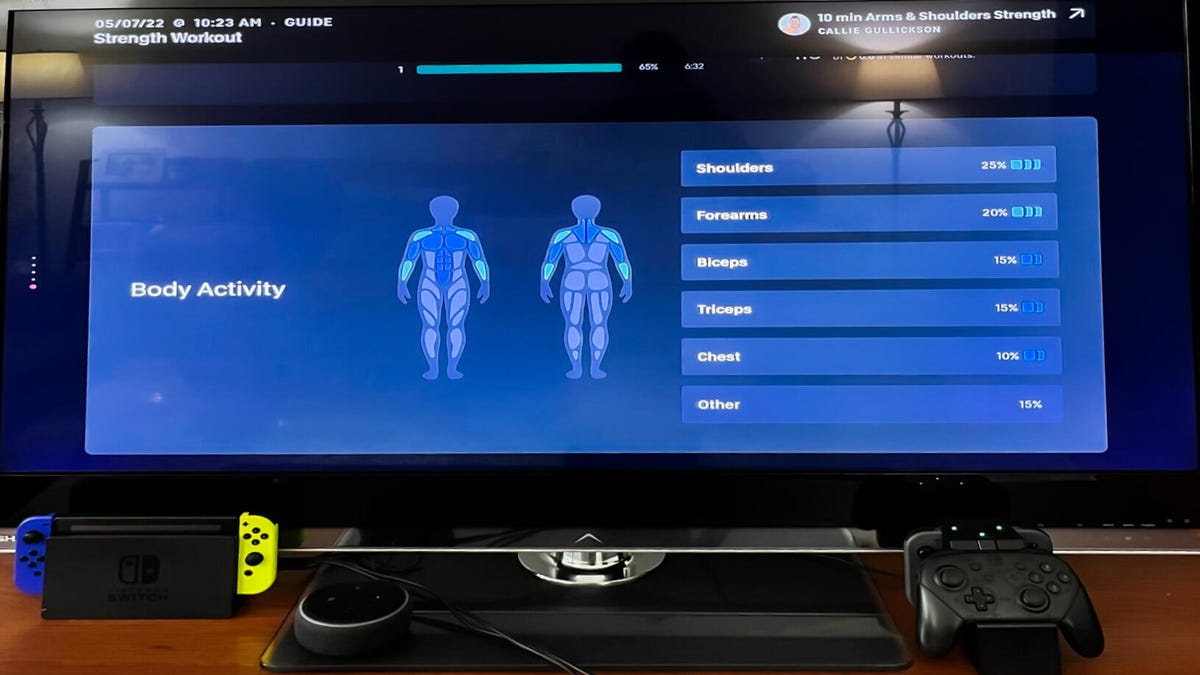
The Body Activity Guide tells you which muscles need rest and which are ready to be worked out.
Giselle Castro-Sloboda/CNET
Once the Guide is up and running, you can select from strength classes on Peloton’s roster that are compatible with the Guide. Classes that are meant to be used with the Guide have an icon that resembles a water droplet located on the lower right side. Classes can be selected based on the Body Activity Guide. This guide shows you a silhouette of a body and highlights what muscles you have already worked on in the past seven or 30 days. Based on this, it will suggest classes based on muscle groups you haven’t worked on, so you’re not exhausting the same body parts each time. The more you work a specific muscle, the bluer it will appear on the body activity guide model.
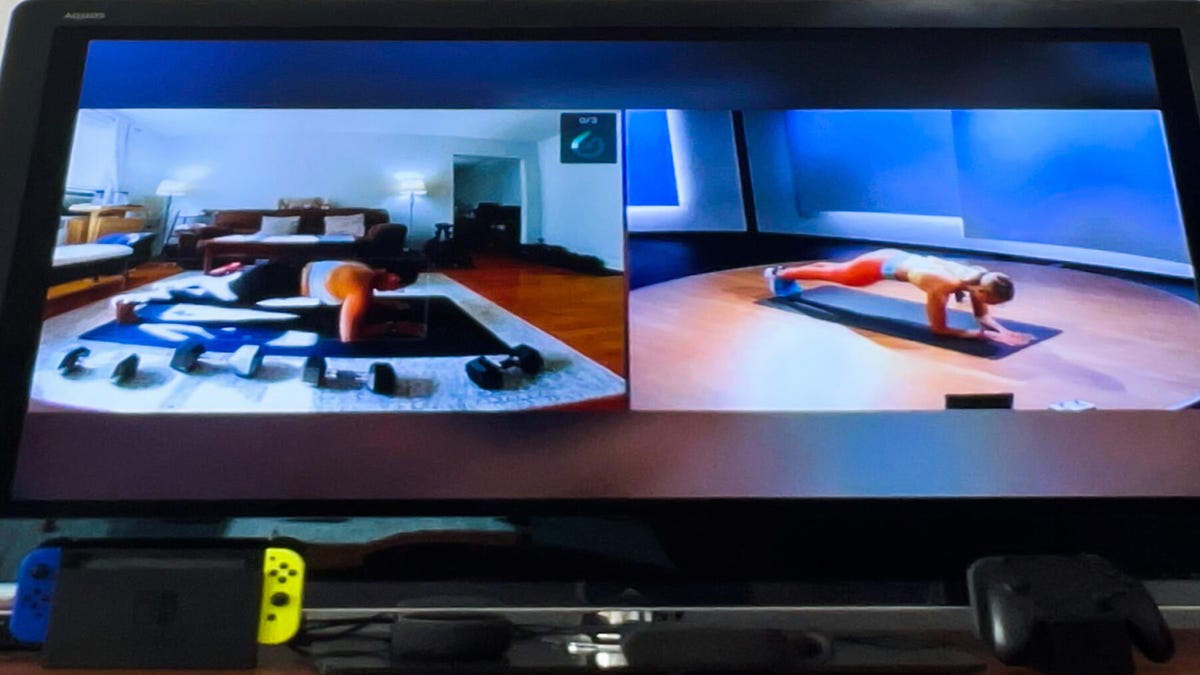
Self Mode through Peloton Guide gives you the option to view yourself side by side with the instructor.
Giselle Castro-Sloboda/CNET
Once you’re set on a class, then you have to set up Self Mode. This function allows you to choose how you want to view yourself during class. You have the option to see yourself full screen, with a minimized instructor screen on the left side, or you can set it up the other way around. The last option is to view yourself in a split screen so you are side by side or stacked above with the instructor, which is helpful if you want to make sure your form is on par with theirs. Personally, I found it distracting seeing myself full screen, so I preferred the split screen mode where I could view both myself and the instructor.
If you have any privacy concerns, you’ll want to know that the device has a plastic cover that you can slide to conceal the camera when it’s not in use.
Space requirements
The good thing about the Peloton Guide is that you don’t need a lot of room to use it. At minimum you need 4.5 feet by 6 feet of unobstructed space. For reference, this is about the size of two yoga mats side by side. You should also make sure you can maintain a distance of two to three feet away from your TV. The device is intended to be used by people of all different heights, so finding the stance that works for you is important, otherwise you’ll be out of frame.
What it’s like to use the Peloton Guide
Taking a class with the Guide is a little different than taking a class without it. The Guide adds its own personal training element by using AI technology to track your movements. This way you can compare your form against the instructor’s during class. (Though the Guide itself doesn’t have the ability to correct your form.)
Before taking a class, you can view demos of the exercises ahead of time. When you finally start the class, the teardrop-shaped movement icon fills up as it counts how many exercises you complete. This is subject to it capturing you in frame during the exercises – which it didn’t always do for me. I also noticed if I took a slightly longer break or moved slower the tracker assumes you’re not moving and doesn’t fill up the movement icon entirely. This defeats the purpose when strength training is supposed to be done at a slower pace than a cardio-based class. At the end of class, you can see your statistics and how many exercises you completed based on what the Guide was able to capture. The more your movement is tracked throughout a class, the higher the chances you’ll earn an awards badge.
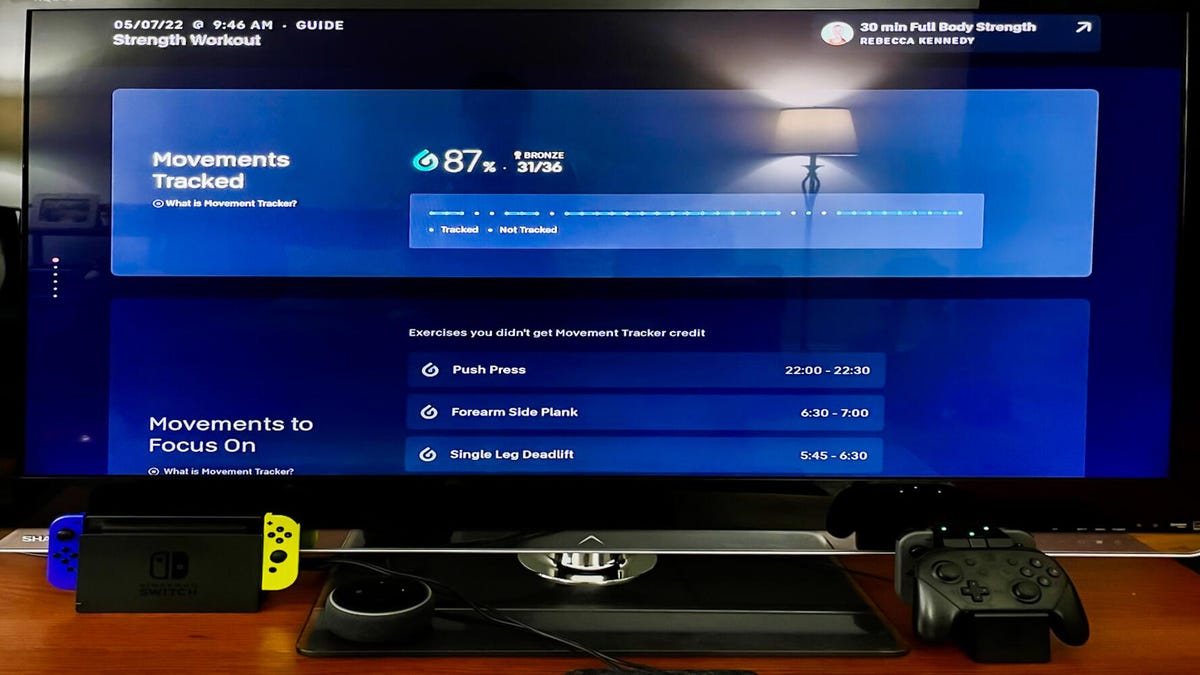
The Movement Tracker lets you know at the end of class how many movements it captured.
Giselle Castro-Sloboda/CNET
I personally found the movement tracker to be inconsistent depending on the exercise I was doing. It could’ve been my error, but I even made sure I was in frame for the camera to see me. This could be distracting for the average user if they’re fixated on looking at themselves onscreen instead of focusing on the exercise at hand. For example, when you’re doing push-ups, craning your neck to look up at the screen isn’t optimal or good for your form.
Workout programs
The Peloton Guide is designed to be used with certain Peloton strength classes instead of its cycling or tread classes. There are three class offerings so far: Floor Bootcamp, taught by instructors Jess Sims and Selena Samuela; Split Programs, which is a four-week program designated to work various muscle groups and Live Guide Classes taught live by instructors.
As someone who enjoys strength training I liked the idea of Peloton coming up with a program that functions like a personal trainer. I think it’s a decent start for those who want more of a structure with a strength training program — the Guide offers just that. The instructors are also good motivators if you need that extra boost and are still learning some strength training exercises.
Pros and cons
As with any piece of fitness equipment, the Peloton Guide has its pros and cons.
Pros
- It fits in just about any space, and is ideal for a living room, basement or apartment.
- It’s affordable enough for people interested in trying out Peloton without spending upward of $1,000.
- It can be motivating to have a set strength class schedule that takes out the guesswork for you.
Cons
- There’s no way of knowing if you’re out of frame during class unless you’re looking at the screen the whole time.
- If you’re not going at the expected pace, the tracker assumes you’re not moving and doesn’t fill up the movement icon entirely.
- Novice lifters would benefit more from the Guide if it was able to correct your form, count reps or determine when you should lift heavier.

Watch this:
Lanebreak Is a Video Game Workout for Peloton Bikes
8:03
How the Peloton Guide compares
Although the Peloton Guide is the first AI home gym I’ve heard of on the cheaper and smaller scale, there are bigger smart home gyms that it will be competing with on the market. The smallest smart home gym I would compare it to is the Tempo Move.
Tempo Move is intended to be a smaller version of the Tempo Studio, and it comes with weights and a small stand for storage. Although Tempo Move costs more than Peloton Guide (it retails at $495) and requires a bit more space, it’s still cheaper than the Guide Strength Starter package.
Tempo Move’s AI technology is also more advanced than Peloton Guide’s because it allows you to use your smartphone and acts more like a personal trainer by correcting your form and letting you know when it’s time to increase your weights. I think the Peloton Guide has the potential to be just as good with a few tweaks, and Peloton’s spokespeople told me that they plan on evolving the Guide with lots of upcoming feature updates.
Final verdict: Is the Peloton Guide worth it?
If you’re somewhere between a beginner and intermediate experienced strength trainer, then you may like the Peloton Guide. Novice lifters will probably not find this device entirely helpful if it isn’t helping them know if they’re doing an exercise correctly.
Devoted Peloton members who already own the bike or treadmill may not feel like it’s necessary to purchase an additional device if they can take the same strength classes through the same membership. A possible feature the Guide could include in the future is being able to read and correct cycling or running form, which would make it a more appealing purchase to existing Peloton bike or tread owners. For example, the Guide could serve helpful for people new to indoor cycling who need help measuring the right height settings for their bikes. Or even making sure that their form is correct during the three different positions used in class. Likewise for people running on the treadmill, the Guide could make sure they maintain decent running form during class.
Although the Peloton Guide is a good start for Peloton to jump into the smart home gym market, I still think it has a few kinks it has to work out as well as features it needs to add to make it comparable to the competition. It’s got a lot of potential and I’m looking forward to seeing what new upgrades are added to the Peloton Guide in the near future.
The information contained in this article is for educational and informational purposes only and is not intended as health or medical advice. Always consult a physician or other qualified health provider regarding any questions you may have about a medical condition or health objectives.










Discussion about this post