
• Home
  • Insight
  • Blog
  • Business
  • Entertainment
  • Health
  • Politics
  • Shop
    • Gift Shop
    • Value Shop
    • Store
    • Bargain Shop
    • Discount
  • Sports
  • Tech
  • Travel
  • USA
  • Video
  • World
    • Asia
    • Africa
    • South America
    • North America
    • Europe
    • Oceania
Wednesday, October 7, 2026
No Result
View All Result
Subscribe Now
  • Home
  • Insight
  • Blog
  • Business
  • Entertainment
  • Health
  • Politics
  • Shop
    • Gift Shop
    • Value Shop
    • Store
    • Bargain Shop
    • Discount
  • Sports
  • Tech
  • Travel
  • USA

    Washington state man charged with helping Canadian mass shooter plan for attack

    Border Security, Public Safety, and American Sovereignty with Markwayne Mullin

    Students injured as NJ high school bleachers collapse in scary scene

    California man in incest case busted in Mexico; teen daughter rescued

    Cornell president calls gang rape allegations ‘deeply disturbing’ : NPR

    France’s violent student protests raise warning for America: ‘A cautionary tale’

    Birmingham’s WBHM Public Radio Station Forced to Use “Gulf of America”

    Eminem gets online backlash from fans over Kid Rock Christian album collab

    Trump leans into Iran war, admits it could cost Republicans the midterms

  • Video
  • World
    • Asia
    • Africa
    • South America
    • North America
    • Europe
    • Oceania
The Insight Post
  • Home
  • Insight
  • Blog
  • Business
  • Entertainment
  • Health
  • Politics
  • Shop
    • Gift Shop
    • Value Shop
    • Store
    • Bargain Shop
    • Discount
  • Sports
  • Tech
  • Travel
  • USA

    Washington state man charged with helping Canadian mass shooter plan for attack

    Border Security, Public Safety, and American Sovereignty with Markwayne Mullin

    Students injured as NJ high school bleachers collapse in scary scene

    California man in incest case busted in Mexico; teen daughter rescued

    Cornell president calls gang rape allegations ‘deeply disturbing’ : NPR

    France’s violent student protests raise warning for America: ‘A cautionary tale’

    Birmingham’s WBHM Public Radio Station Forced to Use “Gulf of America”

    Eminem gets online backlash from fans over Kid Rock Christian album collab

    Trump leans into Iran war, admits it could cost Republicans the midterms

  • Video
  • World
    • Asia
    • Africa
    • South America
    • North America
    • Europe
    • Oceania
No Result
View All Result
No Result
View All Result
Home Tech

5 features you didn’t know your AirPods could do

by Theinsightpost
July 10, 2022
in Tech
0 0
0
5 features you didn’t know your AirPods could do


Ever since their debut, one of AirPods’ biggest selling points has been their simplicity and ease of use. Open the case near your iPhone and a card pops up, tap Connect, and you’re ready to listen. Pop them out of the case and into your ears and you’re ready to answer calls, listen to music, and watch videos. Take a bud out of your ear and the music automatically pauses.

But the fact that they’re so easy to use means that millions of AirPods owners are probably unaware of some of their more advanced features and settings. They may not have ever thought to even look for them! Here are five features you may have have ever known your AirPods can do. (And most of these also work on Beats Fit Pro and Powerbeats Pro, or other Beats products with Apple’s H1 chip inside.)

Get important alerts without looking

With iOS 13, Apple made it possible for Siri to read incoming messages directly to your AirPods, so you didn’t have to take your phone out of your pocket at the gym or out on a run. With iOS 15, that has expanded to announce notifications, including Messages, calls, reminders, and supported third-party apps.

Open Settings, tap Notifications, then tap Announce Notifications. Here you can toggle the feature on and off, but you’ll also see a list of the apps you can announce notifications with, and enable or disable them individually.

For messages, Siri will listen for a reply after reading your notification, and you can reply without saying “Hey Siri” first. Just wait for the message to be read and say something like “Tell her I’ll be there at 5” or “Reply I’m running a little late” or whatever. Siri will read back your reply before asking if you want to send it.

Share what you’re listening

You and a friend can simultaneously listen to the audio from a single iPhone, each with your own volume control. Provided you both have AirPods or supported Beats earbuds, that is.

To do this, open Control Center on the iPhone you want to share audio from (swipe down from the upper right edge of your screen). In the audio control, you’ll see an AirPlay button (the triangle with circles emanating out of it). You’ll also find it on the play controls on your lock screen. Tap the AirPlay button and you’ll see a list of audio devices with an option to Share Audio at the bottom. Tap it and your friend will have to hold their AirPods close to your iPhone with the buds inside their case, similar to what you do when first pairing them.

You’ll see your friends AirPods pop up on your screen with a Share Audio button. Tap that. You should now both be listening to audio from the same iPhone. Tap that AirPlay button again to see volume sliders for both sets of AirPods, which you can adjust individually. To stop sharing, tap the checkmark next to the AirPods you wish to stop sharing with.

Apple

Change what the taps do

By default, double-tapping your AirPods will play audio (or skip forward if it’s already playing). If you have first-gen AirPods, it will invoke Siri. With AirPods Pro, pressing the force sensor on the stem will play/pause, double-pressing skips forward, triple-pressing skips back, and if you press and hold it changes the noise cancellation settings.

You can adjust all these behaviors. (However, you can not change the behavior of the force sensor on the stem of third-gen AirPods.) Open Settings then tap Bluetooth. Then tap the little (i) button next to your AirPods or AirPods Pro.

Here you’ll find settings to change the press-and-hold behavior on your AirPods Pro (but not any of the tap behavior, unfortunately). If you have regular AirPods, you can change what the double-tap function does, and you can change it for the left and right ear independently, so you can have two different double-tap functions enabled.
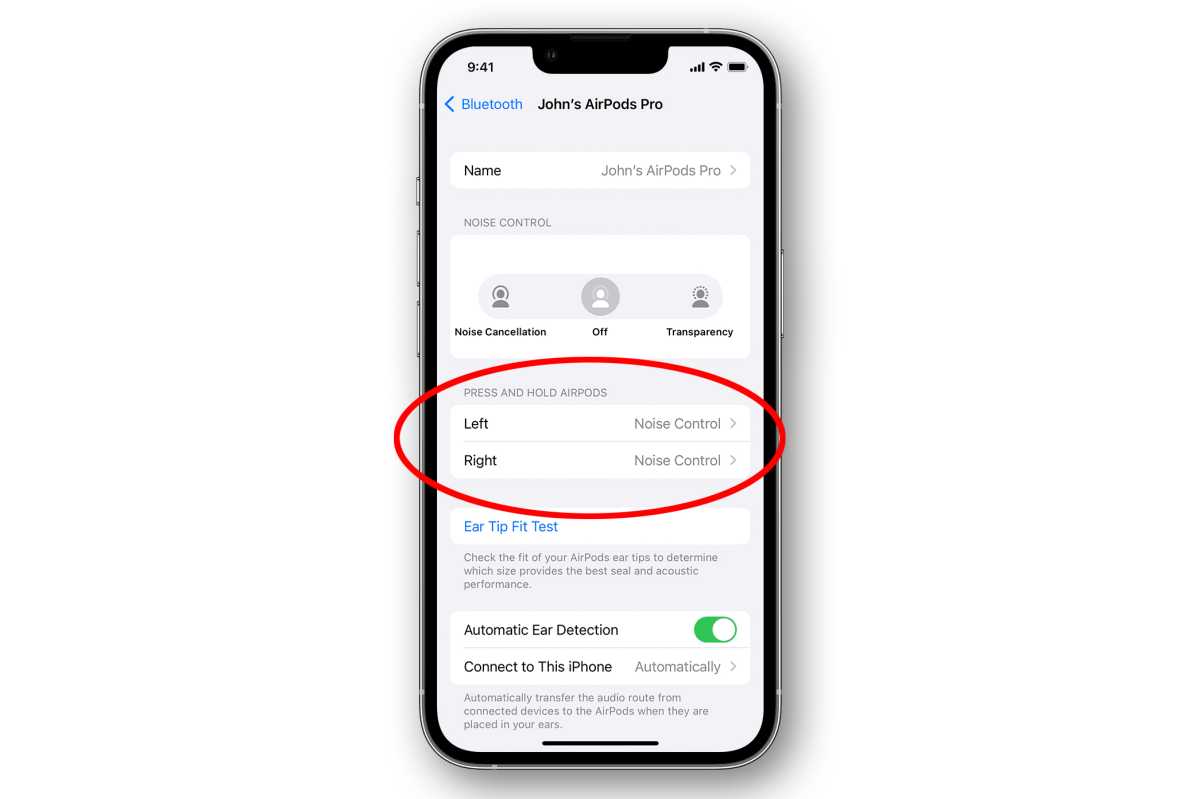
airpods adjust controls

Apple

Boost your conversations

This one is just for those with AirPods Pro–it’s not available on any other AirPods or Beats products.

Conversation Boost is an accessibility setting that focuses on the sound in the spoken voice frequency range only right in front of you, so you can more easily hear the person you’re talking to, without boosting the rest of the audio around you. This is one of those settings that is extremely useful but is buried so deep in settings menus that most people won’t find it.

Open Settings, then Accessibility, then Audio/Visual, then Headphone Accommodations.

Scroll to the bottom and tap on Transparency Mode, then turn on Custom Transparency Mode. Here you’ll find a bunch of settings to tweak Transparency Mode on your AirPods Pro, including a toggle for Conversation Boost.
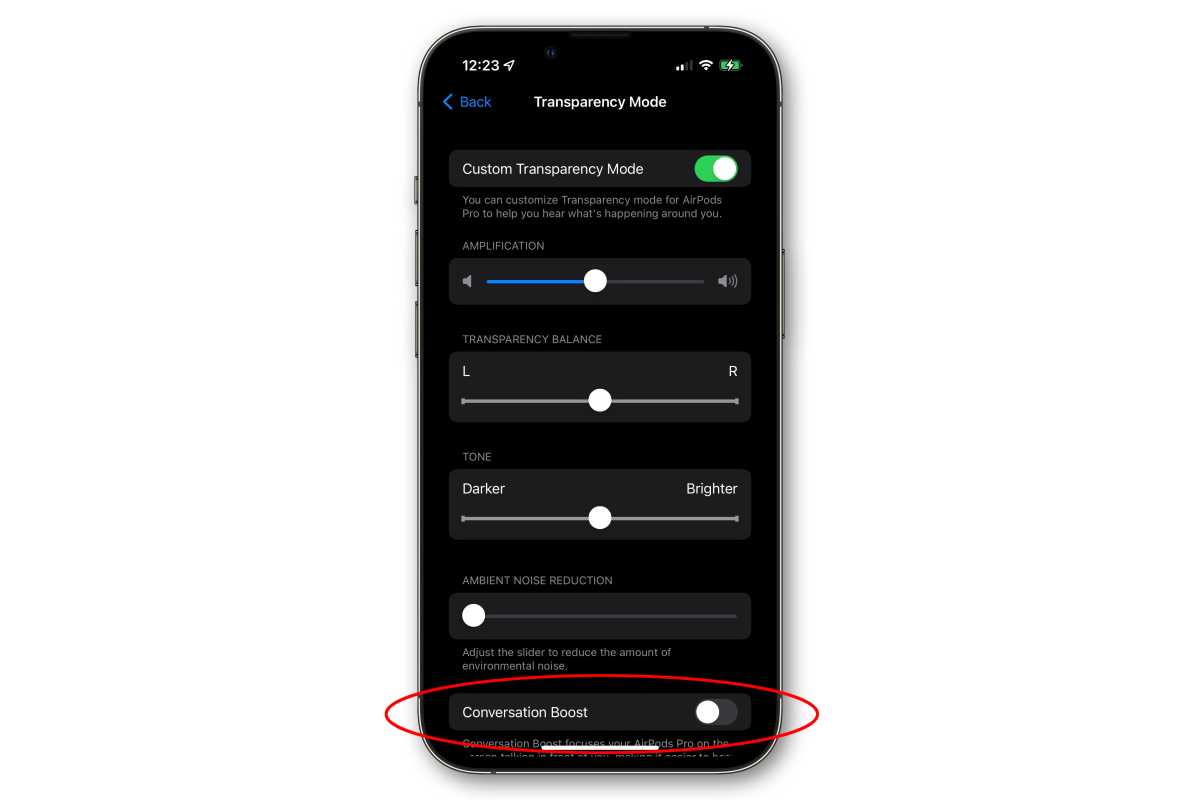
airpods conversation boost

IDG

Automatically switch between devices

If you’re signed in to your Mac, iPhone, Apple TV, or iPad with the same Apple ID (and it has two-factor authentication enabled), they will by default switch from one device to another. Stop playing audio on your iPhone, start playing it on your Mac, and your AirPods will play the audio from your Mac.

You might get a notification on your Mac; just click Connect to confirm you want to use your AirPods.

You may want to turn this feature off, though. First, make sure your AirPods are connected to your iPhone and in your ears. Then open Settings > Bluetooth and tap on the (i) button next to your AirPods.

Tap Connect to this iPhone and then you can toggle between Automatically or When Last Connected to This iPhone.

On your Mac, make sure your AirPods are connected and in your ears, then open System Preferences and click Bluetooth. In the Connect to This Mac menu, choose between Automatically or When Last Connected to This Mac.



Source link

ShareTweetSend
Previous Post

WATCH: Spirit airline plane catches fire at Atlanta airport

Next Post

#WAFCON2022 quarter-finals confirmed: Nigeria to play Cameroon

Related News

Tech

Spotify expands audiobooks to over 180 markets

October 7, 2026
Tech

You Probably Aren’t Going to Get the Plague

October 6, 2026
Tech

Sources: the FBI removes an Accenture contractor over a breach exposing thousands of employees’ data; the FBI says a contractor failed to apply a security patch (Reuters)

October 6, 2026
Tech

Amazon hires a veteran Microsoft AI leader to help build its tools for coding and work

October 5, 2026
Next Post
#WAFCON2022 quarter-finals confirmed: Nigeria to play Cameroon

#WAFCON2022 quarter-finals confirmed: Nigeria to play Cameroon

Discussion about this post

Subscribe To Our Newsletters

    Customer Support


    1251 Wilcrest Drive
    Houston, Texas
    77042 USA
    Call-832.795.1420
    e-mail – news@theinsightpost.com

    Subscribe To Our Newsletters

      Categories

      • Africa
      • Africa-East
      • African Sports
      • American Sports
      • Arts
      • Asia
      • Australia
      • Business
      • Business Asia
      • Business- Africa
      • Canada
      • Defense
      • Education
      • Egypt
      • Energy
      • Entertainment
      • Europe
      • European Soccer
      • Finance
      • Germany
      • Ghana
      • Health
      • Insight
      • International
      • Investing
      • Japan
      • Latest Headlines
      • Life & Living
      • Markets
      • Mobile
      • Movies
      • New Zealand
      • Nigeria
      • Politics
      • Scholarships
      • Science
      • South Africa
      • South America
      • Sports
      • Tech
      • Travel
      • UK
      • USA
      • Weather
      • World
      No Result
      View All Result

      Recent News

      Boxing legend Mike Tyson talks going to juvie and trading cigarettes for cookies as a young boy

      October 7, 2026

      Hogbetsotso 2026 to promote tourism, local businesses

      October 7, 2026

      Mikel Arteta’s new contract: The challenges facing Arsenal boss as he enters ‘step five’ of his project | Football News

      October 7, 2026

      Spotify expands audiobooks to over 180 markets

      October 7, 2026
      • Home
      • Advertise With Us
      • About Us
      • Corporate
      • Consumer Rewards
      • Forum
      • Privacy Policy
      • Social Trends

      Theinsightpost ©2026 | All Rights Reserved. Theinsightpost is an Elnegy LLC company, registered in Texas, USA

      Welcome Back!

      Login to your account below

      Forgotten Password?

      Retrieve your password

      Please enter your username or email address to reset your password.

      Log In

      Add New Playlist

      We are using cookies to give you the best experience on our website.

      You can find out more about which cookies we are using or switch them off in .

      No Result
      View All Result
      • Home
      • Insight
      • Blog
      • Business
      • Entertainment
      • Health
      • Politics
      • Shop
        • Gift Shop
        • Value Shop
        • Store
        • Bargain Shop
        • Discount
      • Sports
      • Tech
      • Travel
      • USA
      • Video
      • World
        • Asia
        • Africa
        • South America
        • North America
        • Europe
        • Oceania

      Theinsightpost ©2026 | All Rights Reserved. Theinsightpost is an Elnegy LLC company, registered in Texas, USA

      The Insight Post
      Powered by  GDPR Cookie Compliance
      Privacy Overview

      This website uses cookies so that we can provide you with the best user experience possible. Cookie information is stored in your browser and performs functions such as recognising you when you return to our website and helping our team to understand which sections of the website you find most interesting and useful.

      Strictly Necessary Cookies

      Strictly Necessary Cookie should be enabled at all times so that we can save your preferences for cookie settings.

      Cookie Policy

      More information about our Cookie Policy

      Clear examples do more than decorate an explanation: they show how an idea behaves under recognizable conditions. In education and software documentation alike, strong illustrations begin with a defined goal, then reveal the steps, assumptions, and result without unnecessary detail. A practical test example should state the input, expected output, and boundary condition, because these elements show whether a rule works beyond the simplest case. Including a contrasting case also helps readers distinguish a valid application from a tempting but incorrect one, while concise notes explain why the outcomes differ. When examples are updated with current data and checked against the underlying rule, they remain useful across classrooms, product guides, and professional training.