
• Home
  • Insight
  • Blog
  • Business
  • Entertainment
  • Health
  • Politics
  • Shop
    • Gift Shop
    • Value Shop
    • Store
    • Bargain Shop
    • Discount
  • Sports
  • Tech
  • Travel
  • USA
  • Video
  • World
    • Asia
    • Africa
    • South America
    • North America
    • Europe
    • Oceania
Wednesday, October 7, 2026
No Result
View All Result
Subscribe Now
  • Home
  • Insight
  • Blog
  • Business
  • Entertainment
  • Health
  • Politics
  • Shop
    • Gift Shop
    • Value Shop
    • Store
    • Bargain Shop
    • Discount
  • Sports
  • Tech
  • Travel
  • USA

    Washington state man charged with helping Canadian mass shooter plan for attack

    Border Security, Public Safety, and American Sovereignty with Markwayne Mullin

    Students injured as NJ high school bleachers collapse in scary scene

    California man in incest case busted in Mexico; teen daughter rescued

    Cornell president calls gang rape allegations ‘deeply disturbing’ : NPR

    France’s violent student protests raise warning for America: ‘A cautionary tale’

    Birmingham’s WBHM Public Radio Station Forced to Use “Gulf of America”

    Eminem gets online backlash from fans over Kid Rock Christian album collab

    Trump leans into Iran war, admits it could cost Republicans the midterms

  • Video
  • World
    • Asia
    • Africa
    • South America
    • North America
    • Europe
    • Oceania
The Insight Post
  • Home
  • Insight
  • Blog
  • Business
  • Entertainment
  • Health
  • Politics
  • Shop
    • Gift Shop
    • Value Shop
    • Store
    • Bargain Shop
    • Discount
  • Sports
  • Tech
  • Travel
  • USA

    Washington state man charged with helping Canadian mass shooter plan for attack

    Border Security, Public Safety, and American Sovereignty with Markwayne Mullin

    Students injured as NJ high school bleachers collapse in scary scene

    California man in incest case busted in Mexico; teen daughter rescued

    Cornell president calls gang rape allegations ‘deeply disturbing’ : NPR

    France’s violent student protests raise warning for America: ‘A cautionary tale’

    Birmingham’s WBHM Public Radio Station Forced to Use “Gulf of America”

    Eminem gets online backlash from fans over Kid Rock Christian album collab

    Trump leans into Iran war, admits it could cost Republicans the midterms

  • Video
  • World
    • Asia
    • Africa
    • South America
    • North America
    • Europe
    • Oceania
No Result
View All Result
No Result
View All Result
Home Tech

Govee’s DreamView G1 Pro is a solid upgrade over its Flow Pro Light Bar

by Theinsightpost
August 1, 2022
in Tech
0 0
0
Govee’s DreamView G1 Pro is a solid upgrade over its Flow Pro Light Bar


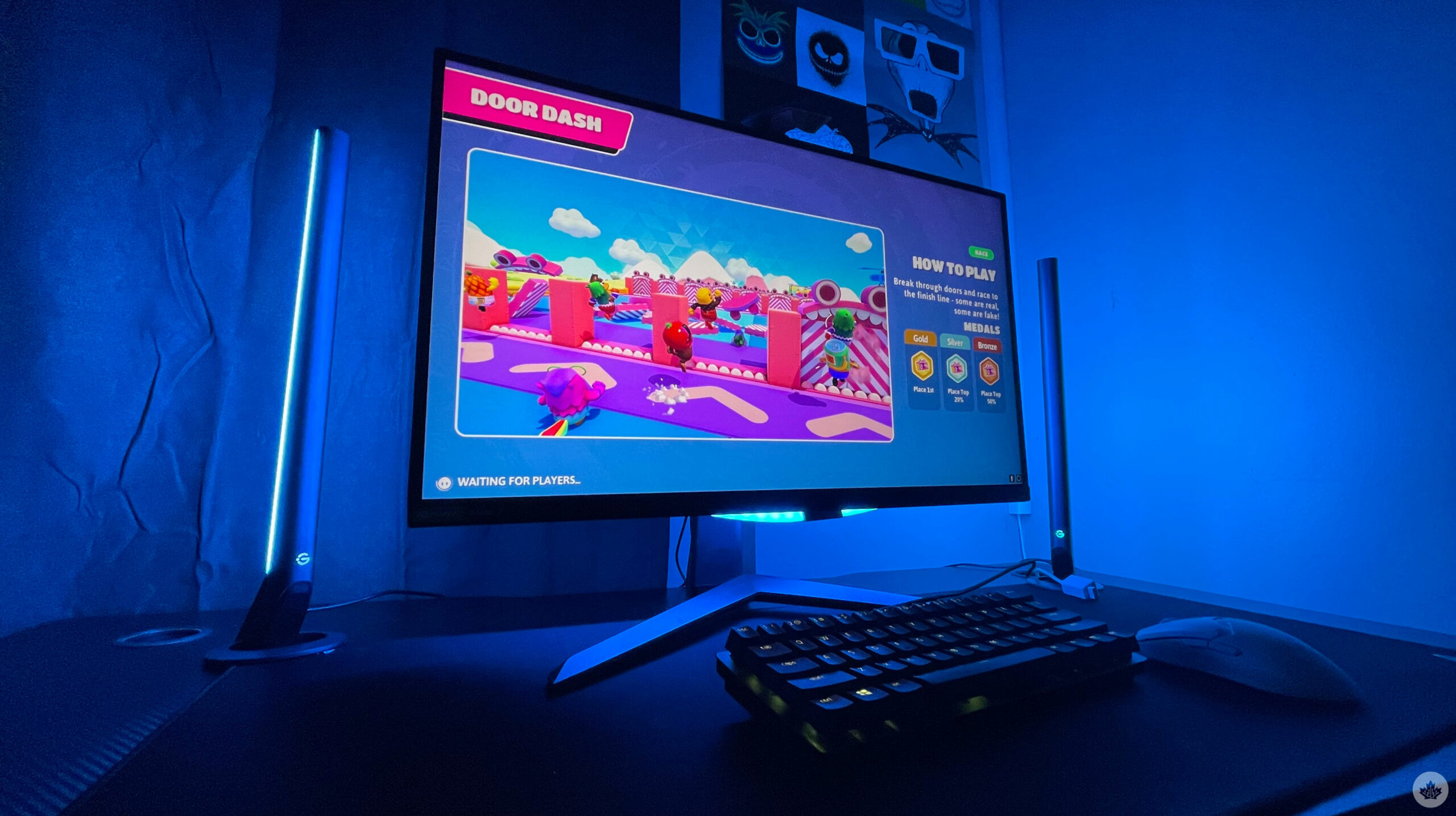
Govee is no stranger to solid smart lights, and its latest DreamView G1 Pro doesn’t disappoint. It, in essence, is an upgraded version of the company’s Flow Pro Light Bar, with brighter output, more accurate colour replication, better build materials, and has an overall more premium and less ‘scattered’ look to it.

It follows the same concept as the Flow Pro Light Bar, where it has two light bars that go on each side of your PC monitor, paired with a fish-eye lens camera that sits on top of your monitor. The camera scans for colours on your screen, and tries to replicate them out of the light bars.

In addition, with the G1 Pro, you also get a tube-like LED light strip that attaches to the back of your monitor, which also replicates the colours on your screen.

Like most of Govee’s products, the initial setup is rather simple. Generally, Govee’s products have a control box that acts as the brains of the operation, and all the wires from the lights and the camera connect directly to the control box. This time around, Govee got rid of a separate control box and added its functionality to the fish-eye camera, a welcome change that allows for a less scattered look on your desk.
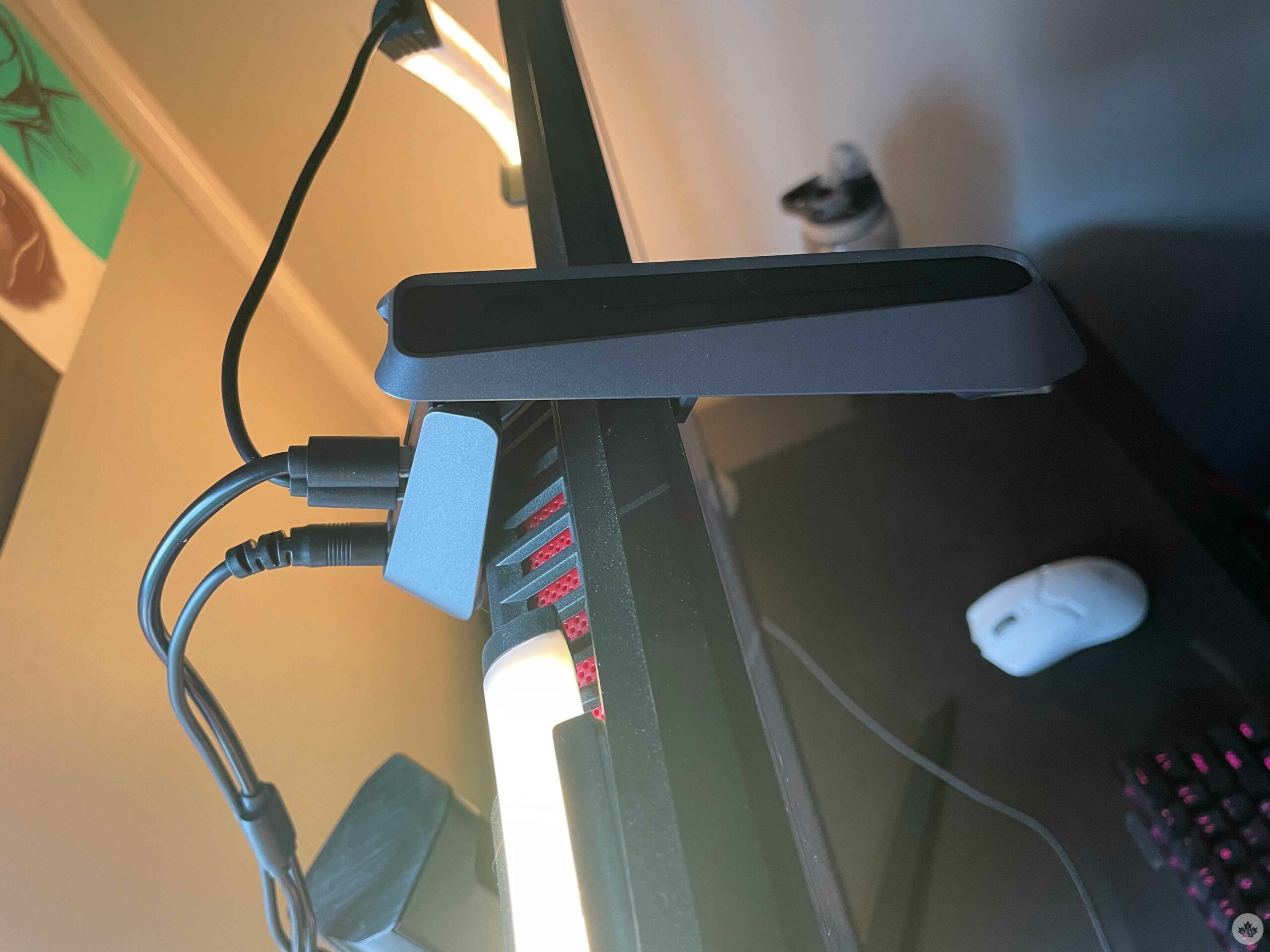

The tube-like LED strip goes behind your monitor. Note: while the Flow Pro Light Bar could be used with either a TV or a monitor, the G1 Pro is specifically made for small-sized screens, so it will only work optimally when used on a monitor. Further, Govee makes it very clear that the light strip will only perfectly fit monitors with a flat back panel. I have three monitors, and none of them have a flat back panel, so I decided to use it with my LG Ultragear monitor. The setup looks kind of scuffed from behind, but works nonetheless.

The package includes four corner mounting clips that stick to the back of your monitor on each corner, and the light tube passes through each of them, holding it in place.

Once connected, you take these tiny orange foam blocks that are provided and place them around the corners of the monitor and let the Govee Home app do its thing. Once calibrated, these are the spots the camera will look at to analyze the colour on your screen and replicate them via the light bars and the rear-attached light tube. The analyzed blocks also help the camera register the edges of your monitor, so that it doesn’t scan any further than those points.
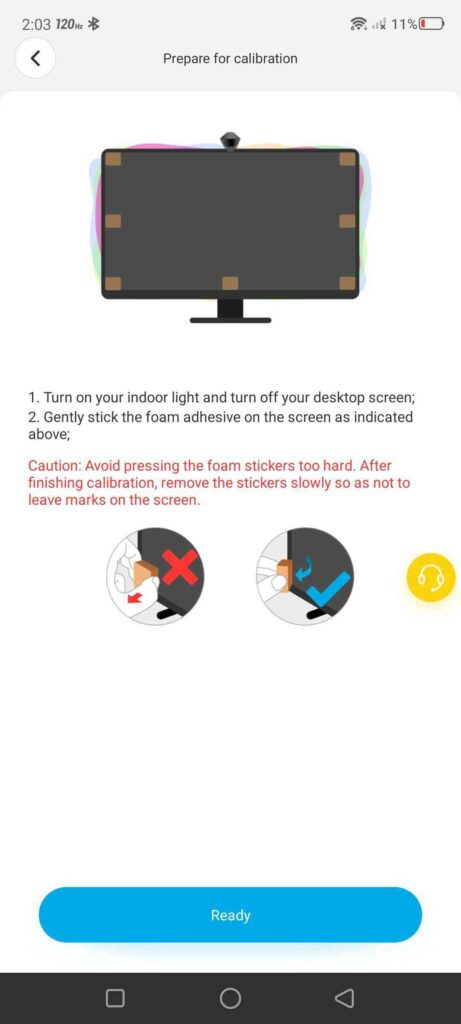
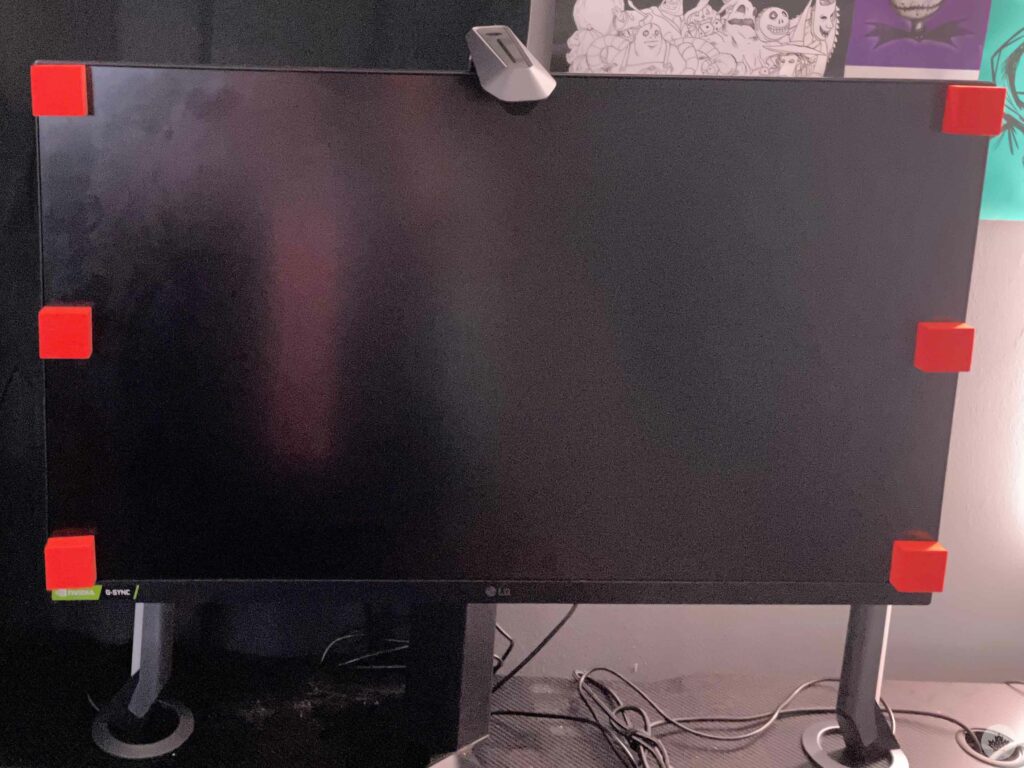
The camera has a capacitive touch on/off button on the top, though for all other controls, you’ll be using the Govee Home app. Govee has been consistently pushing out solid smart lights for a while now, and I’d imagine for a light that is made exclusively for PCs, they’d have a PC app, but that is not the case. While the Govee phone app is intuitive and its UI very user-friendly, especially since I’ve used the company’s lights in the past, I’d still like to see an application for desktop that I can control the lights with, similar to Nanoleaf and Philips Hue‘s PC apps.

App woes aside, the G1 Pro creates a very impressive light show. The light bars are sleek, yet, their light output is very bright and punchy, and the same goes for the rear-attached light tube. Their brightness can be adjusted from the Govee Home app, and I doubt you’ll ever have them cranked up to a hundred. The app also lets you control the lights you want to use.

The Video mode (camera mode) also lets you set some light presets depending on the activity you’re doing, including ‘Game’ and ‘Movie.’  Under Game, you’ll find presets like ‘Story,’ ‘Action,’ ‘Shoot,’ and ‘Racing,’ all offering different light vibrancy and speed. Whereas with Movie mode, you can specify if you want the bars to show the same colours, different colours, show the same colour throughout the bar, or have different segments of the bar show different colours.

The app also gives you the option of turning either one or both of the bars off, while keeping the tube light on, or vice versa.

In my experience, the video mode can be a little wonky at times.

While It does accurately replicate the base colours, it does mess up on tones. For example, If the scene on my PC screen shows a light green grass scenery, the light would normally output green, mixed with some sort of yellow to give it the light green effect. Similarly, blues would often mix with violets, and reds would mix with orange.

The mode is distracting in certain scenarios, like when your attention needs to be on the screen, however, during more casual use, the lights can add a sense of immersion, like while watching an animated movie, or playing casual games like Fall Guys or Warner Bros.’ Multiversus.

Other modes in the app are the same ones I’ve grown to love with other Govee products, like a ‘Music’ mode that changes the light colour depending on audio cues, ‘Colour’ mode, that lets you independently choose colours for the bars and the tube light, and a ‘Scene’ mode with several presets.

It’s worth noting, that unlike the Flow Pro light bars, the G1 Pro only works with the camera, since the camera also doubles as the control box, so if you’re someone that is not comfortable having a camera pointed at your screen all day, you should skip the G1 Pro. Privacy aside, the camera also takes up the space that would normally be reserved for your webcam.

Overall, the lights produce a very immersive effect. While the colour replication can be a little off at times when it comes to tones, it normally reproduces colours accurately and adds life to a regularly mundane desk. The solid-built lights are bright enough to independently light up your whole room, and its compatibility with both Google and Alexa voice assistants is a plus. The app itself is smooth to use, and offers multiple modes and customization to give you the control. However, its lack of compatibility with large screen TVs or with non-flat back panel monitors might be offputting for some, so if you intend to buy the G1 Pro, make sure you have a compatible monitor, or be fine with a scuffed rear tube setup like mine.

The Govee DreamView G1 Pro Gaming Light seems to be out of stock on Govee’s Canadian webstore at the moment, however, it is available in its U.S. store for $129.99 (roughly $166 CAD).


Source link

ShareTweetSend
Previous Post

Woman gives birth to two sets of identical twins

Next Post

Fernando Alonso signs for Aston Martin in 2023, news, latest, Sebastian Vettel retirement, Formula One, Oscar Piastri

Related News

Tech

Spotify expands audiobooks to over 180 markets

October 7, 2026
Tech

You Probably Aren’t Going to Get the Plague

October 6, 2026
Tech

Sources: the FBI removes an Accenture contractor over a breach exposing thousands of employees’ data; the FBI says a contractor failed to apply a security patch (Reuters)

October 6, 2026
Tech

Amazon hires a veteran Microsoft AI leader to help build its tools for coding and work

October 5, 2026
Next Post
Fernando Alonso signs for Aston Martin in 2023, news, latest, Sebastian Vettel retirement, Formula One, Oscar Piastri

Fernando Alonso signs for Aston Martin in 2023, news, latest, Sebastian Vettel retirement, Formula One, Oscar Piastri

Discussion about this post

Subscribe To Our Newsletters

    Customer Support


    1251 Wilcrest Drive
    Houston, Texas
    77042 USA
    Call-832.795.1420
    e-mail – news@theinsightpost.com

    Subscribe To Our Newsletters

      Categories

      • Africa
      • Africa-East
      • African Sports
      • American Sports
      • Arts
      • Asia
      • Australia
      • Business
      • Business Asia
      • Business- Africa
      • Canada
      • Defense
      • Education
      • Egypt
      • Energy
      • Entertainment
      • Europe
      • European Soccer
      • Finance
      • Germany
      • Ghana
      • Health
      • Insight
      • International
      • Investing
      • Japan
      • Latest Headlines
      • Life & Living
      • Markets
      • Mobile
      • Movies
      • New Zealand
      • Nigeria
      • Politics
      • Scholarships
      • Science
      • South Africa
      • South America
      • Sports
      • Tech
      • Travel
      • UK
      • USA
      • Weather
      • World
      No Result
      View All Result

      Recent News

      Boxing legend Mike Tyson talks going to juvie and trading cigarettes for cookies as a young boy

      October 7, 2026

      Hogbetsotso 2026 to promote tourism, local businesses

      October 7, 2026

      Mikel Arteta’s new contract: The challenges facing Arsenal boss as he enters ‘step five’ of his project | Football News

      October 7, 2026

      Spotify expands audiobooks to over 180 markets

      October 7, 2026
      • Home
      • Advertise With Us
      • About Us
      • Corporate
      • Consumer Rewards
      • Forum
      • Privacy Policy
      • Social Trends

      Theinsightpost ©2026 | All Rights Reserved. Theinsightpost is an Elnegy LLC company, registered in Texas, USA

      Welcome Back!

      Login to your account below

      Forgotten Password?

      Retrieve your password

      Please enter your username or email address to reset your password.

      Log In

      Add New Playlist

      We are using cookies to give you the best experience on our website.

      You can find out more about which cookies we are using or switch them off in .

      No Result
      View All Result
      • Home
      • Insight
      • Blog
      • Business
      • Entertainment
      • Health
      • Politics
      • Shop
        • Gift Shop
        • Value Shop
        • Store
        • Bargain Shop
        • Discount
      • Sports
      • Tech
      • Travel
      • USA
      • Video
      • World
        • Asia
        • Africa
        • South America
        • North America
        • Europe
        • Oceania

      Theinsightpost ©2026 | All Rights Reserved. Theinsightpost is an Elnegy LLC company, registered in Texas, USA

      The Insight Post
      Powered by  GDPR Cookie Compliance
      Privacy Overview

      This website uses cookies so that we can provide you with the best user experience possible. Cookie information is stored in your browser and performs functions such as recognising you when you return to our website and helping our team to understand which sections of the website you find most interesting and useful.

      Strictly Necessary Cookies

      Strictly Necessary Cookie should be enabled at all times so that we can save your preferences for cookie settings.

      Cookie Policy

      More information about our Cookie Policy

      Clear examples do more than decorate an explanation: they show how an idea behaves under recognizable conditions. In education and software documentation alike, strong illustrations begin with a defined goal, then reveal the steps, assumptions, and result without unnecessary detail. A practical test example should state the input, expected output, and boundary condition, because these elements show whether a rule works beyond the simplest case. Including a contrasting case also helps readers distinguish a valid application from a tempting but incorrect one, while concise notes explain why the outcomes differ. When examples are updated with current data and checked against the underlying rule, they remain useful across classrooms, product guides, and professional training.