

• Home
  • Insight
  • Blog
  • Business
  • Entertainment
  • Health
  • Politics
  • Shop
    • Gift Shop
    • Value Shop
    • Store
    • Bargain Shop
    • Discount
  • Sports
  • Tech
  • Travel
  • USA
  • Video
  • World
    • Asia
    • Africa
    • South America
    • North America
    • Europe
    • Oceania
Thursday, July 30, 2026
No Result
View All Result
Subscribe Now
  • Home
  • Insight
  • Blog
  • Business
  • Entertainment
  • Health
  • Politics
  • Shop
    • Gift Shop
    • Value Shop
    • Store
    • Bargain Shop
    • Discount
  • Sports
  • Tech
  • Travel
  • USA
    TX Rep. Brandon Gill Mocks James Talarico Over Fauci Action Figure Post

    TX Rep. Brandon Gill Mocks James Talarico Over Fauci Action Figure Post

    NBA players are ‘being taught’ to flop

    NBA players are ‘being taught’ to flop

    Industry was warned for years about chemical ‘runaway’ dangers. Then came near-catastrophe in O.C.

    Industry was warned for years about chemical ‘runaway’ dangers. Then came near-catastrophe in O.C.

    Trump administration seeks government-wide NDAs to stop leaks : NPR

    Trump administration seeks government-wide NDAs to stop leaks : NPR

    Dog discharges shotgun inside truck, striking woman at Nebraska traffic light

    Dog discharges shotgun inside truck, striking woman at Nebraska traffic light

    Toshifumi Suzuki, Japan’s ‘God’ of Convenience Stores, Dies at 93

    Toshifumi Suzuki, Japan’s ‘God’ of Convenience Stores, Dies at 93

     Judge Sanctioned CoreCivic for Destroying Video in ICE Death Suit

     Judge Sanctioned CoreCivic for Destroying Video in ICE Death Suit

    Suspect dead after opening fire near White House security checkpoint, Secret Service says

    Suspect dead after opening fire near White House security checkpoint, Secret Service says

    Trump trashes Colbert’s high-rated finale as “no ratings”

    Trump trashes Colbert’s high-rated finale as “no ratings”

  • Video
  • World
    • Asia
    • Africa
    • South America
    • North America
    • Europe
    • Oceania
The Insight Post
  • Home
  • Insight
  • Blog
  • Business
  • Entertainment
  • Health
  • Politics
  • Shop
    • Gift Shop
    • Value Shop
    • Store
    • Bargain Shop
    • Discount
  • Sports
  • Tech
  • Travel
  • USA
    TX Rep. Brandon Gill Mocks James Talarico Over Fauci Action Figure Post

    TX Rep. Brandon Gill Mocks James Talarico Over Fauci Action Figure Post

    NBA players are ‘being taught’ to flop

    NBA players are ‘being taught’ to flop

    Industry was warned for years about chemical ‘runaway’ dangers. Then came near-catastrophe in O.C.

    Industry was warned for years about chemical ‘runaway’ dangers. Then came near-catastrophe in O.C.

    Trump administration seeks government-wide NDAs to stop leaks : NPR

    Trump administration seeks government-wide NDAs to stop leaks : NPR

    Dog discharges shotgun inside truck, striking woman at Nebraska traffic light

    Dog discharges shotgun inside truck, striking woman at Nebraska traffic light

    Toshifumi Suzuki, Japan’s ‘God’ of Convenience Stores, Dies at 93

    Toshifumi Suzuki, Japan’s ‘God’ of Convenience Stores, Dies at 93

     Judge Sanctioned CoreCivic for Destroying Video in ICE Death Suit

     Judge Sanctioned CoreCivic for Destroying Video in ICE Death Suit

    Suspect dead after opening fire near White House security checkpoint, Secret Service says

    Suspect dead after opening fire near White House security checkpoint, Secret Service says

    Trump trashes Colbert’s high-rated finale as “no ratings”

    Trump trashes Colbert’s high-rated finale as “no ratings”

  • Video
  • World
    • Asia
    • Africa
    • South America
    • North America
    • Europe
    • Oceania
No Result
View All Result
No Result
View All Result
Home Mobile

macOS UI testing with Codemagic

by Theinsightpost
August 5, 2022
in Mobile
0 0
0
macOS UI testing with Codemagic


TL;DR: Automating UI tests is good, but for macOS, it may be hard to do on remote machines in CI/CD services due to issues with permissions. This isn’t the case with Codemagic, which lets you automate macOS UI testing in a handful of quick steps.

This article is written by Rudrank Riyam.

If you have been manually testing your macOS app’s UI, going through the same flow repeatedly, and wishing for a way to automate the process, then you are in the right place! Testing the UI of your app has great benefits, but it is a tedious task if done manually.

However, automated user interface tests can make sure the UX is intact: You can add a new UI feature with confidence without affecting the rest of the app. In this article, we discuss how to write macOS UI tests and automate them using Codemagic.

We’ll learn:

  • How to add a user interface testing target;
  • How to write your first UI test;
  • How to run UI tests;
  • What the issues with macOS UI testing are;
  • How to configure Codemagic for macOS UI testing;
  • How to run tests on Codemagic.

So, let’s start exploring and writing some macOS UI tests!

Getting started with macOS UI testing

In this article, we will create a simple project that conditionally shows a label with the click of a button. Then, we’ll write a test to show the label and check if it is visible. Finally, we’ll look at the issues with macOS UI testing on a CI/CD platform and how you can overcome them using Codemagic.

For reference, download the sample project used for this article from here.

Note: This article assumes you have a basic knowledge of testing on Apple platforms.

Adding a UI testing target

Xcode provides an option to include tests if you’re starting off with a new project. In this case, it will create a folder for both UI and unit tests.

If you already have a project and want to add UI tests, go to the Xcode menu bar, select File, then click New, and select Target. Search for UI Testing Bundle and name it accordingly. For example, you can add the word “UITests” after the name of your target.
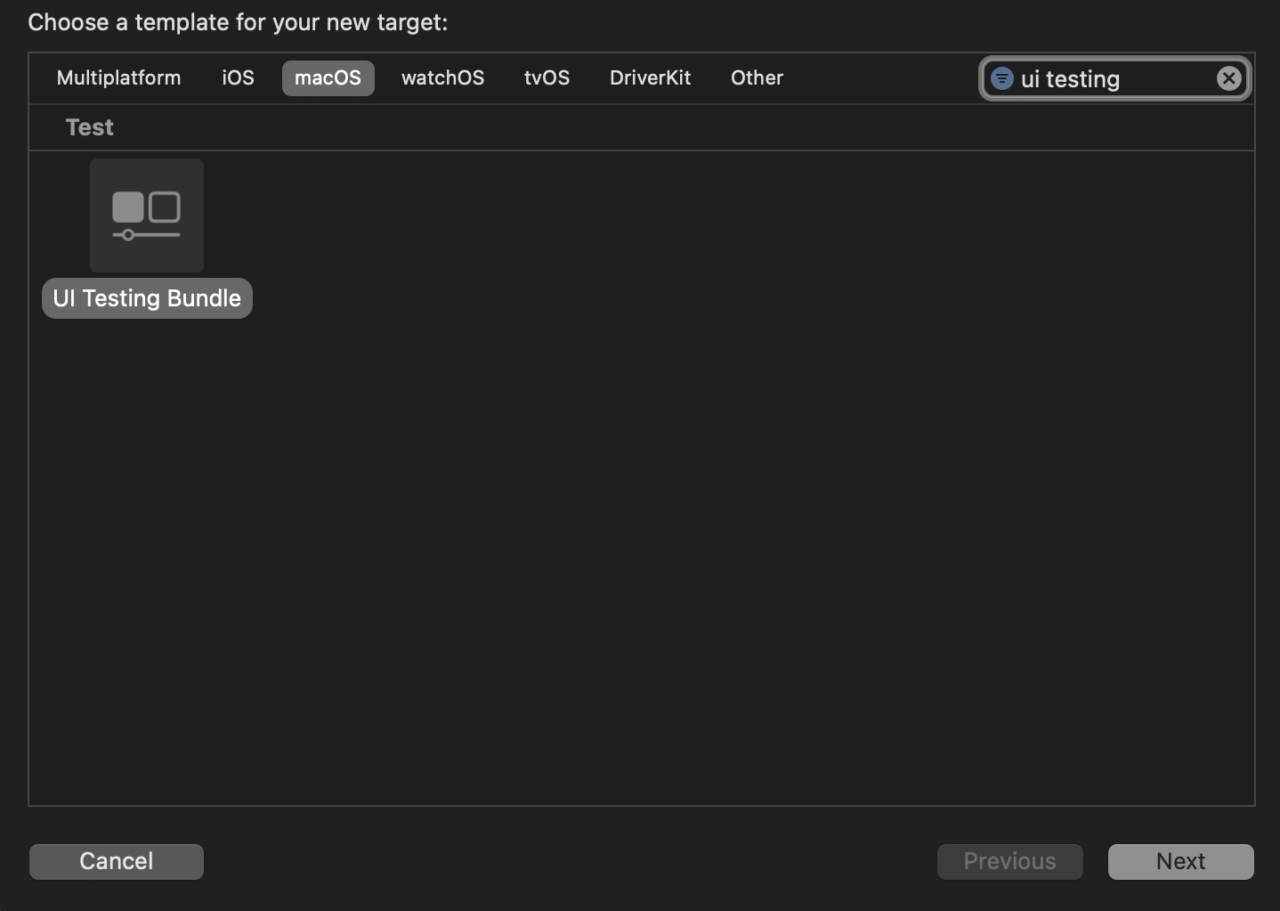
When creating a new target for UI tests, Xcode creates a folder with two files. The first one is for normal UI tests, and the second one is for testing the launch of the application.

Writing your first UI test

Automated tests interact with your app similar to how a user does, so you should keep that in mind while writing your UI tests. Let’s start with a simple example, a button that conditionally displays a label:

struct ContentView: View {
  @State private var showWelcomeLabel = false
  
  var body: some View {
    VStack {
      if showWelcomeLabel {
        Text("Welcome to Codemagic!")
          .font(.largeTitle)
          .padding()
      }
      
      Button("Show!") {
        showWelcomeLabel.toggle()
      }
      .accessibilityIdentifier("show")
    }
    .frame(width: 500, height: 500, alignment: .center)
  }
}

When you click on the Show button, it toggles the showWelcomeLabel variable and displays the text “Welcome to Codemagic!” Clicking on it again hides the label.
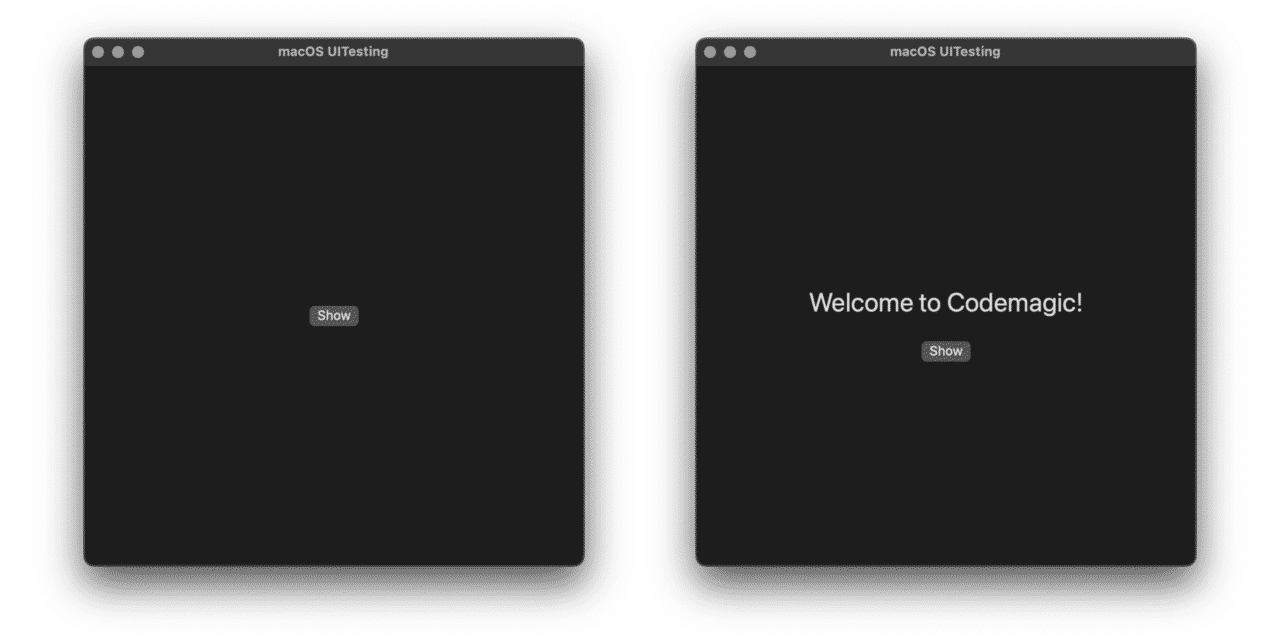
Do note that we use an accessibility identifier for the button so that it is easier to query the button element when writing the tests.

In the UI test target file (not the LaunchTests), add the following test method:

func testShowButtonDisplaysWelcomeLabel() {
  // 1
  let app = XCUIApplication()
  app.launch()
  
  // 2
  let window = app.windows
  
  // 3
  XCTAssertFalse(window.staticTexts["Welcome to Codemagic!"].exists)

  // 4
  let showButton = window.buttons["show"]
  
  // 5
  showButton.click()
  
  // 6
  XCTAssertTrue(window.staticTexts["Welcome to Codemagic!"].exists)
}

Let’s quickly review what the code above does:

  1. It creates an instance of XCUIApplication() and then launches the application.
  2. It creates a constant for querying the window elements of the application.
  3. As the welcome label is not visible on the screen, we assert that the text does not exist.
  4. Then, it initiates a query for the button element with the identifier show.
  5. Then it clicks the button.
  6. The label should be visible on the screen, so we query the static texts and assert that the text “Welcome to Codemagic!” exists.

Yay, you’ve just written your first UI test for your macOS app! ?

Running macOS UI tests

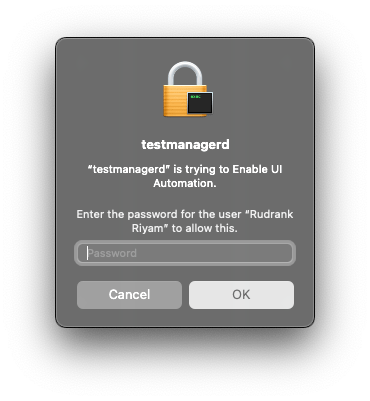
When you run your UI tests for the macOS target, you get an alert that “testmanagerd” is trying to Enable UIAutomation. To allow this, you have to enter your Mac’s password.
macOS UI testing with Codemagic

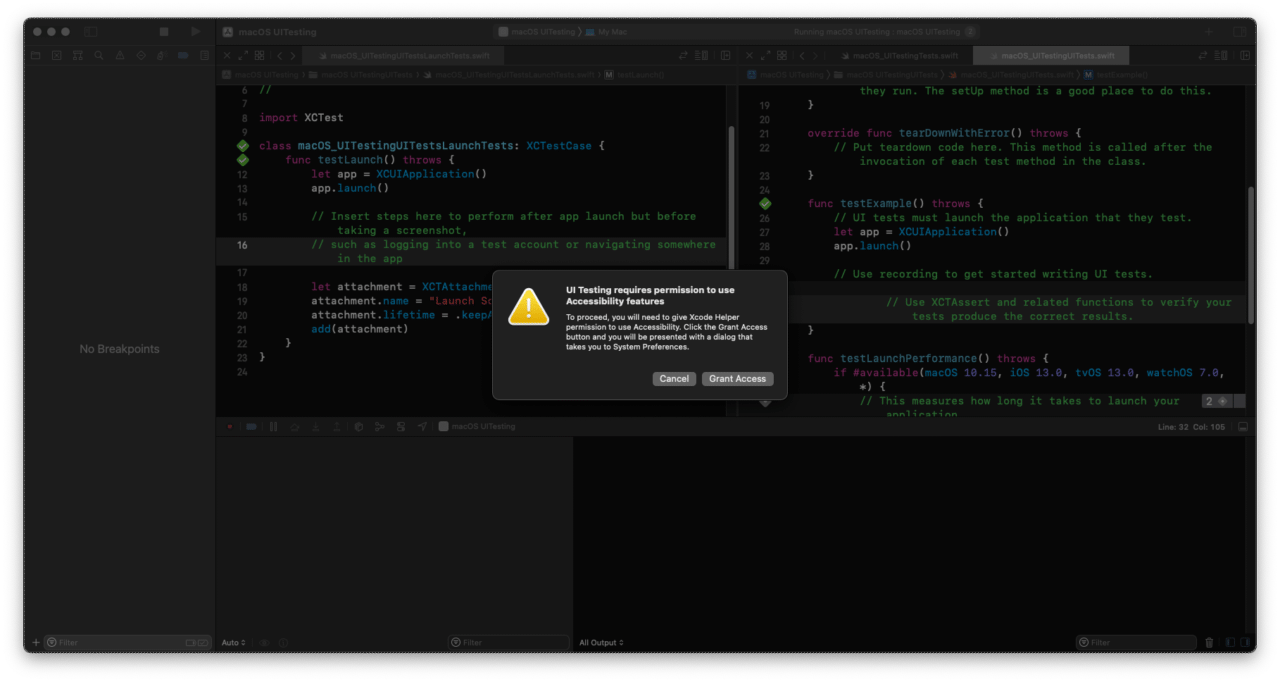
You are then asked to grant permission to use Accessibility features to proceed with UI testing.
macOS UI tests with Codemagic

To proceed, you have to provide Xcode Helper permission to use Accessibility. Click the Grant Access button, and the system presents you with a dialog that takes you to System Preferences.

After all the required permissions have been granted, the tests are finally run. You can see on your screen that the machine clicks on the “Show!” button, the label appears, and the test subsequently passes.
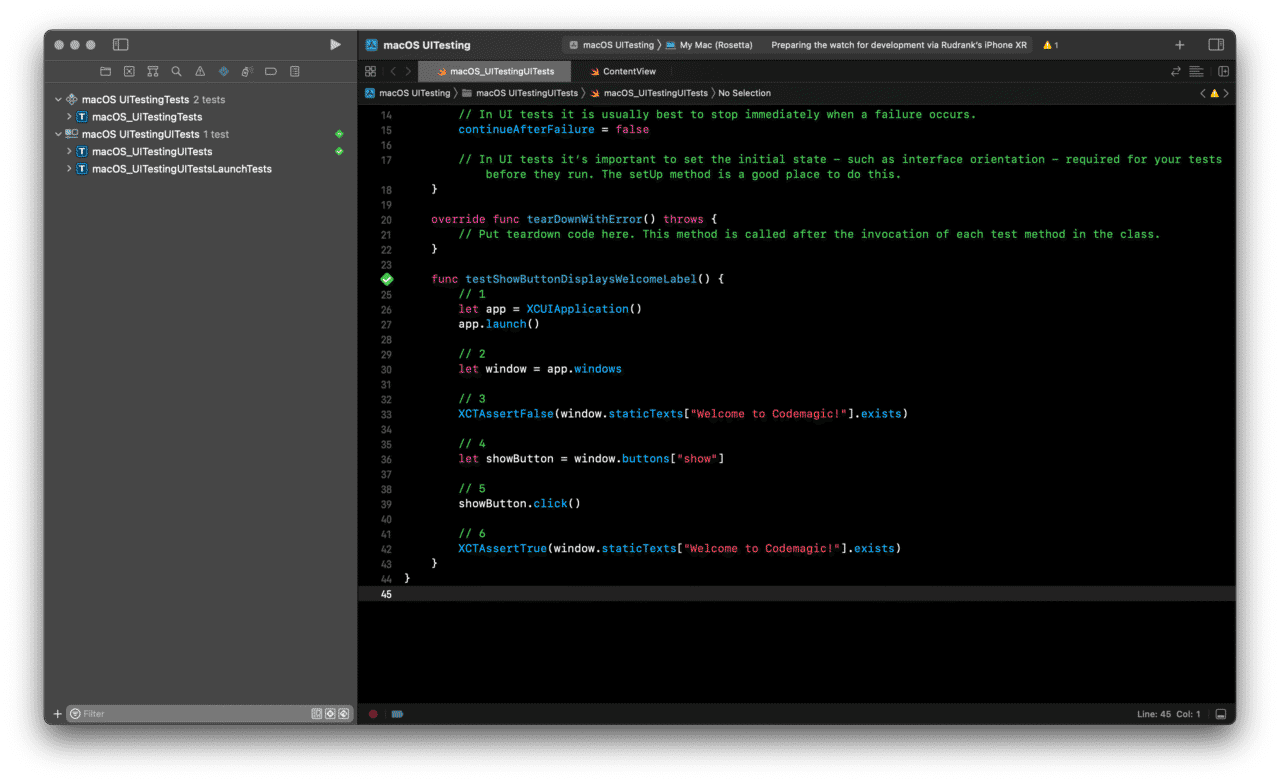
macOS UI testing with Codemagic

Issues with macOS UI testing

When testing on a local machine, you can manually grant access to the Xcode Helper to run UI tests for your macOS app. However, it isn’t as easy to do this on a remote CI/CD machine. Furthermore, the remote device does not interact with the UI without this permission, resulting in UI test failure.

Granting the accessibility permission allows the app to control your computer. This makes it a dangerous permission that should not be granted thoughtlessly. To protect the user from granting this permission without their consent, Apple has a mechanism called the TCC (Transparency, Consent, and Control) system.

It has two databases, TCC.db, located in:

  • /Library/Application Support
  • ~/Library/Application Support

These databases contain the settings for privacy controls. When you manually provide permission in the Security & Privacy pane, it is stored in these files. To protect your security and privacy, you cannot edit these databases without having SIP (System Integrity Protection) disabled. For reference, you can read more about each column and its importance here.

Configuring codemagic.yaml to run macOS UI tests

With Codemagic, you don’t have to add permissions to the database manually. SIP is disabled for Xcode 13 and above images, and the required permissions are in place already. Just run your UI tests directly!

Here’s a sample workflow configuration for you to use as a template:

workflows:
  macos-workflow:
    name: macOS Workflow
    environment:
      vars:
        XCODE_PROJECT: "macOS UITesting.xcodeproj"
        XCODE_SCHEME: "macOS UITesting"
      xcode: latest
      cocoapods: default
    scripts:
      - name: Run UI and Unit tests
        script: |
          xcode-project run-tests 
              --project "$XCODE_PROJECT" 
              --scheme "$XCODE_SCHEME" 
              --sdk macosx 
              --test-xcargs "CODE_SIGNING_ALLOWED='no'" 
              --output-dir build/macos/test          
        test_report: build/macos/test/*.xml

Here’s what the above workflow is doing:

  1. Start with a macOS workflow, and add environment variables for the project and scheme name. We use the latest Xcode version available on Codemagic, with the default CocoaPods.
  2. Create a script to run the macOS tests for the given project and scheme. We specifically mention that the SDK is macosx so that Codemagic runs the tests on macOS, whereas the default value is the iPhone simulator.

After configuring the codemagic.yaml file, we are ready to run the tests on Codemagic!

Running tests on Codemagic

Head over to Codemagic’s website to run the UI tests. If you’re not registered yet, you’ll need to sign up:
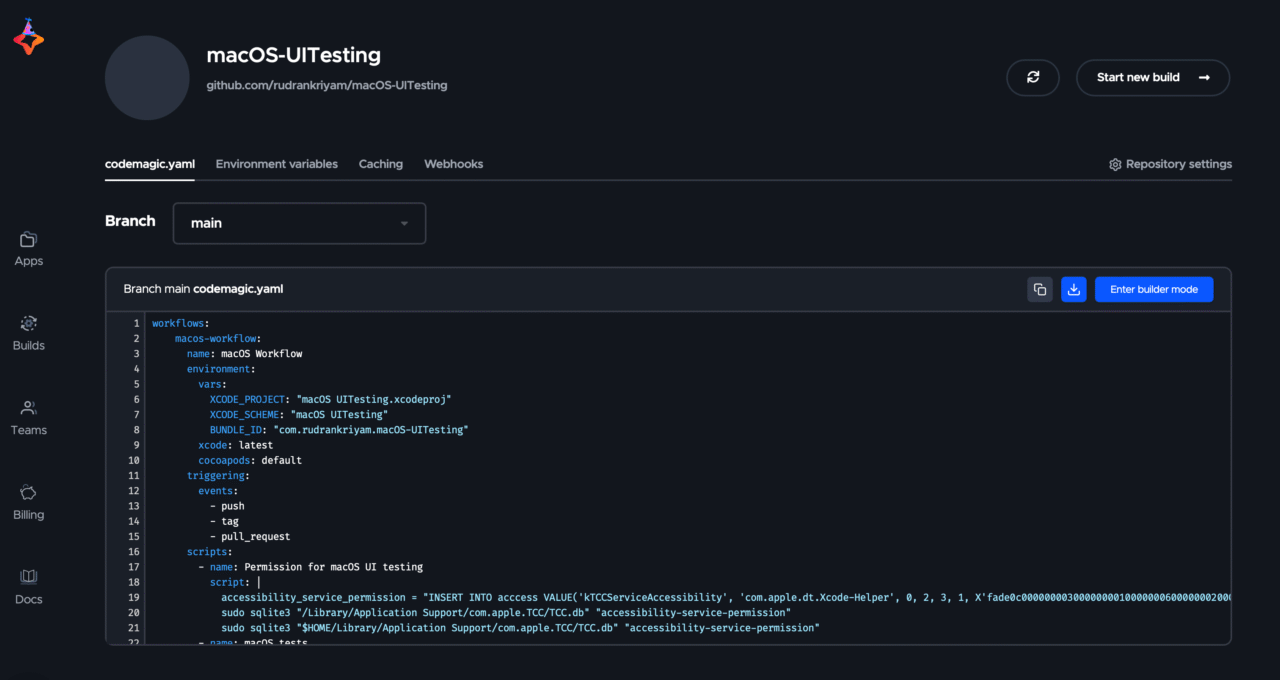
Sign up

macOS UI testing with Codemagic yaml

Start a new build by choosing the current workflow:
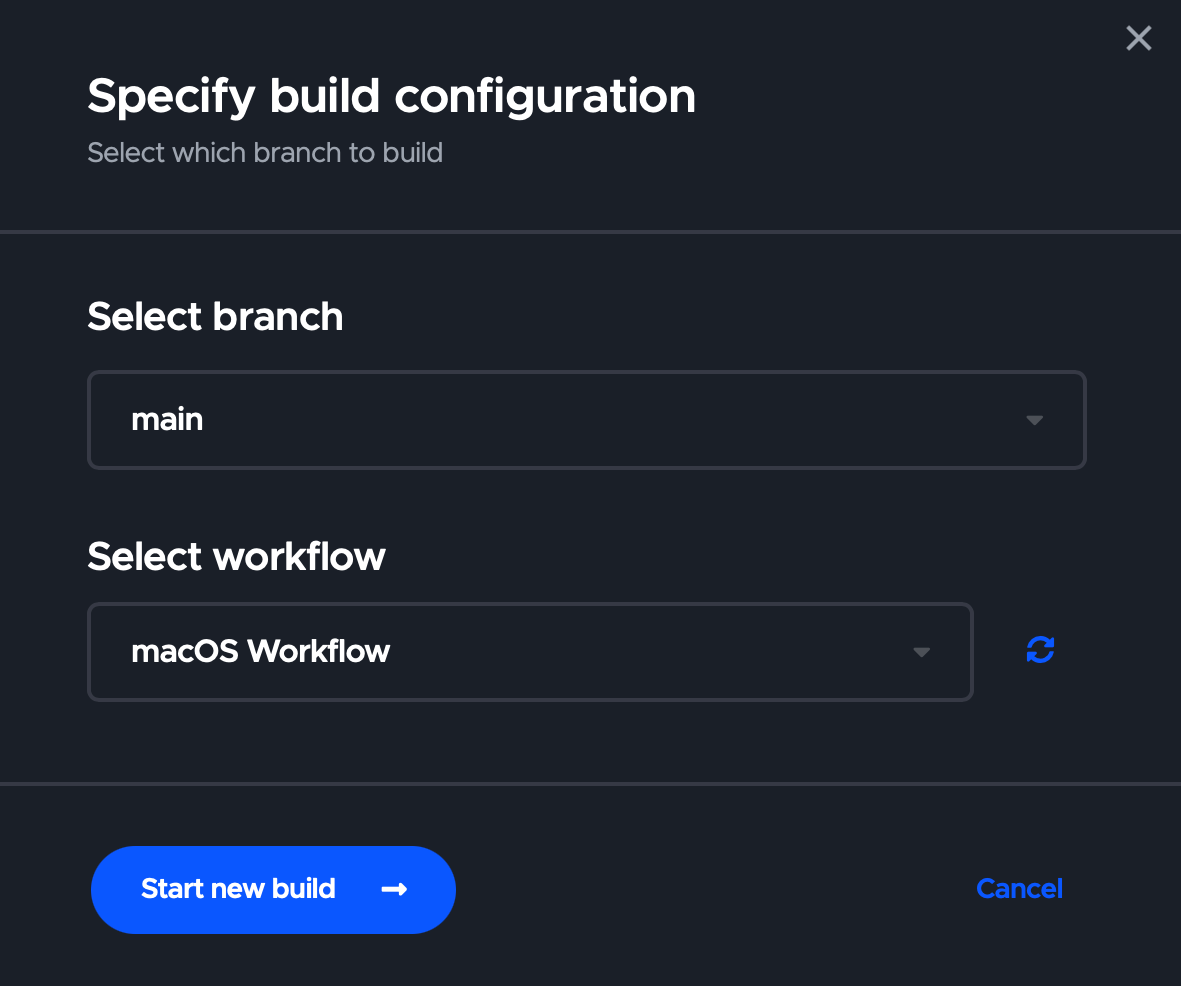
macOS UI testing build configuration

Once the process finishes, the UI tests should be completed successfully for your macOS app!

Conclusion

UI testing for iOS and macOS can both be done on a remote machine. Although, running successful UI tests for a macOS app on a remote machine is often more complicated than for an iOS app, but with Codemagic’s support, that’s not the case anymore.

Now that you have written UI tests for your macOS app, refer to the documentation for code signing your macOS app and publishing it on the App Store.

We hope you enjoyed the article. If you have any questions or suggestions, join our Slack community. Our team would love to hear about your experience with UI testing your macOS apps! If you have any problems, give a shout to the #support channel on Slack as well: We are always there to help, and so is the huge and friendly community of other Codemagic users.



Source link

ShareTweetSend
Previous Post

President Uhuru Kenyatta opens Sh40 billion Kipevu Oil Terminal

Next Post

VIDEO : Latest news bulletin | August 5th – Morning

Related News

Announcing Codemagic Patch: an open-source CodePush rebuild for React Native
Mobile

Announcing Codemagic Patch: an open-source CodePush rebuild for React Native

July 30, 2026
React Native OTA Updates: What You Can (and Can’t) Deploy Over the Air
Mobile

React Native OTA Updates: What You Can (and Can’t) Deploy Over the Air

May 28, 2026
Your phone drawer hides an app designed to “exploit developing brains”
Mobile

Your phone drawer hides an app designed to “exploit developing brains”

May 27, 2026
iPhone 16 has a secret charging upgrade Apple didn’t even mention
Mobile

iPhone 16 has a secret charging upgrade Apple didn’t even mention

May 26, 2026
Next Post
VIDEO : Latest news bulletin | August 5th – Morning

VIDEO : Latest news bulletin | August 5th – Morning

Discussion about this post

Subscribe To Our Newsletters

    Customer Support


    1251 Wilcrest Drive
    Houston, Texas
    77042 USA
    Call-832.795.1420
    e-mail – news@theinsightpost.com

    Subscribe To Our Newsletters

      Categories

      • Africa
      • Africa-East
      • African Sports
      • American Sports
      • Arts
      • Asia
      • Australia
      • Business
      • Business Asia
      • Business- Africa
      • Canada
      • Defense
      • Education
      • Egypt
      • Energy
      • Entertainment
      • Europe
      • European Soccer
      • Finance
      • Germany
      • Ghana
      • Health
      • Insight
      • International
      • Investing
      • Japan
      • Latest Headlines
      • Life & Living
      • Markets
      • Mobile
      • Movies
      • New Zealand
      • Nigeria
      • Politics
      • Scholarships
      • Science
      • South Africa
      • South America
      • Sports
      • Tech
      • Travel
      • UK
      • USA
      • Weather
      • World
      No Result
      View All Result

      Recent News

      US Navy to overhaul torpedo stockpile under new two-war strategy

      US Navy to overhaul torpedo stockpile under new two-war strategy

      July 30, 2026
      Free Cloud Computing Course | AWS Re/Start Program 

      Free Cloud Computing Course | AWS Re/Start Program 

      July 30, 2026
      Thirty Years Later

      Thirty Years Later

      July 30, 2026
      Announcing Codemagic Patch: an open-source CodePush rebuild for React Native

      Announcing Codemagic Patch: an open-source CodePush rebuild for React Native

      July 30, 2026
      • Home
      • Advertise With Us
      • About Us
      • Corporate
      • Consumer Rewards
      • Forum
      • Privacy Policy
      • Social Trends

      Theinsightpost ©2026 | All Rights Reserved. Theinsightpost is an Elnegy LLC company, registered in Texas, USA

      Welcome Back!

      Login to your account below

      Forgotten Password?

      Retrieve your password

      Please enter your username or email address to reset your password.

      Log In

      Add New Playlist

      We are using cookies to give you the best experience on our website.

      You can find out more about which cookies we are using or switch them off in .

      No Result
      View All Result
      • Home
      • Insight
      • Blog
      • Business
      • Entertainment
      • Health
      • Politics
      • Shop
        • Gift Shop
        • Value Shop
        • Store
        • Bargain Shop
        • Discount
      • Sports
      • Tech
      • Travel
      • USA
      • Video
      • World
        • Asia
        • Africa
        • South America
        • North America
        • Europe
        • Oceania

      Theinsightpost ©2026 | All Rights Reserved. Theinsightpost is an Elnegy LLC company, registered in Texas, USA

      The Insight Post
      Powered by  GDPR Cookie Compliance
      Privacy Overview

      This website uses cookies so that we can provide you with the best user experience possible. Cookie information is stored in your browser and performs functions such as recognising you when you return to our website and helping our team to understand which sections of the website you find most interesting and useful.

      Strictly Necessary Cookies

      Strictly Necessary Cookie should be enabled at all times so that we can save your preferences for cookie settings.

      Cookie Policy

      More information about our Cookie Policy