
• Home
  • Insight
  • Blog
  • Business
  • Entertainment
  • Health
  • Politics
  • Shop
    • Gift Shop
    • Value Shop
    • Store
    • Bargain Shop
    • Discount
  • Sports
  • Tech
  • Travel
  • USA
  • Video
  • World
    • Asia
    • Africa
    • South America
    • North America
    • Europe
    • Oceania
Thursday, November 19, 2026
No Result
View All Result
Subscribe Now
  • Home
  • Insight
  • Blog
  • Business
  • Entertainment
  • Health
  • Politics
  • Shop
    • Gift Shop
    • Value Shop
    • Store
    • Bargain Shop
    • Discount
  • Sports
  • Tech
  • Travel
  • USA
    FAA Administrator Takes Responsibility as Mullin Faces Tough Questions Over Nationwide Ground Stop

    FAA Administrator Takes Responsibility as Mullin Faces Tough Questions Over Nationwide Ground Stop

    Mary Peltola Emerges Victorious in Alaska Senate Race, Making History for Democrats

    Mary Peltola Emerges Victorious in Alaska Senate Race, Making History for Democrats

    Stranded in Conflict: Palestinians Navigate the Tenuous Balance of War and Peace Amid Ceasefire Efforts

    Stranded in Conflict: Palestinians Navigate the Tenuous Balance of War and Peace Amid Ceasefire Efforts

    Trump Administration Revokes Pay Increase for Head Start Educators

    Trump Administration Revokes Pay Increase for Head Start Educators

    Unexpected Triumph: Gay Candidates Achieve Unforeseen Victories in Challenging Races

    Unexpected Triumph: Gay Candidates Achieve Unforeseen Victories in Challenging Races

    Microsoft Outlook Experiences Prolonged Outage Affecting Users Nationwide

    Microsoft Outlook Experiences Prolonged Outage Affecting Users Nationwide

    Gunfire Erupts in D.C.: Authorities Search for Suspect Amid Rising Concerns Over Public Safety

    Gunfire Erupts in D.C.: Authorities Search for Suspect Amid Rising Concerns Over Public Safety

    LAUSD Takes Strong Action Against Hate Speech Following Racial Slur Incidents

    LAUSD Takes Strong Action Against Hate Speech Following Racial Slur Incidents

    Beloved Former Los Angeles Times Columnist Steve Harvey Passes Away at 80

    Beloved Former Los Angeles Times Columnist Steve Harvey Passes Away at 80

  • Video
  • World
    • Asia
    • Africa
    • South America
    • North America
    • Europe
    • Oceania
The Insight Post
  • Home
  • Insight
  • Blog
  • Business
  • Entertainment
  • Health
  • Politics
  • Shop
    • Gift Shop
    • Value Shop
    • Store
    • Bargain Shop
    • Discount
  • Sports
  • Tech
  • Travel
  • USA
    FAA Administrator Takes Responsibility as Mullin Faces Tough Questions Over Nationwide Ground Stop

    FAA Administrator Takes Responsibility as Mullin Faces Tough Questions Over Nationwide Ground Stop

    Mary Peltola Emerges Victorious in Alaska Senate Race, Making History for Democrats

    Mary Peltola Emerges Victorious in Alaska Senate Race, Making History for Democrats

    Stranded in Conflict: Palestinians Navigate the Tenuous Balance of War and Peace Amid Ceasefire Efforts

    Stranded in Conflict: Palestinians Navigate the Tenuous Balance of War and Peace Amid Ceasefire Efforts

    Trump Administration Revokes Pay Increase for Head Start Educators

    Trump Administration Revokes Pay Increase for Head Start Educators

    Unexpected Triumph: Gay Candidates Achieve Unforeseen Victories in Challenging Races

    Unexpected Triumph: Gay Candidates Achieve Unforeseen Victories in Challenging Races

    Microsoft Outlook Experiences Prolonged Outage Affecting Users Nationwide

    Microsoft Outlook Experiences Prolonged Outage Affecting Users Nationwide

    Gunfire Erupts in D.C.: Authorities Search for Suspect Amid Rising Concerns Over Public Safety

    Gunfire Erupts in D.C.: Authorities Search for Suspect Amid Rising Concerns Over Public Safety

    LAUSD Takes Strong Action Against Hate Speech Following Racial Slur Incidents

    LAUSD Takes Strong Action Against Hate Speech Following Racial Slur Incidents

    Beloved Former Los Angeles Times Columnist Steve Harvey Passes Away at 80

    Beloved Former Los Angeles Times Columnist Steve Harvey Passes Away at 80

  • Video
  • World
    • Asia
    • Africa
    • South America
    • North America
    • Europe
    • Oceania
No Result
View All Result
No Result
View All Result
Home Tech

How to rip CDs & use your own audio files in Music on macOS Ventura

by Theinsightpost
December 15, 2022
in Tech
0 0
0
How to rip CDs & use your own audio files in Music on macOS Ventura


Article Hero Image


AppleInsider may earn an affiliate commission on purchases made through links on our site.

While the main focus in 2022 is on streaming, the Music app on your Mac still allows you to import music files and CDs into your music library. Here’s how to do it.

Here is how to upload music files and folders, edit singular songs or a whole album, and how to change the album artwork in macOS Ventura.

How to add files to the Music app

Uploading music is easy to do in the Music app, and only takes a few steps. Here is how to upload music files and folders.
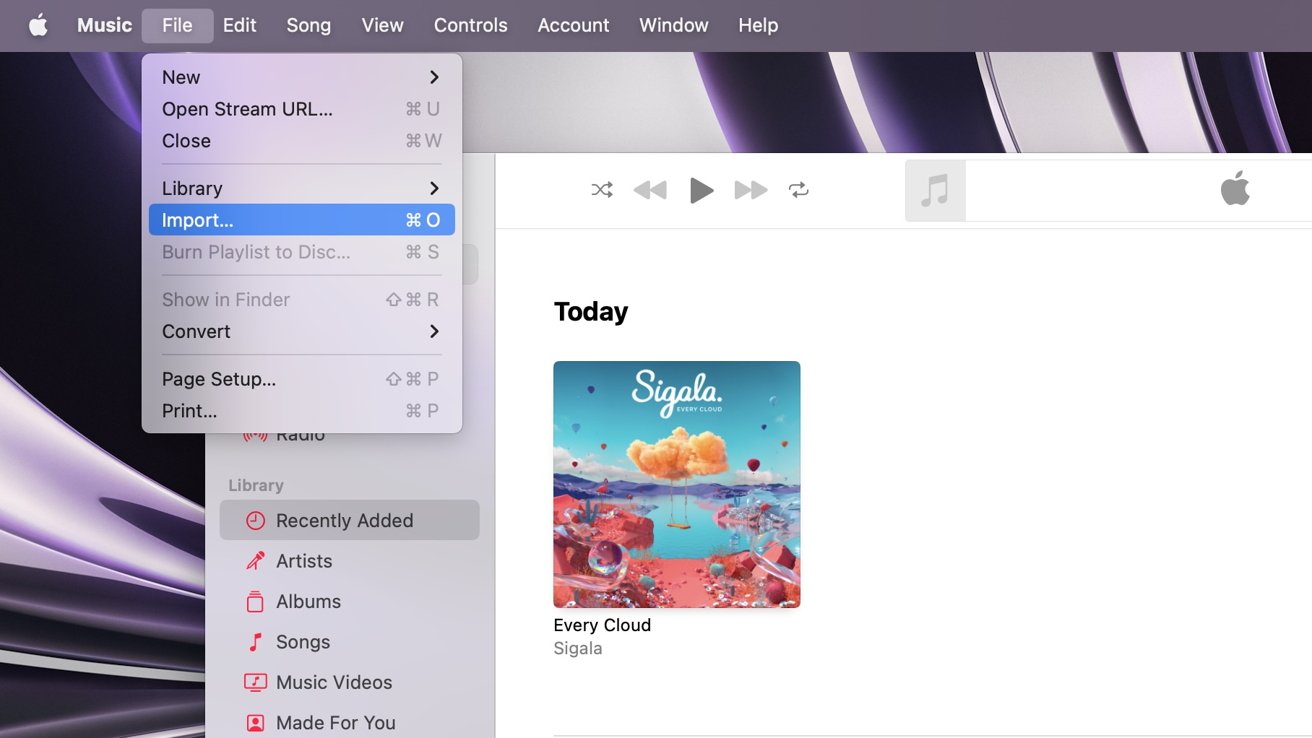
  1. Open Music
  2. Go to the Recently Added tab
  3. Click on File from the top toolbar
  4. Click Import
  5. Select either the audio file or folder — containing multiple audio files — that you want to import

You can also drag and drop audio files directly into the Music app to make the import faster and more seamless.

Once you import the file or folder, a new album will be created in the Recently Added tab of the application with the name and artwork that was pre-added to the file before import being displayed.

How to import a CD in macOS Ventura

Importing a CD is easy to do with the Music app. The toughest part is finding a computer that still houses a disc drive. There are obviously external drives you can buy, but using them with USB-C and hubs can be a bit challenging sometimes. We’ll be speaking more about this soon.

  1. Open Music
  2. Insert the CD you want to import into the CD or DVD drive
  3. The CD will appear below the Devices tab in the sidebar
  4. All the songs on the CD will automatically start importing into your Library
  5. To cancel the importing at anytime, click Stop Importing. Any songs already imported will still be in your Library.
  6. When the songs are finished importing, click the Eject button near the top right of the music window

Once your CD has been imported, you can listen to the songs it had, create playlists out of them, or edit the audio file’s metadata further to your likings.

If you import the CD onto a computer that is not your own — but is logged into your Apple ID — the music will be transferred to your devices via iCloud Music Library (if you have it turned on).

Once you import your audio, you may want to edit the metadata of it. This may include the file’s name, author, album artwork, and other details about it.

You should decide if you want to edit just one song or the whole album before making changes.

  1. Two-finger click, right-click, or control-click on the song to edit that one specific song, or the album artwork to edit the whole album
  2. Click on Get Info
  3. A prompt will ask you if you’re sure you want to edit the item(s). Select Edit Items from the options given.
  4. To edit different aspects of the audio file or album, just click on the text box with the information you want to edit and type in what you want it to say
  5. Click OK at the bottom right of the menu to apply the changes you had made
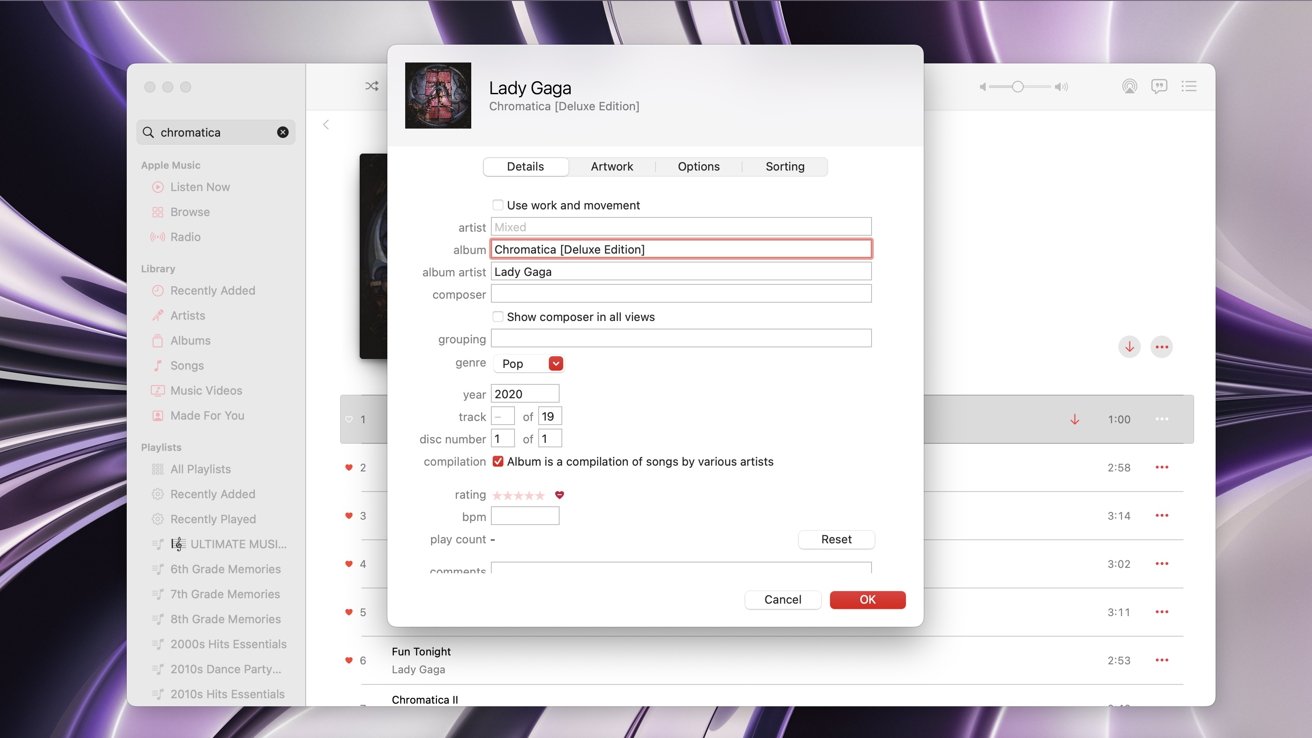
If you are editing a singular song within an album and you change either the album name or the artist of it, then the song will be separated from the album it was part of. It will then become part of its own album.

Changing the disc number — when editing one song from that album — will keep the song in the same album location, but will be brought to the bottom of the album and sectioned into the new “Disc Number” area you assigned it to.

How to change the album artwork in macOS Ventura

If you do not like the current artwork an album has – or just want to change it – you simply can within the Music app. Here is how to change it.

  1. Two-finger click, right-click, or control-click on the song or album you want to change
  2. Select Get Info
  3. Click on Artwork from the tabs in the menu next to Details
  4. Click on Add Artwork at the bottom left of the menu
  5. Select the photo you want to change or make the album artwork to
  6. Once you select it, the photo will appear next to the current album artwork that was previously there (if there was one)
  7. Click OK on the bottom right of the menu to apply the changes
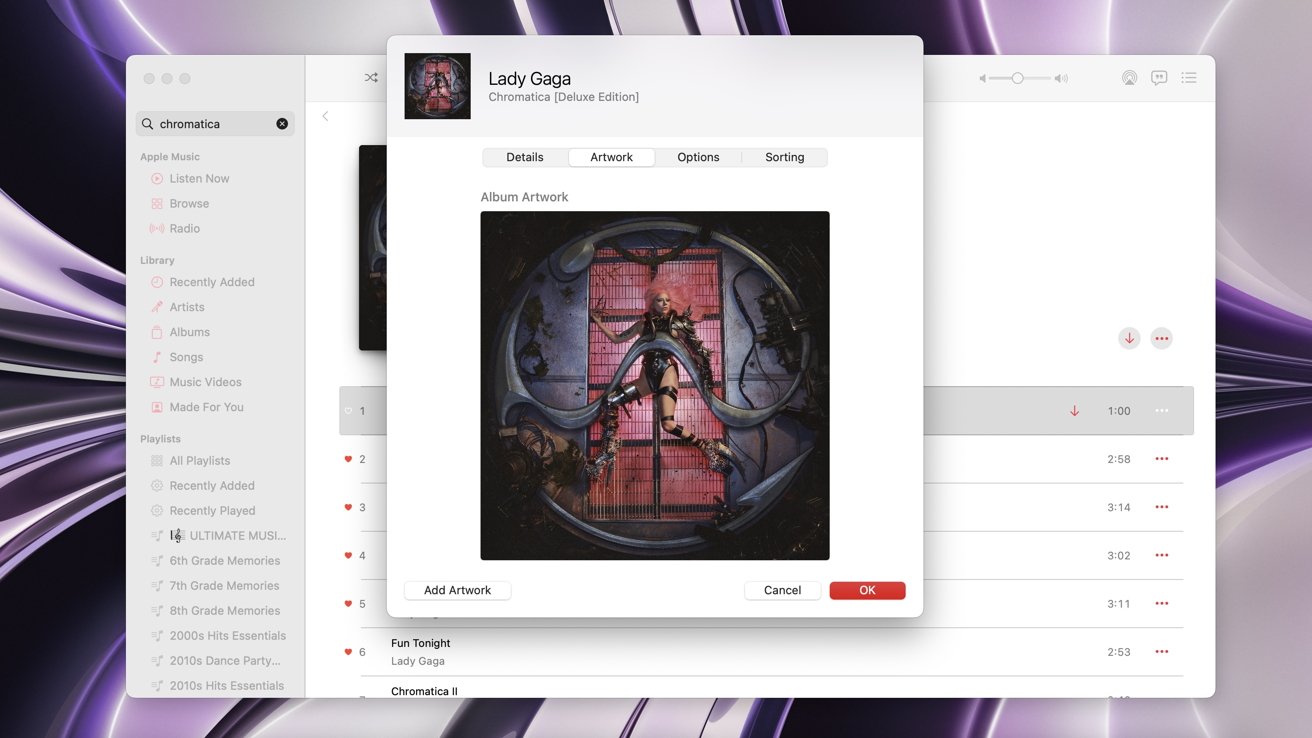
The changes may take a few moments to show on your other devices.

If they do not show, try removing the download(s) of the song or album and then redownload them. Do this on your other devices as well.

Even if you downloaded songs from Apple Music, you can go in and change their album artwork or details about them. It does not matter where the audio track came from.

Keep on listening

Importing music files and editing the file details and artwork is a great way to customize your music library to your personal preferences.

If you are not subscribed to Apple Music and then decide to join the service, the metadata that you customized (such as album artwork) may be changed to the default version that Apple Music offers. Any downloaded songs (like from an physical CD) will also be converted to Dolby Atmos format — if you have that enabled and it is offered for those songs.




Source link

ShareTweetSend
Previous Post

Response in Beijing after China eases virus rules

Next Post

Panel: Who is the biggest pound-for-pound puncher in the sport today?

Related News

Microsoft’s Satya Nadella Reveals Strategic Rationale Behind Layoff of 60,000 Employees
Tech

Microsoft’s Satya Nadella Reveals Strategic Rationale Behind Layoff of 60,000 Employees

November 19, 2026
Cybercriminals Embrace Innovative AI Tool for Streamlined Hacking Operations
Tech

Cybercriminals Embrace Innovative AI Tool for Streamlined Hacking Operations

November 18, 2026
Transform Your Laptop Setup with These 5 Affordable Accessories
Tech

Transform Your Laptop Setup with These 5 Affordable Accessories

November 15, 2026
Microsoft 365 Services Gradually Restore Functionality Following Global Outage
Tech

Microsoft 365 Services Gradually Restore Functionality Following Global Outage

November 14, 2026
Next Post
Panel: Who is the biggest pound-for-pound puncher in the sport today?

Panel: Who is the biggest pound-for-pound puncher in the sport today?

Discussion about this post

Subscribe To Our Newsletters

    Customer Support


    1251 Wilcrest Drive
    Houston, Texas
    77042 USA
    Call-832.795.1420
    e-mail – news@theinsightpost.com

    Subscribe To Our Newsletters

      Categories

      • Africa
      • Africa-East
      • African Sports
      • American Sports
      • Arts
      • Asia
      • Australia
      • Business
      • Business Asia
      • Business- Africa
      • Canada
      • Defense
      • Education
      • Egypt
      • Energy
      • Entertainment
      • Europe
      • European Soccer
      • Finance
      • Germany
      • Ghana
      • Health
      • Insight
      • International
      • Investing
      • Japan
      • Latest Headlines
      • Life & Living
      • Markets
      • Mobile
      • Movies
      • New Zealand
      • Nigeria
      • Politics
      • Scholarships
      • Science
      • South Africa
      • South America
      • Sports
      • Tech
      • Travel
      • Travel-Africa
      • UK
      • USA
      • Weather
      • World
      No Result
      View All Result

      Recent News

      Anthropic Set to Make Market Debut Today Following Historic  Billion IPO

      Anthropic Set to Make Market Debut Today Following Historic $81 Billion IPO

      November 19, 2026
      Discover the Fascinating Secrets of NASA’s Voyager Mission: Test Your Knowledge!

      Discover the Fascinating Secrets of NASA’s Voyager Mission: Test Your Knowledge!

      November 19, 2026
      WNBA Begins Search for New Commissioner as Cathy Engelbert’s Tenure May Extend to 2027

      WNBA Begins Search for New Commissioner as Cathy Engelbert’s Tenure May Extend to 2027

      November 19, 2026
      Six Drainage Enhancement Projects Pending Financial Approval, Says Ahmed Ibrahim

      Six Drainage Enhancement Projects Pending Financial Approval, Says Ahmed Ibrahim

      November 19, 2026
      • Home
      • Advertise With Us
      • About Us
      • Corporate
      • Consumer Rewards
      • Forum
      • Privacy Policy
      • Social Trends

      Theinsightpost ©2026 | All Rights Reserved. Theinsightpost is an Elnegy LLC company, registered in Texas, USA

      Welcome Back!

      Login to your account below

      Forgotten Password?

      Retrieve your password

      Please enter your username or email address to reset your password.

      Log In

      Add New Playlist

      We are using cookies to give you the best experience on our website.

      You can find out more about which cookies we are using or switch them off in .

      No Result
      View All Result
      • Home
      • Insight
      • Blog
      • Business
      • Entertainment
      • Health
      • Politics
      • Shop
        • Gift Shop
        • Value Shop
        • Store
        • Bargain Shop
        • Discount
      • Sports
      • Tech
      • Travel
      • USA
      • Video
      • World
        • Asia
        • Africa
        • South America
        • North America
        • Europe
        • Oceania

      Theinsightpost ©2026 | All Rights Reserved. Theinsightpost is an Elnegy LLC company, registered in Texas, USA

      The Insight Post
      Powered by  GDPR Cookie Compliance
      Privacy Overview

      This website uses cookies so that we can provide you with the best user experience possible. Cookie information is stored in your browser and performs functions such as recognising you when you return to our website and helping our team to understand which sections of the website you find most interesting and useful.

      Strictly Necessary Cookies

      Strictly Necessary Cookie should be enabled at all times so that we can save your preferences for cookie settings.

      Cookie Policy

      More information about our Cookie Policy