• Home
  • Insight
  • Blog
  • Business
  • Entertainment
  • Health
  • Politics
  • Shop
    • Gift Shop
    • Value Shop
    • Store
    • Bargain Shop
    • Discount
  • Sports
  • Tech
  • Travel
  • USA
  • Video
  • World
    • Asia
    • Africa
    • South America
    • North America
    • Europe
    • Oceania
Thursday, November 19, 2026
No Result
View All Result
Subscribe Now
  • Home
  • Insight
  • Blog
  • Business
  • Entertainment
  • Health
  • Politics
  • Shop
    • Gift Shop
    • Value Shop
    • Store
    • Bargain Shop
    • Discount
  • Sports
  • Tech
  • Travel
  • USA
    FAA Administrator Takes Responsibility as Mullin Faces Tough Questions Over Nationwide Ground Stop

    FAA Administrator Takes Responsibility as Mullin Faces Tough Questions Over Nationwide Ground Stop

    Mary Peltola Emerges Victorious in Alaska Senate Race, Making History for Democrats

    Mary Peltola Emerges Victorious in Alaska Senate Race, Making History for Democrats

    Stranded in Conflict: Palestinians Navigate the Tenuous Balance of War and Peace Amid Ceasefire Efforts

    Stranded in Conflict: Palestinians Navigate the Tenuous Balance of War and Peace Amid Ceasefire Efforts

    Trump Administration Revokes Pay Increase for Head Start Educators

    Trump Administration Revokes Pay Increase for Head Start Educators

    Unexpected Triumph: Gay Candidates Achieve Unforeseen Victories in Challenging Races

    Unexpected Triumph: Gay Candidates Achieve Unforeseen Victories in Challenging Races

    Microsoft Outlook Experiences Prolonged Outage Affecting Users Nationwide

    Microsoft Outlook Experiences Prolonged Outage Affecting Users Nationwide

    Gunfire Erupts in D.C.: Authorities Search for Suspect Amid Rising Concerns Over Public Safety

    Gunfire Erupts in D.C.: Authorities Search for Suspect Amid Rising Concerns Over Public Safety

    LAUSD Takes Strong Action Against Hate Speech Following Racial Slur Incidents

    LAUSD Takes Strong Action Against Hate Speech Following Racial Slur Incidents

    Beloved Former Los Angeles Times Columnist Steve Harvey Passes Away at 80

    Beloved Former Los Angeles Times Columnist Steve Harvey Passes Away at 80

  • Video
  • World
    • Asia
    • Africa
    • South America
    • North America
    • Europe
    • Oceania
The Insight Post
  • Home
  • Insight
  • Blog
  • Business
  • Entertainment
  • Health
  • Politics
  • Shop
    • Gift Shop
    • Value Shop
    • Store
    • Bargain Shop
    • Discount
  • Sports
  • Tech
  • Travel
  • USA
    FAA Administrator Takes Responsibility as Mullin Faces Tough Questions Over Nationwide Ground Stop

    FAA Administrator Takes Responsibility as Mullin Faces Tough Questions Over Nationwide Ground Stop

    Mary Peltola Emerges Victorious in Alaska Senate Race, Making History for Democrats

    Mary Peltola Emerges Victorious in Alaska Senate Race, Making History for Democrats

    Stranded in Conflict: Palestinians Navigate the Tenuous Balance of War and Peace Amid Ceasefire Efforts

    Stranded in Conflict: Palestinians Navigate the Tenuous Balance of War and Peace Amid Ceasefire Efforts

    Trump Administration Revokes Pay Increase for Head Start Educators

    Trump Administration Revokes Pay Increase for Head Start Educators

    Unexpected Triumph: Gay Candidates Achieve Unforeseen Victories in Challenging Races

    Unexpected Triumph: Gay Candidates Achieve Unforeseen Victories in Challenging Races

    Microsoft Outlook Experiences Prolonged Outage Affecting Users Nationwide

    Microsoft Outlook Experiences Prolonged Outage Affecting Users Nationwide

    Gunfire Erupts in D.C.: Authorities Search for Suspect Amid Rising Concerns Over Public Safety

    Gunfire Erupts in D.C.: Authorities Search for Suspect Amid Rising Concerns Over Public Safety

    LAUSD Takes Strong Action Against Hate Speech Following Racial Slur Incidents

    LAUSD Takes Strong Action Against Hate Speech Following Racial Slur Incidents

    Beloved Former Los Angeles Times Columnist Steve Harvey Passes Away at 80

    Beloved Former Los Angeles Times Columnist Steve Harvey Passes Away at 80

  • Video
  • World
    • Asia
    • Africa
    • South America
    • North America
    • Europe
    • Oceania
No Result
View All Result
No Result
View All Result
Home Tech

How to use OpenAPI in ASP.NET Core

by Theinsightpost
January 12, 2023
in Tech
0 0
0
How to use OpenAPI in ASP.NET Core


ASP.NET Core 6 introduced a simplified hosting model that allows us to build lightweight APIs with minimal dependencies. These minimal API projects make it easy to get our application up and running fast, by writing less boilerplate code. ASP.NET Core 7 further improved minimal APIs by adding support for filters.

Whenever you work with APIs—including minimal APIs—you will often want to document your endpoints. Fortunately, ASP.NET Core provides built-in support for the OpenAPI specification, so you can take advantage of OpenAPI and the Swagger UI to generate nice documentation for all of your APIs.

The goal of this post is to give you a head start on doing so. To use the code examples provided in this article, you should have Visual Studio 2022 Preview installed in your system. If you don’t already have a copy, you can download Visual Studio 2022 here.

Create a minimal Web API project in Visual Studio 2022

First off, let’s create an ASP.NET Core 7 project in Visual Studio 2022. Follow these steps:

  1. Launch the Visual Studio 2022 Preview IDE.
  2. Click on “Create new project.”
  3. In the “Create new project” window, select “ASP.NET Core Web API” from the list of templates displayed.
  4. Click Next.
  5. In the “Configure your new project” window, specify the name and location for the new project.
  6. Optionally check the “Place solution and project in the same directory” check box, depending on your preferences.
  7. Click Next.
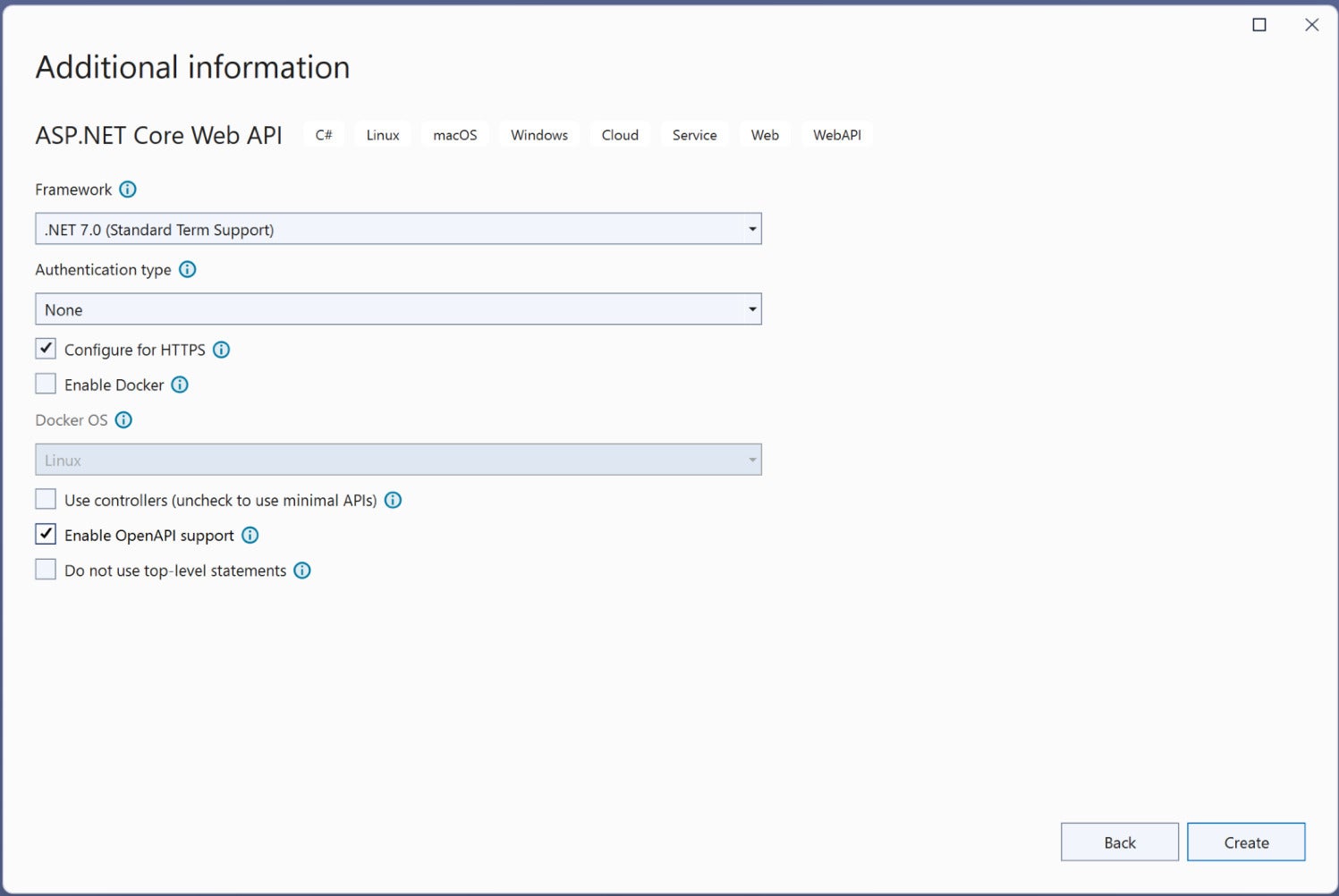
  8. In the “Additional Information” window shown next, uncheck the check box that says “Use controllers…” since we’ll be using minimal APIs in this example. Leave the “Authentication Type” set as “None” (default). Check the “Configure for HTTPS” and “Enable Open API Support” check boxes. Finally, ensure that the “Enable Docker” check box is unchecked as we won’t be using Docker here. (See Figure 1 below.)
  9. Click Create.
openapi aspnet core 01 IDG

Figure 1. Check the Configure for HTTP and Enable OpenAPI Support check boxes. Leave Authentication set to None and the other check boxes unchecked.

We’ll use this ASP.NET Core 7 Web API project to use OpenAPI to document minimal API endpoints in the sections below.

What is the OpenAPI specification?

Previously known as the Swagger specification, the OpenAPI specification defines a standard, machine-readable, programming language-agnostic interface description language (IDL) for APIs. It is a language-independent standard for describing HTTP APIs. The standard is supported by a combination of built-in APIs and open-source libraries.

The three most significant aspects of OpenAPI integration in an application are:

  1. Creating information about the app’s endpoints.
  2. Putting the data together in a format compatible with the OpenAPI standard.
  3. Exposing the created OpenAPI schema through a graphical user interface or a serialized file.

Because we enabled OpenAPI support when we created our ASP.NET Core 7 Web API project, the Swashbuckle.AspNetCore package will be added to the project automatically. Swashbuckle is an open source project that enables the generation of Swagger documentation.

Note that you can always add the Swashbuckle.AspNetCore NuGet package to your other projects manually.

Create a simple minimal API endpoint in ASP.NET Core

When you create a new ASP.NET Core Web API project in Visual Studio, the default controller (named WeatherForecast) and model class will be created automatically. Because we’re using minimal APIs here, these files will not be created.

Instead, a default HTTP GET endpoint will be created in the Program.cs file. Now, replace the default generated code of the HTTP GET endpoint with the following code.

app.MapGet("https://www.infoworld.com/", () => "Hello World!")
.WithName("Welcome")
.WithOpenApi();

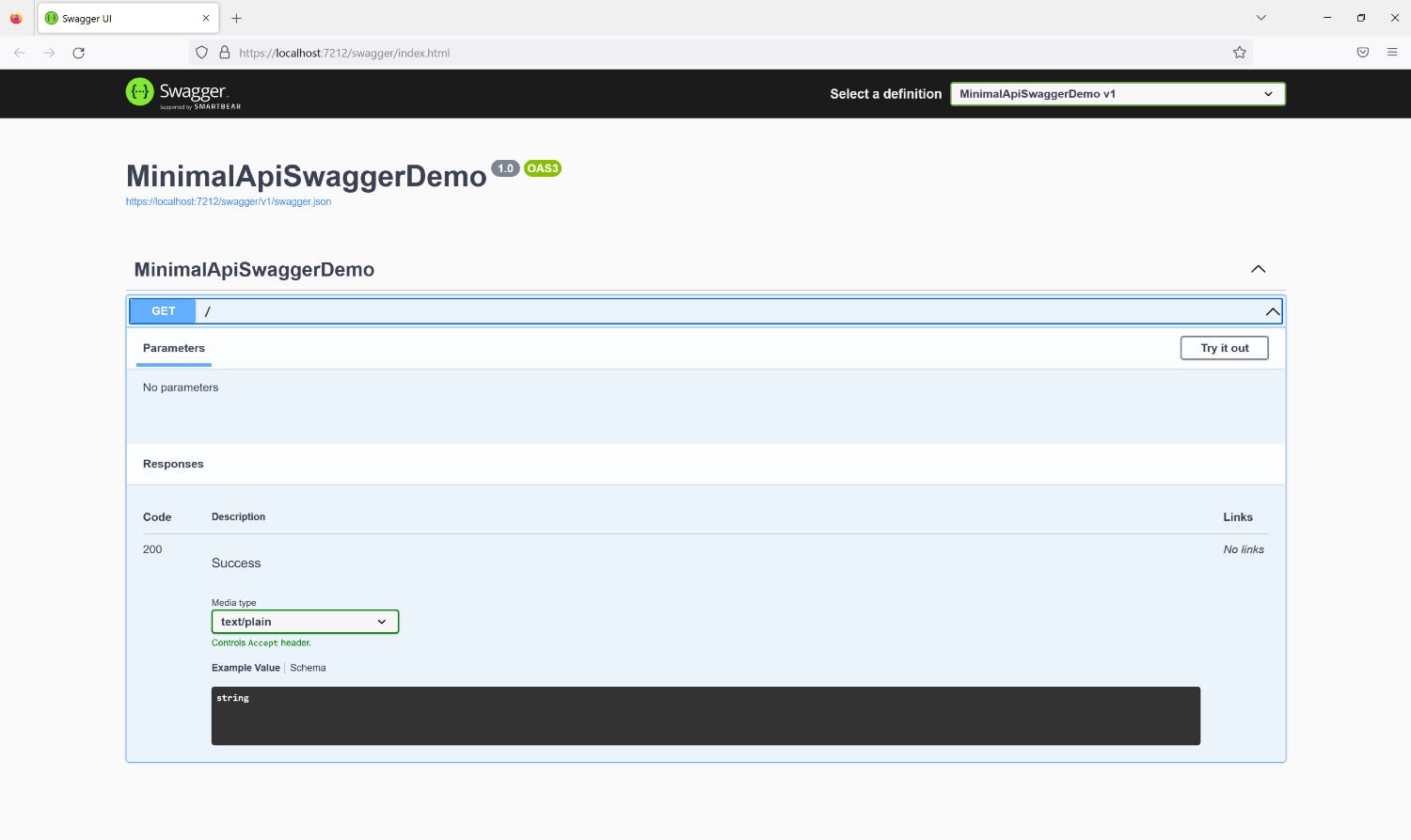
When you run the application, you’ll be able to see the Swagger UI in your web browser, as shown in Figure 2.
openapi aspnet core 02 IDG

Figure 2. The Swagger UI.

Configure Swagger in a minimal API in ASP.NET Core

The code snippet below illustrates how you can configure the Swagger middleware to add metadata for the API document.

builder.Services.AddSwaggerGen(setup => setup.SwaggerDoc("v1", new OpenApiInfo()
{
    Description = "This is a simple implementation of a Minimal Api in Asp.Net 7 Core",
    Title = "Demo Api",
    Version = "v1",
    Contact = new OpenApiContact()
    {
        Name = "Joydip Kanjilal",
        Url = new Uri("https://joydipkanjilal.com")
    }
}));

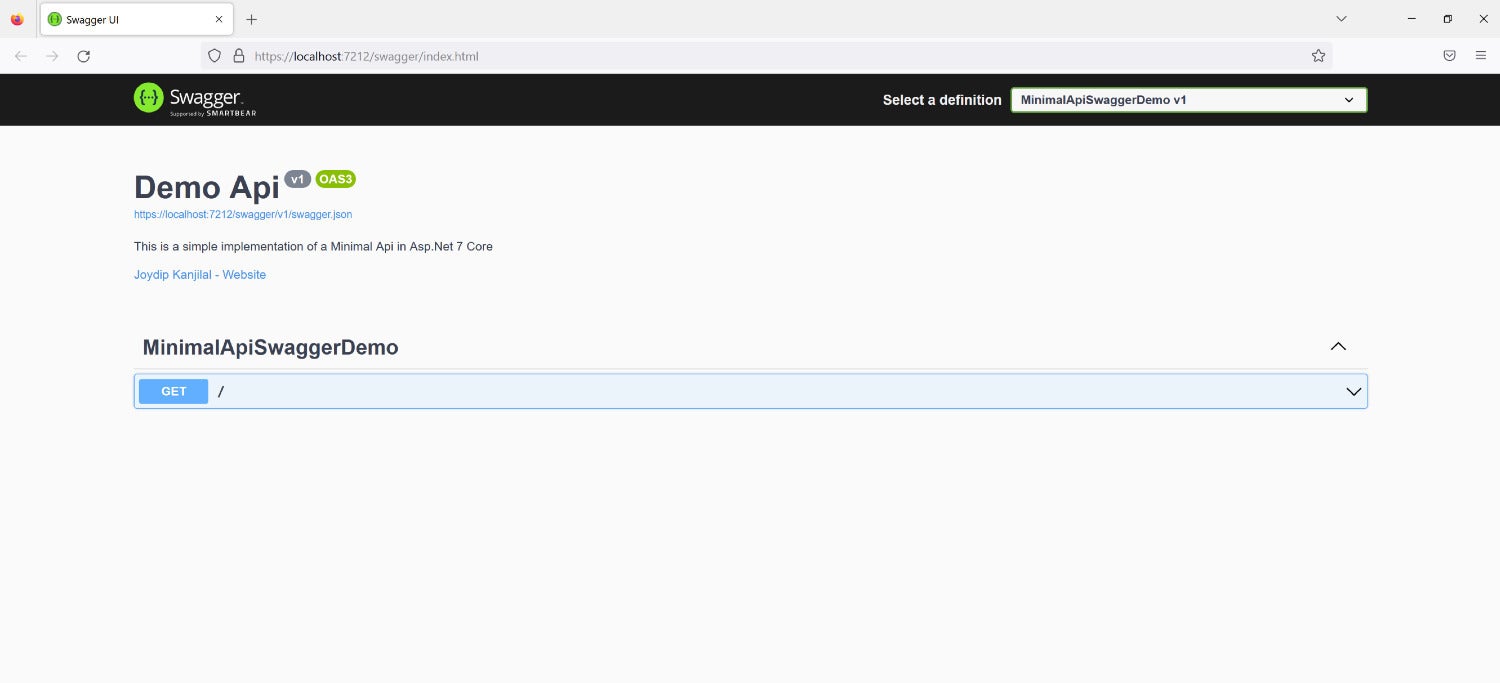
When you execute the application now, the metadata you added will be displayed in the Swagger UI as shown in Figure 3.
openapi aspnet core 03 IDG

Figure 3. Adding API metadata.

Create a model class

Now let’s flesh out our minimal API example application. First, create a model class using the following code.

public class Author
{
    public int Id { get; set; }
    public string FirstName { get; set; }
    public string LastName { get; set; }
    public string Address { get; set; }
    public string Email { get; set; }
    public string Phone { get; set; }
}

Create and implement an interface

Next, create an interface named IAuthorRepository and enter the following code.

public interface IAuthorRepository
{
    Author GetById(int id);
    void Create(Author entity);
    void Delete(Author entity);
    void Update(Author entity);
}

Now create another class named AuthorRepository and enter the following code.

public class AuthorRepository : IAuthorRepository
{
    void IAuthorRepository.Create(Author entity)
    {
        throw new NotImplementedException();
    }
    void IAuthorRepository.Delete(Author entity)
    {
        throw new NotImplementedException();
    }
    Author IAuthorRepository.GetById(int id)
    {
        throw new NotImplementedException();
    }
    void IAuthorRepository.Update(Author entity)
    {
        throw new NotImplementedException();
    }
}

Note that none of the methods of the AuthorRepository class have been implemented.  We’ll use this skeleton implementation just for the purposes of seeing how we can work with OpenAPI in minimal API applications.

Create a minimal API endpoint

Lastly, delete the endpoint we created earlier since we won’t be needing it anymore. Instead, add the following piece of code to your Program.cs file to create four new endpoints.

app.MapGet("/authors/{id}", async ([FromServices] Author entity, int id) =>
{
    return Results.Ok();
});
app.MapPost("/authors", async ([FromServices] Author entity) =>
{
    return Results.Ok();
});
app.MapPut("/authors/{id}", async ([FromServices] int id, Author entityToUpdate) =>
{
    return Results.Ok();
});
app.MapDelete("/authors/{id}", async ([FromServices] int id) =>
{
    return Results.Ok();
});

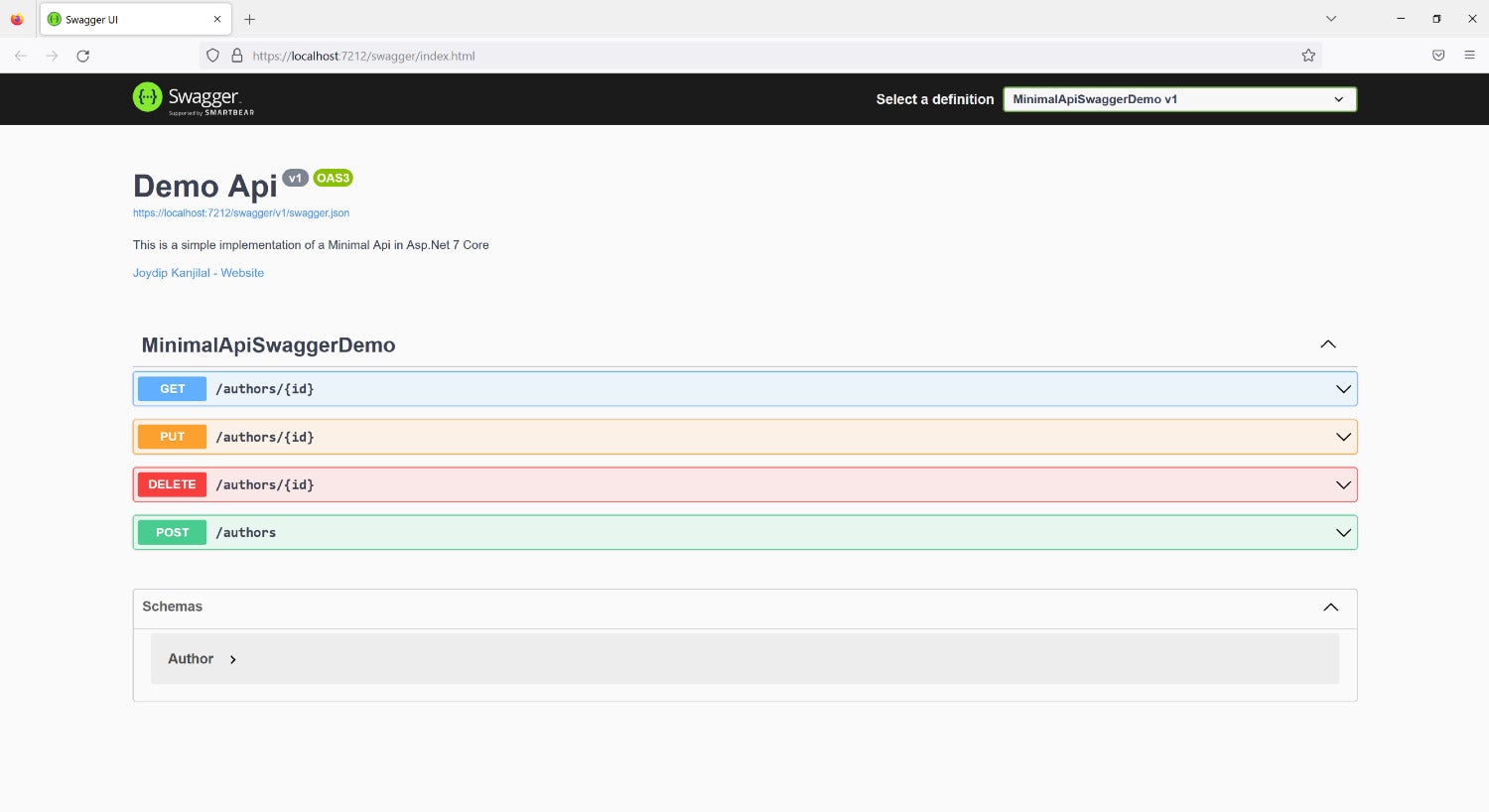
When you run the application, you should see these endpoints displayed in your Swagger UI as in Figure 4.
openapi aspnet core 04 IDG

Figure 4. The four endpoints of our minimal API.

Complete minimal API example in ASP.NET Core

The complete code listing for our OpenAPI-documented minimal API is given below for your reference.

using Microsoft.AspNetCore.Mvc;
using Microsoft.OpenApi.Models;
var builder = WebApplication.CreateBuilder(args);
// Add services to the container.
builder.Services.AddEndpointsApiExplorer();
builder.Services.AddSwaggerGen();
builder.Services.AddSwaggerGen(setup => setup.SwaggerDoc("v1", new OpenApiInfo()
{
    Description = "This is a simple implementation of a Minimal Api in Asp.Net 7 Core",
    Title = "Demo Api",
    Version = "v1",
    Contact = new OpenApiContact()
    {
        Name = "Joydip Kanjilal",
        Url = new Uri("https://joydipkanjilal.com")
    }
}));
var app = builder.Build();
// Configure the HTTP request pipeline.
if (app.Environment.IsDevelopment())
{
    app.UseSwagger();
    app.UseSwaggerUI();
}
app.UseHttpsRedirection();
app.MapGet("/authors/{id}", async ([FromServices] Author entity, int id) =>
{
    return Results.Ok();
});
app.MapPost("/authors", async ([FromServices] Author entity) =>
{
    return Results.Ok();
});
app.MapPut("/authors/{id}", async ([FromServices] int id, Author entityToUpdate) =>
{
    return Results.Ok();
});
app.MapDelete("/authors/{id}", async ([FromServices] int id) =>
{
    return Results.Ok();
});
app.Run();
public class Author
{
    public int Id { get; set; }
    public string FirstName { get; set; }
    public string LastName { get; set; }
    public string Address { get; set; }
    public string Email { get; set; }
    public string Phone { get; set; }
}
public interface IAuthorRepository
{
    Author GetById(int id);
    void Create(Author entity);
    void Delete(Author entity);
    void Update(Author entity);
}
public class AuthorRepository : IAuthorRepository
{
    void IAuthorRepository.Create(Author entity)
    {
        throw new NotImplementedException();
    }
    void IAuthorRepository.Delete(Author entity)
    {
        throw new NotImplementedException();
    }
    Author IAuthorRepository.GetById(int id)
    {
        throw new NotImplementedException();
    }
    void IAuthorRepository.Update(Author entity)
    {
        throw new NotImplementedException();
    }
}

By enabling OpenAPI support in your Web API projects when you create them, you can have ASP.NET Core automatically document your HTTP endpoints, and you can view that information through the Swagger UI. Note you can customize the Swagger UI using Cascading Style Sheets, show enum values as string values, and create different Swagger documents for different versions of your API.

Copyright © 2023 IDG Communications, Inc.



Source link

ShareTweetSend
Previous Post

California suddenly has so much snow. But is it enough?

Next Post

“If Again I Do Well This IPL, Maybe I’ll Get Considered This Year”- T Natarajan Hoping For Comeback To Indian Squad

Related News

Microsoft’s Satya Nadella Reveals Strategic Rationale Behind Layoff of 60,000 Employees
Tech

Microsoft’s Satya Nadella Reveals Strategic Rationale Behind Layoff of 60,000 Employees

November 19, 2026
Cybercriminals Embrace Innovative AI Tool for Streamlined Hacking Operations
Tech

Cybercriminals Embrace Innovative AI Tool for Streamlined Hacking Operations

November 18, 2026
Transform Your Laptop Setup with These 5 Affordable Accessories
Tech

Transform Your Laptop Setup with These 5 Affordable Accessories

November 15, 2026
Microsoft 365 Services Gradually Restore Functionality Following Global Outage
Tech

Microsoft 365 Services Gradually Restore Functionality Following Global Outage

November 14, 2026
Next Post
“If Again I Do Well This IPL, Maybe I’ll Get Considered This Year”- T Natarajan Hoping For Comeback To Indian Squad

"If Again I Do Well This IPL, Maybe I’ll Get Considered This Year"- T Natarajan Hoping For Comeback To Indian Squad

Discussion about this post

Subscribe To Our Newsletters

    Customer Support


    1251 Wilcrest Drive
    Houston, Texas
    77042 USA
    Call-832.795.1420
    e-mail – news@theinsightpost.com

    Subscribe To Our Newsletters

      Categories

      • Africa
      • Africa-East
      • African Sports
      • American Sports
      • Arts
      • Asia
      • Australia
      • Business
      • Business Asia
      • Business- Africa
      • Canada
      • Defense
      • Education
      • Egypt
      • Energy
      • Entertainment
      • Europe
      • European Soccer
      • Finance
      • Germany
      • Ghana
      • Health
      • Insight
      • International
      • Investing
      • Japan
      • Latest Headlines
      • Life & Living
      • Markets
      • Mobile
      • Movies
      • New Zealand
      • Nigeria
      • Politics
      • Scholarships
      • Science
      • South Africa
      • South America
      • Sports
      • Tech
      • Travel
      • Travel-Africa
      • UK
      • USA
      • Weather
      • World
      No Result
      View All Result

      Recent News

      Discover the Fascinating Secrets of NASA’s Voyager Mission: Test Your Knowledge!

      Discover the Fascinating Secrets of NASA’s Voyager Mission: Test Your Knowledge!

      November 19, 2026
      WNBA Begins Search for New Commissioner as Cathy Engelbert’s Tenure May Extend to 2027

      WNBA Begins Search for New Commissioner as Cathy Engelbert’s Tenure May Extend to 2027

      November 19, 2026
      Six Drainage Enhancement Projects Pending Financial Approval, Says Ahmed Ibrahim

      Six Drainage Enhancement Projects Pending Financial Approval, Says Ahmed Ibrahim

      November 19, 2026
      Jordan Poyer Takes Center Stage: A Look Ahead to November 18, 2026

      Jordan Poyer Takes Center Stage: A Look Ahead to November 18, 2026

      November 19, 2026
      • Home
      • Advertise With Us
      • About Us
      • Corporate
      • Consumer Rewards
      • Forum
      • Privacy Policy
      • Social Trends

      Theinsightpost ©2026 | All Rights Reserved. Theinsightpost is an Elnegy LLC company, registered in Texas, USA

      Welcome Back!

      Login to your account below

      Forgotten Password?

      Retrieve your password

      Please enter your username or email address to reset your password.

      Log In

      Add New Playlist

      We are using cookies to give you the best experience on our website.

      You can find out more about which cookies we are using or switch them off in .

      No Result
      View All Result
      • Home
      • Insight
      • Blog
      • Business
      • Entertainment
      • Health
      • Politics
      • Shop
        • Gift Shop
        • Value Shop
        • Store
        • Bargain Shop
        • Discount
      • Sports
      • Tech
      • Travel
      • USA
      • Video
      • World
        • Asia
        • Africa
        • South America
        • North America
        • Europe
        • Oceania

      Theinsightpost ©2026 | All Rights Reserved. Theinsightpost is an Elnegy LLC company, registered in Texas, USA

      The Insight Post
      Powered by  GDPR Cookie Compliance
      Privacy Overview

      This website uses cookies so that we can provide you with the best user experience possible. Cookie information is stored in your browser and performs functions such as recognising you when you return to our website and helping our team to understand which sections of the website you find most interesting and useful.

      Strictly Necessary Cookies

      Strictly Necessary Cookie should be enabled at all times so that we can save your preferences for cookie settings.

      Cookie Policy

      More information about our Cookie Policy