




• Home
  • Insight
  • Blog
  • Business
  • Entertainment
  • Health
  • Politics
  • Shop
    • Gift Shop
    • Value Shop
    • Store
    • Bargain Shop
    • Discount
  • Sports
  • Tech
  • Travel
  • USA
  • Video
  • World
    • Asia
    • Africa
    • South America
    • North America
    • Europe
    • Oceania
Tuesday, November 17, 2026
No Result
View All Result
Subscribe Now
  • Home
  • Insight
  • Blog
  • Business
  • Entertainment
  • Health
  • Politics
  • Shop
    • Gift Shop
    • Value Shop
    • Store
    • Bargain Shop
    • Discount
  • Sports
  • Tech
  • Travel
  • USA
    Stranded in Conflict: Palestinians Navigate the Tenuous Balance of War and Peace Amid Ceasefire Efforts

    Stranded in Conflict: Palestinians Navigate the Tenuous Balance of War and Peace Amid Ceasefire Efforts

    Trump Administration Revokes Pay Increase for Head Start Educators

    Trump Administration Revokes Pay Increase for Head Start Educators

    Unexpected Triumph: Gay Candidates Achieve Unforeseen Victories in Challenging Races

    Unexpected Triumph: Gay Candidates Achieve Unforeseen Victories in Challenging Races

    Microsoft Outlook Experiences Prolonged Outage Affecting Users Nationwide

    Microsoft Outlook Experiences Prolonged Outage Affecting Users Nationwide

    Gunfire Erupts in D.C.: Authorities Search for Suspect Amid Rising Concerns Over Public Safety

    Gunfire Erupts in D.C.: Authorities Search for Suspect Amid Rising Concerns Over Public Safety

    LAUSD Takes Strong Action Against Hate Speech Following Racial Slur Incidents

    LAUSD Takes Strong Action Against Hate Speech Following Racial Slur Incidents

    Beloved Former Los Angeles Times Columnist Steve Harvey Passes Away at 80

    Beloved Former Los Angeles Times Columnist Steve Harvey Passes Away at 80

    Exploring Diversity: ‘Ten Lives’ Showcases the Varied Economic Journeys of Americans

    Exploring Diversity: ‘Ten Lives’ Showcases the Varied Economic Journeys of Americans

    Philadelphia Eagles Facing Turmoil as Coach Nick Sirianni Addresses Controversy Over Gesture to Fans

    Philadelphia Eagles Facing Turmoil as Coach Nick Sirianni Addresses Controversy Over Gesture to Fans

  • Video
  • World
    • Asia
    • Africa
    • South America
    • North America
    • Europe
    • Oceania
The Insight Post
  • Home
  • Insight
  • Blog
  • Business
  • Entertainment
  • Health
  • Politics
  • Shop
    • Gift Shop
    • Value Shop
    • Store
    • Bargain Shop
    • Discount
  • Sports
  • Tech
  • Travel
  • USA
    Stranded in Conflict: Palestinians Navigate the Tenuous Balance of War and Peace Amid Ceasefire Efforts

    Stranded in Conflict: Palestinians Navigate the Tenuous Balance of War and Peace Amid Ceasefire Efforts

    Trump Administration Revokes Pay Increase for Head Start Educators

    Trump Administration Revokes Pay Increase for Head Start Educators

    Unexpected Triumph: Gay Candidates Achieve Unforeseen Victories in Challenging Races

    Unexpected Triumph: Gay Candidates Achieve Unforeseen Victories in Challenging Races

    Microsoft Outlook Experiences Prolonged Outage Affecting Users Nationwide

    Microsoft Outlook Experiences Prolonged Outage Affecting Users Nationwide

    Gunfire Erupts in D.C.: Authorities Search for Suspect Amid Rising Concerns Over Public Safety

    Gunfire Erupts in D.C.: Authorities Search for Suspect Amid Rising Concerns Over Public Safety

    LAUSD Takes Strong Action Against Hate Speech Following Racial Slur Incidents

    LAUSD Takes Strong Action Against Hate Speech Following Racial Slur Incidents

    Beloved Former Los Angeles Times Columnist Steve Harvey Passes Away at 80

    Beloved Former Los Angeles Times Columnist Steve Harvey Passes Away at 80

    Exploring Diversity: ‘Ten Lives’ Showcases the Varied Economic Journeys of Americans

    Exploring Diversity: ‘Ten Lives’ Showcases the Varied Economic Journeys of Americans

    Philadelphia Eagles Facing Turmoil as Coach Nick Sirianni Addresses Controversy Over Gesture to Fans

    Philadelphia Eagles Facing Turmoil as Coach Nick Sirianni Addresses Controversy Over Gesture to Fans

  • Video
  • World
    • Asia
    • Africa
    • South America
    • North America
    • Europe
    • Oceania
No Result
View All Result
No Result
View All Result
Home Tech

Now’s the time to prep for Microsoft’s Excel macro crackdown

by Theinsightpost
July 11, 2022
in Tech
0 0
0
Now’s the time to prep for Microsoft’s Excel macro crackdown


On July 8, Microsoft pulled back from its decision in February to block macros in Excel documents by default. Microsoft had said it would block Excel files that contained macros if they were downloaded from the internet. (Malicious actors use these lures as a way to launch attacks on networks; specifically, ransomware and other types of malicious activity can launched from a plain, old malicious spreadsheet.)

Microsoft still plans to put this blocking in place, but only after “a better experience.” In the meantime, there are actions you can take now so you won’t need to worry about the change in the future.

If you work for a firm that’s developed spreadsheets for your own internal office use, chances are the spreadsheet does not have a digital signature. Signing machos is similar to how websites use SSL certificates to validate the site is legit. The hardest part of the self-signing process is deciding whether you want to purchase a code-signing certificate or use the self-signed certificate process. (I can tell you from personal experience that trying to purchase a code-signing certificate is an expensive and cumbersome process. I don’t recommend that option, except for large enterprises where the code-signing process is routine.)

For everyone else, I recommend that you self-sign your Excel macros. The tricky part is getting the program that allows you to do so. You’ll need to follow this Knowledge Base article to find the location of the file selfcert.exe on your computer. In my case, the file is located in “C:Program FilesMicrosoft OfficerootOffice16″ (if you’re running the 64-bit version of Office). Launch the selfcert.exe program and name the certificate something descriptive such as MyExcelFiles.

In the search box on your Windows computer, type in mmc.exe to launch the Management console. Click on file, then on “add/remove snap in,” then on the “snap in certificates,” and add it to your management view. You’ll want to add it to “My user account.” Click on certificates> current user and then on the personal certificate store. You should now see that “MyExcelFiles” certificate in your certificate store. You can double-click on it to review the certificate. (It should say that the CA root certificate is not trusted; this is normal with a self-signed certificate.)

Now, open the Excel file you want to code sign with your self-signed certificate. (You’ll need to add the Developer tab to your Excel spreadsheet if it’s not already showing.) After clicking on File> more> options, select “Customize Ribbon” from the left. Next, select “Main Tabs” on the right, check the “Developer” checkbox and click the “OK” button.

On the Developer tab in the Code group, select Visual Basic. In Visual Basic on the Tools menu, click Digital Signature. When the Digital Signature dialog appears, select a certificate and click OK. Save the Visual Basic and close the Visual Basic interface. Now resave your Excel file.

It’s also important to review the macro security settings on your computer. On the Developer tab (again in the Code group), click Macro Security. In the Macro Settings category, choose the option you want. Once you have all Excel files you use signed with your self-signed certificate, you can change the settings to “Disable VBA Macros except digitally signed macros.”

Now it’s time to review the spreadsheets that include macros. If you’ve downloaded any online and do not know where they came from, stop. You’ll want to check to ensure that they are not malicious by uploading the files to www.reverse.it or www.virustotal.com to see  what the file contains. Once you identify the Excel files with macros you want to use (but that you’ve haven’t personally developed), your next step is to ensure that each one of these Excel files do not have “mark of the web” on them.

Don’t open the files — simply right-click on the Excel spreadsheet and select properties. In the general tab, look for an indication that “This file came from another computer and might be blocked to help protect this computer.” You should click on the box that says “Unblock” and click to apply. Now that the file has been scanned and unblocked, open it up, digitally sign it and resave. This will ensure that your Excel files are signed by you; should you open them up anytime in the future, you will know if they’ve been tampered with.
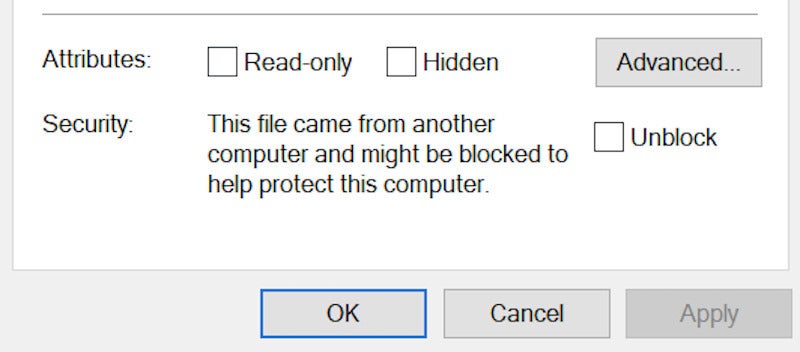
Unblocking macros in Excel Microsoft

For a small business that saves and shares Excel files, I recommend that you set up a safe location on your network for trusted Excel spreadsheets. Go into Excel and click on file> options> trust center, then on trust center settings; here you can review the locations you deem “trusted.” By default, Excel doesn’t trust a network location. Even though Microsoft doesn’t recommend adding a trusted location on the network, for business purposes I add a specific site or location and then review who has access to that location. Be clear on who needs access to macros and especially access to this trusted network location. Not everyone in your office needs this level of access. In fact, most of your users – even in a small business – likely don’t. Plan accordingly.

Deciding who and what has access to a trusted location could be the difference between getting attacked with ransomware – or not. Not everyone needs an Excel file with a macro. Not everyone needs trusted locations on your network. But attackers clearly would love it if we didn’t make these decisions.

Microsoft will eventually block macros in Excel documents downloaded from the internet. Take the time now to get ahead of that change; don’t wait for Microsoft to roll it out again.

Copyright © 2022 IDG Communications, Inc.



Source link

ShareTweetSend
Previous Post

The Largo Fire Rescue Is Holing A 2022 Hurricane Preparedness Expo – CBS Tampa

Next Post

NFL: Mayfield Traded To Carolina

Related News

Transform Your Laptop Setup with These 5 Affordable Accessories
Tech

Transform Your Laptop Setup with These 5 Affordable Accessories

November 15, 2026
Microsoft 365 Services Gradually Restore Functionality Following Global Outage
Tech

Microsoft 365 Services Gradually Restore Functionality Following Global Outage

November 14, 2026
Epic Seeks Accountability for Apple’s Alleged Disregard of Court Ruling Intent
Tech

Epic Seeks Accountability for Apple’s Alleged Disregard of Court Ruling Intent

November 13, 2026
European Cybersecurity Firms Make Strides Against U.S. Competitors, Yet American Companies Still Command 62% of the Market
Tech

European Cybersecurity Firms Make Strides Against U.S. Competitors, Yet American Companies Still Command 62% of the Market

November 13, 2026
Next Post
NFL: Mayfield Traded To Carolina

NFL: Mayfield Traded To Carolina

Discussion about this post

Subscribe To Our Newsletters

    Customer Support


    1251 Wilcrest Drive
    Houston, Texas
    77042 USA
    Call-832.795.1420
    e-mail – news@theinsightpost.com

    Subscribe To Our Newsletters

      Categories

      • Africa
      • Africa-East
      • African Sports
      • American Sports
      • Arts
      • Asia
      • Australia
      • Business
      • Business Asia
      • Business- Africa
      • Canada
      • Defense
      • Education
      • Egypt
      • Energy
      • Entertainment
      • Europe
      • European Soccer
      • Finance
      • Germany
      • Ghana
      • Health
      • Insight
      • International
      • Investing
      • Japan
      • Latest Headlines
      • Life & Living
      • Markets
      • Mobile
      • Movies
      • New Zealand
      • Nigeria
      • Politics
      • Scholarships
      • Science
      • South Africa
      • South America
      • Sports
      • Tech
      • Travel
      • Travel-Africa
      • UK
      • USA
      • Weather
      • World
      No Result
      View All Result

      Recent News

      Gators Shock Wildcats 21-14 in Thrilling Upset Amid Rollercoaster Season

      Gators Shock Wildcats 21-14 in Thrilling Upset Amid Rollercoaster Season

      November 15, 2026
      Government Announces Historic  Billion Investment in Energy Infrastructure Development

      Government Announces Historic $2 Billion Investment in Energy Infrastructure Development

      November 15, 2026
      Notre Dame Postgame Insights: Dive into Superchats with Westwood One Sports

      Notre Dame Postgame Insights: Dive into Superchats with Westwood One Sports

      November 15, 2026
      Transform Your Laptop Setup with These 5 Affordable Accessories

      Transform Your Laptop Setup with These 5 Affordable Accessories

      November 15, 2026
      • Home
      • Advertise With Us
      • About Us
      • Corporate
      • Consumer Rewards
      • Forum
      • Privacy Policy
      • Social Trends

      Theinsightpost ©2026 | All Rights Reserved. Theinsightpost is an Elnegy LLC company, registered in Texas, USA

      Welcome Back!

      Login to your account below

      Forgotten Password?

      Retrieve your password

      Please enter your username or email address to reset your password.

      Log In

      Add New Playlist

      We are using cookies to give you the best experience on our website.

      You can find out more about which cookies we are using or switch them off in .

      No Result
      View All Result
      • Home
      • Insight
      • Blog
      • Business
      • Entertainment
      • Health
      • Politics
      • Shop
        • Gift Shop
        • Value Shop
        • Store
        • Bargain Shop
        • Discount
      • Sports
      • Tech
      • Travel
      • USA
      • Video
      • World
        • Asia
        • Africa
        • South America
        • North America
        • Europe
        • Oceania

      Theinsightpost ©2026 | All Rights Reserved. Theinsightpost is an Elnegy LLC company, registered in Texas, USA

      The Insight Post
      Powered by  GDPR Cookie Compliance
      Privacy Overview

      This website uses cookies so that we can provide you with the best user experience possible. Cookie information is stored in your browser and performs functions such as recognising you when you return to our website and helping our team to understand which sections of the website you find most interesting and useful.

      Strictly Necessary Cookies

      Strictly Necessary Cookie should be enabled at all times so that we can save your preferences for cookie settings.

      Cookie Policy

      More information about our Cookie Policy