• Home
  • Insight
  • Blog
  • Business
  • Entertainment
  • Health
  • Politics
  • Shop
    • Gift Shop
    • Value Shop
    • Store
    • Bargain Shop
    • Discount
  • Sports
  • Tech
  • Travel
  • USA
  • Video
  • World
    • Asia
    • Africa
    • South America
    • North America
    • Europe
    • Oceania
Monday, November 16, 2026
No Result
View All Result
Subscribe Now
  • Home
  • Insight
  • Blog
  • Business
  • Entertainment
  • Health
  • Politics
  • Shop
    • Gift Shop
    • Value Shop
    • Store
    • Bargain Shop
    • Discount
  • Sports
  • Tech
  • Travel
  • USA
    Stranded in Conflict: Palestinians Navigate the Tenuous Balance of War and Peace Amid Ceasefire Efforts

    Stranded in Conflict: Palestinians Navigate the Tenuous Balance of War and Peace Amid Ceasefire Efforts

    Trump Administration Revokes Pay Increase for Head Start Educators

    Trump Administration Revokes Pay Increase for Head Start Educators

    Unexpected Triumph: Gay Candidates Achieve Unforeseen Victories in Challenging Races

    Unexpected Triumph: Gay Candidates Achieve Unforeseen Victories in Challenging Races

    Microsoft Outlook Experiences Prolonged Outage Affecting Users Nationwide

    Microsoft Outlook Experiences Prolonged Outage Affecting Users Nationwide

    Gunfire Erupts in D.C.: Authorities Search for Suspect Amid Rising Concerns Over Public Safety

    Gunfire Erupts in D.C.: Authorities Search for Suspect Amid Rising Concerns Over Public Safety

    LAUSD Takes Strong Action Against Hate Speech Following Racial Slur Incidents

    LAUSD Takes Strong Action Against Hate Speech Following Racial Slur Incidents

    Beloved Former Los Angeles Times Columnist Steve Harvey Passes Away at 80

    Beloved Former Los Angeles Times Columnist Steve Harvey Passes Away at 80

    Exploring Diversity: ‘Ten Lives’ Showcases the Varied Economic Journeys of Americans

    Exploring Diversity: ‘Ten Lives’ Showcases the Varied Economic Journeys of Americans

    Philadelphia Eagles Facing Turmoil as Coach Nick Sirianni Addresses Controversy Over Gesture to Fans

    Philadelphia Eagles Facing Turmoil as Coach Nick Sirianni Addresses Controversy Over Gesture to Fans

  • Video
  • World
    • Asia
    • Africa
    • South America
    • North America
    • Europe
    • Oceania
The Insight Post
  • Home
  • Insight
  • Blog
  • Business
  • Entertainment
  • Health
  • Politics
  • Shop
    • Gift Shop
    • Value Shop
    • Store
    • Bargain Shop
    • Discount
  • Sports
  • Tech
  • Travel
  • USA
    Stranded in Conflict: Palestinians Navigate the Tenuous Balance of War and Peace Amid Ceasefire Efforts

    Stranded in Conflict: Palestinians Navigate the Tenuous Balance of War and Peace Amid Ceasefire Efforts

    Trump Administration Revokes Pay Increase for Head Start Educators

    Trump Administration Revokes Pay Increase for Head Start Educators

    Unexpected Triumph: Gay Candidates Achieve Unforeseen Victories in Challenging Races

    Unexpected Triumph: Gay Candidates Achieve Unforeseen Victories in Challenging Races

    Microsoft Outlook Experiences Prolonged Outage Affecting Users Nationwide

    Microsoft Outlook Experiences Prolonged Outage Affecting Users Nationwide

    Gunfire Erupts in D.C.: Authorities Search for Suspect Amid Rising Concerns Over Public Safety

    Gunfire Erupts in D.C.: Authorities Search for Suspect Amid Rising Concerns Over Public Safety

    LAUSD Takes Strong Action Against Hate Speech Following Racial Slur Incidents

    LAUSD Takes Strong Action Against Hate Speech Following Racial Slur Incidents

    Beloved Former Los Angeles Times Columnist Steve Harvey Passes Away at 80

    Beloved Former Los Angeles Times Columnist Steve Harvey Passes Away at 80

    Exploring Diversity: ‘Ten Lives’ Showcases the Varied Economic Journeys of Americans

    Exploring Diversity: ‘Ten Lives’ Showcases the Varied Economic Journeys of Americans

    Philadelphia Eagles Facing Turmoil as Coach Nick Sirianni Addresses Controversy Over Gesture to Fans

    Philadelphia Eagles Facing Turmoil as Coach Nick Sirianni Addresses Controversy Over Gesture to Fans

  • Video
  • World
    • Asia
    • Africa
    • South America
    • North America
    • Europe
    • Oceania
No Result
View All Result
No Result
View All Result
Home Business

Holy crap! The Galaxy S26 Ultra just ordered dinner and tea for me and all I had to do was hit ‘Confirm’

by Theinsightpost
March 12, 2026
in Business
0 0
0
Holy crap! The Galaxy S26 Ultra just ordered dinner and tea for me and all I had to do was hit ‘Confirm’

Google and Samsung announced a mind-blowing automation feature at the Galaxy S26’s unveiling that simply sounded too good to be true. In short, Gemini could automatically order things for you, from an Uber or Lyft, to entire meals at places like McDonald’s and Starbucks. That feature just launched today, and there was no way I was waiting to try it.

To test this out, I unlocked my Samsung Galaxy S26 Ultra and asked Gemini to “order a tall Medicine Ball tea from the nearest Starbucks for pickup.” I specifically used “Medicine Ball” for the name to see if I could trip it up, as that’s not the drink’s official name.

Even with this little nuance, Gemini immediately got to work. It opened the Starbucks app in the background, navigated to the right store, selected the “Citrus Honey Mint Tea” in the right size from the menu, customized it to my liking, and added it to the cart. All I had to do was hit “confirm,” and I was about to pick up my favorite tea on the way home. Yeah, it worked, and I was truly blown away at the result.

Article continues below


You may like

This feature is also launching on the Google Pixel 10 family, but Google hasn’t given a specific timeframe yet. For now, it’s available right now on the Galaxy S26 family in the U.S. and South Korea, according to Google’s support page. Here’s how to make the magic happen.

Today’s best Samsung Galaxy S26 Ultra deals

Next level automation is here

(Image credit: Nicholas Sutrich / Android Central)

If Galaxy S26 Ultra is running One UI 8.5 with the February 2026 security patch, you’re all set to try out Gemini automation. To get started, you’ll just need to use Gemini to make the query and use a personal Google account. Work or school accounts don’t support automation at this time.

The Gemini app also provides a list of supported apps on your phone. As of launch, popular apps like Lyft, Uber, Grubhub, DoorDash, Uber Eats, and Starbucks are supported, and Google will regularly add to this list, with planned rollouts to services like Instacart coming soon.

How to set up screen automation in Gemini

Here’s how to make sure screen automation is enabled and check the list of supported apps installed on your phone:

Get the latest news from Android Central, your trusted companion in the world of Android

1. Open the Gemini app from your app drawer or home screen.

2. Tap on your profile picture on the top right.

3. Scroll down to the bottom of the list and tap Settings.


What to read next

4. Select Screen automation from the list.

5. Select your permission level for screen automation. The default is to “ask every time.”

6. Review the list of supported installed apps at the bottom of the screen automation section.
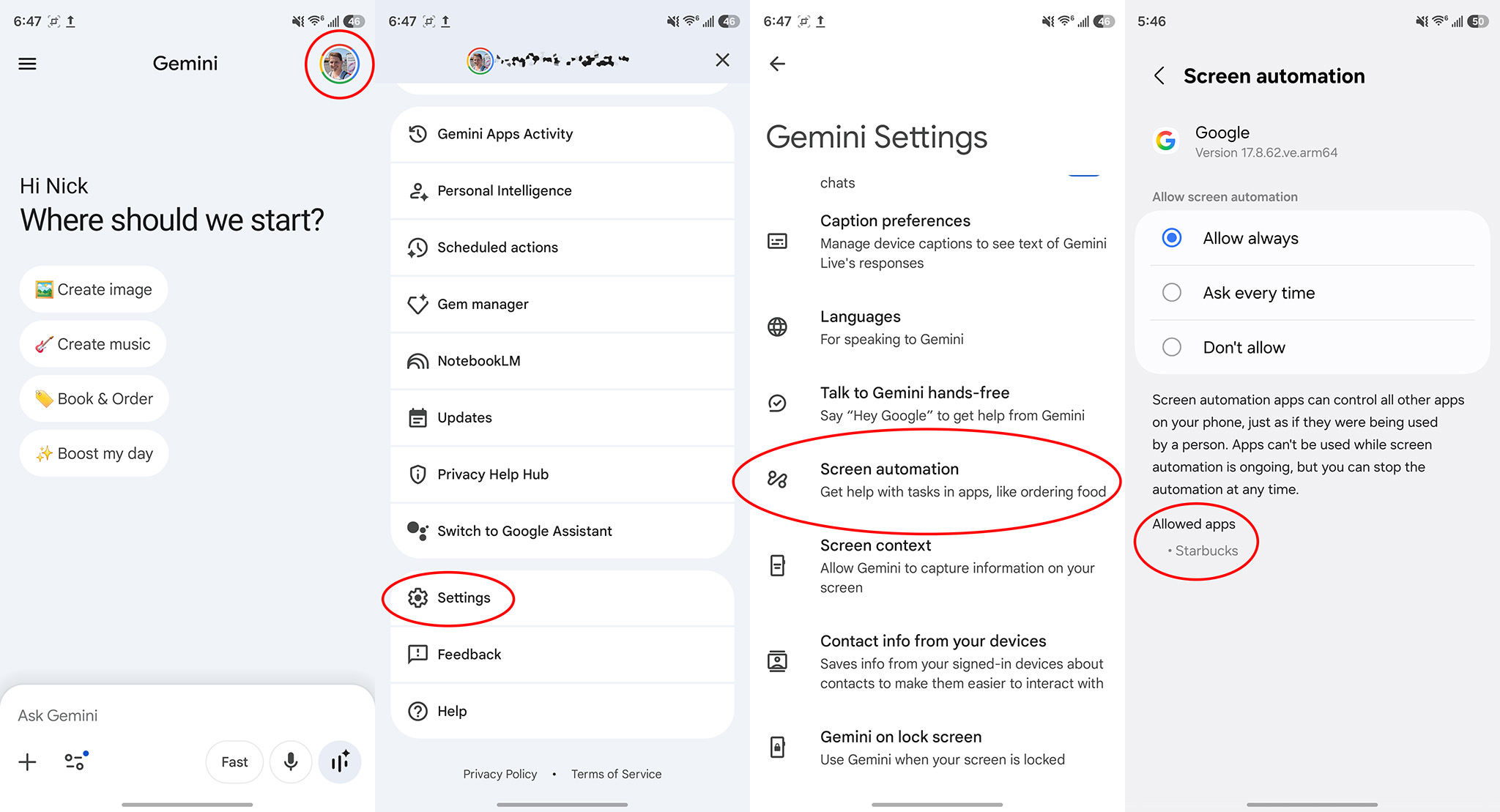
How to enable screen automation in Google Gemini

(Image credit: Android Central)

Note that the list of supported apps Gemini will show you is seemingly based on the apps you have installed on your phone.

How to ask Gemini to order food, rideshares, etc. using screen automation

Now that you know what apps can be used, you can quickly and easily order something using Gemini. What’s particularly wild is that you can chain Gemini commands together to get the job done. For example, if you have a group text going that talks about dinner options, you can ask Gemini to order food for everyone in the chat, and it’ll read the chat and ask you any follow-up questions that might be necessary to complete the order.

Here’s how the flow typically works:

1. Call up Gemini your normal way, like saying “hey Google” or holding the power button.

2. Ask Gemini to order your favorite meal, a special drink, or even have it handle a group order by asking it to order what’s on screen.

3. Gemini may prompt you for screen automation permission, depending on the permission level you previously set. Accept it to continue (if applicable).

4. From here, you can continue doing something else on your phone while Gemini works in the background. To check the status, pull down your notification bar and tap View progress on the Gemini notification.

5. If you want to stop the task or take control at any time, tap the respective buttons while viewing Gemini’s real-time progress.

6. Once the order has been finalized, Gemini will ask you to review your cart and hit confirm. This will take you to the app to finalize the purchase.
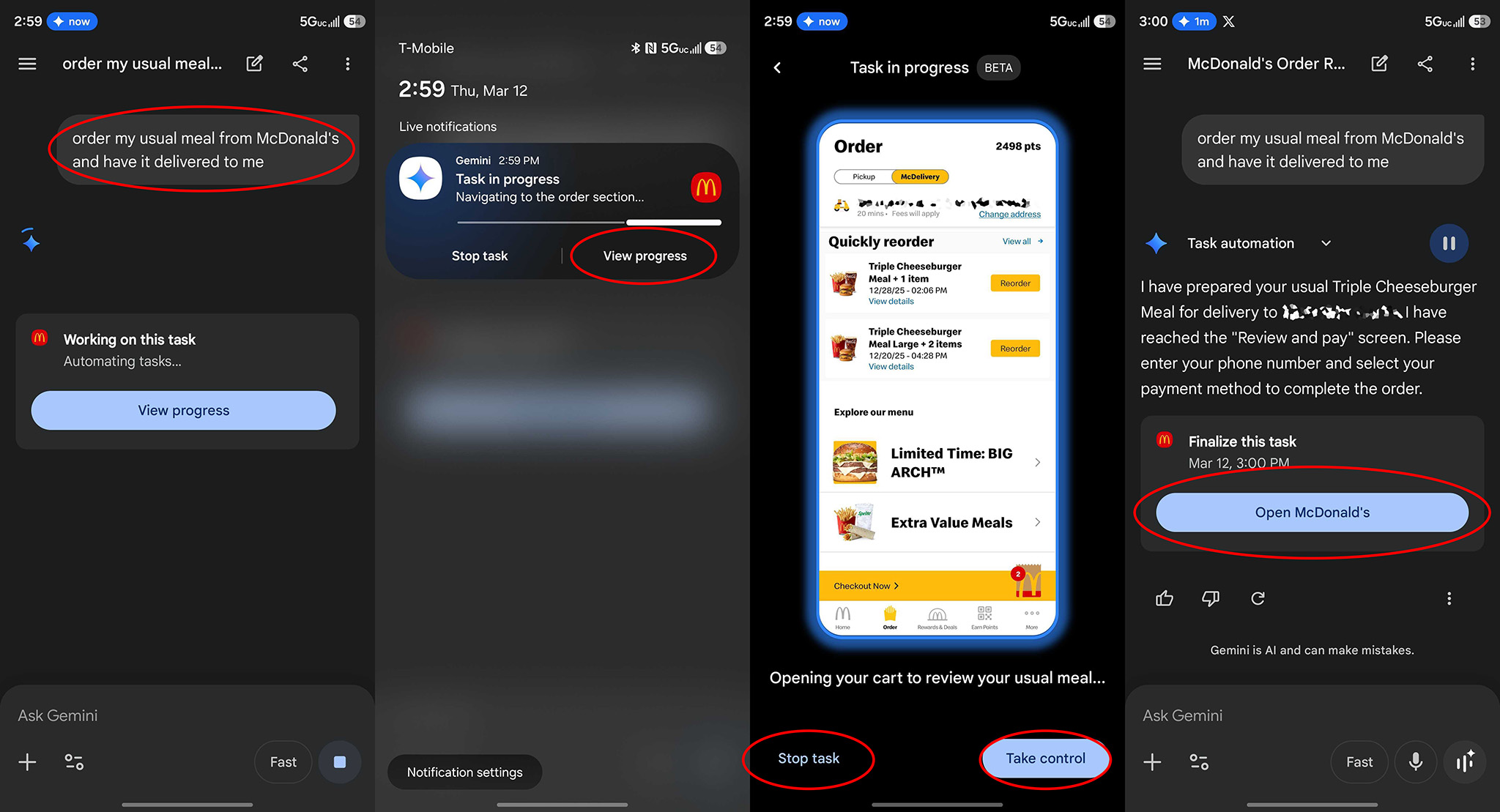
Asking Gemini to order food from McDonalds using the screen automation feature

(Image credit: Android Central)

If Gemini needs more information from you at any time during the progress, it’ll pause what it’s doing and prompt you. When I was ordering tea from Starbucks the first time, I forgot to specify the size and store location. Gemini realized this after I asked it to order the tea and followed up with me before making further choices.

Limitations and preferences

While the number of supported apps is limited right now, apps like GrubHub, DoorDash, and Uber Eats can all be used far more open-endedly than Starbucks, McDonald’s, Lyft, or Uber. You can say something fairly vague like “Order me 2 dinner entrees of vegetable korma and 4 samosas from the nearest Indian restaurant in the DoorDash app and have it ready for pickup.” It’s smart enough to understand what that means.

We’ve found that some tasks are a little too complex for it at present, though. It can’t call an Uber and make multiple stops, for instance. You can only request an Uber to go to one destination right now, but that kind of even more advanced functionality is almost certainly on the way.

But what’s really cool is that you can set default preferences to prevent Gemini from making mistakes with some more nuanced options. You can add a preference to “only order the cheapest Uber fare,” “only order gluten-free items,” or “only fly Delta in economy class,” for example. Here’s how to do that:

1. Open up the Gemini app from your app drawer or home screen.

2. Tap your profile picture on the top right.

3. Select Personal Intelligence from the list.

4. Scroll down to and select Instructions for Gemini.

5. Tap the Add button and describe your preference for any default order you might make.

6. You can review each preference and manage it by tapping the three dots next to each item, or delete all with the labeled button.
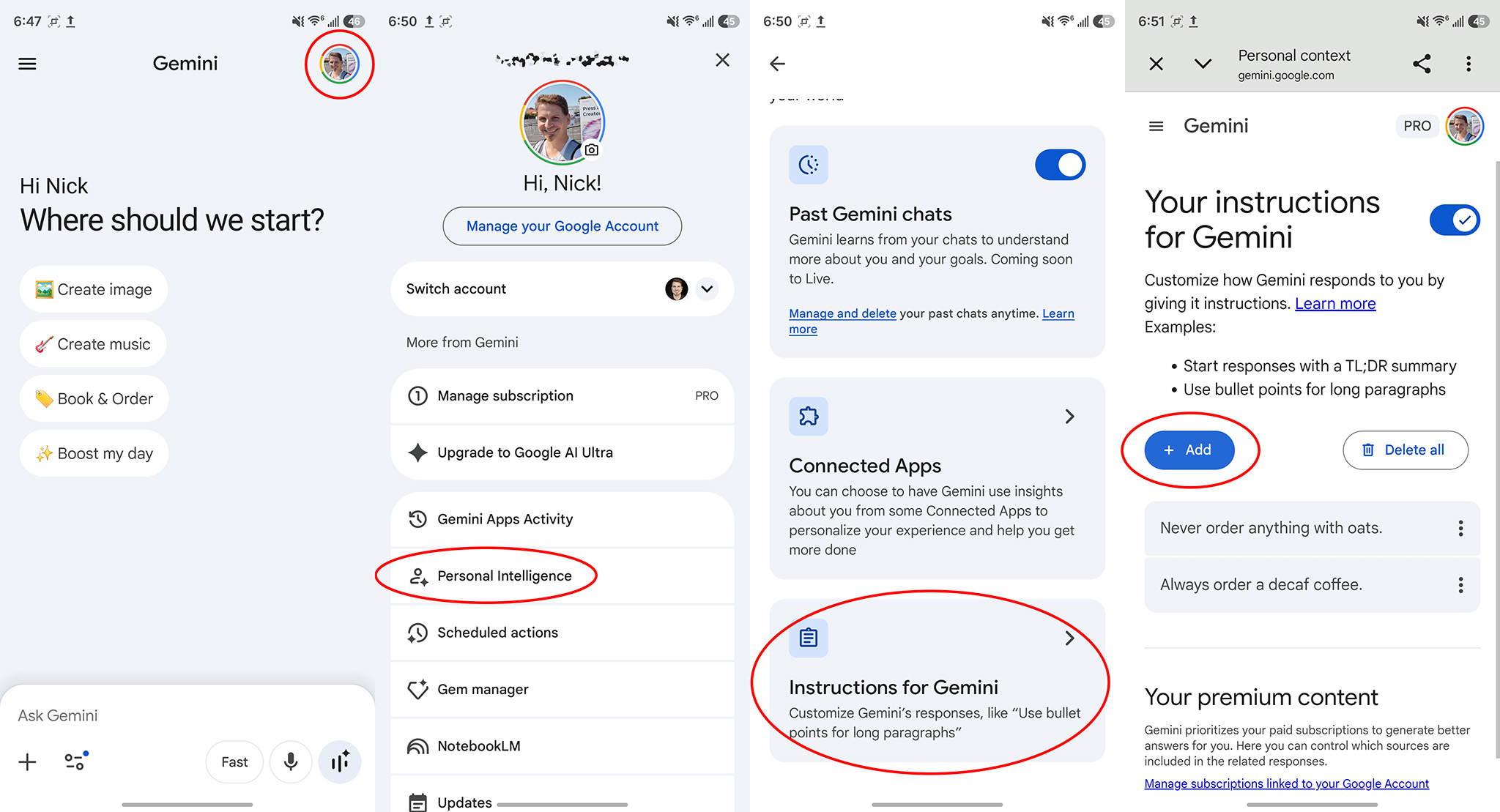
How to set default instructions for Gemini for automation

(Image credit: Android Central)

These preferences are permanently stored and always referenced by Gemini for each and every order or command you might make, so these personal preferences don’t just have to be for food or taxi requests.

Now that you’ve got screen automation set up, go hog wild with your requests next time you’re ordering out and see if Gemini’s newfound automation brings a little more helpfulness to your life.
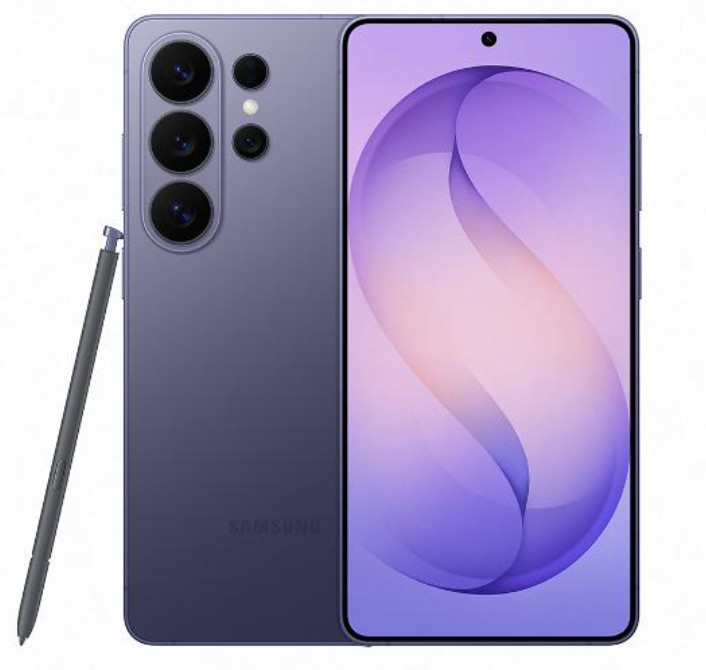
Samsung Galaxy S26 Ultra

The Galaxy S26 Ultra is Samsung’s most amazing flagship yet, packing an impressive Privacy Display along with more Galaxy AI smarts than you even knew were possible. Plus, thanks to Samsung and Google’s close relationship, new Gemini features are almost always available on Galaxy before other brands.


ShareTweetSend
Previous Post

Netflix is spending up to $600 million to buy Ben Affleck’s AI startup. What exactly is it buying?

Next Post

Despite Trump's frustration, Spain's Pedro Sánchez doubles down on opposing the war

Related News

Weekly Poll Reveals Strong Support for GrapheneOS’s Impact on the Motorola Signature 27
Business

Weekly Poll Reveals Strong Support for GrapheneOS’s Impact on the Motorola Signature 27

November 15, 2026
Huawei Unveils Sense G1: Pioneering Its First Continuous Glucose Monitor
Business

Huawei Unveils Sense G1: Pioneering Its First Continuous Glucose Monitor

November 14, 2026
Google Unveils Android XR Glasses Compatible with iPhone
Business

Google Unveils Android XR Glasses Compatible with iPhone

November 13, 2026
Samsung Plans Exciting Enhancements for Contacts App, Including Birthday Reminder Feature
Business

Samsung Plans Exciting Enhancements for Contacts App, Including Birthday Reminder Feature

November 13, 2026
Next Post
Despite Trump's frustration, Spain's Pedro Sánchez doubles down on opposing the war

Despite Trump's frustration, Spain's Pedro Sánchez doubles down on opposing the war

Discussion about this post

Subscribe To Our Newsletters

    Customer Support


    1251 Wilcrest Drive
    Houston, Texas
    77042 USA
    Call-832.795.1420
    e-mail – news@theinsightpost.com

    Subscribe To Our Newsletters

      Categories

      • Africa
      • Africa-East
      • African Sports
      • American Sports
      • Arts
      • Asia
      • Australia
      • Business
      • Business Asia
      • Business- Africa
      • Canada
      • Defense
      • Education
      • Egypt
      • Energy
      • Entertainment
      • Europe
      • European Soccer
      • Finance
      • Germany
      • Ghana
      • Health
      • Insight
      • International
      • Investing
      • Japan
      • Latest Headlines
      • Life & Living
      • Markets
      • Mobile
      • Movies
      • New Zealand
      • Nigeria
      • Politics
      • Scholarships
      • Science
      • South Africa
      • South America
      • Sports
      • Tech
      • Travel
      • Travel-Africa
      • UK
      • USA
      • Weather
      • World
      No Result
      View All Result

      Recent News

      Gators Shock Wildcats 21-14 in Thrilling Upset Amid Rollercoaster Season

      Gators Shock Wildcats 21-14 in Thrilling Upset Amid Rollercoaster Season

      November 15, 2026
      Government Announces Historic  Billion Investment in Energy Infrastructure Development

      Government Announces Historic $2 Billion Investment in Energy Infrastructure Development

      November 15, 2026
      Notre Dame Postgame Insights: Dive into Superchats with Westwood One Sports

      Notre Dame Postgame Insights: Dive into Superchats with Westwood One Sports

      November 15, 2026
      Transform Your Laptop Setup with These 5 Affordable Accessories

      Transform Your Laptop Setup with These 5 Affordable Accessories

      November 15, 2026
      • Home
      • Advertise With Us
      • About Us
      • Corporate
      • Consumer Rewards
      • Forum
      • Privacy Policy
      • Social Trends

      Theinsightpost ©2026 | All Rights Reserved. Theinsightpost is an Elnegy LLC company, registered in Texas, USA

      Welcome Back!

      Login to your account below

      Forgotten Password?

      Retrieve your password

      Please enter your username or email address to reset your password.

      Log In

      Add New Playlist

      We are using cookies to give you the best experience on our website.

      You can find out more about which cookies we are using or switch them off in .

      No Result
      View All Result
      • Home
      • Insight
      • Blog
      • Business
      • Entertainment
      • Health
      • Politics
      • Shop
        • Gift Shop
        • Value Shop
        • Store
        • Bargain Shop
        • Discount
      • Sports
      • Tech
      • Travel
      • USA
      • Video
      • World
        • Asia
        • Africa
        • South America
        • North America
        • Europe
        • Oceania

      Theinsightpost ©2026 | All Rights Reserved. Theinsightpost is an Elnegy LLC company, registered in Texas, USA

      The Insight Post
      Powered by  GDPR Cookie Compliance
      Privacy Overview

      This website uses cookies so that we can provide you with the best user experience possible. Cookie information is stored in your browser and performs functions such as recognising you when you return to our website and helping our team to understand which sections of the website you find most interesting and useful.

      Strictly Necessary Cookies

      Strictly Necessary Cookie should be enabled at all times so that we can save your preferences for cookie settings.

      Cookie Policy

      More information about our Cookie Policy