
• Home
  • Insight
  • Blog
  • Business
  • Entertainment
  • Health
  • Politics
  • Shop
    • Gift Shop
    • Value Shop
    • Store
    • Bargain Shop
    • Discount
  • Sports
  • Tech
  • Travel
  • USA
  • Video
  • World
    • Asia
    • Africa
    • South America
    • North America
    • Europe
    • Oceania
Thursday, July 30, 2026
No Result
View All Result
Subscribe Now
  • Home
  • Insight
  • Blog
  • Business
  • Entertainment
  • Health
  • Politics
  • Shop
    • Gift Shop
    • Value Shop
    • Store
    • Bargain Shop
    • Discount
  • Sports
  • Tech
  • Travel
  • USA
    TX Rep. Brandon Gill Mocks James Talarico Over Fauci Action Figure Post

    TX Rep. Brandon Gill Mocks James Talarico Over Fauci Action Figure Post

    NBA players are ‘being taught’ to flop

    NBA players are ‘being taught’ to flop

    Industry was warned for years about chemical ‘runaway’ dangers. Then came near-catastrophe in O.C.

    Industry was warned for years about chemical ‘runaway’ dangers. Then came near-catastrophe in O.C.

    Trump administration seeks government-wide NDAs to stop leaks : NPR

    Trump administration seeks government-wide NDAs to stop leaks : NPR

    Dog discharges shotgun inside truck, striking woman at Nebraska traffic light

    Dog discharges shotgun inside truck, striking woman at Nebraska traffic light

    Toshifumi Suzuki, Japan’s ‘God’ of Convenience Stores, Dies at 93

    Toshifumi Suzuki, Japan’s ‘God’ of Convenience Stores, Dies at 93

     Judge Sanctioned CoreCivic for Destroying Video in ICE Death Suit

     Judge Sanctioned CoreCivic for Destroying Video in ICE Death Suit

    Suspect dead after opening fire near White House security checkpoint, Secret Service says

    Suspect dead after opening fire near White House security checkpoint, Secret Service says

    Trump trashes Colbert’s high-rated finale as “no ratings”

    Trump trashes Colbert’s high-rated finale as “no ratings”

  • Video
  • World
    • Asia
    • Africa
    • South America
    • North America
    • Europe
    • Oceania
The Insight Post
  • Home
  • Insight
  • Blog
  • Business
  • Entertainment
  • Health
  • Politics
  • Shop
    • Gift Shop
    • Value Shop
    • Store
    • Bargain Shop
    • Discount
  • Sports
  • Tech
  • Travel
  • USA
    TX Rep. Brandon Gill Mocks James Talarico Over Fauci Action Figure Post

    TX Rep. Brandon Gill Mocks James Talarico Over Fauci Action Figure Post

    NBA players are ‘being taught’ to flop

    NBA players are ‘being taught’ to flop

    Industry was warned for years about chemical ‘runaway’ dangers. Then came near-catastrophe in O.C.

    Industry was warned for years about chemical ‘runaway’ dangers. Then came near-catastrophe in O.C.

    Trump administration seeks government-wide NDAs to stop leaks : NPR

    Trump administration seeks government-wide NDAs to stop leaks : NPR

    Dog discharges shotgun inside truck, striking woman at Nebraska traffic light

    Dog discharges shotgun inside truck, striking woman at Nebraska traffic light

    Toshifumi Suzuki, Japan’s ‘God’ of Convenience Stores, Dies at 93

    Toshifumi Suzuki, Japan’s ‘God’ of Convenience Stores, Dies at 93

     Judge Sanctioned CoreCivic for Destroying Video in ICE Death Suit

     Judge Sanctioned CoreCivic for Destroying Video in ICE Death Suit

    Suspect dead after opening fire near White House security checkpoint, Secret Service says

    Suspect dead after opening fire near White House security checkpoint, Secret Service says

    Trump trashes Colbert’s high-rated finale as “no ratings”

    Trump trashes Colbert’s high-rated finale as “no ratings”

  • Video
  • World
    • Asia
    • Africa
    • South America
    • North America
    • Europe
    • Oceania
No Result
View All Result
No Result
View All Result
Home Tech

How to unlock your iPhone if you forget your passcode

by Theinsightpost
September 1, 2022
in Tech
0 0
0
How to unlock your iPhone if you forget your passcode


One of the first things you have to do when setting up an iPhone is set a passcode along with Face ID or Touch ID. That’s how you secure the privacy of your data and ensure that others can’t access your iPhone, especially thieves. But you also have to make sure that you don’t forget your iPhone’s passcode once you start using Face ID to unlock your phone.

It’s easy to forget the Lock Screen passcode if you don’t use it as often or if you’ve recently changed it. The good news is that there are still ways to get into your iPhone if that happens. The bad news is that you might lose some of the personal data you’ve saved on your iPhone. That’s where backups will come in handy, however.

Remember to back up your iPhone

There are a few ways to reset an iPhone after you’ve forgotten the passcode and Face ID/Touch ID no longer works. But each of them involves erasing the contents of the phone. Reader’s Digest put together a guide explaining your options based on available documentation from Apple for such extreme iPhone troubleshooting.

But all these endeavors will lead to the same outcome. You’ll erase the phone, losing your contacts, messages, photos, and app settings. Apple implemented this specific iPhone behavior to ensure third parties can’t access your data with ease.

Whether it’s the police, a significant other, or a thief, you wouldn’t want them to be able to reset your password and access your data. That’s why unlocking the iPhone after forgetting the passcode involves erasing everything.

With that in mind, you need to ensure that you have recent iPhone backups available so the data loss is minimal. You can back up to iCloud and have an automatic schedule for the backups.

The best option is backing up to a computer and going for encrypted backups. These save the settings and passwords of all apps, so restoring will be even easier. But this process isn’t automatic as the iCloud backups.

How to unlock the iPhone from the device

One way to unlock the iPhone after forgetting the password is to go for the Erase iPhone option directly from the handset. The steps are straightforward, as Apple explains:

  • From your device’s Lock Screen, try entering your passcode until the “[Device] Unavailable” screen appears and your device asks you to try again later. When you’re able to, continue trying to enter your passcode until the “Security Lockout” screen appears, and you get the Erase [Device] option in the bottom corner of the screen.
  • Tap Erase [Device], then tap Erase [Device] again to confirm.
  • Enter your Apple ID password to sign out of your Apple ID on your device.
  • Tap Erase [Device] to permanently delete all of your data and settings.
  • When your device restarts, follow the onscreen instructions to set up your device again, restore your data and settings from a backup, and set a new passcode.
Erasing an iPhone directly from the Lock Screen. Image source: Apple Inc.

Note that you need your Apple ID password here. Without this step, anyone could steal your iPhone, erase it, and make it their own. Also, Apple advises users to ensure they contact their carriers before erasing the handset if they use eSIM functionality.

How to unlock the iPhone with a Mac or Windows PC

Like the previous method, you’ll need to turn off your iPhone to unlock it after you’ve forgotten the passcode.

Turn off the iPhone

Turning off the iPhone involves different gestures, depending on your model. Here are the official options:

  • iPhone 8, iPhone 8 Plus, iPhone X, and later, including iPhone SE (2nd and 3rd generation): Press and hold both the side button and the Volume down button until the power off slider appears.
  • iPhone 7, iPhone 7 Plus, iPhone 6s, and iPhone 6: Press and hold the side button until the power off slider appears.
  • iPhone SE (1st generation), iPhone 5s, and earlier: Press and hold the top button until the power off slider appears.

In either case, you’ll want to drag the slider to turn off your iPhone.

Enter recovery mode

After waiting a minute for the phone to shut down, you’ll want to enable recovery mode. Again, the process differs depending on your iPhone. From Apple:

  • iPhone 8, iPhone 8 Plus, iPhone X, and later, including iPhone SE (2nd and 3rd generation), use the Side button.
  • iPhone 7 and iPhone 7 Plus use the Volume down button.
  • iPhone SE (1st generation), and iPhone 6s and earlier use the Home button.

As you press the correct button, you’ll want to connect your computer to the iPhone without letting go of the button.

Keep holding until you see the recovery mode icon on your iPhone.

Recovery screen on an iPhone.
Recovery screen on an iPhone. Image source: Apple Inc.

Restoring your iPhone

Depending on the operating system, you’ll want to open Finder (macOS Catalina or later) or iTunes (Windows and macOS older than Catalina). Find your iPhone, and then tap Restore.

Your computer will download the software and start the restore process. If the download takes more than 15 minutes, you’ll need to enter recovery mode again after the download finishes to finish the restore.

This process applies to the previous iPhone unlock method — if you’ve erased the iPhone from the Lock Screen. That is if you want to restore your iPhone from a Mac/Windows backup. Because the previous method will also let you restore from iCloud if you have recent backups.
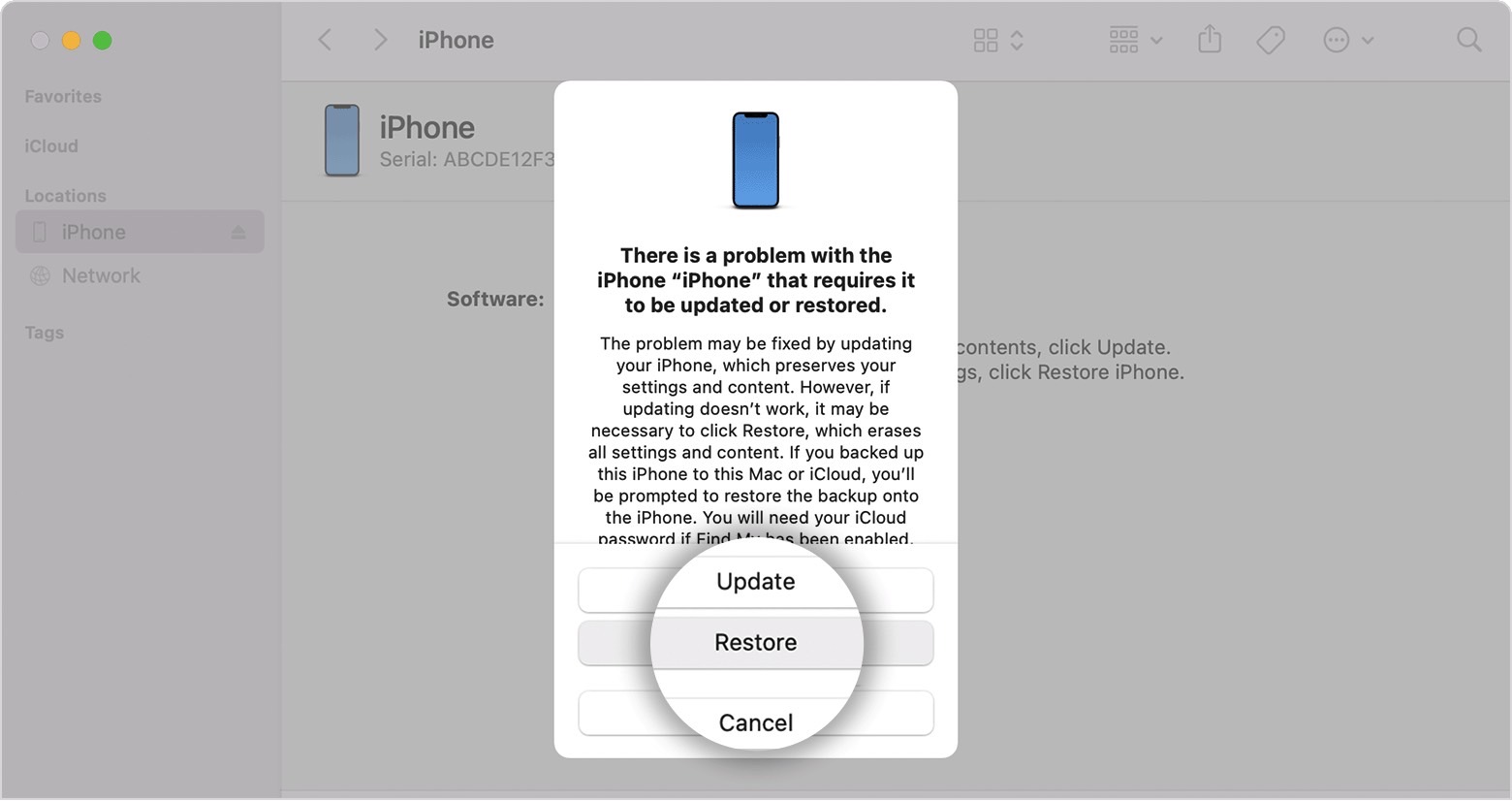
Using macOS to restore an iPhone.
Using macOS to restore an iPhone. Image source: Apple Inc.

Use Find My to unlock the iPhone

Reader’s Digest also has another wireless alternative for unlocking an iPhone after you forgot the password. You can use Find My to do it by going to iCloud.com on a computer.

Open the Find My app after logging in, tap All Devices and select the iPhone you’re targeting. Press Erase iPhone, and that will get the job done. But, again, this step involves knowing your Apple ID password.

On Macs, you can just open the standalone Find My app.

The process starts once it connects to a known data network.

Like the previous methods, you’ll still want to restore from an iCloud backup or connect to a computer for a local backup. 

If any of this fails, you can always contact Apple support for further guidance.

What not to do

After you’ve restored the iPhone, make sure you set up a password that you remember. That way, you don’t have to restart the recovery process.

Whatever method you choose, you should know that all of these are safe, free-to-use unlock procedures for iPhones (and iPads) after forgetting the passcode.

You shouldn’t buy third-party apps to handle the process, even if they promise no data loss. It’s doubtful they can deliver. And if they can, then that implies breaking Apple’s encryption, something that should worry you more than erasing any personal data.

Finally, you should check out Apple Support’s video below on how to unlock an iPhone if you forgot the passcode. It covers the methods above, except for the Find My procedure, showing plenty of imagery to assist you along the way.

https://www.youtube.com/watch?v=7s8-zLG9ySQ


More iPhone coverage: For more iPhone news, visit our iPhone 14 guide.



Source link

ShareTweetSend
Previous Post

A collector is selling nearly every gaming console made in the last 50 years on eBay for $1 million

Next Post

Jan Bednarek, Leander Dendoncker join Aston Villa as Wolves agree deal for Boubacar Troate | Football News

Related News

A fundamental flaw leaves LLMs strikingly vulnerable to attack
Tech

A fundamental flaw leaves LLMs strikingly vulnerable to attack

July 30, 2026
Google engineer charged with insider trading after making .2M on Polymarket
Tech

Google engineer charged with insider trading after making $1.2M on Polymarket

May 27, 2026
The Osprey Farpoint 40 Has Been My Go-To Travel Bag for 8 Years
Tech

The Osprey Farpoint 40 Has Been My Go-To Travel Bag for 8 Years

May 27, 2026
Source: AI inference provider Baseten is in talks to raise B at a post-money valuation of B, up from B after its 0M Series E announced in January (The Information)
Tech

Source: AI inference provider Baseten is in talks to raise $1B at a post-money valuation of $11B, up from $5B after its $300M Series E announced in January (The Information)

May 26, 2026
Next Post
Jan Bednarek, Leander Dendoncker join Aston Villa as Wolves agree deal for Boubacar Troate | Football News

Jan Bednarek, Leander Dendoncker join Aston Villa as Wolves agree deal for Boubacar Troate | Football News

Discussion about this post

Subscribe To Our Newsletters

    Customer Support


    1251 Wilcrest Drive
    Houston, Texas
    77042 USA
    Call-832.795.1420
    e-mail – news@theinsightpost.com

    Subscribe To Our Newsletters

      Categories

      • Africa
      • Africa-East
      • African Sports
      • American Sports
      • Arts
      • Asia
      • Australia
      • Business
      • Business Asia
      • Business- Africa
      • Canada
      • Defense
      • Education
      • Egypt
      • Energy
      • Entertainment
      • Europe
      • European Soccer
      • Finance
      • Germany
      • Ghana
      • Health
      • Insight
      • International
      • Investing
      • Japan
      • Latest Headlines
      • Life & Living
      • Markets
      • Mobile
      • Movies
      • New Zealand
      • Nigeria
      • Politics
      • Scholarships
      • Science
      • South Africa
      • South America
      • Sports
      • Tech
      • Travel
      • UK
      • USA
      • Weather
      • World
      No Result
      View All Result

      Recent News

      US Navy to overhaul torpedo stockpile under new two-war strategy

      US Navy to overhaul torpedo stockpile under new two-war strategy

      July 30, 2026
      Free Cloud Computing Course | AWS Re/Start Program 

      Free Cloud Computing Course | AWS Re/Start Program 

      July 30, 2026
      Thirty Years Later

      Thirty Years Later

      July 30, 2026
      Announcing Codemagic Patch: an open-source CodePush rebuild for React Native

      Announcing Codemagic Patch: an open-source CodePush rebuild for React Native

      July 30, 2026
      • Home
      • Advertise With Us
      • About Us
      • Corporate
      • Consumer Rewards
      • Forum
      • Privacy Policy
      • Social Trends

      Theinsightpost ©2026 | All Rights Reserved. Theinsightpost is an Elnegy LLC company, registered in Texas, USA

      Welcome Back!

      Login to your account below

      Forgotten Password?

      Retrieve your password

      Please enter your username or email address to reset your password.

      Log In

      Add New Playlist

      We are using cookies to give you the best experience on our website.

      You can find out more about which cookies we are using or switch them off in .

      No Result
      View All Result
      • Home
      • Insight
      • Blog
      • Business
      • Entertainment
      • Health
      • Politics
      • Shop
        • Gift Shop
        • Value Shop
        • Store
        • Bargain Shop
        • Discount
      • Sports
      • Tech
      • Travel
      • USA
      • Video
      • World
        • Asia
        • Africa
        • South America
        • North America
        • Europe
        • Oceania

      Theinsightpost ©2026 | All Rights Reserved. Theinsightpost is an Elnegy LLC company, registered in Texas, USA

      The Insight Post
      Powered by  GDPR Cookie Compliance
      Privacy Overview

      This website uses cookies so that we can provide you with the best user experience possible. Cookie information is stored in your browser and performs functions such as recognising you when you return to our website and helping our team to understand which sections of the website you find most interesting and useful.

      Strictly Necessary Cookies

      Strictly Necessary Cookie should be enabled at all times so that we can save your preferences for cookie settings.

      Cookie Policy

      More information about our Cookie Policy