










Controlling memberships in privileged groups is an important task that PowerShell automation can handle with minimal effort.
The easy approach to manage members of groups, such as domain admins in Active Directory or the local administrators group on a server, is to control group management access — and keep your fingers crossed that no one goes rogue. However, in larger environments where many people have administrative access to these groups, finger crossing isn’t a good policy. With PowerShell, we can easily write a script to monitor, or even enforce, the memberships of these groups.
For both Windows servers and Active Directory, the approach to manage these groups will be similar. First, we need to maintain a list of the groups to monitor, then get the members of each group and finally check for any changes since the last time the script ran.
How to gather local group memberships on Windows Server
On a local server, the list of groups is likely quite short. For this article, we will work with just two groups — administrators and remote desktop users — but you can expand your coverage to other groups by adjusting the script accordingly.
Start the script with a variable to hold the groups and then add a foreach loop to go through each of those groups and return the group membership.
$groups = @(
    'Administrators'
    'Remote Desktop Users'
)
$groupMembers = foreach ($group in $groups) {
    Get-LocalGroupMember $group
}
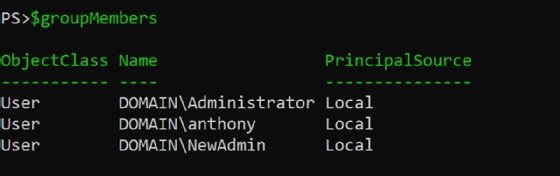
Now we can look at the output of $groupMembers and see the members of each of those groups (Figure 1).
If you wanted to take those memberships and send them as an emailed report, you could. But we can use PowerShell to monitor group memberships and send notifications if any changes occur.
To start, export the memberships to a CSV file and then load that to compare the previous run with the current run. To do this, use two additional foreach loops: the first will look for users that were added and the second will look for users that were removed.
foreach ($group in $groups) {
    $previousRunMemberships = $null
    if (Test-Path "C:tmp$group.csv") {
        $previousRunMemberships = Import-Csv -Path "C:tmp$group.csv"
    }
    $groupMembers = Get-LocalGroupMember $group
    $added = foreach ($member in $groupMembers) {
        if ($previousRunMemberships.SID -notcontains $member.SID) {
            $member
        }
    }
    $removed = foreach ($member in $previousRunMemberships) {
        if ($groupMembers.SID -notcontains $member.SID) {
            $member
        }
    }
   $groupMembers | Export-Csv -Path "C:tmp$group.csv" -NoTypeInformation
}
The script will output the current users to a CSV file that will be used to compare current group memberships to a previous state.
The next step adds the notification. There are many options, such as the Send-MailMessage command, but this tutorial will use Azure Logic Apps to route your notification.
First, make a function and include it in the top of the script, as follows:
Function Send-LogicAppEmail {
    param (
        [string]$LogicAppUri = '<logic app uri>',
        [string]$To = '[email protected]',
        [string]$CC,
        [string]$Subject,
        [string]$Message
    )
    $headers = @{
        'Content-Type' = 'application/json'
    }
    $body = @{
        To = $To
        CC = $CC
        Subject = $Subject
        Body = $Message
    }
    $splat = @{
        Uri = $LogicAppUri
        Method = 'POST'
        Headers = $headers
        Body = ($body | ConvertTo-Json)
    }
    Invoke-RestMethod @splat
}
Next, build the HTML and call that function in the foreach loop.
    if ($added -or $removed) {
        $html = @"
<h1>$($env:COMPUTERNAME)</h1>
<h2>$group</h2>
<h3>Added</h3>
<pre>
$($added | Format-Table | Out-String)
</pre>
<h3>Removed</h3>
<pre>
$($removed | Format-Table | Out-String)
</pre>
"@
        Send-LogicAppEmail -To '[email protected]' -Subject "Changes to $group on $($env:COMPUTERNAME)" -Message $html
    }
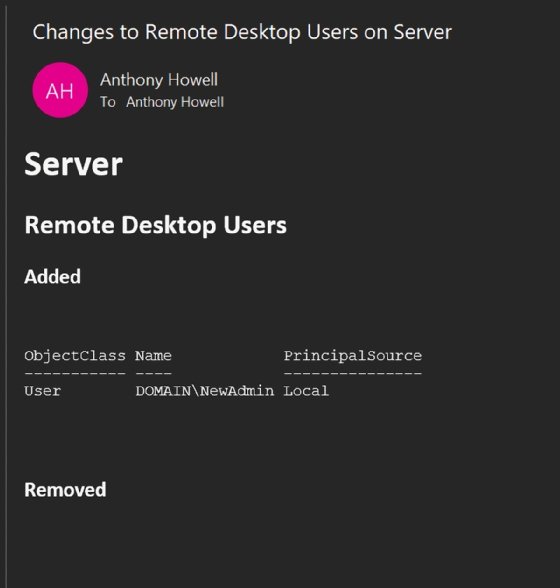
Figure 2 shows an example of the email that indicates a user was added to the remote desktop users group.
What follows is the full group membership monitoring script.
Function Send-LogicAppEmail {
    param (
        [string]$LogicAppUri = '<logic app uri>',
        [string]$To = '[email protected]',
        [string]$CC,
        [string]$Subject,
        [string]$Message
    )
    $headers = @{
        'Content-Type' = 'application/json'
    }
    $body = @{
        To = $To
        CC = $CC
        Subject = $Subject
        Body = $Message
    }
    $splat = @{
        Uri = $LogicAppUri
        Method = 'POST'
        Headers = $headers
        Body = ($body | ConvertTo-Json)
    }
    Invoke-RestMethod @splat
}
$groups = @(
    'Administrators'
    'Remote Desktop Users'
)
foreach ($group in $groups) {
    $previousRunMemberships = $null
    if (Test-Path "C:tmp$group.csv") {
        $previousRunMemberships = Import-Csv -Path "C:tmp$group.csv"
    }
    $groupMembers = Get-LocalGroupMember $group
    $added = foreach ($member in $groupMembers) {
        if ($previousRunMemberships.SID -notcontains $member.SID) {
            $member
        }
    }
    $removed = foreach ($member in $previousRunMemberships) {
        if ($groupMembers.SID -notcontains $member.SID) {
            $member
        }
    }
    if ($added -or $removed) {
        $html = @"
<h1>$($env:COMPUTERNAME)</h1>
<h2>$group</h2>
<h3>Added</h3>
<pre>
$($added | Format-Table | Out-String)
</pre>
<h3>Removed</h3>
<pre>
$($removed | Format-Table | Out-String)
</pre>
"@
        Send-LogicAppEmail -To '[email protected]' -Subject "Changes to $group on $($env:COMPUTERNAME)" -Message $html
    }
$groupMembers | Export-Csv -Path "C:tmp$group.csv" -NoTypeInformation
}
Take this script, save it in on a local path on each server, and then call it periodically with a scheduled task.
How to monitor group memberships in Active Directory
The process to monitor groups in Active Directory is similar to the steps to monitor local groups on server systems. The only difference is we will use commands from the Active Directory module, which will require the following script to run either on a domain controller or on a device with the Active Directory module installed that is connected to the domain controller.
First, set the groups array to reference Active Directory groups. Add as many as you want, but for this example we’ll use the following two groups:
$groups = @(
    'Domain Admins'
    'Schema Admins'
)
Use the Get-ADGroupMember command to gather group members.
$groupMembers = Get-ADGroupMember $group
Lastly, adjust the HTML message and subject to reference Active Directory.
    if ($added -or $removed) {
        $html = @"
<h1>Active Directory</h1>
<h2>$group</h2>
<h3>Added</h3>
<pre>
$($added | Format-Table | Out-String)
</pre>
<h3>Removed</h3>
<pre>
$($removed | Format-Table | Out-String)
</pre>
"@
        Send-LogicAppEmail -To '[email protected]' -Subject "Changes to $group in Active Directory" -Message $html
    }
Now the full script will look like the following:
Function Send-LogicAppEmail {
    param (
        [string]$LogicAppUri = '<logic app uri>',
        [string]$To = '[email protected]',
        [string]$CC,
        [string]$Subject,
        [string]$Message
    )
    $headers = @{
        'Content-Type' = 'application/json'
    }
    $body = @{
        To = $To
        CC = $CC
        Subject = $Subject
        Body = $Message
    }
   $splat = @{
        Uri = $LogicAppUri
        Method = 'POST'
        Headers = $headers
        Body = ($body | ConvertTo-Json)
    }
    Invoke-RestMethod @splat
}
$groups = @(
    'Domain Admins'
    'Schema Admins'
)
foreach ($group in $groups) {
    $previousRunMemberships = $null
    if (Test-Path "C:tmp$group.csv") {
        $previousRunMemberships = Import-Csv -Path "C:tmp$group.csv"
    }
    $groupMembers = Get-ADGroupMember $group
    $added = foreach ($member in $groupMembers) {
        if ($previousRunMemberships.SID -notcontains $member.SID) {
            $member
        }
    }
    $removed = foreach ($member in $previousRunMemberships) {
        if ($groupMembers.SID -notcontains $member.SID) {
            $member
        }
    }
    if ($added -or $removed) {
        $html = @"
<h1>Active Directory</h1>
<h2>$group</h2>
<h3>Added</h3>
<pre>
$($added | Format-Table | Out-String)
</pre>
<h3>Removed</h3>
<pre>
$($removed | Format-Table | Out-String)
</pre>
"@
        Send-LogicAppEmail -To '[email protected]' -Subject "Changes to $group in Active Directory" -Message $html
    }
    $groupMembers | Export-Csv -Path "C:tmp$group.csv" -NoTypeInformation
}
Figure 3 shows the email notification generated by the script.
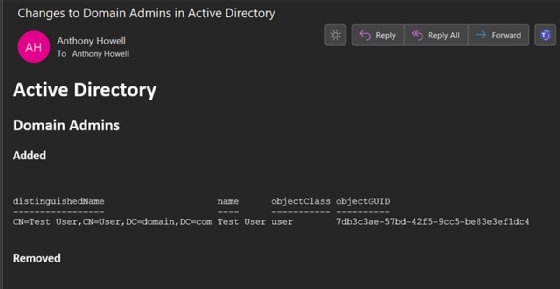
The email shows that a user with the name Test User was added to the domain admins group.
This script can also run periodically via the Task Scheduler.
Why monitor group memberships with a PowerShell script?
PowerShell might not have the allure of a sophisticated monitoring product, but it certainly can meet your needs if you take the time to learn how to write and maintain a script. A more sophisticated version of the script can go even further and remove users that should not be in the group or add users who have been removed accidentally. PowerShell is flexible enough to handle these tasks and let you focus on other work.







Discussion about this post