









• Home
  • Insight
  • Blog
  • Business
  • Entertainment
  • Health
  • Politics
  • Shop
    • Gift Shop
    • Value Shop
    • Store
    • Bargain Shop
    • Discount
  • Sports
  • Tech
  • Travel
  • USA
  • Video
  • World
    • Asia
    • Africa
    • South America
    • North America
    • Europe
    • Oceania
Thursday, November 19, 2026
No Result
View All Result
Subscribe Now
  • Home
  • Insight
  • Blog
  • Business
  • Entertainment
  • Health
  • Politics
  • Shop
    • Gift Shop
    • Value Shop
    • Store
    • Bargain Shop
    • Discount
  • Sports
  • Tech
  • Travel
  • USA
    FAA Administrator Takes Responsibility as Mullin Faces Tough Questions Over Nationwide Ground Stop

    FAA Administrator Takes Responsibility as Mullin Faces Tough Questions Over Nationwide Ground Stop

    Mary Peltola Emerges Victorious in Alaska Senate Race, Making History for Democrats

    Mary Peltola Emerges Victorious in Alaska Senate Race, Making History for Democrats

    Stranded in Conflict: Palestinians Navigate the Tenuous Balance of War and Peace Amid Ceasefire Efforts

    Stranded in Conflict: Palestinians Navigate the Tenuous Balance of War and Peace Amid Ceasefire Efforts

    Trump Administration Revokes Pay Increase for Head Start Educators

    Trump Administration Revokes Pay Increase for Head Start Educators

    Unexpected Triumph: Gay Candidates Achieve Unforeseen Victories in Challenging Races

    Unexpected Triumph: Gay Candidates Achieve Unforeseen Victories in Challenging Races

    Microsoft Outlook Experiences Prolonged Outage Affecting Users Nationwide

    Microsoft Outlook Experiences Prolonged Outage Affecting Users Nationwide

    Gunfire Erupts in D.C.: Authorities Search for Suspect Amid Rising Concerns Over Public Safety

    Gunfire Erupts in D.C.: Authorities Search for Suspect Amid Rising Concerns Over Public Safety

    LAUSD Takes Strong Action Against Hate Speech Following Racial Slur Incidents

    LAUSD Takes Strong Action Against Hate Speech Following Racial Slur Incidents

    Beloved Former Los Angeles Times Columnist Steve Harvey Passes Away at 80

    Beloved Former Los Angeles Times Columnist Steve Harvey Passes Away at 80

  • Video
  • World
    • Asia
    • Africa
    • South America
    • North America
    • Europe
    • Oceania
The Insight Post
  • Home
  • Insight
  • Blog
  • Business
  • Entertainment
  • Health
  • Politics
  • Shop
    • Gift Shop
    • Value Shop
    • Store
    • Bargain Shop
    • Discount
  • Sports
  • Tech
  • Travel
  • USA
    FAA Administrator Takes Responsibility as Mullin Faces Tough Questions Over Nationwide Ground Stop

    FAA Administrator Takes Responsibility as Mullin Faces Tough Questions Over Nationwide Ground Stop

    Mary Peltola Emerges Victorious in Alaska Senate Race, Making History for Democrats

    Mary Peltola Emerges Victorious in Alaska Senate Race, Making History for Democrats

    Stranded in Conflict: Palestinians Navigate the Tenuous Balance of War and Peace Amid Ceasefire Efforts

    Stranded in Conflict: Palestinians Navigate the Tenuous Balance of War and Peace Amid Ceasefire Efforts

    Trump Administration Revokes Pay Increase for Head Start Educators

    Trump Administration Revokes Pay Increase for Head Start Educators

    Unexpected Triumph: Gay Candidates Achieve Unforeseen Victories in Challenging Races

    Unexpected Triumph: Gay Candidates Achieve Unforeseen Victories in Challenging Races

    Microsoft Outlook Experiences Prolonged Outage Affecting Users Nationwide

    Microsoft Outlook Experiences Prolonged Outage Affecting Users Nationwide

    Gunfire Erupts in D.C.: Authorities Search for Suspect Amid Rising Concerns Over Public Safety

    Gunfire Erupts in D.C.: Authorities Search for Suspect Amid Rising Concerns Over Public Safety

    LAUSD Takes Strong Action Against Hate Speech Following Racial Slur Incidents

    LAUSD Takes Strong Action Against Hate Speech Following Racial Slur Incidents

    Beloved Former Los Angeles Times Columnist Steve Harvey Passes Away at 80

    Beloved Former Los Angeles Times Columnist Steve Harvey Passes Away at 80

  • Video
  • World
    • Asia
    • Africa
    • South America
    • North America
    • Europe
    • Oceania
No Result
View All Result
No Result
View All Result
Home Mobile

Publish to App Store Connect with Codemagic’s Apple Developer Portal integration

by Theinsightpost
November 25, 2022
in Mobile
0 0
0
Publish to App Store Connect with Codemagic’s Apple Developer Portal integration


Last year, we introduced an easier way of distributing your app to users via the App Store. It simplified and automated publishing apps on App Store Connect with a few lines you could add to your codemagic.yaml file. This feature automated your iOS releases from start to finish and pushed the CI-verified builds straight to the App Store.

We are excited to announce that we have simplified this process even further! Now, you can directly reference the API key and authenticate with App Store Connect! This helps you easily reference the same API key across multiple apps and workflow configurations.

We also have a video on publishing to the App Store using the Apple Developer Portal integration:

For those of you who prefer reading, let’s discuss how to publish to the App Store using the Apple Developer Portal integration in some more detail.

Setting up the Apple Developer Portal integration in Codemagic

You can enable the Apple Developer Portal integration in Teams > Personal Account > Integrations for personal projects and in Team settings > Team integrations for projects shared in the team (if you are the team owner). This allows you to conveniently use the same credentials for publishing across different apps and workflows.

If you are the team owner, select your team to access Team settings. Under Team settings, select Team integrations:

Under Team integrations, click on the Connect button to access the Developer Portal integration:

If you are working on a personal project, go to Teams and click on your personal account to open your account settings. Then select Integrations:

Under Integrations, click on the Connect button for the Developer Portal integration:

This opens a window for the Apple Developer Portal Integration. There are three fields for you to fill in and one to upload the API key.
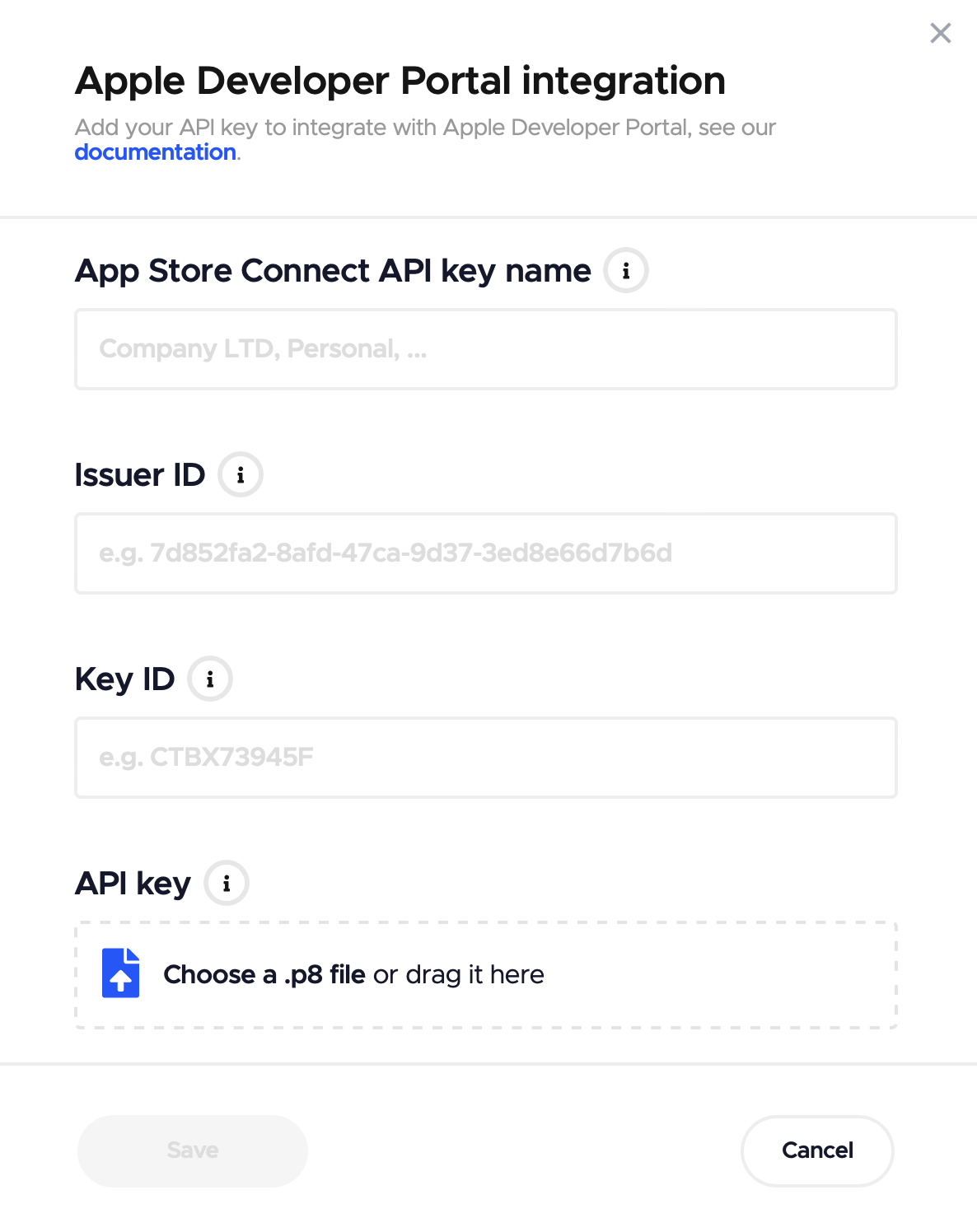
  1. App Store Connect API key name: Provide a readable name for the key that you can use later in the codemagic.yaml file for your app(s).
  2. Issuer ID: This is the App Store Connect API key issuer ID. You can obtain it from App Store Connect > Users and Access > Keys. This is the issuer ID displayed above the table of active keys.
  3. Key ID: This is the App Store Connect API key ID. You can obtain it from App Store Connect > Users and Access > Keys.
  4. API key: This is the App Store Connect API private key. You’ll have to upload the private key, which is available for download only once from App Store Connect > Users and Access > Keys. Make sure to save it somewhere safe as well.

Finally, click on the Save button to finish the setup.

You can add multiple API keys as needed.

Configuring the codemagic.yaml file

After setting up the Apple Developer Portal integration on Codemagic’s website, all you need to do is add a couple of lines to your codemagic.yaml file:

workflows:
  ios-app-workflow:
    integrations:
      app_store_connect: <your API key name>
    scripts:
      - ...
    publishing:
      app_store_connect:
        auth: integration

The first step is to add the integrations section and reference the name of the API key, as shown in the example below:

integrations:
  app_store_connect: Nevercode ASC API Key

The second and final step is to add integration as the authentication method under the publishing section:

publishing:
  app_store_connect:
    auth: integration

And that’s it! Because the variables you’ve added work across your team (be it personal or shared), you can use the new integration method of referencing the API key for multiple apps. This makes it a lot easier to work across different apps and codemagic.yaml configuration files!

Submit to App Store review

After updating the configuration, run a build and send it to App Store Connect for Apple to review:

When the main workflow has finished running on Codemagic and the app artifact has been successfully published to App Store Connect, the workflow process switches to the App Store distribution steps. Actions like submit_to_app_store, submit_to_testflight, beta_groups, and uploading release notes occur asynchronously in the post-processing step.

Note: This method avoids using the macOS build machine while we wait for Apple to finish processing the build, and it becomes available for further actions. (This way, you don’t spend build minutes while waiting.)

After the post-processing step is finished, head to App Store Connect and navigate to your app. You should find your app waiting for review:

Additional configuration options

For additional configuration tips, you can refer to our article on how to publish apps to App Store Connect with Codemagic and the Codemagic CLI documentation.

Conclusion

Codemagic’s publishing process is a quick and seamless way to publish your app to App Store Connect. With Codemagic, you can easily automate iOS releases from start to finish. Our new integration method is faster to work with, saving you the hassle of manually waiting for the build to process and submit for review. Now, you can focus more on providing the best experience to your users!

The Codemagic team is eager to know about your experience publishing to App Store Connect using the new integration method. If you have suggestions or feedback, join our Slack community!




Source link

ShareTweetSend
Previous Post

The Kenyans lured to become unwitting 'love' fraudsters – BBC

Next Post

What Companies Make Drones For the US Military?

Related News

WhatsApp Set to Ditch iCloud and Google Drive Support – But Users Should Brace for Changes
Mobile

WhatsApp Set to Ditch iCloud and Google Drive Support – But Users Should Brace for Changes

November 19, 2026
Understanding the Recent Apple Outage: Causes and Implications for Users
Mobile

Understanding the Recent Apple Outage: Causes and Implications for Users

November 18, 2026
Unlocking Potential: Exploring the FDE Model in Enterprise AI Solutions
Mobile

Unlocking Potential: Exploring the FDE Model in Enterprise AI Solutions

November 14, 2026
Unlocking the Scoop: Upcoming Sale Dates, Price Highlights, and Previous Bargains
Mobile

Unlocking the Scoop: Upcoming Sale Dates, Price Highlights, and Previous Bargains

November 14, 2026
Next Post
What Companies Make Drones For the US Military?

What Companies Make Drones For the US Military?

Discussion about this post

Subscribe To Our Newsletters

    Customer Support


    1251 Wilcrest Drive
    Houston, Texas
    77042 USA
    Call-832.795.1420
    e-mail – news@theinsightpost.com

    Subscribe To Our Newsletters

      Categories

      • Africa
      • Africa-East
      • African Sports
      • American Sports
      • Arts
      • Asia
      • Australia
      • Business
      • Business Asia
      • Business- Africa
      • Canada
      • Defense
      • Education
      • Egypt
      • Energy
      • Entertainment
      • Europe
      • European Soccer
      • Finance
      • Germany
      • Ghana
      • Health
      • Insight
      • International
      • Investing
      • Japan
      • Latest Headlines
      • Life & Living
      • Markets
      • Mobile
      • Movies
      • New Zealand
      • Nigeria
      • Politics
      • Scholarships
      • Science
      • South Africa
      • South America
      • Sports
      • Tech
      • Travel
      • Travel-Africa
      • UK
      • USA
      • Weather
      • World
      No Result
      View All Result

      Recent News

      Anthropic Set to Make Market Debut Today Following Historic  Billion IPO

      Anthropic Set to Make Market Debut Today Following Historic $81 Billion IPO

      November 19, 2026
      Discover the Fascinating Secrets of NASA’s Voyager Mission: Test Your Knowledge!

      Discover the Fascinating Secrets of NASA’s Voyager Mission: Test Your Knowledge!

      November 19, 2026
      WNBA Begins Search for New Commissioner as Cathy Engelbert’s Tenure May Extend to 2027

      WNBA Begins Search for New Commissioner as Cathy Engelbert’s Tenure May Extend to 2027

      November 19, 2026
      Six Drainage Enhancement Projects Pending Financial Approval, Says Ahmed Ibrahim

      Six Drainage Enhancement Projects Pending Financial Approval, Says Ahmed Ibrahim

      November 19, 2026
      • Home
      • Advertise With Us
      • About Us
      • Corporate
      • Consumer Rewards
      • Forum
      • Privacy Policy
      • Social Trends

      Theinsightpost ©2026 | All Rights Reserved. Theinsightpost is an Elnegy LLC company, registered in Texas, USA

      Welcome Back!

      Login to your account below

      Forgotten Password?

      Retrieve your password

      Please enter your username or email address to reset your password.

      Log In

      Add New Playlist

      We are using cookies to give you the best experience on our website.

      You can find out more about which cookies we are using or switch them off in .

      No Result
      View All Result
      • Home
      • Insight
      • Blog
      • Business
      • Entertainment
      • Health
      • Politics
      • Shop
        • Gift Shop
        • Value Shop
        • Store
        • Bargain Shop
        • Discount
      • Sports
      • Tech
      • Travel
      • USA
      • Video
      • World
        • Asia
        • Africa
        • South America
        • North America
        • Europe
        • Oceania

      Theinsightpost ©2026 | All Rights Reserved. Theinsightpost is an Elnegy LLC company, registered in Texas, USA

      The Insight Post
      Powered by  GDPR Cookie Compliance
      Privacy Overview

      This website uses cookies so that we can provide you with the best user experience possible. Cookie information is stored in your browser and performs functions such as recognising you when you return to our website and helping our team to understand which sections of the website you find most interesting and useful.

      Strictly Necessary Cookies

      Strictly Necessary Cookie should be enabled at all times so that we can save your preferences for cookie settings.

      Cookie Policy

      More information about our Cookie Policy