• Home
  • Insight
  • Blog
  • Business
  • Entertainment
  • Health
  • Politics
  • Shop
    • Gift Shop
    • Value Shop
    • Store
    • Bargain Shop
    • Discount
  • Sports
  • Tech
  • Travel
  • USA
  • Video
  • World
    • Asia
    • Africa
    • South America
    • North America
    • Europe
    • Oceania
Thursday, November 19, 2026
No Result
View All Result
Subscribe Now
  • Home
  • Insight
  • Blog
  • Business
  • Entertainment
  • Health
  • Politics
  • Shop
    • Gift Shop
    • Value Shop
    • Store
    • Bargain Shop
    • Discount
  • Sports
  • Tech
  • Travel
  • USA
    Trump’s Deal Turns Sour as Voters Withdraw Support

    Trump’s Deal Turns Sour as Voters Withdraw Support

    FAA Administrator Takes Responsibility as Mullin Faces Tough Questions Over Nationwide Ground Stop

    FAA Administrator Takes Responsibility as Mullin Faces Tough Questions Over Nationwide Ground Stop

    Mary Peltola Emerges Victorious in Alaska Senate Race, Making History for Democrats

    Mary Peltola Emerges Victorious in Alaska Senate Race, Making History for Democrats

    Stranded in Conflict: Palestinians Navigate the Tenuous Balance of War and Peace Amid Ceasefire Efforts

    Stranded in Conflict: Palestinians Navigate the Tenuous Balance of War and Peace Amid Ceasefire Efforts

    Trump Administration Revokes Pay Increase for Head Start Educators

    Trump Administration Revokes Pay Increase for Head Start Educators

    Unexpected Triumph: Gay Candidates Achieve Unforeseen Victories in Challenging Races

    Unexpected Triumph: Gay Candidates Achieve Unforeseen Victories in Challenging Races

    Microsoft Outlook Experiences Prolonged Outage Affecting Users Nationwide

    Microsoft Outlook Experiences Prolonged Outage Affecting Users Nationwide

    Gunfire Erupts in D.C.: Authorities Search for Suspect Amid Rising Concerns Over Public Safety

    Gunfire Erupts in D.C.: Authorities Search for Suspect Amid Rising Concerns Over Public Safety

    LAUSD Takes Strong Action Against Hate Speech Following Racial Slur Incidents

    LAUSD Takes Strong Action Against Hate Speech Following Racial Slur Incidents

  • Video
  • World
    • Asia
    • Africa
    • South America
    • North America
    • Europe
    • Oceania
The Insight Post
  • Home
  • Insight
  • Blog
  • Business
  • Entertainment
  • Health
  • Politics
  • Shop
    • Gift Shop
    • Value Shop
    • Store
    • Bargain Shop
    • Discount
  • Sports
  • Tech
  • Travel
  • USA
    Trump’s Deal Turns Sour as Voters Withdraw Support

    Trump’s Deal Turns Sour as Voters Withdraw Support

    FAA Administrator Takes Responsibility as Mullin Faces Tough Questions Over Nationwide Ground Stop

    FAA Administrator Takes Responsibility as Mullin Faces Tough Questions Over Nationwide Ground Stop

    Mary Peltola Emerges Victorious in Alaska Senate Race, Making History for Democrats

    Mary Peltola Emerges Victorious in Alaska Senate Race, Making History for Democrats

    Stranded in Conflict: Palestinians Navigate the Tenuous Balance of War and Peace Amid Ceasefire Efforts

    Stranded in Conflict: Palestinians Navigate the Tenuous Balance of War and Peace Amid Ceasefire Efforts

    Trump Administration Revokes Pay Increase for Head Start Educators

    Trump Administration Revokes Pay Increase for Head Start Educators

    Unexpected Triumph: Gay Candidates Achieve Unforeseen Victories in Challenging Races

    Unexpected Triumph: Gay Candidates Achieve Unforeseen Victories in Challenging Races

    Microsoft Outlook Experiences Prolonged Outage Affecting Users Nationwide

    Microsoft Outlook Experiences Prolonged Outage Affecting Users Nationwide

    Gunfire Erupts in D.C.: Authorities Search for Suspect Amid Rising Concerns Over Public Safety

    Gunfire Erupts in D.C.: Authorities Search for Suspect Amid Rising Concerns Over Public Safety

    LAUSD Takes Strong Action Against Hate Speech Following Racial Slur Incidents

    LAUSD Takes Strong Action Against Hate Speech Following Racial Slur Incidents

  • Video
  • World
    • Asia
    • Africa
    • South America
    • North America
    • Europe
    • Oceania
No Result
View All Result
No Result
View All Result
Home Tech

How to download and play Minecraft on a Chromebook

by Theinsightpost
December 21, 2022
in Tech
0 0
0
How to download and play Minecraft on a Chromebook


Minecraft, in all of its different forms and spinoffs, is one of the most popular games of all time. Players of all ages have been enjoying it since its official debut back in 2011. If you or your child have a Chromebook and you’re wondering if you can play Minecraft on it, the answer is yes. Minecraft’s developers and publishers have been working hard to make the title playable on as many different devices as possible, and this includes Chromebooks. There are a couple of ways to get Minecraft running on a Chromebook.

READ MORE: The best Chromebooks you can buy

QUICK ANSWER 

You can run Minecraft on a Chromebook by installing Minecraft: Education Edition from the Google Play Store or installing PojavLauncher from the Play Store to run the full version. Alternatively, you can install Minecraft Java Edition using the Linux app support in Chrome OS.


JUMP TO KEY SECTIONS 

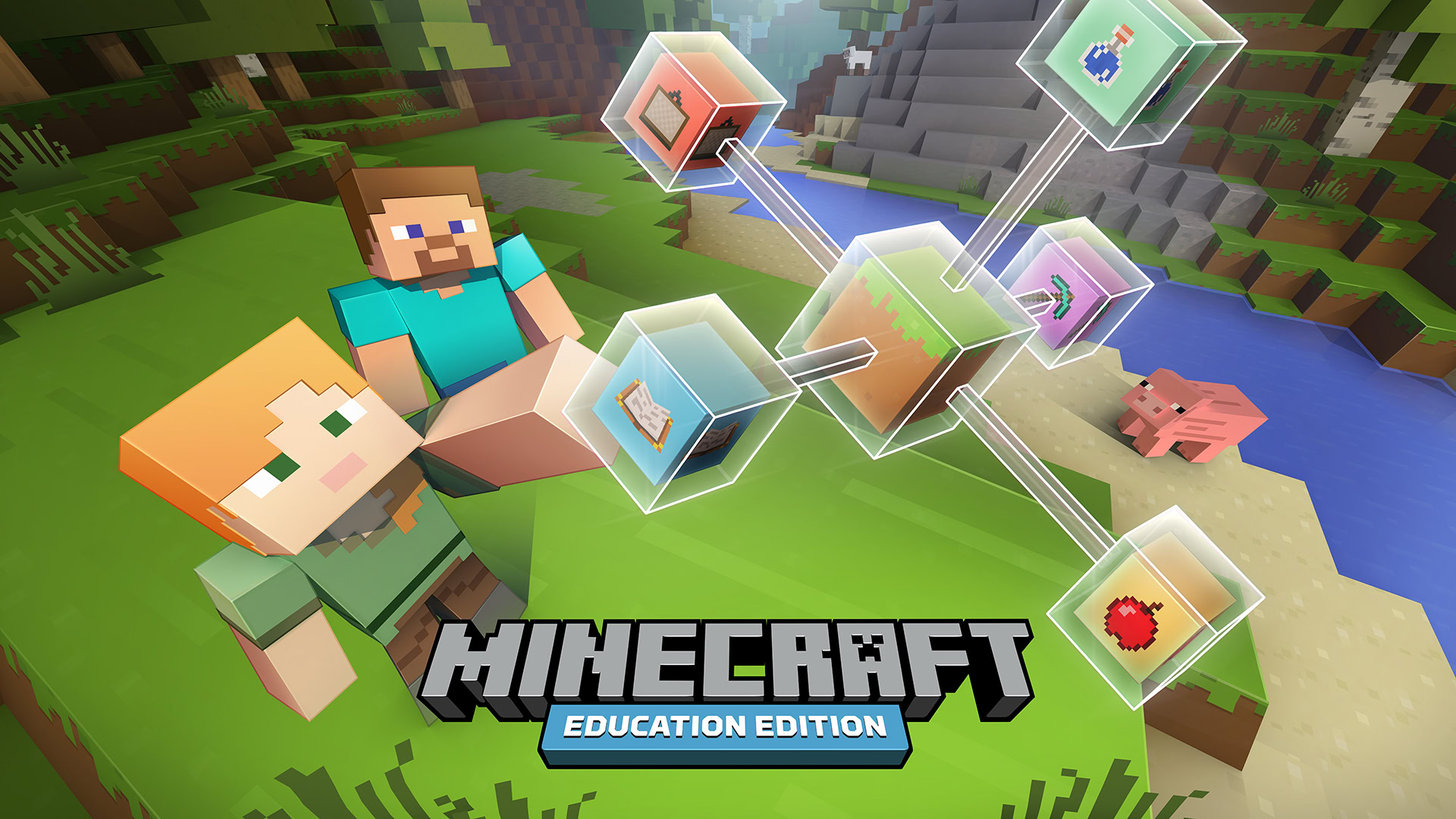
Installing Minecraft: Education Edition from Google Play Store
Minecraft Education Edition

Many Chromebooks support running Android apps through the Google Play Store. Chromebooks released in and after 2017 support Android apps directly. Some older Chromebooks have also got the feature via updates. We have a complete guide to running Android apps on a Chromebook, but we will include the basic steps in the instructions below.

As of now, the Android version of the full Minecraft game isn’t available for Chromebooks. However, you can download and install Minecraft: Education Edition on your Chromebook from the Play Store. It’s not the same, but it is a more student-centric version of the game. You will need a subscription through the education email address to run this version post-installation.

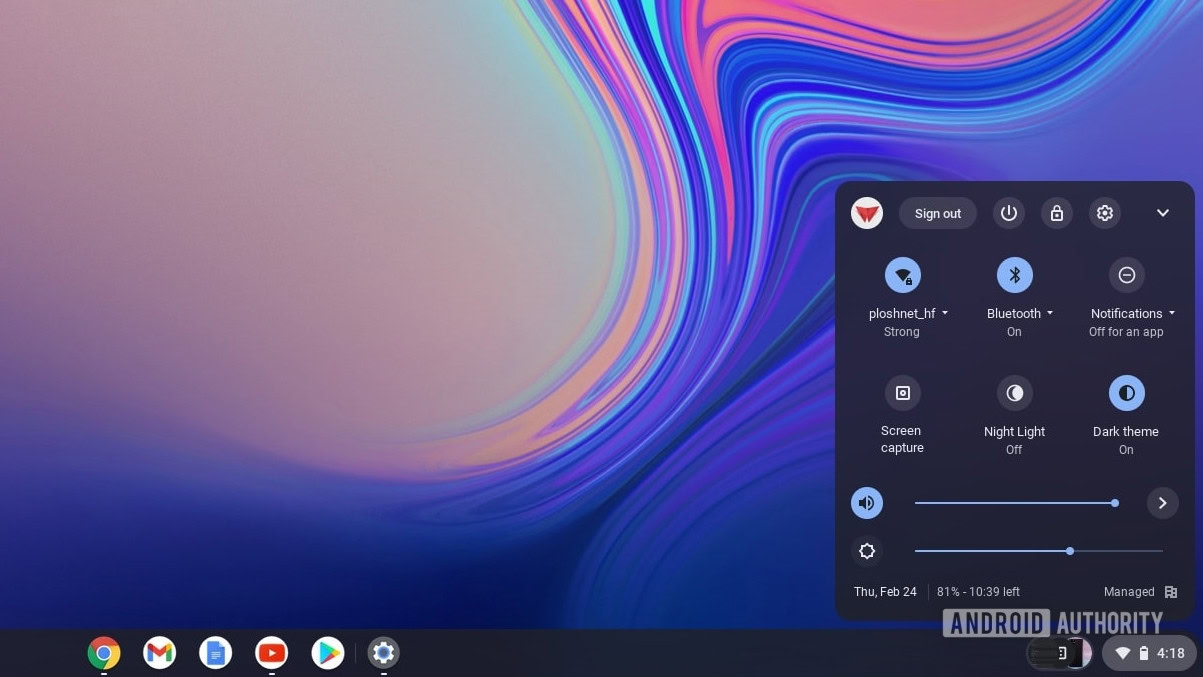
Before you start, make sure your Chromebook has the latest version of Chrome OS. Open the Settings app by clicking the time at the right bottom corner of the screen, on the status bar, and clicking the Settings cog.
Chromebook time settings shortcut

Palash Volvoikar / Android Authority

Select the Apps option. If your Chromebook supports Google Play Store, you will see the option listed on the Apps screen. Click the Turn on button next to the Google Play Store option.

Chromebook Play Store enabled

Palash Volvoikar / Android Authority

Open the Google Play Store from the dock/taskbar or via search. Look for Minecraft: Education Edition by searching for it. Click on the Install button.

Minecraft Education Edition Play Store

Palash Volvoikar / Android Authority

It’ll take some time, but Minecraft: Education Edition will eventually finish installing. Launch it by clicking the Open button on the Play Store screen. You can also open it by looking for it in search.

HOOK IT UP: How to connect a Chromebook to a monitor

Using Linux app support to install Minecraft Java Edition
Minecraft best minecraft apps for Android 2020

Joe Hindy / Android Authority

This is the Minecraft Java Edition for Linux and will only work on x86 systems. If you have an ARM-based Chromebook, this method will not work for you. Also, note that your Chromebook will need to support Linux apps for this method to work.

HERE: How to install Linux apps on your Chromebook

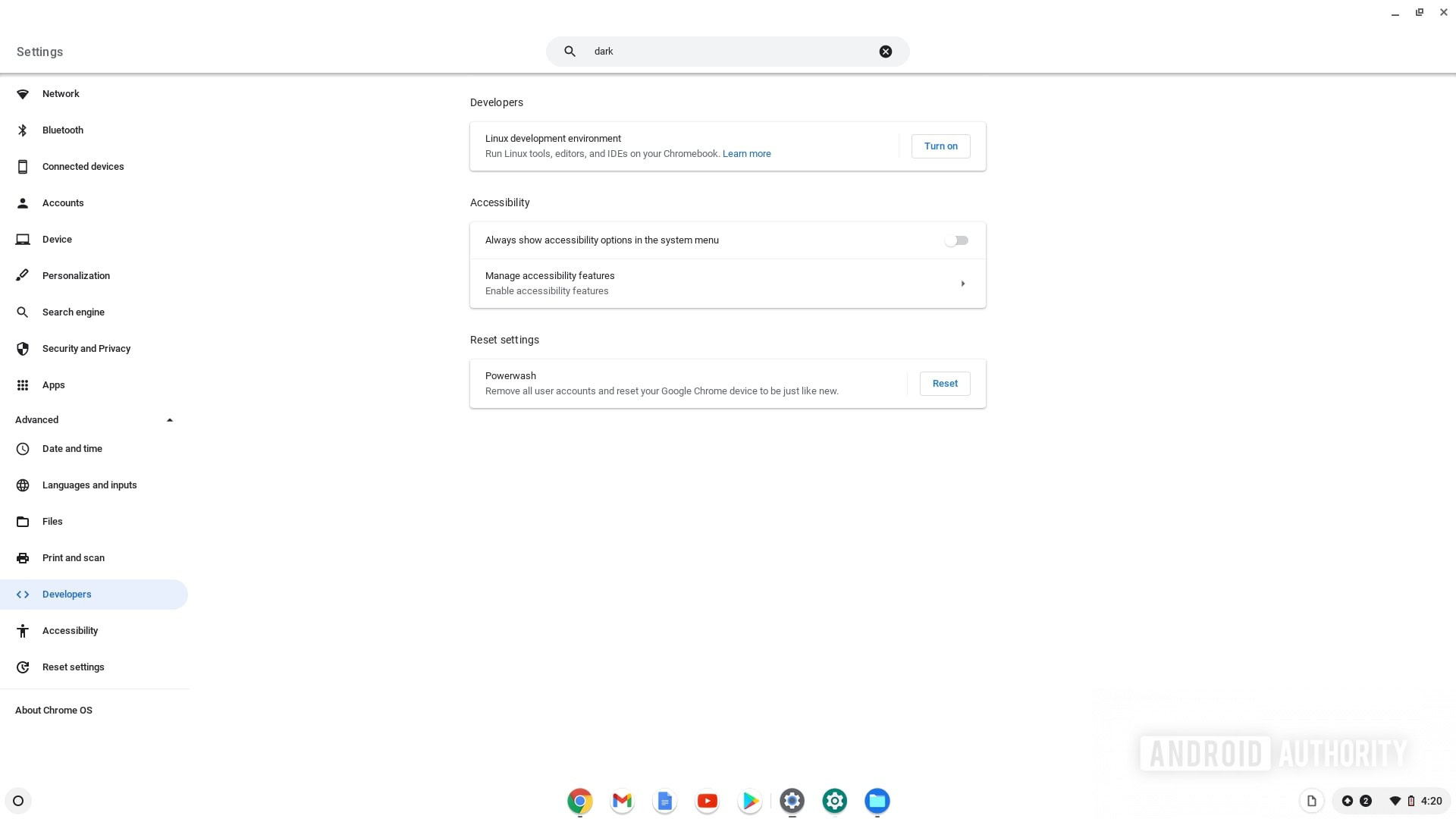
Open the Settings app on your Chromebook and open the advanced settings by clicking the Advanced tab in the left navigation pane. Click the Developers tab under advanced settings. There will be a tab that says Linux development environment in the right pane. Click the Turn on button under it.
Chromebook Developer settings

Palash Volvoikar / Android Authority

An installation window will show up. Click Next. Select the disk size according to your preference on the following screen and click Install.

Chromebook Linux disk size

Palash Volvoikar / Android Authority

It will take some time, but the installation will finish, and a terminal window will open. Update your Linux environment to the latest version by typing in the command below. Hit Enter once you type it in.

Code

sudo apt-get update && sudo apt-get upgrade -y
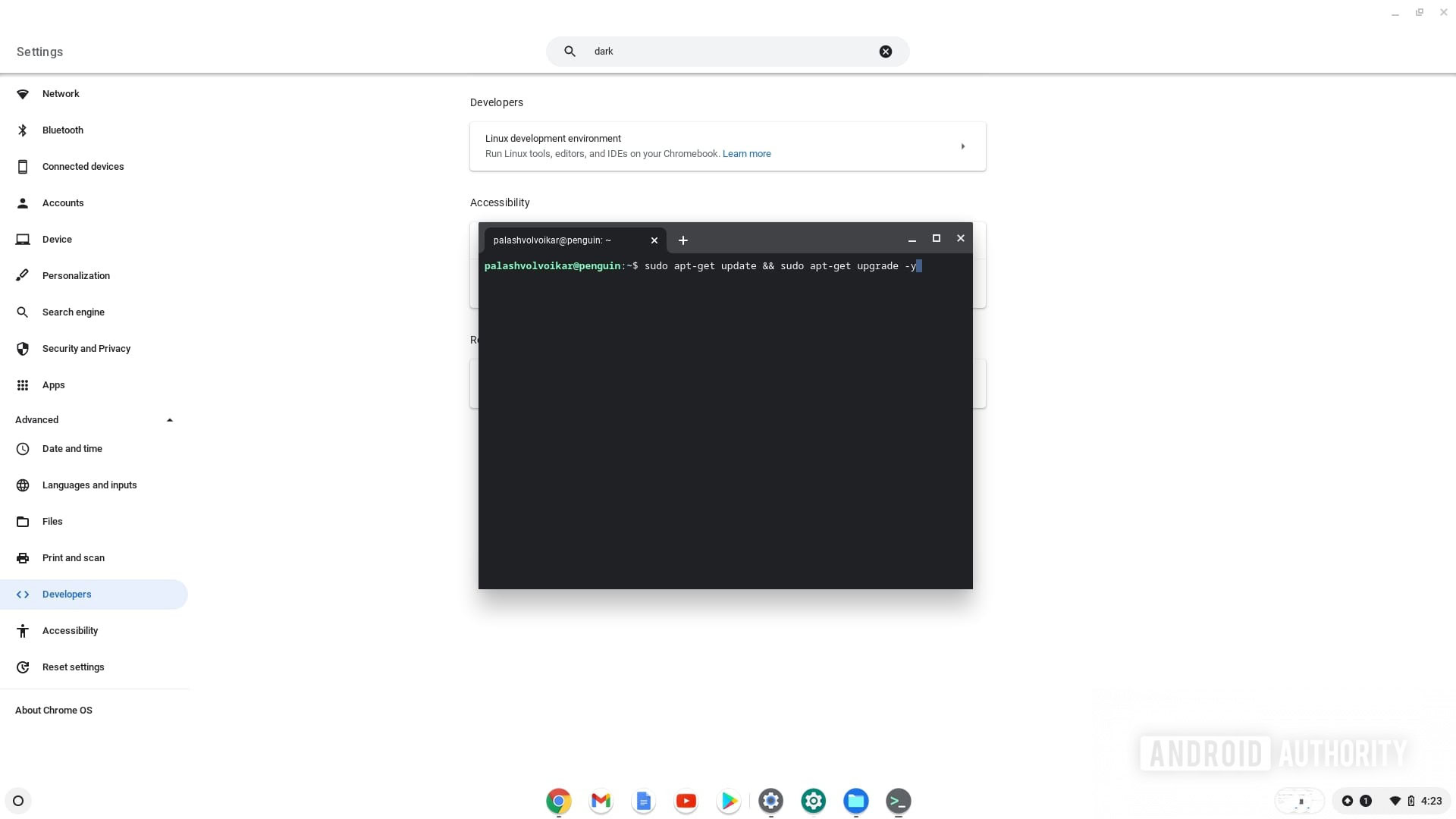
Chromebook Linux terminal update

Palash Volvoikar / Android Authority

Head over to the Minecraft downloads page, and download the Debian / Ubuntu version by clicking on Minecraft.deb. Find it in your Downloads folder and copy the file by pressing Ctrl + C or right-click and Copy.

Chromebook Minecraft download

Palash Volvoikar / Android Authority

Open the Linux files folder from the left navigation pane, and paste it into the folder. Double-click the file to run.

Chromenook Linux Files folder

Palash Volvoikar / Android Authority

In the window that appears, click Install. It’ll take a few seconds, and the installation will finish. Click OK to close the window.
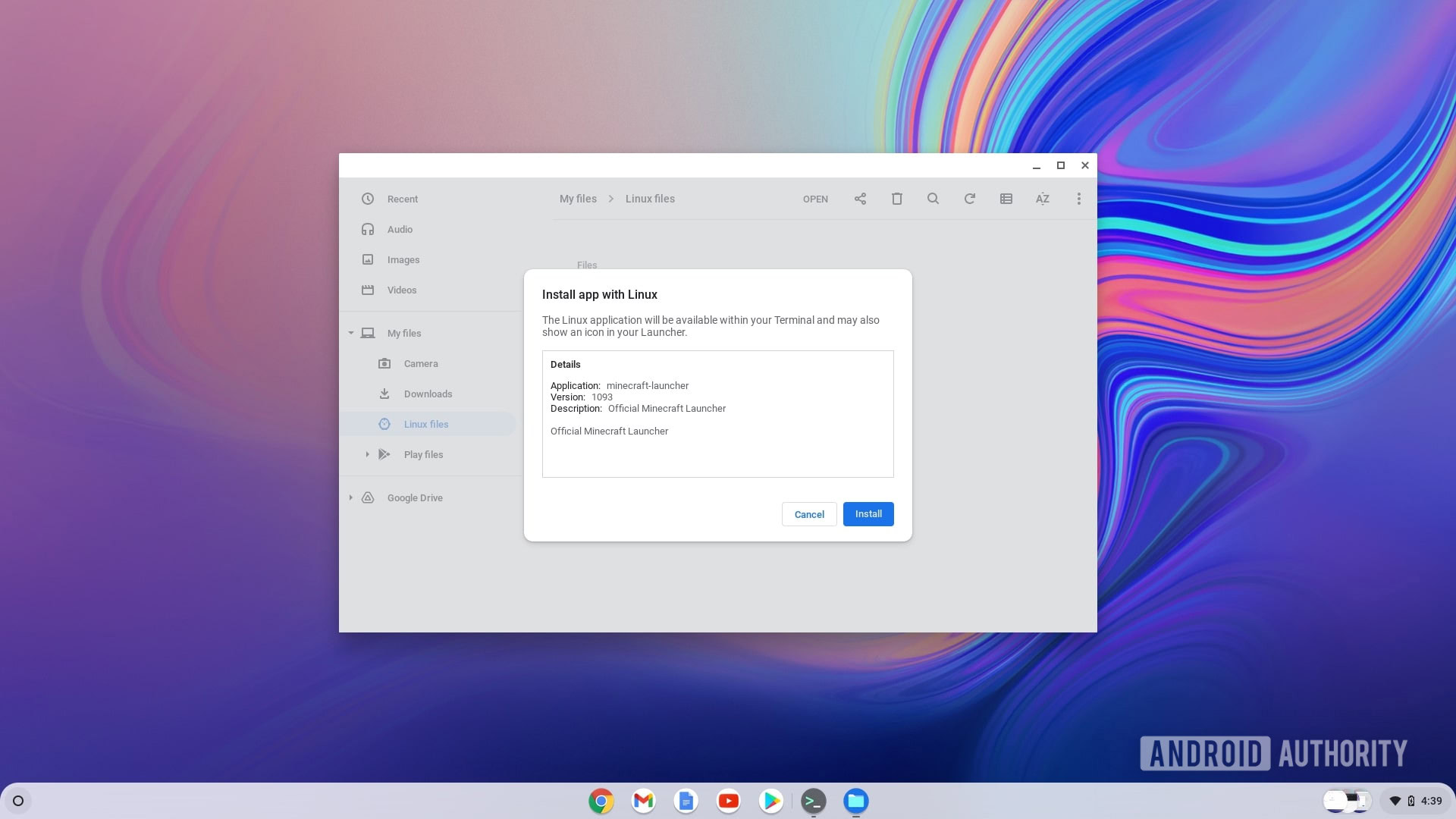
Chromebook Minecraft install

Palash Volvoikar / Android Authority

Look for Minecraft Launcher in the search tab, and click it to launch. You can then log in with your Minecraft account and start playing.

Chromebook Minecraft launcher

Palash Volvoikar / Android Authority

Installing Minecraft using PojavLauncher (ARM and x86)
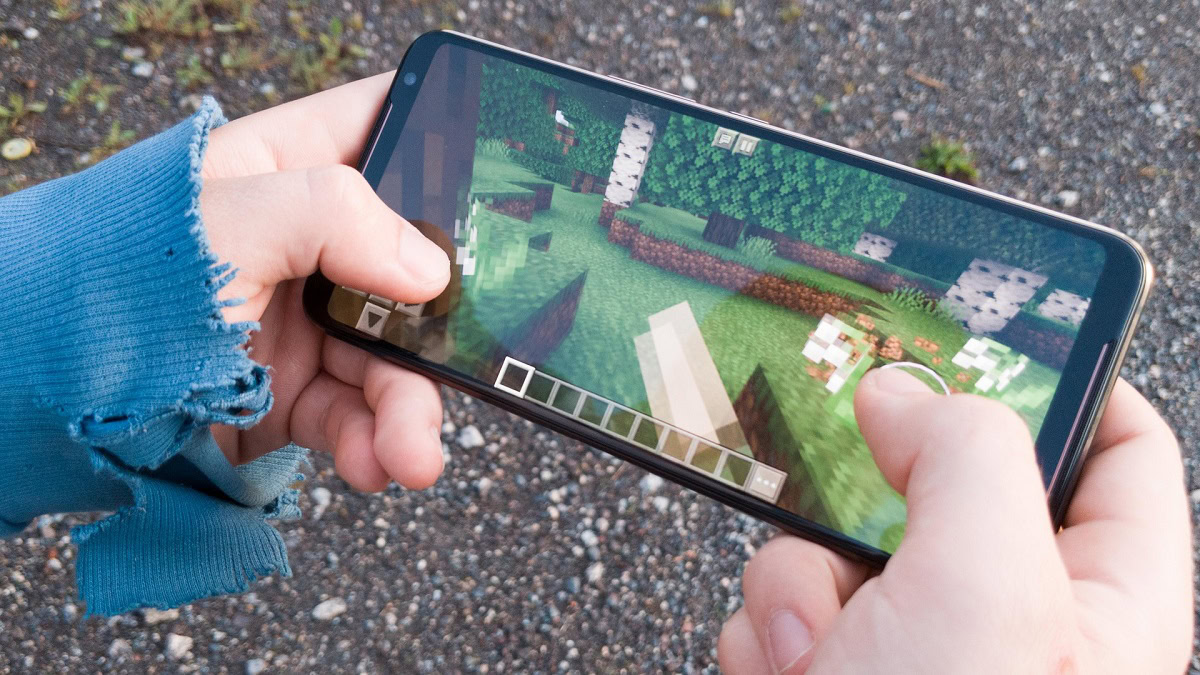
ROG Phone 2 Minecraft Demonstration

Curtis Joe / Android Authority

If your Chromebook has an ARM chipset, i.e., it runs on a CPU not from Intel or AMD, the Linux method will not work for you. In that case, you will need to install PojavLauncher, which helps run the Android version of Minecraft on ARM-based and x86-based Chromebooks.

Open the Settings app on your Chromebook by clicking on the time at the right bottom corner of the screen, on the status bar, and clicking the Settings icon.

Chromebook time settings shortcut

Palash Volvoikar / Android Authority

Click on the Apps tab. If your Chromebook supports Google Play Store, you will see the option listed on the Apps screen. Click the Turn on button next to the Google Play Store option.

Chromebook Play Store enabled

Palash Volvoikar / Android Authority

Open the Google Play Store from the dock/taskbar or via search. Search for PojavLauncher, and open it in the Play Store by clicking on the search result. Click the Install button.

Minecraft PojavLauncher Play Store

Palash Volvoikar / Android Authority

Once installed, run PojavLauncher. Grant it storage permission when prompted.

PojavLauncher permissions

Palash Volvoikar / Android Authority

It will download and install the files needed to run Minecraft and then give you the option to log in to Minecraft.

Minecraft Chromebook PojavLauncher

Palash Volvoikar / Android Authority

FAQs

It depends upon the kind of Chromebook you have, but most Chromebooks will be able to play Minecraft at 30 FPS at an acceptable resolution.

The Android version of Minecraft, also known as Minecraft Pocket Edition, is the bedrock version. It can be run on Chromebooks using PojavLauncher, even though the official Minecraft Pocket Edition app is unavailable.

Minecraft is a paid game, so there’s no legal way to get it for free. All these methods will ask you to log in to a Minecraft account that already has a purchase associated with it.




Source link

ShareTweetSend
Previous Post

Women sexually abused by ICU nurse sue Colorado hospital

Next Post

Kangaroos return to the top of the International Rugby League World Rankings

Related News

Exploring Innovations: A Breakthrough in Living Liver Technology, a Lucrative Battery Partnership, and the Surge of AI Excitement
Tech

Exploring Innovations: A Breakthrough in Living Liver Technology, a Lucrative Battery Partnership, and the Surge of AI Excitement

November 19, 2026
Microsoft’s Satya Nadella Reveals Strategic Rationale Behind Layoff of 60,000 Employees
Tech

Microsoft’s Satya Nadella Reveals Strategic Rationale Behind Layoff of 60,000 Employees

November 19, 2026
Cybercriminals Embrace Innovative AI Tool for Streamlined Hacking Operations
Tech

Cybercriminals Embrace Innovative AI Tool for Streamlined Hacking Operations

November 18, 2026
Transform Your Laptop Setup with These 5 Affordable Accessories
Tech

Transform Your Laptop Setup with These 5 Affordable Accessories

November 15, 2026
Next Post
Kangaroos return to the top of the International Rugby League World Rankings

Kangaroos return to the top of the International Rugby League World Rankings

Discussion about this post

Subscribe To Our Newsletters

    Customer Support


    1251 Wilcrest Drive
    Houston, Texas
    77042 USA
    Call-832.795.1420
    e-mail – news@theinsightpost.com

    Subscribe To Our Newsletters

      Categories

      • Africa
      • Africa-East
      • African Sports
      • American Sports
      • Arts
      • Asia
      • Australia
      • Business
      • Business Asia
      • Business- Africa
      • Canada
      • Defense
      • Education
      • Egypt
      • Energy
      • Entertainment
      • Europe
      • European Soccer
      • Finance
      • Germany
      • Ghana
      • Health
      • Insight
      • International
      • Investing
      • Japan
      • Latest Headlines
      • Life & Living
      • Markets
      • Mobile
      • Movies
      • New Zealand
      • Nigeria
      • Politics
      • Scholarships
      • Science
      • South Africa
      • South America
      • Sports
      • Tech
      • Travel
      • Travel-Africa
      • UK
      • USA
      • Weather
      • World
      No Result
      View All Result

      Recent News

      Navigating Budgeting Apps: Essential Insights on Account Security Before You Connect

      Navigating Budgeting Apps: Essential Insights on Account Security Before You Connect

      November 19, 2026
      Australia Claims Victory Over Argentina with 2-0 Win at Under-17 FIFA World Cup

      Australia Claims Victory Over Argentina with 2-0 Win at Under-17 FIFA World Cup

      November 19, 2026
      Putin Promises Consequences Following Ukraine’s Assault on Kerch Strait Bridge

      Putin Promises Consequences Following Ukraine’s Assault on Kerch Strait Bridge

      November 19, 2026
      Brian Blessed Shares Amusing Encounter with Female Gorillas at Zoo

      Brian Blessed Shares Amusing Encounter with Female Gorillas at Zoo

      November 19, 2026
      • Home
      • Advertise With Us
      • About Us
      • Corporate
      • Consumer Rewards
      • Forum
      • Privacy Policy
      • Social Trends

      Theinsightpost ©2026 | All Rights Reserved. Theinsightpost is an Elnegy LLC company, registered in Texas, USA

      Welcome Back!

      Login to your account below

      Forgotten Password?

      Retrieve your password

      Please enter your username or email address to reset your password.

      Log In

      Add New Playlist

      We are using cookies to give you the best experience on our website.

      You can find out more about which cookies we are using or switch them off in .

      No Result
      View All Result
      • Home
      • Insight
      • Blog
      • Business
      • Entertainment
      • Health
      • Politics
      • Shop
        • Gift Shop
        • Value Shop
        • Store
        • Bargain Shop
        • Discount
      • Sports
      • Tech
      • Travel
      • USA
      • Video
      • World
        • Asia
        • Africa
        • South America
        • North America
        • Europe
        • Oceania

      Theinsightpost ©2026 | All Rights Reserved. Theinsightpost is an Elnegy LLC company, registered in Texas, USA

      The Insight Post
      Powered by  GDPR Cookie Compliance
      Privacy Overview

      This website uses cookies so that we can provide you with the best user experience possible. Cookie information is stored in your browser and performs functions such as recognising you when you return to our website and helping our team to understand which sections of the website you find most interesting and useful.

      Strictly Necessary Cookies

      Strictly Necessary Cookie should be enabled at all times so that we can save your preferences for cookie settings.

      Cookie Policy

      More information about our Cookie Policy