









• Home
  • Insight
  • Blog
  • Business
  • Entertainment
  • Health
  • Politics
  • Shop
    • Gift Shop
    • Value Shop
    • Store
    • Bargain Shop
    • Discount
  • Sports
  • Tech
  • Travel
  • USA
  • Video
  • World
    • Asia
    • Africa
    • South America
    • North America
    • Europe
    • Oceania
Wednesday, November 11, 2026
No Result
View All Result
Subscribe Now
  • Home
  • Insight
  • Blog
  • Business
  • Entertainment
  • Health
  • Politics
  • Shop
    • Gift Shop
    • Value Shop
    • Store
    • Bargain Shop
    • Discount
  • Sports
  • Tech
  • Travel
  • USA
    Exploring Diversity: ‘Ten Lives’ Showcases the Varied Economic Journeys of Americans

    Exploring Diversity: ‘Ten Lives’ Showcases the Varied Economic Journeys of Americans

    Philadelphia Eagles Facing Turmoil as Coach Nick Sirianni Addresses Controversy Over Gesture to Fans

    Philadelphia Eagles Facing Turmoil as Coach Nick Sirianni Addresses Controversy Over Gesture to Fans

    Trump Believes Immigration Policies Could Have Backfired on Republicans in Midterms

    Trump Believes Immigration Policies Could Have Backfired on Republicans in Midterms

    Navigating Challenges: LA’s Trailblazing Socialist Mayor Faces Rising Expectations

    Navigating Challenges: LA’s Trailblazing Socialist Mayor Faces Rising Expectations

    Scott Colom and Black Mississippians Poised to Make Senate History

    Scott Colom and Black Mississippians Poised to Make Senate History

    Salon Bids Farewell: A New Chapter Begins

    Salon Bids Farewell: A New Chapter Begins

    Foster Parent Charged in Tragic Murder Case of 10-Year-Old Girl under Her Care, Authorities Report

    Foster Parent Charged in Tragic Murder Case of 10-Year-Old Girl under Her Care, Authorities Report

    Trump Promises Upcoming Decision on Potential Military Action Against Iran

    Trump Promises Upcoming Decision on Potential Military Action Against Iran

    Kim Kardashian and Jennifer Lawrence Turn Heads in Coordinated Skims Pajamas in New York City

    Kim Kardashian and Jennifer Lawrence Turn Heads in Coordinated Skims Pajamas in New York City

  • Video
  • World
    • Asia
    • Africa
    • South America
    • North America
    • Europe
    • Oceania
The Insight Post
  • Home
  • Insight
  • Blog
  • Business
  • Entertainment
  • Health
  • Politics
  • Shop
    • Gift Shop
    • Value Shop
    • Store
    • Bargain Shop
    • Discount
  • Sports
  • Tech
  • Travel
  • USA
    Exploring Diversity: ‘Ten Lives’ Showcases the Varied Economic Journeys of Americans

    Exploring Diversity: ‘Ten Lives’ Showcases the Varied Economic Journeys of Americans

    Philadelphia Eagles Facing Turmoil as Coach Nick Sirianni Addresses Controversy Over Gesture to Fans

    Philadelphia Eagles Facing Turmoil as Coach Nick Sirianni Addresses Controversy Over Gesture to Fans

    Trump Believes Immigration Policies Could Have Backfired on Republicans in Midterms

    Trump Believes Immigration Policies Could Have Backfired on Republicans in Midterms

    Navigating Challenges: LA’s Trailblazing Socialist Mayor Faces Rising Expectations

    Navigating Challenges: LA’s Trailblazing Socialist Mayor Faces Rising Expectations

    Scott Colom and Black Mississippians Poised to Make Senate History

    Scott Colom and Black Mississippians Poised to Make Senate History

    Salon Bids Farewell: A New Chapter Begins

    Salon Bids Farewell: A New Chapter Begins

    Foster Parent Charged in Tragic Murder Case of 10-Year-Old Girl under Her Care, Authorities Report

    Foster Parent Charged in Tragic Murder Case of 10-Year-Old Girl under Her Care, Authorities Report

    Trump Promises Upcoming Decision on Potential Military Action Against Iran

    Trump Promises Upcoming Decision on Potential Military Action Against Iran

    Kim Kardashian and Jennifer Lawrence Turn Heads in Coordinated Skims Pajamas in New York City

    Kim Kardashian and Jennifer Lawrence Turn Heads in Coordinated Skims Pajamas in New York City

  • Video
  • World
    • Asia
    • Africa
    • South America
    • North America
    • Europe
    • Oceania
No Result
View All Result
No Result
View All Result
Home Mobile

How to install Windows 10 on your Mac using Boot Camp

by Theinsightpost
December 31, 2022
in Mobile
0 0
0
How to install Windows 10 on your Mac using Boot Camp


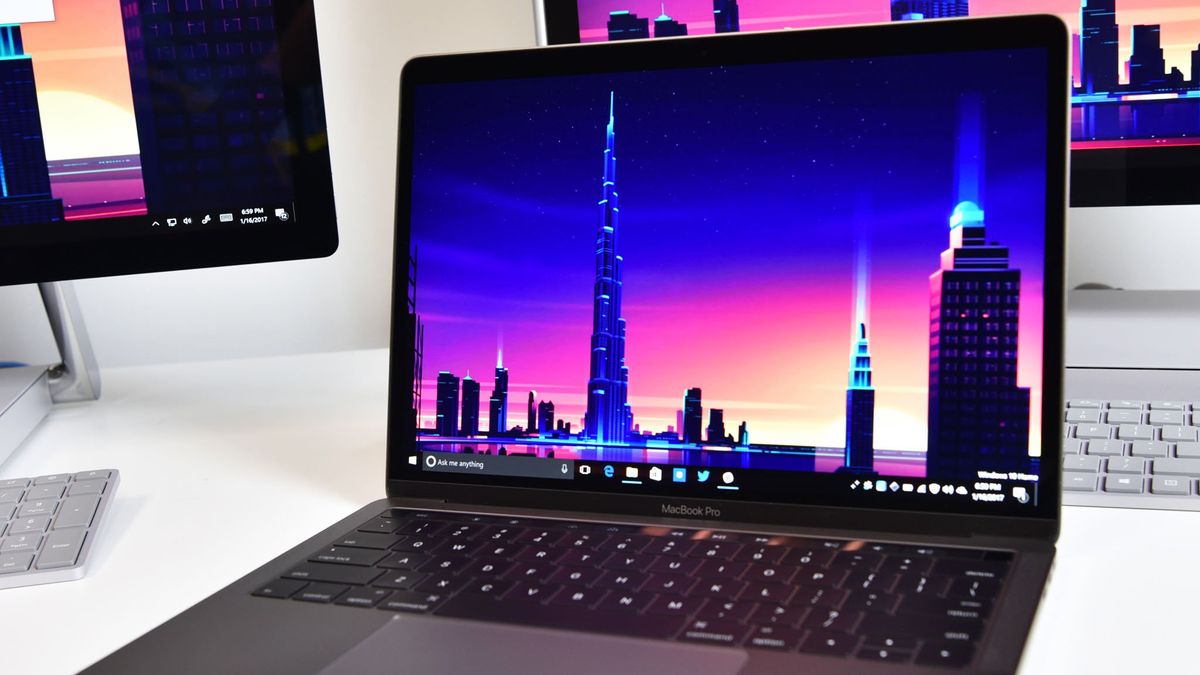
If you want to install Windows on your Intel-based Mac, then Boot Camp is the best way to do it. Whether it’s for a great gaming experience or you just want to try out how Windows 10 feels on Apple’s svelte hardware, here’s how to get everything set up.

It’s worth nothing that some of the newer Macs from late 2020 onwards have Apple Silicon processors, which will no longer support Boot Camp. In this case, virtualization software like Parallels will be necessary to install Windows 10 instead. 

In this guide we’ll walk you through the steps you’ll need to follow to install Windows 10 on your older Mac.

What you’ll need before you install Windows 10 on your Mac

Before starting anything else, be sure you have a Mac that supports Windows 10. Straight from Apple, these are the compatible models:

  • MacBook Pro (2012 and later)
  • MacBook Air (2012 and later)
  • MacBook (2015 and later)
  • iMac Pro (2017)
  • iMac (2012 and later)*
  • Mac mini (2012 and later)
  • Mac mini Server (Late 2012)
  • Mac Pro (Late 2013)

If you own an iMac with 3TB or more, check out this Apple Support document (opens in new tab)for more information on installing Windows 10 on your machine through Boot Camp.

Once you’ve confirmed that you have a Mac that can run Windows 10, you’ll need to make sure you have at least 64GB of free space on your hard drive for the Windows installation. During the installation process, you can set the Windows partition to whatever size you want, as long as the drive has enough storage.

Finally, update your Mac’s OS to ensure there are no compatibility problems. You’ll also want to perform a backup of your Mac in the (rare) case that something goes wrong.

How to download the Windows 10 ISO file

To start, we need to grab a Windows 10 ISO file from the Microsoft website. You can download it straight to your internal hard drive.

  1. Navigate to the Microsoft Windows 10 ISO download page (opens in new tab).
  2. Click the dropdown menu below Select edition.
  3. Click Windows 10 (multi-edition ISO) in the Windows 10 section. You can download the Creators Update through Windows once it is installed.

(Image credit: Apple/iMore)
  1. Click Confirm.
  2. Click the dropdown menu below Select the product language.

A screenshot showing how to install Windows on Mac

(Image credit: Apple/iMore)
  1. Click your language of choice.
  2. Click Confirm.

A screenshot showing how to install Windows on Mac

(Image credit: Apple/iMore)
  1. Click 64-bit Download.
  2. Click Save. The ISO file will now be downloaded.

A screenshot showing how to install Windows on Mac

(Image credit: iMore/Apple)

Once the file has finished downloading, continue on to the next set of steps.

How to install Windows 10 with Boot Camp

Once you’ve downloaded a Windows 10 ISO, you can complete the following steps.

  1. Launch Boot Camp Assistant from the Utilities folder in Applications.
  2. Click Continue. Boot Camp should automatically locate the ISO file on your system.

A screenshot showing how to install Windows on Mac

(Image credit: Apple/iMore)
  1. Click and drag the slider in the partition section. It will be set to 48GB by default, but you can add as much storage as you want within the limits of the drive.
  2. Click Install. Windows support software will now be downloaded.

A screenshot showing how to install Windows on Mac

(Image credit: iMore/Apple)
  1. Type your password.
  2. Click OK. Your Mac will restart and you will see the Windows 10 setup screen.

A screenshot showing how to install Windows on Mac

(Image credit: iMore/Apple)
  1. Choose your language.
  2. Click Install Now.
  3. Type your product key or click I don’t have a key. You can enter it after the installation.
  4. Click either Windows 10 Pro or Windows 10 Pro based on your preference.
  5. Click Next.
  6. Click Custom: Install Windows Only.
  7. Click Drive 0 Partition X: BOOTCAMP. Do not choose anything else.
  8. Click Next. Windows 10 will now be installed. Your Mac will restart several times during the process.
  9. Click Use Express Settings or Customize Your Installation when the Windows 10 setup screen appears. In this case, we use express settings, as all can be changed after the installation.
  10. Type a username. You can also add a password.
  11. Click Next.
  12. Choose to use or not to use Cortana.

Windows 10 will now boot fully, and you’ll be able to use Windows normally.

How to install Boot Camp software on your Windows 10 partition

When Windows 10 loads for the first time on your Mac, a Boot Camp software installer will automatically pop up.

  1. Click Install.
  2. Click I accept the terms in the license agreement.
  3. Click Install.
  4. Click Finish when the installation is complete.

This is an important process, as it installs a bunch of drivers and software that will help make your Windows 10 experience as good as possible on your Mac.

How to return to macOS from Windows 10

One of the best parts of Boot Camp is how easy it is to switch back and forth between operating systems.

  1. Click the Show hidden icons button in the Windows 10 taskbar.
  2. Click the Boot Camp button.
  3. Click Restart in OS X.

A screenshot showing how to install Windows on Mac

(Image credit: iMore/Apple)

Your Mac will now restart, and you’ll be brought right back to macOS. To get back to Windows 10, and indeed another way to switch from Windows 10 to macOS, is to restart your Mac and hold down the Option key on your keyboard until a boot menu appears. From here, you can choose which OS to load.

Updating Windows 10 and more

Now that you have Windows 10 installed on your Mac, you can update it to the Creators Update.

The easiest way to do so is to use Windows Update.

  1. Click the Start button.
  2. Click the Settings button. It looks like a gear.

A screenshot showing how to install Windows on Mac

(Image credit: iMore/Apple)
  1. Click Update & security.
  2. Click Check for updates.

A screenshot showing how to install Windows on Mac

(Image credit: iMore/Apple)

The Creators Update should begin downloading and will install. Follow the steps on screen, and you’ll be up to date in no time.






Source link

ShareTweetSend
Previous Post

Azimio Makes 4 Fresh Demands to Ruto’s Govt

Next Post

The Taliban, these men who are afraid of educated women

Related News

Exploring AI Agents: Transformative Applications in Support, Sales, and Operations for 2026
Mobile

Exploring AI Agents: Transformative Applications in Support, Sales, and Operations for 2026

November 10, 2026
Accelerate Your React Native Deployment: Seamless OTA Updates from CI with Robust QA Integrity
Mobile

Accelerate Your React Native Deployment: Seamless OTA Updates from CI with Robust QA Integrity

November 9, 2026
Seamlessly Implement OTA Updates on Fly.io Using Codemagic Patch
Mobile

Seamlessly Implement OTA Updates on Fly.io Using Codemagic Patch

November 9, 2026
Gboard Elevates User Experience with Enhanced Features for Pixel 11 Owners
Mobile

Gboard Elevates User Experience with Enhanced Features for Pixel 11 Owners

November 8, 2026
Next Post
The Taliban, these men who are afraid of educated women

The Taliban, these men who are afraid of educated women

Discussion about this post

Subscribe To Our Newsletters

    Customer Support


    1251 Wilcrest Drive
    Houston, Texas
    77042 USA
    Call-832.795.1420
    e-mail – news@theinsightpost.com

    Subscribe To Our Newsletters

      Categories

      • Africa
      • Africa-East
      • African Sports
      • American Sports
      • Arts
      • Asia
      • Australia
      • Business
      • Business Asia
      • Business- Africa
      • Canada
      • Defense
      • Education
      • Egypt
      • Energy
      • Entertainment
      • Europe
      • European Soccer
      • Finance
      • Germany
      • Ghana
      • Health
      • Insight
      • International
      • Investing
      • Japan
      • Latest Headlines
      • Life & Living
      • Markets
      • Mobile
      • Movies
      • New Zealand
      • Nigeria
      • Politics
      • Scholarships
      • Science
      • South Africa
      • South America
      • Sports
      • Tech
      • Travel
      • Travel-Africa
      • UK
      • USA
      • Weather
      • World
      No Result
      View All Result

      Recent News

      Navigating Sexual Rejection: Addressing Loneliness Within Your Relationship

      Navigating Sexual Rejection: Addressing Loneliness Within Your Relationship

      November 11, 2026
      Marnus Labuschagne’s Sheffield Shield Comeback Cut Short After Just 36 Balls Against Tasmania

      Marnus Labuschagne’s Sheffield Shield Comeback Cut Short After Just 36 Balls Against Tasmania

      November 11, 2026
      Beyond Cornell: Why Enhanced Regulations Fall Short in Addressing Key Issues

      Beyond Cornell: Why Enhanced Regulations Fall Short in Addressing Key Issues

      November 11, 2026
      First Look: The Enchanting Teaser Trailer for Shrek 5 Unveiled!

      First Look: The Enchanting Teaser Trailer for Shrek 5 Unveiled!

      November 11, 2026
      • Home
      • Advertise With Us
      • About Us
      • Corporate
      • Consumer Rewards
      • Forum
      • Privacy Policy
      • Social Trends

      Theinsightpost ©2026 | All Rights Reserved. Theinsightpost is an Elnegy LLC company, registered in Texas, USA

      Welcome Back!

      Login to your account below

      Forgotten Password?

      Retrieve your password

      Please enter your username or email address to reset your password.

      Log In

      Add New Playlist

      We are using cookies to give you the best experience on our website.

      You can find out more about which cookies we are using or switch them off in .

      No Result
      View All Result
      • Home
      • Insight
      • Blog
      • Business
      • Entertainment
      • Health
      • Politics
      • Shop
        • Gift Shop
        • Value Shop
        • Store
        • Bargain Shop
        • Discount
      • Sports
      • Tech
      • Travel
      • USA
      • Video
      • World
        • Asia
        • Africa
        • South America
        • North America
        • Europe
        • Oceania

      Theinsightpost ©2026 | All Rights Reserved. Theinsightpost is an Elnegy LLC company, registered in Texas, USA

      The Insight Post
      Powered by  GDPR Cookie Compliance
      Privacy Overview

      This website uses cookies so that we can provide you with the best user experience possible. Cookie information is stored in your browser and performs functions such as recognising you when you return to our website and helping our team to understand which sections of the website you find most interesting and useful.

      Strictly Necessary Cookies

      Strictly Necessary Cookie should be enabled at all times so that we can save your preferences for cookie settings.

      Cookie Policy

      More information about our Cookie Policy