









• Home
  • Insight
  • Blog
  • Business
  • Entertainment
  • Health
  • Politics
  • Shop
    • Gift Shop
    • Value Shop
    • Store
    • Bargain Shop
    • Discount
  • Sports
  • Tech
  • Travel
  • USA
  • Video
  • World
    • Asia
    • Africa
    • South America
    • North America
    • Europe
    • Oceania
Friday, November 20, 2026
No Result
View All Result
Subscribe Now
  • Home
  • Insight
  • Blog
  • Business
  • Entertainment
  • Health
  • Politics
  • Shop
    • Gift Shop
    • Value Shop
    • Store
    • Bargain Shop
    • Discount
  • Sports
  • Tech
  • Travel
  • USA
    Texas Execution Prolonged As Staff Encounter Difficulties Finding Vein, Inmate Reinaldo Dennes Reports Pain

    Texas Execution Prolonged As Staff Encounter Difficulties Finding Vein, Inmate Reinaldo Dennes Reports Pain

    Trump’s Deal Turns Sour as Voters Withdraw Support

    Trump’s Deal Turns Sour as Voters Withdraw Support

    FAA Administrator Takes Responsibility as Mullin Faces Tough Questions Over Nationwide Ground Stop

    FAA Administrator Takes Responsibility as Mullin Faces Tough Questions Over Nationwide Ground Stop

    Mary Peltola Emerges Victorious in Alaska Senate Race, Making History for Democrats

    Mary Peltola Emerges Victorious in Alaska Senate Race, Making History for Democrats

    Stranded in Conflict: Palestinians Navigate the Tenuous Balance of War and Peace Amid Ceasefire Efforts

    Stranded in Conflict: Palestinians Navigate the Tenuous Balance of War and Peace Amid Ceasefire Efforts

    Trump Administration Revokes Pay Increase for Head Start Educators

    Trump Administration Revokes Pay Increase for Head Start Educators

    Unexpected Triumph: Gay Candidates Achieve Unforeseen Victories in Challenging Races

    Unexpected Triumph: Gay Candidates Achieve Unforeseen Victories in Challenging Races

    Microsoft Outlook Experiences Prolonged Outage Affecting Users Nationwide

    Microsoft Outlook Experiences Prolonged Outage Affecting Users Nationwide

    Gunfire Erupts in D.C.: Authorities Search for Suspect Amid Rising Concerns Over Public Safety

    Gunfire Erupts in D.C.: Authorities Search for Suspect Amid Rising Concerns Over Public Safety

  • Video
  • World
    • Asia
    • Africa
    • South America
    • North America
    • Europe
    • Oceania
The Insight Post
  • Home
  • Insight
  • Blog
  • Business
  • Entertainment
  • Health
  • Politics
  • Shop
    • Gift Shop
    • Value Shop
    • Store
    • Bargain Shop
    • Discount
  • Sports
  • Tech
  • Travel
  • USA
    Texas Execution Prolonged As Staff Encounter Difficulties Finding Vein, Inmate Reinaldo Dennes Reports Pain

    Texas Execution Prolonged As Staff Encounter Difficulties Finding Vein, Inmate Reinaldo Dennes Reports Pain

    Trump’s Deal Turns Sour as Voters Withdraw Support

    Trump’s Deal Turns Sour as Voters Withdraw Support

    FAA Administrator Takes Responsibility as Mullin Faces Tough Questions Over Nationwide Ground Stop

    FAA Administrator Takes Responsibility as Mullin Faces Tough Questions Over Nationwide Ground Stop

    Mary Peltola Emerges Victorious in Alaska Senate Race, Making History for Democrats

    Mary Peltola Emerges Victorious in Alaska Senate Race, Making History for Democrats

    Stranded in Conflict: Palestinians Navigate the Tenuous Balance of War and Peace Amid Ceasefire Efforts

    Stranded in Conflict: Palestinians Navigate the Tenuous Balance of War and Peace Amid Ceasefire Efforts

    Trump Administration Revokes Pay Increase for Head Start Educators

    Trump Administration Revokes Pay Increase for Head Start Educators

    Unexpected Triumph: Gay Candidates Achieve Unforeseen Victories in Challenging Races

    Unexpected Triumph: Gay Candidates Achieve Unforeseen Victories in Challenging Races

    Microsoft Outlook Experiences Prolonged Outage Affecting Users Nationwide

    Microsoft Outlook Experiences Prolonged Outage Affecting Users Nationwide

    Gunfire Erupts in D.C.: Authorities Search for Suspect Amid Rising Concerns Over Public Safety

    Gunfire Erupts in D.C.: Authorities Search for Suspect Amid Rising Concerns Over Public Safety

  • Video
  • World
    • Asia
    • Africa
    • South America
    • North America
    • Europe
    • Oceania
No Result
View All Result
No Result
View All Result
Home Tech

5 more out-of-sight options to supercharge Google Assistant on Android

by Theinsightpost
February 5, 2023
in Tech
0 0
0
5 more out-of-sight options to supercharge Google Assistant on Android


Google Assistant may not be the shiny new A.I. superstar of the moment, but it’s a surprisingly useful resource just waiting to hop in and help on any Android phone you’re carrying.

And some of its most helpful options are buried deep within the service’s virtual bowels.

Continuing on the theme of hidden settings for a smarter Assistant Android experience, today, we’ll pick up where we left off on Wednesday and explore another five easily overlooked Google Assistant Android options. Dig ’em up, check ’em out, and add ’em into your own personal Assistant setup, and you’ll find your favorite familiar helper growing ever more helpful and tuned into your needs.

Google Assistant Android option No. 1: The shortcut supernova

Few mere mortals realize it, but Google Assistant’s got a whole universe of time-saving shortcuts just waiting to be activated on your favorite Android phone.

These shortcuts are highly customizable and connected to specific apps installed on your device. They’re some of Assistant’s most useful on-demand commands — if you figure out how to activate ’em.

[Psst: If you love shortcuts, come check out my free Android Shortcut Supercourse next. It’ll teach you tons of time-saving tricks for your phone — going way beyond just Assistant!]

Lucky for us, it’s pretty forkin’ easy, once you know where to look:

  • Say Hey Google, Assistant settings to pull up your phone’s Google Assistant settings.
  • Tap the line labeled “Shortcuts,” then look through all of the apps for which Assistant can add custom commands.
  • Tap any app in the list to explore the available actions.
  • Tap the plus icon alongside any action to activate it and decide what voice command you want to use for it.

Some of the custom Assistant commands you might find, depending on what specific apps you’ve got installed:

  • Opening up a new Chrome tab or incognito tab with any phrase you want
  • Hopping into your Google Photos screenshots section with whatever word you prefer
  • Firing up a new Google Doc document or search
  • Jumping directly into the Play Store’s “My apps” area
  • Snapping a selfie anytime you say “Pookity bookity” (or whatever command for that makes sense to you, you odd little orangutan)
  • Starting a new LinkedIn post or private message or even opening up a specific contact’s profile in that app
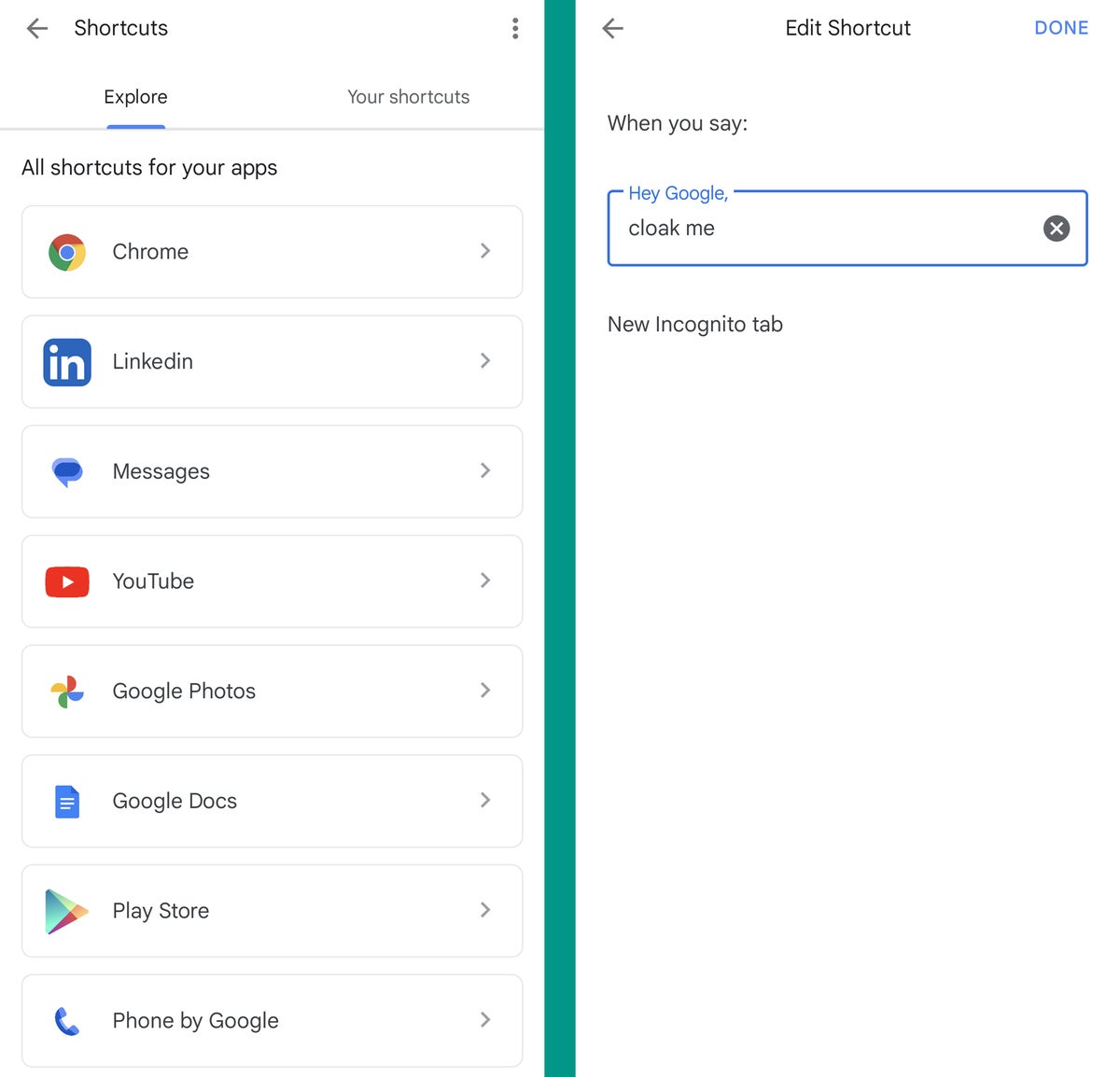
Google Assistant Android: Shortcuts JR

The options are all there and waiting. All you’ve gotta do is embrace ’em.

Google Assistant Android option No. 2: The complex command creator

If you want to get even more ambitious with your custom Assistant command creation, make it your mission to browse through Assistant’s Routines section next.

Routines are one of those things that can be a little overwhelming at first, but once you figure out some good uses for ’em, believe you me: They’ll exponentially expand your Assistant-enabled efficiency.

The simplest way to think about a Google Assistant Routine is as a collection of related commands you can trigger with a single custom command on Assistant — or automate even further and set to have happen automatically on specific days and times. You can bring in all sorts of actions and controls related to your actual Android phone as well as any smart lights, thermostats, or other connected gadgets you’ve got associated with your account.

The possibilities are practically endless. Peek into the “Routines” area of the Assistant settings on your phone to start playing around and seeing what sorts of practical concoctions you can come up with.

Google Assistant Android option No. 3: The no-speak setup

By default, Assistant’s a system that responds to your spoken commands (obviously, right?!). But if you’re working in an office with other people — or just using your Android phone out and about in the real world, around other (alleged) humans — speaking to a screen can sometimes feel a bit…awkward.

Not to fear, though, for Assistant’s got a couple compelling possibilities worth contemplating in such scenarios:

  1. Anytime you activate Assistant, you can tap the little keyboard-shaped icon in its panel to switch over to keyboard input instead of the standard voice control.
  2. If you find yourself leaning on typing more than talking in your typical Assistant interactions, you can change the default behavior so that the keyboard pops up first, anytime Assistant is summoned — and you can then switch to voice input as the alternative, if and when the desire strikes.

To make that change, dance back into your Assistant settings — then:

  • Tap “General” on the main Assistant settings screen.
  • Tap “Preferred input” and change its setting from “Voice” to “Keyboard.”
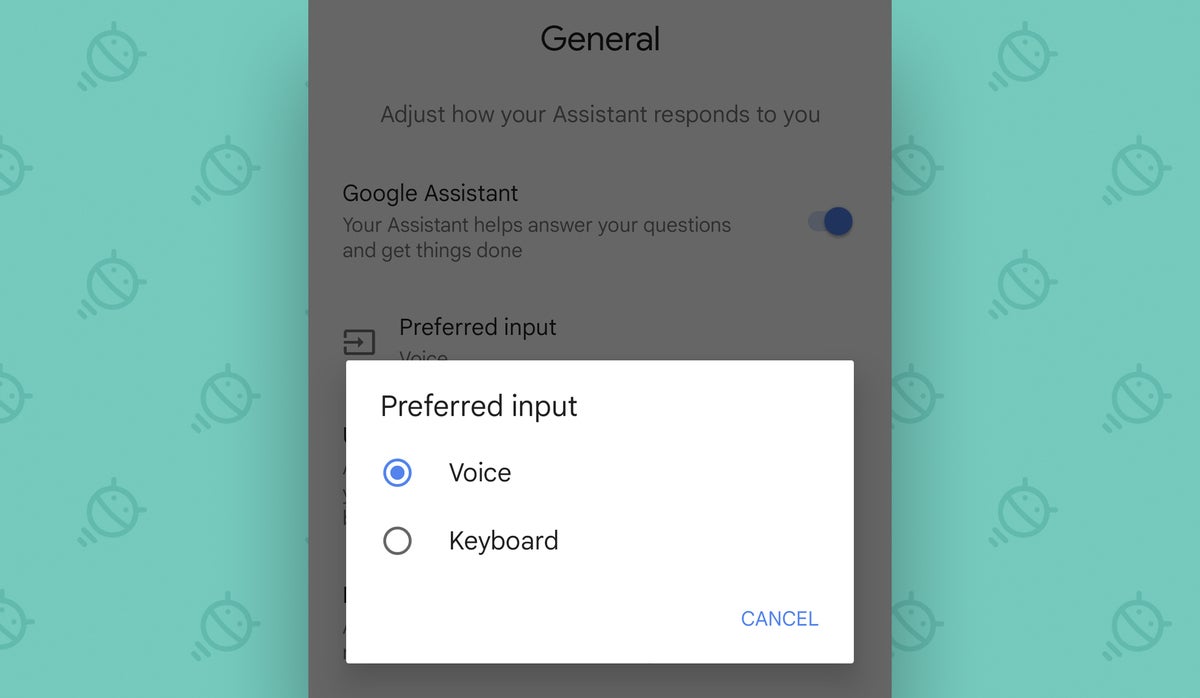
Google Assistant Android: Input JR

Easy peasy, wouldn’t ya say?

Google Assistant Android option No. 4: The name fixer

I don’t know if you’ve experienced this or not, but I’ve got a real beef with Assistant’s pronunciation habits.

By default, y’see, my friendly neighborhood Assistant likes to say my first name as “Junior” (charming — but, alas, inaccurate) and my last name as “RAH-fay-ell” (an understandable error, but again, not the way it’s actually said).

After many a moon of cringing in annoyance every time Assistant addressed me, I finally stumbled onto the fix:

  • Say Hey Google, Assistant settings to pull up your phone’s Google Assistant settings.
  • Tap “Basic info” and then “Nickname.”
  • There, you can phonetically spell or even just record the way you want Assistant to pronounce your name.
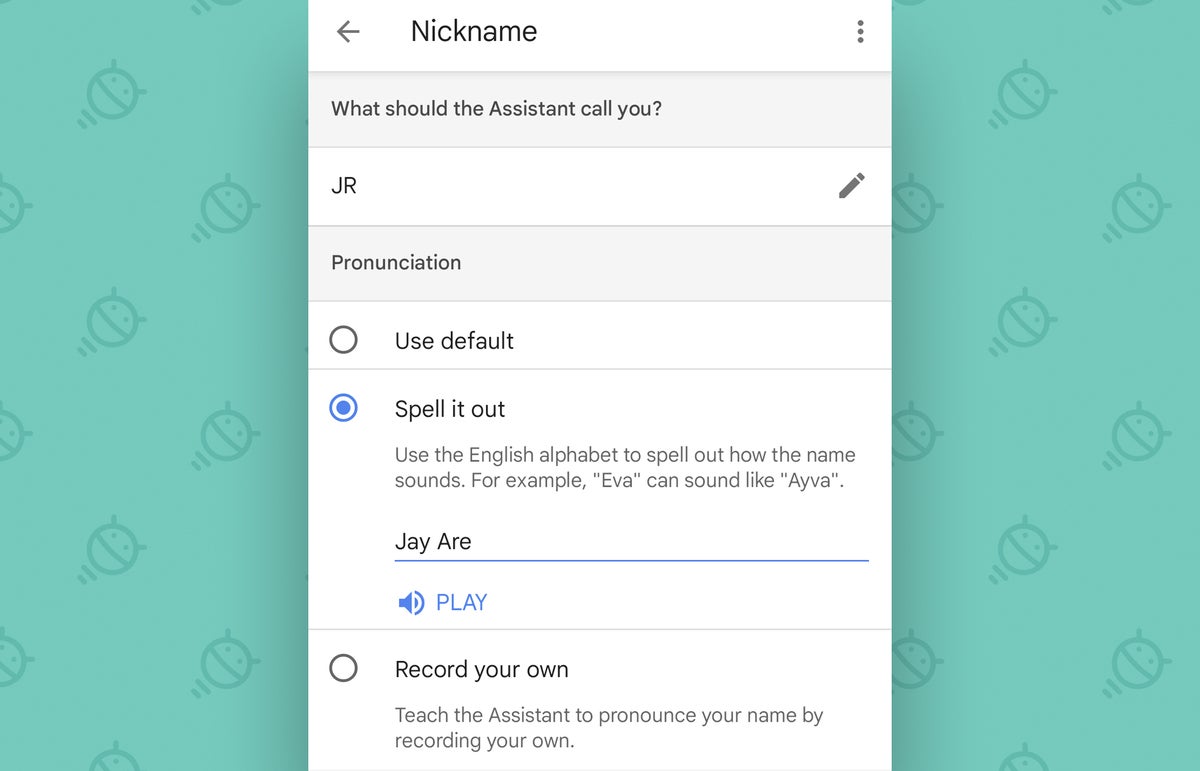
Google Assistant Android: Nickname JR

Save those settings, whether you go the serious route or instruct your Assistant to refer to you as “Goopity Galoshes” — and whatever your wish, your Assistant will eagerly oblige.

Google Assistant Android option No. 5: The people pleaser

Your name might not be the only moniker Assistant mangles — or fails to recognize when you say it properly as part of a command. So to wrap things up today, let’s unearth an area of Assistant’s Android settings that lets you create your own custom name for anyone in your contacts and then teach Assistant the proper way to both say and recognize it:

  • Get back to those Google Assistant settings on your phone one final time.
  • Tap “Your People,” way at the bottom of the list.
  • Tap the “Add person” button to add anyone from your contacts into that area for customization…
  • And then look in the “Name pronunciation” area of their profile to either provide a phonetic pronunciation for what you want to call them or record your own spoken example.
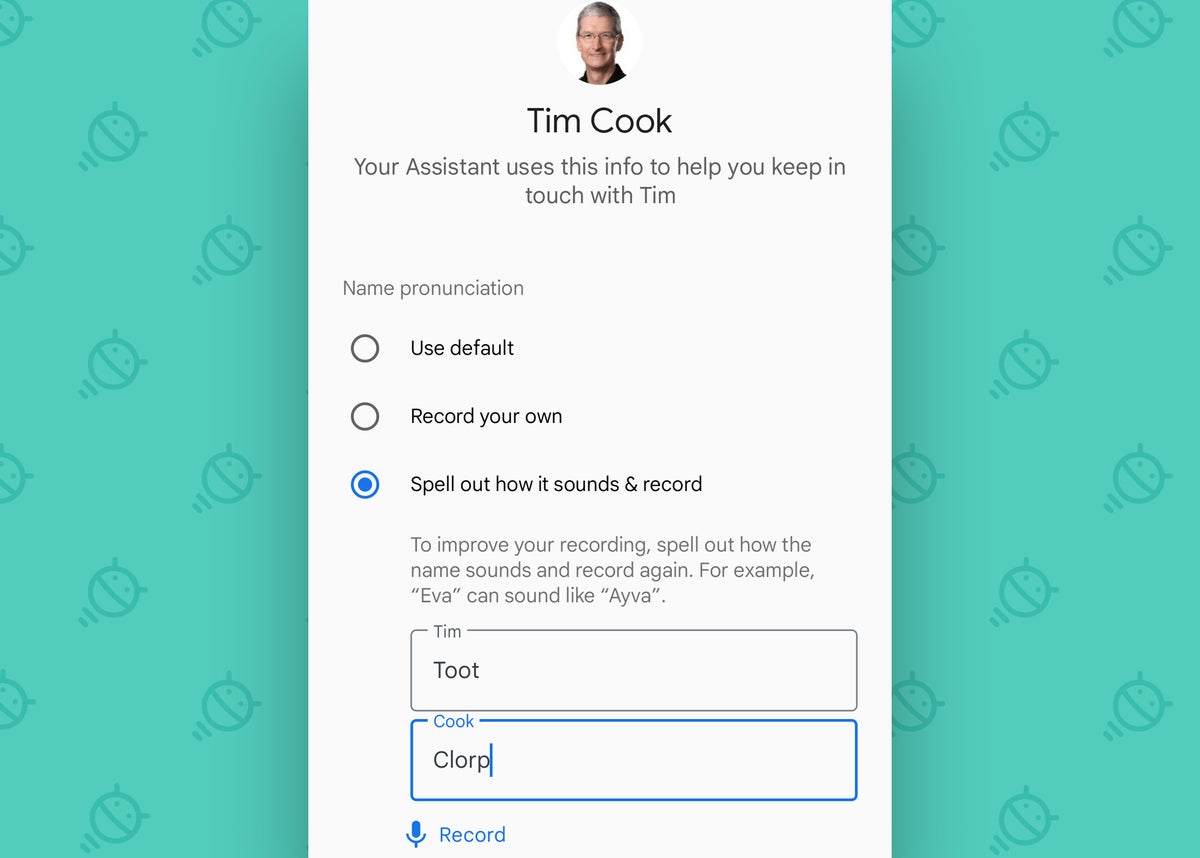
Google Assistant Android: People JR

Hey Google: Thanks for finally getting that right.

Get even more advanced shortcut knowledge with my free Android Shortcut Supercourse. You’ll learn tons of time-saving tricks for your phone!

Copyright © 2023 IDG Communications, Inc.



Source link

ShareTweetSend
Previous Post

Arnold Schwarzenegger, bicyclist collide in Brentwood traffic

Next Post

Liverpool, Real Madrid and Man City to fight it out to sign Jude Bellingham – Paper Talk | Transfer Centre News

Related News

Uber Launches Pilot Program for Safe Children’s Rides with Trusted Drivers
Tech

Uber Launches Pilot Program for Safe Children’s Rides with Trusted Drivers

November 20, 2026
Exploring Innovations: A Breakthrough in Living Liver Technology, a Lucrative Battery Partnership, and the Surge of AI Excitement
Tech

Exploring Innovations: A Breakthrough in Living Liver Technology, a Lucrative Battery Partnership, and the Surge of AI Excitement

November 19, 2026
Microsoft’s Satya Nadella Reveals Strategic Rationale Behind Layoff of 60,000 Employees
Tech

Microsoft’s Satya Nadella Reveals Strategic Rationale Behind Layoff of 60,000 Employees

November 19, 2026
Cybercriminals Embrace Innovative AI Tool for Streamlined Hacking Operations
Tech

Cybercriminals Embrace Innovative AI Tool for Streamlined Hacking Operations

November 18, 2026
Next Post
Liverpool, Real Madrid and Man City to fight it out to sign Jude Bellingham – Paper Talk | Transfer Centre News

Liverpool, Real Madrid and Man City to fight it out to sign Jude Bellingham - Paper Talk | Transfer Centre News

Discussion about this post

Subscribe To Our Newsletters

    Customer Support


    1251 Wilcrest Drive
    Houston, Texas
    77042 USA
    Call-832.795.1420
    e-mail – news@theinsightpost.com

    Subscribe To Our Newsletters

      Categories

      • Africa
      • Africa-East
      • African Sports
      • American Sports
      • Arts
      • Asia
      • Australia
      • Business
      • Business Asia
      • Business- Africa
      • Canada
      • Defense
      • Education
      • Egypt
      • Energy
      • Entertainment
      • Europe
      • European Soccer
      • Finance
      • Germany
      • Ghana
      • Health
      • Insight
      • International
      • Investing
      • Japan
      • Latest Headlines
      • Life & Living
      • Markets
      • Mobile
      • Movies
      • New Zealand
      • Nigeria
      • Politics
      • Scholarships
      • Science
      • South Africa
      • South America
      • Sports
      • Tech
      • Travel
      • Travel-Africa
      • UK
      • USA
      • Weather
      • World
      No Result
      View All Result

      Recent News

      Claire Sweeney Faces Heartbreak Following the Passing of Ex-Partner Ricky Hatton

      Claire Sweeney Faces Heartbreak Following the Passing of Ex-Partner Ricky Hatton

      November 20, 2026
      Democrats Poised to Amplify Investigation into Trump’s Obamacare Rollback Following Major Victory

      Democrats Poised to Amplify Investigation into Trump’s Obamacare Rollback Following Major Victory

      November 20, 2026
      White House Cybersecurity Official Resigns Amid Rising Threats to National Security

      White House Cybersecurity Official Resigns Amid Rising Threats to National Security

      November 20, 2026
      Essential Insights from Experts on Embracing Healthy Aging for Men

      Essential Insights from Experts on Embracing Healthy Aging for Men

      November 20, 2026
      • Home
      • Advertise With Us
      • About Us
      • Corporate
      • Consumer Rewards
      • Forum
      • Privacy Policy
      • Social Trends

      Theinsightpost ©2026 | All Rights Reserved. Theinsightpost is an Elnegy LLC company, registered in Texas, USA

      Welcome Back!

      Login to your account below

      Forgotten Password?

      Retrieve your password

      Please enter your username or email address to reset your password.

      Log In

      Add New Playlist

      We are using cookies to give you the best experience on our website.

      You can find out more about which cookies we are using or switch them off in .

      No Result
      View All Result
      • Home
      • Insight
      • Blog
      • Business
      • Entertainment
      • Health
      • Politics
      • Shop
        • Gift Shop
        • Value Shop
        • Store
        • Bargain Shop
        • Discount
      • Sports
      • Tech
      • Travel
      • USA
      • Video
      • World
        • Asia
        • Africa
        • South America
        • North America
        • Europe
        • Oceania

      Theinsightpost ©2026 | All Rights Reserved. Theinsightpost is an Elnegy LLC company, registered in Texas, USA

      The Insight Post
      Powered by  GDPR Cookie Compliance
      Privacy Overview

      This website uses cookies so that we can provide you with the best user experience possible. Cookie information is stored in your browser and performs functions such as recognising you when you return to our website and helping our team to understand which sections of the website you find most interesting and useful.

      Strictly Necessary Cookies

      Strictly Necessary Cookie should be enabled at all times so that we can save your preferences for cookie settings.

      Cookie Policy

      More information about our Cookie Policy