





• Home
  • Insight
  • Blog
  • Business
  • Entertainment
  • Health
  • Politics
  • Shop
    • Gift Shop
    • Value Shop
    • Store
    • Bargain Shop
    • Discount
  • Sports
  • Tech
  • Travel
  • USA
  • Video
  • World
    • Asia
    • Africa
    • South America
    • North America
    • Europe
    • Oceania
Thursday, July 30, 2026
No Result
View All Result
Subscribe Now
  • Home
  • Insight
  • Blog
  • Business
  • Entertainment
  • Health
  • Politics
  • Shop
    • Gift Shop
    • Value Shop
    • Store
    • Bargain Shop
    • Discount
  • Sports
  • Tech
  • Travel
  • USA
    TX Rep. Brandon Gill Mocks James Talarico Over Fauci Action Figure Post

    TX Rep. Brandon Gill Mocks James Talarico Over Fauci Action Figure Post

    NBA players are ‘being taught’ to flop

    NBA players are ‘being taught’ to flop

    Industry was warned for years about chemical ‘runaway’ dangers. Then came near-catastrophe in O.C.

    Industry was warned for years about chemical ‘runaway’ dangers. Then came near-catastrophe in O.C.

    Trump administration seeks government-wide NDAs to stop leaks : NPR

    Trump administration seeks government-wide NDAs to stop leaks : NPR

    Dog discharges shotgun inside truck, striking woman at Nebraska traffic light

    Dog discharges shotgun inside truck, striking woman at Nebraska traffic light

    Toshifumi Suzuki, Japan’s ‘God’ of Convenience Stores, Dies at 93

    Toshifumi Suzuki, Japan’s ‘God’ of Convenience Stores, Dies at 93

     Judge Sanctioned CoreCivic for Destroying Video in ICE Death Suit

     Judge Sanctioned CoreCivic for Destroying Video in ICE Death Suit

    Suspect dead after opening fire near White House security checkpoint, Secret Service says

    Suspect dead after opening fire near White House security checkpoint, Secret Service says

    Trump trashes Colbert’s high-rated finale as “no ratings”

    Trump trashes Colbert’s high-rated finale as “no ratings”

  • Video
  • World
    • Asia
    • Africa
    • South America
    • North America
    • Europe
    • Oceania
The Insight Post
  • Home
  • Insight
  • Blog
  • Business
  • Entertainment
  • Health
  • Politics
  • Shop
    • Gift Shop
    • Value Shop
    • Store
    • Bargain Shop
    • Discount
  • Sports
  • Tech
  • Travel
  • USA
    TX Rep. Brandon Gill Mocks James Talarico Over Fauci Action Figure Post

    TX Rep. Brandon Gill Mocks James Talarico Over Fauci Action Figure Post

    NBA players are ‘being taught’ to flop

    NBA players are ‘being taught’ to flop

    Industry was warned for years about chemical ‘runaway’ dangers. Then came near-catastrophe in O.C.

    Industry was warned for years about chemical ‘runaway’ dangers. Then came near-catastrophe in O.C.

    Trump administration seeks government-wide NDAs to stop leaks : NPR

    Trump administration seeks government-wide NDAs to stop leaks : NPR

    Dog discharges shotgun inside truck, striking woman at Nebraska traffic light

    Dog discharges shotgun inside truck, striking woman at Nebraska traffic light

    Toshifumi Suzuki, Japan’s ‘God’ of Convenience Stores, Dies at 93

    Toshifumi Suzuki, Japan’s ‘God’ of Convenience Stores, Dies at 93

     Judge Sanctioned CoreCivic for Destroying Video in ICE Death Suit

     Judge Sanctioned CoreCivic for Destroying Video in ICE Death Suit

    Suspect dead after opening fire near White House security checkpoint, Secret Service says

    Suspect dead after opening fire near White House security checkpoint, Secret Service says

    Trump trashes Colbert’s high-rated finale as “no ratings”

    Trump trashes Colbert’s high-rated finale as “no ratings”

  • Video
  • World
    • Asia
    • Africa
    • South America
    • North America
    • Europe
    • Oceania
No Result
View All Result
No Result
View All Result
Home Tech

How to handle errors in minimal APIs in ASP.NET Core

by Theinsightpost
March 19, 2023
in Tech
0 0
0
How to handle errors in minimal APIs in ASP.NET Core


In ASP.NET Core 7, minimal APIs provide a lightweight way to create web APIs with less boilerplate code. However, errors can still occur and you should be able to handle them elegantly.

This article discusses how we can handle errors gracefully in minimal API apps in ASP.NET Core 7. To use the code examples provided in this article, you should have Visual Studio 2022 installed in your system. If you don’t already have a copy, you can download Visual Studio 2022 here.

Create an ASP.NET Core 7 minimal Web API project in Visual Studio 2022

First off, let’s create an ASP.NET Core 7 project in Visual Studio 2022. Follow these steps:

  1. Launch the Visual Studio 2022 IDE.
  2. Click on “Create new project.”
  3. In the “Create new project” window, select “ASP.NET Core Web API” from the list of templates displayed.
  4. Click Next.
  5. In the “Configure your new project” window, specify the name and location for the new project.
  6. Optionally check the “Place solution and project in the same directory” check box, depending on your preferences.
  7. Click Next.
  8. In the “Additional Information” window shown next, select “NET 7.0 (Current)” as the framework and uncheck the check box that says “Use controllers…” Leave the “Authentication Type” as “None” (default).
  9. Ensure that the check boxes “Enable OpenAPI Support,” “Enable Docker”, “Configure for HTTPS,” and “Enable Open API Support” are unchecked as we won’t be using any of those features here.
  10. Click Create.

We’ll use this ASP.NET Core 7 Web API project to create a minimal API and implement error handling in the sections below.

Handling errors in minimal API applications

Replace the default generated source code of the Program.cs file in the project we created with the following code snippet.

var builder = WebApplication.CreateBuilder(args);
var app = builder.Build();
app.MapGet("https://www.infoworld.com/", () => "Hello World!");
app.Map("/error", ()
    => {
            throw new InvalidOperationException("An Error Occurred...");
        });
app.Run();

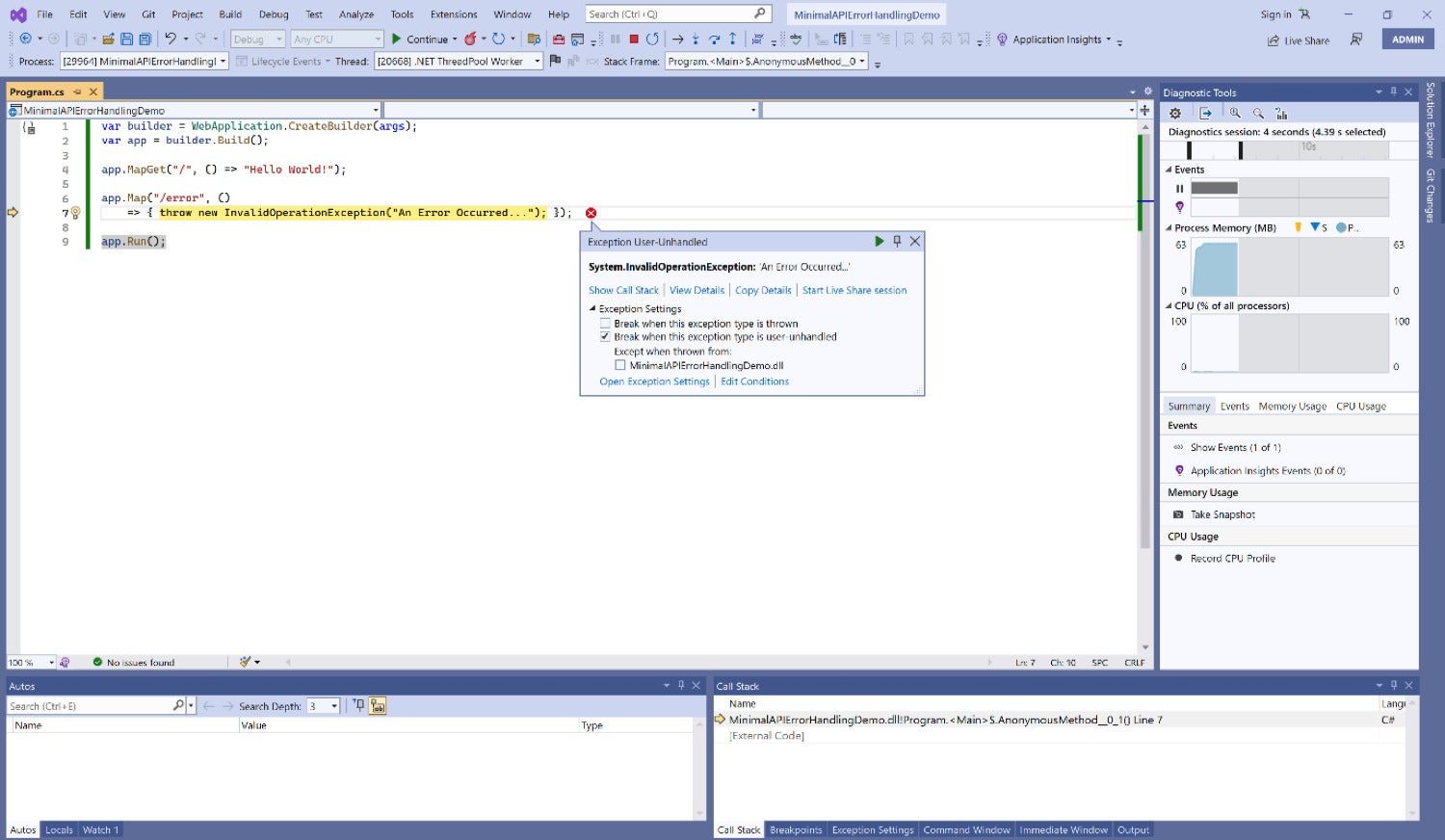
When you run the application, the “Hello World” text message will be displayed in your web browser. If you browse to the /error endpoint, a run time error will occur, and the execution of the application will halt, as shown in Figure 1.
errors minimal apis 01 IDG

Figure 1. A fatal exception in our minimal API application.

There are two built-in mechanisms for handling errors in minimal API applications, the Developer Exception Page middleware and the Exception Handler middleware. Let’s examine each in turn. 

Using the Developer Exception Page middleware

To help developers diagnose and fix errors during development, you can use the Developer Exception Page middleware. The Developer Exception Page middleware displays detailed error information in the browser when an exception occurs.

Here is an example of how to use the Developer Exception Page middleware in a minimal API.

var builder = WebApplication.CreateBuilder(args);
builder.Services.AddEndpointsApiExplorer();
//builder.Services.AddSwaggerGen();
var app = builder.Build();
if (app.Environment.IsDevelopment())
{
   app.UseDeveloperExceptionPage();
}
app.MapGet("https://www.infoworld.com/", () => "Hello, world!");
app.Run();

In this example, the UseDeveloperExceptionPage method is used to add the middleware to the pipeline. The middleware is enabled only when the application is running in the Development environment, which is determined by the app.Environment.IsDevelopment() method.

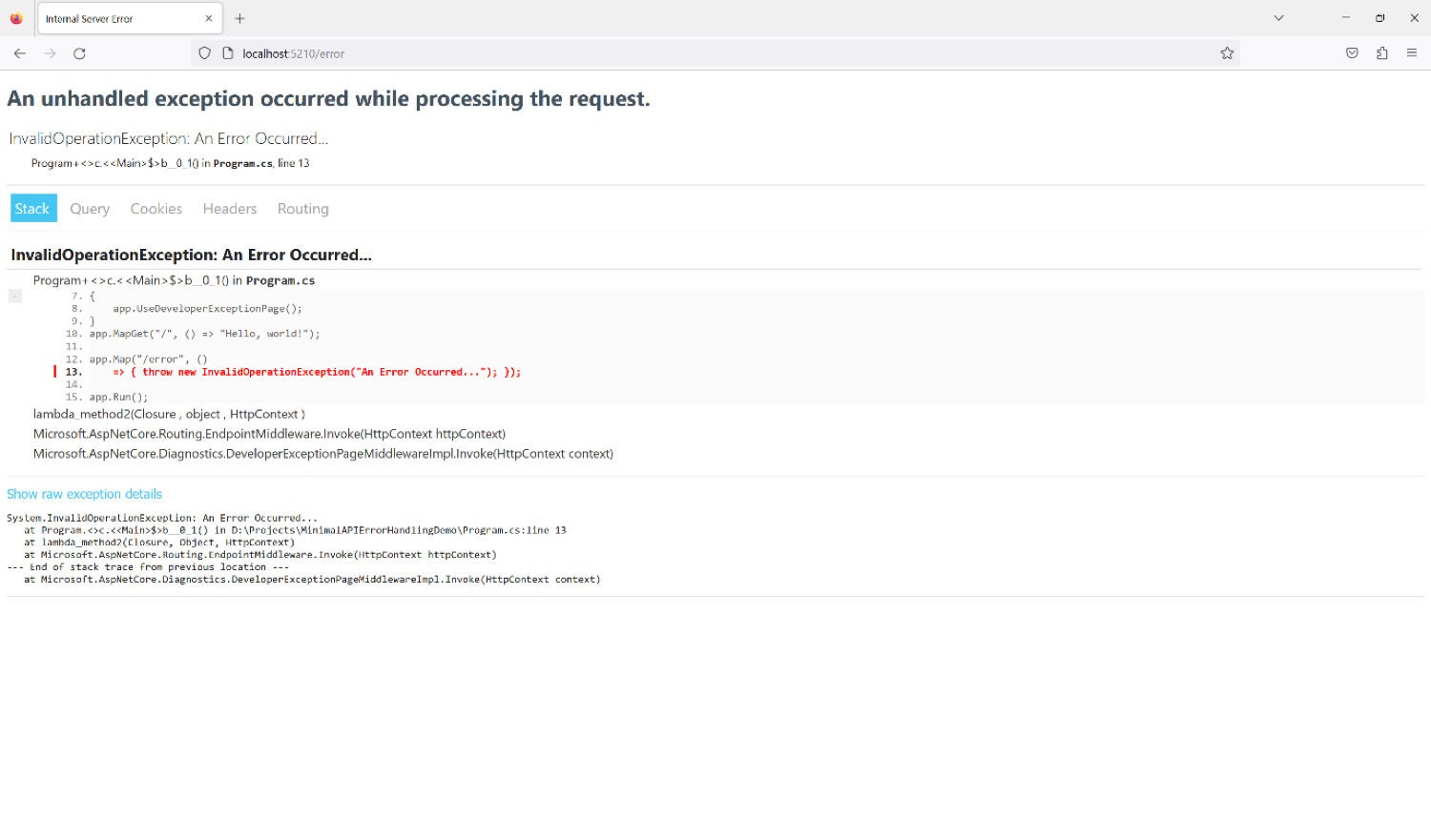
If an exception occurs within the pipeline, the Developer Exception Page middleware catches it and displays a detailed error page in the browser. The error page includes information about the exception, including the stack trace, request details, and environment variables as shown in Figure 2.
errors minimal apis 02 IDG

Figure 2. The Developer Exception Page middleware in action.

By using the Developer Exception Page middleware, developers can quickly diagnose and fix errors during development.

Using the Exception Handler middleware

The Exception Handler middleware catches unhandled exceptions and returns an error response. Typically, you should use this middleware in a non-development environment. Here is an example of how to use the Exception Handler middleware in a minimal API.

var builder = WebApplication.CreateBuilder(args);
var app = builder.Build();
app.UseExceptionHandler(exceptionHandlerApp
    => exceptionHandlerApp.Run(async context => await Results.Problem().ExecuteAsync(context)));
app.Map("/error", ()
    => { throw new InvalidOperationException("An Error Occurred..."); });
app.MapGet("https://www.infoworld.com/", () => "Hello, world!");
app.Run();

In this example, the UseExceptionHandler method is used to configure this middleware. The parameter “/error” specifies the endpoint to which the middleware will redirect in case of an exception.

If an unhandled exception occurs within the pipeline, the Exception Handling middleware catches it and redirects the request to the specified endpoint. Subsequently the error will be handled and an appropriate error message returned.

By using the Exception Handling middleware, you can easily handle exceptions that occur within minimal APIs in ASP.NET Core 7. This can help to improve the reliability and usability of your API.

Using ProblemDetails for response formatting

The ProblemDetails class is a way to include details of error information to avoid creating custom error response formats in ASP.NET Core. The AddProblemDetails extension method pertaining to the IServiceCollection interface can be used to register a default implementation of the IProblemDetailsService.

The following middleware in ASP.NET Core generates ProblemDetails HTTP responses when you make a call to the AddProblemDetailsMiddleware method in your application.

  • ExceptionHandlerMiddleware: This middleware is used to generate a ProblemDetails response if no custom handler is available.
  • DeveloperExceptionPageMiddleware: The DeveloperExceptionPageMiddleware creates a ProblemDetails response if the Accept HTTP header does not contain text/html.
  • StatusCodePagesMiddleware: By default, StatusCodePagesMiddleware generates ProblemDetails responses.

The following code listing shows how you can use ProblemDetails in your minimal APIs.

var builder = WebApplication.CreateBuilder(args);
builder.Services.AddProblemDetails();
var app = builder.Build();
app.UseExceptionHandler();
app.UseStatusCodePages();
app.Map("/authors/{id:int}", (int id)
=> id <= 0 ? Results.BadRequest() : Results.Ok(new Author(id)));
app.Map("/error", ()
=> {
       throw new InvalidOperationException("An Error Occurred...");
   });
app.Run();
public record Author(int Id);

In this example, the /error endpoint extracts the exception information from the HttpContext and creates a ProblemDetails object with the error details. It then sets the response status code and content type, and returns the ProblemDetails object as a JSON response.

Using Status Code Pages middleware to generate a response body

When an ASP.NET Core app encounters HTTP error codes such as “404 – Not Found,” it does not provide a status code page by default. Whenever a response body is not provided for an HTTP 400-599 error status code, the app returns the status code and an empty response body.

You can invoke the UseStatusCodePages method in the Program.cs file of your application to enable text-only handlers for common error status codes. You can use the StatusCodePagesMiddleware class in ASP.NET Core to generate the response as shown in the code snippet given below.

var builder = WebApplication.CreateBuilder(args);
var app = builder.Build();
app.UseStatusCodePages(async statusCodeContext
    => await Results.Problem(statusCode: statusCodeContext.HttpContext.Response.StatusCode)
                 .ExecuteAsync(statusCodeContext.HttpContext));
app.Map("/authors/{id:int}", (int id)
    => id <= 0 ? Results.BadRequest() : Results.Ok(new Author(id)));
app.Run();
public record Author(int Id);

In ASP.NET Core applications, exception filters can be used to catch specific types of exceptions and handle them gracefully. To use a filter, implement the IExceptionFilter interface and add it to the application pipeline. You can learn more about using exception filters (and other filters) in ASP.NET Core in my earlier article here.

Copyright © 2023 IDG Communications, Inc.


Source link

ShareTweetSend
Previous Post

From the desk of The Antler Queen: A “Yellowjackets” primer to catch you up before the show returns

Next Post

High School Basketball Plays of the Week

Related News

A fundamental flaw leaves LLMs strikingly vulnerable to attack
Tech

A fundamental flaw leaves LLMs strikingly vulnerable to attack

July 30, 2026
Google engineer charged with insider trading after making .2M on Polymarket
Tech

Google engineer charged with insider trading after making $1.2M on Polymarket

May 27, 2026
The Osprey Farpoint 40 Has Been My Go-To Travel Bag for 8 Years
Tech

The Osprey Farpoint 40 Has Been My Go-To Travel Bag for 8 Years

May 27, 2026
Source: AI inference provider Baseten is in talks to raise B at a post-money valuation of B, up from B after its 0M Series E announced in January (The Information)
Tech

Source: AI inference provider Baseten is in talks to raise $1B at a post-money valuation of $11B, up from $5B after its $300M Series E announced in January (The Information)

May 26, 2026
Next Post
High School Basketball Plays of the Week

High School Basketball Plays of the Week

Discussion about this post

Subscribe To Our Newsletters

    Customer Support


    1251 Wilcrest Drive
    Houston, Texas
    77042 USA
    Call-832.795.1420
    e-mail – news@theinsightpost.com

    Subscribe To Our Newsletters

      Categories

      • Africa
      • Africa-East
      • African Sports
      • American Sports
      • Arts
      • Asia
      • Australia
      • Business
      • Business Asia
      • Business- Africa
      • Canada
      • Defense
      • Education
      • Egypt
      • Energy
      • Entertainment
      • Europe
      • European Soccer
      • Finance
      • Germany
      • Ghana
      • Health
      • Insight
      • International
      • Investing
      • Japan
      • Latest Headlines
      • Life & Living
      • Markets
      • Mobile
      • Movies
      • New Zealand
      • Nigeria
      • Politics
      • Scholarships
      • Science
      • South Africa
      • South America
      • Sports
      • Tech
      • Travel
      • UK
      • USA
      • Weather
      • World
      No Result
      View All Result

      Recent News

      US Navy to overhaul torpedo stockpile under new two-war strategy

      US Navy to overhaul torpedo stockpile under new two-war strategy

      July 30, 2026
      Free Cloud Computing Course | AWS Re/Start Program 

      Free Cloud Computing Course | AWS Re/Start Program 

      July 30, 2026
      Thirty Years Later

      Thirty Years Later

      July 30, 2026
      Announcing Codemagic Patch: an open-source CodePush rebuild for React Native

      Announcing Codemagic Patch: an open-source CodePush rebuild for React Native

      July 30, 2026
      • Home
      • Advertise With Us
      • About Us
      • Corporate
      • Consumer Rewards
      • Forum
      • Privacy Policy
      • Social Trends

      Theinsightpost ©2026 | All Rights Reserved. Theinsightpost is an Elnegy LLC company, registered in Texas, USA

      Welcome Back!

      Login to your account below

      Forgotten Password?

      Retrieve your password

      Please enter your username or email address to reset your password.

      Log In

      Add New Playlist

      We are using cookies to give you the best experience on our website.

      You can find out more about which cookies we are using or switch them off in .

      No Result
      View All Result
      • Home
      • Insight
      • Blog
      • Business
      • Entertainment
      • Health
      • Politics
      • Shop
        • Gift Shop
        • Value Shop
        • Store
        • Bargain Shop
        • Discount
      • Sports
      • Tech
      • Travel
      • USA
      • Video
      • World
        • Asia
        • Africa
        • South America
        • North America
        • Europe
        • Oceania

      Theinsightpost ©2026 | All Rights Reserved. Theinsightpost is an Elnegy LLC company, registered in Texas, USA

      The Insight Post
      Powered by  GDPR Cookie Compliance
      Privacy Overview

      This website uses cookies so that we can provide you with the best user experience possible. Cookie information is stored in your browser and performs functions such as recognising you when you return to our website and helping our team to understand which sections of the website you find most interesting and useful.

      Strictly Necessary Cookies

      Strictly Necessary Cookie should be enabled at all times so that we can save your preferences for cookie settings.

      Cookie Policy

      More information about our Cookie Policy



