









• Home
  • Insight
  • Blog
  • Business
  • Entertainment
  • Health
  • Politics
  • Shop
    • Gift Shop
    • Value Shop
    • Store
    • Bargain Shop
    • Discount
  • Sports
  • Tech
  • Travel
  • USA
  • Video
  • World
    • Asia
    • Africa
    • South America
    • North America
    • Europe
    • Oceania
Wednesday, November 18, 2026
No Result
View All Result
Subscribe Now
  • Home
  • Insight
  • Blog
  • Business
  • Entertainment
  • Health
  • Politics
  • Shop
    • Gift Shop
    • Value Shop
    • Store
    • Bargain Shop
    • Discount
  • Sports
  • Tech
  • Travel
  • USA
    Mary Peltola Emerges Victorious in Alaska Senate Race, Making History for Democrats

    Mary Peltola Emerges Victorious in Alaska Senate Race, Making History for Democrats

    Stranded in Conflict: Palestinians Navigate the Tenuous Balance of War and Peace Amid Ceasefire Efforts

    Stranded in Conflict: Palestinians Navigate the Tenuous Balance of War and Peace Amid Ceasefire Efforts

    Trump Administration Revokes Pay Increase for Head Start Educators

    Trump Administration Revokes Pay Increase for Head Start Educators

    Unexpected Triumph: Gay Candidates Achieve Unforeseen Victories in Challenging Races

    Unexpected Triumph: Gay Candidates Achieve Unforeseen Victories in Challenging Races

    Microsoft Outlook Experiences Prolonged Outage Affecting Users Nationwide

    Microsoft Outlook Experiences Prolonged Outage Affecting Users Nationwide

    Gunfire Erupts in D.C.: Authorities Search for Suspect Amid Rising Concerns Over Public Safety

    Gunfire Erupts in D.C.: Authorities Search for Suspect Amid Rising Concerns Over Public Safety

    LAUSD Takes Strong Action Against Hate Speech Following Racial Slur Incidents

    LAUSD Takes Strong Action Against Hate Speech Following Racial Slur Incidents

    Beloved Former Los Angeles Times Columnist Steve Harvey Passes Away at 80

    Beloved Former Los Angeles Times Columnist Steve Harvey Passes Away at 80

    Exploring Diversity: ‘Ten Lives’ Showcases the Varied Economic Journeys of Americans

    Exploring Diversity: ‘Ten Lives’ Showcases the Varied Economic Journeys of Americans

  • Video
  • World
    • Asia
    • Africa
    • South America
    • North America
    • Europe
    • Oceania
The Insight Post
  • Home
  • Insight
  • Blog
  • Business
  • Entertainment
  • Health
  • Politics
  • Shop
    • Gift Shop
    • Value Shop
    • Store
    • Bargain Shop
    • Discount
  • Sports
  • Tech
  • Travel
  • USA
    Mary Peltola Emerges Victorious in Alaska Senate Race, Making History for Democrats

    Mary Peltola Emerges Victorious in Alaska Senate Race, Making History for Democrats

    Stranded in Conflict: Palestinians Navigate the Tenuous Balance of War and Peace Amid Ceasefire Efforts

    Stranded in Conflict: Palestinians Navigate the Tenuous Balance of War and Peace Amid Ceasefire Efforts

    Trump Administration Revokes Pay Increase for Head Start Educators

    Trump Administration Revokes Pay Increase for Head Start Educators

    Unexpected Triumph: Gay Candidates Achieve Unforeseen Victories in Challenging Races

    Unexpected Triumph: Gay Candidates Achieve Unforeseen Victories in Challenging Races

    Microsoft Outlook Experiences Prolonged Outage Affecting Users Nationwide

    Microsoft Outlook Experiences Prolonged Outage Affecting Users Nationwide

    Gunfire Erupts in D.C.: Authorities Search for Suspect Amid Rising Concerns Over Public Safety

    Gunfire Erupts in D.C.: Authorities Search for Suspect Amid Rising Concerns Over Public Safety

    LAUSD Takes Strong Action Against Hate Speech Following Racial Slur Incidents

    LAUSD Takes Strong Action Against Hate Speech Following Racial Slur Incidents

    Beloved Former Los Angeles Times Columnist Steve Harvey Passes Away at 80

    Beloved Former Los Angeles Times Columnist Steve Harvey Passes Away at 80

    Exploring Diversity: ‘Ten Lives’ Showcases the Varied Economic Journeys of Americans

    Exploring Diversity: ‘Ten Lives’ Showcases the Varied Economic Journeys of Americans

  • Video
  • World
    • Asia
    • Africa
    • South America
    • North America
    • Europe
    • Oceania
No Result
View All Result
No Result
View All Result
Home Tech

How to use Collaboration in iMessage on iOS 16

by Theinsightpost
September 24, 2022
in Tech
0 0
0
How to use Collaboration in iMessage on iOS 16


AppleInsider is supported by its audience and may earn commission as an Amazon Associate and affiliate partner on qualifying purchases. These affiliate partnerships do not influence our editorial content.

Apple has made collaborating with others easier with iMessage in iOS 16, allowing users to invite others to collaborate on a project and get real-time updates on the changes made. Here’s how to get started.

Collaboration works across iPhones, iPads, and Macs running the latest operating systems.

Here is what you can do with Collaboration and how you can send a collaboration invite via iMessage to people you want to work on a project with.

How Collaboration helps groups

Previously, you would have to send a copy – and not the live version – of a document to share with others, but in iOS 16, Apple resolves this issue with Collaboration. This feature allows you to select a document and instantly start collaborating with others on it from the share sheet.

When inviting others to collaborate on a project, you can send an attachment within iMessage. Sending the invite is as easy as sending a link to others.

Once you want to start collaborating with others on a project, you can select the share button and select the people you want to collaborate with. You do not need to select multiple people, but if everyone you wish to share with is in one group chat, you can easily select or type in the group chat name and everyone in it will have access to the project. Make sure “Collaborate” is the option selected and not “Send Copy” in the share sheet.

When the people you sent the project to get it, they can start making edits and changes right away. In the project, a side message in the corner will appear of the people who have joined the collaboration.
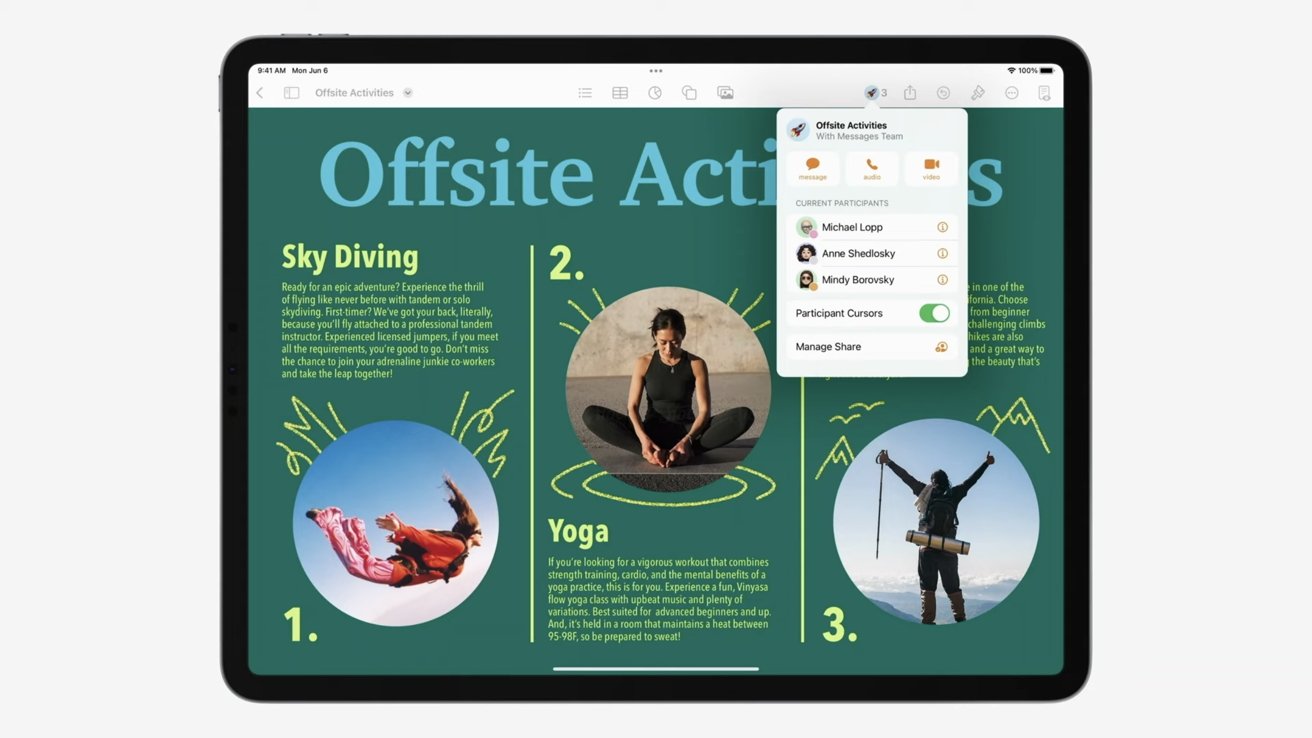
On the top of the messaging thread, you can see updates on the edits that were made or the changes you have missed. From the document, you can kick off communication right from within the toolbar. You can send a message to the group, call, or start a FaceTime them as well.

You can also collaborate with Shared Tabs in Safari too.

Members can share a group of tabs for the whole team to see and interact with. Once looking at what was shared, you can see who is in what tab by their profile picture showing up next to the webpage’s name.
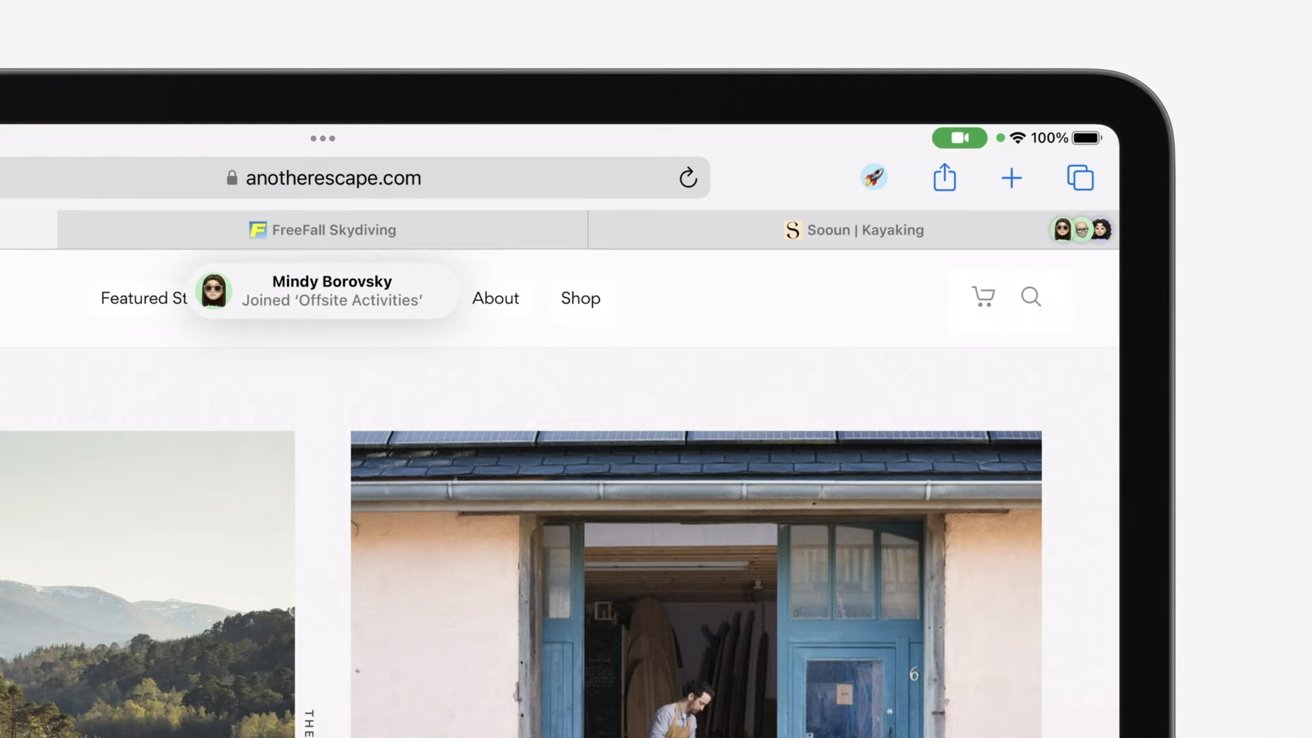
More tabs can be added at any time, and when they are added, team members can jump into them right away.

Once a member jumps into the project and starts making edits and changes to it, you can see what they are changing and the elements they are altering in real-time. Turning on “Participant Cursors” will allow a name to pop up next to the text they are changing – which will be highlighted.

Collaboration is a great way to work with others on a project simultaneously and get updates in real-time about what changes are being made. The feature works across all devices running iOS 16, iPadOS 16, and macOS Ventura.

How to send a Collaboration invite

Sending a Collaboration invite is very easy and simple to do with iMessage. Sending an invite is like sending a link to anyone. Here is how you send one.

  1. Go into the document you want to collaborate on
  2. Tap on the “Share” icon to bring up the share sheet
  3. Make sure the setting is set to “Collaborate” and not “Send a Copy” under the document name. You can also select the option of who can edit the document and what permissions they have.
  4. Tap on the person or group chat you want to send the invite too. If who you want to collaborate with is not accessible within the share sheet, you can send a new message and type their name in there.
  5. Once you send it, others will be able to start accessing the document right away. You will get a notification within the document of the people who have joined.

Once an invite is sent out, you can alter who has access – by adding or revoking it – at any time. To do so, you just tap “Manage Share” within the document’s communication toolbar (located in the area you would go to make a FaceTime call within the document).

Collaborations can be sent to people other than within the Messages app.

Teamwork makes the dream work

Collaboration is a great tool to help any group complete a project simultaneously while being remote. You can see changes and edits made to the document in real-time and get a summary of what you have missed within the messaging thread in iMessage.

The feature is a quick and easy way to work together, and with the addition of iMessage – and being able to share the invitation and communicate upon it quickly and effortlessly – make the completion of a project less of a hassle.

Collaboration works on iOS 16, iPadOS 16, and macOS Ventura. iOS 16 is available now with iPadOS16 and macOS Ventura being released in October 2022.




Source link

ShareTweetSend
Previous Post

Taylor Swift Front-Runner to Head Super Bowl Halftime Show

Next Post

Napoli’s Canonico gives update on Osimhen’s injury

Related News

Cybercriminals Embrace Innovative AI Tool for Streamlined Hacking Operations
Tech

Cybercriminals Embrace Innovative AI Tool for Streamlined Hacking Operations

November 18, 2026
Transform Your Laptop Setup with These 5 Affordable Accessories
Tech

Transform Your Laptop Setup with These 5 Affordable Accessories

November 15, 2026
Microsoft 365 Services Gradually Restore Functionality Following Global Outage
Tech

Microsoft 365 Services Gradually Restore Functionality Following Global Outage

November 14, 2026
Epic Seeks Accountability for Apple’s Alleged Disregard of Court Ruling Intent
Tech

Epic Seeks Accountability for Apple’s Alleged Disregard of Court Ruling Intent

November 13, 2026
Next Post
Napoli’s Canonico gives update on Osimhen’s injury

Napoli's Canonico gives update on Osimhen's injury

Discussion about this post

Subscribe To Our Newsletters

    Customer Support


    1251 Wilcrest Drive
    Houston, Texas
    77042 USA
    Call-832.795.1420
    e-mail – news@theinsightpost.com

    Subscribe To Our Newsletters

      Categories

      • Africa
      • Africa-East
      • African Sports
      • American Sports
      • Arts
      • Asia
      • Australia
      • Business
      • Business Asia
      • Business- Africa
      • Canada
      • Defense
      • Education
      • Egypt
      • Energy
      • Entertainment
      • Europe
      • European Soccer
      • Finance
      • Germany
      • Ghana
      • Health
      • Insight
      • International
      • Investing
      • Japan
      • Latest Headlines
      • Life & Living
      • Markets
      • Mobile
      • Movies
      • New Zealand
      • Nigeria
      • Politics
      • Scholarships
      • Science
      • South Africa
      • South America
      • Sports
      • Tech
      • Travel
      • Travel-Africa
      • UK
      • USA
      • Weather
      • World
      No Result
      View All Result

      Recent News

      Jeff Bezos Reveals His Role in Selecting Robert Pattinson as James Bond, Sparking Online Buzz

      Jeff Bezos Reveals His Role in Selecting Robert Pattinson as James Bond, Sparking Online Buzz

      November 18, 2026
      Nicolas Cage Embraces Unique Pasta Diet to Channel NFL Legend for Upcoming ‘Madden’ Role

      Nicolas Cage Embraces Unique Pasta Diet to Channel NFL Legend for Upcoming ‘Madden’ Role

      November 18, 2026
      Ghana Actors’ Guild Leadership Conflict Escalates to High Court in Tema

      Ghana Actors’ Guild Leadership Conflict Escalates to High Court in Tema

      November 18, 2026
      Fulham Sets £50 Million Price Tag on Calvin Bassey as Manchester United Eyes Transfer

      Fulham Sets £50 Million Price Tag on Calvin Bassey as Manchester United Eyes Transfer

      November 18, 2026
      • Home
      • Advertise With Us
      • About Us
      • Corporate
      • Consumer Rewards
      • Forum
      • Privacy Policy
      • Social Trends

      Theinsightpost ©2026 | All Rights Reserved. Theinsightpost is an Elnegy LLC company, registered in Texas, USA

      Welcome Back!

      Login to your account below

      Forgotten Password?

      Retrieve your password

      Please enter your username or email address to reset your password.

      Log In

      Add New Playlist

      We are using cookies to give you the best experience on our website.

      You can find out more about which cookies we are using or switch them off in .

      No Result
      View All Result
      • Home
      • Insight
      • Blog
      • Business
      • Entertainment
      • Health
      • Politics
      • Shop
        • Gift Shop
        • Value Shop
        • Store
        • Bargain Shop
        • Discount
      • Sports
      • Tech
      • Travel
      • USA
      • Video
      • World
        • Asia
        • Africa
        • South America
        • North America
        • Europe
        • Oceania

      Theinsightpost ©2026 | All Rights Reserved. Theinsightpost is an Elnegy LLC company, registered in Texas, USA

      The Insight Post
      Powered by  GDPR Cookie Compliance
      Privacy Overview

      This website uses cookies so that we can provide you with the best user experience possible. Cookie information is stored in your browser and performs functions such as recognising you when you return to our website and helping our team to understand which sections of the website you find most interesting and useful.

      Strictly Necessary Cookies

      Strictly Necessary Cookie should be enabled at all times so that we can save your preferences for cookie settings.

      Cookie Policy

      More information about our Cookie Policy