










One of the best deals in the travel world is the Southwest Companion Pass.
It lets you take along a companion for free (plus applicable taxes and fees) on an unlimited number of Southwest flights for the lifetime of the pass. For Southwest frequent flyers, this can easily be worth thousands of dollars a year in value.
But how do you unlock this valuable golden ticket of sorts? You’ll need to earn 135,000 tier qualifying points in a single calendar year to earn the pass for the remainder of the current calendar year and the entirety of the next one. This is a lot of points to earn, but there are times when you can leverage a Southwest cobranded credit card’s welcome bonus to earn a Companion Pass quickly.
One of these offers just popped up, wherein you can earn a Companion Pass through February 2024 by spending a few thousand dollars on a new cobranded credit card. Here’s a little about how to get the pass, and how to put it to good use once it’s in your hands.
How to earn the Southwest Companion Pass

You must earn 135,000 Companion Pass-eligible points in one calendar year to get the Southwest Companion Pass.
These points can be earned by flying with Southwest or by earning with one of the airline’s various partners. This includes spending through the Southwest shopping portal, booking hotels with Southwest partners and even spending on a Southwest credit card. The last option is generally the easiest way to earn the Companion Pass, as you effectively earn with your everyday spending, and welcome bonuses count too.
Further, those with a Southwest cobranded credit card automatically receive 10,000 Companion Pass-qualifying points every year. This effectively reduces the requirement to 125,000 points per year.
Related: How to quickly earn the Southwest Companion Pass
Southwest’s newly launched credit card offers make it easier than ever to earn the Companion Pass. Instead of needing to accrue 135,000 points throughout the year, you can meet the card’s minimum spending requirement after you’re approved. Then, you’re granted a Companion Pass through Feb. 28, 2024. This isn’t valid as long as a standard Companion Pass, but it’s far easier to earn.
Sign up for our daily newsletter
Here’s a look at the current offers:
- Southwest Rapid Rewards Plus Credit Card: Earn a Companion Pass through Feb. 28, 2024, plus 30,000 points after you spend $4,000 on purchases in the first three months
- Southwest Rapid Rewards Premier Credit Card: Earn a Companion Pass through Feb. 28, 2024, plus 30,000 points after you spend $4,000 on purchases in the first three months
- Southwest Rapid Rewards Priority Credit Card: Earn a Companion Pass through Feb. 28, 2024, plus 30,000 points after you spend $4,000 on purchases in the first three months
Check out our post on the best Southwest Airlines credit cards to learn more about these cards plus the two Southwest small-business cards.
If you opt to earn a Companion Pass the traditional way, try and earn your qualifying miles as early in the year as possible. This is because the pass is good for the remainder of the current year and the entirety of the following year. With that in mind, if you earned a Companion Pass in March of 2023, you’d have it for the remaining nine months of 2023 and all of 2024.


How to use the Southwest Companion Pass
Once you’ve earned a Companion Pass, Southwest makes it incredibly easy to use it. Here’s how:
Step 1: Set up your Companion Pass
As soon as you earn a Companion Pass, you should receive an email from Southwest within a few days congratulating you on your big accomplishment. If you want to monitor your progress in real time, you can check your status by logging in to your Rapid Rewards account on Southwest.com.
When you get this email, click on the links to set up your initial companion choice. You must have your companion’s full name (as it appears on their ID), birth date, email address and Rapid Rewards account number.
You can also call Southwest to designate your companion. But it’s easy to make the initial selection online, so there’s no reason to pick up the phone for this step.

Step 2: Confirm flight availability for your entire traveling party
Now that you have a companion selected, it’s time for the fun part — booking a flight when your companion will fly free (other than taxes and fees). However, before booking, it’s vital to check that there are enough seats available on the flight for your entire traveling party. A Companion Pass fare can only be added if there is a seat available for sale.

For example, if you have a family of four that will be traveling, including one person on a Companion Pass, search on Southwest.com for four seats. Note that all four seats do not have to be in the same fare bucket. If there are only three seats left with Wanna Get Away fares, but there are also Anytime and Business Select fares available, in addition to those three cheaper fares, your booking will work.
Step 3: Book flights for everyone other than your companion
The next step in using your Companion Pass is to book flight reservations as you normally would for everyone in your traveling party except the companion. This means that if you have a family of four where Mom holds a Companion Pass and Dad is the companion, you should book tickets for Mom and the two kids first. Do not book flights for Dad at this stage.
Most travelers will find that booking flights online on Southwest.com is very easy, although it’s also possible to book flights over the phone with Southwest phone agents. You can book these flights with cash or Rapid Rewards points, as either method works in conjunction with the Companion Pass.
If you are purchasing these tickets with cash, don’t forget to add the Rapid Rewards numbers of everyone in your traveling party to the booking. There’s no reason to leave points-earning possibilities on the table — even kids can earn frequent flyer points on Southwest.

Step 4: Make your companion’s flight booking
After you have booked flights for everyone in your traveling party (except for your companion), the next step is to secure a flight reservation for that person. To avoid losing the ticket availability you just checked for in Step 1, I recommend booking your companion immediately after your flight is booked. This is especially important on flights that regularly sell out (think: peak Christmas dates to and from Hawaii).
The Companion Pass holder (Mom, in our example) should return to the Southwest website and log in to their Rapid Rewards account. Go to “My Account” at the top of the home page.

On the left-hand side of the screen, you’ll see a section called “My upcoming trips.” There, you should see the flight reservation you just made, along with any other trips you have booked on Southwest. If you have many flights reserved, you’ll need to click the “See all trips” link for all of your reservations to appear.
Underneath your flight details, you’ll see a button that says “Add Companion.” Click on it.

You’ll find that the “Trip & Price Details” are already pre-filled with the flight information and the cost of the taxes and fees. In this case, for a domestic one-way trip, that price is just $5.60 for your companion to fly.
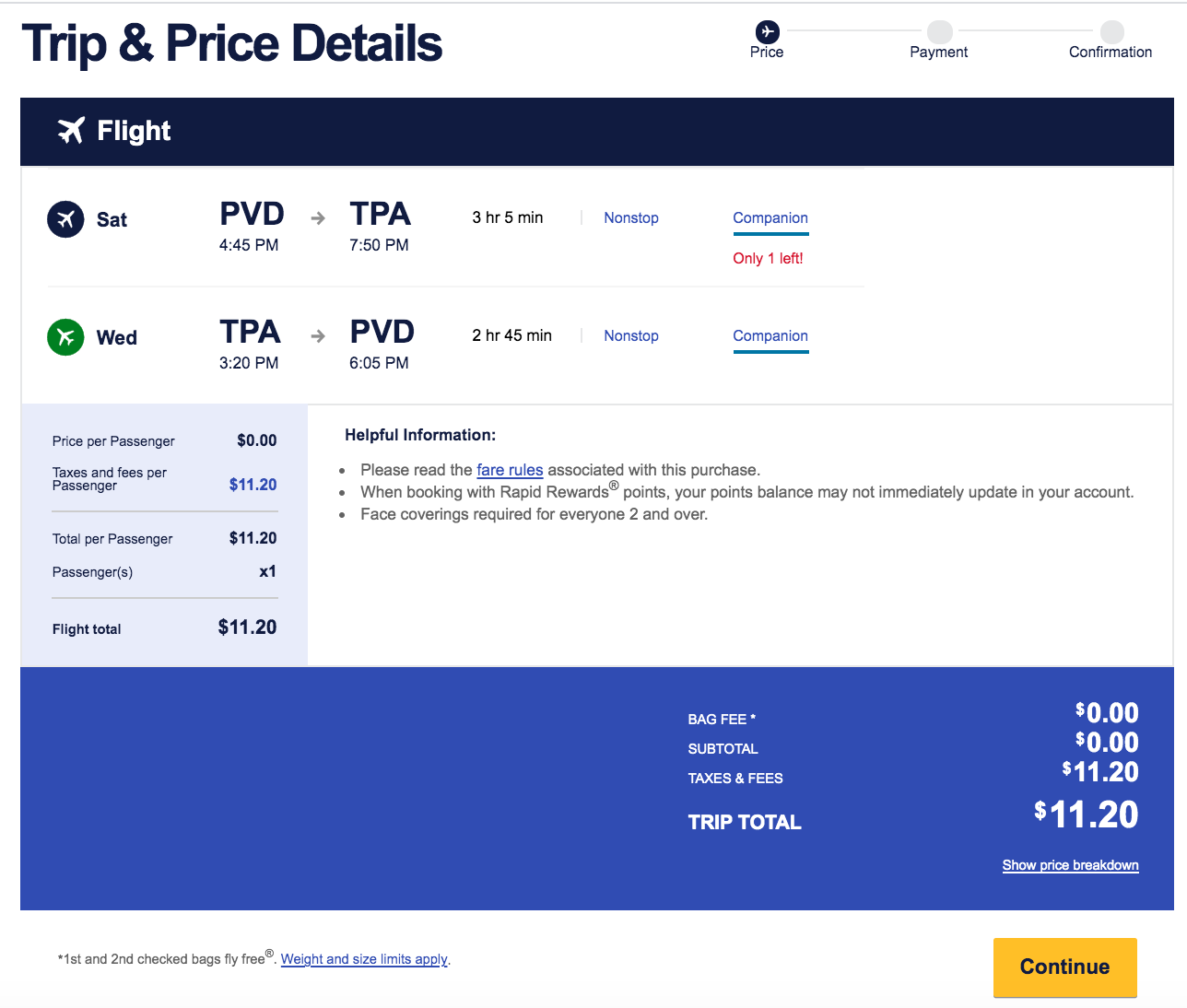
Click “Continue” to go to the next page that includes “Passenger & Payment Info.” There, you will find your companion’s name and identifying information filled in. With everything pre-filled, there is very little chance of a booking mistake at this stage of the process.

Finally, you’ll be prompted through the process to pay applicable taxes and fees and secure the flight reservation for the companion. If you have a credit card already saved to your account profile, it’s even quicker and easier to complete the booking.
I have found that after you go through this process once, you’ll be able to book subsequent flights with your Companion Pass in just a minute or two. It’s that simple.
Additional Southwest Companion Pass tips and tricks

Although the process of using the Southwest Companion Pass is almost always easy, there are a few idiosyncrasies that can arise. Companion Pass holders should be aware of the following:
You’ll receive separate confirmation numbers
When you book flights for a group or family together, everyone will have the same confirmation number. However, with the Companion Pass, your companion will always be assigned a different Southwest confirmation number than the rest of the party. While this isn’t a big deal, it can matter for the strategy surrounding Southwest’s unique check-in policy.
When the time comes to check in for your flight, you won’t be able to check in online together. If you are playing the Southwest fastest-finger game exactly 24 hours before your flight to get a prime boarding position, I highly recommend having two devices ready to check you and your companion in simultaneously. If you check in one person first and then check in the other person next, you may well lose out on some of the best boarding positions.
Related: Is Southwest EarlyBird Check-In worth it?
You must call to change companions
While you can change your companion three times in a calendar year, Southwest Companion Pass holders should know that doing so requires you to make a phone call. There is no way to change a companion online.
The fine print on Southwest’s site says that it may take up to 21 business days for processing. In our experience, the companion is always changed nearly instantaneously. It will take a while for a new Companion Pass card to arrive in the mail for your new companion, but the change is usually implemented for online booking purposes within seconds.
Watch out for reservations close together with different companions
While you can change companions up to three times in a single year, you won’t be able to change your companion until you’ve completed all travel with your current companion. If you have two trips close together with different companions, things can get a bit tricky.
For example, if you have a trip with your child on June 1 and another with your spouse on June 15, you won’t be able to add your spouse as a companion to that second trip until after June 1. It is theoretically possible that the June 15 flight could sell out before June 1, leaving your spouse high and dry for the June 15 trip.
Although this situation doesn’t arise often, it’s an important consideration if you are planning to travel during peak times and/or on popular routes. If a flight does sell out, you may find yourself in the position of having to book a new flight for yourself at a higher price to find an itinerary with availability for your companion.
Related: 13 lessons from 13 years’ worth of Southwest Companion Passes
Bottom line
Using the Southwest Companion Pass is a breeze. And right now, earning it is pretty easy thanks to new Southwest credit card offers. Meet the minimum spending requirement, and you’ll be rewarded with 30,000 Rapid Rewards points and a Companion Pass through Feb. 28, 2024. This is the perfect way to travel more often this year without breaking the bank.
Additional reporting by Jennifer Yellin and Andrew Kunesh.










Discussion about this post