










Written by Lorenzo Pichilli
In this article, we are going to learn how to create a custom Content Blocker for our WebView instances using the flutter_inappwebview plugin.
Read this article to get started with Flutter InAppWebView
Content Blockers are usually used for blocking ads, but you can also use them to block any other content. Blocking behaviors include hiding elements, blocking loads, and, on iOS and macOS, stripping cookies from WebView requests.
Keep in mind that, in general, Content Blockers cannot achieve the same level of functionality as specialized extensions such as AdBlock or AdBlock Plus. Content Blockers are a set of rules that never receive any callbacks or notifications back from the WebView when it finds content it needs to block.
Through the contentBlockers property of the InAppWebViewSettings class, we can define a list of ContentBlocker instances that the WebView will use.
The ContentBlocker class
We define content-blocking behavior in the ContentBlocker class. Each one contains an action property and a trigger property. The action tells the WebView what to do when it encounters a match for the trigger. The trigger tells the WebView when to perform the corresponding action.
Here is a basic example:
initialSettings: InAppWebViewSettings(contentBlockers: [
 ContentBlocker(
   trigger: ContentBlockerTrigger(
     urlFilter: ".*",
     resourceType: [
       ContentBlockerTriggerResourceType.IMAGE,
       ContentBlockerTriggerResourceType.STYLE_SHEET
     ]
   ),
   action: ContentBlockerAction(
     type: ContentBlockerActionType.BLOCK
   )
 )
]),
In this example, the ContentBlocker blocks the loading of every image and stylesheet for every URL.
Add triggers to your Content Blocker
A trigger must define the required urlFilter property, which specifies a regular expression as a string to match the URL against. The other properties are optional — they modify the behavior of the trigger. For example, you can limit the trigger to specific domains or have it not apply when the WebView finds a match for a specific domain.
Here is an example of a Content Blocker with a trigger for image and style sheet resources that the WebView finds on any domain except those specified:
initialSettings: InAppWebViewSettings(contentBlockers: [
 ContentBlocker(
   trigger: ContentBlockerTrigger(
     urlFilter: ".*",
     resourceType: [
       ContentBlockerTriggerResourceType.IMAGE,
       ContentBlockerTriggerResourceType.STYLE_SHEET
     ],
     unlessDomain: ["example.com", "github.com", "pub.dev"]
   ),
   action: ContentBlockerAction(
     type: ContentBlockerActionType.BLOCK
   )
 )
]),
For deeper trigger customization, you can use the other properties of ContentBlockerTrigger:
-
urlFilterIsCaseSensitive: If the URL matching should be case-sensitive. By default, it is case insensitive. -
resourceType: A list of “ContentBlockerTriggerResourceType” representing the resource types (how the browser intends to use the resource) that the rule should match. If it is not specified, the rule matches all resource types. -
ifDomain: A list of strings matched to a URL’s domain; it limits action to a list of specific domains. Values must be lowercase ASCII or Punycode for non-ASCII characters. Add*in front to match the domain and subdomains. It can’t be used withunlessDomain. -
unlessDomain: A list of strings matched to a URL’s domain; acts on any site except domains in a provided list. Values must be lowercase ASCII or Punycode for non-ASCII. Add*in front to match the domain and subdomains. It can’t be used withifDomain. -
loadType: A list ofContentBlockerTriggerLoadTypethat can include one of two mutually exclusive values. If not specified, the rule matches all load types.ContentBlockerTriggerLoadType.FIRST_PARTYtriggers only if the resource has the same scheme, domain, and port as the main page resource.ContentBlockerTriggerLoadType.THIRD_PARTYtriggers if the resource isn’t from the same domain as the main page resource. -
ifTopUrl: A list of strings matched to the entire main document URL; it limits the action to a specific list of URL patterns. Values must be lowercase ASCII or Punycode for non-ASCII characters. It can’t be used withunlessTopUrl. -
unlessTopUrl: An array of strings matched to the entire main document URL; it acts on any site except URL patterns in the provided list. Values must be lowercase ASCII or Punycode for non-ASCII characters. It can’t be used withifTopUrl. -
loadContext: An array of strings that specify loading contexts. -
ifFrameUrl: A list of regular expressions to match iframes’ URL against.
Check the code documentation for each specific property to find out which platform supports that feature.
Add actions to your Content Blocker
When a trigger matches a resource, the WebView evaluates all the triggers and executes the actions in order.
Group the rules with similar actions together to improve performance. For example, first specify rules that block content loading followed by rules that block cookies.
There are only two valid properties for actions: type and selector. An action type is required.
If the type is ContentBlockerActionType.CSS_DISPLAY_NONE, a selector is required as well; otherwise, the selector is optional.
Here is a simple example:
initialSettings: InAppWebViewSettings(contentBlockers: [
 ContentBlocker(
   trigger: ContentBlockerTrigger(
     urlFilter: "https://flutter.dev/.*",
   ),
   action: ContentBlockerAction(
     type: ContentBlockerActionType.CSS_DISPLAY_NONE,
     selector: '.notification, .media, #developer-story'
   )
 )
]),
Valid types are:
-
BLOCK: Stops the loading of the resource. If the resource was cached, the cache is ignored. -
BLOCK_COOKIES: Strips cookies from the header before sending it to the server. This only blocks cookies that are otherwise acceptable to WebView’s privacy policy. CombiningBLOCK_COOKIESwithIGNORE_PREVIOUS_RULESdoesn’t override the browser’s privacy settings. -
CSS_DISPLAY_NONE: Hides elements of the page based on a CSS selector. A selector field contains the selector list. Any matching element has its display property set to none, which hides it. -
MAKE_HTTPS: Changes a URL fromhttptohttps. URLs with a specified (nondefault) port and links using other protocols are unaffected. -
IGNORE_PREVIOUS_RULES: Ignores previously triggered actions.
Check the code documentation for each specific type to find out which platform supports it.
Creating a simple ad blocker
Let’s create a simple ad blocker using what we have learned.
import 'package:flutter/foundation.dart';
import 'package:flutter/material.dart';
import 'package:flutter_inappwebview/flutter_inappwebview.dart';

Future main() async {
 WidgetsFlutterBinding.ensureInitialized();
 if (!kIsWeb &&
     kDebugMode &&
     defaultTargetPlatform == TargetPlatform.android) {
   await InAppWebViewController.setWebContentsDebuggingEnabled(kDebugMode);
 }
 runApp(const MaterialApp(home: MyApp()));
}

class MyApp extends StatefulWidget {
 const MyApp({Key? key}) : super(key: key);

 @override
 State<MyApp> createState() => _MyAppState();
}

class _MyAppState extends State<MyApp> {
 final GlobalKey webViewKey = GlobalKey();

 // list of ad URL filters to be used to block ads from loading
 final adUrlFilters = [
   ".*.doubleclick.net/.*",
   ".*.ads.pubmatic.com/.*",
   ".*.googlesyndication.com/.*",
   ".*.google-analytics.com/.*",
   ".*.adservice.google.*/.*",
   ".*.adbrite.com/.*",
   ".*.exponential.com/.*",
   ".*.quantserve.com/.*",
   ".*.scorecardresearch.com/.*",
   ".*.zedo.com/.*",
   ".*.adsafeprotected.com/.*",
   ".*.teads.tv/.*",
   ".*.outbrain.com/.*"
 ];

 final List<ContentBlocker> contentBlockers = [];
 var contentBlockerEnabled = true;

 InAppWebViewController? webViewController;

 @override
 void initState() {
   super.initState();

   // for each ad URL filter, add a Content Blocker to block its loading
   for (final adUrlFilter in adUrlFilters) {
     contentBlockers.add(ContentBlocker(
         trigger: ContentBlockerTrigger(
           urlFilter: adUrlFilter,
         ),
         action: ContentBlockerAction(
           type: ContentBlockerActionType.BLOCK,
         )));
   }

   // apply the "display: none" style to some HTML elements
   contentBlockers.add(ContentBlocker(
       trigger: ContentBlockerTrigger(
         urlFilter: ".*",
       ),
       action: ContentBlockerAction(
           type: ContentBlockerActionType.CSS_DISPLAY_NONE,
           selector: ".banner, .banners, .ads, .ad, .advert")));
 }

 @override
 Widget build(BuildContext context) {
   return Scaffold(
       appBar: AppBar(
         title: const Text("Ads Content Blocker"),
         actions: [
           TextButton(
             onPressed: () async {
               contentBlockerEnabled = !contentBlockerEnabled;
               if (contentBlockerEnabled) {
                 await webViewController?.setSettings(
                     settings: InAppWebViewSettings(
                         contentBlockers: contentBlockers));
               } else {
                 await webViewController?.setSettings(
                     settings: InAppWebViewSettings(contentBlockers: []));
               }
               webViewController?.reload();

               setState(() {});
             },
             style: TextButton.styleFrom(foregroundColor: Colors.white),
             child: Text(contentBlockerEnabled ? 'Disable' : 'Enable'),
           )
         ],
       ),
       body: SafeArea(
           child: Column(children: <Widget>[
         Expanded(
           child: Stack(
             children: [
               InAppWebView(
                 key: webViewKey,
                 initialUrlRequest:
                     URLRequest(url: WebUri('https://www.tomshardware.com/')),
                 initialSettings:
                     InAppWebViewSettings(contentBlockers: contentBlockers),
                 onWebViewCreated: (controller) {
                   webViewController = controller;
                 },
               ),
             ],
           ),
         ),
       ])));
 }
}
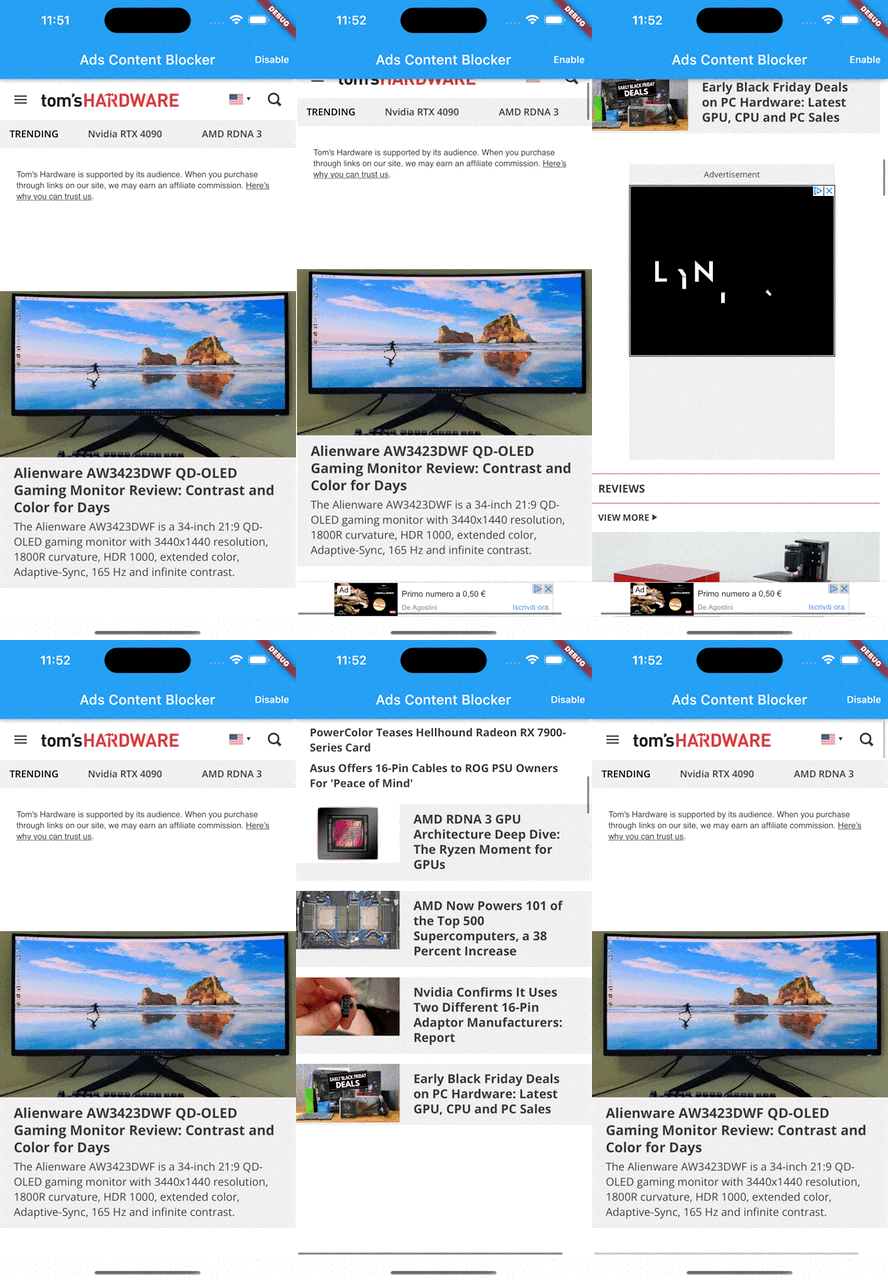
Using these rules will prevent a bunch of ads from appearing, such as Google Ads.
Click the Disable/Enable button to disable or enable the ad blocker feature.
Conclusion
Content Blockers allow us to write performant rules for blocking content in the WebView while respecting the user’s privacy.
Full project code is available on GitHub.
That’s all for today!
Are you using this plugin? Submit your app through the Submit Application page and follow the instructions.
Check the Showcase page to see who’s already using it!
This project follows the all-contributors specification (contributors). I want to thank all the people who are supporting the project in any way. Thanks a lot to all of you! ?
.
Lorenzo Pichilli is a Heroku architecture designer and software engineer who mostly focuses on full-stack web and mobile development. He’s a JavaScript, TypeScript, and Flutter enthusiast who loves open source. (You can check out his projects on GitHub.) He also writes articles on Medium.










Discussion about this post