









State Management
State management is a crucial aspect while working on a large scale production app. That said, every state management solution is unique and is fit for a certain architecture of the app.
One of our favorite State management libraries is Flutter BloC because…
Flutter BLoC
Helps implementing BLoC pattern
Flutter BLoC is a predictable state management library that helps to implement the Business Logic Component (BLoC) design pattern. It uses Reactive Programming to handle the flow of data within an app.
Why BLoC?
BLoC helps to encapsulate the business logic from the UI. Events are fed in as the input to the logic component, and states are generated as the output. It relies heavily on Streams and is often used in conjunction with the Provider for exposing the BLoC to the UI. Testing BLoC is really easy using the library bloc_test.
Developer’s perspective
There are a lot of options while choosing a state management library for Flutter, and every app’s structure is unique. So, there is no state management library best for every use-case. BLoC is really nice if you are working on a large-scale production app, but due to the amount of boilerplate code, it might not be suitable for smaller apps.
Pros
- Easy to separate UI & business logic
- Good tooling support for VS Code & IntelliJ
- Easy to test
- Nice documentation
Cons
- Creates a lot of boilerplate code
- Not suitable for simple apps
Example
An app for fetching Applications using Codemagic API is implemented using the BLoC pattern.
The FetchApplication event will be added to the BLoC to fetch the Applications from the server. It will mostly be used right after the initial state when there is no Application that is already fetched.
// BLoC Event

abstract class ApplicationEvent extends Equatable {
  const ApplicationEvent();
}

class FetchApplication extends ApplicationEvent {
  const FetchApplication();

  @override
  List<Object> get props => [];
}
ApplicationState will define all possible states while fetching the Applications from the server.
-
ApplicationEmpty: Initial state when there is no data present -
ApplicationLoading: While fetching Applications -
ApplicationLoaded: Successfully fetched an Application -
ApplicationError: Unable to fetch the Application
// BLoC State

abstract class ApplicationState extends Equatable {
  ApplicationState();

  @override
  List<Object> get props => [];
}

class ApplicationEmpty extends ApplicationState {}

class ApplicationLoading extends ApplicationState {}

class ApplicationLoaded extends ApplicationState {
  final Application application;

  ApplicationLoaded({@required this.application}) : assert(application != null);

  @override
  List<Object> get props => [application];
}

class ApplicationError extends ApplicationState {}
The ApplicationBloc is responsible for receiving the ApplicationEvents and converting them to ApplicationStates.
// BLoC

class ApplicationBloc extends Bloc<ApplicationEvent, ApplicationState> {
  final ApplicationRepository applicationRepository;
  ApplicationBloc({@required this.applicationRepository})
      : assert(applicationRepository != null);

  @override
  ApplicationState get initialState => ApplicationEmpty();

  @override
  Stream<ApplicationState> mapEventToState(ApplicationEvent event) async* {
    if (event is FetchApplication) {
      yield ApplicationLoading();

      try {
        final Application application =
            await applicationRepository.fetchApplication();
        yield ApplicationLoaded(application: application);
      } catch (_) {
        ApplicationError();
      }
    }
  }
}
BlocProvider is used to create an instance of ApplicationBloc and manage it.
class HomePage extends StatelessWidget {
  final ApplicationRepository repository;

  HomePage({@required this.repository}) : assert(repository != null);

  @override
  Widget build(BuildContext context) {
    return BlocProvider(
      create: (context) => ApplicationBloc(applicationRepository: repository),
      child: ApplicationView(),
    );
  }
}
BlocBuilder is used to build the UI based upon the state returned by the ApplicationBloc. When the state is ApplicationEmpty, the FetchApplication event is added to the ApplicationBloc.
class ApplicationView extends StatelessWidget {
  final TextStyle _style = TextStyle(fontSize: 18);
  @override
  Widget build(BuildContext context) {
    return BlocBuilder<ApplicationBloc, ApplicationState>(
      builder: (context, state) {
        if (state is ApplicationEmpty) {
          BlocProvider.of<ApplicationBloc>(context).add(FetchApplication());
        }
        if (state is ApplicationError) {
          return Center(
            child: Text('Failed to load app info'),
          );
        }
        if (state is ApplicationLoaded) {
          return Center(
            child: Column(
              mainAxisAlignment: MainAxisAlignment.center,
              crossAxisAlignment: CrossAxisAlignment.start,
              children: <Widget>[
                Text('App ID: ${state.application.id}', style: _style),
                Text('App Name: ${state.application.appName}', style: _style),
                Text('Last Build Id: ${state.application.lastBuildId}',
                    style: _style),
              ],
            ),
          );
        }
        return Center(
          child: CircularProgressIndicator(),
        );
      },
    );
  }
}
Reference Links
Flutter Favorite package
Platforms supported: Android, iOS, Web
List of State Management libraries
The following are some of the libraries that you can choose among for managing the state of your Flutter app.
-
flutter_mobx: Flutter integration for MobX. It provides a set of Observer widgets that automatically rebuild when the tracked observables change.
-
flutter_redux: A set of utilities that allow you to easily consume a Redux Store to build Flutter Widgets.
-
provider: A Flutter plugin that acts as a wrapper around the InheritedWidget to make them easier to use and more reusable.
-
flutter_modular: A Flutter plugin that helps to deal with problems like, dependency injection and route management.
-
get_it: Simple direct Service Locator that allows you to decouple the interface from a concrete implementation, and access it from everywhere in the app.
Let’s take a look at one of the state management libraries that does a great job of separating the business logic from the UI.
Networking
Fetching data from the internet is necessary for most apps. Stated below are some Flutter libraries that will help you to make network requests and handle the responses gracefully in your app.
Dio
A powerful HTTP client for Dart
Dio is a Flutter networking library for handling HTTP requests with ease. It supports Interceptors, Global configuration, FormData, Request Cancellation, File downloading, Timeout, etc.
Why Dio?
Dio is a quite helpful library for anyone working with APIs in their application. It helps in making API calls and provides good control over them. With Dio, you can easily manage upload and download of multiple files. Using Dio Interceptor, you can intercept, lock/unlock requests, for performing some operations in between an API request.
Developer’s perspective
There is a similar library for handling HTTP requests in Dart, known as http. But it is quite verbose and does not allow much control over the HTTP calls. Interceptor is a vital part of Dio that is useful in different scenarios like, if you want to automatically retry a request as an internet connection is restored. You can even track the download progress of large files easily using Dio.
Pros
- Make API calls over HTTP
- Track download/upload progress
- Ability to intercept requests
Example
// Initialize Dio
BaseOptions options = new BaseOptions(
    baseUrl: 'https://api.codemagic.io',
    connectTimeout: 5000,
    receiveTimeout: 3000,
    headers: {
      "Content-Type": "application/json",
      "x-auth-token": _token,
    });

_dio = new Dio(options);
// POST Data
Response response = await _dio.post(
  "/builds",
  data: {
    "appId": _appId,
    "workflowId": _workflowId,
    "branch": _branch,
  },
);
if (response.statusCode == 200) {
  print(response.data);
}
// GET Data
Response response = await _dio.get(
  "/builds/$_buildId",
);
if (response.statusCode == 200) {
  print(response.data);
}
Reference Links
Platforms supported: Android, iOS, Web
List of Networking libraries
-
http: A Flutter plugin supporting composable, multi-platform, Future-based API for HTTP requests.
-
url_launcher: A Flutter plugin for launching a URL in the mobile platform having support for web, phone, SMS, and email schemes.
-
firebase_auth: Flutter plugin for Firebase Auth, enabling authentication using passwords, phone numbers and identity providers like Google, Facebook and Twitter.
-
firebase_messaging: Flutter plugin for Firebase Cloud Messaging, a cross-platform messaging solution that lets you reliably deliver messages.
-
google_sign_in: Flutter plugin for Google Sign-In, a secure authentication system for signing in with a Google account.
Highlighting a library that will help you to work with HTTP requests in your Flutter app.
Text & Fonts
Typography is a vital aspect of every popular mobile application. It makes your app more attractive and consistent throughout different screen sizes. Let’s take a look at some of the Flutter libraries for improving the text and font of your app.
Animated Text Kit
Create cool and beautiful text animations
Animated Text Kit helps in easy implementation of beautiful and nice text animations to your Flutter app. It contains 7 types of text animations including Rotate, Fade, Typer, Typewriter, Scale, Colorize & TextLiquidFill.
Why Animated Text Kit?
With Animated Text Kit, you can prevent the boilerplate code required to achieve these text animations. They are several customization options, so it won’t be that challenging to build your unique design using this package. You can apply the animations to either a single String or a List of Strings.
Developer’s perspective
Animated Text Kit is an impressive text animation package that lets you add subtle but eye-catching texts to your app. This package comes with several types of text animations, but the most distinguishable among these is the TextLiquidFill, which adds a liquid filling like text animation.
Pros
- Easy implementation
- Large number of customization options
- Support for any
TextStyle
Example
class LiquidTextView extends StatelessWidget {
  @override
  Widget build(BuildContext context) {
    return SafeArea(
      child: Column(
        mainAxisAlignment: MainAxisAlignment.start,
        children: <Widget>[
          SizedBox(height: 50),
          Text(
            'TextLiquidFill',
            style: TextStyle(fontSize: 30.0, fontWeight: FontWeight.bold),
          ),
          SizedBox(height: 200),
          TextLiquidFill(
            text: 'CODE',
            waveColor: Colors.blueAccent[700],
            boxBackgroundColor: Colors.orange[600],
            textStyle: style,
            waveDuration: Duration(seconds: 4),
            boxHeight: 120,
            boxWidth: 300,
          ),
          TextLiquidFill(
            text: 'MAGIC',
            waveColor: Colors.blueAccent[700],
            boxBackgroundColor: Colors.orange[600],
            textStyle: style,
            waveDuration: Duration(seconds: 2),
            boxHeight: 120,
            boxWidth: 300,
          ),
        ],
      ),
    );
  }
}
Reference Links
Platforms supported: Android, iOS, Web
List of Text & Fonts libraries
-
google_fonts: A Flutter package for accessing the Google Fonts API, allowing you to easily use any of the 977 fonts from
fonts.google.com. -
auto_size_text: A Flutter widget that automatically resizes text to fit perfectly within its bounds.
-
enough_ascii_art: Generates ASCII art using image to ASCII, FIGlet text banner support and emoticon to text conversions.
-
font_awesome_flutter: The Font Awesome Icon pack available as Flutter Icons. Provides 1500 additional icons to use in your apps.
-
flutter_screenutil: A flutter plugin for adapting screen and font size.
A Flutter library that adds astonishing animations to any texts of your app is worthy of being highlighted.
UI/UX
Getting User Interface and User Experience right is a crucial thing in modern applications. Flutter is known as Google’s UI toolkit for creating beautiful and natively compiled apps. To further improve your app design, let’s take a look at some UI libraries that caught our attention.
The most unique UI library that we want to highlight is as follows:
VelocityX
by Pawan Kumar
Platforms supported: Android, iOS, Web, Desktop
A minimalist UI framework for Flutter
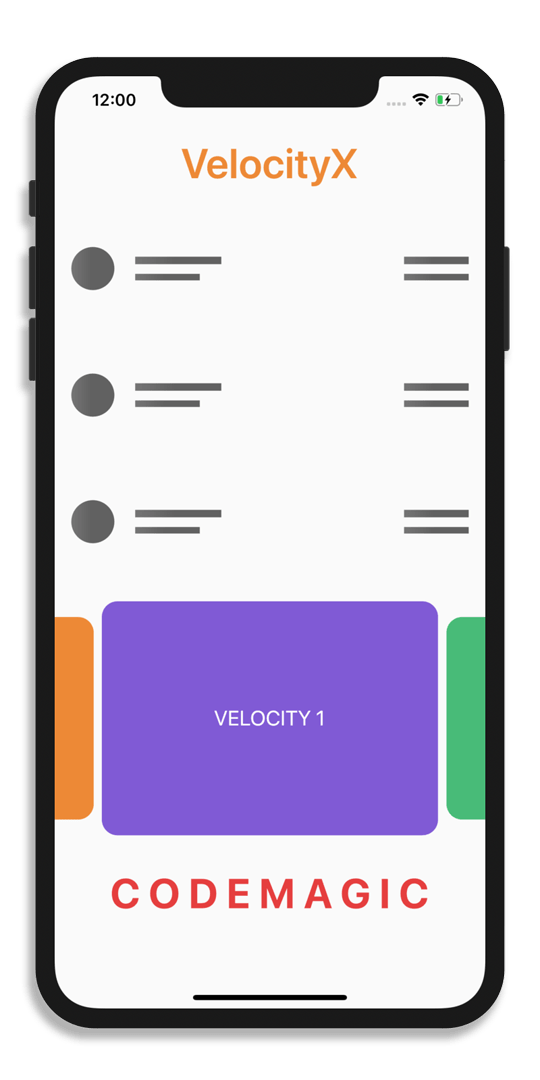
VelocityX gives you access to all the building blocks you need to create beautiful and responsive UI designs without the annoying nested style of Flutter. This package uses Tailwind CSS like property naming and SwiftUI style declarative syntax to facilitate rapid development.
Why VelocityX?
VelocityX can make developers more productive because of its declaration style. It uses extension methods to form a chain of properties rather than using the nested style which is default in Flutter.
Developer’s perspective
Though this package can make you more productive, this property chaining style can be quite intimidating for the beginners.
The best thing about this package is that it makes every widget responsive, which is great if you are building Flutter apps for Web or Desktop.
So, this package can be quite famous among the people who want to create Flutter apps that are mainly focused on the Web and Desktop platform. But those who are mostly focused on mobile cross-platform support might prefer the nested style of Flutter. Also, using this package compromises the readability of the code.
Pros
- Increases productivity
- Highly responsive UI
- Declarative syntax like SwiftUI
Cons
- Loses Flutter’s unique declaration style using Widgets
- Precise control over styling in some complex UI design is not possible
- Reduces readability of the code
Example
class VelocityDemo extends StatelessWidget {
  @override
  Widget build(BuildContext context) {
    return Scaffold(
      body: SafeArea(
        child: VxBox(
          child: Column(
            mainAxisAlignment: MainAxisAlignment.start,
            children: <Widget>[
              'VelocityX'.text.orange500.semiBold.size(40).make().p16(),
              VxZeroList(
                length: 3,
                isDark: true,
                isBottomLinesActive: false,
              ),
              [
                "Velocity 1"
                .text.white.uppercase.size(20).make().box.rounded.alignCenter.purple600.make().p4(),
                "Velocity 2"
                .text.white.uppercase.size(20).make().box.rounded.alignCenter.green500.make().p4(),
                "Velocity 3"
                .text.white.uppercase.size(20).make().box.rounded.alignCenter.orange500.make().p4(),
              ].swiper(enlargeCenterPage: true).py12(),
              'Codemagic'.text.uppercase.red600.bold.letterSpacing(8).size(40).make().p16(),
            ],
          ),
        ).make(),
      ),
    );
  }
}
Reference Links
Platforms supported: Android, iOS, Web, Desktop
List of UI/UX libraries
-
fl_chart: A powerful Flutter chart library, currently supporting Line Chart, Bar Chart, Pie Chart and Scatter Chart.
-
giffy_dialog: A beautiful and custom alert dialog for Flutter.
-
emoji_picker: A Flutter package that provides an Emoji Keyboard widget with 390 emojis in 8 categories.
-
flutter_webview_plugin: A plugin that allows Flutter to communicate with a native Webview.
-
fluttertoast: A Flutter library for creating toast messages in a single line of code.
-
share: A Flutter plugin to share content from your Flutter app via the platform’s share dialog.
If you are working with an app that requires you to access some platform-specific services like device location, Bluetooth, WiFi, etc., then you may want some plugin that can help you to achieve that. The following are some Flutter libraries that may come handy if you are dealing with any of the above.
A Flutter plugin that will help you to work with locations and give you easy access to geocoding is being highlighted next.
Geolocator
by Baseflow
API for generic location services
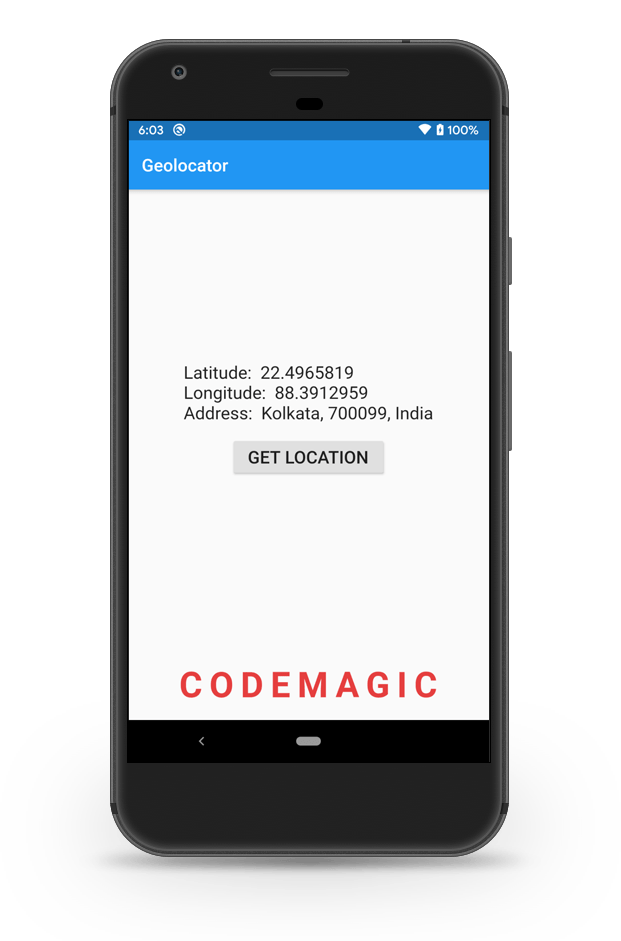
Flutter Geolocator plugin provides easy access to the platform-specific location services. It uses FusedLocationProviderClient or if not available the LocationManager on Android and CLLocationManager on iOS.
Why Geolocator?
Geolocator helps in retrieving current location of the device comfortably on both the Android and iOS platforms. You can even generate an approximate address of the place based on the coordinates of that location or vice versa. Fetching the last known location of the device is also possible using this plugin. The plugin provides an excellent method for determining the distance between two coordinates.
Developer’s perspective
Geolocator is an essential library for people dealing with GPS or Maps in their app. This plugin is a perfect fit for the google_maps_flutter library, as it often accepts the location of a place in the form of coordinates. Being a quite popular and useful library, it has also made its position in the Flutter Favorite package list.
Pros
- Location addresses can be easily retrieved from the coordinates
- Background location access is available
- Distance between two location can be measured with ease
- Addresses can be formatted to the specified locale
Example
class GeolocationView extends StatefulWidget {
  @override
  _GeolocationViewState createState() => _GeolocationViewState();
}

class _GeolocationViewState extends State<GeolocationView> {
  TextStyle _style = TextStyle(fontSize: 20);
  final Geolocator _geolocator = Geolocator();
  Position _currentPosition;
  String _currentAddress;

  // Method for retrieving the current location
  _getCurrentLocation() {
    _geolocator
        .getCurrentPosition(desiredAccuracy: LocationAccuracy.best)
        .then((Position position) {
      setState(() {
        _currentPosition = position;
      });
      _getAddress();
    }).catchError((e) {
      print(e);
    });
  }

  // Method for retrieving the address
  _getAddress() async {
    try {
      List<Placemark> p = await _geolocator.placemarkFromCoordinates(
          _currentPosition.latitude, _currentPosition.longitude);

      Placemark place = p[0];

      setState(() {
        _currentAddress =
            "${place.locality}, ${place.postalCode}, ${place.country}";
      });
    } catch (e) {
      print(e);
    }
  }

  @override
  Widget build(BuildContext context) {
    return Column(
      mainAxisAlignment: MainAxisAlignment.center,
      children: <Widget>[
        _currentPosition != null
            ? Column(
                crossAxisAlignment: CrossAxisAlignment.start,
                children: <Widget>[
                  Text(
                    'Latitude:  ${_currentPosition.latitude}',
                    style: _style,
                  ),
                  Text(
                    'Longitude:  ${_currentPosition.longitude}',
                    style: _style,
                  ),
                  _currentAddress != null
                      ? Text(
                          'Address:  $_currentAddress',
                          style: _style,
                        )
                      : Container(),
                ],
              )
            : Container(),
        Padding(
          padding: const EdgeInsets.only(top: 15.0),
          child: RaisedButton(
            onPressed: _getCurrentLocation,
            child: Text('GET LOCATION', style: _style),
          ),
        )
      ],
    );
  }
}
Reference Links
Flutter Favorite package
Platforms supported: Android, iOS
List of Location & Connectivity libraries
-
google_maps_flutter: A Flutter plugin that provides a Google Maps widget.
-
flutter_polyline_points: A Flutter plugin that decodes a Polyline string into list of geo-coordinates suitable for showing route on Maps.
-
connectivity: Flutter plugin for discovering the state of the network (WiFi & cellular) connectivity.
-
flutter_blue: Flutter plugin for connecting and communicating with Bluetooth Low Energy devices.
Animations & Transitions
Animations always make your app more attractive and help in enhancing the user experience. But overdoing animations may also result in a bad UX. Let’s take a look at some Flutter packages that can help you in adding precisely the right amount of animations to your app.
Highlighting a Flutter package using which you can add spectacular liquid swipe like animation to your Flutter app.
Liquid Swipe
Amazing liquid like swipe
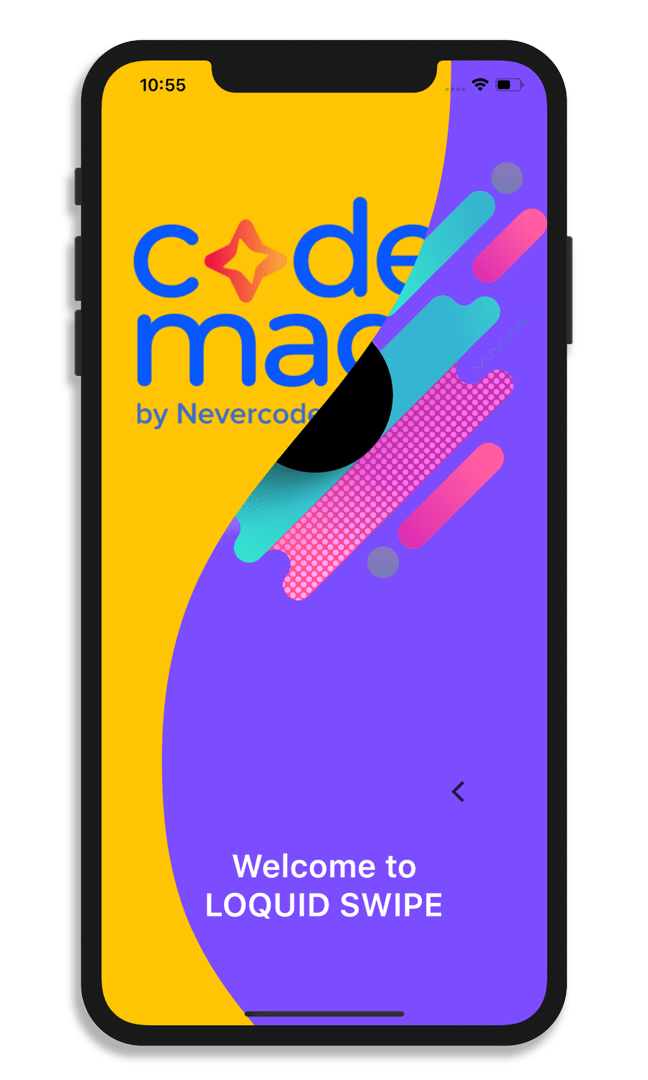
Liquid Swipe is a Flutter package to bring off liquid swipe animation to stacked Container. It has a kind of reveling clipper to swipe between different pages. This is inspired from Cuberto’s liquid swipe and IntroViews.
Why Liquid Swipe?
Liquid Swipe provides great animation without much boilerplate code. The implementation is simple and easy to use with a list of Containers having almost any widget within them.
Developer’s perspective
Liquid Swipe package would be quite useful for anyone who wants to add some kind of out of the box animation to their app. An animation like this is quite complex and time-consuming to design, and this package makes it simple to implement within a matter of minutes.
Pros
- Quite simple to implement
- Out of the box animation design
- Can be applied to almost any widget
Cons
- Could provide more customization options
- Lacks in good user documentation
Example
class LiquidSwipeView extends StatelessWidget {
  // List of Containers
  final pages = [
    codemagicPage,
    welcomePage,
  ];

  @override
  Widget build(BuildContext context) {
    return LiquidSwipe(
      pages: pages,
      fullTransitionValue: 200,
      enableSlideIcon: true,
      enableLoop: true,
      positionSlideIcon: 0.5,
      waveType: WaveType.liquidReveal,
    );
  }
}
Reference Links
Platforms supported: Android, iOS
List of Animations & Transitions libraries
-
animations: Fancy pre-built animations that can easily be integrated into any Flutter application.
-
curved_navigation_bar: A Flutter package for easy implementation of stunning animating Curved Shape Navigation Bar.
-
confetti: A Flutter package for blasting colorful confetti over the screen.
-
intro_slider: A Flutter package that helps you make a cool intro for your app.
-
flip_panel: A Flutter package for implementing Flip Panel animation in your app.
Images & Videos
One of the most fundamental features for most of the applications are images and video support. Some of the libraries that may help you to integrate images and videos to your Flutter app are listed below.
-
flutter_svg: An SVG rendering and widget library for Flutter, which allows painting and displaying Scalable Vector Graphics 1.1 files.
-
image_cropper: A Flutter plugin for Android and iOS supports cropping images.
-
before_after: A Flutter package which makes it easier to display the difference between two images.
-
image_picker: A Flutter plugin for iOS and Android for picking images from the image library, and taking new pictures with the camera.
-
video_player: A Flutter plugin for iOS, Android and Web for playing back video on a Widget surface.
We want to highlight an excellent image library that loads images from a given network URL and caches it.
Cached network image
by Baseflow
Download, cache and show images in Flutter
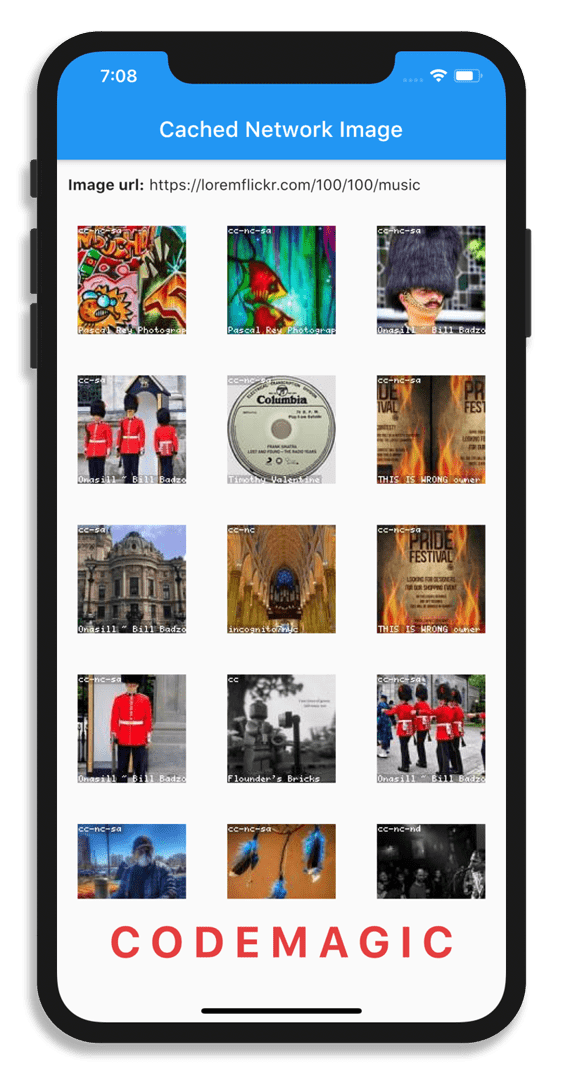
Cached network image helps in loading images from a given network URL and caches it by storing it in the temporary directory of the app. It uses sqflite for storing the image file information which is later used for retrieving it from the cache directory if present.
Why Cached Network Image?
Cached network image simplifies the caching process of any image that is to be fetched from the network. You can use it to show any widget while the image is being retrieved. If any error occurs during the retrieval process, it provides a nice property to handle that case also.
Developer’s perspective
This library is very useful for anybody who is working with network images in their app. Most of the well-known apps use this kind of feature to prevent the annoying loading screen from being popped up every time by caching commonly used images in the local storage.
Pros
- Prevents the annoying loading screen
- In-built property for showing placeholder widget
- Handles error cases gracefully
Cons
- Takes up local storage space
Example
class CachedImageView extends StatelessWidget {
  @override
  Widget build(BuildContext context) {
    return GridView.builder(
      itemCount: 500,
      gridDelegate: const SliverGridDelegateWithFixedCrossAxisCount(
        crossAxisCount: 3,
      ),
      itemBuilder: (BuildContext context, int index) => CachedNetworkImage(
        imageUrl: 'https://loremflickr.com/100/100/music?lock=$index',
        placeholder: (context, url) => Center(
          child: CircularProgressIndicator(),
        ),
        errorWidget: (context, url, image) => Center(
          child: Icon(Icons.error),
        ),
      ),
    );
  }
}
Reference Links
Platforms supported: Android, iOS, Web, MacOS
Data Persistence & File System
It is really frustrating for any user of your app if they have to login every time or a theme that switches back to the default every time they come back to it. To prevent these situations from arising, Data persistence and the ability to interact with the File System of the device should be an essential part of any app. Flutter has several libraries to help you with that. Let’s take a look at them.
A lightweight and performant pure-Dart library that proves to an excellent solution for the local database is discussed below.
Hive
by HiveDB
Platforms supported: Android, iOS, Web, Desktop
Lightweight and blazing fast key-value database
Hive is a lightweight, yet powerful database which is easy to manage and is very performant on every platform. It is a pure-Dart package with no native dependencies, so it can even run smoothly on Flutter Web.
Why Hive?
Hive works seamlessly on all platforms, including Mobile, Web & Desktop. Data is stored in the key-value pair format on the Hive Database. It is strongly encrypted using AES-256 and has a great performance across all the platforms. You can check out the benchmark.
Hive supports only regular Dart types out of the box, but behind the scenes, it works with binary data. So, you can define custom types easily using TypeAdapter with the help of hive_generator package.
Developer’s perspective
Unless you absolutely need to deal with a lot of relations in your database, Hive being a pure-Dart library is one of the best options out there. If you are not using any heavy-weight state management library, it is very tedious to manually rebuild the UI every time a value changes in the database. In that case, you can take the help of hive_flutter package to listen to the changes and render the Widgets accordingly.
Pros
- Great performance
- No native dependencies
- Simple, powerful & intuitive API
- Strong encryption
- Support for TypeAdapters
Cons
- Not ideal if you are using a lot of relations in the database
Example
An example showing how to build a simple Color Generator using Hive database.
Initializing Hive:
void main() async {
  WidgetsFlutterBinding.ensureInitialized();

  // Retrieving the path where to store the Hive database
  final appDocDir = await getApplicationDocumentsDirectory();

  // Initializing Hive
  Hive.init(appDocDir.path);

  // Registering custom adapter
  Hive.registerAdapter(CustomColorAdapter());

  runApp(MyApp());
}
Opening a Hive box for storing the key-value pairs in the database:
class _HiveViewState extends State<HiveView> {
  @override
  void dispose() {
    // Close all Hive boxes while disposing
    Hive.close();
    super.dispose();
  }

  @override
  Widget build(BuildContext context) {
    // Using a FutureBuilder to open a Hive box with
    // the specified name `colors`
    return FutureBuilder(
      future: Hive.openBox('colors'),
      builder: (BuildContext context, AsyncSnapshot snapshot) {
        if (snapshot.connectionState == ConnectionState.done) {
          if (snapshot.hasError)
            return Text(snapshot.error.toString());
          else
            return ColorPage();
        } else {
          return CircularProgressIndicator();
        }
      },
    );
  }
}
UI for showing the ListView of colors and the button for generating random colors:
class ColorPage extends StatelessWidget {
  // Defining the Box variable
  final _colorsBox = Hive.box('colors');

  // ...

  @override
  Widget build(BuildContext context) {
    return Column(
      children: <Widget>[
        Expanded(
          // TODO: Show the ListView of colors present
          // in the Box
          child: Container(),
        ),
        // TODO: Show a button for adding colors to the Box
      ],
    );
  }
}
ValueListenableBuilder is for listening to the changes in the Hive database and render the Widgets accordingly.
// For showing the ListView of colors
ValueListenableBuilder(
  valueListenable: _colorsBox.listenable(),
  builder: (context, Box<dynamic> box, _) {
    return ListView.builder(
      itemCount: box.values.length,
      itemBuilder: (BuildContext context, int index) {
        final color = box.getAt(index) as CustomColor;
        return ListTile(
          leading: ClipOval(
            child: Material(
              color: Color(
                  int.parse('0xFF${color.colorHex.substring(1)}')),
              child: SizedBox(
                width: 50,
                height: 50,
              ),
            ),
          ),
          trailing: Row(
            mainAxisSize: MainAxisSize.min,
            children: <Widget>[

              // For Updating the color of that index
              IconButton(
                  icon: Icon(Icons.refresh),
                  onPressed: () {
                    // Function generating random colors
                    CustomColor newColor = _generateColor();

                    // Replacing color of that position in the Hive Box
                    box.putAt(index, newColor);
                  }),

              // For Deleting the color of that index
              IconButton(
                  icon: Icon(Icons.delete),
                  onPressed: () {
                    box.deleteAt(index);
                  }),
            ],
          ),
          title: Text(color.colorName),
          subtitle: Text(color.colorHex),
        );
      },
    );
  }),
Button for adding colors to the Hive database.
RaisedButton(
  onPressed: () {
    // Function generating random colors
    CustomColor newColor = _generateColor();

    // Adding colors to the Box
    _colorsBox.add(newColor);
  },
  color: Colors.blue,
  child: text,
  shape: RoundedRectangleBorder(
    borderRadius: BorderRadius.circular(30.0),
  ),
)

Reference Links
List of Data Persistence & File System Libraries
-
shared_preferences: Flutter plugin for reading and writing simple key-value pairs. Wraps NSUserDefaults on iOS and SharedPreferences on Android.
-
sqflite: Flutter plugin for SQLite, a self-contained, high-reliability, embedded, SQL database engine.
-
moor: An easy to use, reactive, type-safe persistence library for Dart & Flutter, built on top of SQLite.
-
path_provider: Flutter plugin for getting commonly used locations on the Android & iOS file systems.
-
file_access: A Flutter package to handle files on Web, Desktop and Mobile platforms.
Animations & Transitions
Animations always make your app more attractive and help in enhancing the user experience. But overdoing animations may also result in a bad UX. Let’s take a look at some Flutter packages that can help you in adding precisely the right amount of animations to your app.
Highlighting a Flutter package using which you can add spectacular liquid swipe like animation to your Flutter app.
Liquid Swipe
by Sahdeep Singh
Platforms supported: Android, iOS
Amazing liquid like swipe
Liquid Swipe is a Flutter package to bring off liquid swipe animation to stacked Container. It has a kind of reveling clipper to swipe between different pages. This is inspired from Cuberto’s liquid swipe and IntroViews.
Why Liquid Swipe?
Liquid Swipe provides great animation without much boilerplate code. The implementation is simple and easy to use with a list of Containers having almost any widget within them.
Developer’s perspective
Liquid Swipe package would be quite useful for anyone who wants to add some kind of out of the box animation to their app. An animation like this is quite complex and time-consuming to design, and this package makes it simple to implement within a matter of minutes.
Pros
- Quite simple to implement
- Out of the box animation design
- Can be applied to almost any widget
Cons
- Could provide more customization options
- Lacks in good user documentation
Example
class LiquidSwipeView extends StatelessWidget {
  // List of Containers
  final pages = [
    codemagicPage,
    welcomePage,
  ];

  @override
  Widget build(BuildContext context) {
    return LiquidSwipe(
      pages: pages,
      fullTransitionValue: 200,
      enableSlideIcon: true,
      enableLoop: true,
      positionSlideIcon: 0.5,
      waveType: WaveType.liquidReveal,
    );
  }
}
Reference Links
List of Animations & Transitions Libraries
-
animations: Fancy pre-built animations that can easily be integrated into any Flutter application.
-
curved_navigation_bar: A Flutter package for easy implementation of stunning animating Curved Shape Navigation Bar.
-
confetti: A Flutter package for blasting colorful confetti over the screen.
-
intro_slider: A Flutter package that helps you make a cool intro for your app.
-
flip_panel: A Flutter package for implementing Flip Panel animation in your app.
Some assortments of important Flutter libraries that caught our attention. These include libraries that will help you in debugging your app, get device information, set up authentication, show advertisements, and other essential utilities for enhancing your app’s functionality.
Highlighting a Flutter library that will help you to easily add internationalization and localization support to your apps without any tedious setup.
Easy Localization
by Aissat
Platforms supported: Android, iOS, Web, MacOS
Easy and Fast internationalization
Easy Localization package simplifies the internationalization and localization process of Flutter apps. For loading translations, it has support for different formats like JSON, CSV, YAML, XML. You can also use the Easy Localization Loader package, which helps in loading the translation files quickly.
Why Easy Localization?
You can use the official flutter_localizations package for internationalizing your app, but that requires an elaborate setup to get it working. Using Easy Localization, you can not only skip this whole setup process but also get a lot of extra functionalities, which further simplifies the process. It even has a built-in Error widget for missing translations.
Developer’s perspective
Though English is widely spoken throughout the world, internationalization is a must if you are releasing your app for a specific region or want to reach a variety of audiences. Easy Localization package not only helps with localization, but it also has support for plural, gender, nesting & RTL locales. Supports extension methods on Text & BuildContext widgets for easy translation. It is also reactive to locale changes.
Pros
- Load translations in any format JSON, CSV, YAML, XML
- Supports plural, gender, nesting, RTL locales
- Extension methods on Text and BuildContext
- Built-in Error widget
- Code generation for localization files
Example
Add the EasyLocalization widget inside the main function:
void main() {
  runApp(
    EasyLocalization(
      // English, Spanish & Hindi are added as the supported languages
      supportedLocales: [Locale('en'), Locale('es'), Locale('hi')],
      // Path to the localization files (JSON)
      path: 'assets/translations',
      fallbackLocale: Locale('en'),
      child: MyApp(),
    ),
  );
}
Inside MaterialApp define the following properties:
class MyApp extends StatelessWidget {
  @override
  Widget build(BuildContext context) {
    return MaterialApp(
      localizationsDelegates: context.localizationDelegates,
      supportedLocales: context.supportedLocales,
      locale: context.locale,
      home: HomePage(),
    );
  }
}
Then you can easily use this text from the translation file (in this case JSON):
// `text` is the key having the translated text for
// each language
Text(
  'text',
  textAlign: TextAlign.center,
  style: _style,
).tr(),
For changing the locale, you can use the following with the specific language code:
// Changing to Spanish
context.locale = Locale('es');
Reference Links
List of Utility Libraries
-
device_preview: A Flutter package to easily preview your app on different devices.
-
fimber: Extensible logging for Flutter – based on Timber on Android, using similar method API with same concepts for tree and planting logging tree.
-
flutter_launcher_icons: A package which simplifies the task of updating your Flutter app’s launcher icon.
-
intl: A package that provides internationalization and localization facilities, including message translation, plurals and genders, date/number formatting and parsing, and bidirectional text.
-
device_info: Flutter plugin providing detailed information about the device (make, model, etc.) and Android or iOS version the app is running on.
-
local_auth: Flutter plugin for accessing Android and iOS device authentication sensors such as Fingerprint Reader, Touch ID & Face ID.
-
flutter_local_notifications: A plugin for displaying and scheduling local notifications in Flutter applications with the ability to customize for each platform.
-
firebase_admob: A plugin for Flutter that supports loading and displaying banner, interstitial (full-screen), and rewarded video ads using the Firebase AdMob API.
-
permission_handler: A Flutter plugin that provides a cross-platform (Android & iOS) API to request permissions and check their status.
Code generation takes the help of Dart Build System builders to generate boilerplate code. It helps in accelerating the development process, prevent errors caused by manually written boilerplate code, and bring apps to production faster. The following are some libraries that take the help of code generation for creating boilerplate code for various functionalities.
A Native Dart library that helps with the serialization by auto-generating the boilerplate code required for working with JSON in your app.
Json Serializable
by Dart
Flutter Favorite package
Platforms supported: Native Dart
Automatically generate code for JSON
Json Serializable provides Dart Build System builders to generate code for converting to and from JSON by annotating Dart classes. To indicate a class is serializable you have to annotate it with @JsonSerializable().
Why Json Serializable?
Manual serialization is hard to manage as the project grows larger and may lead to errors. JSON Serializable library helps you to generate code from your model classes. Any typo in hand-written boilerplate can result in an error during runtime. But you can prevent this by using this library where errors in JSON fields are caught at compile-time.
Developer’s perspective
If you are dealing with any kind of JSON data retrieved from an API, structuring the data using model class is very important. But, as you know that needs a lot of boilerplate code if it is a large JSON response. So, you can prevent a huge chunk of this boilerplate using the JSON Serializable library. It also provides a number of properties that you can apply to the classes annotated with @JsonSerializable & @JsonKey. Besides setting arguments on the associated annotation classes, you can also configure code generation by setting values in build.yaml.
Pros
- Generates boilerplate for JSON
- Apply properties on annotated classes
- Prevents Runtime errors due to invalid JSON field
- Support for build configuration
Cons
- Requires some initial setup
- Might produce visual clutter in the project navigator
Example
The following is a model class for retrieving applications using Codemagic API:
// application.dart

import 'package:json_annotation/json_annotation.dart';

part 'application.g.dart';

// An annotation for the code generator to know that this class needs the
// JSON serialization logic to be generated.
@JsonSerializable()
class Application {
  // To specify thst JSON must contain the key,
  // if the key doesn't exist, an exception is thrown.
  // Also as the key name is different than the
  // variable name, so it is specified
  @JsonKey(required: true, name: '_id')
  final String id;
  final String appName;
  final String iconUrl;
  final String lastBuildId;

  Application({
    this.id,
    this.appName,
    this.iconUrl,
    this.lastBuildId,
  });

  factory Application.fromJson(Map<String, dynamic> json) =>
      _$ApplicationFromJson(json);

  Map<String, dynamic> toJson() => _$ApplicationToJson(this);
}
The generated code using Json Serializable library:
// application.g.dart

part of 'application.dart';

Application _$ApplicationFromJson(Map<String, dynamic> json) {
  $checkKeys(json, requiredKeys: const ['_id']);
  return Application(
    id: json['_id'] as String,
    appName: json['appName'] as String,
    iconUrl: json['iconUrl'] as String,
    lastBuildId: json['lastBuildId'] as String,
  );
}

Map<String, dynamic> _$ApplicationToJson(Application instance) =>
    <String, dynamic>{
      '_id': instance.id,
      'appName': instance.appName,
      'iconUrl': instance.iconUrl,
      'lastBuildId': instance.lastBuildId,
    };
Reference Links
-
build_runner: A build system for Dart code generation and modular compilation.
-
slidy: CLI package manager and template for Flutter, helps to generate Modules, Pages, Widgets and BLoCs.
-
freezed: Code generator for immutable classes that has a simple syntax/API without compromising on the features.
-
hive_generator: Extension for Hive that automatically generates TypeAdapters to store any class.
-
moor_generator: Dev-dependency to generate table and data-classes together with the Moor package.
Testing
Testing is a must for an app before it gets into production. It helps to prevent bugs and logical errors, which may otherwise result in an unsatisfactory experience for the user. Some Flutter libraries that can make testing easier and faster are listed below.
A testing framework that makes it easy to test classes that depend on live web services or databases is discussed below.
Mockito
by Dart
Platforms supported: Android, iOS, Web
Mock library for Dart
Mockito is a mocking framework written in Dart inspired by original Mockito (available in JAVA). It helps in unit testing classes that depend on the data fetched from live web services or databases.
Why Mockito?
Unit testing classes that depend on dynamic data, i.e. the data that can change at any time, is quite difficult. Testing these dynamic data with respect to static data defined in your test class may result in an error at any time. Using Mockito library, you don’t have to depend on these dynamic data anymore, rather you can test the logic in a more error-free manner by mocking the data.
Developer’s perspective
Mockito helps to emulate a live web service or database and return specific results depending upon the situation. This allows you to run unit tests faster and reliably. Also, it is quite easy to test all the possible success and failure scenarios using this library.
Pros
- Prevents errors due to dynamic data
- Helps to test all possible scenarios
- Allows faster execution of tests
Example
An example showing how to test an API response from a live web service using Mockito library.
Create a MockClient using the Mock class provided by the Mockito package.
// fetch_app_test.dart

class MockClient extends Mock implements http.Client {}
The fetchApplication() function does one of two things:
- Returns an Application if the HTTP call succeeds
- Throws an Exception if the HTTP call fails
Here, we will test these two cases by mocking them.
// fetch_app_test.dart

main() {
  group('fetchApplication', () {
    test('returns an Application if the HTTP call is successfully', () async {
      final client = MockClient();

      // Use Mockito to return a successful response when it calls the
      // provided http.Client.
      when(client.get(
        BASE_URL + ENDPOINT,
        headers: {
          "Content-Type": "application/json",
          "x-auth-token": API_TOKEN,
        },
      )).thenAnswer((_) async => http.Response(
            '{"application":{"_id": "1","appName":"sign_in_flutter","lastBuildId":"123"}}',
            200,
          ));

      expect(await fetchApps(client), isA<Application>());
    });

    test('throws an exception if the HTTP call returns an error', () {
      final client = MockClient();

      // Use Mockito to return an unsuccessful response when it calls the
      // provided http.Client.
      when(client.get(
        BASE_URL + ENDPOINT,
        headers: {
          "Content-Type": "application/json",
          "x-auth-token": API_TOKEN,
        },
      )).thenAnswer((_) async => http.Response('Not Found', 404));

      expect(fetchApps(client), throwsException);
    });
  });
}
Reference Links
List of Testing Libraries
-
e2e: A Flutter package that enables self-driving tests on devices and emulators.
-
bloc_test: A testing library which makes it easy to test blocs, built to work with bloc and mockito.
-
angular_test: Test runner and library for AngularDart.
-
flutter_gherkin: A Gherkin / Cucumber parser and test runner for Dart and Flutter.
Author
Souvik Biswas is a passionate Mobile App Developer (Android, iOS, and Flutter), having extensive knowledge of UX designs. He has developed several mobile apps throughout his journey, both freelance and personal projects. Apart from mobile apps, he has also worked on platforms like WearOS and VR. As a Technical Writer, he has published over 30+ Flutter articles on Codemagic Blog & Medium – Flutter Community, having over 100K+ views. When not developing apps or writing articles, he is an avid video game player. He is currently pursuing a B.Tech degree in Computer Science and Engineering from the Indian Institute of Information Technology Kalyani.









Discussion about this post