









Written by Bram De Coninck
Developing a small application or PoC in one language is acceptable, but as soon as you release an app to the public you might want to consider localising it first. I live in Belgium, a country best known for its chocolate, waffles, fries and beer. We have three official languages: Dutch, French and German. We also have English as an unofficial language. If I want to publish an app and I want as many Belgians as possible to be able to use it, it’ll definitely need to support these languages.
The more languages and locales your application supports, the bigger your target audience will be.
In this article I will guide you through localising your Flutter application using .arb (Application Resource Bundle) files and the Intl package. I will also show you how you can automatically provide your app with the latest translations using the Loco tool. I’ve written a shell script that can be run locally or used by a CI/CD tool of choice. I’ll be using Codemagic because it’s easy to set up and visualise.
Adding the dependencies to the project
Before you can localise your Flutter app, you’ll first need to add some dependencies to the pubspec.yaml file of your project.
dependencies:
  flutter:
    sdk: flutter

  flutter_localizations:
    sdk: flutter

dev_dependencies:
  flutter_test:
    sdk: flutter

  intl_translation: ^0.17.7
Localisation in the MaterialApp
Most of the setup for the localisation happens in the MaterialApp, which is the heart of your Flutter app. It doesn’t necessarily have to be a MaterialApp though, it can also be a CupertinoApp or a WidgetsApp. This is the place where the supported locales are defined and is decided which locale is going to be used in the app. It’s also where we’ll add our own localisations delegate, which is where the rest of the magic happens.
class MyApp extends StatelessWidget {
  @override
  Widget build(BuildContext context) {
    return MaterialApp(
      title: 'Localisation Demo';
      theme: ThemeData(
        primarySwatch: Colors.blue,
      ),
      home: HelloWorld(),
      // List of all supported locales (language code followed by country code).
      // For this example, I'll be using Belgian English, Belgian Dutch and Belgian French.
      // The order of the supported locales is very important because a fallback mechanism is used.
      supportedLocales: const [
        Locale('en', 'BE'),
        Locale('nl', 'BE'),
        Locale('fr', 'BE'),
      ],
      // These delegates are responsible for loading the translations of the selected locale.
      localizationsDelegates: [
        // This is where all translations are defined, will be added later.
        const AppLocalizationsDelegate(),
        // Built-in delegate for the localisation of the Material widgets (e.g. tooltips).
        GlobalMaterialLocalizations.delegate,
        // Built-in localisation for text direction (left-to-right or right-to-left).
        GlobalWidgetsLocalizations.delegate
      ],
      // This is where it's decided which locale should be used.
      localeResolutionCallback: (Locale locale, Iterable<Locale> supportedLocales) {
        for (final supportedLocale in supportedLocales) {
          // The language of the device of the user is compared to every supported language.
          // If the language codes match, the supported locale with that language code is chosen.
          // This allows users using American English or British English as locales
          // to be able to use the Belgian English localisation.
          if (locale.languageCode == supportedLocale.languageCode) {
            return supportedLocale;
          }
        }

        // If the language of the user isn't supported, the default locale should be used.
        return supportedLocales.first;
      },
    );
  }
}
Creating the AppLocalizations class and the AppLocalizationsDelegate
The AppLocalizations class contains the logic to load the messages (= translations) of a given locale. It’s also where you’ll define all Intl messages that will be used in the app. All messages should be in the same language, the language of the ‘source locale’ of your project. In this case it’s Belgian English.
I’ve created two Intl messages: one for the app title and one for a ‘hello world’ message that we’ll use later in the UI.
class AppLocalizations {
  static Future<AppLocalizations> load(Locale locale) {
    final String name = locale.countryCode == null || locale.countryCode.isEmpty
      ? locale.languageCode
      : locale.toString();
    final String localeName = Intl.canonicalizedLocale(name);

    return initializeMessages(localeName).then((_) {
      Intl.defaultLocale = localeName;
      return AppLocalizations();
    });
  }

  // Localizations are usually accessed using the InheritedWidget "of" syntax.
  static AppLocalizations of(BuildContext context) {
    return Localizations.of<AppLocalizations>(context, AppLocalizations);
  }

  // Messages which contain a string in the default language of your app and a name as identifier.
  // CamelCasing is required for the name of the Intl message.
  String get appTitle => Intl.message('Localisation Demo', name: 'appTitle');
  String get helloWorld => Intl.message('Hello world!', name: 'helloWorld');
}
The AppLocalizationsDelegate is the glue between the AppLocalizations class and the MaterialApp. The load function returns an AppLocalizations object as it contains all localised messages. The isSupported function can be used to check if a certain locale (or in this case language code) is supported.
class AppLocalizationsDelegate extends LocalizationsDelegate<AppLocalizations> {
  // As the instance of this delegate will never change, it can have a const constructor.
  const AppLocalizationsDelegate();

  // Checks whether or not a certain locale (or language code in this cast) is supported.
  // The order of the locales doesn't matter in this case.
  @override
  bool isSupported(Locale locale) => ['en', 'nl', 'fr'].contains(locale.languageCode);

  // Load the translations of a certain locale.
  @override
  Future<AppLocalizations> load(Locale locale) => AppLocalizations.load(locale);

  // Defines whether or not all the app’s widgets should be reloaded when the load method is completed.
  @override
  bool shouldReload(LocalizationsDelegate<AppLocalizations> old) => false;
}
If you copy/paste this code you’ll get an error on the initializeMessages method, as it’s not defined yet. This method will be generated later by the Intl package. Before you can start providing translations to your Flutter app, you first need to create a Loco project.
Creating the Loco project
Head over to Loco and create an account if you don’t already have one. Loco has a generous free plan which allows you to create two projects. Create a new Loco project and make sure to select the same source locale you’ve used for your Intl messages.
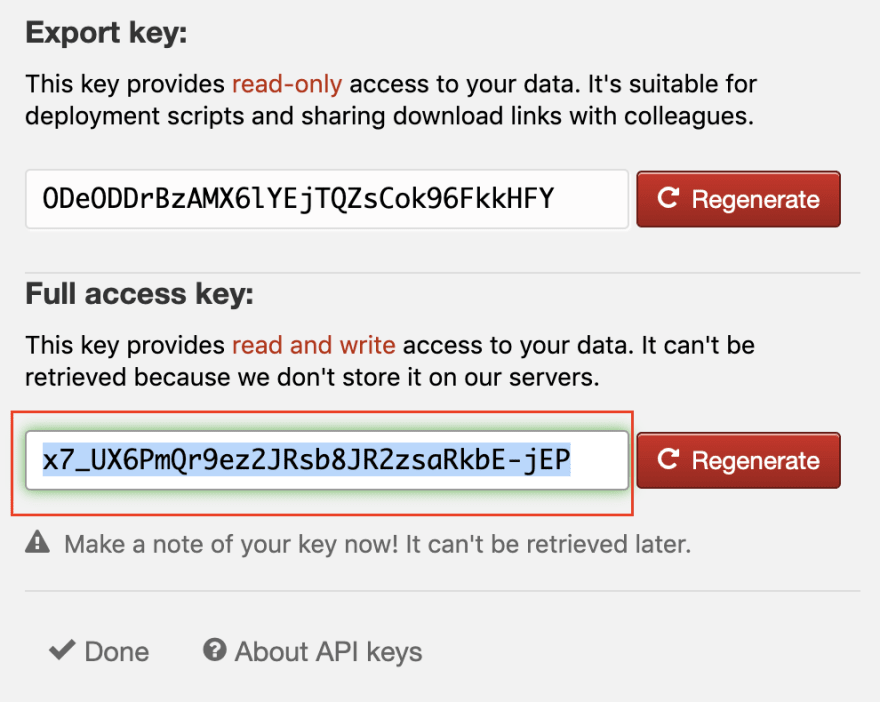
Next, head over to ‘Developer Tools’ and click on ‘API Keys’. This will open up a dialog in which you can create a ‘Full access key’ for your project. Make sure to save this key somewhere, as it’s impossible to retrieve it later. In case you lose this key, you’ll have to generate a new one.
How Flutter works together with Loco
Your Flutter app will interact with Loco in two ways. The Intl messages you created in the AppLocalizations class will be imported into Loco. Everytime you add or update these translations your Loco project will get an update as well. New assets will be created in your source locale or existing assets will get a new value. The second way you use Loco is by downloading all translations for all locales in .arb format and then turning these files into .dart files.
It doesn’t have to be the job of the developer to provider the translations for the app, it can also be done by a product owner or a client for example.
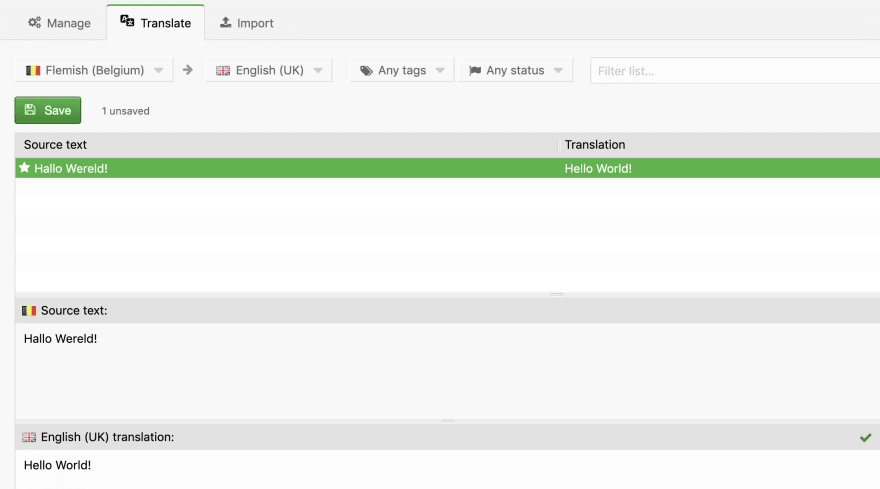
In your Loco project you can choose additional locales you want to support, in my case Belgian Dutch and Belgian French. Translating messages for a new locale from your source locale can be done by a very user-friendly GUI. You don’t need to be a technical person to add or edit translations.
Automating the localisation process
Importing messages into Loco and exporting translations from Loco can be done manually, but it’s a tedious process. These are the steps that need to be taken for the entire localisation process:
- Generate .arb files from the Intl messages defined in the AppLocalizations class.
- Import those .arb files into the Loco project to add/update the translations for the source locale.
- Fetch the latest translations for all locales in .arb format from the Loco project.
- Generate .dart files from these translations.
It’s possible to automate this process with a simple shell script I’ve provided below. The only thing you need to do is provide a value for all variables: your Loco API key, the path of the AppLocalizations class and the desired output path for the translations.
#!/usr/bin/env sh

set -e # Exit on first failed command

# Variables
LOCO_API_KEY="LOCO_API_KEY"
APP_LOCALIZATIONS_PATH="lib/app_localizations.dart"
OUTPUT_PATH="lib/l10n"

# Get packages
flutter packages get

# Generate .arb files
mkdir l10n-input
flutter pub pub run intl_translation:extract_to_arb --output-dir=l10n-input $APP_LOCALIZATIONS_PATH

# Import translations into Loco
curl -f -s --data-binary "@l10n-input/intl_messages.arb" "https://localise.biz/api/import/arb?async=true&index=id&locale=en&key=$LOCO_API_KEY"

# Export translations from Loco
curl -s -o "translated.zip" "https://localise.biz/api/export/archive/arb.zip?key=$LOCO_API_KEY"
unzip -qq "translated.zip" -d "l10n-translated"

# Create directory for output if it doesn't exist yet
if [ ! -d $OUTPUT_PATH ]
then
    mkdir $OUTPUT_PATH
fi

# Generate Dart files with translations
flutter pub pub run intl_translation:generate_from_arb --output-dir=$OUTPUT_PATH --no-use-deferred-loading $APP_LOCALIZATIONS_PATH l10n-translated/*/l10n/intl_messages_*.arb

# Cleanup
rm translated.zip
rm -rf l10n-translated
rm -rf l10n-input
It’s possible to run this script locally but you can also integrate it into your CI/CD tool of choice. I’ve chosen to use Codemagic because it’s easy to set up and use. Codemagic allows you to execute shell scripts before and after every phase of a build. It’s important to execute this script before the build phase though. I’ve decide to run the script before the test phase.
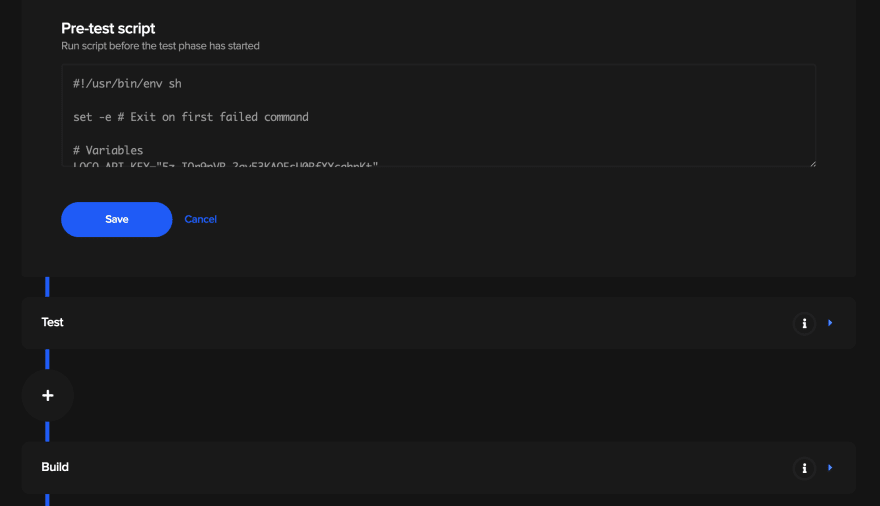
Using a CI/CD tool to fetch translations automatically will make sure users always have the most recent translations.
The reason it’s so useful to integrate this script into a CI/CD tool is that with every build of the application the latest translations will be fetched automatically. A developer might forget to fetch the latest translations before releasing a new version of the Flutter app to the stores and it’s possible that another person has added or updated translations on Loco.
Using localised messages in the UI
In the example below you can see how to get a localised message from the AppLocalizations class and use it in a Text widget. Try changing the language of your device without closing the app. When you open the app again, the widget will be rerendered automatically and display the message in the language you’ve selected (as long as it’s supported, obviously).
class HelloWorld extends StatelessWidget {
  @override
  Widget build(BuildContext context) {
    return Scaffold(
      body: Center(
        child: Text(AppLocalizations.of(context).helloWorld),
      ),
    );
  }
}
Using localised messages without context
Using localised messages without context is possible but it’s a bit hacky in my opinion. There’s currently no other way to do it though.
It can sometimes be useful to get a localised message without using context, in a BLoC or a ViewModel for example.
class AppLocalizations {
  static AppLocalizations current;

  AppLocalizations._(Locale locale) {
    current = this;
  }

  static Future<AppLocalizations> load(Locale locale) {
    final String name = locale.countryCode == null || locale.countryCode.isEmpty
      ? locale.languageCode
      : locale.toString();
    final String localeName = Intl.canonicalizedLocale(name);

    return initializeMessages(localeName).then((_) {
      Intl.defaultLocale = localeName;
      return AppLocalizations._(locale);
    });
  }

  // Localizations are usually accessed using the InheritedWidget "of" syntax
  static AppLocalizations of(BuildContext context) {
    return Localizations.of<AppLocalizations>(context, AppLocalizations);
  }
I’ve added a static AppLocalizations object in the AppLocalizations class. It gets its value from the private constructor, which is used in the load method. As you can see in the example below, it’s now possible to use localised messages without context.
class HelloWorld extends StatelessWidget {
  @override
  Widget build(BuildContext context) {
    return Scaffold(
      body: Center(
        child: Text(AppLocalizations.current.helloWorld),
      ),
    );
  }
}
Localising the app title
It’s also possible to localise the name of your application by using the onGenerateTitle callback of the MaterialApp at the root of your project. Make sure you’re not using the ‘title’ property of the MaterialApp.
class MyApp extends StatelessWidget {
  @override
  Widget build(BuildContext context) {
    return MaterialApp(
      theme: ThemeData(
        primarySwatch: Colors.blue,
      ),
      home: HelloWorld(),
      // Make sure you're not using the title property!
      onGenerateTitle: (BuildContext context) => AppLocalizations.of(context).appTitle,
      ...
    );
  }
}
Conclusion
This approach makes localising your Flutter apps a lot easier. Developers create or adjust Intl messages in the source locale in the AppLocalizations class. Anyone can provide translations for those messages on Loco, it doesn’t have to be the developer. Using the provided script and a CI/CD tool of choice will make sure the Flutter app and the Loco project are always synchronised. This allows the users of the Flutter app to always have the most recent translations.
More articles by Bram De Coninck:
Bram De Coninck is a Mobile App Developer (Android, Xamarin & Flutter) born in Belgium. He recently graduated at University College Ghent in Applied Computer Science. He’s been passionate about Flutter since it was in Beta and his current mission is to start using Flutter at his workplace.









Discussion about this post