• Home
  • Insight
  • Blog
  • Business
  • Entertainment
  • Health
  • Politics
  • Shop
    • Gift Shop
    • Value Shop
    • Store
    • Bargain Shop
    • Discount
  • Sports
  • Tech
  • Travel
  • USA
  • Video
  • World
    • Asia
    • Africa
    • South America
    • North America
    • Europe
    • Oceania
Thursday, November 19, 2026
No Result
View All Result
Subscribe Now
  • Home
  • Insight
  • Blog
  • Business
  • Entertainment
  • Health
  • Politics
  • Shop
    • Gift Shop
    • Value Shop
    • Store
    • Bargain Shop
    • Discount
  • Sports
  • Tech
  • Travel
  • USA
    Trump’s Deal Turns Sour as Voters Withdraw Support

    Trump’s Deal Turns Sour as Voters Withdraw Support

    FAA Administrator Takes Responsibility as Mullin Faces Tough Questions Over Nationwide Ground Stop

    FAA Administrator Takes Responsibility as Mullin Faces Tough Questions Over Nationwide Ground Stop

    Mary Peltola Emerges Victorious in Alaska Senate Race, Making History for Democrats

    Mary Peltola Emerges Victorious in Alaska Senate Race, Making History for Democrats

    Stranded in Conflict: Palestinians Navigate the Tenuous Balance of War and Peace Amid Ceasefire Efforts

    Stranded in Conflict: Palestinians Navigate the Tenuous Balance of War and Peace Amid Ceasefire Efforts

    Trump Administration Revokes Pay Increase for Head Start Educators

    Trump Administration Revokes Pay Increase for Head Start Educators

    Unexpected Triumph: Gay Candidates Achieve Unforeseen Victories in Challenging Races

    Unexpected Triumph: Gay Candidates Achieve Unforeseen Victories in Challenging Races

    Microsoft Outlook Experiences Prolonged Outage Affecting Users Nationwide

    Microsoft Outlook Experiences Prolonged Outage Affecting Users Nationwide

    Gunfire Erupts in D.C.: Authorities Search for Suspect Amid Rising Concerns Over Public Safety

    Gunfire Erupts in D.C.: Authorities Search for Suspect Amid Rising Concerns Over Public Safety

    LAUSD Takes Strong Action Against Hate Speech Following Racial Slur Incidents

    LAUSD Takes Strong Action Against Hate Speech Following Racial Slur Incidents

  • Video
  • World
    • Asia
    • Africa
    • South America
    • North America
    • Europe
    • Oceania
The Insight Post
  • Home
  • Insight
  • Blog
  • Business
  • Entertainment
  • Health
  • Politics
  • Shop
    • Gift Shop
    • Value Shop
    • Store
    • Bargain Shop
    • Discount
  • Sports
  • Tech
  • Travel
  • USA
    Trump’s Deal Turns Sour as Voters Withdraw Support

    Trump’s Deal Turns Sour as Voters Withdraw Support

    FAA Administrator Takes Responsibility as Mullin Faces Tough Questions Over Nationwide Ground Stop

    FAA Administrator Takes Responsibility as Mullin Faces Tough Questions Over Nationwide Ground Stop

    Mary Peltola Emerges Victorious in Alaska Senate Race, Making History for Democrats

    Mary Peltola Emerges Victorious in Alaska Senate Race, Making History for Democrats

    Stranded in Conflict: Palestinians Navigate the Tenuous Balance of War and Peace Amid Ceasefire Efforts

    Stranded in Conflict: Palestinians Navigate the Tenuous Balance of War and Peace Amid Ceasefire Efforts

    Trump Administration Revokes Pay Increase for Head Start Educators

    Trump Administration Revokes Pay Increase for Head Start Educators

    Unexpected Triumph: Gay Candidates Achieve Unforeseen Victories in Challenging Races

    Unexpected Triumph: Gay Candidates Achieve Unforeseen Victories in Challenging Races

    Microsoft Outlook Experiences Prolonged Outage Affecting Users Nationwide

    Microsoft Outlook Experiences Prolonged Outage Affecting Users Nationwide

    Gunfire Erupts in D.C.: Authorities Search for Suspect Amid Rising Concerns Over Public Safety

    Gunfire Erupts in D.C.: Authorities Search for Suspect Amid Rising Concerns Over Public Safety

    LAUSD Takes Strong Action Against Hate Speech Following Racial Slur Incidents

    LAUSD Takes Strong Action Against Hate Speech Following Racial Slur Incidents

  • Video
  • World
    • Asia
    • Africa
    • South America
    • North America
    • Europe
    • Oceania
No Result
View All Result
No Result
View All Result
Home Tech

Adaptive Brightness: Everything you need to know

by Theinsightpost
October 20, 2022
in Tech
0 0
0
Adaptive Brightness: Everything you need to know


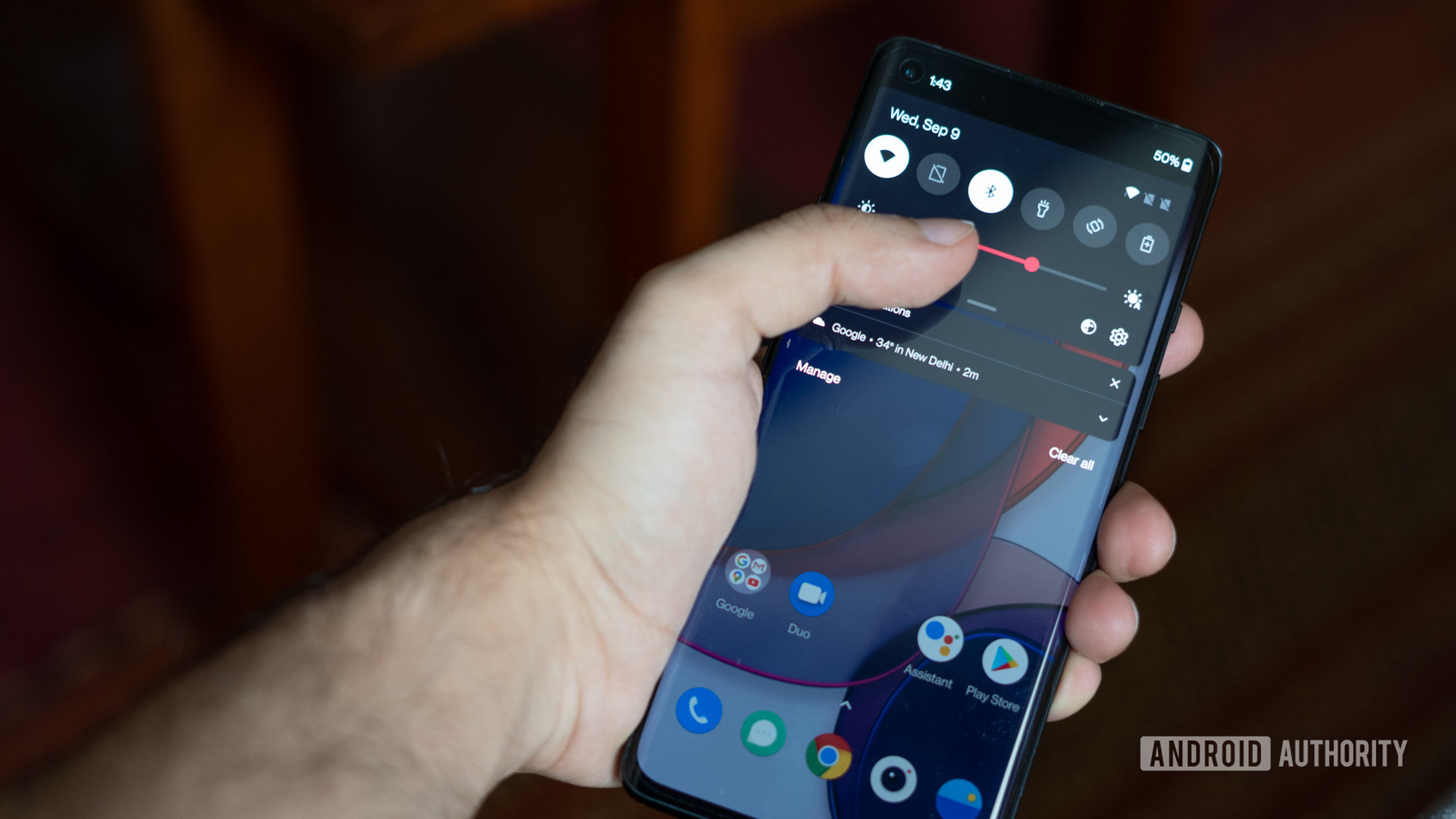
Adaptive brightness is a useful feature on old and new Android devices that, as the name suggests, automatically adjusts the brightness levels of your display based on the environmental lighting. Moreover, it will learn from your habits whenever you tweak the brightness slider manually so that it adapts more accurately to your liking. Not only can the feature save you time, but also improves battery life. Here’s everything you need to know about Adaptive brightness on Android so you can always see your screen.

Read more: How to adjust the brightness of your Fitbit

THE SHORT ANSWER

Adaptive brightness is an Android feature that adjusts your display’s brightness levels based on the surrounding lighting and your preferences. It uses the ambient light sensor and machine learning to make these adjustments for you automatically.


KEY SECTIONS

What is Android Adaptive brightness, and how does it work?

Adaptive Brightness was the successor to Automatic Brightness, released with Android Pie. Automatic Brightness suffered a few faults. For instance, manual adjustments often yielded better battery life and more suitable brightness levels for people. Automatic brightness made significant improvements by implementing machine learning algorithms. This means that your Android system can now learn your preferred settings over time. Moving the brightness slider during the day or night will train the phone to understand the desired display brightness in your typical lighting conditions. Ideally, you should gradually use the slider less and less until you no longer need to touch it.

Using an ambient light sensor, your Android can automatically adjust the brightness of the screen based on your liking.

So how does Adaptive brightness work? Android smartphones are equipped with ambient light sensors near the front-facing camera. Essentially, it is a simple photodiode. When light falls on it, a current is produced, and the intensity of the current helps the processor adjust the screen’s brightness. The higher the luminous intensity, the higher the current. So when you turn on Adaptive brightness, the Android software will automatically increase the screen’s brightness to suit your surroundings. You can actually test this for yourself by covering the top portion of your phone with your hand. If your sensor is working, the screen brightness will dampen.

How to turn Adaptive brightness on or off

You can find the Adaptive brightness option in your Display settings. Simply hit the toggle to turn it on or off.

You might also consider enabling the adaptive eye comfort shield to help reduce the amount of blue light your screen emits to help improve your sleep quality.
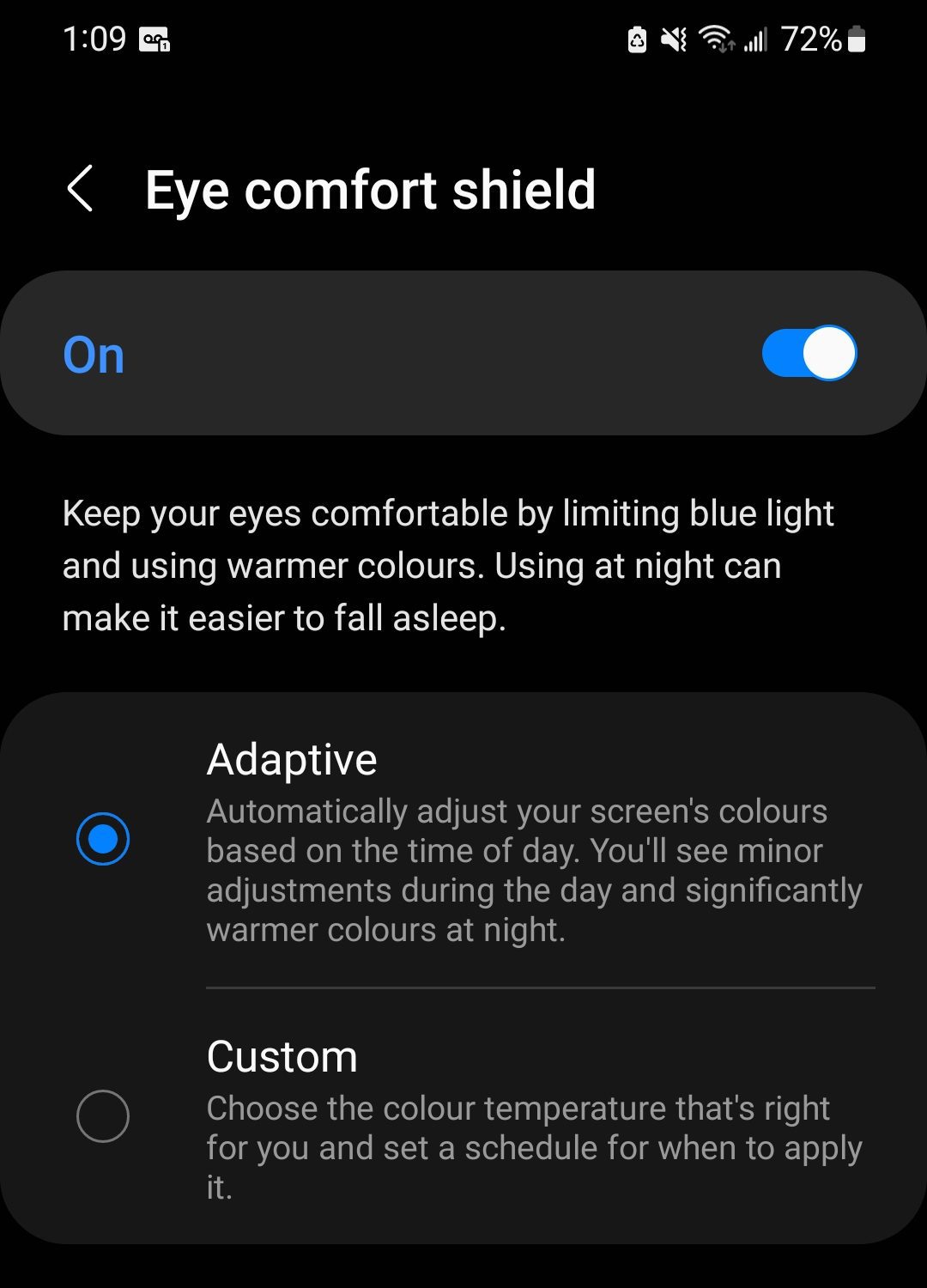
eye comfort shield

Adam Birney / Android Authority

How to reset Adaptive brightness on your Android device

Because adaptive brightness relies on machine learning, it takes time to properly dial in your device’s settings, and it doesn’t always get it right. If you find the brightness isn’t adapting appropriately or is changing randomly and doesn’t recalibrate after a few days, restoring the feature to its factory default state can be the best method to set it straight. Follow the steps below to do so:

Open the Settings app and navigate to Apps. Then, scroll down to select Digital Health Services. 
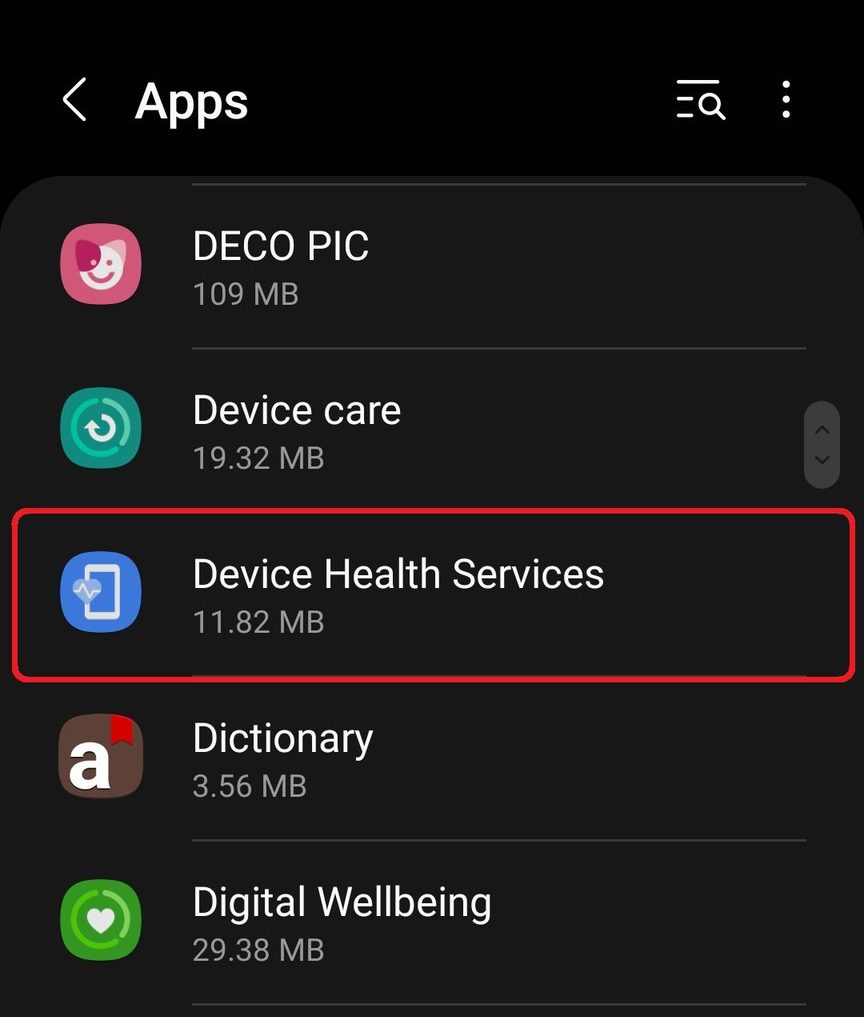
apps digital health services

Adam Birney / Android Authority

Select Storage under the Usage section in App Info.
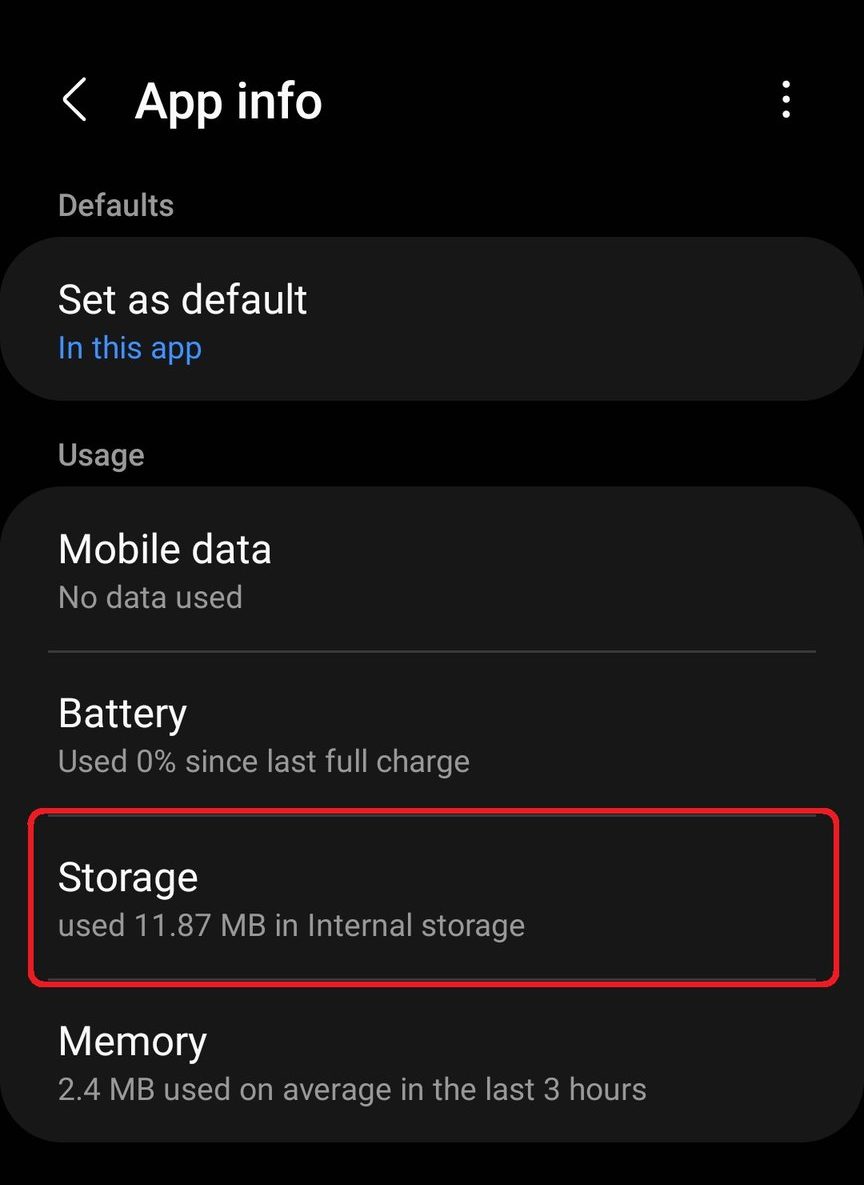
App info storage

Adam Birney / Android Authority

Then select Manage storage at the bottom left of the screen.
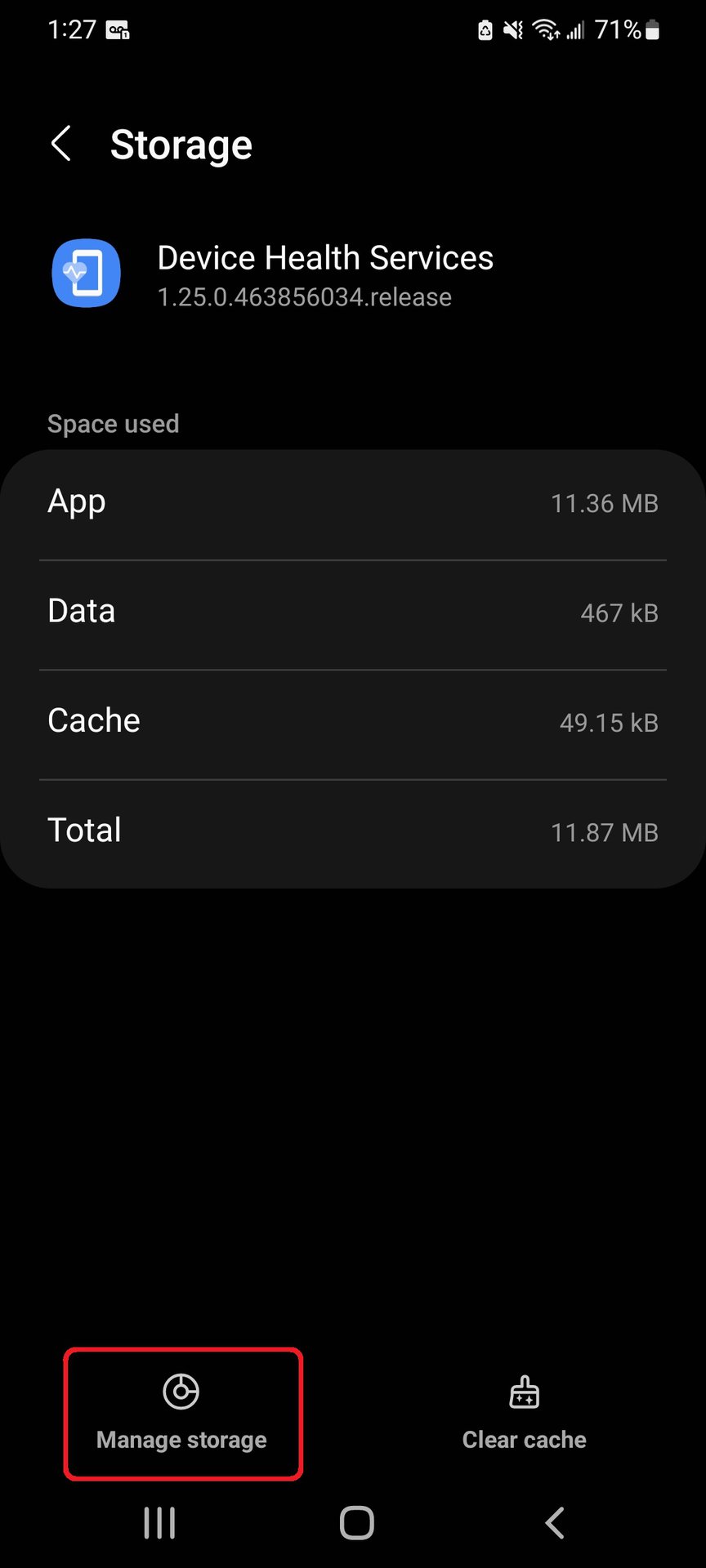
digital health services manage storage

Adam Birney / Android Authority

Lastly, tap the Reset adaptive brightness button. Note that on Samsung devices, you will only have the option to Clear all data.

reset adaptive brightness

Adam Birney / Android Authority

FAQs

Navigate to your device’s Display settings and tap the toggle to turn off Adaptive brightness.

When Adaptive brightness is enabled, your display’s brightness levels automatically adjust based on the lighting. The feature also learns from your manual brightness adjustments to better gauge your preferences.

If you are having problems with Adaptive brightness, try resetting the feature. To do so, navigate to Settings -> Apps -> Device Health Services and select Storage -> Manage storage. You will then see the option to reset the adaptive brightness.




Source link

ShareTweetSend
Previous Post

Saudis Sought Oil Production Cut So Deep It Surprised Even Russia

Next Post

Steven Gerrard fired as Aston Villa manager

Related News

Microsoft’s Satya Nadella Reveals Strategic Rationale Behind Layoff of 60,000 Employees
Tech

Microsoft’s Satya Nadella Reveals Strategic Rationale Behind Layoff of 60,000 Employees

November 19, 2026
Cybercriminals Embrace Innovative AI Tool for Streamlined Hacking Operations
Tech

Cybercriminals Embrace Innovative AI Tool for Streamlined Hacking Operations

November 18, 2026
Transform Your Laptop Setup with These 5 Affordable Accessories
Tech

Transform Your Laptop Setup with These 5 Affordable Accessories

November 15, 2026
Microsoft 365 Services Gradually Restore Functionality Following Global Outage
Tech

Microsoft 365 Services Gradually Restore Functionality Following Global Outage

November 14, 2026
Next Post
Steven Gerrard fired as Aston Villa manager

Steven Gerrard fired as Aston Villa manager

Discussion about this post

Subscribe To Our Newsletters

    Customer Support


    1251 Wilcrest Drive
    Houston, Texas
    77042 USA
    Call-832.795.1420
    e-mail – news@theinsightpost.com

    Subscribe To Our Newsletters

      Categories

      • Africa
      • Africa-East
      • African Sports
      • American Sports
      • Arts
      • Asia
      • Australia
      • Business
      • Business Asia
      • Business- Africa
      • Canada
      • Defense
      • Education
      • Egypt
      • Energy
      • Entertainment
      • Europe
      • European Soccer
      • Finance
      • Germany
      • Ghana
      • Health
      • Insight
      • International
      • Investing
      • Japan
      • Latest Headlines
      • Life & Living
      • Markets
      • Mobile
      • Movies
      • New Zealand
      • Nigeria
      • Politics
      • Scholarships
      • Science
      • South Africa
      • South America
      • Sports
      • Tech
      • Travel
      • Travel-Africa
      • UK
      • USA
      • Weather
      • World
      No Result
      View All Result

      Recent News

      Trump Raises Alarm Over Possible Chemical or Biological Weapons Development in Tehran Amid Rising Tensions

      Trump Raises Alarm Over Possible Chemical or Biological Weapons Development in Tehran Amid Rising Tensions

      November 19, 2026
      APC Leader Calls for Unity Among Tinubu and Yari to Strengthen Kano’s Political Landscape in 2027

      APC Leader Calls for Unity Among Tinubu and Yari to Strengthen Kano’s Political Landscape in 2027

      November 19, 2026
      Trump’s Deal Turns Sour as Voters Withdraw Support

      Trump’s Deal Turns Sour as Voters Withdraw Support

      November 19, 2026
      Hong Kong’s Building Maintenance Authority Secures HK3 Million to Expand Operations and Recruit 160 New Employees

      Hong Kong’s Building Maintenance Authority Secures HK$413 Million to Expand Operations and Recruit 160 New Employees

      November 19, 2026
      • Home
      • Advertise With Us
      • About Us
      • Corporate
      • Consumer Rewards
      • Forum
      • Privacy Policy
      • Social Trends

      Theinsightpost ©2026 | All Rights Reserved. Theinsightpost is an Elnegy LLC company, registered in Texas, USA

      Welcome Back!

      Login to your account below

      Forgotten Password?

      Retrieve your password

      Please enter your username or email address to reset your password.

      Log In

      Add New Playlist

      We are using cookies to give you the best experience on our website.

      You can find out more about which cookies we are using or switch them off in .

      No Result
      View All Result
      • Home
      • Insight
      • Blog
      • Business
      • Entertainment
      • Health
      • Politics
      • Shop
        • Gift Shop
        • Value Shop
        • Store
        • Bargain Shop
        • Discount
      • Sports
      • Tech
      • Travel
      • USA
      • Video
      • World
        • Asia
        • Africa
        • South America
        • North America
        • Europe
        • Oceania

      Theinsightpost ©2026 | All Rights Reserved. Theinsightpost is an Elnegy LLC company, registered in Texas, USA

      The Insight Post
      Powered by  GDPR Cookie Compliance
      Privacy Overview

      This website uses cookies so that we can provide you with the best user experience possible. Cookie information is stored in your browser and performs functions such as recognising you when you return to our website and helping our team to understand which sections of the website you find most interesting and useful.

      Strictly Necessary Cookies

      Strictly Necessary Cookie should be enabled at all times so that we can save your preferences for cookie settings.

      Cookie Policy

      More information about our Cookie Policy