• Home
  • Insight
  • Blog
  • Business
  • Entertainment
  • Health
  • Politics
  • Shop
    • Gift Shop
    • Value Shop
    • Store
    • Bargain Shop
    • Discount
  • Sports
  • Tech
  • Travel
  • USA
  • Video
  • World
    • Asia
    • Africa
    • South America
    • North America
    • Europe
    • Oceania
Wednesday, October 7, 2026
No Result
View All Result
Subscribe Now
  • Home
  • Insight
  • Blog
  • Business
  • Entertainment
  • Health
  • Politics
  • Shop
    • Gift Shop
    • Value Shop
    • Store
    • Bargain Shop
    • Discount
  • Sports
  • Tech
  • Travel
  • USA

    Washington state man charged with helping Canadian mass shooter plan for attack

    Border Security, Public Safety, and American Sovereignty with Markwayne Mullin

    Students injured as NJ high school bleachers collapse in scary scene

    California man in incest case busted in Mexico; teen daughter rescued

    Cornell president calls gang rape allegations ‘deeply disturbing’ : NPR

    France’s violent student protests raise warning for America: ‘A cautionary tale’

    Birmingham’s WBHM Public Radio Station Forced to Use “Gulf of America”

    Eminem gets online backlash from fans over Kid Rock Christian album collab

    Trump leans into Iran war, admits it could cost Republicans the midterms

  • Video
  • World
    • Asia
    • Africa
    • South America
    • North America
    • Europe
    • Oceania
The Insight Post
  • Home
  • Insight
  • Blog
  • Business
  • Entertainment
  • Health
  • Politics
  • Shop
    • Gift Shop
    • Value Shop
    • Store
    • Bargain Shop
    • Discount
  • Sports
  • Tech
  • Travel
  • USA

    Washington state man charged with helping Canadian mass shooter plan for attack

    Border Security, Public Safety, and American Sovereignty with Markwayne Mullin

    Students injured as NJ high school bleachers collapse in scary scene

    California man in incest case busted in Mexico; teen daughter rescued

    Cornell president calls gang rape allegations ‘deeply disturbing’ : NPR

    France’s violent student protests raise warning for America: ‘A cautionary tale’

    Birmingham’s WBHM Public Radio Station Forced to Use “Gulf of America”

    Eminem gets online backlash from fans over Kid Rock Christian album collab

    Trump leans into Iran war, admits it could cost Republicans the midterms

  • Video
  • World
    • Asia
    • Africa
    • South America
    • North America
    • Europe
    • Oceania
No Result
View All Result
No Result
View All Result
Home Mobile

Codemagicの仮想MacOSビルドマシンへのリモートアクセスの使い方 | Codemagic Blog

by Theinsightpost
August 6, 2022
in Mobile
0 0
0
Codemagicの仮想MacOSビルドマシンへのリモートアクセスの使い方 | Codemagic Blog


本記事は2021年7月に更新されました。

各セッション中にCodemagicのビルドが実行される仮想MacOSビルドマシンへの一時的な リモートアクセス/接続 が可能になりました。

まだCodemagicのユーザーでない場合は、こちらでサインアップできます:

サインアップ

。

リモートマシンへの接続には2つの方法があります:

-SSHアクセス
-VNC Viewer

仮想MacOSマシンへのリモートアクセスは、MacOSシステムにアクセスできない人々に全く新しい可能性をもたらします。

Click to tweet

本記事は Souvik Biswas が執筆いたしました。

事前インストールされたソフトウェア

このリモートMacOSマシンには、複数のバージョンのXcodeや**iOSシミュレーター(複数)**など、Flutterプロジェクトのテストやデバッグに必要な重要なソフトウェアが事前に用意されています。

Macを持っていなくても、FlutterアプリをiOSシミュレーターで動作させてパフォーマンスをテストしたり、XcodeでFlutterプロジェクトの構成を変更したりできます。

事前インストールされたソフトウェアの全リストはこちらからご覧いただけます。

仮想ビルドマシンへのアクセス

SSHかVNC Viewerを使用して仮想ビルドマシンにアクセスするには、以下の手順に従います。

**注意:**仮想マシンへのSSHまたはVNC接続の確立は、手動でトリガーされたビルドでのみ可能です。

  1. プロジェクトをCodemagicで開きます。

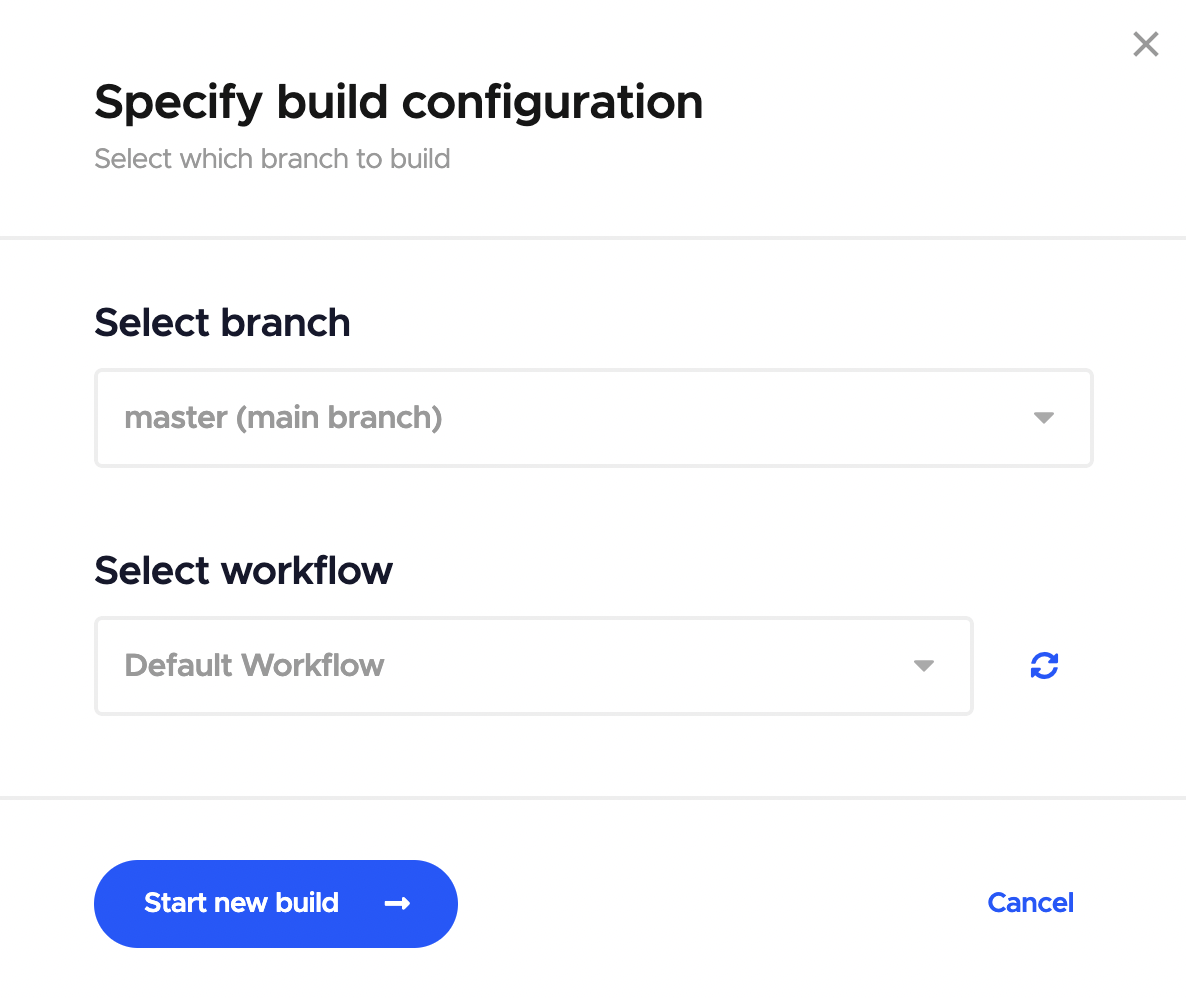
  2. **新規ビルドを開始(Start new build)**をクリックします。

  3. ビルド構成を指定ダイアログボックスで、正しいブランチとワークフローを選択し、再度新規ビルドを開始をクリックするとビルドプロセスが開始されます。
  4. ビルドが始まると、「SSHまたはVNCクライアントでビルドマシンを探索」タブをを展開し、しばらく待つと、SSHまたはVNC接続を確立するための指示が表示されます。
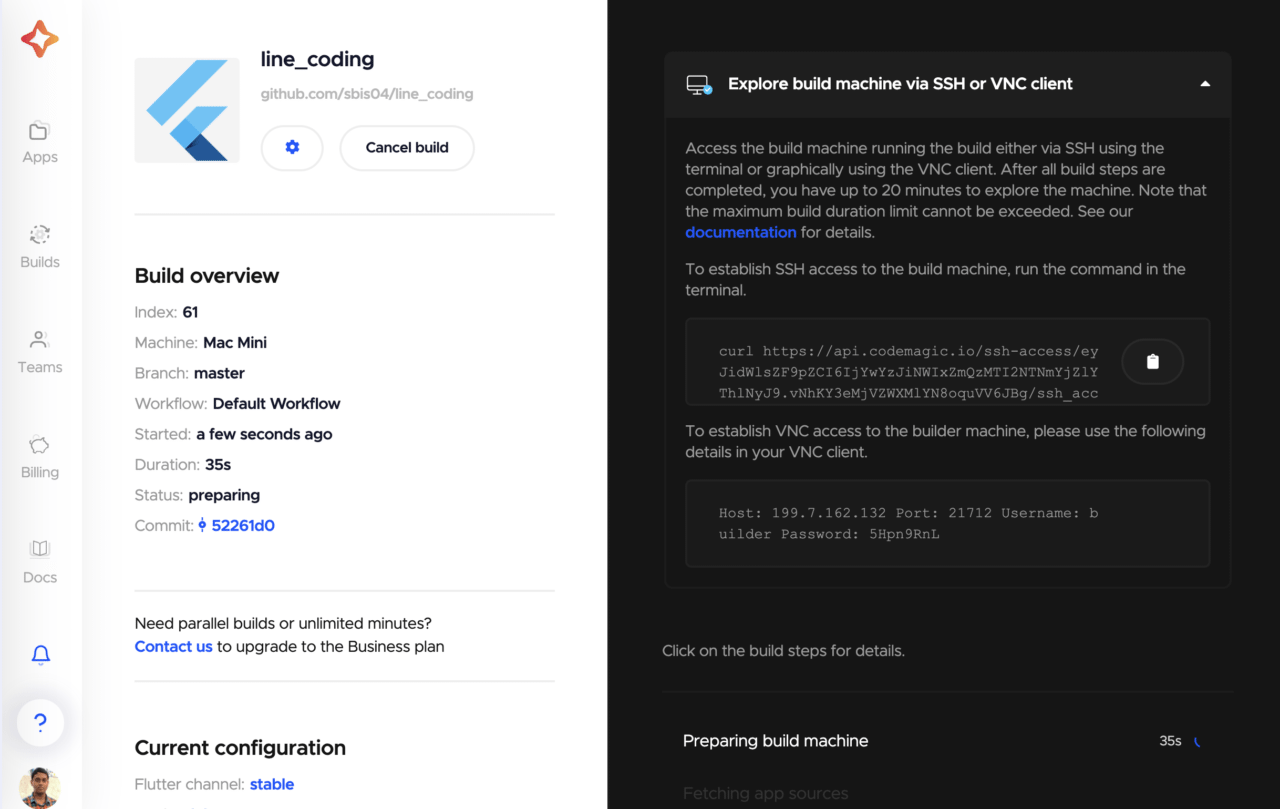
SSHによるアクセス

SSH接続では、ターミナルを介してのみビルドマシンにアクセスし、そこでコマンドを実行することができます。

SSH接続を確立するためのスクリプトは、LinuxとMacOSでネイティブに動作します。ですが、Windowsで動作させたい場合は、追加のソフトウェアが必要になります。

SSH接続を確立するには、ターミナルから(LinuxとMacOSで)curlコマンドを実行するだけです。

ターミナルにcurlコマンドをコピー&ペーストします。Enterを押すと、リモートMacOSシステムに接続します。
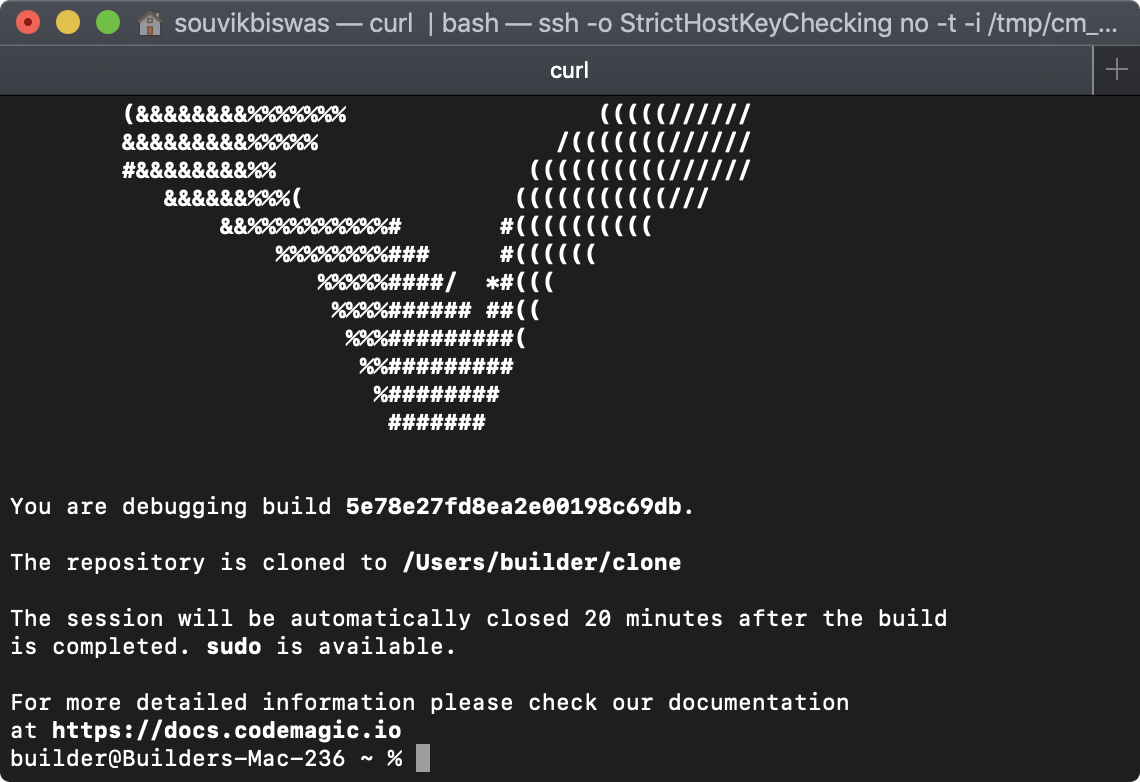
これでVMへのアクセスが可能になりました。

クローンされたプロジェクトは、パス /Users/builder/clone で利用できます。次のコマンドを実行するだけでパスにナビゲートします:
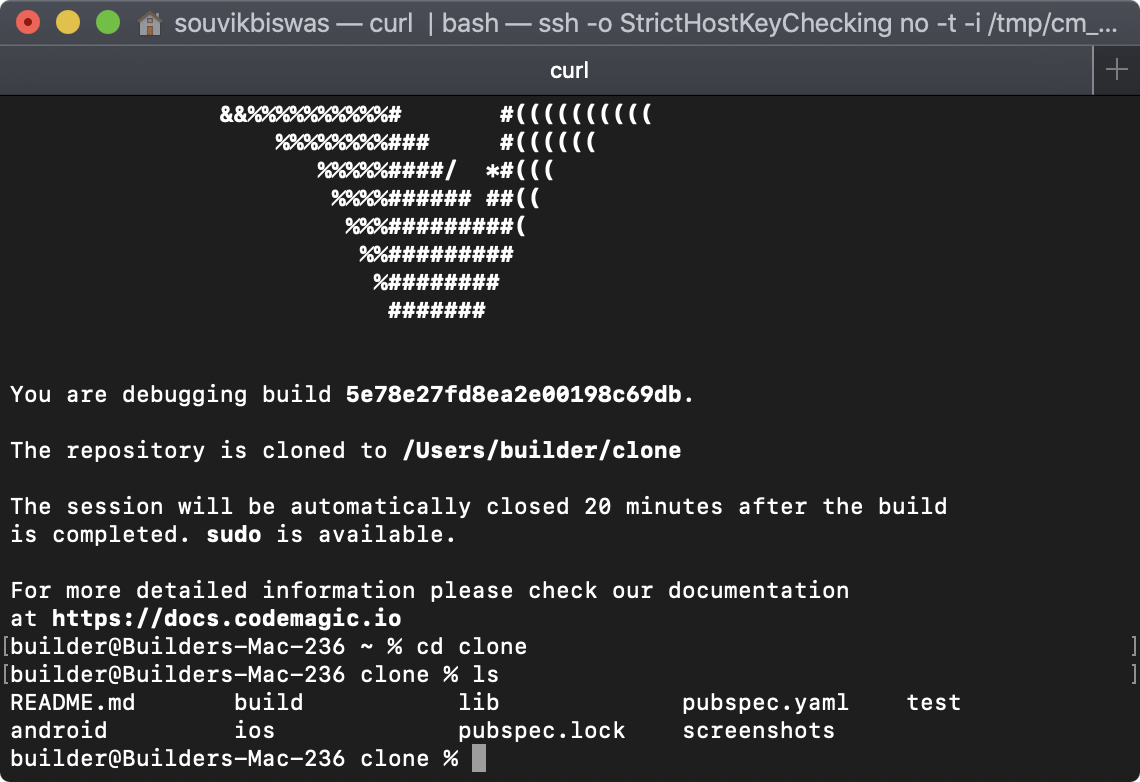
SSHセッションは、ビルドステップがすべて完了してから最大20分間、またはビルド時間の最大制限に達するまでのいずれか早い方の時間の間アクティブになります。

SSHアクセスは、ビルドのデバッグに最適なオプションです。CIジョブ中に実行されたプロセスを確認したり、ビルド中に実行されたコマンドをすべて再現したり、カスタムスクリプトをデバッグしたりできます。sudoアクセスでVMを完全に制御できます。

ヒント: codemagic.yaml スクリプトのbashコマンドを、SSHアクセスでビルダーマシン上で直接再実行して、正しい出力が得られるかどうかを確認できます。

すべての環境変数にアクセスできます。ビルダー上で printenv というコマンドを実行すると、それらを見れます。

VNC Viewerによるアクセス

VNC Viewerでは、グラフィカルなインターフェイスを使ってリモートビルドマシンにアクセスできます。これにより、MacOSマシンを所有していなくても、Flutterアプリをシミュレーター上で実行し、そのパフォーマンスを理解することができます。

  1. [VNC Viewer]をダウンロード(https://www.realvnc.com/en/connect/download/viewer/ ‘Remote access virtual Mac build machine’)します。

  2. VNC Viewerをインストールして実行します。

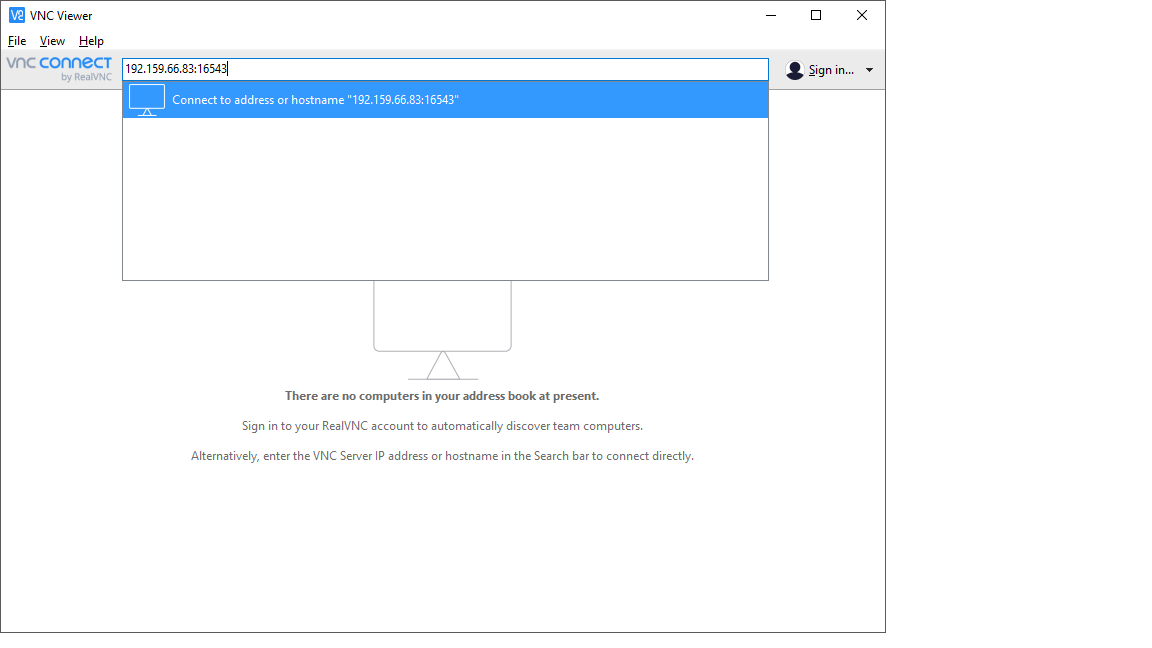
  3. ここで、ホストIDとポート番号をコピーして、次の形式で**_VNCサーバーアドレスフィールド**に貼り付けます:<ホストID>:<ポート番号>(例: 192.159.66.83:16543)。その後、 Enter を押します。
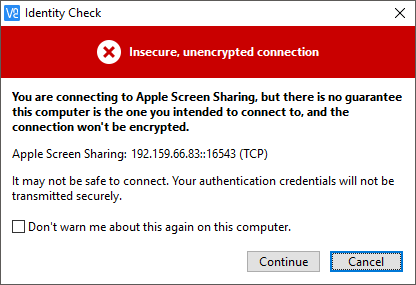
  4. 警告メッセージが表示されますが、単に**続行(Continue)**をクリックします。
  5. Codemagic UIで生成されたユーザー名とパスワードを入力して、OKをクリックします。
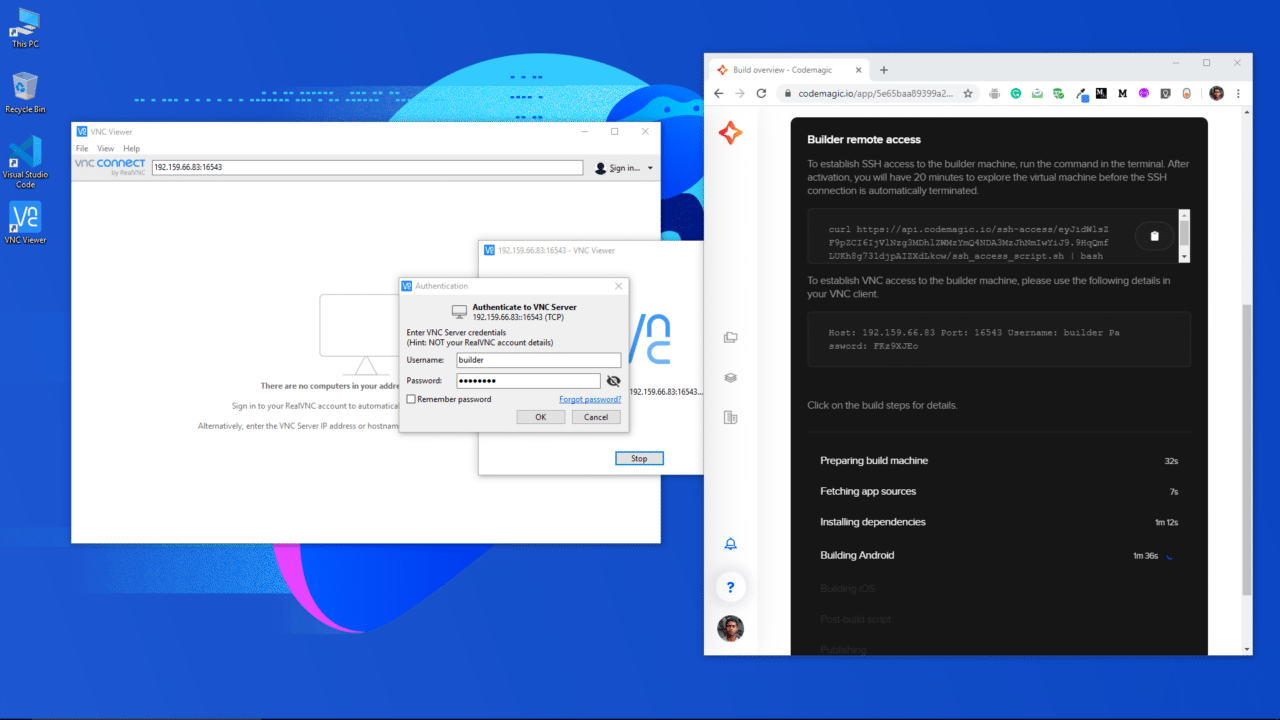
これでリモートMacOSビルドマシンに接続されました。接続が確立されると、システムのデスクトップが表示されます。

VNCセッションは、ビルドステップがすべて完了してから最大20分間、またはビルド時間の最大制限に達するまでのいずれか早い方の時間の間アクティブになります。

異なるアプリケーションへのアクセス方法

MacOSの環境に慣れていない場合、リモートMac内のさまざまなアプリケーションにアクセスするのが難しいと感じるかもしれません。ご安心ください。ターミナルを使って様々なアプリケーションを起動できます。

ドックにあるターミナルのアイコンをクリックすると、ターミナルにアクセスできます。
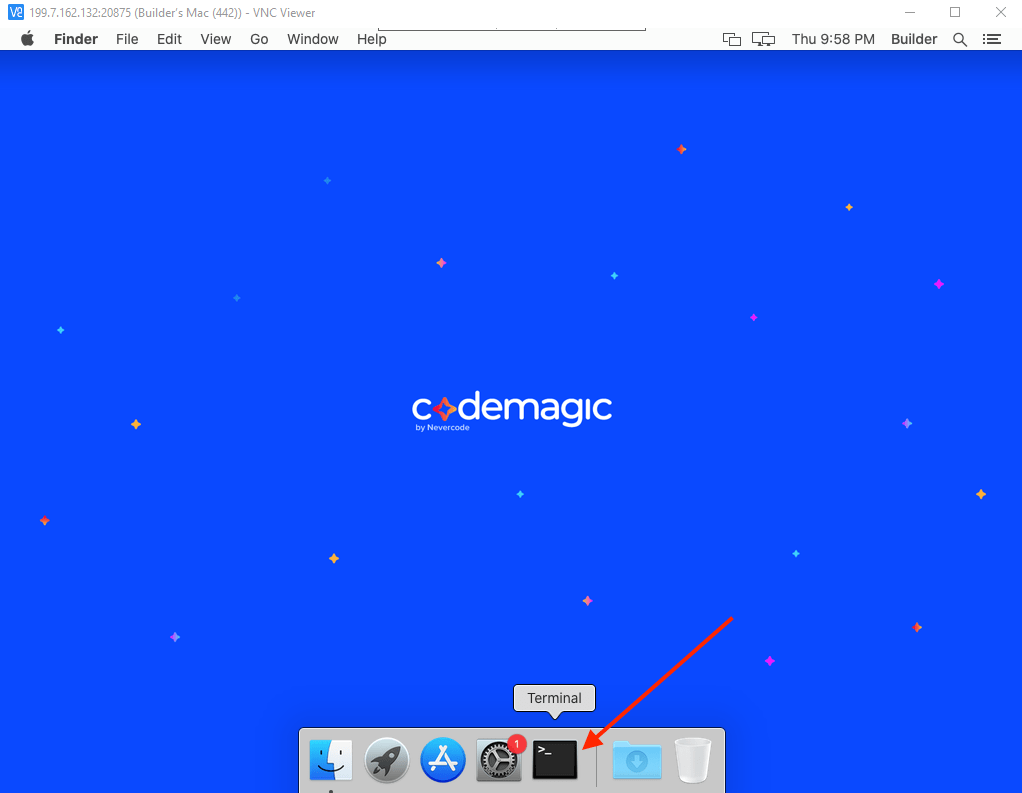
ターミナルを使えば、Safari、Xcode、Simulatorなど、Macで様々なアプリケーションを簡単に起動できます。

シミュレーターでの実行

MacOSをお使いでない方は、まず、FlutterアプリをiOSシミュレーターで実行することになるでしょう。では、シミュレーターでアプリを実行する方法をご紹介いたします。

まず、仮想MacOSシステム上でiOSシミュレーターを起動します。

ビルドマシンには、異なるバージョンのシミュレーターが搭載されています。そのため、最初に、ビルドする対象のiOSバージョンでアプリをテストする必要があります。

ビルドマシンにインストールされているシミュレーターのバージョンはすべて、以下のコマンドで確認できます:

次のコマンドを使って、デフォルトのシミュレーターのバージョンを実行できます:

また、システム上に存在する任意のシミュレーターを起動するには、デバイスのUDIDを指定して、次のコマンドを使用します:

open -a Simulator --args -CurrentDeviceUDID <device UDID>
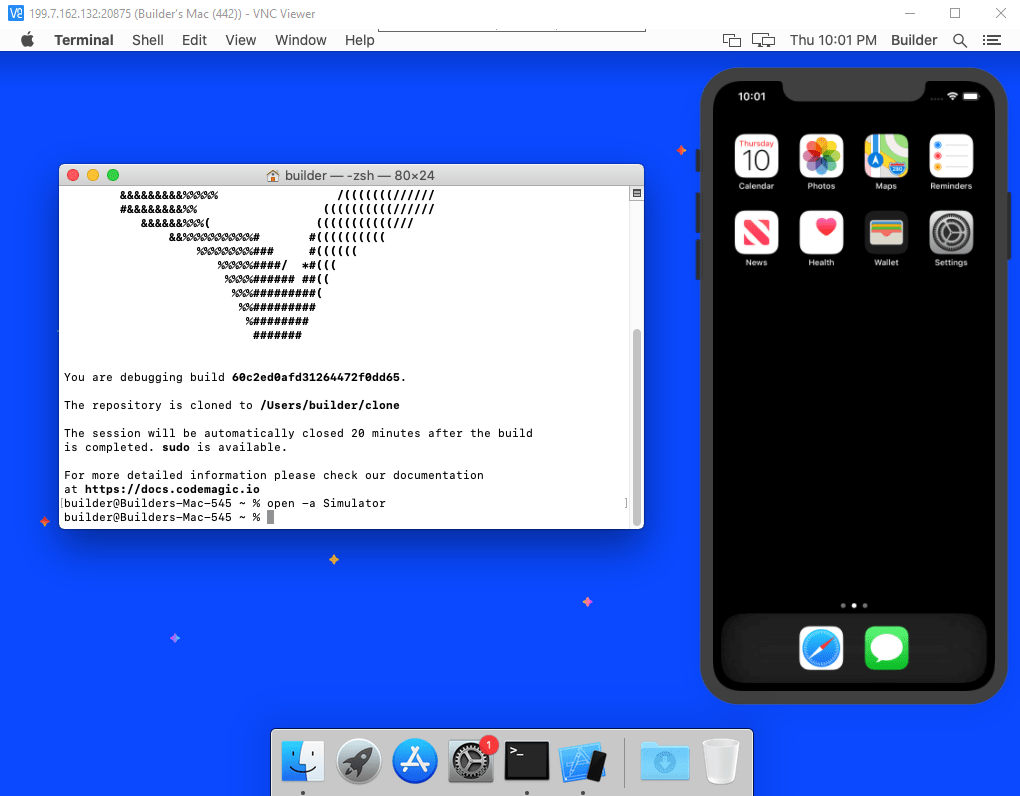
シミュレーターでアプリを実行するには、クローンされたFlutterアプリのディレクトリに移動する必要があります。プロジェクトのクローンは、VM上のパス /Users/builder/clone で利用できるようになります。

それを次のコマンドを使って簡単にナビゲートできます:

そして、次のコマンドを使ってアプリを実行します:
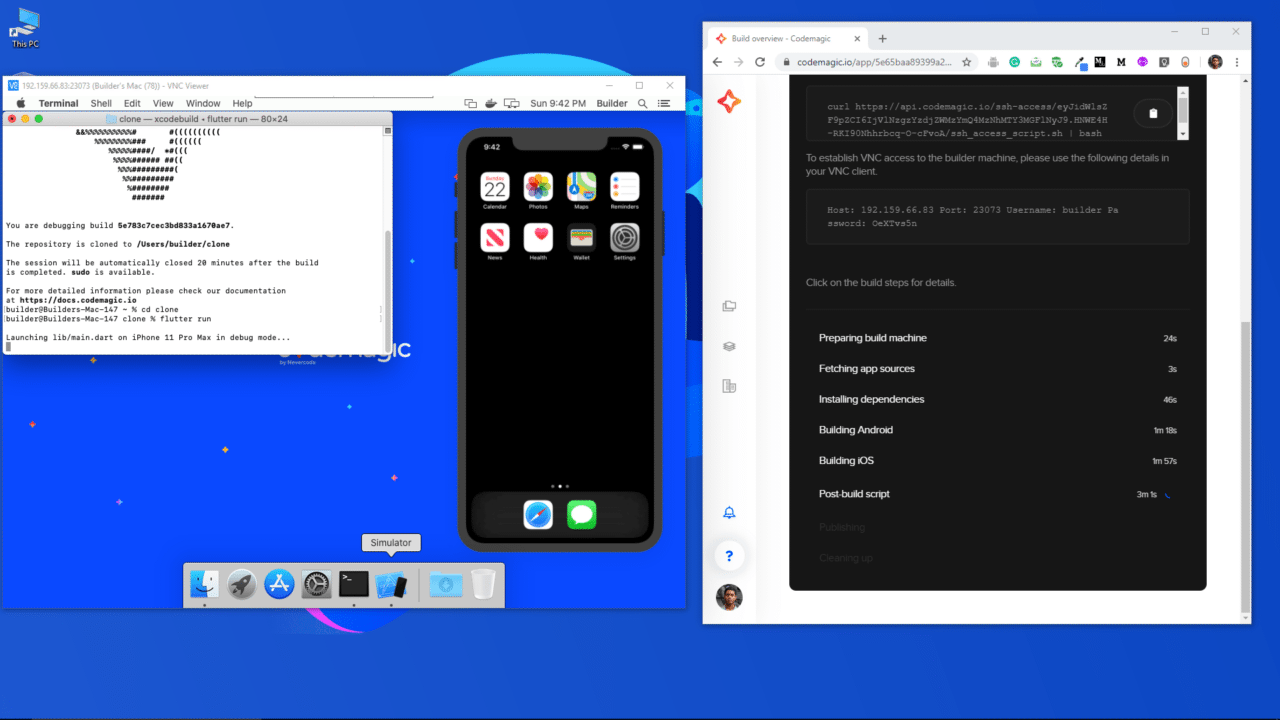
シミュレーターでプロジェクトが読み込まれるのを待ちます。
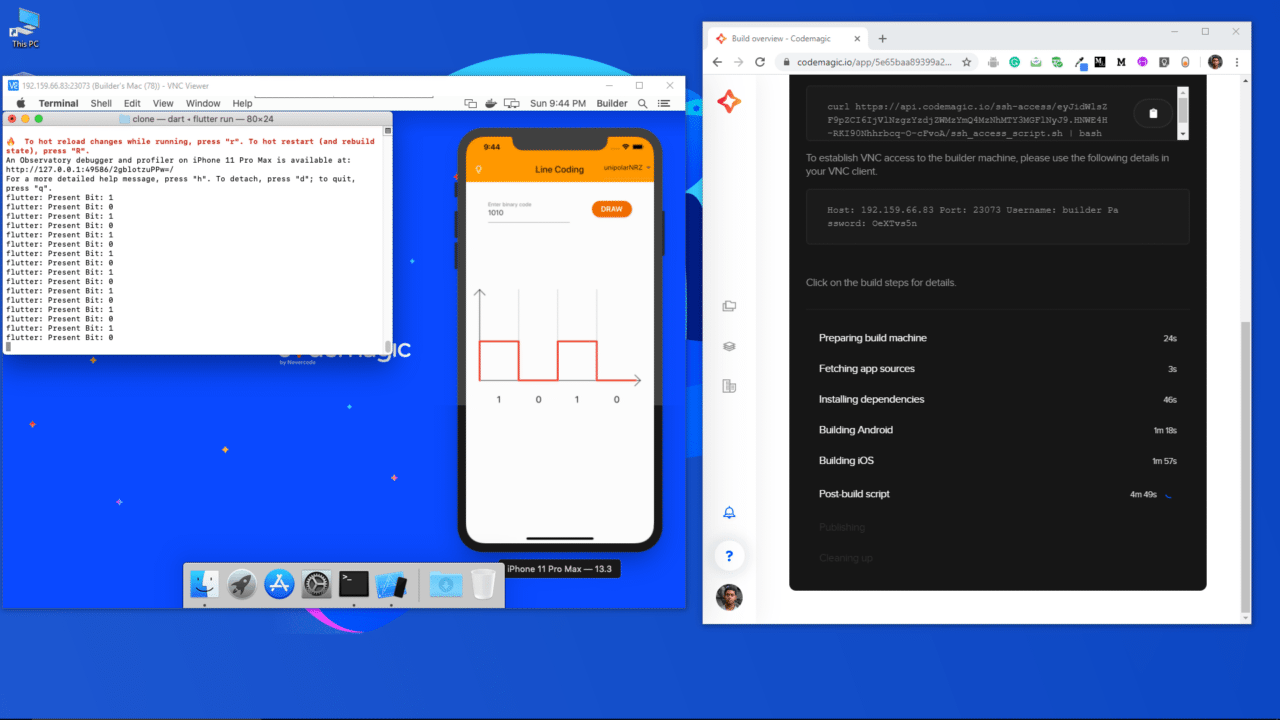
Line Coding app

iOSの構成変更

FlutterプロジェクトのiOS部分の構成を変更するには、VM上でXcodeを使用する必要があります。

次のコマンドを使って、デフォルトバージョンのXcodeを起動できます:
現在選択されているXcodeのバージョンを確認するには、次のコマンドを使用します:
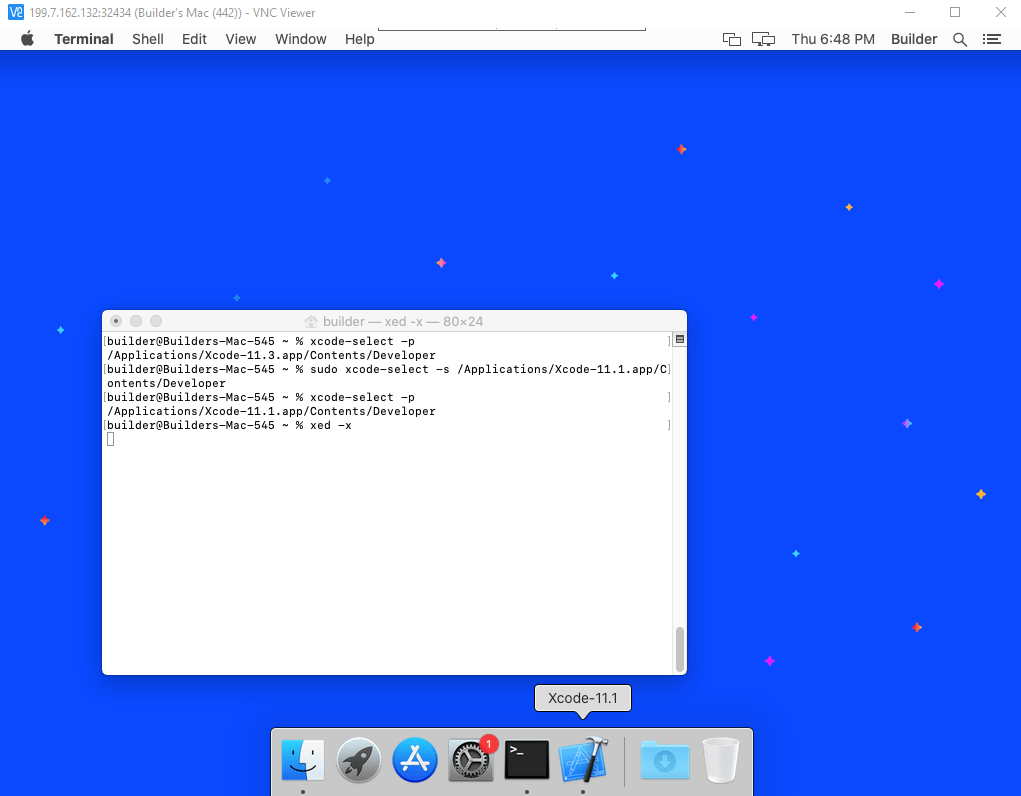
Xcodeのバージョンを変更するには、以下を使用します:

sudo xcode-select -s /Applications/Xcode-<version>.app/Contents/Developer

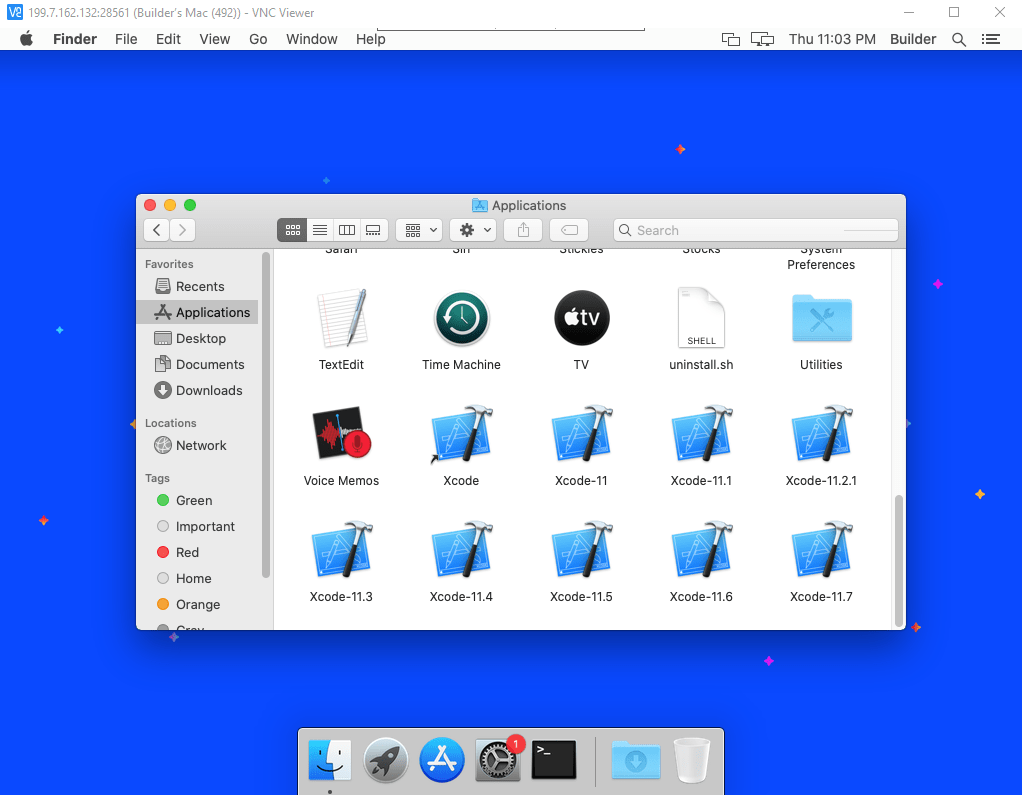
<version>は、システムで利用可能な任意のバージョンに置き換えてください。システムに存在するバージョンは、ビルドマシンのFinderから アプリケーションフォルダに移動して確認できます。
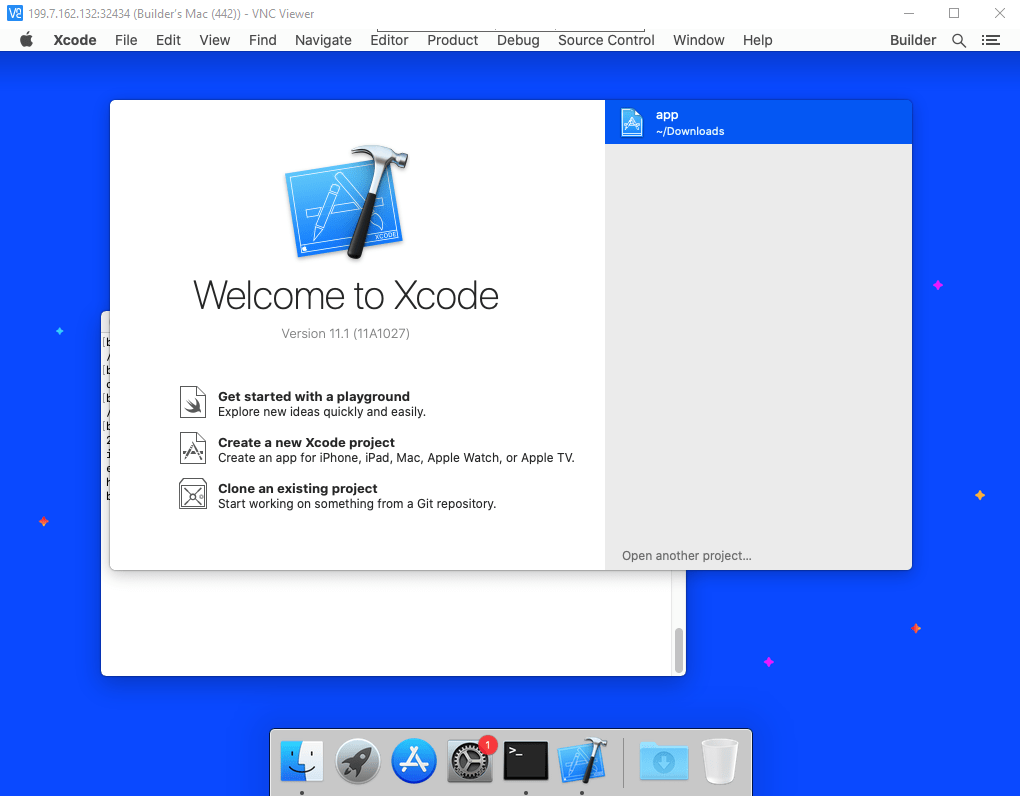
Xcodeを開いた後、**別のプロジェクトを開く(Open another project)**をクリックします。
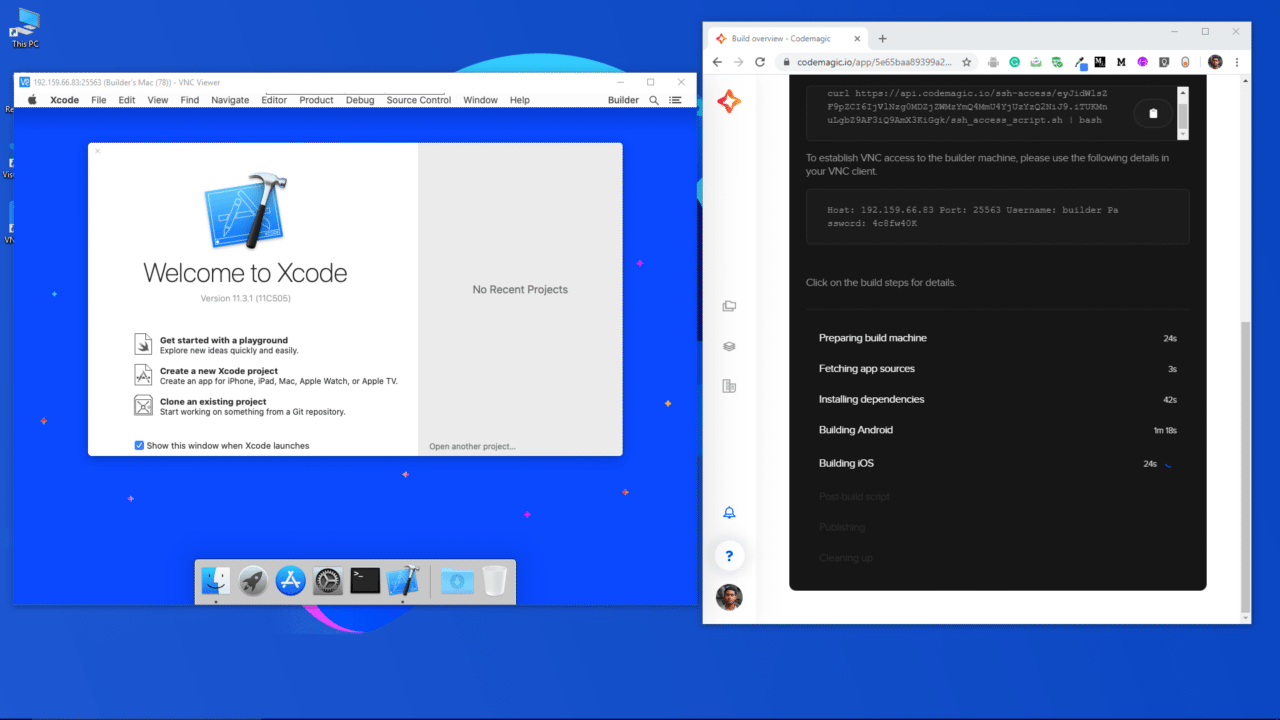
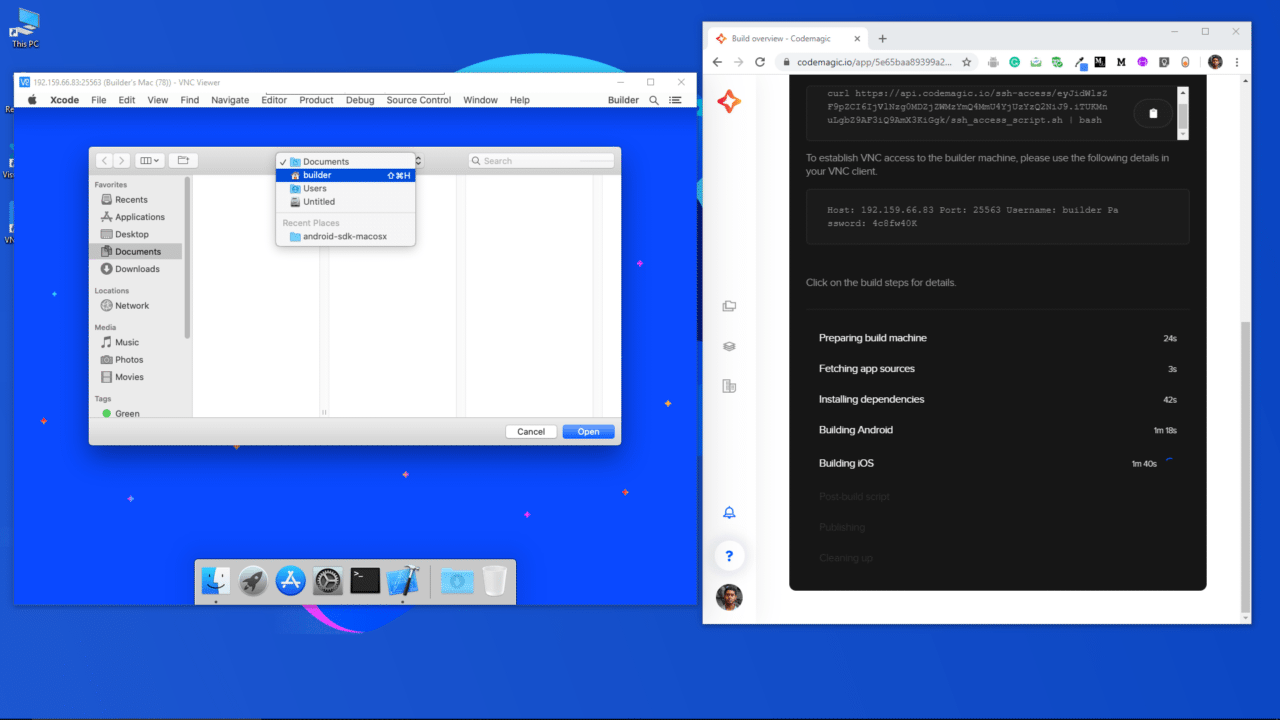
ここで、Flutterプロジェクトのiosフォルダに移動し、Xcode上でそれを開く必要があります。上部のドロップダウンから「ビルダー」を選択します。
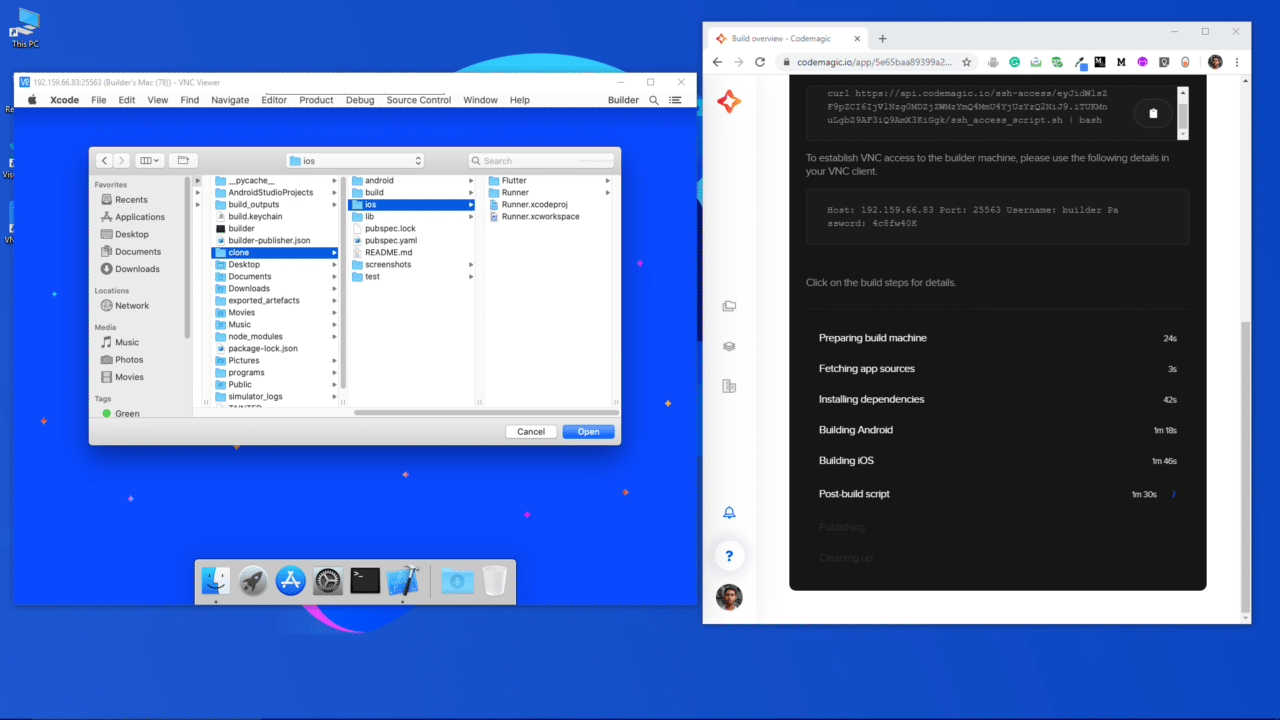
次に、クローン(clone)→iosと進み、開くをクリックします。
プロジェクトが Xcode で開かれます。iOSアプリのバージョンやバンドルIDを変更したい場合は、左サイドバーからRunnerにアクセスします。
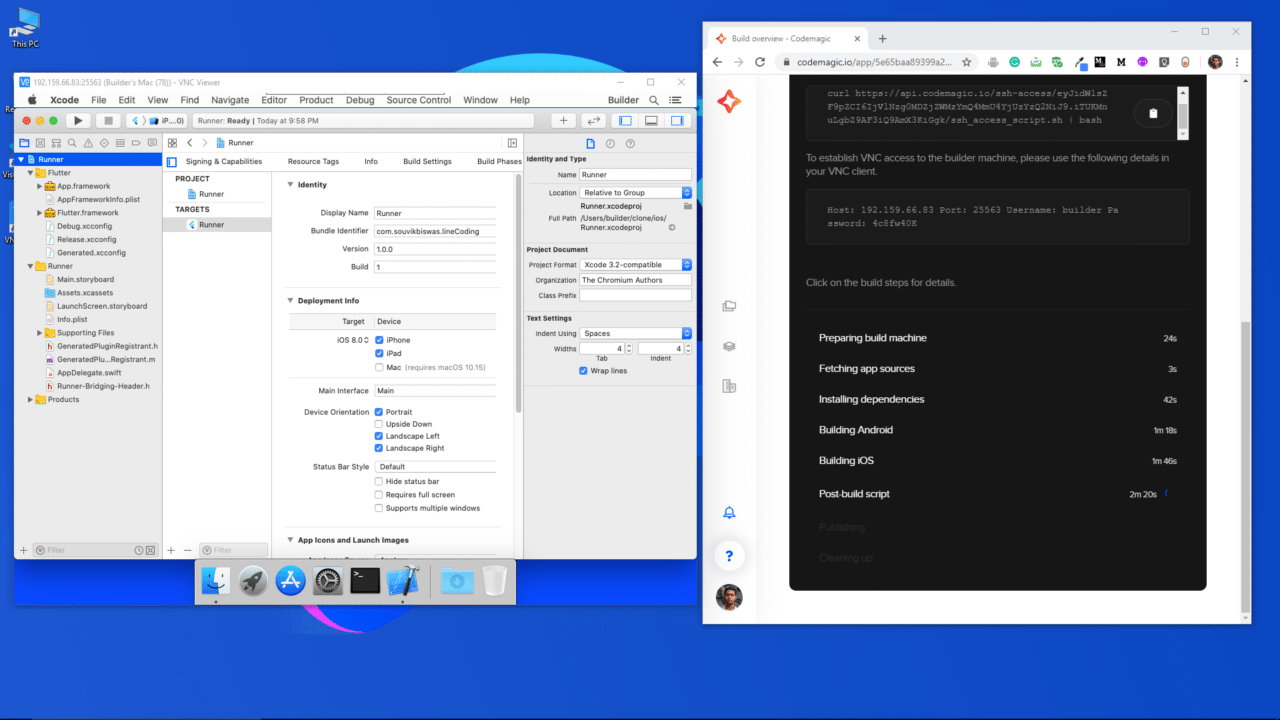
また、Xcodeからプロジェクトのプロビジョニングプロファイルと開発者署名証明書を生成することもできます。

コード署名ファイル(プロビジョニングプロファイルや証明書など)を生成するためのガイドはこちらにあります。

また、このVM上で行った構成変更を保存するのも非常に簡単です。リポジトリは*GitHub**/GitLab/Bitbucketアカウントからクローンされているため、gitを使って変更を直接_commit_して、アカウントに_push_できます。

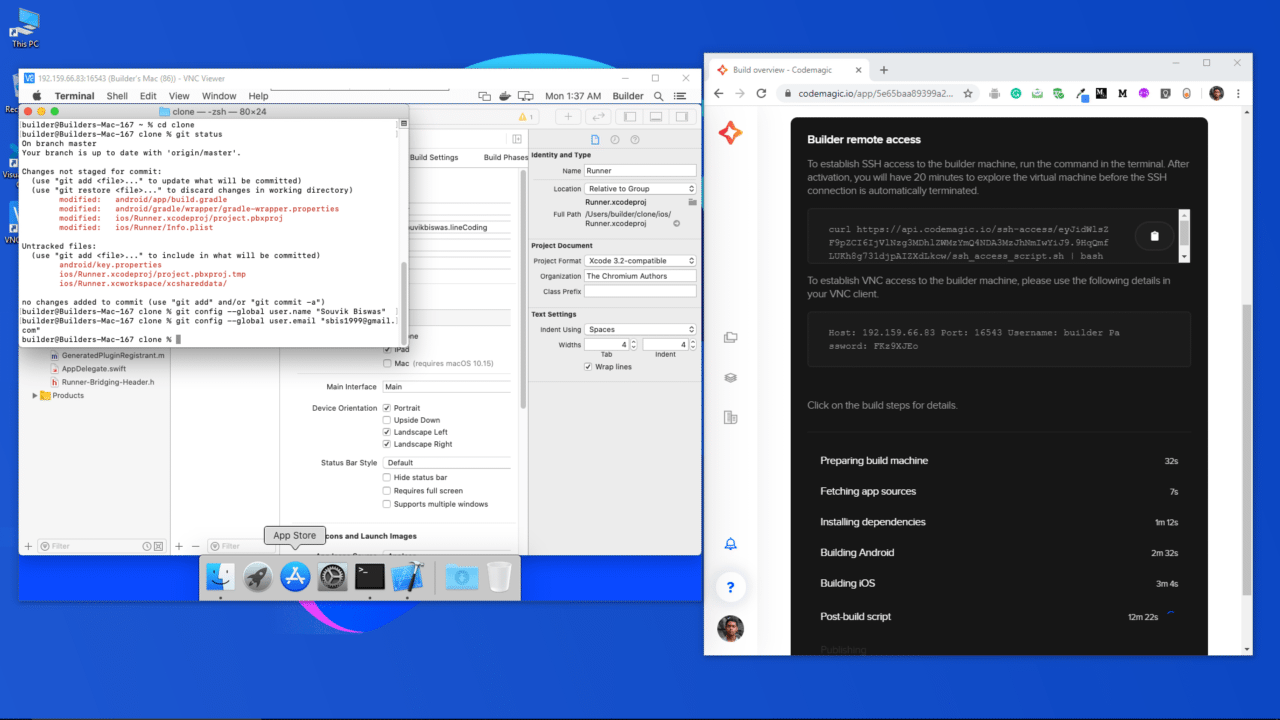
デモ用に、Xcode内でiOSアプリのバージョンを更新したところです。
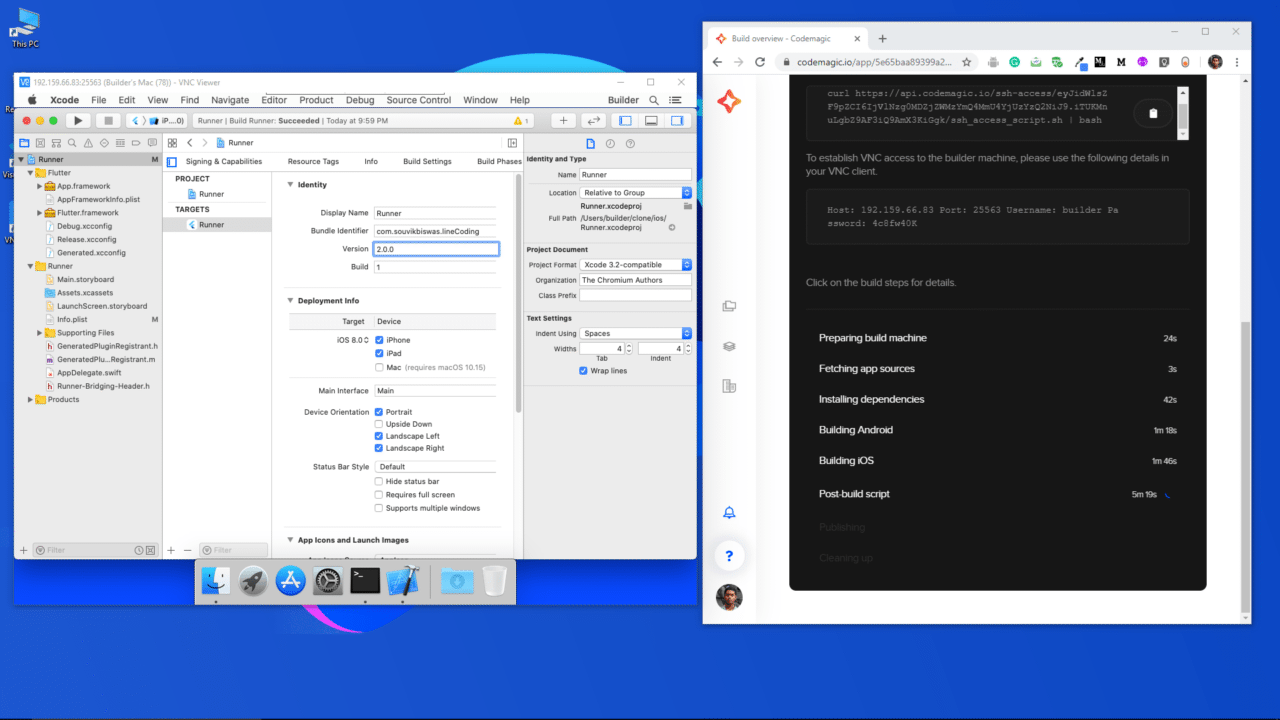
ここで、ターミナルを開き、プロジェクトディレクトリに移動します。

次に、以下のコマンドを実行すると、変更されたファイルが表示されます:
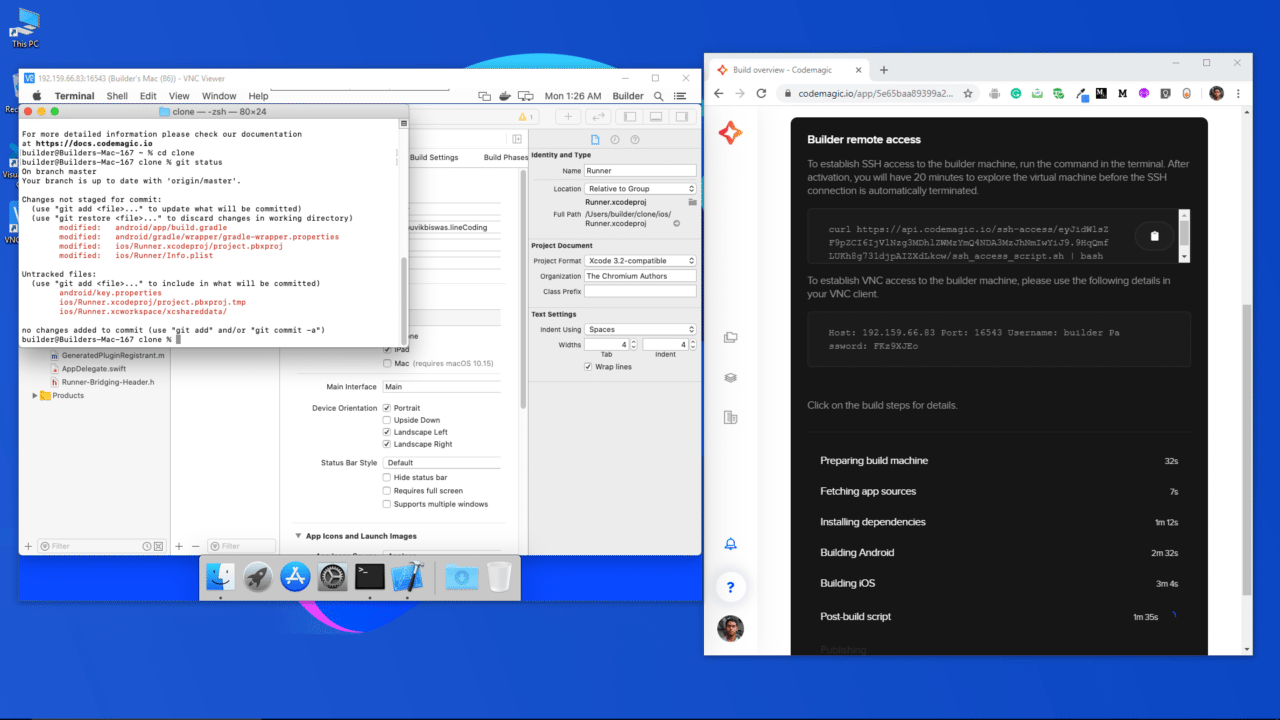
ファイルをGitにコミットする前に、以下の2つのコマンドを実行して、変更内容の正しい作成者を定義します:

git config --global user.name "<your_name>"
git config --global user.email "<your_email>"

<your_name> をお名前に、<your_email> をメールアドレスに置き換えてください。

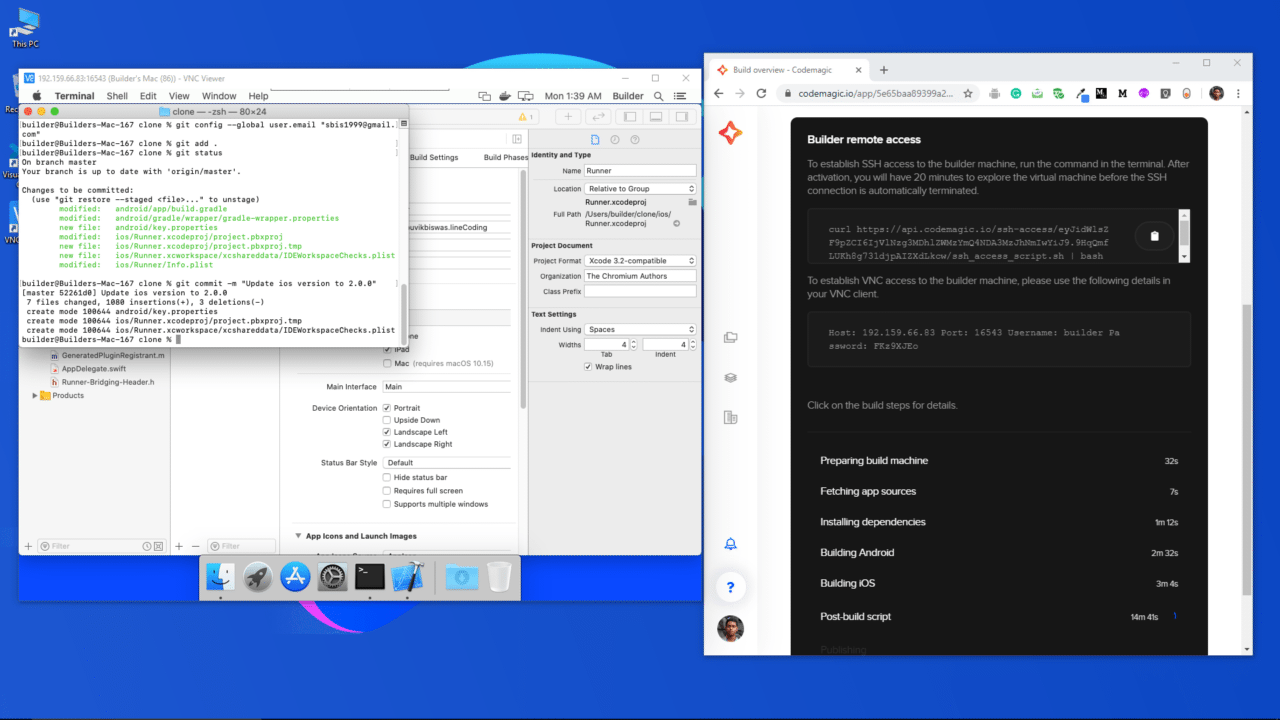
次のコマンドを使って、変更したファイルをコミットします:

git add .
git commit -m "Update ios version to 2.0.0"

iosディレクトリのみをコミットしたい場合は(git add .ではなく)、以下を実行します:

次のコマンドを実行して、正しい作成者で変更が行われているかどうかを確認できます:
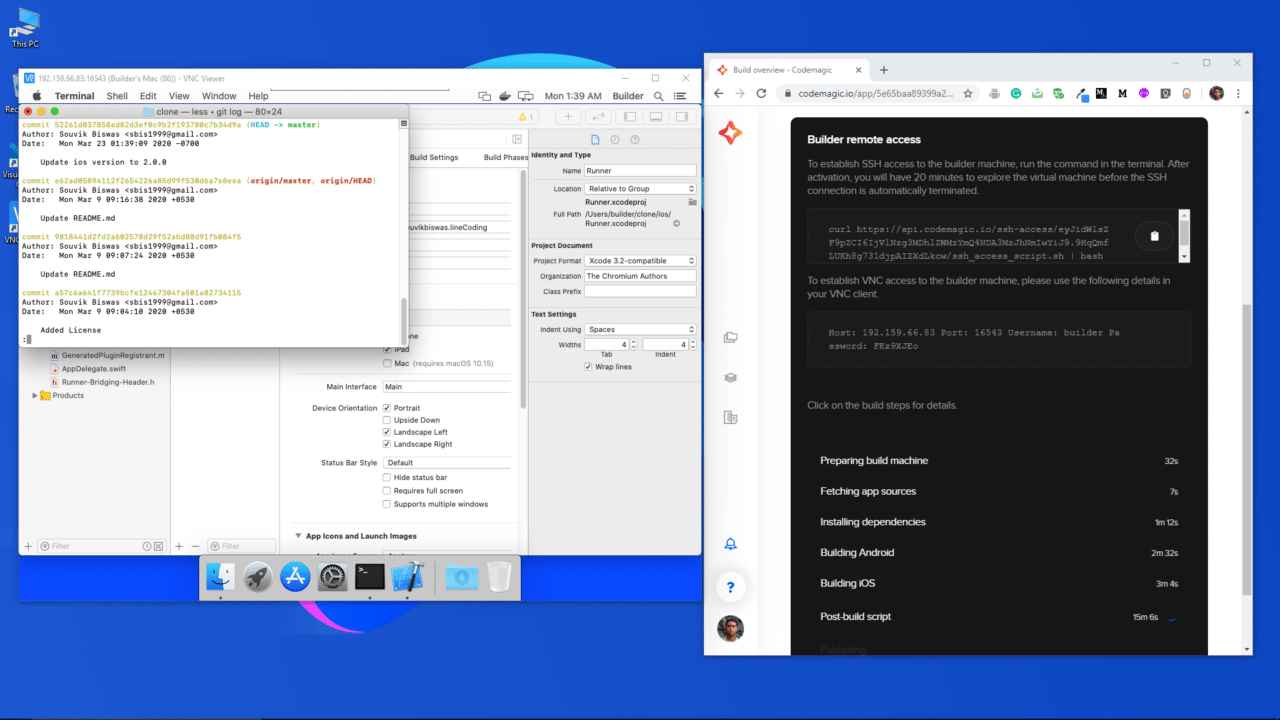
プロジェクトで使用可能なリモートがあるかどうかを確認します。
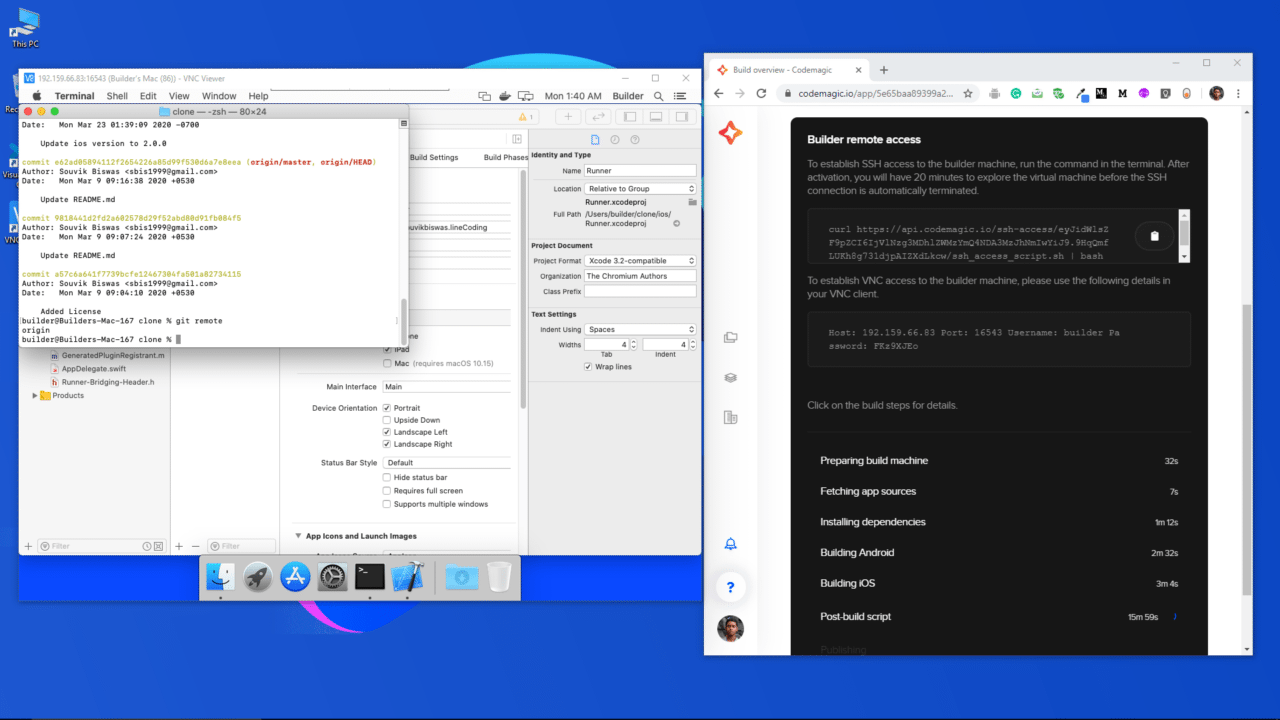
次のコマンドを使って変更内容をプッシュします:
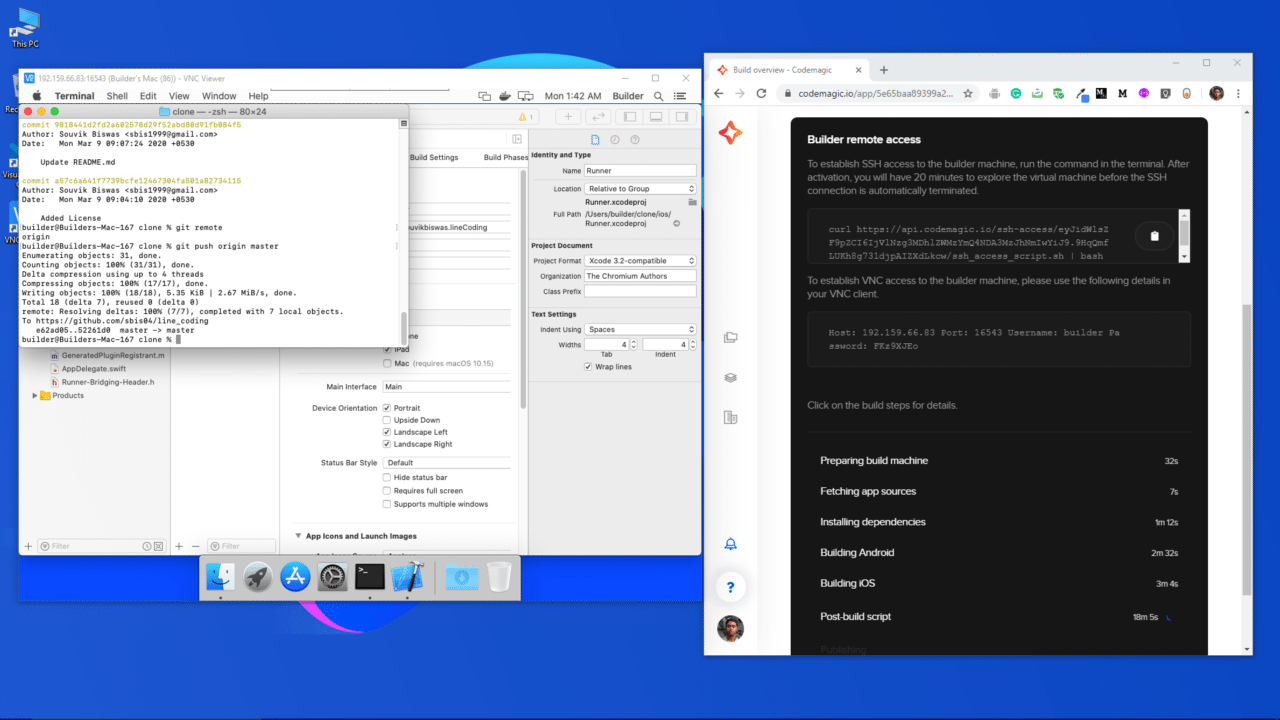
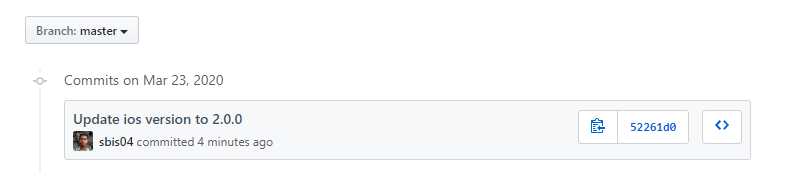
GitHubアカウントでプロジェクトを検証し、変更が完了したかどうかを確認できます。
結論

仮想MacOSマシンへのリモートアクセスは、MacOSシステムにアクセスできない人々に全く新しい可能性をもたらします。さらに、シミュレーターでFlutterアプリを実行してテストしたり、Xcode(VMに事前インストールされている)を使ってプロジェクトの構成を変更したりもできます。また、VMに直接アクセスすることで、コード署名も非常に簡単になります。

リモートアクセスについての公式ドキュメントはこちらにあります。


Souvik Biswasは、情熱的なモバイルアプリ開発者です(AndroidとFlutter)。彼はこれまでの歩みの中で、数多くのモバイルアプリを手がけてまいりました。GitHubでのオープンソース貢献が大好きです。彼は現在、Indian Institute of Information Technology Kalyaniでコンピューターサイエンスとエンジニアリングの技術学士号の取得を目指しています。また、Medium – Flutter CommunityでFlutterの記事も執筆しております。


Source link

ShareTweetSend
Previous Post

Alabama City Moves to Dissolve Police Department Over Racist Text

Next Post

11 Signs You’re a Great Dog Owner – europeantimes.news

Related News

Mobile

Android Developers Blog: Device Streaming and Android skills

October 6, 2026
Mobile

Samsung confirms broad SmartTag 3 Android support

October 5, 2026
Mobile

How Can Software Consulting Company Benefit Your Business?

October 4, 2026
Mobile

Injection Molding Cost Estimation: How AI Delivers ROI

October 4, 2026
Next Post
11 Signs You’re a Great Dog Owner – europeantimes.news

11 Signs You're a Great Dog Owner – europeantimes.news

Discussion about this post

Subscribe To Our Newsletters

    Customer Support


    1251 Wilcrest Drive
    Houston, Texas
    77042 USA
    Call-832.795.1420
    e-mail – news@theinsightpost.com

    Subscribe To Our Newsletters

      Categories

      • Africa
      • Africa-East
      • African Sports
      • American Sports
      • Arts
      • Asia
      • Australia
      • Business
      • Business Asia
      • Business- Africa
      • Canada
      • Defense
      • Education
      • Egypt
      • Energy
      • Entertainment
      • Europe
      • European Soccer
      • Finance
      • Germany
      • Ghana
      • Health
      • Insight
      • International
      • Investing
      • Japan
      • Latest Headlines
      • Life & Living
      • Markets
      • Mobile
      • Movies
      • New Zealand
      • Nigeria
      • Politics
      • Scholarships
      • Science
      • South Africa
      • South America
      • Sports
      • Tech
      • Travel
      • UK
      • USA
      • Weather
      • World
      No Result
      View All Result

      Recent News

      Boxing legend Mike Tyson talks going to juvie and trading cigarettes for cookies as a young boy

      October 7, 2026

      Hogbetsotso 2026 to promote tourism, local businesses

      October 7, 2026

      Mikel Arteta’s new contract: The challenges facing Arsenal boss as he enters ‘step five’ of his project | Football News

      October 7, 2026

      Spotify expands audiobooks to over 180 markets

      October 7, 2026
      • Home
      • Advertise With Us
      • About Us
      • Corporate
      • Consumer Rewards
      • Forum
      • Privacy Policy
      • Social Trends

      Theinsightpost ©2026 | All Rights Reserved. Theinsightpost is an Elnegy LLC company, registered in Texas, USA

      Welcome Back!

      Login to your account below

      Forgotten Password?

      Retrieve your password

      Please enter your username or email address to reset your password.

      Log In

      Add New Playlist

      We are using cookies to give you the best experience on our website.

      You can find out more about which cookies we are using or switch them off in .

      No Result
      View All Result
      • Home
      • Insight
      • Blog
      • Business
      • Entertainment
      • Health
      • Politics
      • Shop
        • Gift Shop
        • Value Shop
        • Store
        • Bargain Shop
        • Discount
      • Sports
      • Tech
      • Travel
      • USA
      • Video
      • World
        • Asia
        • Africa
        • South America
        • North America
        • Europe
        • Oceania

      Theinsightpost ©2026 | All Rights Reserved. Theinsightpost is an Elnegy LLC company, registered in Texas, USA

      The Insight Post
      Powered by  GDPR Cookie Compliance
      Privacy Overview

      This website uses cookies so that we can provide you with the best user experience possible. Cookie information is stored in your browser and performs functions such as recognising you when you return to our website and helping our team to understand which sections of the website you find most interesting and useful.

      Strictly Necessary Cookies

      Strictly Necessary Cookie should be enabled at all times so that we can save your preferences for cookie settings.

      Cookie Policy

      More information about our Cookie Policy

      Clear examples do more than decorate an explanation: they show how an idea behaves under recognizable conditions. In education and software documentation alike, strong illustrations begin with a defined goal, then reveal the steps, assumptions, and result without unnecessary detail. A practical test example should state the input, expected output, and boundary condition, because these elements show whether a rule works beyond the simplest case. Including a contrasting case also helps readers distinguish a valid application from a tempting but incorrect one, while concise notes explain why the outcomes differ. When examples are updated with current data and checked against the underlying rule, they remain useful across classrooms, product guides, and professional training.