
• Home
  • Insight
  • Blog
  • Business
  • Entertainment
  • Health
  • Politics
  • Shop
    • Gift Shop
    • Value Shop
    • Store
    • Bargain Shop
    • Discount
  • Sports
  • Tech
  • Travel
  • USA
  • Video
  • World
    • Asia
    • Africa
    • South America
    • North America
    • Europe
    • Oceania
Thursday, November 19, 2026
No Result
View All Result
Subscribe Now
  • Home
  • Insight
  • Blog
  • Business
  • Entertainment
  • Health
  • Politics
  • Shop
    • Gift Shop
    • Value Shop
    • Store
    • Bargain Shop
    • Discount
  • Sports
  • Tech
  • Travel
  • USA
    FAA Administrator Takes Responsibility as Mullin Faces Tough Questions Over Nationwide Ground Stop

    FAA Administrator Takes Responsibility as Mullin Faces Tough Questions Over Nationwide Ground Stop

    Mary Peltola Emerges Victorious in Alaska Senate Race, Making History for Democrats

    Mary Peltola Emerges Victorious in Alaska Senate Race, Making History for Democrats

    Stranded in Conflict: Palestinians Navigate the Tenuous Balance of War and Peace Amid Ceasefire Efforts

    Stranded in Conflict: Palestinians Navigate the Tenuous Balance of War and Peace Amid Ceasefire Efforts

    Trump Administration Revokes Pay Increase for Head Start Educators

    Trump Administration Revokes Pay Increase for Head Start Educators

    Unexpected Triumph: Gay Candidates Achieve Unforeseen Victories in Challenging Races

    Unexpected Triumph: Gay Candidates Achieve Unforeseen Victories in Challenging Races

    Microsoft Outlook Experiences Prolonged Outage Affecting Users Nationwide

    Microsoft Outlook Experiences Prolonged Outage Affecting Users Nationwide

    Gunfire Erupts in D.C.: Authorities Search for Suspect Amid Rising Concerns Over Public Safety

    Gunfire Erupts in D.C.: Authorities Search for Suspect Amid Rising Concerns Over Public Safety

    LAUSD Takes Strong Action Against Hate Speech Following Racial Slur Incidents

    LAUSD Takes Strong Action Against Hate Speech Following Racial Slur Incidents

    Beloved Former Los Angeles Times Columnist Steve Harvey Passes Away at 80

    Beloved Former Los Angeles Times Columnist Steve Harvey Passes Away at 80

  • Video
  • World
    • Asia
    • Africa
    • South America
    • North America
    • Europe
    • Oceania
The Insight Post
  • Home
  • Insight
  • Blog
  • Business
  • Entertainment
  • Health
  • Politics
  • Shop
    • Gift Shop
    • Value Shop
    • Store
    • Bargain Shop
    • Discount
  • Sports
  • Tech
  • Travel
  • USA
    FAA Administrator Takes Responsibility as Mullin Faces Tough Questions Over Nationwide Ground Stop

    FAA Administrator Takes Responsibility as Mullin Faces Tough Questions Over Nationwide Ground Stop

    Mary Peltola Emerges Victorious in Alaska Senate Race, Making History for Democrats

    Mary Peltola Emerges Victorious in Alaska Senate Race, Making History for Democrats

    Stranded in Conflict: Palestinians Navigate the Tenuous Balance of War and Peace Amid Ceasefire Efforts

    Stranded in Conflict: Palestinians Navigate the Tenuous Balance of War and Peace Amid Ceasefire Efforts

    Trump Administration Revokes Pay Increase for Head Start Educators

    Trump Administration Revokes Pay Increase for Head Start Educators

    Unexpected Triumph: Gay Candidates Achieve Unforeseen Victories in Challenging Races

    Unexpected Triumph: Gay Candidates Achieve Unforeseen Victories in Challenging Races

    Microsoft Outlook Experiences Prolonged Outage Affecting Users Nationwide

    Microsoft Outlook Experiences Prolonged Outage Affecting Users Nationwide

    Gunfire Erupts in D.C.: Authorities Search for Suspect Amid Rising Concerns Over Public Safety

    Gunfire Erupts in D.C.: Authorities Search for Suspect Amid Rising Concerns Over Public Safety

    LAUSD Takes Strong Action Against Hate Speech Following Racial Slur Incidents

    LAUSD Takes Strong Action Against Hate Speech Following Racial Slur Incidents

    Beloved Former Los Angeles Times Columnist Steve Harvey Passes Away at 80

    Beloved Former Los Angeles Times Columnist Steve Harvey Passes Away at 80

  • Video
  • World
    • Asia
    • Africa
    • South America
    • North America
    • Europe
    • Oceania
No Result
View All Result
No Result
View All Result
Home Tech

Error tracking with JavaScript, React, and Sentry

by Theinsightpost
September 9, 2022
in Tech
0 0
0
Error tracking with JavaScript, React, and Sentry


Tracking errors in a way that makes them manageable is one of the most painstaking tasks for developers. In the past, we had to rebuild error tracking for every application, which often led to extraneous lines of code throughout the business logic. Sentry is an error-tracking framework that does much of the heavy lifting, providing the framework, back end, and visualization console. It also provides everything you need for low-effort integration into your JavaScript codebase.

Sentry recently announced a new optimization for its front-end JavaScript bundles that reduces the package size by about 29%. Ben Vinegar, Sentry’s VP of Emerging Technology, said the company had two goals for this optimization, “One being the ability for some quick wins like the deletion of deprecated code and removal of unnecessary abstractions, and the second being larger refactoring, which enabled tree shaking and switching from JavaScript ES5 to ES6.”

It’s a great time to take a look at using Sentry in your JavaScript apps. If you are already using Sentry, now is the time to update your bundles.

We’ll use React for this demo to see how Sentry works in a front-end JavaScript application.

How Sentry works

To use Sentry in your React applications, you first include the Sentry library in your application directory, then initialize the framework early in the app’s lifecycle. Sentry will then gather information and report it back to the Sentry service, where you can view it in your application dashboard. Sentry offers various ways to slice and dice the information into a form that is most useful to you. It also automatically groups similar errors, making it simple to recognize high-priority problems.

Set up Sentry

The first step is to create an account with Sentry. The developer tier gives you ongoing free access. 

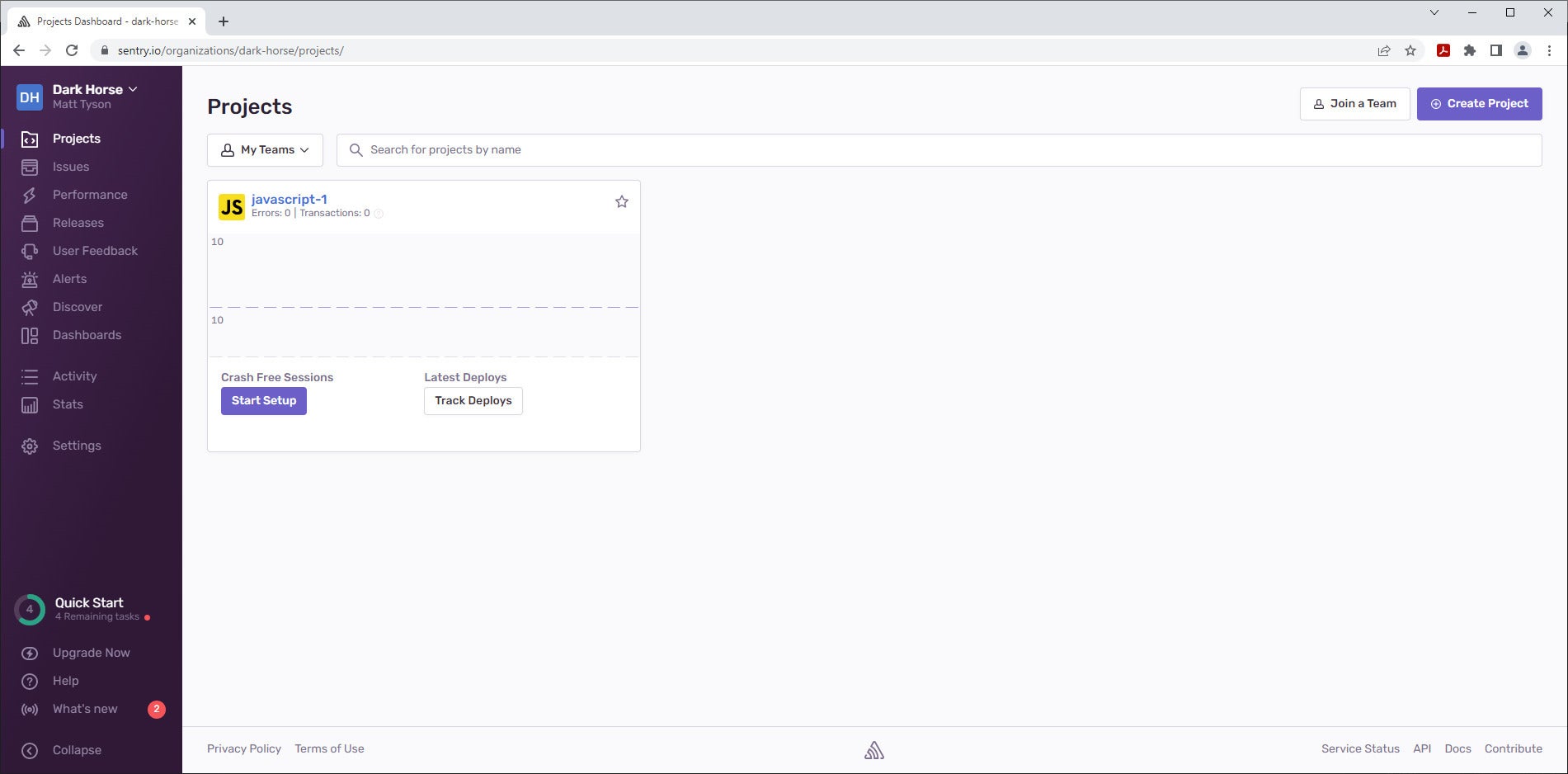
Once you are logged in to your account, you will create a project. The main navigation is in the left-side menu on your screen. Click Projects, then Create Project in the upper left corner. Select JavaScript as your technology, then give the project a name and create the project.

Now, your project will appear as a card in the projects pane, as shown in Figure 1. If you click the project name, Sentry will take you to the project details page. You now have a place to track issues with your app, which we’ll develop next.
sentry fig1 IDG

Figure 1. The Sentry projects pane.

Create a React app

Let’s bootstrap a JavaScript React application on the command line by typing: npx create-react-app sentry-js. You can test that everything is running properly by typing npm run start. The UI will be visible at localhost:3000. 

Next, incorporate the Sentry SDK. Note that you need to hit CTRL-C if the app is still running in dev mode or put it in the background. We’ll add two packages via NPM: npm i @sentry/browser @sentry/tracing. 

Your project has a unique ID that is associated with a unique URL, called the DSN (data source name). This is where your error reports go. You can find your project’s URL by opening its details pane and clicking the Installation Instructions link (the one next to what looks like a friendly imperial droid). The code snippet in the middle is the one we want to incorporate in our project.

Now, we want to add the API to the code early in the application’s loading, so open /src/index.js and put the snippet in there. It will be something like what’s shown in Listing 1.

Listing 1. Add the Sentry SDK to index.js


import React from 'react';
import ReactDOM from 'react-dom/client';
import './index.css';
import App from './App';
import reportWebVitals from './reportWebVitals';

import * as Sentry from "@sentry/browser";
import { BrowserTracing } from "@sentry/tracing";

Sentry.init({
  dsn: "https://<YOUR-DSN-HERE>",
  integrations: [new BrowserTracing()],

  tracesSampleRate: 1.0
});

const root = ReactDOM.createRoot(document.getElementById('root'));
root.render(
  <React.StrictMode>
    <App />
  </React.StrictMode>
);

reportWebVitals();

Now let’s create an error. Open /src/App.js and add the button element, as shown in Listing 2.

Listing 2. Add an error button to /src/App.js


<button onClick={() => {throw new Error('FooBar Error');}}>Make another Error</button>
<a className="App-link" href="https://reactjs.org" target="_blank" rel="noopener noreferrer">

When clicked, this button will throw an error. Reload the dev app and click it. Sentry will automatically report on it without any explicit instrumentation.

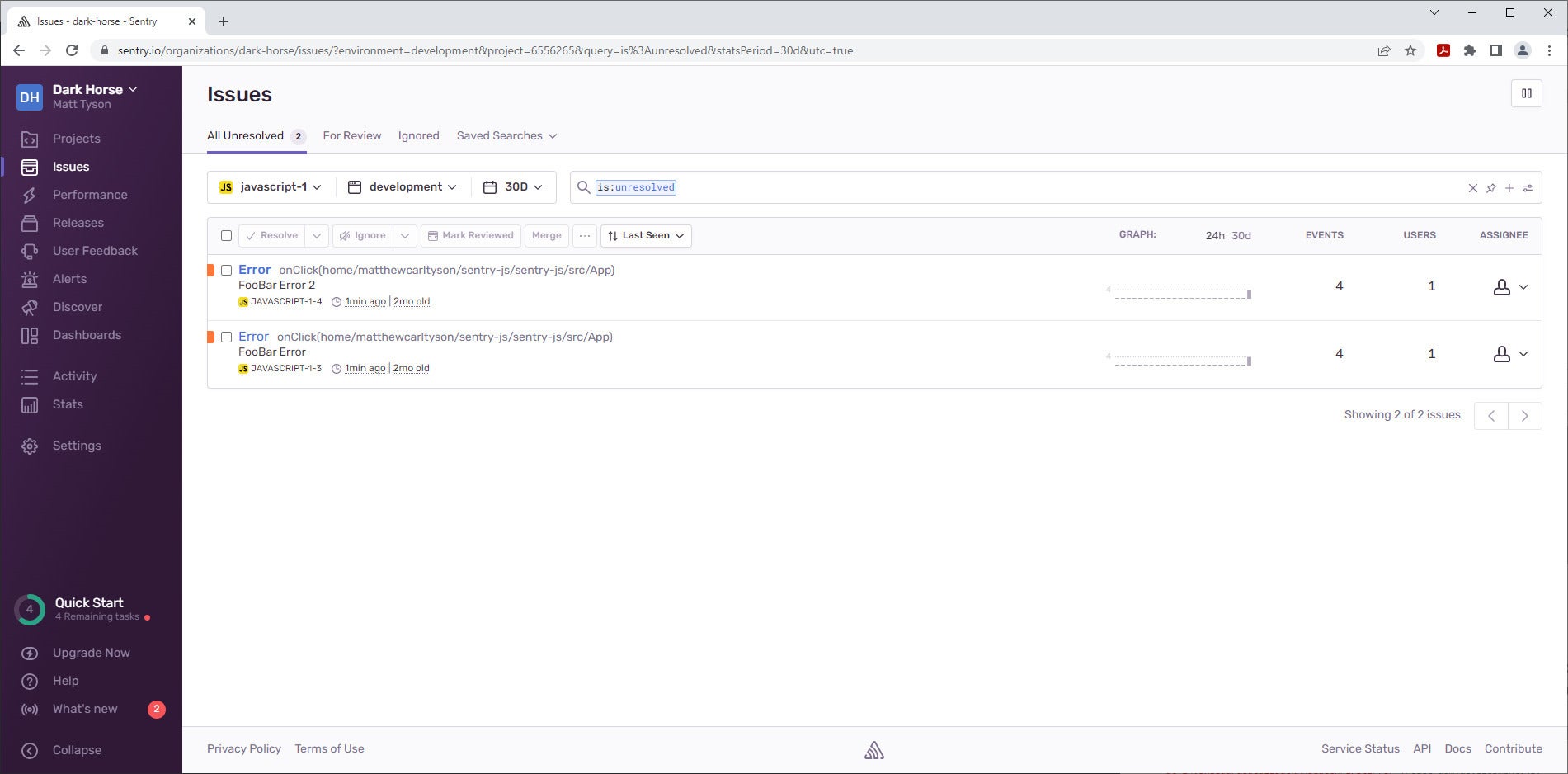
Return to the Sentry dashboard and click the Issues link on the left-hand navigation bar. You’ll see a screen similar to Figure 2.
sentry fig2 IDG

Figure 2. Issues screen in the Sentry dashboard.

Notice that the error is shown here with some details, including where the error was called from (in my case, onClick(home/matthewcarltyson/sentry-js/sentry-js/src/App)) and the error message FooBar Error. Sentry is already capturing useful information.

If you click the button repeatedly, you’ll notice that the error count does not rise. Sentry recognizes similar events, such as an instance of an error occurring, and groups them together as a single issue. 

Performance monitoring with Sentry

You can see transactions by clicking on Performance in Sentry’s navigation menu.

Transactions work in tandem with error monitoring, providing a way to not only monitor for errors but also identify performance issues. A simple example would be identifying slow API fetch requests in your application, versus exceptions that were thrown.

You’ll see some panes charting transaction metrics. At the bottom of the screen, is a table with transactions, including / transaction. That is the result of hitting the root of the application. If you click on the slash, you’ll open the transaction details, and Sentry will give you metrics on the various assets that were loaded by this page, like how long it took to load the favicon. 

Set and filter by environment

Sentry automatically assigns issues and transactions to the production environment if you don’t tell it what environment the reports are coming from. You can see this in the Issues table, where the header dropdown All Env shows Production when clicked.

You can set the environment explicitly by adding an environment field in the Sentry initialization (/src/index.js in this case). An example would be: environment: development. Once transactions have arrived with that in place, you can sort and filter by the environment. 

In your builds, you can set the environment field to have the appropriate value via environment value with a tool like dotenv.

Releases

With Sentry, you can also view and organize data via releases. Click the Releases link in the navigation menu to get started. In the All Project dropdown, select the project you created earlier. This will open a dialog for creating a release. Click the <click-here-for-your-token> link and select Create new integration. The resulting dialog asks for a name for your new integration, which is an association between a deployment and a project. You can accept the default, which in my case is javascript-1 Release Integration.

The configuration screen will now be populated with the release ID. Before we can do anything else, we’ll need a Git commit for Sentry to attach to. So, init a new repo with the steps show in Listing 3 (note that Git must be installed):

Listing 3. Init local repo


git init
git add .
git commit -m “initial”

We can now follow steps similar to those provided in the Sentry Releases screen, as shown in Listing 4.

Listing 4. Create a release


# Installs the sentry command line tool:
curl -sL https://sentry.io/get-cli/ | SENTRY_CLI_VERSION="2.2.0" bash
# Sets env variables
SENTRY_AUTH_TOKEN=
VERSION=`sentry-cli releases propose-version`
# use the tool to create a release
sentry-cli releases new "$VERSION" --org=dark-horse --project=javascript-1 --auth-token=<YOUR-INTEGRATION-ID-HERE>

# Associate the git commit
sentry-cli releases set-commits "$VERSION" --auto --org=dark-horse --project=javascript-1 --auth-token=<YOUR-INTEGRATION-ID-HERE>

#
sentry-cli releases finalize "$VERSION" --org=dark-horse --project=javascript-1 --auth-token=<YOUR-INTEGRATION-ID-HERE>

Now, when you return to the Sentry console and select Releases on the left, you’ll see the newly created release. You can see it has correctly placed the javascript-1 project. If you click into the release itself, you will see metrics and details about it.

We can use releases to track errors and performance as part of your release cycles. You can track what release an issue was introduced in, follow regressions, and so on. You can also directly associate releases to commits in a repository like GitHub.

Conclusion

We have just scratched the surface of what we can do with Sentry. It can be used for integrating with issue tracking systems, assigning issues to people and teams, tracking issues, and incorporating fine-grained performance metrics.

Every project of sufficient size and complexity merits error and performance tracking. It’s not hard to see why Sentry is a leader in this space, as it makes it easy to manage the data generated and gain visibility into it. Sentry’s sophisticated yet low-effort integration makes it simple to add to a project. You’ve seen that here with our example based on React.

Copyright © 2022 IDG Communications, Inc.



Source link

ShareTweetSend
Previous Post

This Winter, Freezing Europeans Can Blame Trump’s Neocon Foreign Policy

Next Post

President Buhari sacks LMC , Orders NFF to set up interim management committee

Related News

Cybercriminals Embrace Innovative AI Tool for Streamlined Hacking Operations
Tech

Cybercriminals Embrace Innovative AI Tool for Streamlined Hacking Operations

November 18, 2026
Transform Your Laptop Setup with These 5 Affordable Accessories
Tech

Transform Your Laptop Setup with These 5 Affordable Accessories

November 15, 2026
Microsoft 365 Services Gradually Restore Functionality Following Global Outage
Tech

Microsoft 365 Services Gradually Restore Functionality Following Global Outage

November 14, 2026
Epic Seeks Accountability for Apple’s Alleged Disregard of Court Ruling Intent
Tech

Epic Seeks Accountability for Apple’s Alleged Disregard of Court Ruling Intent

November 13, 2026
Next Post
President Buhari sacks LMC , Orders NFF to set up interim management committee

President Buhari sacks LMC , Orders NFF to set up interim management committee

Discussion about this post

Subscribe To Our Newsletters

    Customer Support


    1251 Wilcrest Drive
    Houston, Texas
    77042 USA
    Call-832.795.1420
    e-mail – news@theinsightpost.com

    Subscribe To Our Newsletters

      Categories

      • Africa
      • Africa-East
      • African Sports
      • American Sports
      • Arts
      • Asia
      • Australia
      • Business
      • Business Asia
      • Business- Africa
      • Canada
      • Defense
      • Education
      • Egypt
      • Energy
      • Entertainment
      • Europe
      • European Soccer
      • Finance
      • Germany
      • Ghana
      • Health
      • Insight
      • International
      • Investing
      • Japan
      • Latest Headlines
      • Life & Living
      • Markets
      • Mobile
      • Movies
      • New Zealand
      • Nigeria
      • Politics
      • Scholarships
      • Science
      • South Africa
      • South America
      • Sports
      • Tech
      • Travel
      • Travel-Africa
      • UK
      • USA
      • Weather
      • World
      No Result
      View All Result

      Recent News

      The Cross-Over Titans: How Sports Media Personalities Are Redefining Political Discourse in the 2026–2028 Cycle

      The Cross-Over Titans: How Sports Media Personalities Are Redefining Political Discourse in the 2026–2028 Cycle

      November 18, 2026
      The Critical Role of ADCCE in Shaping Today’s Global Landscape

      The Critical Role of ADCCE in Shaping Today’s Global Landscape

      November 18, 2026
      La La Anthony and Ciara Show Their Support for Kiyan Anthony at Madison Square Garden

      La La Anthony and Ciara Show Their Support for Kiyan Anthony at Madison Square Garden

      November 18, 2026
      Transforming American Global Health Aid: A New Era Begins

      Transforming American Global Health Aid: A New Era Begins

      November 18, 2026
      • Home
      • Advertise With Us
      • About Us
      • Corporate
      • Consumer Rewards
      • Forum
      • Privacy Policy
      • Social Trends

      Theinsightpost ©2026 | All Rights Reserved. Theinsightpost is an Elnegy LLC company, registered in Texas, USA

      Welcome Back!

      Login to your account below

      Forgotten Password?

      Retrieve your password

      Please enter your username or email address to reset your password.

      Log In

      Add New Playlist

      We are using cookies to give you the best experience on our website.

      You can find out more about which cookies we are using or switch them off in .

      No Result
      View All Result
      • Home
      • Insight
      • Blog
      • Business
      • Entertainment
      • Health
      • Politics
      • Shop
        • Gift Shop
        • Value Shop
        • Store
        • Bargain Shop
        • Discount
      • Sports
      • Tech
      • Travel
      • USA
      • Video
      • World
        • Asia
        • Africa
        • South America
        • North America
        • Europe
        • Oceania

      Theinsightpost ©2026 | All Rights Reserved. Theinsightpost is an Elnegy LLC company, registered in Texas, USA

      The Insight Post
      Powered by  GDPR Cookie Compliance
      Privacy Overview

      This website uses cookies so that we can provide you with the best user experience possible. Cookie information is stored in your browser and performs functions such as recognising you when you return to our website and helping our team to understand which sections of the website you find most interesting and useful.

      Strictly Necessary Cookies

      Strictly Necessary Cookie should be enabled at all times so that we can save your preferences for cookie settings.

      Cookie Policy

      More information about our Cookie Policy