









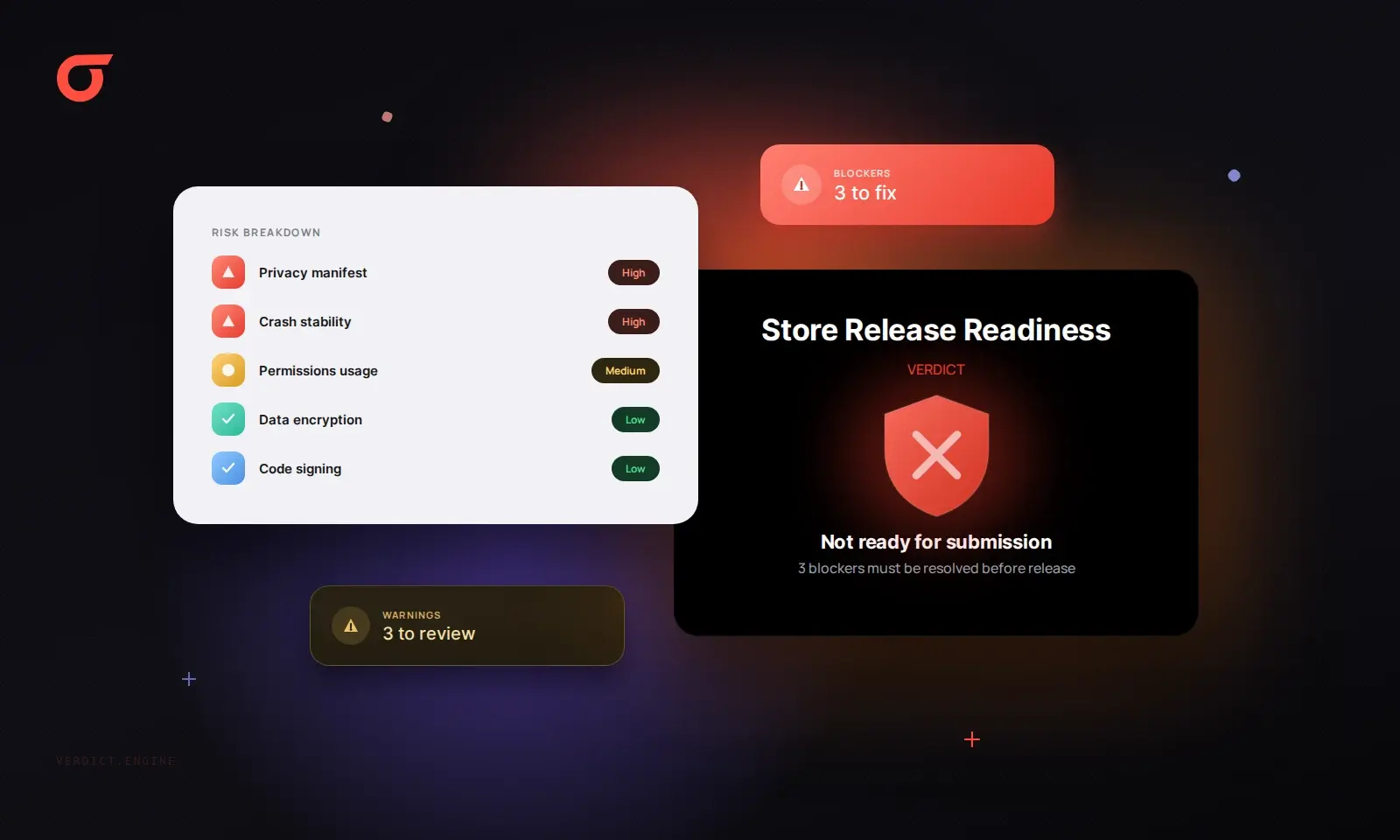
Appknox Introduces Store Release Readiness to Streamline App Approval Process
Appknox has launched a new feature that evaluates every uploaded build against the submission criteria of the Apple App Store and Google Play, allowing teams to identify and resolve potential blockers before submission.
In the current mobile app development landscape, many release processes include security checks but often lack a thorough review against app store guidelines until after the final build is completed. This oversight can lead to last-minute submission headaches.
The newly unveiled Appknox Store Release Readiness feature addresses this gap. By assessing each build against the submission requirements of both major app stores, development teams can gain insights into possible approval barriers before they even access the store console.
Essential Features of Store Release Readiness
- Automatically runs on every build submitted to Appknox, eliminating the need for separate scans.
- Provides a Release Rejection Risk rating categorized as High, Medium, or Low for each app.
- Identifies failed checks as either blockers or warnings, complete with evidence, policy references, and remediation advice.
- Offers a portfolio view to highlight which applications are least prepared for release.
- Available to all Appknox customers at no extra cost, both on the cloud and on-premises, although it does not guarantee approval.
Understanding Appknox Store Release Readiness
Store Release Readiness systematically evaluates each uploaded build against the submission standards set by Apple and Google. It generates a Release Rejection Risk rating, classifying it as High, Medium, or Low, and outlines any blockers or warnings with supporting documentation and suggested fixes. This approach ensures that security, engineering, product, and release teams work from a unified perspective regarding any potential release impediments.
Seven Key Areas Assessed Before Submission
The Store Release Readiness feature rigorously tests the application against the guidelines published by each app store, covering aspects such as privacy declarations, permissions, billing, and release configurations. Each failed check is linked to the relevant store policy, facilitating a clear understanding of required actions to address the issues.
| Check Area | Criteria Assessed | Apple App Store | Google Play |
|---|---|---|---|
| Store-policy compatibility | Compliance with published app policies | Yes | Yes |
| Release configuration | Build and release settings under review | Yes | Yes |
| Permissions | Requested permissions | Yes | Yes |
| Network configuration | App connection settings | [confirm] | [confirm] |
| Billing requirements | Handling of in-app purchases and subscriptions | [confirm] | [confirm] |
| Components and services | Declared components and services | Yes | Yes |
| Privacy and data handling | User data declaration and management | Yes | Yes |
How Store Release Readiness Operates
To utilize Store Release Readiness, developers simply upload their build as usual. The system automatically assesses the build, rates the Release Rejection Risk, and compiles a list of any failed checks categorized as blockers or warnings, along with necessary evidence and remediation steps.
Step-by-Step Process
Step 1: Upload the Build
The analysis begins once a build is uploaded to Appknox, either on cloud or on-premises. Importantly, Appknox evaluates the binary directly, meaning there’s no need to share source code or repository access.
Step 2: Review the Release Rejection Risk Rating
Each app is assigned an overall Release Rejection Risk rating of High, Medium, or Low, allowing teams to quickly assess the necessary work before submission.
Step 3: Address Blockers First
Failed checks are categorized into blockers and warnings, guiding teams on where to focus their efforts first.
| Finding Type | Implications | Recommended Action |
|---|---|---|
| Blocker | Likely to halt app progress through review | Resolve before submission |
| Warning | May prompt review concerns or delays | Address it, or prepare an explanation for the reviewer |
Step 4: Utilize Evidence for Fixes
Each failed check is supported by evidence from the build, the relevant store policy, and detailed remediation guidance, thereby minimizing time spent deciphering store requirements.
Step 5: Filter Non-Applicable Findings and Re-upload
Teams can disregard findings that are irrelevant to their specific app, maintaining focus on genuine issues. After addressing the blockers, the revised build can be re-uploaded for comparison against the previous rating.
Tracking Rejection Risk Across App Portfolios
The Store Release Readiness feature includes a portfolio view that allows teams to search and filter apps by package name, platform, and rejection risk, ensuring that the most critical builds are prioritized.
The Importance of Store Release Readiness in Business
In industries where timely app releases directly impact business outcomes, avoiding app store rejections is crucial. Different sectors, such as banking, fintech, retail, travel, and healthcare, experience varying pressures regarding app launch timelines.
| Industry | Release Pressure | Utilization of Store Release Readiness |
|---|---|---|
| Banking and Financial Services | Fixed change windows with multiple apps | Clearing blockers across all apps before submission |
| Fintech and Payments | Frequent releases impacting billing and data privacy | Identifying billing and privacy gaps early |
| Retail and E-commerce | Revenue generation through app transactions | Ensuring seasonal releases stay on track |
| Travel and Hospitality | Dependence on app updates for bookings | Avoiding delays on new booking features |
| Healthcare | Strict data privacy and compliance requirements | Aligning data declarations with app functionality |
Integration of Store Release Readiness with the Appknox Platform
Store Release Readiness is a component of the Appknox Assess suite, which includes SAST, DAST, and API testing. While these tools assess the security of a build, Store Release Readiness focuses on its preparedness for submission. This dual assessment provides a comprehensive view of both security and readiness prior to release.
Accessibility and Additional Information
Appknox Store Release Readiness is automatically available to all existing customers without extra charges. New users can access a free Store Readiness Scan for Android builds.
| Appknox Customers | Free Store Readiness Scan |
|---|---|
| Access by uploading a build in your Appknox dashboard | Upload an APK or AAB for a free scan |
| Included at no additional cost | Free of charge |
| Coverage for Apple App Store and Google Play | Applicable only for Google Play |
| Available on cloud and on-premises | Web upload required for scanning |
| Provides detailed risk ratings and remediation guidance | Includes a snapshot and optional consultation with an Appknox specialist |
Frequently Asked Questions
Does Store Release Readiness guarantee App Store or Google Play approval?
No, while Store Release Readiness identifies potential blockers and warnings, final approval is contingent upon the app stores’ review processes.
Does Store Release Readiness cover both iOS and Android?
Yes, it checks builds against the submission requirements of both Apple and Google, though the free scan is limited to Android builds.
Is source code required for Store Release Readiness?
No, the feature analyzes the binary provided, eliminating the need for source code or repository access.
Is there an additional cost for Store Release Readiness?
No, it is included for all Appknox customers without any added fees.
How does Store Release Readiness differ from Google Play’s pre-review checks?
Store Release Readiness operates earlier in the development process and encompasses a broader range of criteria than Google’s pre-review checks, which occur once the app is submitted to the Play Console.






Discussion about this post