









• Home
  • Insight
  • Blog
  • Business
  • Entertainment
  • Health
  • Politics
  • Shop
    • Gift Shop
    • Value Shop
    • Store
    • Bargain Shop
    • Discount
  • Sports
  • Tech
  • Travel
  • USA
  • Video
  • World
    • Asia
    • Africa
    • South America
    • North America
    • Europe
    • Oceania
Friday, November 20, 2026
No Result
View All Result
Subscribe Now
  • Home
  • Insight
  • Blog
  • Business
  • Entertainment
  • Health
  • Politics
  • Shop
    • Gift Shop
    • Value Shop
    • Store
    • Bargain Shop
    • Discount
  • Sports
  • Tech
  • Travel
  • USA
    Texas Execution Prolonged As Staff Encounter Difficulties Finding Vein, Inmate Reinaldo Dennes Reports Pain

    Texas Execution Prolonged As Staff Encounter Difficulties Finding Vein, Inmate Reinaldo Dennes Reports Pain

    Trump’s Deal Turns Sour as Voters Withdraw Support

    Trump’s Deal Turns Sour as Voters Withdraw Support

    FAA Administrator Takes Responsibility as Mullin Faces Tough Questions Over Nationwide Ground Stop

    FAA Administrator Takes Responsibility as Mullin Faces Tough Questions Over Nationwide Ground Stop

    Mary Peltola Emerges Victorious in Alaska Senate Race, Making History for Democrats

    Mary Peltola Emerges Victorious in Alaska Senate Race, Making History for Democrats

    Stranded in Conflict: Palestinians Navigate the Tenuous Balance of War and Peace Amid Ceasefire Efforts

    Stranded in Conflict: Palestinians Navigate the Tenuous Balance of War and Peace Amid Ceasefire Efforts

    Trump Administration Revokes Pay Increase for Head Start Educators

    Trump Administration Revokes Pay Increase for Head Start Educators

    Unexpected Triumph: Gay Candidates Achieve Unforeseen Victories in Challenging Races

    Unexpected Triumph: Gay Candidates Achieve Unforeseen Victories in Challenging Races

    Microsoft Outlook Experiences Prolonged Outage Affecting Users Nationwide

    Microsoft Outlook Experiences Prolonged Outage Affecting Users Nationwide

    Gunfire Erupts in D.C.: Authorities Search for Suspect Amid Rising Concerns Over Public Safety

    Gunfire Erupts in D.C.: Authorities Search for Suspect Amid Rising Concerns Over Public Safety

  • Video
  • World
    • Asia
    • Africa
    • South America
    • North America
    • Europe
    • Oceania
The Insight Post
  • Home
  • Insight
  • Blog
  • Business
  • Entertainment
  • Health
  • Politics
  • Shop
    • Gift Shop
    • Value Shop
    • Store
    • Bargain Shop
    • Discount
  • Sports
  • Tech
  • Travel
  • USA
    Texas Execution Prolonged As Staff Encounter Difficulties Finding Vein, Inmate Reinaldo Dennes Reports Pain

    Texas Execution Prolonged As Staff Encounter Difficulties Finding Vein, Inmate Reinaldo Dennes Reports Pain

    Trump’s Deal Turns Sour as Voters Withdraw Support

    Trump’s Deal Turns Sour as Voters Withdraw Support

    FAA Administrator Takes Responsibility as Mullin Faces Tough Questions Over Nationwide Ground Stop

    FAA Administrator Takes Responsibility as Mullin Faces Tough Questions Over Nationwide Ground Stop

    Mary Peltola Emerges Victorious in Alaska Senate Race, Making History for Democrats

    Mary Peltola Emerges Victorious in Alaska Senate Race, Making History for Democrats

    Stranded in Conflict: Palestinians Navigate the Tenuous Balance of War and Peace Amid Ceasefire Efforts

    Stranded in Conflict: Palestinians Navigate the Tenuous Balance of War and Peace Amid Ceasefire Efforts

    Trump Administration Revokes Pay Increase for Head Start Educators

    Trump Administration Revokes Pay Increase for Head Start Educators

    Unexpected Triumph: Gay Candidates Achieve Unforeseen Victories in Challenging Races

    Unexpected Triumph: Gay Candidates Achieve Unforeseen Victories in Challenging Races

    Microsoft Outlook Experiences Prolonged Outage Affecting Users Nationwide

    Microsoft Outlook Experiences Prolonged Outage Affecting Users Nationwide

    Gunfire Erupts in D.C.: Authorities Search for Suspect Amid Rising Concerns Over Public Safety

    Gunfire Erupts in D.C.: Authorities Search for Suspect Amid Rising Concerns Over Public Safety

  • Video
  • World
    • Asia
    • Africa
    • South America
    • North America
    • Europe
    • Oceania
No Result
View All Result
No Result
View All Result
Home Tech

How to merge data in R using R merge, dplyr, or data.table

by Theinsightpost
February 8, 2023
in Tech
0 0
0
How to merge data in R using R merge, dplyr, or data.table


R has a number of quick, elegant ways to join data frames by a common column. I’d like to show you three of them:

  • base R’s merge() function
  • dplyr’s join family of functions
  • data.table’s bracket syntax

Get and import the data

For this example I’ll use one of my favorite demo data sets—flight delay times from the U.S. Bureau of Transportation Statistics. If you want to follow along, head to http://bit.ly/USFlightDelays and download data for the time frame of your choice with the columns Flight Date, Reporting_Airline, Origin, Destination, and DepartureDelayMinutes. Also get the lookup table for Reporting_Airline.

Or, you can download these two data sets—plus my R code in a single file and a PowerPoint explaining different types of data merges—here:

download

Includes R scripts, several data files, and a PowerPoint to accompany the InfoWorld tutorial. Sharon Machlis


To read in the file with base R, I’d first unzip the flight delay file and then import both flight delay data and the code lookup file with read.csv(). If you’re running the code, the delay file you downloaded will likely have a different name than in the code below. Also, note the lookup file’s unusual .csv_ extension.


unzip("673598238_T_ONTIME_REPORTING.zip")
mydf <- read.csv("673598238_T_ONTIME_REPORTING.csv",
sep = ",", quote="\"")
mylookup <- read.csv("L_UNIQUE_CARRIERS.csv_",
quote="\"", sep = "," )

Next, I’ll take a peek at both files with head():


head(mydf)
     FL_DATE OP_UNIQUE_CARRIER ORIGIN DEST DEP_DELAY_NEW  X
1 2019-08-01                DL    ATL  DFW            31 NA
2 2019-08-01                DL    DFW  ATL             0 NA
3 2019-08-01                DL    IAH  ATL            40 NA
4 2019-08-01                DL    PDX  SLC             0 NA
5 2019-08-01                DL    SLC  PDX             0 NA
6 2019-08-01                DL    DTW  ATL            10 NA

head(mylookup) Code Description 1 02Q Titan Airways 2 04Q Tradewind Aviation 3 05Q Comlux Aviation, AG 4 06Q Master Top Linhas Aereas Ltd. 5 07Q Flair Airlines Ltd. 6 09Q Swift Air, LLC d/b/a Eastern Air Lines d/b/a Eastern

Merges with base R

The mydf delay data frame only has airline information by code. I’d like to add a column with the airline names from mylookup. One base R way to do this is with the merge() function, using the basic syntax merge(df1, df2). The order of data frame 1 and data frame 2 doesn’t matter, but whichever one is first is considered x and the second one is y. 

If the columns you want to join by don’t have the same name, you need to tell merge which columns you want to join by: by.x for the x data frame column name, and by.y for the y one, such as merge(df1, df2, by.x = "df1ColName", by.y = "df2ColName").

You can also tell merge whether you want all rows, including ones without a match, or just rows that match, with the arguments all.x and all.y. In this case, I’d like all the rows from the delay data; if there’s no airline code in the lookup table, I still want the information. But I don’t need rows from the lookup table that aren’t in the delay data (there are some codes for old airlines that don’t fly anymore in there). So, all.x equals TRUE but all.y equals FALSE. Here’s the code:


joined_df <- merge(mydf, mylookup, by.x = "OP_UNIQUE_CARRIER", 
by.y = "Code", all.x = TRUE, all.y = FALSE)

The new joined data frame includes a column called Description with the name of the airline based on the carrier code:


head(joined_df)
  OP_UNIQUE_CARRIER    FL_DATE ORIGIN DEST DEP_DELAY_NEW  X       Description
1                9E 2019-08-12    JFK  SYR             0 NA Endeavor Air Inc.
2                9E 2019-08-12    TYS  DTW             0 NA Endeavor Air Inc.
3                9E 2019-08-12    ORF  LGA             0 NA Endeavor Air Inc.
4                9E 2019-08-13    IAH  MSP             6 NA Endeavor Air Inc.
5                9E 2019-08-12    DTW  JFK            58 NA Endeavor Air Inc.
6                9E 2019-08-12    SYR  JFK             0 NA Endeavor Air Inc.

Joins with dplyr

The dplyr package uses SQL database syntax for its join functions. A left join means: Include everything on the left (what was the x data frame in merge()) and all rows that match from the right (y) data frame. If the join columns have the same name, all you need is left_join(x, y). If they don’t have the same name, you need a by argument, such as left_join(x, y, by = c("df1ColName" = "df2ColName")).

Note the syntax for by: It’s a named vector, with both the left and right column names in quotation marks.

Update: Starting with dplyr version 1.1.0 (on CRAN as of January 29, 2023), dplyr joins have an additional by syntax using join_by():


left_join(x, y, by = join_by(df1ColName == df2ColName))

The new join_by() helper function  uses unquoted column names and the ==  boolean operator, which package authors say makes more sense in an R context than c("col1" = "col2"), since = is meant for assigning a value to a variable, not testing for equality.
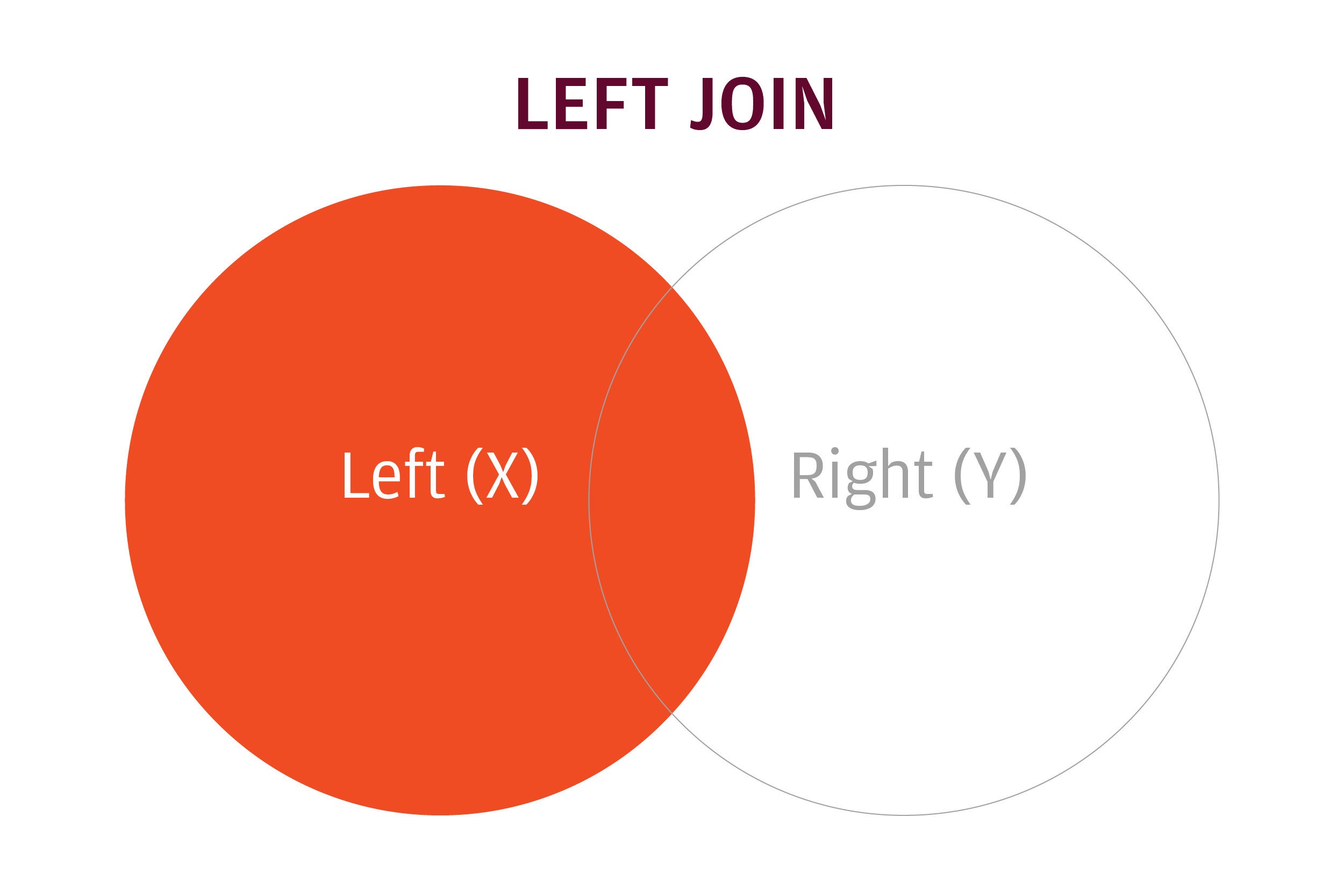

left join IDG

A left join keeps all rows in the left data frame and only matching rows from the right data frame.

The code to import and merge both data sets using left_join() is below. It starts by loading the dplyr and readr packages, and then reads in the two files with read_csv(). When using read_csv(), I don’t need to unzip the file first.


library(dplyr)
library(readr)

mytibble <- read_csv("673598238_T_ONTIME_REPORTING.zip")
mylookup_tibble <- read_csv("L_UNIQUE_CARRIERS.csv_")

joined_tibble <- left_join(mytibble, mylookup_tibble,
by = join_by(OP_UNIQUE_CARRIER == Code))

Note that dplyr’s older by syntax without join_by() still works


joined_tibble <- left_join(mytibble, mylookup_tibble,
by = c("OP_UNIQUE_CARRIER" = "Code"))

read_csv() creates tibbles, which are a type of data frame with some extra features. left_join() merges the two. Take a look at the syntax: In this case, order matters. left_join() means include all rows on the left, or first, data set, but only rows that match from the second one. And, because I need to join by two differently named columns, I included a by argument.

The new join syntax in the development-only version of dplyr would be:


joined_tibble2 <- left_join(mytibble, mylookup_tibble, 
by = join_by(OP_UNIQUE_CARRIER == Code))

Since most people likely have the CRAN version, however, I will use dplyr‘s original named-vector syntax in the rest of this article, until join_by() becomes part of the CRAN version.

We can look at the structure of the result with dplyr’s glimpse() function, which is another way to see the top few items of a data frame:


glimpse(joined_tibble)
Observations: 658,461
Variables: 7
$ FL_DATE           <date> 2019-08-01, 2019-08-01, 2019-08-01, 2019-08-01, 2019-08-01…
$ OP_UNIQUE_CARRIER <chr> "DL", "DL", "DL", "DL", "DL", "DL", "DL", "DL", "DL", "DL",…
$ ORIGIN            <chr> "ATL", "DFW", "IAH", "PDX", "SLC", "DTW", "ATL", "MSP", "JF…
$ DEST              <chr> "DFW", "ATL", "ATL", "SLC", "PDX", "ATL", "DTW", "JFK", "MS…
$ DEP_DELAY_NEW     <dbl> 31, 0, 40, 0, 0, 10, 0, 22, 0, 0, 0, 17, 5, 2, 0, 0, 8, 0, …
$ X6                <lgl> NA, NA, NA, NA, NA, NA, NA, NA, NA, NA, NA, NA, NA, NA, NA,…
$ Description       <chr> "Delta Air Lines Inc.", "Delta Air Lines Inc.", "Delta Air …

This joined data set now has a new column with the name of the airline. If you run a version of this code yourself, you’ll probably notice that dplyr is way faster than base R.

Next, let’s look at a super-fast way to do joins.



Source link

ShareTweetSend
Previous Post

LeBron James breaks Kareem Abdul-Jabbar’s NBA career scoring record : NPR

Next Post

Week 30 Roundup – Sport Grill

Related News

Uber Launches Pilot Program for Safe Children’s Rides with Trusted Drivers
Tech

Uber Launches Pilot Program for Safe Children’s Rides with Trusted Drivers

November 20, 2026
Exploring Innovations: A Breakthrough in Living Liver Technology, a Lucrative Battery Partnership, and the Surge of AI Excitement
Tech

Exploring Innovations: A Breakthrough in Living Liver Technology, a Lucrative Battery Partnership, and the Surge of AI Excitement

November 19, 2026
Microsoft’s Satya Nadella Reveals Strategic Rationale Behind Layoff of 60,000 Employees
Tech

Microsoft’s Satya Nadella Reveals Strategic Rationale Behind Layoff of 60,000 Employees

November 19, 2026
Cybercriminals Embrace Innovative AI Tool for Streamlined Hacking Operations
Tech

Cybercriminals Embrace Innovative AI Tool for Streamlined Hacking Operations

November 18, 2026
Next Post
Week 30 Roundup – Sport Grill

Week 30 Roundup – Sport Grill

Discussion about this post

Subscribe To Our Newsletters

    Customer Support


    1251 Wilcrest Drive
    Houston, Texas
    77042 USA
    Call-832.795.1420
    e-mail – news@theinsightpost.com

    Subscribe To Our Newsletters

      Categories

      • Africa
      • Africa-East
      • African Sports
      • American Sports
      • Arts
      • Asia
      • Australia
      • Business
      • Business Asia
      • Business- Africa
      • Canada
      • Defense
      • Education
      • Egypt
      • Energy
      • Entertainment
      • Europe
      • European Soccer
      • Finance
      • Germany
      • Ghana
      • Health
      • Insight
      • International
      • Investing
      • Japan
      • Latest Headlines
      • Life & Living
      • Markets
      • Mobile
      • Movies
      • New Zealand
      • Nigeria
      • Politics
      • Scholarships
      • Science
      • South Africa
      • South America
      • Sports
      • Tech
      • Travel
      • Travel-Africa
      • UK
      • USA
      • Weather
      • World
      No Result
      View All Result

      Recent News

      Claire Sweeney Faces Heartbreak Following the Passing of Ex-Partner Ricky Hatton

      Claire Sweeney Faces Heartbreak Following the Passing of Ex-Partner Ricky Hatton

      November 20, 2026
      Democrats Poised to Amplify Investigation into Trump’s Obamacare Rollback Following Major Victory

      Democrats Poised to Amplify Investigation into Trump’s Obamacare Rollback Following Major Victory

      November 20, 2026
      White House Cybersecurity Official Resigns Amid Rising Threats to National Security

      White House Cybersecurity Official Resigns Amid Rising Threats to National Security

      November 20, 2026
      Essential Insights from Experts on Embracing Healthy Aging for Men

      Essential Insights from Experts on Embracing Healthy Aging for Men

      November 20, 2026
      • Home
      • Advertise With Us
      • About Us
      • Corporate
      • Consumer Rewards
      • Forum
      • Privacy Policy
      • Social Trends

      Theinsightpost ©2026 | All Rights Reserved. Theinsightpost is an Elnegy LLC company, registered in Texas, USA

      Welcome Back!

      Login to your account below

      Forgotten Password?

      Retrieve your password

      Please enter your username or email address to reset your password.

      Log In

      Add New Playlist

      We are using cookies to give you the best experience on our website.

      You can find out more about which cookies we are using or switch them off in .

      No Result
      View All Result
      • Home
      • Insight
      • Blog
      • Business
      • Entertainment
      • Health
      • Politics
      • Shop
        • Gift Shop
        • Value Shop
        • Store
        • Bargain Shop
        • Discount
      • Sports
      • Tech
      • Travel
      • USA
      • Video
      • World
        • Asia
        • Africa
        • South America
        • North America
        • Europe
        • Oceania

      Theinsightpost ©2026 | All Rights Reserved. Theinsightpost is an Elnegy LLC company, registered in Texas, USA

      The Insight Post
      Powered by  GDPR Cookie Compliance
      Privacy Overview

      This website uses cookies so that we can provide you with the best user experience possible. Cookie information is stored in your browser and performs functions such as recognising you when you return to our website and helping our team to understand which sections of the website you find most interesting and useful.

      Strictly Necessary Cookies

      Strictly Necessary Cookie should be enabled at all times so that we can save your preferences for cookie settings.

      Cookie Policy

      More information about our Cookie Policy