








• Home
  • Insight
  • Blog
  • Business
  • Entertainment
  • Health
  • Politics
  • Shop
    • Gift Shop
    • Value Shop
    • Store
    • Bargain Shop
    • Discount
  • Sports
  • Tech
  • Travel
  • USA
  • Video
  • World
    • Asia
    • Africa
    • South America
    • North America
    • Europe
    • Oceania
Thursday, November 19, 2026
No Result
View All Result
Subscribe Now
  • Home
  • Insight
  • Blog
  • Business
  • Entertainment
  • Health
  • Politics
  • Shop
    • Gift Shop
    • Value Shop
    • Store
    • Bargain Shop
    • Discount
  • Sports
  • Tech
  • Travel
  • USA
    Trump’s Deal Turns Sour as Voters Withdraw Support

    Trump’s Deal Turns Sour as Voters Withdraw Support

    FAA Administrator Takes Responsibility as Mullin Faces Tough Questions Over Nationwide Ground Stop

    FAA Administrator Takes Responsibility as Mullin Faces Tough Questions Over Nationwide Ground Stop

    Mary Peltola Emerges Victorious in Alaska Senate Race, Making History for Democrats

    Mary Peltola Emerges Victorious in Alaska Senate Race, Making History for Democrats

    Stranded in Conflict: Palestinians Navigate the Tenuous Balance of War and Peace Amid Ceasefire Efforts

    Stranded in Conflict: Palestinians Navigate the Tenuous Balance of War and Peace Amid Ceasefire Efforts

    Trump Administration Revokes Pay Increase for Head Start Educators

    Trump Administration Revokes Pay Increase for Head Start Educators

    Unexpected Triumph: Gay Candidates Achieve Unforeseen Victories in Challenging Races

    Unexpected Triumph: Gay Candidates Achieve Unforeseen Victories in Challenging Races

    Microsoft Outlook Experiences Prolonged Outage Affecting Users Nationwide

    Microsoft Outlook Experiences Prolonged Outage Affecting Users Nationwide

    Gunfire Erupts in D.C.: Authorities Search for Suspect Amid Rising Concerns Over Public Safety

    Gunfire Erupts in D.C.: Authorities Search for Suspect Amid Rising Concerns Over Public Safety

    LAUSD Takes Strong Action Against Hate Speech Following Racial Slur Incidents

    LAUSD Takes Strong Action Against Hate Speech Following Racial Slur Incidents

  • Video
  • World
    • Asia
    • Africa
    • South America
    • North America
    • Europe
    • Oceania
The Insight Post
  • Home
  • Insight
  • Blog
  • Business
  • Entertainment
  • Health
  • Politics
  • Shop
    • Gift Shop
    • Value Shop
    • Store
    • Bargain Shop
    • Discount
  • Sports
  • Tech
  • Travel
  • USA
    Trump’s Deal Turns Sour as Voters Withdraw Support

    Trump’s Deal Turns Sour as Voters Withdraw Support

    FAA Administrator Takes Responsibility as Mullin Faces Tough Questions Over Nationwide Ground Stop

    FAA Administrator Takes Responsibility as Mullin Faces Tough Questions Over Nationwide Ground Stop

    Mary Peltola Emerges Victorious in Alaska Senate Race, Making History for Democrats

    Mary Peltola Emerges Victorious in Alaska Senate Race, Making History for Democrats

    Stranded in Conflict: Palestinians Navigate the Tenuous Balance of War and Peace Amid Ceasefire Efforts

    Stranded in Conflict: Palestinians Navigate the Tenuous Balance of War and Peace Amid Ceasefire Efforts

    Trump Administration Revokes Pay Increase for Head Start Educators

    Trump Administration Revokes Pay Increase for Head Start Educators

    Unexpected Triumph: Gay Candidates Achieve Unforeseen Victories in Challenging Races

    Unexpected Triumph: Gay Candidates Achieve Unforeseen Victories in Challenging Races

    Microsoft Outlook Experiences Prolonged Outage Affecting Users Nationwide

    Microsoft Outlook Experiences Prolonged Outage Affecting Users Nationwide

    Gunfire Erupts in D.C.: Authorities Search for Suspect Amid Rising Concerns Over Public Safety

    Gunfire Erupts in D.C.: Authorities Search for Suspect Amid Rising Concerns Over Public Safety

    LAUSD Takes Strong Action Against Hate Speech Following Racial Slur Incidents

    LAUSD Takes Strong Action Against Hate Speech Following Racial Slur Incidents

  • Video
  • World
    • Asia
    • Africa
    • South America
    • North America
    • Europe
    • Oceania
No Result
View All Result
No Result
View All Result
Home Science

How to use the new Gemini AI tools built into Chromebooks

by Theinsightpost
July 8, 2024
in Science
0 0
0
How to use the new Gemini AI tools built into Chromebooks

Google is keen to follow the rest of the tech industry in putting AI features everywhere it possibly can. Its Gemini apps and models are at the forefront of that strategy—and the latest Google products to get a slew of AI features are Chromebooks.

To be more specific, these Gemini AI tools are now available on Chromebook Plus models, which is Google’s new-ish name for the most modern and most powerful of these laptops. It’s a badge to look out for if you’re shopping for the best Chromebooks for students (or indeed any other type of user).

Here we’ll outline all the new features that have just dropped, and how they can be used on ChromeOS. Gemini is now well and truly integrated into the software, so some AI assistance is only ever a few clicks away.

Help me write

Help me write can give you some inspiration. Screenshot: Google

Help me write is a feature that Google is adding all across its products, including Google Docs and Gmail. If you’re stuck for something to say, the feature can generate some AI text for you: For a restaurant review, an email, a blog post, or whatever it happens to be.

With ChromeOS, Help me write is just a click away. With a right-click on the trackpad in any text box on any website, you can bring up the prompt box and start producing some text—just describe the text you need and hit Enter (or click the arrow). You’ll then be shown a selection of text blurbs to choose from.

You can also right-click on any existing text you’ve written to refine it. Use the feature to shorten or expand on what you’ve said, or to make it more or less formal. You can also add your own prompts (“make this sound more casual”) if you need to.

AI wallpaper and backgrounds

screenshot of google AI wallpaper images
AI wallpapers can be generated in seconds, based on your prompts. Screenshot: Google

If the wallpapers that came with your Chromebook aren’t really grabbing you, then you can use generative AI to create some new ones. All you need is a prompt—like “a cabin in the middle of a peaceful meadow”—and ChromeOS will do the rest.

Right-click on a blank area of the desktop, then choose Set wallpaper and style and Wallpaper to bring up your options. You’ll see those options include Create with AI: Follow this link to get started. You’re asked to choose a theme (like Landscape or Classic art), which you can then refine with text prompts.

You can do something similar with video backgrounds. With any video calling app open, click the arrow next to the video icon on the ChromeOS shelf, then choose Image. You then get to the same screen used for generating wallpapers.

Magic Editor in Google Photos
screenshot of magic editor
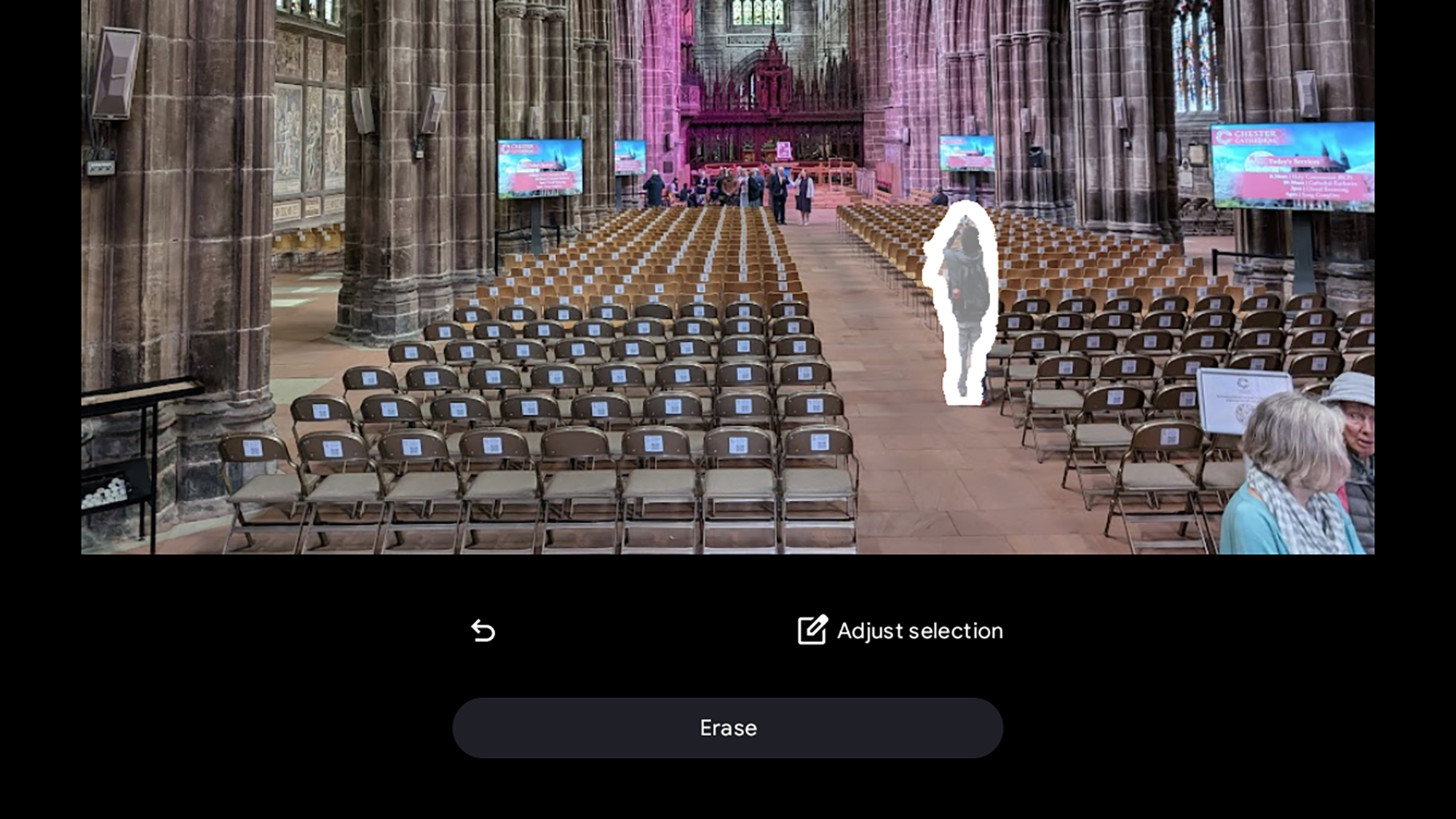
The Magic Editor can remove objects and people from photos. Screenshot: Google

The Magic Editor has been around for a while in Google Photos for phones, but now it’s available on Chromebooks too. The main trick is being able to move or completely erase objects or people inside your pictures. 

For this, you need to have Google Photos for Android installed as an app on ChromeOS. Open up an image, choose Edit, and you’ll see a Magic Editor button up in the top left corner. Click the button to launch the separate Magic Editor interface.

You then need to select the object or person you want to manipulate—you can try scribbling over it, or click once and see if the app can select it automatically. Once that’s done, click Erase to remove the selection from the image, or click and drag it to move it somewhere else. You’ll be shown a few different generative AI takes on the task, which you can choose between.

Gemini on the home screen
AI google tools
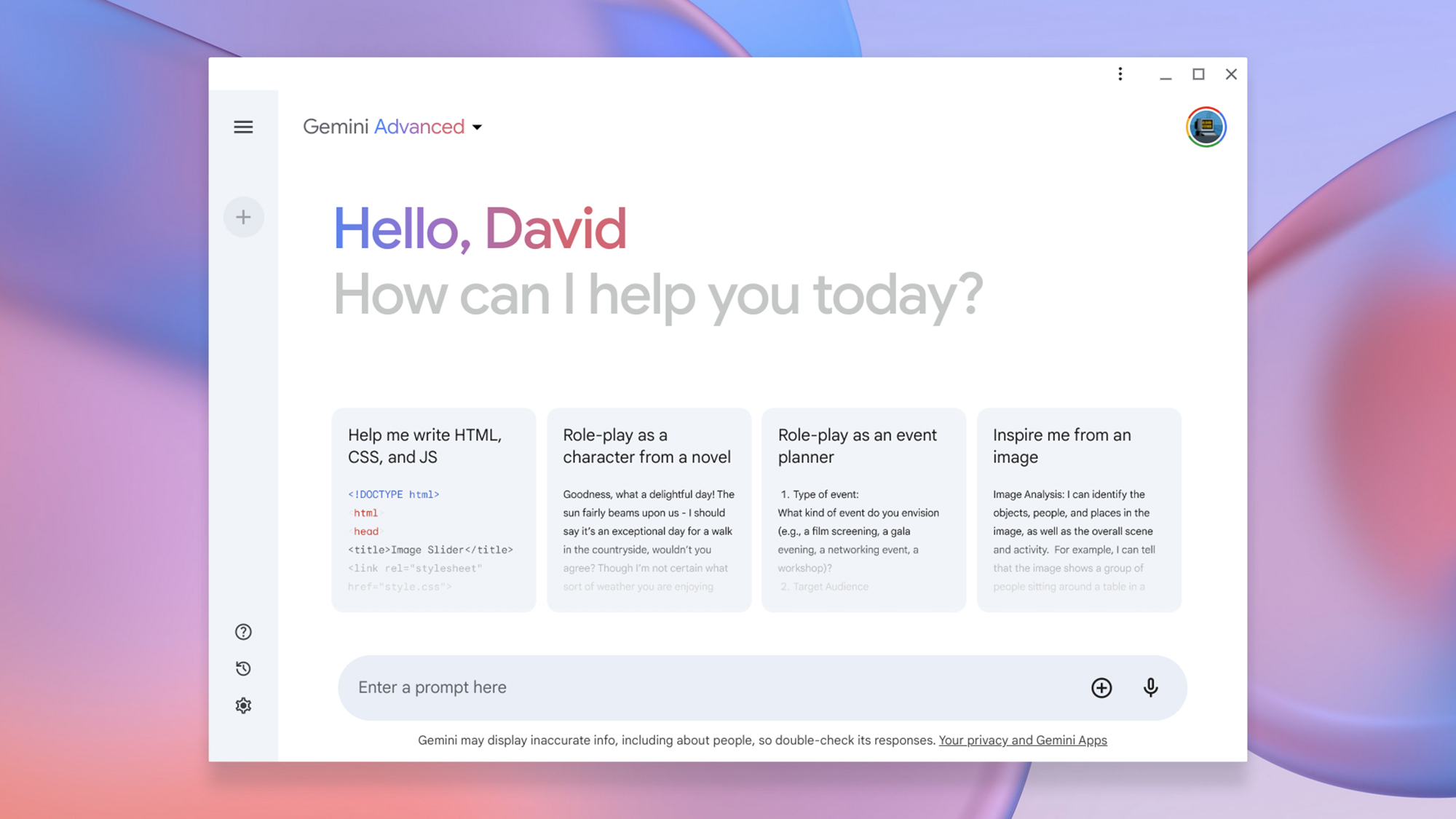
Gemini AI is now just a click away in ChromeOS. Screenshot: Google

Another change you’re going to notice once these AI tools have reached your Chromebook is a new Gemini button on the shelf at the bottom of the screen. Clicking on this simply brings you through to the Gemini AI app in its own window.

This is the same Gemini AI app you can access on the web through any browser. If you haven’t used it before, it can generate text and answer questions on just about any topic you like, from quantum physics to small business ideas. If you’re paying for the more sophisticated Gemini Advanced model, you can switch between it and the standard model using the drop-down menu in the top left corner.

As ever with generative AI, the standard warnings apply: These models can sometimes make stuff up and give you inaccurate answers. They’re essentially probability machines with no actual intrinsic knowledge, so use them as a way of complementing other tools, rather than relying on them entirely and in isolation.


ShareTweetSend
Previous Post

Move and win roundup: Week of July 8, 2024

Next Post

Pistols With Which Napoleon Intended To Kill Himself Sold For $1.8 Million In France

Related News

Discover the Fascinating Secrets of NASA’s Voyager Mission: Test Your Knowledge!
Science

Discover the Fascinating Secrets of NASA’s Voyager Mission: Test Your Knowledge!

November 19, 2026
Groundbreaking Electric Comb Promises Hair Regrowth in Mice Within Four Weeks, Paving the Way for Future Hair-Loss Solutions
Science

Groundbreaking Electric Comb Promises Hair Regrowth in Mice Within Four Weeks, Paving the Way for Future Hair-Loss Solutions

November 18, 2026
Miniature LSD Doses Administered in Rapid Succession Show Antidepressant Potential in Mice: Exploring the Impact of Timing vs. Tolerance
Science

Miniature LSD Doses Administered in Rapid Succession Show Antidepressant Potential in Mice: Exploring the Impact of Timing vs. Tolerance

November 14, 2026
Investigation Underway: Experts Seek Answers Behind Sudden Brooklyn Building Collapse
Science

Investigation Underway: Experts Seek Answers Behind Sudden Brooklyn Building Collapse

November 12, 2026
Next Post
Pistols With Which Napoleon Intended To Kill Himself Sold For .8 Million In France

Pistols With Which Napoleon Intended To Kill Himself Sold For $1.8 Million In France

Discussion about this post

Subscribe To Our Newsletters

    Customer Support


    1251 Wilcrest Drive
    Houston, Texas
    77042 USA
    Call-832.795.1420
    e-mail – news@theinsightpost.com

    Subscribe To Our Newsletters

      Categories

      • Africa
      • Africa-East
      • African Sports
      • American Sports
      • Arts
      • Asia
      • Australia
      • Business
      • Business Asia
      • Business- Africa
      • Canada
      • Defense
      • Education
      • Egypt
      • Energy
      • Entertainment
      • Europe
      • European Soccer
      • Finance
      • Germany
      • Ghana
      • Health
      • Insight
      • International
      • Investing
      • Japan
      • Latest Headlines
      • Life & Living
      • Markets
      • Mobile
      • Movies
      • New Zealand
      • Nigeria
      • Politics
      • Scholarships
      • Science
      • South Africa
      • South America
      • Sports
      • Tech
      • Travel
      • Travel-Africa
      • UK
      • USA
      • Weather
      • World
      No Result
      View All Result

      Recent News

      Navigating Budgeting Apps: Essential Insights on Account Security Before You Connect

      Navigating Budgeting Apps: Essential Insights on Account Security Before You Connect

      November 19, 2026
      Australia Claims Victory Over Argentina with 2-0 Win at Under-17 FIFA World Cup

      Australia Claims Victory Over Argentina with 2-0 Win at Under-17 FIFA World Cup

      November 19, 2026
      Putin Promises Consequences Following Ukraine’s Assault on Kerch Strait Bridge

      Putin Promises Consequences Following Ukraine’s Assault on Kerch Strait Bridge

      November 19, 2026
      Brian Blessed Shares Amusing Encounter with Female Gorillas at Zoo

      Brian Blessed Shares Amusing Encounter with Female Gorillas at Zoo

      November 19, 2026
      • Home
      • Advertise With Us
      • About Us
      • Corporate
      • Consumer Rewards
      • Forum
      • Privacy Policy
      • Social Trends

      Theinsightpost ©2026 | All Rights Reserved. Theinsightpost is an Elnegy LLC company, registered in Texas, USA

      Welcome Back!

      Login to your account below

      Forgotten Password?

      Retrieve your password

      Please enter your username or email address to reset your password.

      Log In

      Add New Playlist

      We are using cookies to give you the best experience on our website.

      You can find out more about which cookies we are using or switch them off in .

      No Result
      View All Result
      • Home
      • Insight
      • Blog
      • Business
      • Entertainment
      • Health
      • Politics
      • Shop
        • Gift Shop
        • Value Shop
        • Store
        • Bargain Shop
        • Discount
      • Sports
      • Tech
      • Travel
      • USA
      • Video
      • World
        • Asia
        • Africa
        • South America
        • North America
        • Europe
        • Oceania

      Theinsightpost ©2026 | All Rights Reserved. Theinsightpost is an Elnegy LLC company, registered in Texas, USA

      The Insight Post
      Powered by  GDPR Cookie Compliance
      Privacy Overview

      This website uses cookies so that we can provide you with the best user experience possible. Cookie information is stored in your browser and performs functions such as recognising you when you return to our website and helping our team to understand which sections of the website you find most interesting and useful.

      Strictly Necessary Cookies

      Strictly Necessary Cookie should be enabled at all times so that we can save your preferences for cookie settings.

      Cookie Policy

      More information about our Cookie Policy