








Video editing has become an important part of the marketing strategy for businesses across the industry. Businesses are creating videos daily and need a tool that makes their job easier. There are several video creating tools out there that can help you with the video editing process. However, there are also several things that you must keep in mind before you choose an online video editorfor making edits to your videos.
You must use a user-friendly tool to work on all kinds of videos. Your tool should also allow you to change the video’s content, from trimming and cutting to patching two clips. As the video needs of businesses have evolved, you may be looking for a video editing tool that can meet your ever-evolving needs of businesses. Some video editing tools are standout and can be used on all kinds of videos you need.
InVideo is one such online video editor.

In this full Invideo review, let’s look at the features of InVideo, its pricing, and how it can be used to edit videos in no time.
What is InVideo?
Before we move on to the different features of InVideo, we should try to understand that what InVideo is and its purpose for businesses.
InVideo is a video editor designed for all video editors who want to create the best videos quickly. This online video editor gives you a user-friendly platform to create high-quality videos for various purposes. Hence, it promotes productivity.
The platform gives you more than 5,000 templates to choose from, and it also gives you about 10 million media options. The tool is also highly recognized for its huge audio library containing copyright-free music that can be readily used in videos.
InVideo Features
Several features of InVideo make it different from all the other video editors. To make best use of this tool, you may want to know the main features of Invideo. Some of the best features that make InVideo one of the best video editors are explained in detail below:
1. Video Templates
InVideo has more than 5,000 pre-designed templates. You can pick any of these templates and put your clip in these templates for an enhanced appeal. The templates are arranged based on themes, so you can pick them easily.

2. Fonts
Video editors are used to working with the same old fonts. Hence, they fail to add fresh fonts to a video while editing it. InVideo offers several font quote templates that have a customized style. You can add these text quotes and change the content easily.
3. Stickers
InVideo has compelling graphic elements that can make your videos much more exciting. You can use different kinds of stickers present on the tool to make the video look quirkier. These stickers will come in handy when you are working with animated videos.
4. Supports High-Quality Videos
The best thing about InVideo is that you can use it to edit and make changes to both low and high-resolution videos. Therefore, if you are worried about uploading a huge file and working on it, you have InVideo to your rescue.
5. Text Features
You will find several text-based features on InVideo that you will not find on other video editing tools. You can edit text by choosing or creating fonts. You can also add graphic elements and animations to the text. The tool also allows you to add text overlays. Better yet, InVideo supports converting text to video. Hence, you can play around with the text as per your choice.

6. Video Editing Features
InVideo is one of the best online video editing software out there. It allows you to experiment with videos and make something that helps you engage with your audience. The tool allows you to capture an HD video. Once you have the footage, you can create the video content using the tool. The tool also allows you to create a video from scratch if you make an animated or a picture video.
When creating the video, you can make all kinds of edits to your videos on InVideo. You can cut, trim and join two or more clips to create a good video. The tool also allows you to create video loops if you want that effect in your video.
You can add audio tones and voiceovers to your video via InVideo. On top of everything, if you are stuck with something or are facing issues in using the tool, you can reach out to the customer support team of InVideo. They will ensure all your queries are clarified.
InVideo Tutorials
While conducting an InVideo review, we realized that the tool is one of the easiest video editing tools available in the market currently. Here are a few simple steps that will navigate you to use the tool.
Step 1: Choose the platform where you will be uploading the video
This step will help you set the aspect ratio of the video so that you will not have to make any changes to it in the future. InVideo offers different platform placements like Facebook stories, YouTube videos, etc.
Step 2: Select a theme
InVideo offers creative templates that are grouped together under different themes. You can select a pre-designed theme to save your time and effort.
Step 3: Use the different editing tools
InVideo has a plethora of tools. You can access the media library to find an image or a clip that can be used in the main video. You can also use the music library to choose quirky background music for your video. Additionally, you have text or a font library and a sticker library that allows you to add different graphic elements to the video.

Step 4: Export
Once you add the elements and create the video, check the timeline to make any changes to the video. Based on the platforms, you can then export your video in 720P or 1080P format.
Types of Videos One Can Create with InVideo
InVideo is a versatile video editing tool. Hence, it allows you to create all kinds of videos. These videos are supported across social media channels. You can visit the template gallery and choose a video template based on the aspect ratio you want your video to have. After the creation of the video, you can share it directly to different social media platforms like Facebook, Instagram, LinkedIn, etc.
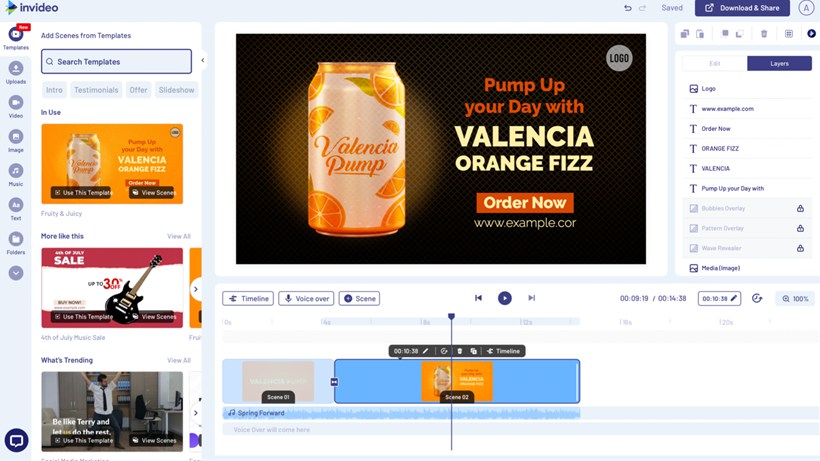
Apart from the social media, you can use the tool to create videos that can serve different objectives of the business. You can create branding videos, product catalogs, video ads, presentations, wedding, and other invites, promos, testimonials, how-to, and every other kind of video using InVideo.
The tool supports all video formats and types. Also, once you create a video, you can easily adjust the same settings to make it suitable for all other platforms. The tool helps you make professional and entertaining videos based on where you want to use it. The thousands of templates on the tool cover almost every kind of video format you can think of. Also, you can use the tool irrespective of the business’s nature or the industry in which your company operates.
InVideo Pricing
Before you pick a video editing tool, you need to check the price of the tool. Before checking the price, you must ensure that whatever you need in a good video editor is covered in the tool.
InVideo comes up with a lifetime free plan and paid version comes with a 7-day free trial. For premium plan, InVideo has adopted competitive pricing. It is quite affordable for individuals and businesses looking for a video editing tool that provides them with a holistic solution to managing all kinds of videos and taking up different kinds of video editing tasks based on the requirements of the video.
Let’s look at the two plans that InVideo provides to its customers.
- Business Plan
- Unlimited Plan
You can take any of these plans based on the volume of videos you edit in a month. In the business plan, there are certain limits on the number of premium videos you can export, the number of stock videos and photos you can access, etc. However, the unlimited plan doesn’t have these limits. Therefore, if you work with a high volume of videos, you must go with the unlimited plan. However, you can select the business plan if you are an individual creator who edits around 20 videos monthly.

The tool also allows you to choose a monthly or annual plan based on the budget and the duration of the requirement of the tool. The business plan is available at $30 per month. However, if you go with the annual subscription of the business plan, you can pay $180 yearly.
Similarly, the monthly price for the unlimited package is $60. However, if you take a yearly plan, you will only need to pay $360 for the year. Taking an annual plan makes sense if you are a company, media, or marketing agency. These companies work with a huge chunk of videos every day.
Pros and Cons of InVideo
InVideo is a versatile video editing tool. However, before you start using it, you should try to understand the features that the tool offers along with the advantages of using the tool. You should also try to understand the cons of the tool so that you can make necessary arrangements if you want a particular function that the tool does not provide.
Some pros and cons are listed below so you can set your expectations straight.
InVideo Pros
InVideo is undoubtedly one of the best video editing apps out there. Some pros that were dominant during the InVideo revieware:
- The app interface is quite easy to use and can be easily used by beginners without experience in video editing.
- The tool also provides users with a vast library that contains templates, images, graphic elements, etc., to be used in the video.
- The tool has pre-designed templates that can help you place a video in the template and edit it. You can choose the template base on the genre of the video.
- InVideo supports almost all languages. Hence, you can use the tool to create videos in regional languages.
- The tool allows you to take control of the project and create a video how you want it to.
- InVideo also provides the text-to-speech feature, which can come in handy while adding subtitles to a video.
InVideo Cons
InVideo has no cons for beginners who have stepped into video editing. However, once you start using the tool every day, you will start noticing the small limitations of the tool. Some of the cons of using InVideo as a video editor are:
- Once you choose a template for your video, you can’t switch the template while you are halfway through creating it. You will have to take a fresh template and work on it if you want to change the template of the video due to any reason.
- You need a laptop to run InVideo if you plan to use the video tool. The mobile version of the app has not been released yet.
- The exporting of video and other graphic elements can be a time-consuming process. Hence, you might waste time uploading the video to the tool.
InVideo Alternatives
If you are looking for some InVideo alternatives, here are a few:
- Canva
- Vidnami
- Offeo
- Adobe Premiere Pro
- Animoto
- iMovie
Now hereby coming to the end of this InVideo review, I must say InVideo is one of the easiest video editors to use. You can select the platform you plan to share the video before its creation. After that, you need to select a theme for your videos. Once you have chosen the theme for the video, you can easily create and edit your video.
You can continue to explore the tool to understand what the platform allows you to do. Then, you can use this tool to create world-class videos.









Discussion about this post