

これはCodemagicのCI/CDツールを使ってIonicアプリを構築するための入門ガイドです。執筆者はSneh Pandya です(2021年6月更新)。
Ionicの公式チームが2020年に実施した開発者アンケートによると、クロスプラットフォームのモバイル開発分野では、86%の開発者がIonicを使ってアプリ開発を続けているという驚異的な結果 が出ています。さらに驚くべきことに、これらの開発者のうち75%以上がウェブ開発者です。また、一層目を引くのは、企業の経営者や開発者の方々が、Ionicのようなモバイルフレームワークは、実際にプラットフォームを問わず、優れたアプリ体験を提供できると回答したことです。
これに伴い、アプリを自動化するためのシームレスなインテグレーションがより重要になってきます。本記事では、Codemagicを使って、Ionicアプリのビルド、テスト、配布をセットアップ します。
理解を深めるために本記事を読み進めることをお勧めいたしますが、すでに
codemagic.yamlファイルのご使用経験がある方は、Ionicプロジェクト用のYAMLテンプレートをこちらから入手できます。
はじめに:Ionicアプリ用の継続的インテグレーションとデリバリー
本記事は、Ionic CLIのバージョン
6.14.1安定版とIonic Coreのバージョン5.6.6安定版に特化して書かれています。
まず、現在のIonicプロジェクトを、GitHub、GitLab、Bitbucketなどのコードリポジトリプラットフォームで、バージョンコントロールシステムを使ってホストしておく必要があります。その後、以下の手順で、プロジェクトに必要なcodemagic.yamlファイルをセットアップし、ダウンロードします。
- お好みの方法でCodemagicにログインまたはサインアップしてください。メールか、プロジェクトがリポジトリとしてホストされているバージョンコントロールプラットフォームをご使用ください。
-
Codemagicのダッシュボードにアクセスしたら、CI/CDを設定したいリポジトリを接続する必要があります。**アプリケーションの追加(Add application)**をクリックして、リポジトリとCodemagicを接続します。
-
お好みのバージョンコントロールシステムを選択するプロンプトが表示されます。次に、統合を承認する(Next: Authorize integration をクリックして、Codemagic CI/CDに、ご選択されたバージョンコントロールシステムへの承認済みアクセスをご提供ください。
-
承認が正常に完了したら、Codemagicのダッシュボードに行くと、CI/CDを設定するために選んだプロジェクトが正常に追加されていることがわかります。ここで、ビルドをセットアップ(Set up build) をクリックします。
-
アプリスターターのワークフローとして、Ionic Appを選択します。
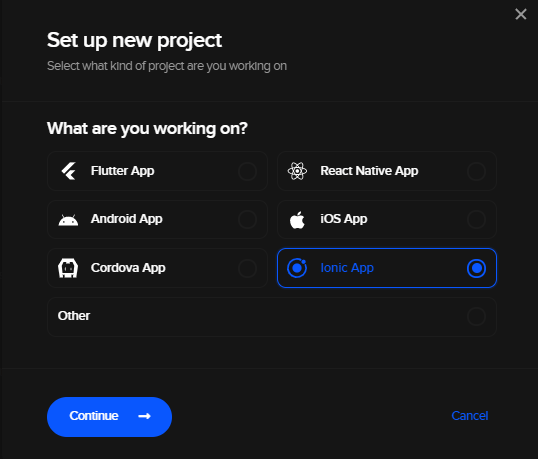
- ダウンロードボタンをクリックして、Ionicプロジェクト用のYAMLテンプレートをダウンロードします。
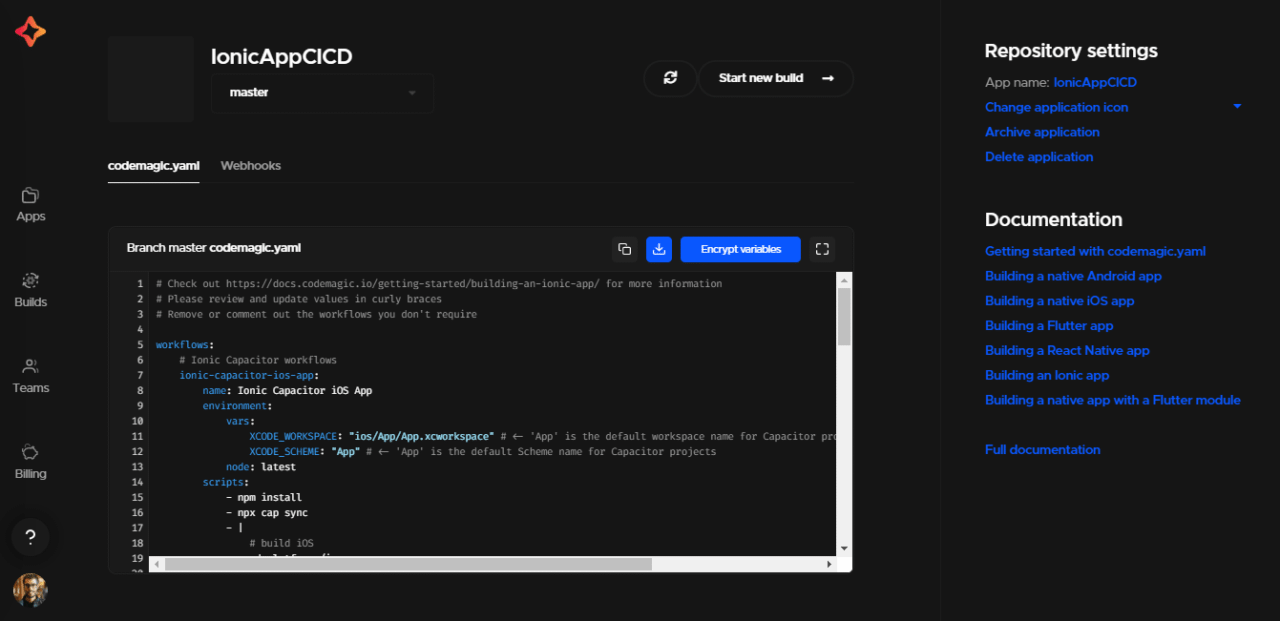
- 次に、お好みのコードエディタを使って、
codemagic.yamlファイルを開きます。ファイルの内容は以下のようになります:
# Check out https://docs.codemagic.io/getting-started/building-an-ionic-app/ for more information
# Please review and update values in curly braces
# Remove or comment out the workflows you don't require

workflows:
    # Ionic Capacitor workflows
    ionic-capacitor-ios-app:
        name: Ionic App
        environment:
            vars:
                XCODE_WORKSPACE: "ios/App/IonicApp.xcworkspace" # <- 'IonicApp' is the default workspace name for Capacitor projects
                XCODE_SCHEME: "IonicApp" # <- 'IonicApp' is the default Scheme name for Capacitor projects
            node: latest
        scripts:
            - npm install
            - npx cap sync
            - |
                # build iOS
                cd platforms/ios
                pod install
                xcodebuild build -workspace "$XCODE_WORKSPACE" -scheme "$XCODE_SCHEME" CODE_SIGN_IDENTITY="" CODE_SIGNING_REQUIRED=NO CODE_SIGNING_ALLOWED=NO
        artifacts:
            - $HOME/Library/Developer/Xcode/DerivedData/**/Build/**/*.app
            - $HOME/Library/Developer/Xcode/DerivedData/**/Build/**/*.dSYM
    ionic-capacitor-android-app:
        name: Ionic App
        environment:
            node: latest
        scripts:
            - npm install
            - npx cap sync
            - |
                # build Android
                cd android
                ./gradlew assembleDebug
        artifacts:
            - android/app/build/outputs/**/*.apk
    # Ionic Cordova workflows
    ionic-cordova-ios-app:
        name: Ionic Cordova iOS App
        environment:
            vars:
                XCODE_WORKSPACE: "{{ ADD WORKSPACE NAME HERE }}"
                XCODE_SCHEME: "{{ ADD SCHEME NAME HERE }}"
            node: latest
        scripts:
            - |
                # install dependencies and update to Cordova version 9
                npm install
                cvm install 9.0.0
                cvm use 9.0.0
            - |
                # Setup Cordova iOS platform
                ionic cordova platform remove ios --nosave
                ionic cordova platform add ios --confirm --no-interactive --noresources
            - |
                # build iOS
                cd platforms/ios
                pod install
                xcodebuild build -workspace "$XCODE_WORKSPACE" -scheme "$XCODE_SCHEME" CODE_SIGN_IDENTITY="" CODE_SIGNING_REQUIRED=NO CODE_SIGNING_ALLOWED=NO
        artifacts:
            - $HOME/Library/Developer/Xcode/DerivedData/**/Build/**/*.app
            - $HOME/Library/Developer/Xcode/DerivedData/**/Build/**/*.dSYM
    ionic-cordova-android-app:
        name: Ionic Cordova Android App
        environment:
            node: latest
        scripts:
            - |
                # install dependencies and update to Cordova version 9
                npm install
                cvm install 9.0.0
                cvm use 9.0.0
            - |
                # Setup Cordova Android platform
                ionic cordova platform remove android --nosave
                ionic cordova platform add android --confirm --no-interactive --noresources
            - |
                # Build Android Cordova App
                script: ionic cordova build android --debug --no-interactive --device
        artifacts:
            - platforms/android/app/build/outputs/**/*.apk
- **ウェブフック(Webhooks)**セクションをクリックして、アプリケーションのウェブフックを設定します。ウェブフックは自動ビルドのトリガーに必要です。
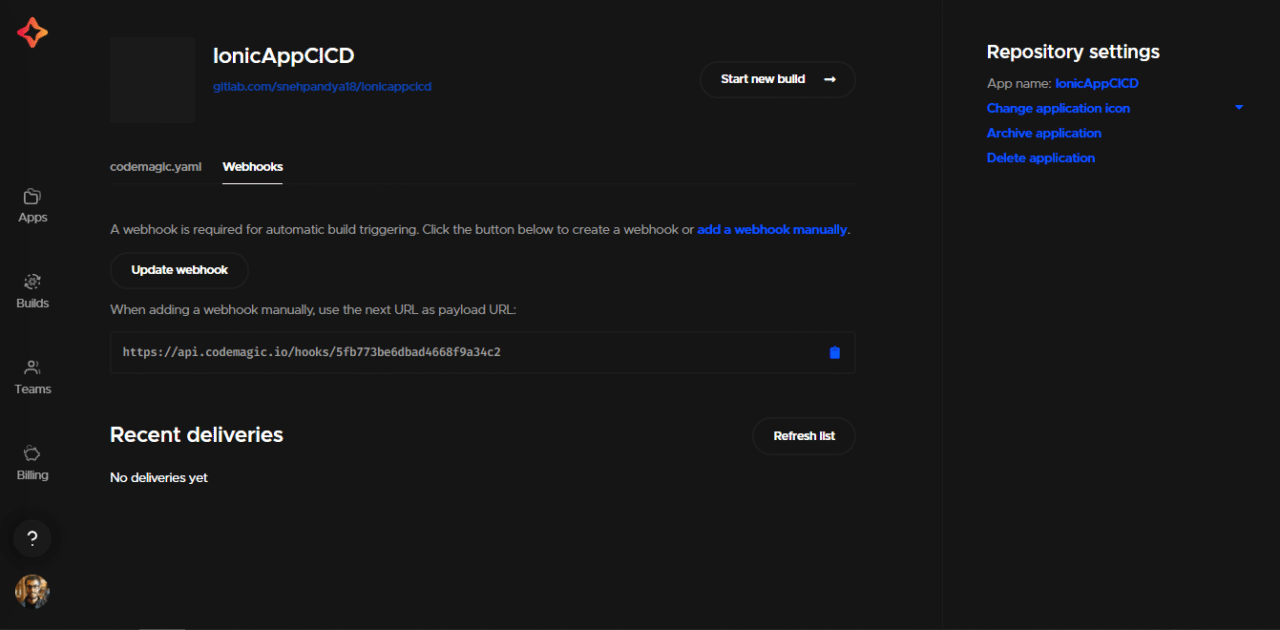
-
ウェブフックの更新(Update webhook) をクリックして、URLをコピーします。コピーしたURLをペイロードURLとしてアプリケーション内で宣言する必要があります。
-
ウェブフックのURLをコピーしたら、Codemagicと接続したバージョンコントロールシステムに応じた手順で、ウェブフックを設定するためのCodemagicドキュメント(Codemagic documentation for setting up webhooks)で指定された手順を実行します。
-
ウェブフックが正常に設定されると、コードがバージョンコントロールシステムにプッシュされたときに自動ビルドをトリガーできるようになります。
デフォルトのYAML構成
YAML構成ファイルでIonicに指定するワークフローは2種類あります。CapacitorとCordova です。YAMLファイルで指定したiOS Cordovaのワークフローには、Xcodeワークスペース名とXcodeスキーム が必要になります。これらはYAMLファイルで、環境変数で指定する必要があります。
iOS用の.ipaファイルを生成するには、コード署名を設定する必要があります。Androidでは、apkビルドを生成するための特定の設定手順は必要ありません。
iOS用にIonicアプリにコード署名する方法
iOS用にコード署名を設定するには、2つの異なる構成ファイルが必要です:
App Store Connectでアプリを公開するには、iOS配布用証明書 が必要です。iOS用にipaビルドファイルのみを生成したい場合は、iOS開発用証明書 も有効です。
必要な構成ファイルをダウンロードするには、以下の手順で行います:
-
Xcodeを開きます。
-
ナビゲーションバーから「Xcode > 環境設定(Preferences)」を選択します。
-
ウィンドウの上部から、アカウント セクションに移動します。
-
ここで、証明書をダウンロードしたいApple IDの チーム を選択します。
-
証明書の管理(Manage Certificates をクリックします。
-
開発用証明書(Development Certificate を右クリックし、証明書をエクスポート(Export Certificate) を選択します。認証情報を入力し、証明書を保存します。
-
プロビジョニングプロファイルを生成するには、マニュアルプロファイルをダウンロード(Download Manual Profiles) をクリックします。これにより、プロファイルがディレクトリ
~/Library/MobileDevice/Provisioning Profiles/に保存されます。
これで、Codemagicにファイルをアップロードする準備が整い、次のステップに進みます。
Ionicアプリ用にYAMLを理解する
ここでは、Ionicプロジェクト用のcodemagic.yamlについてご説明いたします。デフォルトのYAMLスクリプトは、2つの異なるワークフローで構成されています。Capacitorワークフロー とCordovaワークフロー**です。どちらのワークフローにも、AndroidとiOSの両方に対応した構成が含まれています。必要のないワークフローは削除したり、コメントアウトしたりする必要があります。
環境変数の追加
codemagic.yamlファイルの環境変数セクションに、暗号化された形式の認証情報を追加する必要があります。これらの環境変数は、AndroidとiOSのビルドを生成する際に使用されます。
リリース用のAPK生成やGoogle Play Store自動公開用のAndroid環境変数:
-
CM_KEYSTORE: 暗号化された形式のキーストアファイル
-
CM_KEYSTORE_PASSWORD: 暗号化された形式のキーストアパスワード
-
CM_KEY_PASSWORD: 暗号化された形式のキーストアエイリアスのパスワード
-
CM_KEY_ALIAS: 暗号化された形式のキーストアエイリアスのユーザー名
-
クレデンシャル(認証情報): Google Playサービスアカウント用の暗号化された形式のJSONキーファイル
自動コード署名とApp Store Connect公開用のiOS環境変数:
-
APP_STORE_CONNECT_ISSUER_ID: App Store Connect発行者ID
-
APP_STORE_CONNECT_KEY_IDENTIFIER: App Store Connectのキー識別子
-
APP_STORE_CONNECT_PRIVATE_KEY: App Store Connectの秘密鍵
-
CERTIFICATE_PRIVATE_KEY: 証明書の秘密鍵
-
パスワード: App Store Connectのアプリ固有の暗号化された形式のパスワード
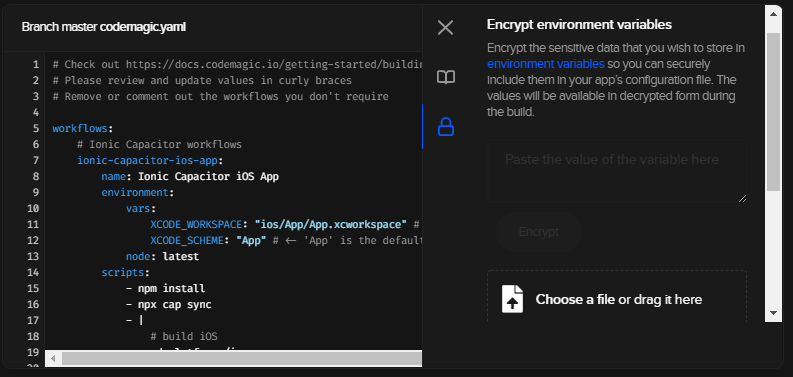
これらのファイル/変数の暗号化されたバージョンを生成するには、以下の手順を実行します:
-
プロジェクト設定に移動します。
-
ノートブックのアイコンが表示されるので、それをクリックします。 プロジェクト設定に役立つガイドのリンクが表示されます。
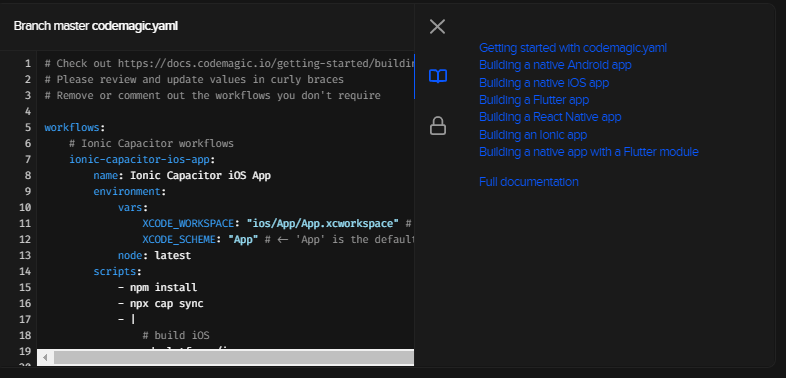
-
ロックアイコンをクリックすると、環境変数の暗号化が表示されます。
-
ファイルをアップロードするか変数を入力して、それぞれの暗号化されたバージョンを生成します。
Ionicアプリのテスト
AndroidとiOSのビルド用にテストを実行するには、以下のようにスクリプトを適宜変更する必要があります。Ionicプロジェクトをテストするためのコードも、scriptsセクションに入ります。
- name: iOS test
    script: |
    xcode-project run-tests
        --workspace "$XCODE_WORKSPACE"
        --scheme "$XCODE_SCHEME"
        --device "iPhone 11"
    test_report: build/ios/test/*.xml

- name: Android test
  script: ./gradlew test
  test_report: app/build/test-results/**/*.xml
成果物の収集
生成された成果物はすべて、スクリプトで指定されたパスに保存されます。これらの成果物はすべて、外部サービスに公開できます。現在利用可能な統合は、email、Slack、Google Playです。また、カスタムスクリプトを使って別の場所で公開することも可能です(例:Firebase App Distribution)。スクリプトの公開に関するその他の例は、こちらをご覧ください。
公開
Androidアプリケーションはすべて、リリース前に署名する必要があります。Ionic Capacitorアプリ用のGradleコード署名の設定については、Androidのコード署名に関するドキュメント(Android code signing documentation)をご参照ください。Ionic CordovaのAndroidアプリを作っている場合は、ワークフロー自体に設定が含まれています。
同様に、iOSアプリケーションはすべて、リリース前に署名する必要があります。iOSコード署名の設定については、iOSコード署名に関するドキュメント(iOS code signing documentation)をご参照ください。
CodemagicでのIonicアプリの構築
Codemagicでビルドを開始する前に、バージョン管理システムを介して、‘codemagic.yaml’ ファイルが同じプロジェクトのルートレベルでコミットされていることを確認します。
ビルドを開始するには、以下の手順に従います:
-
Ionicプロジェクトのアプリケーション設定で、**構成ファイルの確認(*Check for configuration file)**をクリックします。
-
**最初のビルドを開始(*Start your first build)**をクリックすると、IonicプロジェクトからAndroidとiOSアプリのビルドを開始できます。

codemagic.yamlファイルからワークフローを選択して、**新規ビルドを開始(Start new build)**をクリックします。
これにより、プロジェクトの新規ビルドが開始され、ビルド処理ページが表示されます。
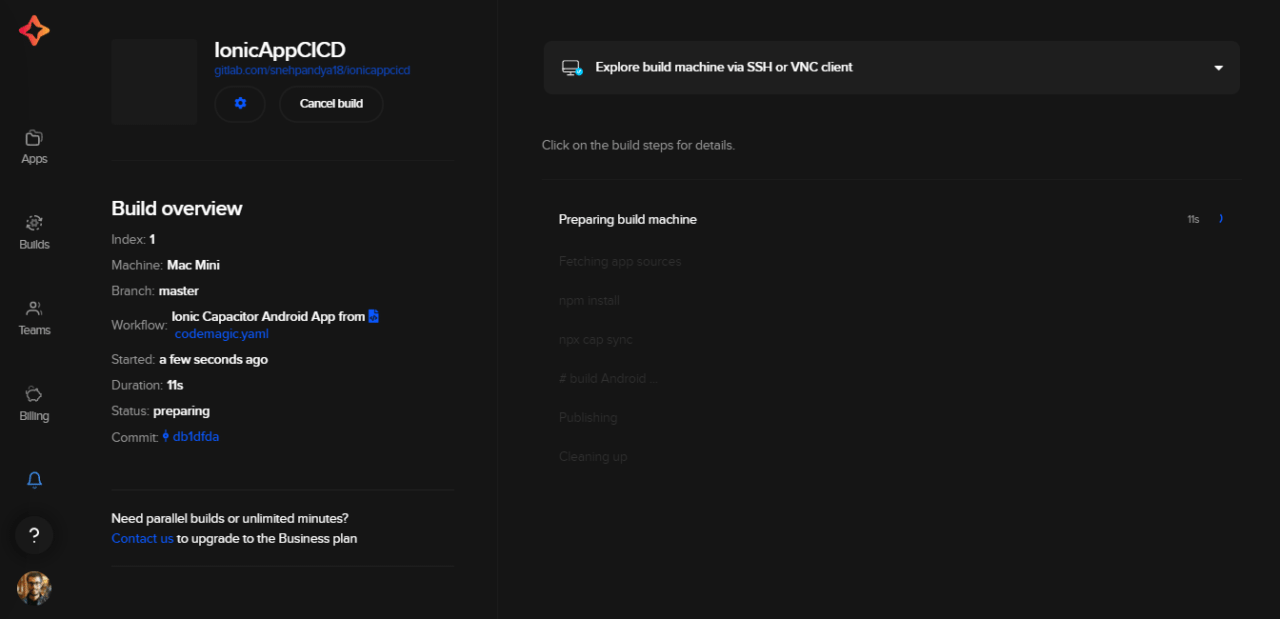
ビルドが完了すると、成果物をダウンロードできるだけでなく、codemagic.yamlファイルで自動公開を設定している場合、アプリを公開することもできます。
結論
クロスプラットフォームのモバイルアプリケーション開発フレームワークと、Codemagicのような継続的インテグレーションとデリバリーのソリューションを組み合わせることで、Ionicフレームワークを使ったアプリケーションのビルド、テスト、デプロイがシームレスに行えます。また、codemagic.yamlを使用することで、面倒な手順を繰り返し実行する手間が省けます。独自のワークフローを管理し、バージョンコントロールシステム上の新規プッシュを含め、好きな時にビルドをトリガーできます。
Codemagic CI/CDツールを使ってIonicアプリを作るのはお好きですか? この入門ガイドはお役に立ちましたか? ご感想をこちらからお聞かせください。
役に立つリンクと参考資料
-
サンプルプロジェクトを公開するために使用されたリポジトリはこちらにございます。
-
YAML用のドキュメントはこちらにございます。
-
Codemagicを使ってアプリをビルド&デリバリー:React Native、iOS、Android。
-
ディスカッション、学習、サポートについては、Codemagic Slackコミュニティにご参加ください。
Snehさんは、バローダ(Baroda)に拠点を置くシニアプロダクトマネージャーです。Snehさんは、Google Developers Groupのコミュニティオーガナイザーで、NinjaTalksポッドキャストの共同ホストでもあります。意義のある製品を作りたいという情熱から、ブログを書いたり、様々な会議で講演したり、才能のある人たちを指導したりしています。
Snehさんへの連絡は、Twitter (@SnehPandya18)やメール(sneh.pandya1@gmail.com)で可能です。


Discussion about this post