• Home
  • Insight
  • Blog
  • Business
  • Entertainment
  • Health
  • Politics
  • Shop
    • Gift Shop
    • Value Shop
    • Store
    • Bargain Shop
    • Discount
  • Sports
  • Tech
  • Travel
  • USA
  • Video
  • World
    • Asia
    • Africa
    • South America
    • North America
    • Europe
    • Oceania
Wednesday, October 7, 2026
No Result
View All Result
Subscribe Now
  • Home
  • Insight
  • Blog
  • Business
  • Entertainment
  • Health
  • Politics
  • Shop
    • Gift Shop
    • Value Shop
    • Store
    • Bargain Shop
    • Discount
  • Sports
  • Tech
  • Travel
  • USA

    Washington state man charged with helping Canadian mass shooter plan for attack

    Border Security, Public Safety, and American Sovereignty with Markwayne Mullin

    Students injured as NJ high school bleachers collapse in scary scene

    California man in incest case busted in Mexico; teen daughter rescued

    Cornell president calls gang rape allegations ‘deeply disturbing’ : NPR

    France’s violent student protests raise warning for America: ‘A cautionary tale’

    Birmingham’s WBHM Public Radio Station Forced to Use “Gulf of America”

    Eminem gets online backlash from fans over Kid Rock Christian album collab

    Trump leans into Iran war, admits it could cost Republicans the midterms

  • Video
  • World
    • Asia
    • Africa
    • South America
    • North America
    • Europe
    • Oceania
The Insight Post
  • Home
  • Insight
  • Blog
  • Business
  • Entertainment
  • Health
  • Politics
  • Shop
    • Gift Shop
    • Value Shop
    • Store
    • Bargain Shop
    • Discount
  • Sports
  • Tech
  • Travel
  • USA

    Washington state man charged with helping Canadian mass shooter plan for attack

    Border Security, Public Safety, and American Sovereignty with Markwayne Mullin

    Students injured as NJ high school bleachers collapse in scary scene

    California man in incest case busted in Mexico; teen daughter rescued

    Cornell president calls gang rape allegations ‘deeply disturbing’ : NPR

    France’s violent student protests raise warning for America: ‘A cautionary tale’

    Birmingham’s WBHM Public Radio Station Forced to Use “Gulf of America”

    Eminem gets online backlash from fans over Kid Rock Christian album collab

    Trump leans into Iran war, admits it could cost Republicans the midterms

  • Video
  • World
    • Asia
    • Africa
    • South America
    • North America
    • Europe
    • Oceania
No Result
View All Result
No Result
View All Result
Home Mobile

Publish your Flutter app to App Store with Codemagic CI/CD

by Theinsightpost
December 13, 2024
in Mobile
0 0
0
Publish your Flutter app to App Store with Codemagic CI/CD

This article is written by Masaki Sato.

In this article, I will introduce the steps to release a Flutter app to the App Store using the Codemagic CI/CD.

If you have been uploading your app to App Store Connect manually using Xcode and want to simplify that process, I hope you find this article helpful ?

What you will achieve with this article

By following the steps in this article, you will be able to automate the upload of your app to App Store Connect.

In other words, during your daily development, you will be able to release to the store with the following flow:

  1. Merge the trigger PR on GitHub (in the example below, from develop to main branch)

  2. After a few minutes, the app build will be completed on Codemagic
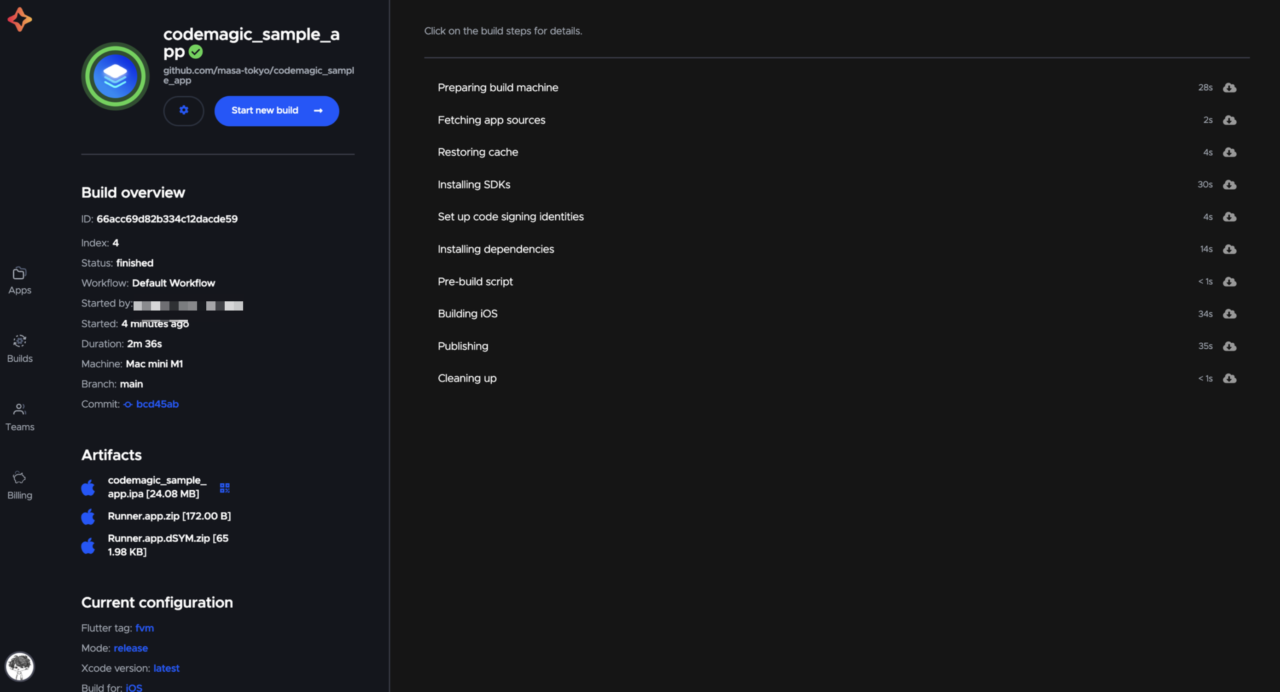
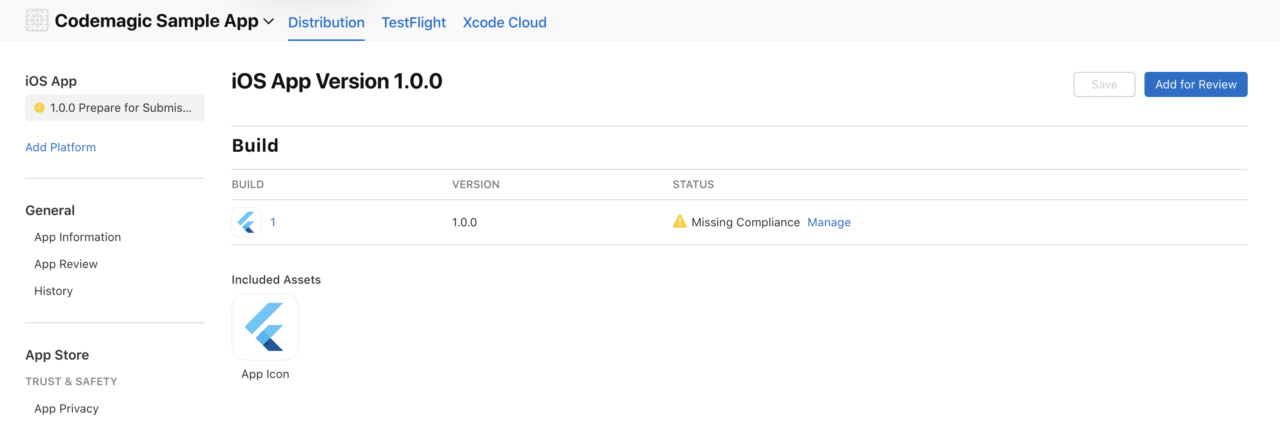
  3. The app will be uploaded to App Store Connect, and you will be able to submit it for release
Requirements

To follow the steps in this article, you will need the following:

Preparation

First, let’s create the Bundle ID and API key needed to create the Codemagic workflow.

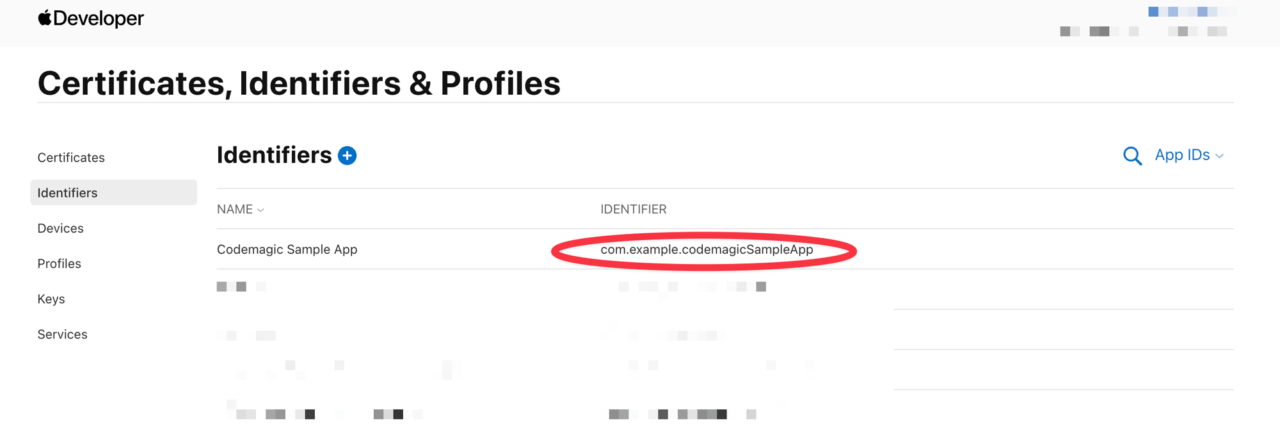
Confirming the Bundle ID

  1. After logging into the Apple Developer Portal, go to the Identifiers page.

  2. If the Bundle ID for the app (the same as registered in Xcode) does not exist, create a new one.

  3. Confirm and save the value.

Creating an API Key

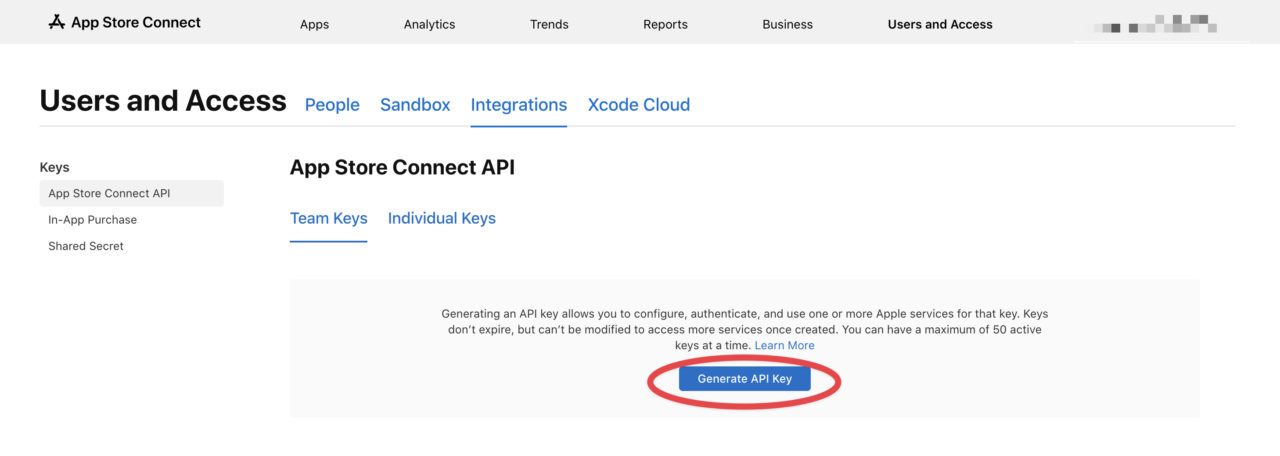
  1. After logging into App Store Connect, go to Users and Access > Integrations.

  2. Click the “Generate API Key” button to create a new API key.
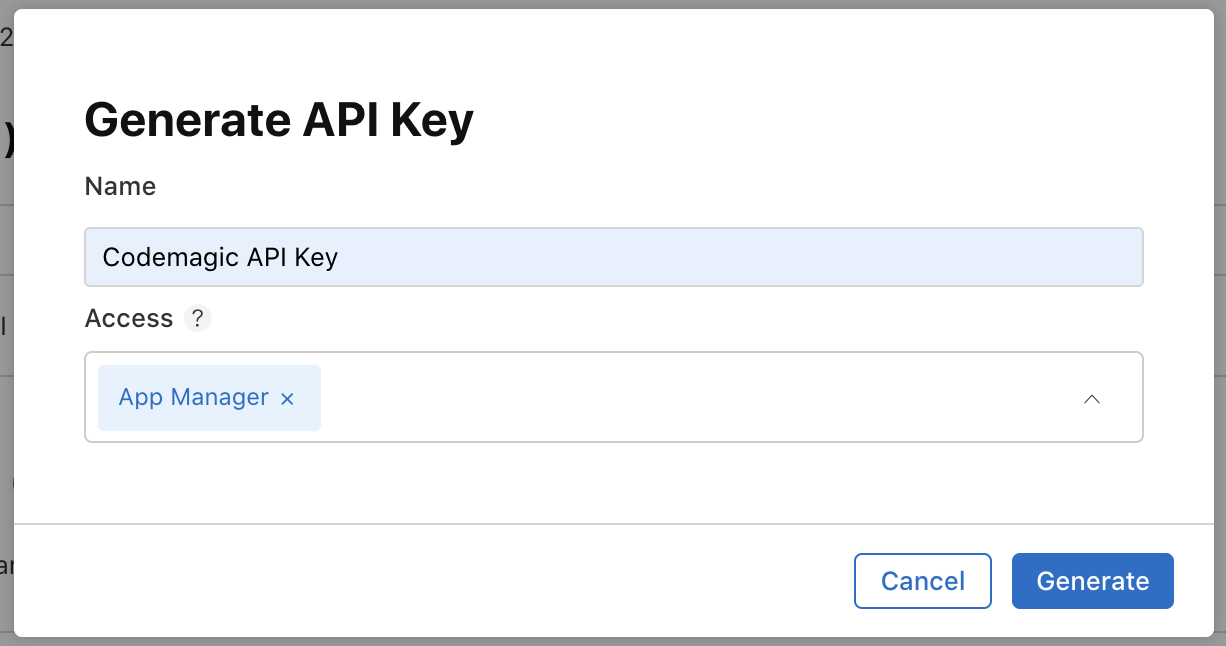
  3. Enter the key name and access rights (App Manager) to generate the key.
  4. Copy the Issuer ID and Key ID, and download the API key file.
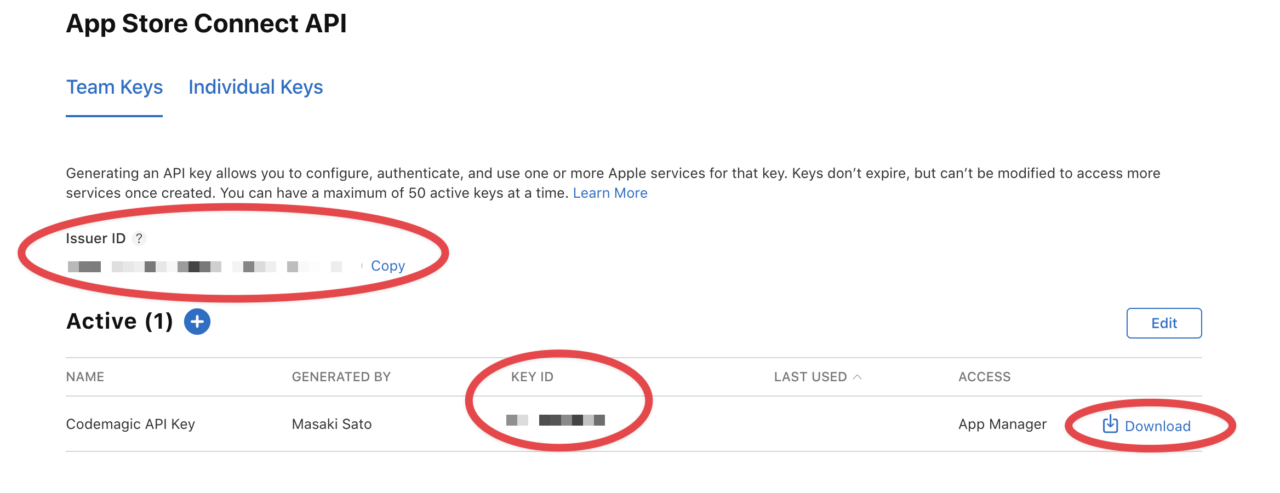
    Keep these IDs and files handy as they will be needed in later steps.

What is Codemagic

Before we get into the steps using Codemagic, let me briefly introduce Codemagic.

Codemagic is a CI/CD tool specialized for Flutter development that automates testing, building, and deployment. It can be used for various projects such as iOS, Android, and React Native, but for Flutter projects, you can use a GUI tool called Workflow Editor. This allows intuitive development without the need to create a dedicated configuration file in the .yaml format.

You can start using it for free for personal use, with a sufficient free tier (500 minutes per month). For more details on pricing, please see here.

Initial Setup

Let’s actually start using Codemagic!

If you are already using Codemagic, skip unnecessary steps as needed.

Creating an Account

Create a new account from the link below.

Sign Up

Adding an App

After signing up, choose an account type. You can start Personal account without credit card information. For more details on Team account, see here.
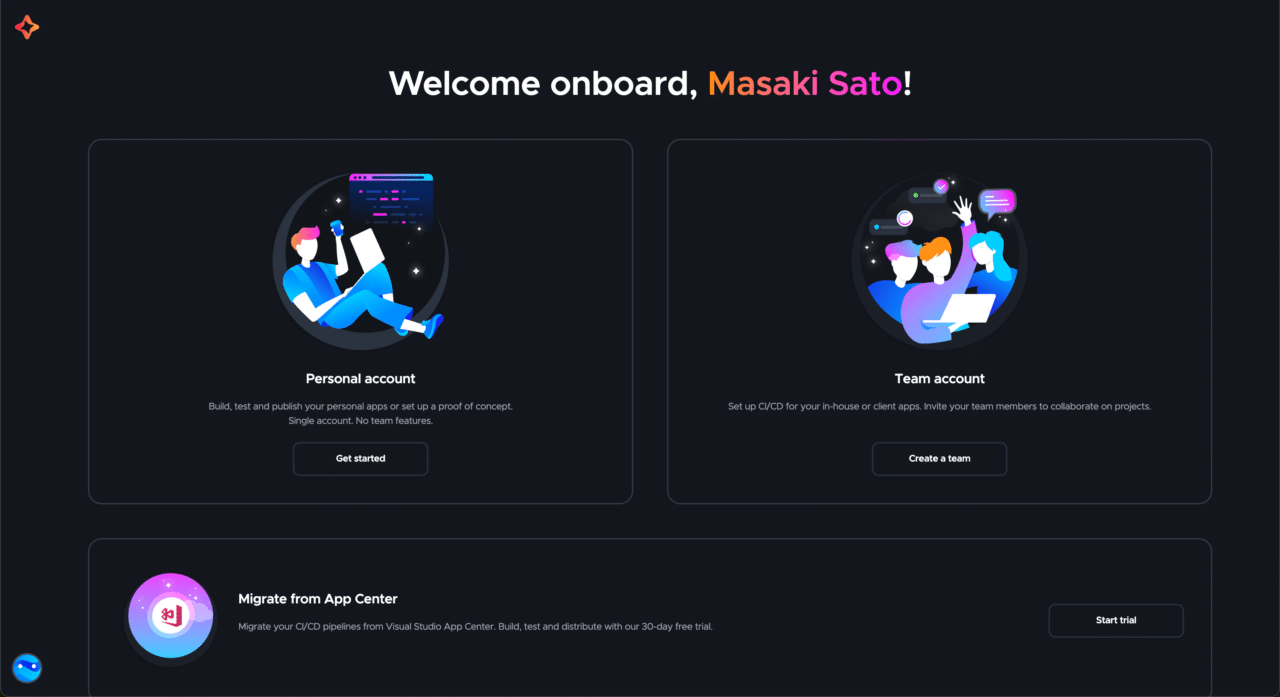
Select the Git Provider you want to connect. In this article, we will use GitHub as an example.
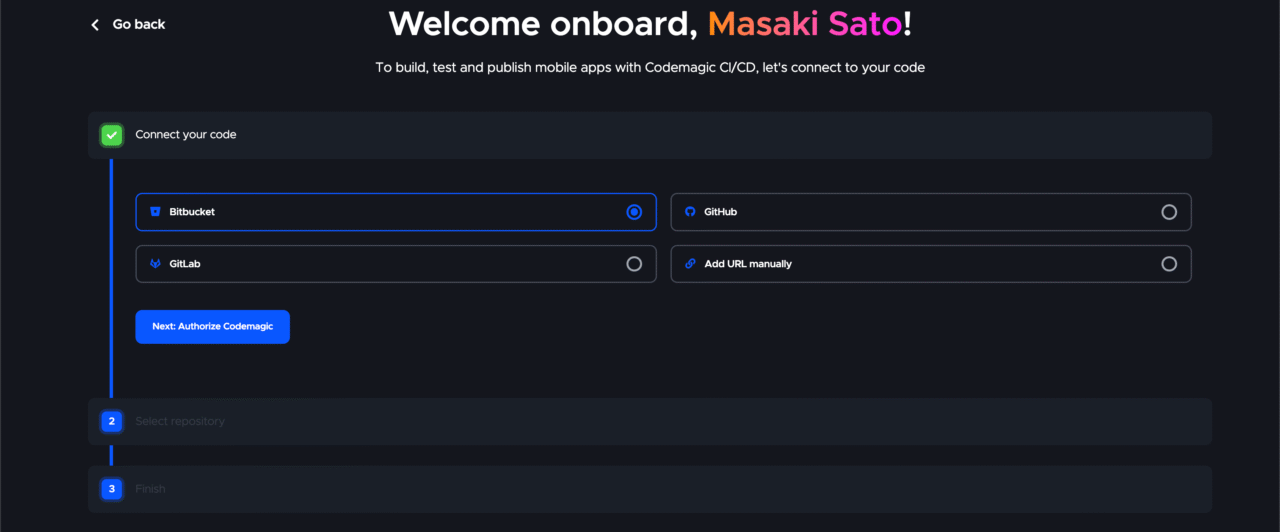
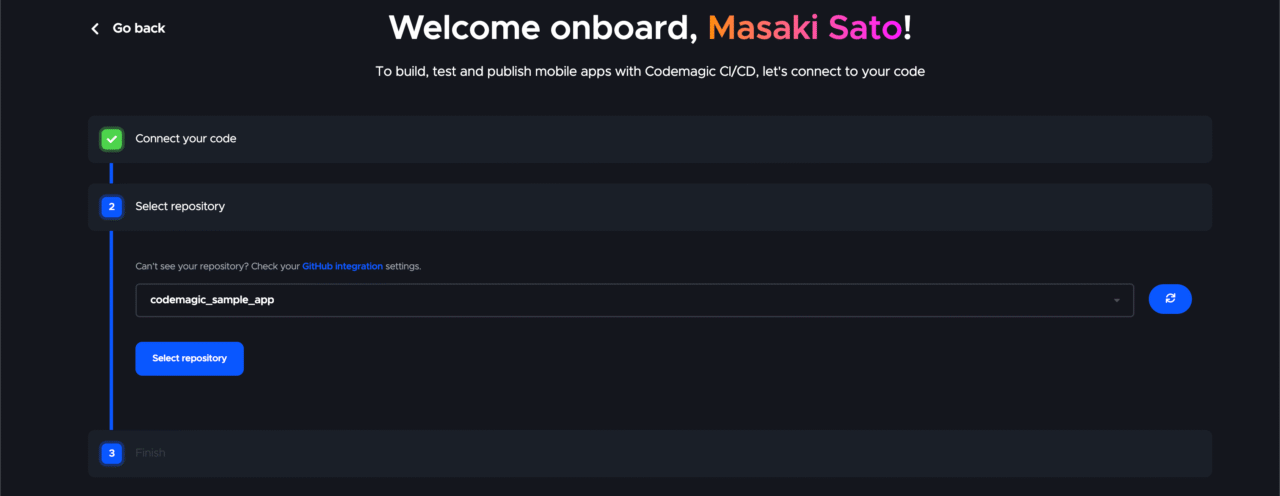
Link the GitHub repository of the app you want to add.
Once the app is created, the following Workflow Editor will open.
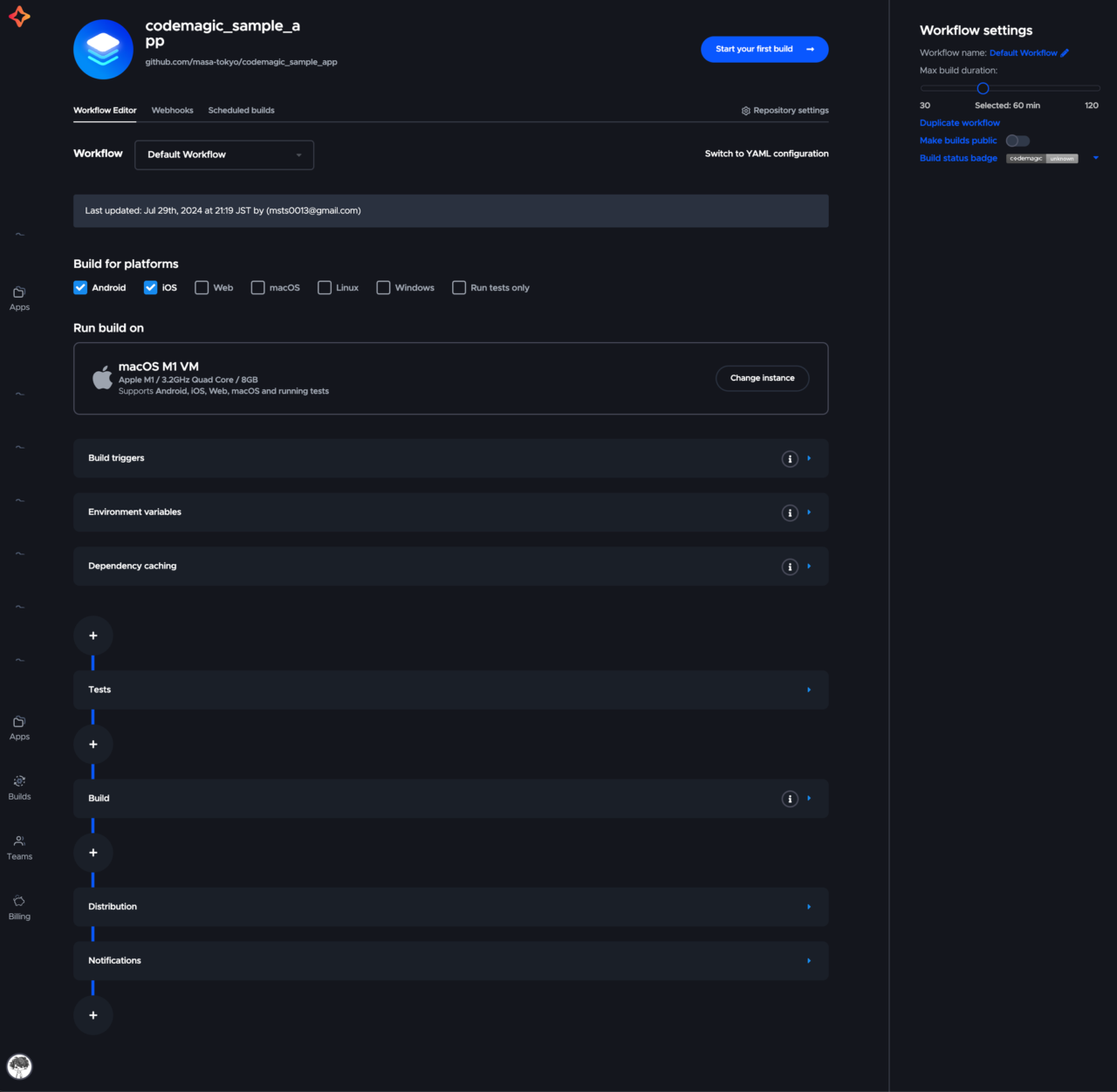
Let’s get familiar with Codemagic step by step from here!

  • Step 1: Run your first build
  • Step 2: Build a Flutter app
  • Step 3: Upload to the store
  • Step 4: Automate triggers

If you have been using Codemagic before, skip steps as needed.

Step 1: Run your first build

First, let’s successfully run your first build.

We will run a simple build that prints “My first green build!”.

  1. Check “Run tests only” for the Build for platforms.

  2. Make sure the tests in the Tests section are disabled.
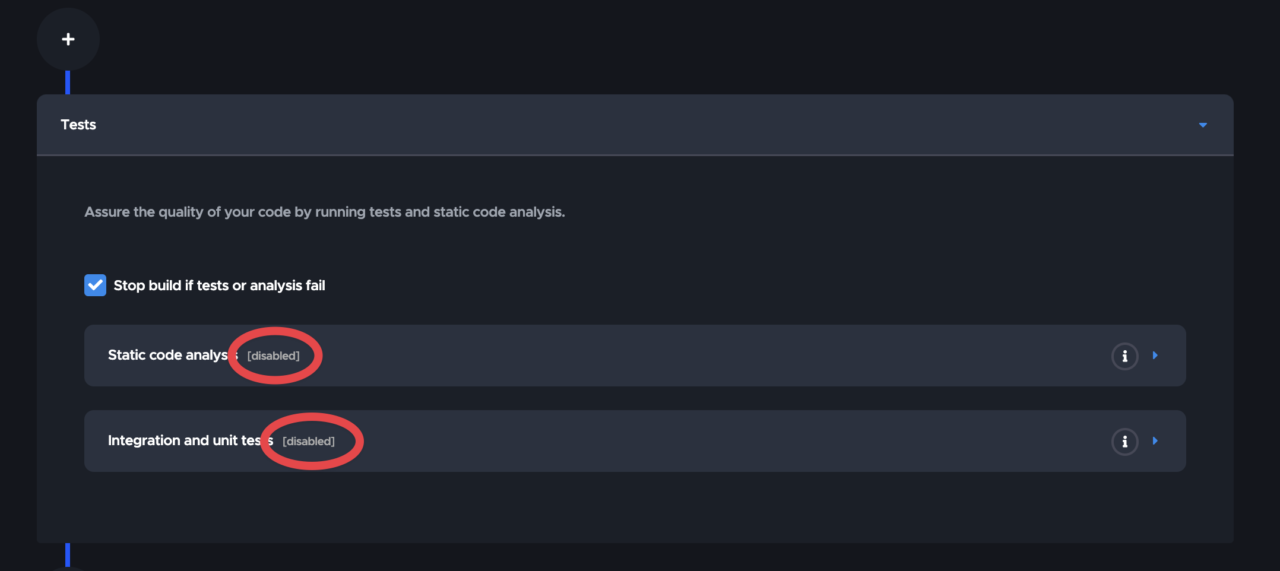
  3. Click the + button after the Notifications section and enter as follows.
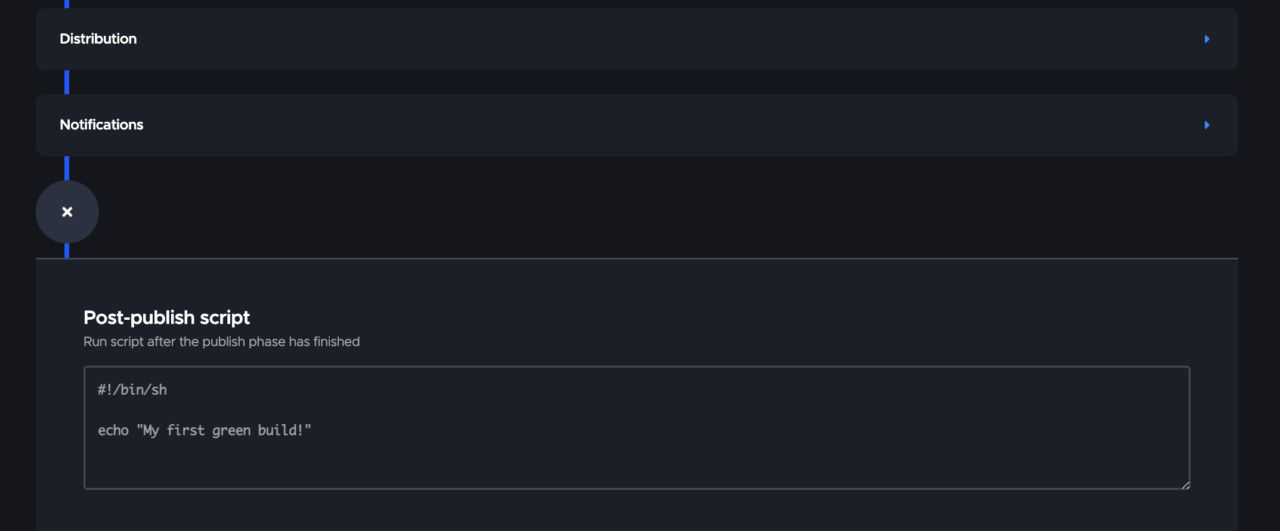
  4. Save the changes from the top right of the screen.

  5. Start the build.

Congratulations ?

You have successfully run your first build!
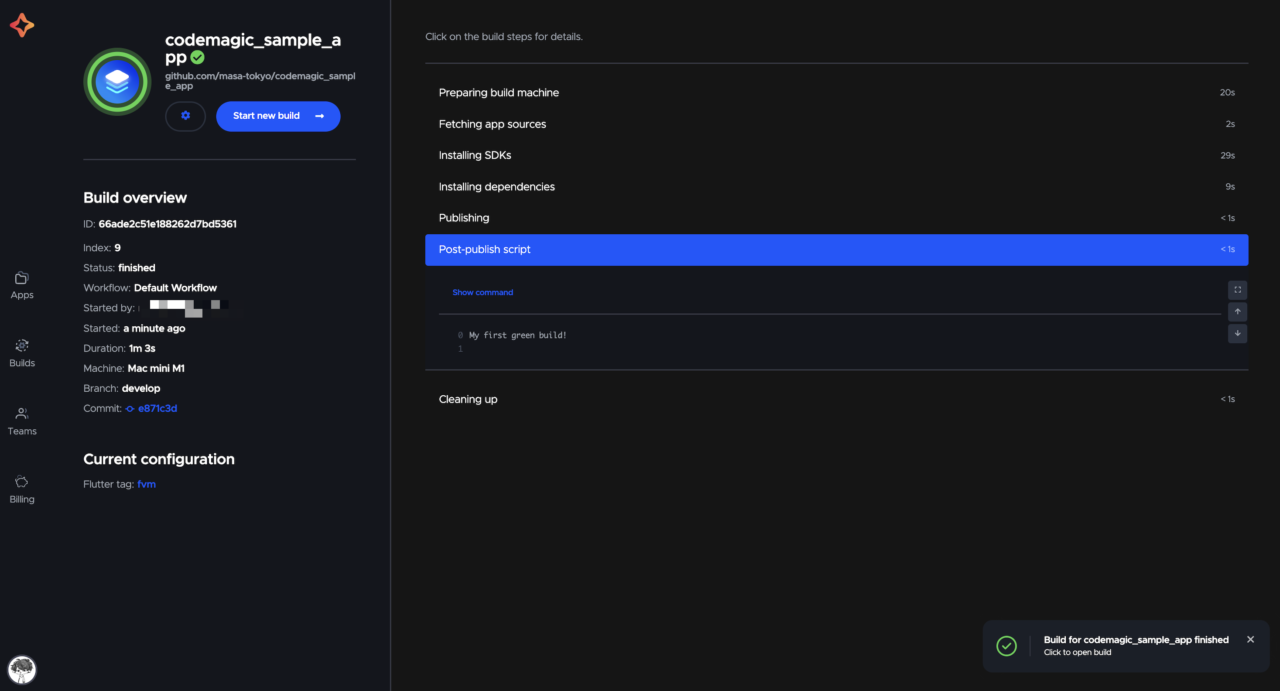
You can see that “My first green build!” is printed in the Post-publish script section.

Step 2: Build a Flutter app

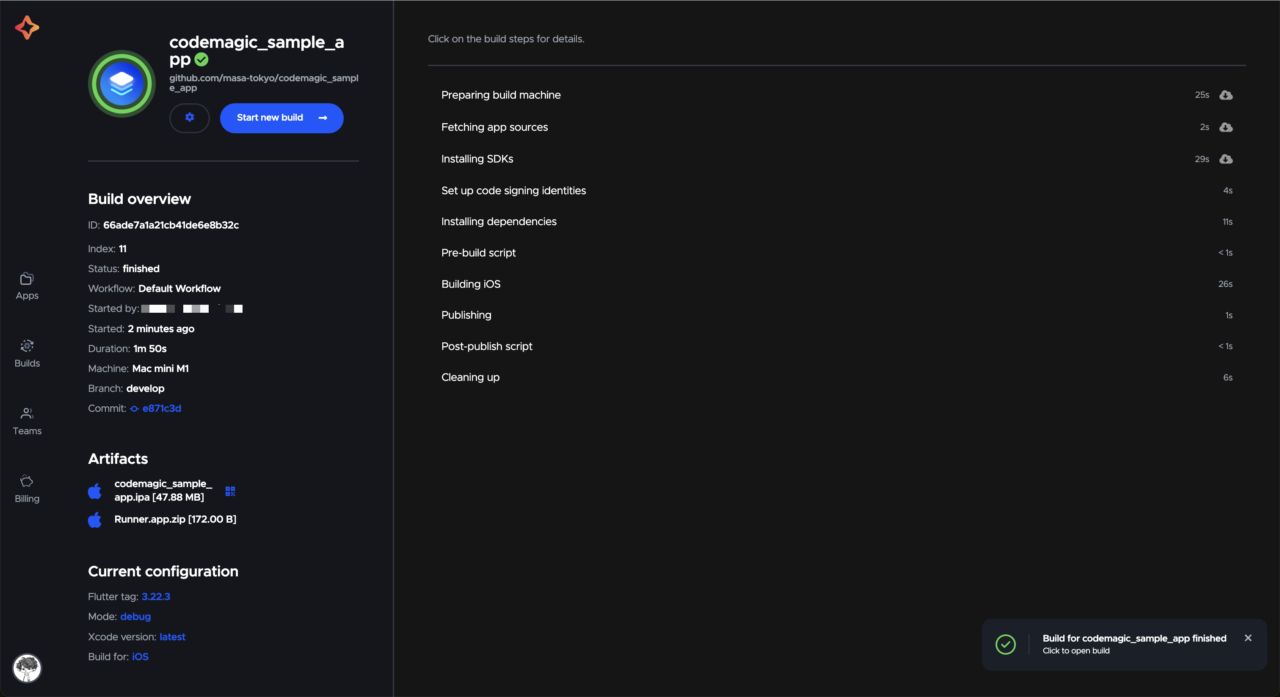
Next, let’s build a Flutter app in the iOS environment.

  1. Select iOS for the Build for platforms.

  2. Set the environment for the build in the Build section.

    Specify the usual execution environment for your app.
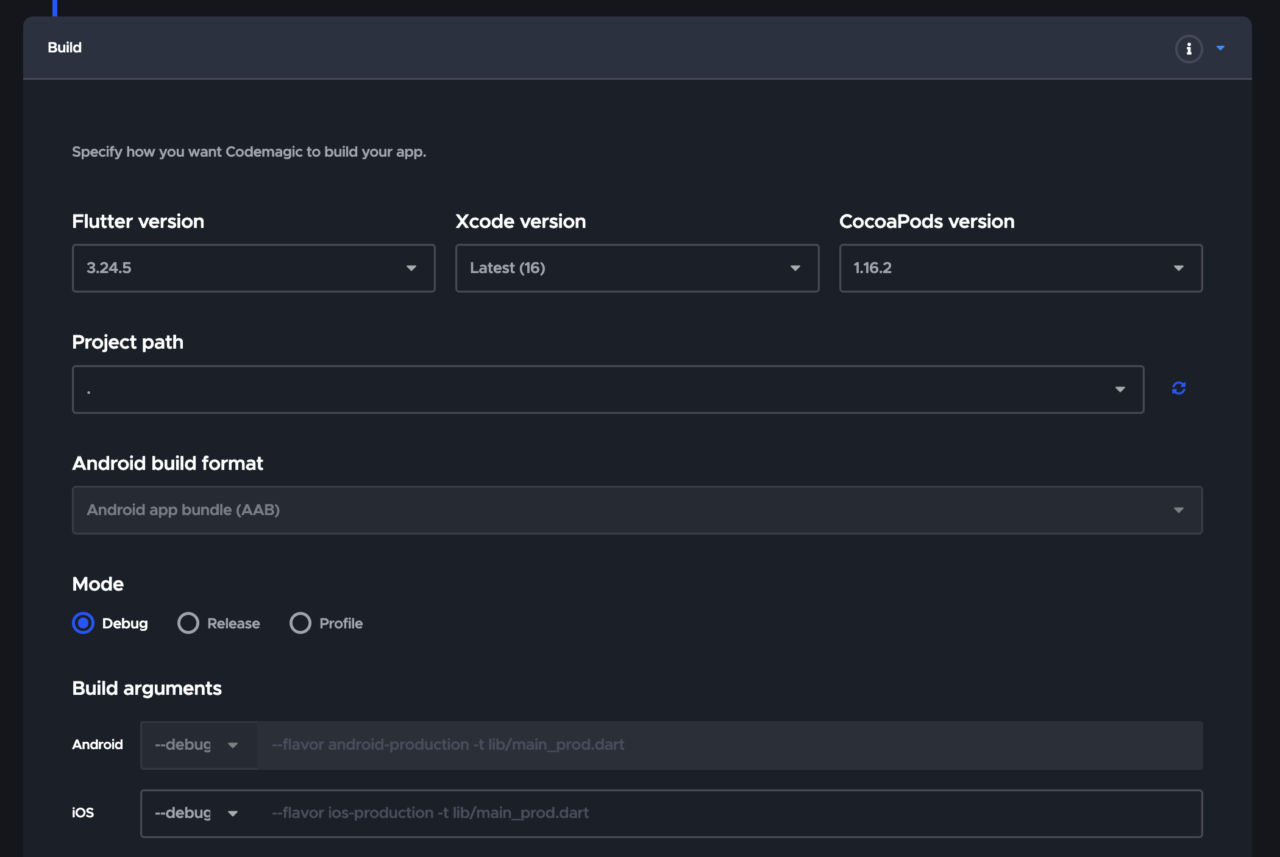
  3. Save the changes and run the build.

The build is successful ?
Step 3: Upload to the store

Finally, let’s upload the built app to App Store Connect.

This step might be a bit challenging, but let’s do our best ?

Build

Since this is a release build, select the Release mode.

iOS code signing

In the Distribution section, perform iOS code signing necessary for integration with Apple services.

  1. Select Automatic, and when the message above appears, navigate to the settings screen from Go to settings.
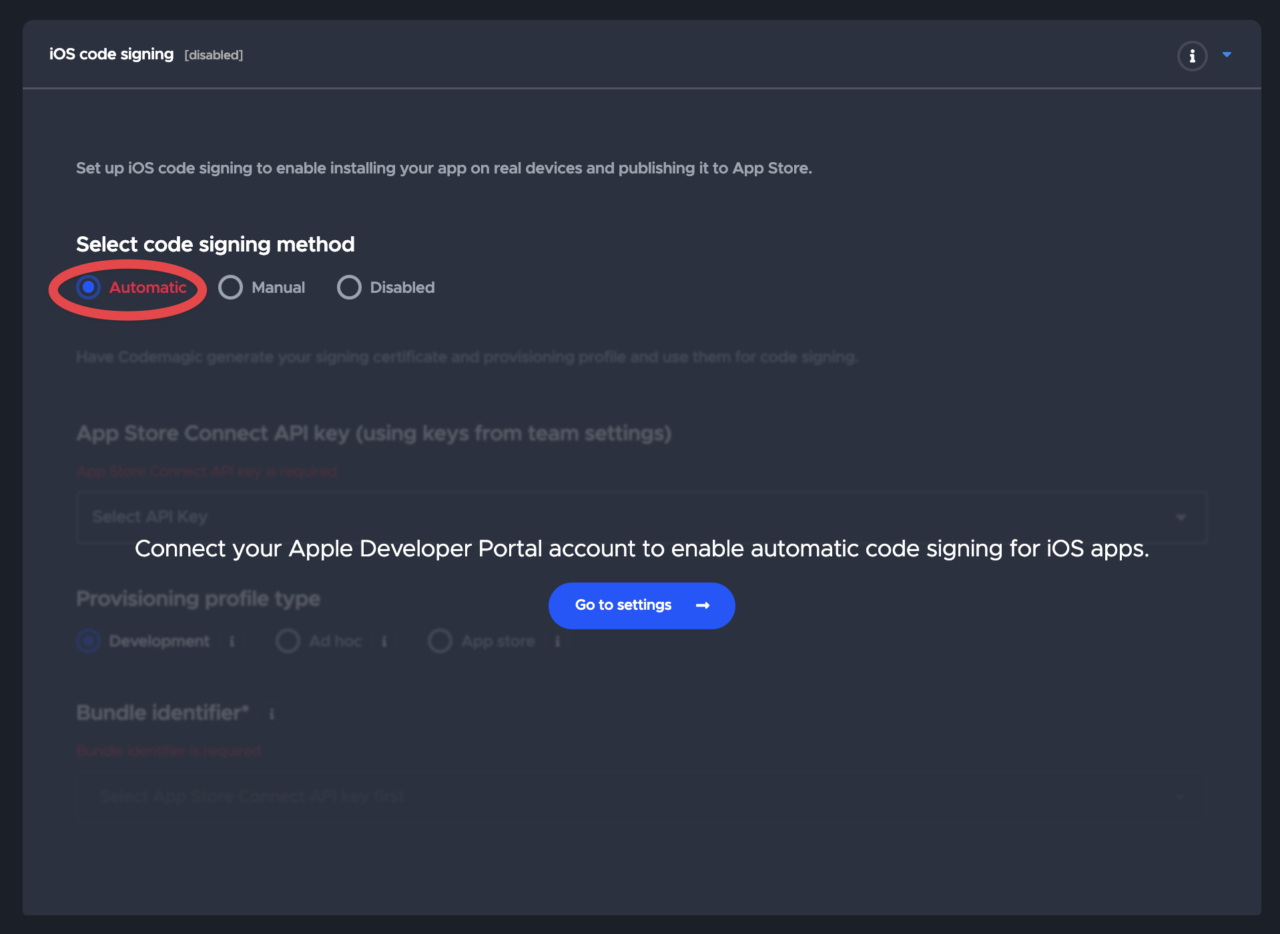
    Since it transitions to a different screen, make sure the changes made before are saved.

  2. Click the Connect button in the Developer Portal.
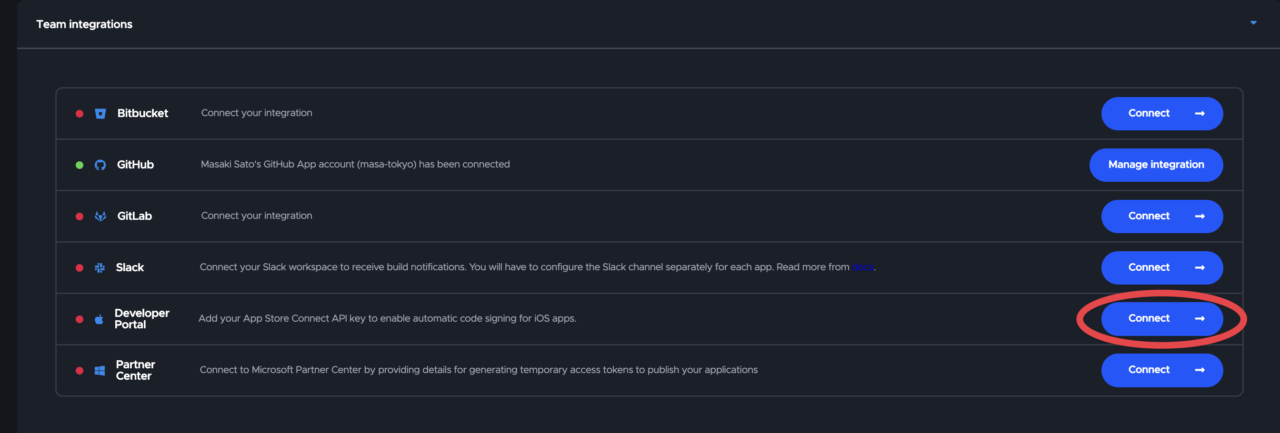
  3. Add the Issuer ID, Key ID, and API Key file obtained from App Store Connect during the Preparation at the beginning of this article, and Save.
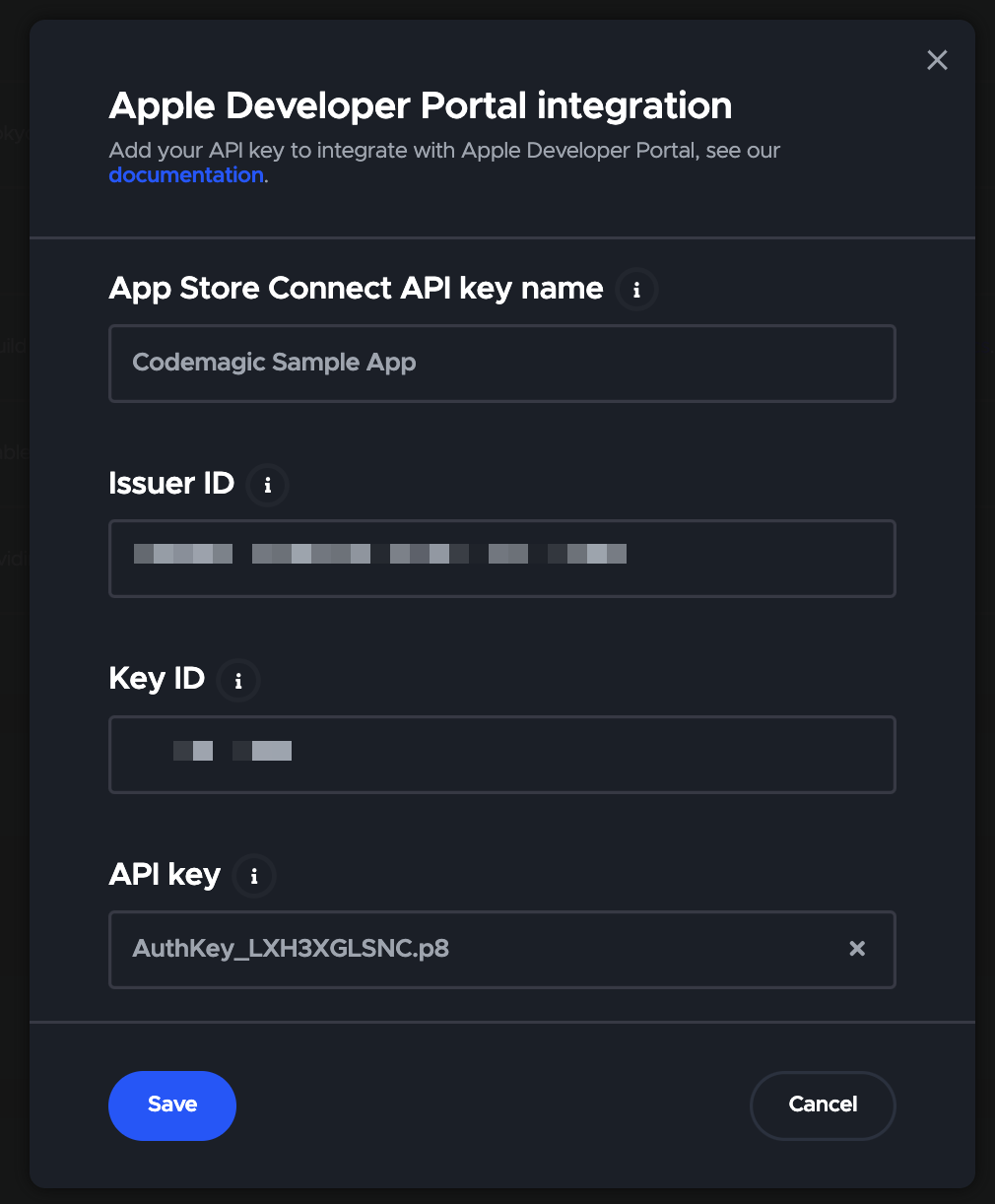
  4. Return to the Workflow Editor and select the created key.

  5. Select the App store for the Provisioning profile type.

  6. Select the Bundle ID confirmed in the Preparation.
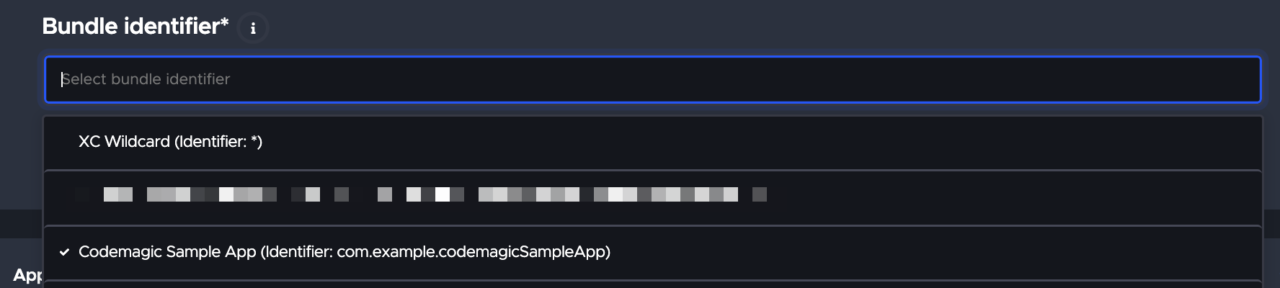
App Store Connect

Check “Enable App Store Connect publishing” and select the API Key created earlier.
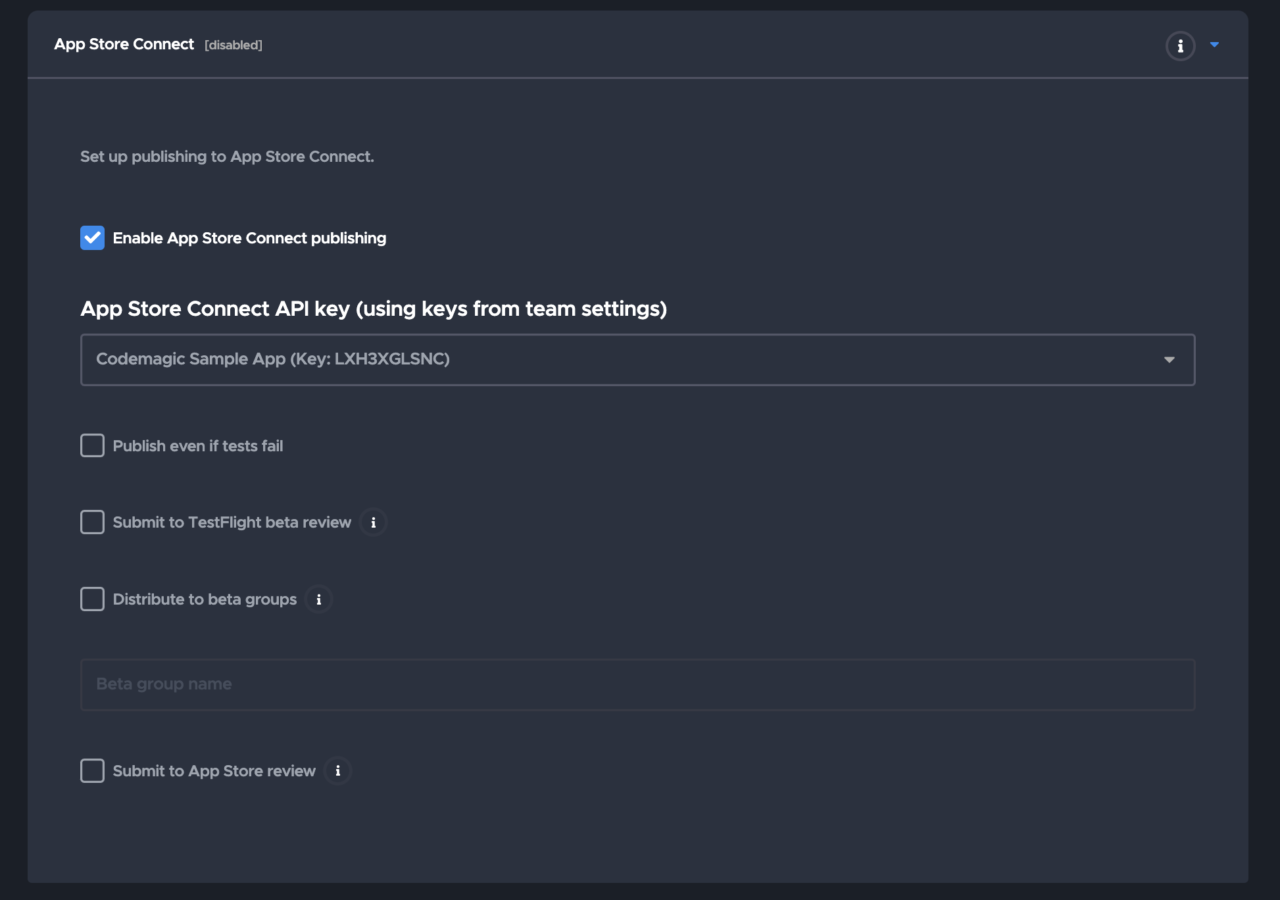
Once this is done, save the changes and run the build.

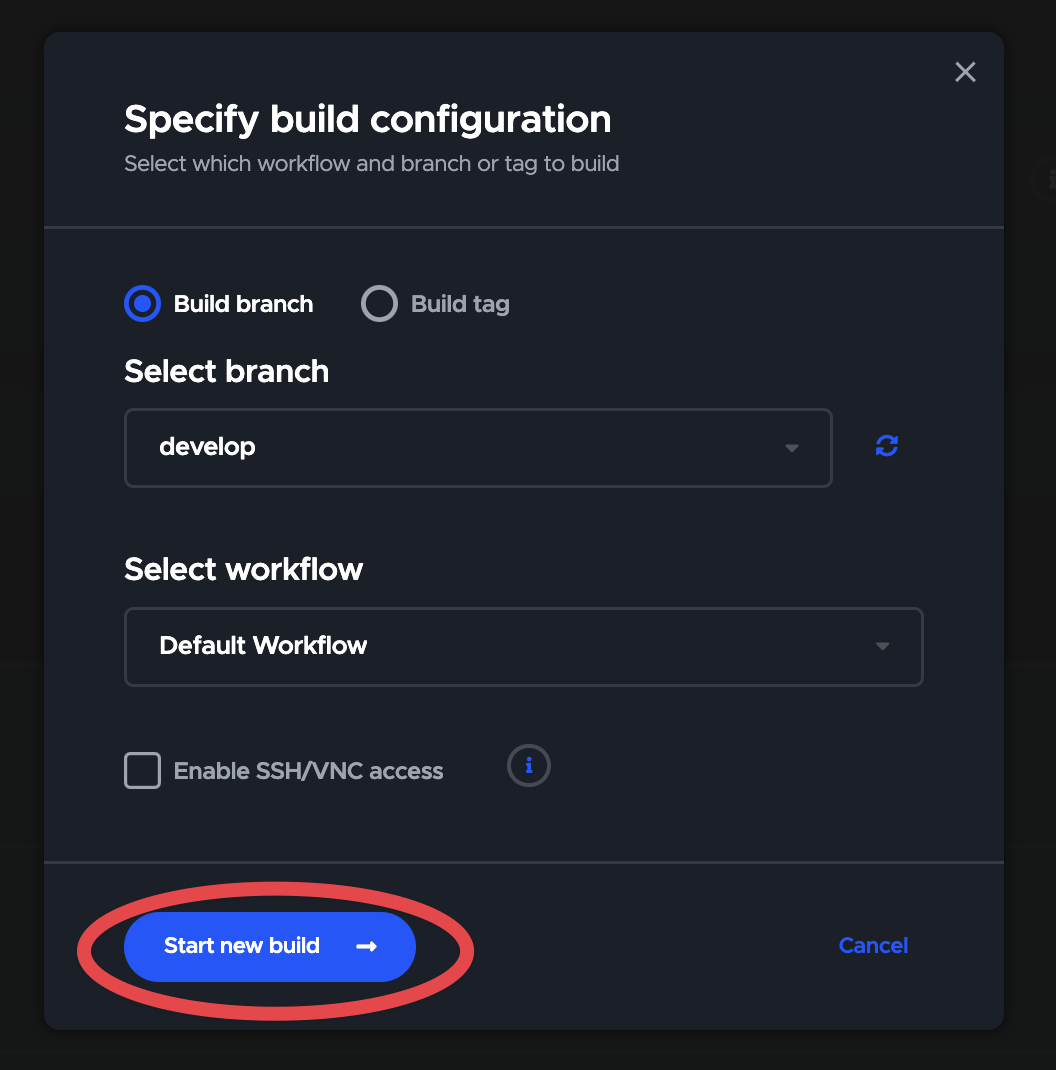
Make sure the appropriate branch is selected and start the build.
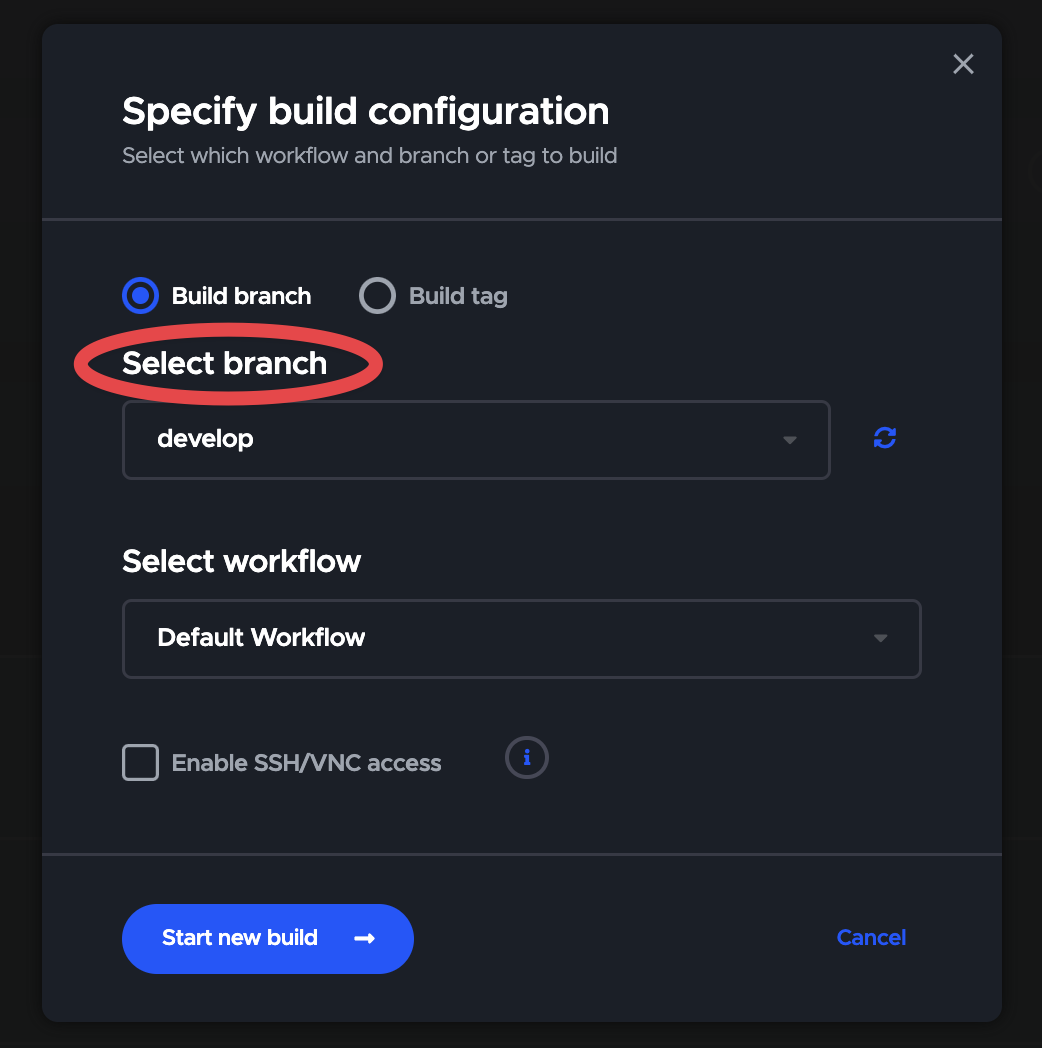
If an error occurs, check the error log details. For common errors, see this document.

Also, feel free to use the GitHub Discussion and Discord community.

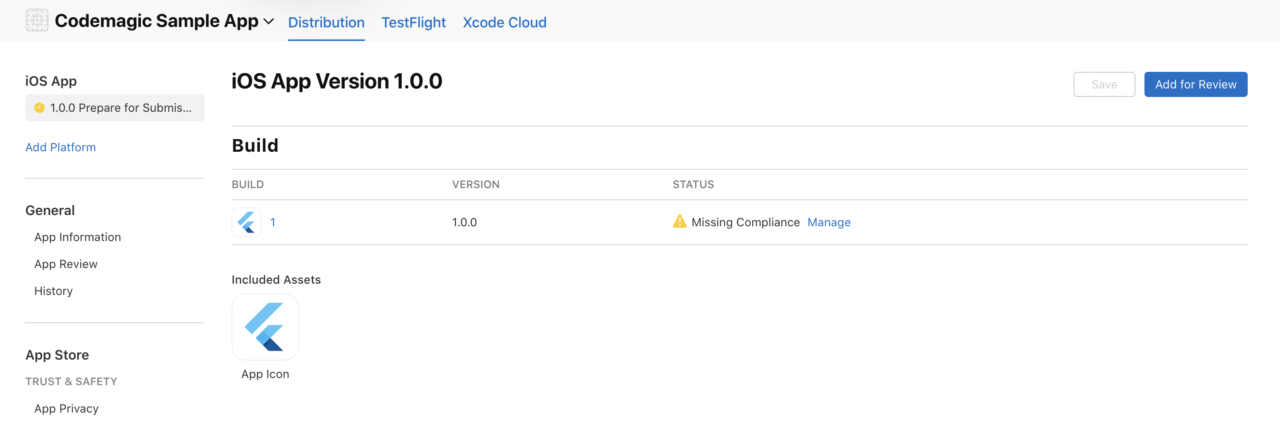
When the build is successful, it will be uploaded to App Store Connect and can be selected from Add Build (it may take some time for the upload to be reflected).
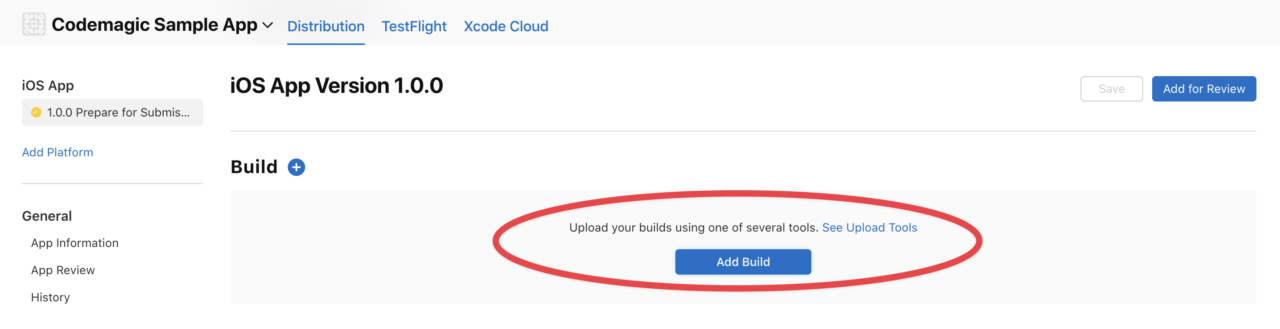
You can now submit it for release ?
Step 4: Automate triggers

As the final step, let’s automate the build.

With the steps up to Step 3, you can already upload to App Store Connect, but by doing this step, you can build with just operations on GitHub, making it even more comfortable.

  1. Open the Build triggers in the Workflow Editor.
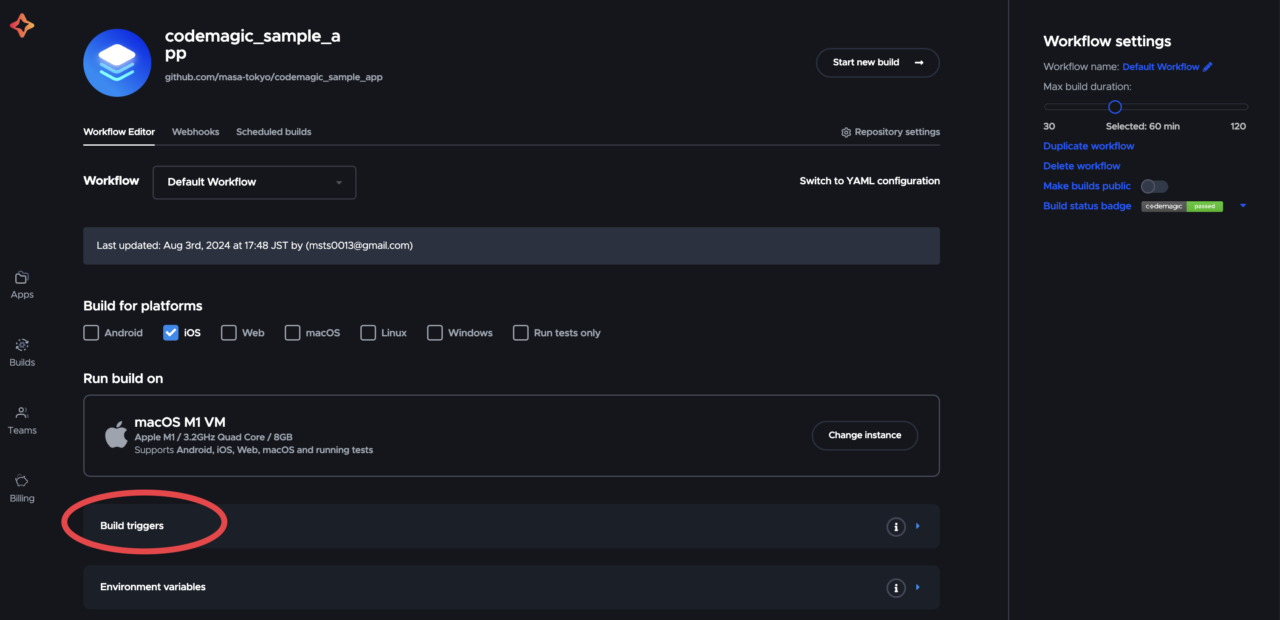
  2. Select Trigger on push as the trigger type.

  3. Enter the target branch and add it from Add pattern.

    In the example below, it is set to trigger when a push is made to the main branch.

  4. Actually create & merge a PR on GitHub and check the operation.
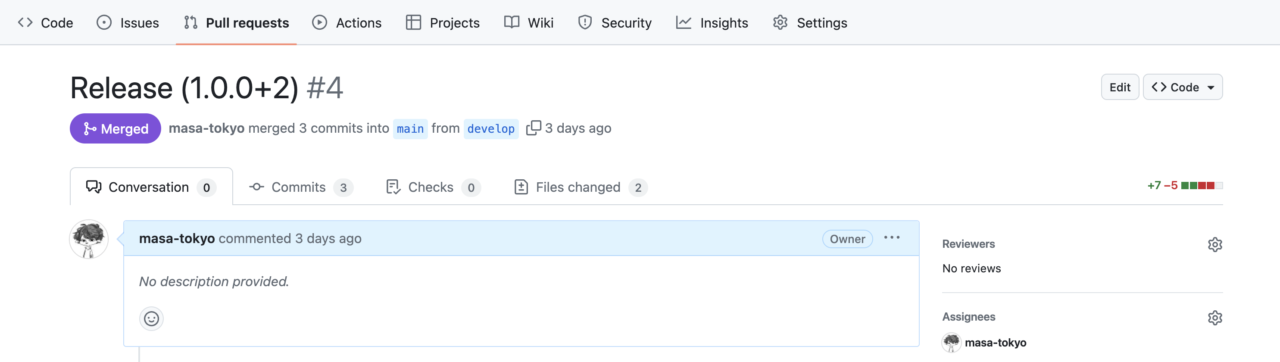
    Make sure the build number is updated from the version uploaded in Step 3.

Conclusion

Great job ?

In addition to the automatic upload to App Store Connect this time, setting up the same process for Google Play will make your development flow even smoother.

Let’s continue to enjoy developing comfortably with Codemagic!

If you have any questions or problems, please talk to the support community ?

If you’ve already enabled billing, you can also get support from the in-app chat widget in the bottom right corner of the page.

ShareTweetSend
Previous Post

Myanmar Remains World’s Leading Source of Illegal Opium Cultivation – The Diplomat

Next Post

Can a College Town Survive the Closure of Its College?

Related News

Mobile

Android Developers Blog: Device Streaming and Android skills

October 6, 2026
Mobile

Samsung confirms broad SmartTag 3 Android support

October 5, 2026
Mobile

How Can Software Consulting Company Benefit Your Business?

October 4, 2026
Mobile

Injection Molding Cost Estimation: How AI Delivers ROI

October 4, 2026
Next Post
Can a College Town Survive the Closure of Its College?

Can a College Town Survive the Closure of Its College?

Discussion about this post

Subscribe To Our Newsletters

    Customer Support


    1251 Wilcrest Drive
    Houston, Texas
    77042 USA
    Call-832.795.1420
    e-mail – news@theinsightpost.com

    Subscribe To Our Newsletters

      Categories

      • Africa
      • Africa-East
      • African Sports
      • American Sports
      • Arts
      • Asia
      • Australia
      • Business
      • Business Asia
      • Business- Africa
      • Canada
      • Defense
      • Education
      • Egypt
      • Energy
      • Entertainment
      • Europe
      • European Soccer
      • Finance
      • Germany
      • Ghana
      • Health
      • Insight
      • International
      • Investing
      • Japan
      • Latest Headlines
      • Life & Living
      • Markets
      • Mobile
      • Movies
      • New Zealand
      • Nigeria
      • Politics
      • Scholarships
      • Science
      • South Africa
      • South America
      • Sports
      • Tech
      • Travel
      • UK
      • USA
      • Weather
      • World
      No Result
      View All Result

      Recent News

      Boxing legend Mike Tyson talks going to juvie and trading cigarettes for cookies as a young boy

      October 7, 2026

      Hogbetsotso 2026 to promote tourism, local businesses

      October 7, 2026

      Mikel Arteta’s new contract: The challenges facing Arsenal boss as he enters ‘step five’ of his project | Football News

      October 7, 2026

      Spotify expands audiobooks to over 180 markets

      October 7, 2026
      • Home
      • Advertise With Us
      • About Us
      • Corporate
      • Consumer Rewards
      • Forum
      • Privacy Policy
      • Social Trends

      Theinsightpost ©2026 | All Rights Reserved. Theinsightpost is an Elnegy LLC company, registered in Texas, USA

      Welcome Back!

      Login to your account below

      Forgotten Password?

      Retrieve your password

      Please enter your username or email address to reset your password.

      Log In

      Add New Playlist

      We are using cookies to give you the best experience on our website.

      You can find out more about which cookies we are using or switch them off in .

      No Result
      View All Result
      • Home
      • Insight
      • Blog
      • Business
      • Entertainment
      • Health
      • Politics
      • Shop
        • Gift Shop
        • Value Shop
        • Store
        • Bargain Shop
        • Discount
      • Sports
      • Tech
      • Travel
      • USA
      • Video
      • World
        • Asia
        • Africa
        • South America
        • North America
        • Europe
        • Oceania

      Theinsightpost ©2026 | All Rights Reserved. Theinsightpost is an Elnegy LLC company, registered in Texas, USA

      The Insight Post
      Powered by  GDPR Cookie Compliance
      Privacy Overview

      This website uses cookies so that we can provide you with the best user experience possible. Cookie information is stored in your browser and performs functions such as recognising you when you return to our website and helping our team to understand which sections of the website you find most interesting and useful.

      Strictly Necessary Cookies

      Strictly Necessary Cookie should be enabled at all times so that we can save your preferences for cookie settings.

      Cookie Policy

      More information about our Cookie Policy

      Clear examples do more than decorate an explanation: they show how an idea behaves under recognizable conditions. In education and software documentation alike, strong illustrations begin with a defined goal, then reveal the steps, assumptions, and result without unnecessary detail. A practical test example should state the input, expected output, and boundary condition, because these elements show whether a rule works beyond the simplest case. Including a contrasting case also helps readers distinguish a valid application from a tempting but incorrect one, while concise notes explain why the outcomes differ. When examples are updated with current data and checked against the underlying rule, they remain useful across classrooms, product guides, and professional training.