• Home
  • Insight
  • Blog
  • Business
  • Entertainment
  • Health
  • Politics
  • Shop
    • Gift Shop
    • Value Shop
    • Store
    • Bargain Shop
    • Discount
  • Sports
  • Tech
  • Travel
  • USA
  • Video
  • World
    • Asia
    • Africa
    • South America
    • North America
    • Europe
    • Oceania
Tuesday, November 17, 2026
No Result
View All Result
Subscribe Now
  • Home
  • Insight
  • Blog
  • Business
  • Entertainment
  • Health
  • Politics
  • Shop
    • Gift Shop
    • Value Shop
    • Store
    • Bargain Shop
    • Discount
  • Sports
  • Tech
  • Travel
  • USA
    Stranded in Conflict: Palestinians Navigate the Tenuous Balance of War and Peace Amid Ceasefire Efforts

    Stranded in Conflict: Palestinians Navigate the Tenuous Balance of War and Peace Amid Ceasefire Efforts

    Trump Administration Revokes Pay Increase for Head Start Educators

    Trump Administration Revokes Pay Increase for Head Start Educators

    Unexpected Triumph: Gay Candidates Achieve Unforeseen Victories in Challenging Races

    Unexpected Triumph: Gay Candidates Achieve Unforeseen Victories in Challenging Races

    Microsoft Outlook Experiences Prolonged Outage Affecting Users Nationwide

    Microsoft Outlook Experiences Prolonged Outage Affecting Users Nationwide

    Gunfire Erupts in D.C.: Authorities Search for Suspect Amid Rising Concerns Over Public Safety

    Gunfire Erupts in D.C.: Authorities Search for Suspect Amid Rising Concerns Over Public Safety

    LAUSD Takes Strong Action Against Hate Speech Following Racial Slur Incidents

    LAUSD Takes Strong Action Against Hate Speech Following Racial Slur Incidents

    Beloved Former Los Angeles Times Columnist Steve Harvey Passes Away at 80

    Beloved Former Los Angeles Times Columnist Steve Harvey Passes Away at 80

    Exploring Diversity: ‘Ten Lives’ Showcases the Varied Economic Journeys of Americans

    Exploring Diversity: ‘Ten Lives’ Showcases the Varied Economic Journeys of Americans

    Philadelphia Eagles Facing Turmoil as Coach Nick Sirianni Addresses Controversy Over Gesture to Fans

    Philadelphia Eagles Facing Turmoil as Coach Nick Sirianni Addresses Controversy Over Gesture to Fans

  • Video
  • World
    • Asia
    • Africa
    • South America
    • North America
    • Europe
    • Oceania
The Insight Post
  • Home
  • Insight
  • Blog
  • Business
  • Entertainment
  • Health
  • Politics
  • Shop
    • Gift Shop
    • Value Shop
    • Store
    • Bargain Shop
    • Discount
  • Sports
  • Tech
  • Travel
  • USA
    Stranded in Conflict: Palestinians Navigate the Tenuous Balance of War and Peace Amid Ceasefire Efforts

    Stranded in Conflict: Palestinians Navigate the Tenuous Balance of War and Peace Amid Ceasefire Efforts

    Trump Administration Revokes Pay Increase for Head Start Educators

    Trump Administration Revokes Pay Increase for Head Start Educators

    Unexpected Triumph: Gay Candidates Achieve Unforeseen Victories in Challenging Races

    Unexpected Triumph: Gay Candidates Achieve Unforeseen Victories in Challenging Races

    Microsoft Outlook Experiences Prolonged Outage Affecting Users Nationwide

    Microsoft Outlook Experiences Prolonged Outage Affecting Users Nationwide

    Gunfire Erupts in D.C.: Authorities Search for Suspect Amid Rising Concerns Over Public Safety

    Gunfire Erupts in D.C.: Authorities Search for Suspect Amid Rising Concerns Over Public Safety

    LAUSD Takes Strong Action Against Hate Speech Following Racial Slur Incidents

    LAUSD Takes Strong Action Against Hate Speech Following Racial Slur Incidents

    Beloved Former Los Angeles Times Columnist Steve Harvey Passes Away at 80

    Beloved Former Los Angeles Times Columnist Steve Harvey Passes Away at 80

    Exploring Diversity: ‘Ten Lives’ Showcases the Varied Economic Journeys of Americans

    Exploring Diversity: ‘Ten Lives’ Showcases the Varied Economic Journeys of Americans

    Philadelphia Eagles Facing Turmoil as Coach Nick Sirianni Addresses Controversy Over Gesture to Fans

    Philadelphia Eagles Facing Turmoil as Coach Nick Sirianni Addresses Controversy Over Gesture to Fans

  • Video
  • World
    • Asia
    • Africa
    • South America
    • North America
    • Europe
    • Oceania
No Result
View All Result
No Result
View All Result
Home Tech

Secure Your Smart Home in 2026: Unifi IoT VLAN Firewall Rules for Apple Home & Matter Users!

by Theinsightpost
May 25, 2026
in Tech
0 0
0
Secure Your Smart Home in 2026: Unifi IoT VLAN Firewall Rules for Apple Home & Matter Users!

Just over a year ago, I published a video tutorial on how to configure a UniFi IoT VLAN and Zone-based firewall rules for an Apple Home smart home. While that setup worked beautifully at the time, the smart home landscape has evolved rapidly over the last year—especially with the explosion of Matter-over-Wi-Fi devices.

If you followed that original video, you might have noticed that newer accessories (like Govee Matter lights) pair successfully but then inevitably throw a dreaded “No Response” error in the Apple Home app a few minutes later.

After diving deep into the latest UniFi OS updates and the strict networking requirements of the Matter protocol, I’ve completely overhauled my UniFi configuration. We are ditching the tedious port-specific firewall rules and fixing the multicast settings that are silently breaking your smart home.

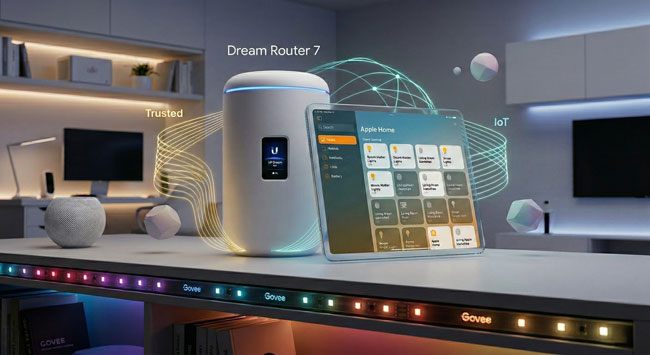
This is important: While I initially visualized this setup around a UDM-Pro, UniFi’s form factors have diversified. But whether you have a cylindrical Dream Machine or Dream Router, or a rack-mount Dream Machine Pro, Pro Max, or next-gen Gateway, they all run the exact same UniFi OS, and this guide is the definitive update for all of them.

Here is the bulletproof way to configure your modern UniFi gateway for Apple Home, Home Assistant, Homey Pro, and Matter.

1. Ditch the Port Rules for “Stateful” Firewall Rules
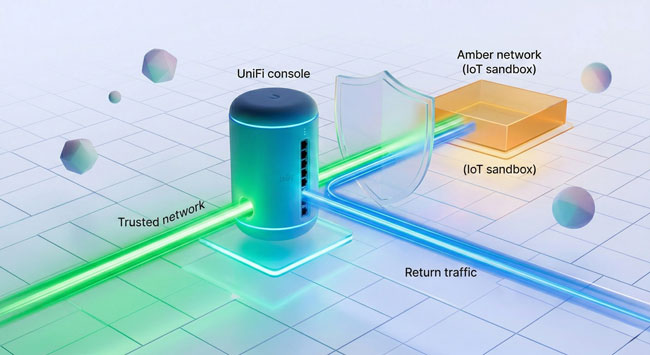
In my original video, I had you create a Network Object for specific ports (80, 443, and 5353 for mDNS) and build rules around them. Delete those rules.

Matter utilizes different ports (like 5540) and dynamically assigns source ports. Managing port groups is a nightmare. Instead, we are going to use “Stateful” firewall rules. This tells the router: “Let my Trusted network reach into the IoT network to give a command, and automatically let the IoT network reply.”

Go to Settings > Policy Engine > Policy Table and create these two simple policies in your Internal Zone:

Rule 1: Allow IoT Return Traffic
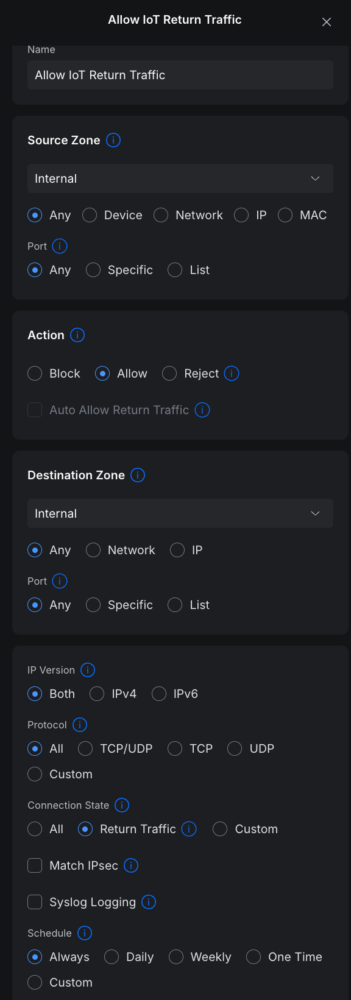
  • Action: Allow
  • Source / Destination: Any to Any
  • Connection State: Select Return Traffic (or check Established and Related on older firmware). (Save this policy and ensure it sits at the top of your list).

Rule 2: Block IoT to Trusted
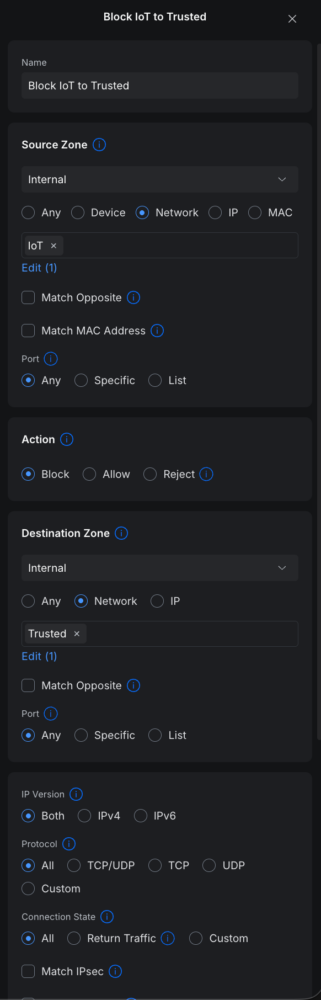
  • Action: Block
  • Source: Network > IoT
  • Destination: Network > Trusted
  • Connection State: All

That’s it. Your controllers can now effortlessly talk to your smart plugs and lights, and the replies are dynamically allowed through without exposing your main network.

2. The Great IGMP Snooping Reversal

This is the biggest update from my previous video. Last year, I recommended turning ON IGMP Snooping. Turn it OFF.

While IGMP Snooping is meant to optimize network traffic, UniFi’s aggressive implementation frequently drops the exact multicast discovery packets that Apple HomePods, Apple TVs, and Matter devices rely on.
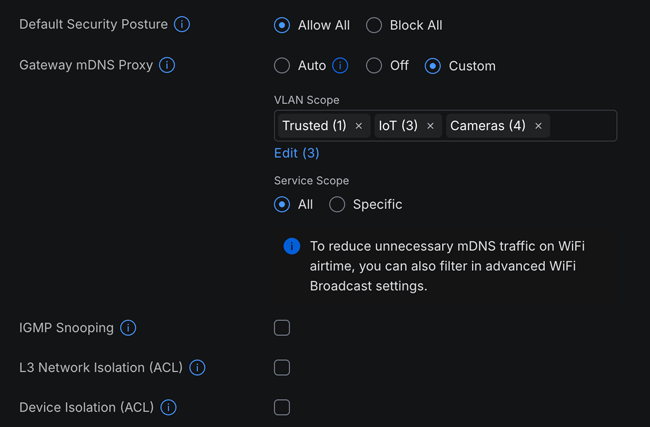
  • Go to Settings > Networks> Multicast Settings.
  • Ensure IoT Auto Discovery (mDNS) is enabled and includes both your Trusted and IoT networks.
  • Under Multicast Filtering (IGMP Snooping), ensure NO networks are selected.

Additionally, you need to stop UniFi from altering your Wi-Fi broadcasts. Go to Settings > WiFi, edit your IoT Wi-Fi network, scroll down to Advanced > Hi-Capacity Tuning, and ensure Multicast to Unicast is unchecked.

3. The Secret Ingredient: Local IPv6
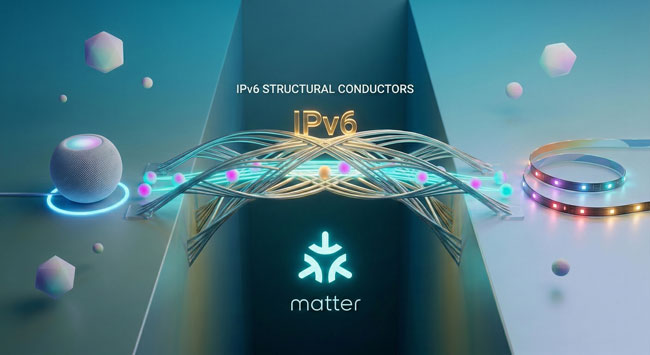
If you are struggling with Matter devices dropping offline across VLANs, this is the silver bullet. Matter over Wi-Fi strictly requires IPv6 Link-Local routing to maintain its connection to your Apple Home Hub.

Even if your internet service provider doesn’t support IPv6, you must create a local IPv6 network for both of your VLANs so the hub on the Trusted side can build a route to the devices on the IoT side.

Step A: Configure the Trusted Network Go to Settings > Networks and edit your Trusted network. Scroll down to the IPv6 section and apply these settings:

  • Interface Type: Static
  • IPv6 Address: Enter fd00:1::1 (Leave Netmask at 64)
  • Client Address Assignment: SLAAC
  • Check Router Advertisement (RA)

Step B: Configure the IoT Network Now, go back and edit your IoT network. Apply the exact same settings, but you must give it a different local subnet so they don’t conflict:

  • Interface Type: Static
  • IPv6 Address: Enter fd00:3::1 (Leave Netmask at 64)
  • Client Address Assignment: SLAAC
  • Check Router Advertisement (RA)

4. Where Do the Hubs Go?

I frequently get asked which VLAN the hubs should live on. Here is the golden rule:

  • The “Commanders” go on the Trusted Network: Your Apple TVs, HomePod Minis, Home Assistant server, and Homey Pro are highly secure, constantly updated “brains” of the operation. They belong on your main Trusted network alongside your iPhone and Mac. (This also ensures flawless AirPlay and ultra-fast app response times).
  • The “Translators” go on the IoT Network: Vendor-specific bridges like the Lutron Caseta smart bridge, Philips Hue bridge, Aqara hubs, and SwitchBot hubs belong in the IoT sandbox. They rely heavily on third-party clouds and should be isolated. Our new stateful firewall rules will ensure your Apple Home can still control them perfectly.

(Note: Sonos is the ultimate exception to every networking rule. Save yourself the headache and keep your Sonos speakers on the Trusted network).

UPDATE: ONE MORE THING – This 3rd Rule is OPTIONAL – But I did end up implementing

The two rules above will work just fine and your devices should work just fine, but because IoT devices like to be chatty and update your Apple Home hub with their status, those attempts will be BLOCKED. Again this won’t hurt anything, but it will create a log entry every single time it happens for every device. This will make your logs unnecessarily long. So this 3rd OPTIONAL rule is to allow the IoT VLAN to talk to your main Apple Hub and only that one device to give it those status updates:

At the bottom Add YOUR Apple Home Hub’s IP Address where you see mine blurred out. Make sure this rule is above your Block rules.

The Final Step: The Great Reboot

Whenever you introduce IPv6 to a network or change multicast behaviors, your devices need to grab fresh IP leases and rebuild their routing tables.

Once you apply these UniFi settings, restart your Apple Home Hubs and manually unplug your smart lights/plugs from the wall for 10 seconds to force a hard reboot.

Once everything powers back up, your smart home will be locked down, blazing fast, and finally capable of handling Matter across VLANs flawlessly.

Here’s the original video for reference:

The Bottom Line

In most cases most users will never have anything to worry about if they never setup VLANs. However, for those that will sleep better at night knowing that cheap devices that may never get security updates or you just don’t trust them, this is probably the easiest way to keep them isolated and from screwing with your trusted devices.

Also if you’re interested in buying or upgrading your UniFi gear, here’s my affiliate link. Using it doesn’t cost you any extra, but it helps support my channel and my blog. Thanks in advance.


ShareTweetSend
Previous Post

Weekly Cape Town News Comedy Wrap-up (22 May 2026)

Next Post

PSG Sweat Over Fitness Issues Ahead UCL Final

Related News

Transform Your Laptop Setup with These 5 Affordable Accessories
Tech

Transform Your Laptop Setup with These 5 Affordable Accessories

November 15, 2026
Microsoft 365 Services Gradually Restore Functionality Following Global Outage
Tech

Microsoft 365 Services Gradually Restore Functionality Following Global Outage

November 14, 2026
Epic Seeks Accountability for Apple’s Alleged Disregard of Court Ruling Intent
Tech

Epic Seeks Accountability for Apple’s Alleged Disregard of Court Ruling Intent

November 13, 2026
European Cybersecurity Firms Make Strides Against U.S. Competitors, Yet American Companies Still Command 62% of the Market
Tech

European Cybersecurity Firms Make Strides Against U.S. Competitors, Yet American Companies Still Command 62% of the Market

November 13, 2026
Next Post
PSG Sweat Over Fitness Issues Ahead UCL Final

PSG Sweat Over Fitness Issues Ahead UCL Final

Discussion about this post

Subscribe To Our Newsletters

    Customer Support


    1251 Wilcrest Drive
    Houston, Texas
    77042 USA
    Call-832.795.1420
    e-mail – news@theinsightpost.com

    Subscribe To Our Newsletters

      Categories

      • Africa
      • Africa-East
      • African Sports
      • American Sports
      • Arts
      • Asia
      • Australia
      • Business
      • Business Asia
      • Business- Africa
      • Canada
      • Defense
      • Education
      • Egypt
      • Energy
      • Entertainment
      • Europe
      • European Soccer
      • Finance
      • Germany
      • Ghana
      • Health
      • Insight
      • International
      • Investing
      • Japan
      • Latest Headlines
      • Life & Living
      • Markets
      • Mobile
      • Movies
      • New Zealand
      • Nigeria
      • Politics
      • Scholarships
      • Science
      • South Africa
      • South America
      • Sports
      • Tech
      • Travel
      • Travel-Africa
      • UK
      • USA
      • Weather
      • World
      No Result
      View All Result

      Recent News

      Gators Shock Wildcats 21-14 in Thrilling Upset Amid Rollercoaster Season

      Gators Shock Wildcats 21-14 in Thrilling Upset Amid Rollercoaster Season

      November 15, 2026
      Government Announces Historic  Billion Investment in Energy Infrastructure Development

      Government Announces Historic $2 Billion Investment in Energy Infrastructure Development

      November 15, 2026
      Notre Dame Postgame Insights: Dive into Superchats with Westwood One Sports

      Notre Dame Postgame Insights: Dive into Superchats with Westwood One Sports

      November 15, 2026
      Transform Your Laptop Setup with These 5 Affordable Accessories

      Transform Your Laptop Setup with These 5 Affordable Accessories

      November 15, 2026
      • Home
      • Advertise With Us
      • About Us
      • Corporate
      • Consumer Rewards
      • Forum
      • Privacy Policy
      • Social Trends

      Theinsightpost ©2026 | All Rights Reserved. Theinsightpost is an Elnegy LLC company, registered in Texas, USA

      Welcome Back!

      Login to your account below

      Forgotten Password?

      Retrieve your password

      Please enter your username or email address to reset your password.

      Log In

      Add New Playlist

      We are using cookies to give you the best experience on our website.

      You can find out more about which cookies we are using or switch them off in .

      No Result
      View All Result
      • Home
      • Insight
      • Blog
      • Business
      • Entertainment
      • Health
      • Politics
      • Shop
        • Gift Shop
        • Value Shop
        • Store
        • Bargain Shop
        • Discount
      • Sports
      • Tech
      • Travel
      • USA
      • Video
      • World
        • Asia
        • Africa
        • South America
        • North America
        • Europe
        • Oceania

      Theinsightpost ©2026 | All Rights Reserved. Theinsightpost is an Elnegy LLC company, registered in Texas, USA

      The Insight Post
      Powered by  GDPR Cookie Compliance
      Privacy Overview

      This website uses cookies so that we can provide you with the best user experience possible. Cookie information is stored in your browser and performs functions such as recognising you when you return to our website and helping our team to understand which sections of the website you find most interesting and useful.

      Strictly Necessary Cookies

      Strictly Necessary Cookie should be enabled at all times so that we can save your preferences for cookie settings.

      Cookie Policy

      More information about our Cookie Policy