
Introduction
In the ever-evolving landscape of mobile apps, developers constantly seek innovative ways to improve user experience and drive app success. One powerful tool that has emerged to meet this need is the App Event API.
This comprehensive guide will walk you through the ins and outs of App Event API, its functionality, benefits, implementation steps, best practices, common challenges, and frequently asked questions. By the end, you’ll be equipped with the knowledge to unlock the full potential of App Event API and revolutionize your app’s performance.
Understanding App Event API
At its core, the App Event API is a programming interface that enables developers to track and analyze user interactions within an app. By integrating App Event API, developers can monitor specific events and actions performed by users, such as button clicks, form submissions, in-app purchases, and more. This rich data allows developers to gain insights into user behavior, optimize app functionality, and drive user engagement.
How Does App Event API Work?
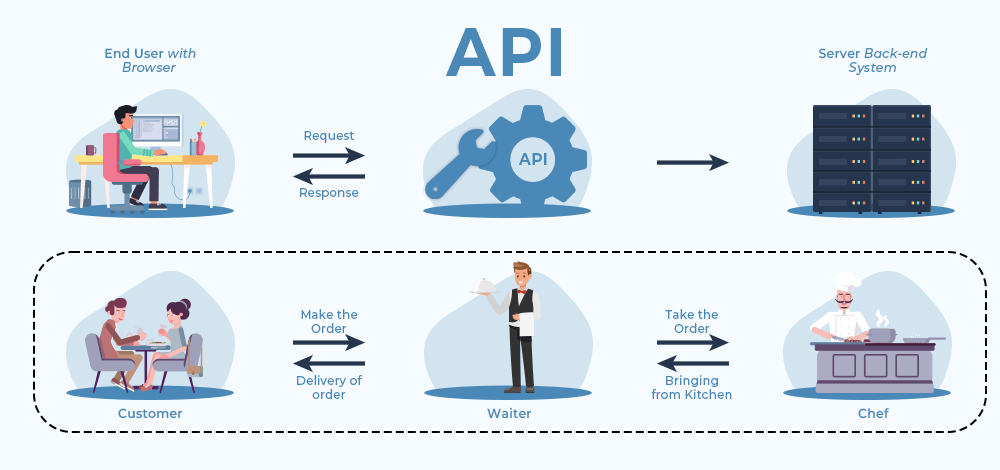
App Event API works by providing developers with a set of tools and methods to define, track, and analyze user events within an app.
The process typically involves the following steps:
Integration and Setup:
-
- Developers integrate the App Event API into their app’s codebase, usually through SDKs or specific libraries.
- Setup involves configuring the necessary parameters and permissions required for event tracking.
Defining App Events:
-
- Developers identify and define the events they want to track within their app.
- App events can include both standard events provided by the platform (e.g., app installs, and in-app purchases) and custom events tailored to the app’s specific features.
Tracking App Events:
-
- Once events are defined, developers implement tracking codes to capture relevant user interactions.
- Tracking codes can be placed at various points in the app’s codebase to record event occurrences.