
• Home
  • Insight
  • Blog
  • Business
  • Entertainment
  • Health
  • Politics
  • Shop
    • Gift Shop
    • Value Shop
    • Store
    • Bargain Shop
    • Discount
  • Sports
  • Tech
  • Travel
  • USA
  • Video
  • World
    • Asia
    • Africa
    • South America
    • North America
    • Europe
    • Oceania
Thursday, July 30, 2026
No Result
View All Result
Subscribe Now
  • Home
  • Insight
  • Blog
  • Business
  • Entertainment
  • Health
  • Politics
  • Shop
    • Gift Shop
    • Value Shop
    • Store
    • Bargain Shop
    • Discount
  • Sports
  • Tech
  • Travel
  • USA
    TX Rep. Brandon Gill Mocks James Talarico Over Fauci Action Figure Post

    TX Rep. Brandon Gill Mocks James Talarico Over Fauci Action Figure Post

    NBA players are ‘being taught’ to flop

    NBA players are ‘being taught’ to flop

    Industry was warned for years about chemical ‘runaway’ dangers. Then came near-catastrophe in O.C.

    Industry was warned for years about chemical ‘runaway’ dangers. Then came near-catastrophe in O.C.

    Trump administration seeks government-wide NDAs to stop leaks : NPR

    Trump administration seeks government-wide NDAs to stop leaks : NPR

    Dog discharges shotgun inside truck, striking woman at Nebraska traffic light

    Dog discharges shotgun inside truck, striking woman at Nebraska traffic light

    Toshifumi Suzuki, Japan’s ‘God’ of Convenience Stores, Dies at 93

    Toshifumi Suzuki, Japan’s ‘God’ of Convenience Stores, Dies at 93

     Judge Sanctioned CoreCivic for Destroying Video in ICE Death Suit

     Judge Sanctioned CoreCivic for Destroying Video in ICE Death Suit

    Suspect dead after opening fire near White House security checkpoint, Secret Service says

    Suspect dead after opening fire near White House security checkpoint, Secret Service says

    Trump trashes Colbert’s high-rated finale as “no ratings”

    Trump trashes Colbert’s high-rated finale as “no ratings”

  • Video
  • World
    • Asia
    • Africa
    • South America
    • North America
    • Europe
    • Oceania
The Insight Post
  • Home
  • Insight
  • Blog
  • Business
  • Entertainment
  • Health
  • Politics
  • Shop
    • Gift Shop
    • Value Shop
    • Store
    • Bargain Shop
    • Discount
  • Sports
  • Tech
  • Travel
  • USA
    TX Rep. Brandon Gill Mocks James Talarico Over Fauci Action Figure Post

    TX Rep. Brandon Gill Mocks James Talarico Over Fauci Action Figure Post

    NBA players are ‘being taught’ to flop

    NBA players are ‘being taught’ to flop

    Industry was warned for years about chemical ‘runaway’ dangers. Then came near-catastrophe in O.C.

    Industry was warned for years about chemical ‘runaway’ dangers. Then came near-catastrophe in O.C.

    Trump administration seeks government-wide NDAs to stop leaks : NPR

    Trump administration seeks government-wide NDAs to stop leaks : NPR

    Dog discharges shotgun inside truck, striking woman at Nebraska traffic light

    Dog discharges shotgun inside truck, striking woman at Nebraska traffic light

    Toshifumi Suzuki, Japan’s ‘God’ of Convenience Stores, Dies at 93

    Toshifumi Suzuki, Japan’s ‘God’ of Convenience Stores, Dies at 93

     Judge Sanctioned CoreCivic for Destroying Video in ICE Death Suit

     Judge Sanctioned CoreCivic for Destroying Video in ICE Death Suit

    Suspect dead after opening fire near White House security checkpoint, Secret Service says

    Suspect dead after opening fire near White House security checkpoint, Secret Service says

    Trump trashes Colbert’s high-rated finale as “no ratings”

    Trump trashes Colbert’s high-rated finale as “no ratings”

  • Video
  • World
    • Asia
    • Africa
    • South America
    • North America
    • Europe
    • Oceania
No Result
View All Result
No Result
View All Result
Home Mobile

How to set up automatic iOS code signing using App Store Connect API keys

by Theinsightpost
August 11, 2022
in Mobile
0 0
0
How to set up automatic iOS code signing using App Store Connect API keys


Codemagic builds and tests your app after every commit, notifies selected team members and releases to the end user. Automatically.Get started

Written by Helina Ariva

One of the killer features of Codemagic is its Apple Developer Portal integration for automatic code signing of iOS apps. With automatic code signing, Codemagic takes care of creating and managing the signing certificates and provisioning profiles for you: just set up the integration once and use the same credentials across all your apps and workflows.

The good news is that our Apple Developer Portal integration just got better as it’s now using the official App Store Connect API, powered by our very own open-source utilities collectively known as Codemagic CLI tools for a transparent code signing experience.

Continue reading to find out what changes with the new Apple Developer Portal integration, how to set it up, and what’s the role of Codemagic CLI tools in all this.

Using API keys instead of login data

Many services, including Codemagic, that used to integrate with Apple’s services did so by asking users for their Apple developer portal username and password to create a session with Apple. This approach came with several problems, such as failure to receive the two-factor authentication code from Apple and expiring sessions that required reconnecting the integration in Codemagic.

Using the App Store Connect API and API keys instead of session-based authentication resolves these issues. There will be no more expiring sessions or hassle with two-factor authentication. In addition, the API keys come with permission levels, which greatly limits our access to your data compared to giving full access to your account. You can create different keys for different teams and use a suitable one per workflow in your Codemagic builds.

Setting up automatic iOS code signing in Codemagic

In order to set up automatic code signing, you need to create an API key in App Store Connect and connect the Apple Developer Portal integration in the Codemagic app for UI builds.

  • Note that connecting the Apple Developer Portal in Codemagic app is required only for builds configured in the UI. The builds configured using codemagic.yaml have the code signing setup in the configuration file.
  • Most Codemagic users and teams with a valid Apple Developer Portal session have been automatically migrated to use the API keys. In case automatic migration was not possible, follow the steps below to reconnect the Apple Developer Portal integration in the Codemagic app.

Creating an API key for Codemagic

We recommend creating a dedicated key for use in Codemagic.

  1. Log in to App Store Connect and navigate to Users and Access > Keys.
  2. Click on the + sign to generate a new API key.
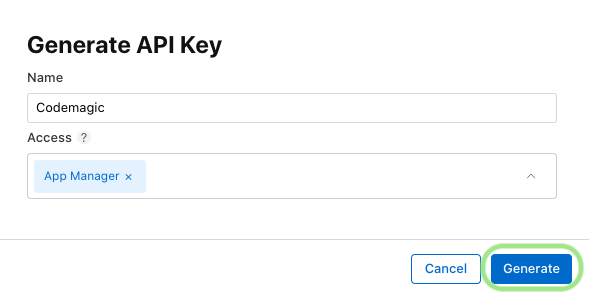
  3. Enter the name for the key and select an access level. We recommend choosing either Developer or App Manager, read more about Apple Developer Program role permissions here. Then, click Generate.
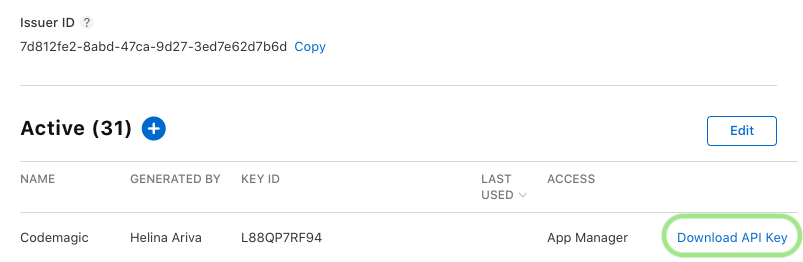
  4. As soon as the key is generated, you can see it added in the list of active keys. Click Download API Key and save the key for later. Note that the key can only be downloaded once.
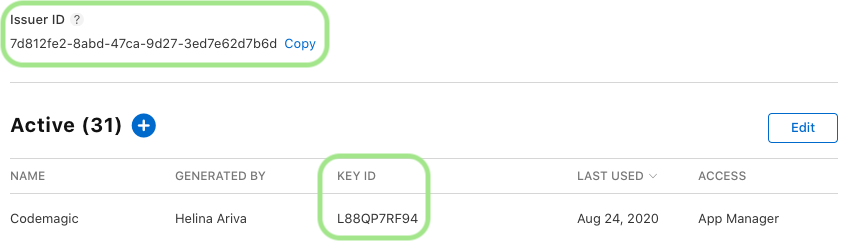
    Take note of the Key ID and the Issuer ID above the table of active keys as these are required in the Codemagic setup in addition to the generated key.
Connecting the Apple Developer Portal integration for UI builds

The integration is configured separately for teams and for your personal account. Connecting the integration in team or user settings allows you to conveniently use the same credentials for automatic code signing across all apps and workflows.

  1. In the list of available integrations, click the Connect button for Developer Portal.
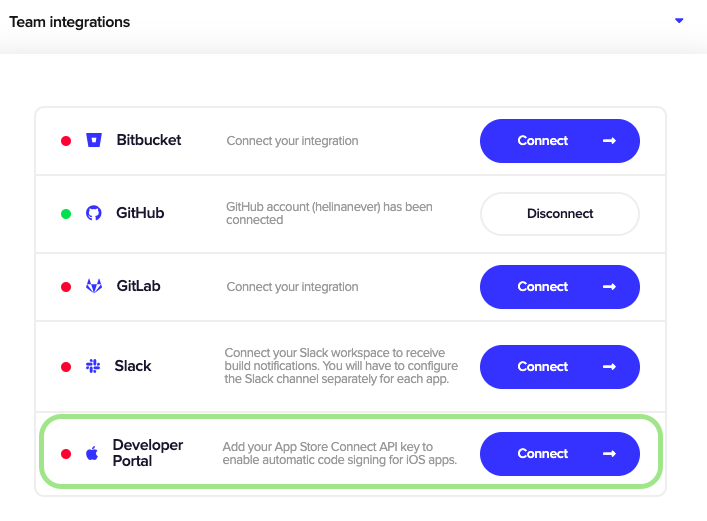
    List of integration in team settings
  2. Fill in the fields in the configuration popup as follows.
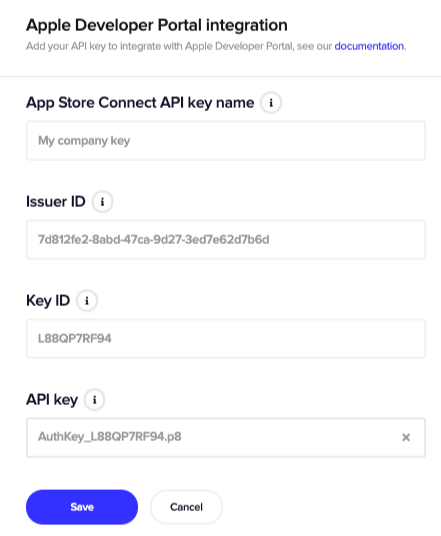
    List of integration in team settings

    • In the App Store Connect API key name field, provide a name for the key you are going to set up the integration with. This is for identifying the key in Codemagic so that when you have multiple keys available, you can easily pick the right one in workflow settings.
    • Enter the Issuer ID related to your Apple Developer account. You can find it above the table of active keys on the Keys tab of the Users and Access page.
    • Enter the Key ID of the key to be used for code signing.
    • In the API key field, upload the private API key downloaded from App Store Connect.
  3. Click Save to finish the setup.

If you work with multiple Apple Developer teams, you can add additional keys by clicking Add another key right after adding the first key and repeating the steps described above. You can delete existing keys or add new ones when you click Manage keys next to the Developer Portal integration in user or team settings. See also our documentation about iOS code signing for more information.

Using automatic code signing with YAML builds

When you export your UI configuration that has automatic code signing as a codemagic.yaml file, all your code signing settings will be exported as well. If you’re getting started with codemagic.yaml from scratch, you need to create an API key as described above and save the key, the Key ID and the Issuer ID into environment variables.

environment:
  vars: # Define your environment variables here
    APP_STORE_CONNECT_ISSUER_ID:
    APP_STORE_CONNECT_KEY_IDENTIFIER:
    APP_STORE_CONNECT_PRIVATE_KEY: Encrypted(...)
    CERTIFICATE_PRIVATE_KEY: Encrypted(...)

Additionally, you need to upload a RSA 2048 bit certificate private key to CERTIFICATE_PRIVATE_KEY. This will be included in the signing certificate that Codemagic creates. You can use an existing key or create a new 2048 bit RSA key by running the following command in your terminal:

ssh-keygen -t rsa -b 2048 -f ~/Desktop/codemagic_private_key -q -N ""

We recommend encrypting the sensitive values as the Codemagic configuration file will be stored in the repository. To properly encrypt the App Store Connect private key and the certificate private key, copy the contents of the file and encrypt it in the Codemagic encryption interface. You can then add the encrypted values to the respective environment variables.

The actual code signing must be set up in the scripts section of the codemagic.yaml file, just before running the actual build commands. Based on the bundle ID and provisioning profile type you specify in this section, Codemagic will fetch (or create) the code signing files from App Store Connect.

scripts:
  - find . -name "Podfile" -execdir pod install ;
  - keychain initialize
  - |
# Fetch signing files for specified bundle ID "com.example.app", 
# specify provisioning profile type, 
# allow creating resources if existing are not found.
  - |
    app-store-connect fetch-signing-files "com.example.app" 
      --type IOS_APP_DEVELOPMENT 
      --create    
  - keychain add-certificates

Read more about the different options for setting up iOS code signing in codemagic.yaml from our documentation.

Under the hood, a set of tools and utilities collectively known as Codemagic CLI tools are used to build and code sign iOS apps. More specifically, we use the xcode-project utility for preparing the code signing properties for the build, the keychain utility for managing macOS keychains and certificates, and the app-store-connect utility for creating and downloading code signing certificates and provisioning profiles. The latter makes use of the App Store Connect API for authenticating with Apple Developer Portal.

We created these utilities to facilitate the many activities related to building and code signing iOS apps when we worked on adding support for building iOS apps with codemagic.yaml and now use them for iOS builds globally. In this log snippet, you can see Codemagic CLI tools in action.
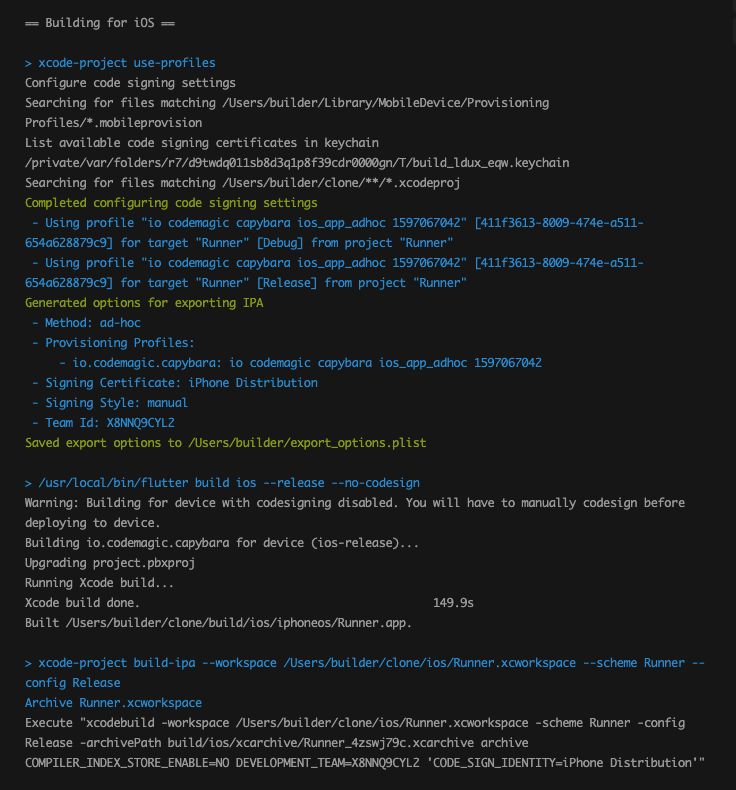
iOS build logs for automatic code signing

The best part of these tools is that they are open source and can be also used locally for iOS builds and code signing management. Check out our documentation on how to use Codemagic CLI tools locally.




Source link

ShareTweetSend
Previous Post

Commonwealth observer briefs the press on the electoral process – Kenya News Agency

Next Post

Sweden overtakes France as EU’s top power exporter

Related News

Announcing Codemagic Patch: an open-source CodePush rebuild for React Native
Mobile

Announcing Codemagic Patch: an open-source CodePush rebuild for React Native

July 30, 2026
React Native OTA Updates: What You Can (and Can’t) Deploy Over the Air
Mobile

React Native OTA Updates: What You Can (and Can’t) Deploy Over the Air

May 28, 2026
Your phone drawer hides an app designed to “exploit developing brains”
Mobile

Your phone drawer hides an app designed to “exploit developing brains”

May 27, 2026
iPhone 16 has a secret charging upgrade Apple didn’t even mention
Mobile

iPhone 16 has a secret charging upgrade Apple didn’t even mention

May 26, 2026
Next Post
Sweden overtakes France as EU’s top power exporter

Sweden overtakes France as EU's top power exporter

Discussion about this post

Subscribe To Our Newsletters

    Customer Support


    1251 Wilcrest Drive
    Houston, Texas
    77042 USA
    Call-832.795.1420
    e-mail – news@theinsightpost.com

    Subscribe To Our Newsletters

      Categories

      • Africa
      • Africa-East
      • African Sports
      • American Sports
      • Arts
      • Asia
      • Australia
      • Business
      • Business Asia
      • Business- Africa
      • Canada
      • Defense
      • Education
      • Egypt
      • Energy
      • Entertainment
      • Europe
      • European Soccer
      • Finance
      • Germany
      • Ghana
      • Health
      • Insight
      • International
      • Investing
      • Japan
      • Latest Headlines
      • Life & Living
      • Markets
      • Mobile
      • Movies
      • New Zealand
      • Nigeria
      • Politics
      • Scholarships
      • Science
      • South Africa
      • South America
      • Sports
      • Tech
      • Travel
      • UK
      • USA
      • Weather
      • World
      No Result
      View All Result

      Recent News

      US Navy to overhaul torpedo stockpile under new two-war strategy

      US Navy to overhaul torpedo stockpile under new two-war strategy

      July 30, 2026
      Free Cloud Computing Course | AWS Re/Start Program 

      Free Cloud Computing Course | AWS Re/Start Program 

      July 30, 2026
      Thirty Years Later

      Thirty Years Later

      July 30, 2026
      Announcing Codemagic Patch: an open-source CodePush rebuild for React Native

      Announcing Codemagic Patch: an open-source CodePush rebuild for React Native

      July 30, 2026
      • Home
      • Advertise With Us
      • About Us
      • Corporate
      • Consumer Rewards
      • Forum
      • Privacy Policy
      • Social Trends

      Theinsightpost ©2026 | All Rights Reserved. Theinsightpost is an Elnegy LLC company, registered in Texas, USA

      Welcome Back!

      Login to your account below

      Forgotten Password?

      Retrieve your password

      Please enter your username or email address to reset your password.

      Log In

      Add New Playlist

      We are using cookies to give you the best experience on our website.

      You can find out more about which cookies we are using or switch them off in .

      No Result
      View All Result
      • Home
      • Insight
      • Blog
      • Business
      • Entertainment
      • Health
      • Politics
      • Shop
        • Gift Shop
        • Value Shop
        • Store
        • Bargain Shop
        • Discount
      • Sports
      • Tech
      • Travel
      • USA
      • Video
      • World
        • Asia
        • Africa
        • South America
        • North America
        • Europe
        • Oceania

      Theinsightpost ©2026 | All Rights Reserved. Theinsightpost is an Elnegy LLC company, registered in Texas, USA

      The Insight Post
      Powered by  GDPR Cookie Compliance
      Privacy Overview

      This website uses cookies so that we can provide you with the best user experience possible. Cookie information is stored in your browser and performs functions such as recognising you when you return to our website and helping our team to understand which sections of the website you find most interesting and useful.

      Strictly Necessary Cookies

      Strictly Necessary Cookie should be enabled at all times so that we can save your preferences for cookie settings.

      Cookie Policy

      More information about our Cookie Policy