
• Home
  • Insight
  • Blog
  • Business
  • Entertainment
  • Health
  • Politics
  • Shop
    • Gift Shop
    • Value Shop
    • Store
    • Bargain Shop
    • Discount
  • Sports
  • Tech
  • Travel
  • USA
  • Video
  • World
    • Asia
    • Africa
    • South America
    • North America
    • Europe
    • Oceania
Friday, October 16, 2026
No Result
View All Result
Subscribe Now
  • Home
  • Insight
  • Blog
  • Business
  • Entertainment
  • Health
  • Politics
  • Shop
    • Gift Shop
    • Value Shop
    • Store
    • Bargain Shop
    • Discount
  • Sports
  • Tech
  • Travel
  • USA

    Crowds throng New Delhi and wave Indian flags amid escalating protests : NPR

    Jerry Seinfeld mocks pro-Palestinian protesters at Chicago Theatre

    Reflecting on the Trump Era

    California can’t make ICE wear ID, federal appeals court rules

    Pope Leo XIV diagnosed with cancer

    WATCH: Runaway goat finds love, forever home

    China Puts Border City on Alert over Russia Suspected Plague Case

    Ben Affleck says political ‘hypocrisy, corruption and failure’ left him ‘disillusioned’

    One woman’s fight to bring her husband home from ICE detention

  • Video
  • World
    • Asia
    • Africa
    • South America
    • North America
    • Europe
    • Oceania
The Insight Post
  • Home
  • Insight
  • Blog
  • Business
  • Entertainment
  • Health
  • Politics
  • Shop
    • Gift Shop
    • Value Shop
    • Store
    • Bargain Shop
    • Discount
  • Sports
  • Tech
  • Travel
  • USA

    Crowds throng New Delhi and wave Indian flags amid escalating protests : NPR

    Jerry Seinfeld mocks pro-Palestinian protesters at Chicago Theatre

    Reflecting on the Trump Era

    California can’t make ICE wear ID, federal appeals court rules

    Pope Leo XIV diagnosed with cancer

    WATCH: Runaway goat finds love, forever home

    China Puts Border City on Alert over Russia Suspected Plague Case

    Ben Affleck says political ‘hypocrisy, corruption and failure’ left him ‘disillusioned’

    One woman’s fight to bring her husband home from ICE detention

  • Video
  • World
    • Asia
    • Africa
    • South America
    • North America
    • Europe
    • Oceania
No Result
View All Result
No Result
View All Result
Home Mobile

How to set up iMessage on Mac

by Theinsightpost
December 31, 2022
in Mobile
0 0
0
How to set up iMessage on Mac


If you have a Mac, an iPhone and an Apple ID, then you can use iMessage. This is Apple’s messaging service and with it you can send unlimited messages to other people who also have Apple devices, including Macs and iPhones. You’ll know an iMessage from a regular SMS because they show up in blue bubbles.

You might associate iMessages with iPhones – that makes sense – but you can access them, send them, read them and organize them from your Mac, too. All you need is an Apple ID, a Mac and an iPhone running iOS 8.1 or later.

In our guide below we’ll walk you through the steps to get iMessage set up on your Mac, whether you have an older MacBook or the latest MacBook Air with M2. 

How to set up iMessage on Mac

  1. Launch Messages from your desktop, dock, or Applications folder. The Messages app will default use your Apple ID to log you in. Enter your Apple ID email address and password if that doesn’t happen.
  2. Click on Messages in the Menu bar
  3. Click on Preferences.
  4. Click on the iMessage tab.
  5. Select the phone number and email addresses you would like to be reached.
  6. Choose which phone number or email address people will see when you start a new conversation.

How to set up Messages in iCloud in macOS

Messages in iCloud keep both your iMessages and standard SMS in sync between one of the best Macs and your iOS devices. This means you can also download your messages when you set up a new device.

  1. Open Messages from your desktop, dock, or Applications folder.
  2. Click on Messages in the Menu bar
  3. Click on Preferences.
  4. Click on the iMessage tab.
  5. Click the checkbox next to Enable Messages on iCloud.
  6. Click the Sync Now button to sync immediately.

How to send a message on your Mac

  1. Open Messages.
  2. Click the New Message button  at the top.
  3. Type the name, email address or phone number of the person you want to message. Or click the Add button and choose someone from your contacts.
  4. Click the message field at the bottom, then type your message.
  5. Press Return to send your message.

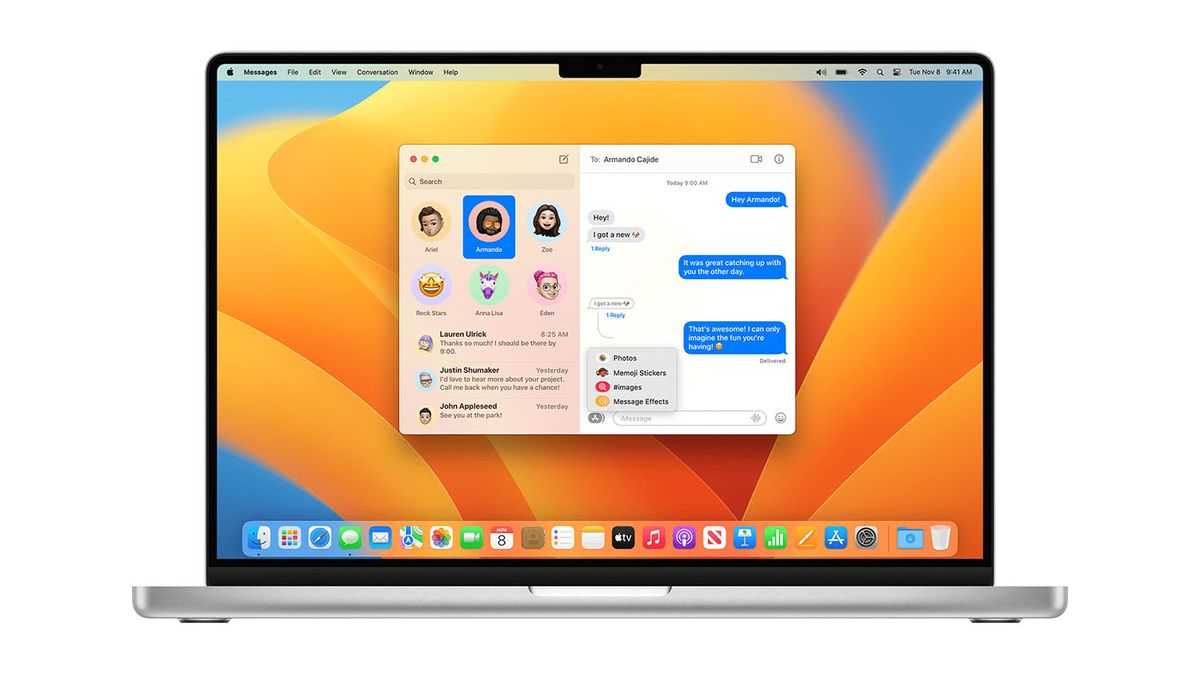
If your Mac is running macOS Big Sur or later you can even add Memoji sticks, GIFs and effects to your messages.  (Image credit: Apple)

You can also add Emoji, images and audio recordings to your messages. If your Mac is running macOS Big Sur or later you can even add Memoji sticks, GIFs and effects. To do this, you need to click the Apps button and find the ones you want to use.

We’ve got more in-depth instructions about how to send iMessages and attach all kinds of extras in our how to send iMessages on iPhone or iPad guide. 

Get chatting

That’s how you turn on iMessage sync and iMessage in general on Mac. 

To fully take advantage of Messages in iCloud, you’ll also need to turn it on for any iOS or iPadOS devices you own. If you want to find out more about how iMessages work on your Mac, then take a look at our ultimate guide to the Messages app for iPhone and iPad.



Source link

ShareTweetSend
Previous Post

Kenya’s economy expanding 4.7 pct in Q3-Xinhua

Next Post

Benedict XVI: The first pope in over 600 years to resign

Related News

Mobile

The new Apple Watch Series 10 bands will work with older Apple Watch models

October 15, 2026
Mobile

New ways to drive smarter discovery, deeper engagement, and business growth on Google Play

October 14, 2026
Mobile

Struggling with calls and connectivity on your Pixel? The latest Android beta has tools for you

October 14, 2026
Mobile

7 Reasons To Use WordPress For Your Website

October 13, 2026
Next Post
Benedict XVI: The first pope in over 600 years to resign

Benedict XVI: The first pope in over 600 years to resign

Discussion about this post

Subscribe To Our Newsletters

    Customer Support


    1251 Wilcrest Drive
    Houston, Texas
    77042 USA
    Call-832.795.1420
    e-mail – news@theinsightpost.com

    Subscribe To Our Newsletters

      Categories

      • Africa
      • Africa-East
      • African Sports
      • American Sports
      • Arts
      • Asia
      • Australia
      • Business
      • Business Asia
      • Business- Africa
      • Canada
      • Defense
      • Education
      • Egypt
      • Energy
      • Entertainment
      • Europe
      • European Soccer
      • Finance
      • Germany
      • Ghana
      • Health
      • Insight
      • International
      • Investing
      • Japan
      • Latest Headlines
      • Life & Living
      • Markets
      • Mobile
      • Movies
      • New Zealand
      • Nigeria
      • Politics
      • Scholarships
      • Science
      • South Africa
      • South America
      • Sports
      • Tech
      • Travel
      • UK
      • USA
      • Weather
      • World
      No Result
      View All Result

      Recent News

      First Look Y&R Spoiler Photos: Sally and Billy’s Wedding

      October 16, 2026

      How To Motivate Yourself To Do Intermittent Fasting

      October 16, 2026

      EverWind announces plan for $10 billion privately funded data centre campus and wind project

      October 16, 2026

      Pope Leo pictured for first time since cancer diagnosis as doctors issue health update | World | News

      October 16, 2026
      • Home
      • Advertise With Us
      • About Us
      • Corporate
      • Consumer Rewards
      • Forum
      • Privacy Policy
      • Social Trends

      Theinsightpost ©2026 | All Rights Reserved. Theinsightpost is an Elnegy LLC company, registered in Texas, USA

      Welcome Back!

      Login to your account below

      Forgotten Password?

      Retrieve your password

      Please enter your username or email address to reset your password.

      Log In

      Add New Playlist

      We are using cookies to give you the best experience on our website.

      You can find out more about which cookies we are using or switch them off in .

      No Result
      View All Result
      • Home
      • Insight
      • Blog
      • Business
      • Entertainment
      • Health
      • Politics
      • Shop
        • Gift Shop
        • Value Shop
        • Store
        • Bargain Shop
        • Discount
      • Sports
      • Tech
      • Travel
      • USA
      • Video
      • World
        • Asia
        • Africa
        • South America
        • North America
        • Europe
        • Oceania

      Theinsightpost ©2026 | All Rights Reserved. Theinsightpost is an Elnegy LLC company, registered in Texas, USA

      The Insight Post
      Powered by  GDPR Cookie Compliance
      Privacy Overview

      This website uses cookies so that we can provide you with the best user experience possible. Cookie information is stored in your browser and performs functions such as recognising you when you return to our website and helping our team to understand which sections of the website you find most interesting and useful.

      Strictly Necessary Cookies

      Strictly Necessary Cookie should be enabled at all times so that we can save your preferences for cookie settings.

      Cookie Policy

      More information about our Cookie Policy

      Clear examples do more than decorate an explanation: they show how an idea behaves under recognizable conditions. In education and software documentation alike, strong illustrations begin with a defined goal, then reveal the steps, assumptions, and result without unnecessary detail. A practical test example should state the input, expected output, and boundary condition, because these elements show whether a rule works beyond the simplest case. Including a contrasting case also helps readers distinguish a valid application from a tempting but incorrect one, while concise notes explain why the outcomes differ. When examples are updated with current data and checked against the underlying rule, they remain useful across classrooms, product guides, and professional training.