

• Home
  • Insight
  • Blog
  • Business
  • Entertainment
  • Health
  • Politics
  • Shop
    • Gift Shop
    • Value Shop
    • Store
    • Bargain Shop
    • Discount
  • Sports
  • Tech
  • Travel
  • USA
  • Video
  • World
    • Asia
    • Africa
    • South America
    • North America
    • Europe
    • Oceania
Wednesday, October 7, 2026
No Result
View All Result
Subscribe Now
  • Home
  • Insight
  • Blog
  • Business
  • Entertainment
  • Health
  • Politics
  • Shop
    • Gift Shop
    • Value Shop
    • Store
    • Bargain Shop
    • Discount
  • Sports
  • Tech
  • Travel
  • USA

    Border Security, Public Safety, and American Sovereignty with Markwayne Mullin

    Students injured as NJ high school bleachers collapse in scary scene

    California man in incest case busted in Mexico; teen daughter rescued

    Cornell president calls gang rape allegations ‘deeply disturbing’ : NPR

    France’s violent student protests raise warning for America: ‘A cautionary tale’

    Birmingham’s WBHM Public Radio Station Forced to Use “Gulf of America”

    Eminem gets online backlash from fans over Kid Rock Christian album collab

    Trump leans into Iran war, admits it could cost Republicans the midterms

    Trump says he would consider pardoning administration members

  • Video
  • World
    • Asia
    • Africa
    • South America
    • North America
    • Europe
    • Oceania
The Insight Post
  • Home
  • Insight
  • Blog
  • Business
  • Entertainment
  • Health
  • Politics
  • Shop
    • Gift Shop
    • Value Shop
    • Store
    • Bargain Shop
    • Discount
  • Sports
  • Tech
  • Travel
  • USA

    Border Security, Public Safety, and American Sovereignty with Markwayne Mullin

    Students injured as NJ high school bleachers collapse in scary scene

    California man in incest case busted in Mexico; teen daughter rescued

    Cornell president calls gang rape allegations ‘deeply disturbing’ : NPR

    France’s violent student protests raise warning for America: ‘A cautionary tale’

    Birmingham’s WBHM Public Radio Station Forced to Use “Gulf of America”

    Eminem gets online backlash from fans over Kid Rock Christian album collab

    Trump leans into Iran war, admits it could cost Republicans the midterms

    Trump says he would consider pardoning administration members

  • Video
  • World
    • Asia
    • Africa
    • South America
    • North America
    • Europe
    • Oceania
No Result
View All Result
No Result
View All Result
Home Mobile

How to solve version inconsistencies for a better compilation with Codemagic CI/CD

by Theinsightpost
August 3, 2022
in Mobile
0 0
0
How to solve version inconsistencies for a better compilation with Codemagic CI/CD


In the development world, it’s very common for technologies to be rapidly updated to introduce new features that improve the development experience and performance. These updates are very beneficial for developers because they allow them to create better products. This is especially the case when a CI/CD like Codemagic is used for continuous deployment that streamlines the process of delivering new products. But things aren’t always rosy — have you ever wondered what problems can arise when technologies are updated quickly and the version you use locally is not the same as the one you have configured in Codemagic?

In the following article, we will explain in detail why versions are updated, why your build works locally but not in Codemagic CI/CD, and much more.

This article is written by Felipe Vergara

Why do the versions change?

First of all, we must be clear about the concept of versions. This has to do with the practice of version control, which is used to manage the various changes that are made to the elements of a product or a configuration. A product’s version is the state the product is in at a given moment of its development or modification.

Therefore, versions are constantly changing for different reasons. Some changes may have been made to solve operating problems (bugs) or to incorporate new functionalities that improve the product, for example.

Preventive actions before a compilation in Codemagic

There are different actions you can take before performing a compilation in Codemagic to reduce potential errors and thus optimize resources.

After finishing a new change to your project, you’ll likely need to generate a new version of the product. This is why we recommend generating a version of the product locally before compiling it in Codemagic.

The following image shows the successful generation of an Android APK. It gives us some level of security to know that we managed to generate this APK locally.

After the compilation is successful, we must go to Codemagic to verify that all local configurations are also defined in the Codemagic settings.

If the local compilation fails, we must solve any problems locally before performing a compilation in Codemagic.

Why does something work on the local machine and not on the CI?

Has the build of a version ever worked correctly on your local machine, only to fail when you run it on Codemagic CI? This can be due to a number of different factors. Below, I’ll go over some common errors:

Flutter

“Because name_of_project requires SDK version >= 2.x.x < 3.x.x, version solving failed.”
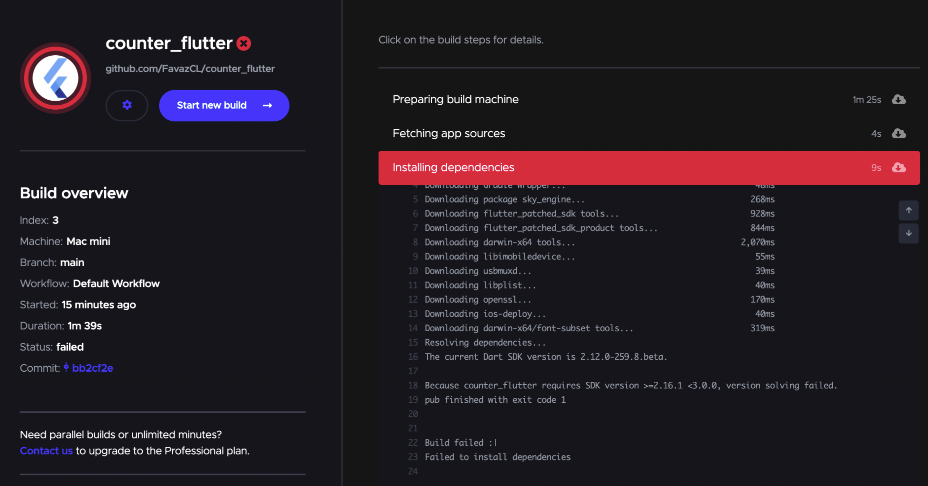
Perhaps you have encountered this error when running your CI in Codemagic. This issue occurs due to a version inconsistency. Let’s analyze the error step by step and go over how to solve it.

The first thing to pay attention to is the SDK version of the Flutter project that we are using locally. To retrieve this information, we must use the following command in a terminal (console):

    flutter --version

This will return the information of the locally installed and used Flutter SDK.

Once we have this information, we know that the version of Flutter is 2.5.3. Then, we must go to our application in codemagic.io and enter in the settings of our application. Here, we must verify which version of Flutter is being used for the compilation:
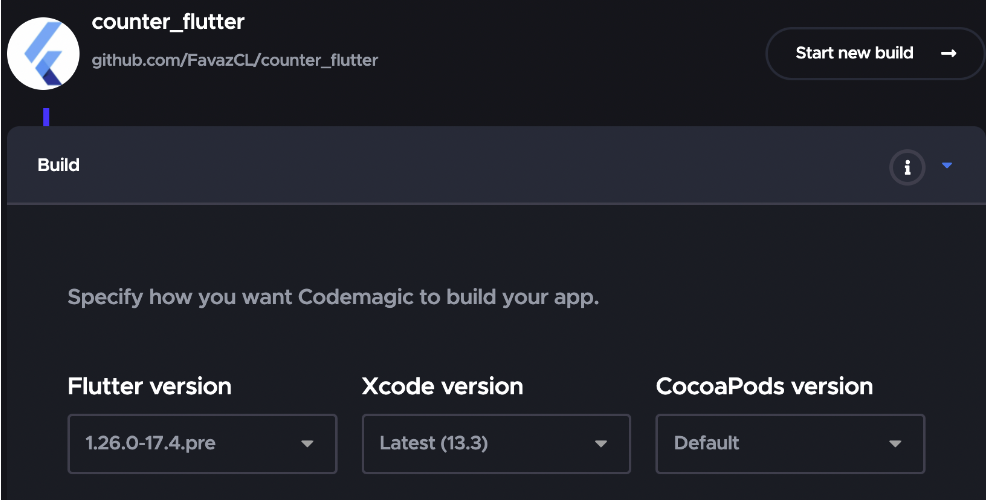
As we can see in the Build section, the selected Flutter version is 1.26.0-17.4.pre, which doesn’t match the version we use locally; to solve this problem, we must change the Codemagic version to 2.5.3.
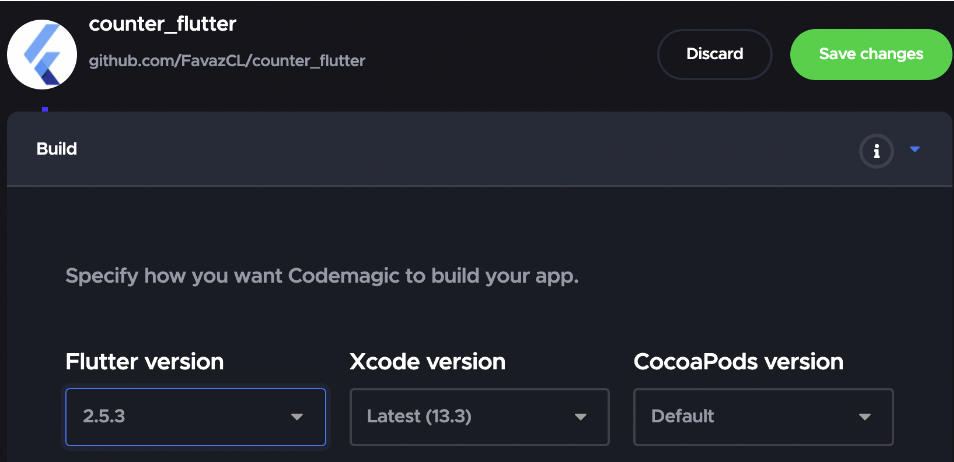
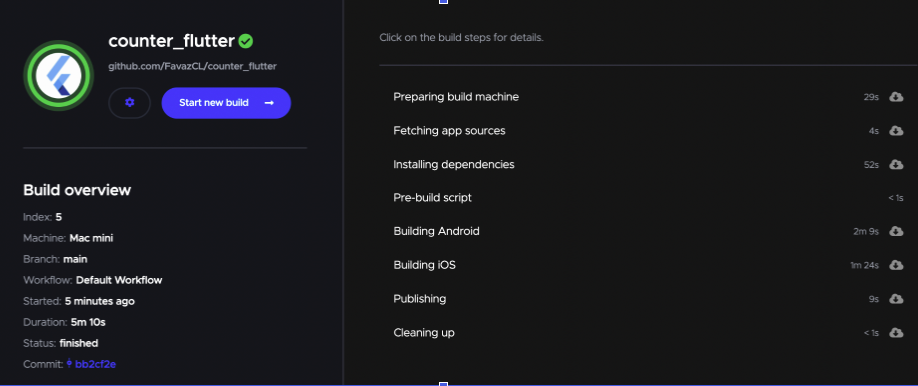
Save the changes and run the compilation once again.
iOS

“Found ‘Xcode 11.x, build version 11x’. Xcode 12.x or greater is required to develop for iOS.”
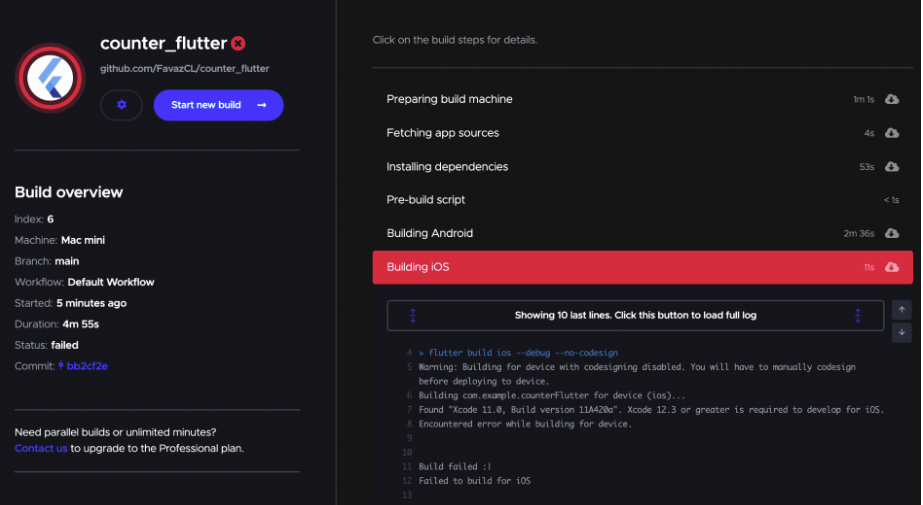
The following error is related to Xcode, which is the IDE used to develop iOS applications and their configurations. This error occurs because the version of Xcode that was used in the project is higher than the version that uses Codemagic configurations.

To find out the version of Xcode that is being used locally, we must run the following command in our terminal (console):

    xed --version

This command will give us more details about the version:

As we can see, the version of Xcode being used locally is 13.2.1. Now, we must verify which version of Xcode is being used in Codemagic.
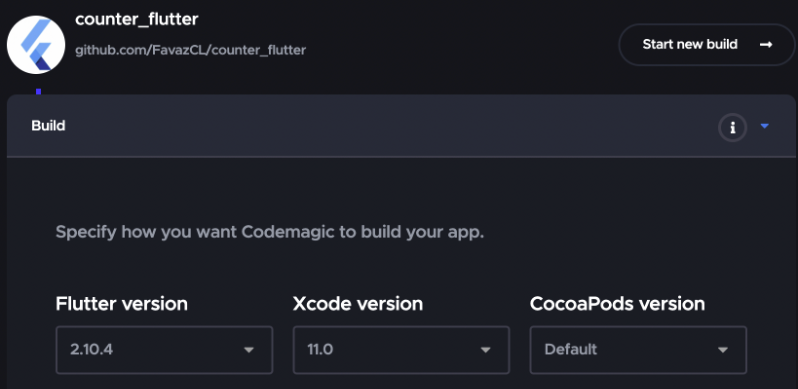
The Xcode version being used in Codemagic is 11.0, so there is an inconsistency in the version. To solve this, we just have to change this version to the one we use locally and re-compile the application.
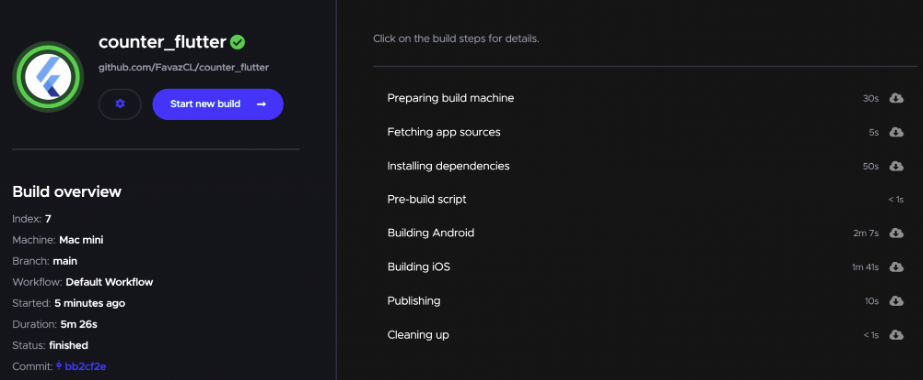
Android

“Minimum supported Gradle version is 6.5. Current version is 6.1.”
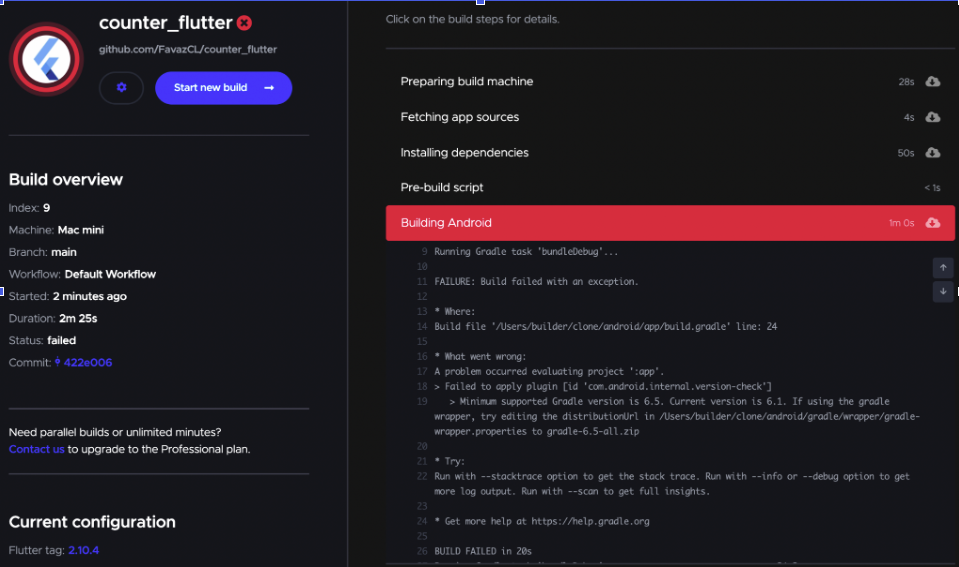
This error occurs because the minimal version of gradle supported by the compiler is 6.5 and we, in our local project, are using a version lower than this one; to check the version of gradle we are using we must go to Android/gradle/wrapper/gradle-wrapper.propierties (see image below).
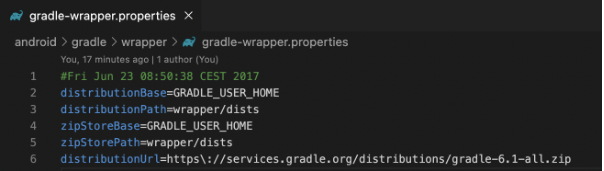
We must modify line 6: distributionUrl and replace the current version with the new one, which, as stated in the error message, must be higher than 6.5. To find out which is the correct address, you can find the Gradle versions here:
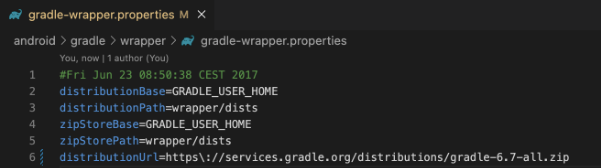
Then we upload the changes to our repository and re-compile, and our application build should work without problems.
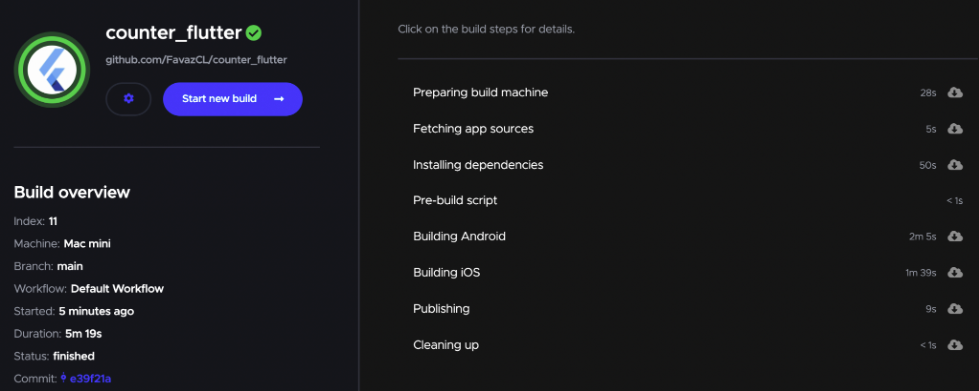
The majority of the Flutter Android builds recently failed due to the misconfiguration of the Gradle. The issues with being unable to lint, using Flutter with other SDKs, and wrong classpaths are the most common in the Flutter GitHub issue list.

Conclusion

In general, if your application compiles correctly on your local machine and doesn’t work on Codemagic CI, the first thing you should try is to verify that the versions match on the CI and locally. And as we mentioned before, it’s important to take preventive action — you should always verify that the local operation is optimal before running a compilation in Codemagic.

Happy building!

Useful links and references
Stay updated with app development news


Felipe Vergara is a software engineer who has more than 5 years of experience in web and mobile development. In his free times he likes to share his knowledge to help the third party developers. You can find Felipe from Twitter, LinkedIn and Medium..


Source link

ShareTweetSend
Previous Post

One step closer for Kenya’s National Maritime Security Strategy

Next Post

UNODC port security training brings results with interception of 36 radiated tortoises in Madagascar  – europeantimes.news

Related News

Mobile

Android Developers Blog: Device Streaming and Android skills

October 6, 2026
Mobile

Samsung confirms broad SmartTag 3 Android support

October 5, 2026
Mobile

How Can Software Consulting Company Benefit Your Business?

October 4, 2026
Mobile

Injection Molding Cost Estimation: How AI Delivers ROI

October 4, 2026
Next Post
UNODC port security training brings results with interception of 36 radiated tortoises in Madagascar  – europeantimes.news

UNODC port security training brings results with interception of 36 radiated tortoises in Madagascar  – europeantimes.news

Discussion about this post

Subscribe To Our Newsletters

    Customer Support


    1251 Wilcrest Drive
    Houston, Texas
    77042 USA
    Call-832.795.1420
    e-mail – news@theinsightpost.com

    Subscribe To Our Newsletters

      Categories

      • Africa
      • Africa-East
      • African Sports
      • American Sports
      • Arts
      • Asia
      • Australia
      • Business
      • Business Asia
      • Business- Africa
      • Canada
      • Defense
      • Education
      • Egypt
      • Energy
      • Entertainment
      • Europe
      • European Soccer
      • Finance
      • Germany
      • Ghana
      • Health
      • Insight
      • International
      • Investing
      • Japan
      • Latest Headlines
      • Life & Living
      • Markets
      • Mobile
      • Movies
      • New Zealand
      • Nigeria
      • Politics
      • Scholarships
      • Science
      • South Africa
      • South America
      • Sports
      • Tech
      • Travel
      • UK
      • USA
      • Weather
      • World
      No Result
      View All Result

      Recent News

      51 of the best Amazon Prime Day deals under $50

      October 6, 2026

      Caribbean Travel Growth Shifts – South American Demand

      October 6, 2026

      Google Will Restrict Free Gemini Users to Flash Lite on Oct. 9 and Pull Pro From Its $4.99 AI Plus Plan

      October 6, 2026

      On eve of Australia vs South Africa Test series, cricket’s batters are losing to bowlers

      October 6, 2026
      • Home
      • Advertise With Us
      • About Us
      • Corporate
      • Consumer Rewards
      • Forum
      • Privacy Policy
      • Social Trends

      Theinsightpost ©2026 | All Rights Reserved. Theinsightpost is an Elnegy LLC company, registered in Texas, USA

      Welcome Back!

      Login to your account below

      Forgotten Password?

      Retrieve your password

      Please enter your username or email address to reset your password.

      Log In

      Add New Playlist

      We are using cookies to give you the best experience on our website.

      You can find out more about which cookies we are using or switch them off in .

      No Result
      View All Result
      • Home
      • Insight
      • Blog
      • Business
      • Entertainment
      • Health
      • Politics
      • Shop
        • Gift Shop
        • Value Shop
        • Store
        • Bargain Shop
        • Discount
      • Sports
      • Tech
      • Travel
      • USA
      • Video
      • World
        • Asia
        • Africa
        • South America
        • North America
        • Europe
        • Oceania

      Theinsightpost ©2026 | All Rights Reserved. Theinsightpost is an Elnegy LLC company, registered in Texas, USA

      The Insight Post
      Powered by  GDPR Cookie Compliance
      Privacy Overview

      This website uses cookies so that we can provide you with the best user experience possible. Cookie information is stored in your browser and performs functions such as recognising you when you return to our website and helping our team to understand which sections of the website you find most interesting and useful.

      Strictly Necessary Cookies

      Strictly Necessary Cookie should be enabled at all times so that we can save your preferences for cookie settings.

      Cookie Policy

      More information about our Cookie Policy

      Clear examples do more than decorate an explanation: they show how an idea behaves under recognizable conditions. In education and software documentation alike, strong illustrations begin with a defined goal, then reveal the steps, assumptions, and result without unnecessary detail. A practical test example should state the input, expected output, and boundary condition, because these elements show whether a rule works beyond the simplest case. Including a contrasting case also helps readers distinguish a valid application from a tempting but incorrect one, while concise notes explain why the outcomes differ. When examples are updated with current data and checked against the underlying rule, they remain useful across classrooms, product guides, and professional training.