
In this article Taha Tesser talks about the APIs of
in_app_purchase, when and where to need them, and platform-specific APIs for iOS and Android.
There are several ways to monetize your apps. Most often, developers choose to show ads in their apps, which allows the users to continue using the app while supporting the developers without having to pay any money. Some apps offer the user a one-time in-app paid feature to get rid of these ads or implement a subscription model so the user can continue using the app without seeing ads. To sweeten the deal, developers can lock some advanced features, which can only be made be available if the user buys a one-time upgrade option or signs up for a subscription. Developers who choose to monetize their apps this way have to implement in-app purchases for each platform.
in_app_purchase is a first-party Flutter package that allows developers to implement in-app purchases in their app from App Store on iOS or Google Play on Android. There are different types of products devs can implement based on their monetization methods, such as consumables (items that can be purchased many times, such as coins or gems), upgrades (permanent items, like an upgrade to the “pro” version of the app) and subscriptions (recurring items that expire when the subscription period ends).
Implementing in-app purchases can be tricky. To run a functioning in-app store, you need to connect to the underlying stores, load the products, listen to purchase updates, allow users to make purchases, verify the purchases, handle payment failures, deliver the products and so on.
Today, we’re going to discuss the APIs of in_app_purchase, when and where you’re going to need them, and platform-specific APIs for iOS and Android. If you’re trying to understand what the APIs of in_app_purchase do and how you can use them in your app, you’re in the right place.
Package structure
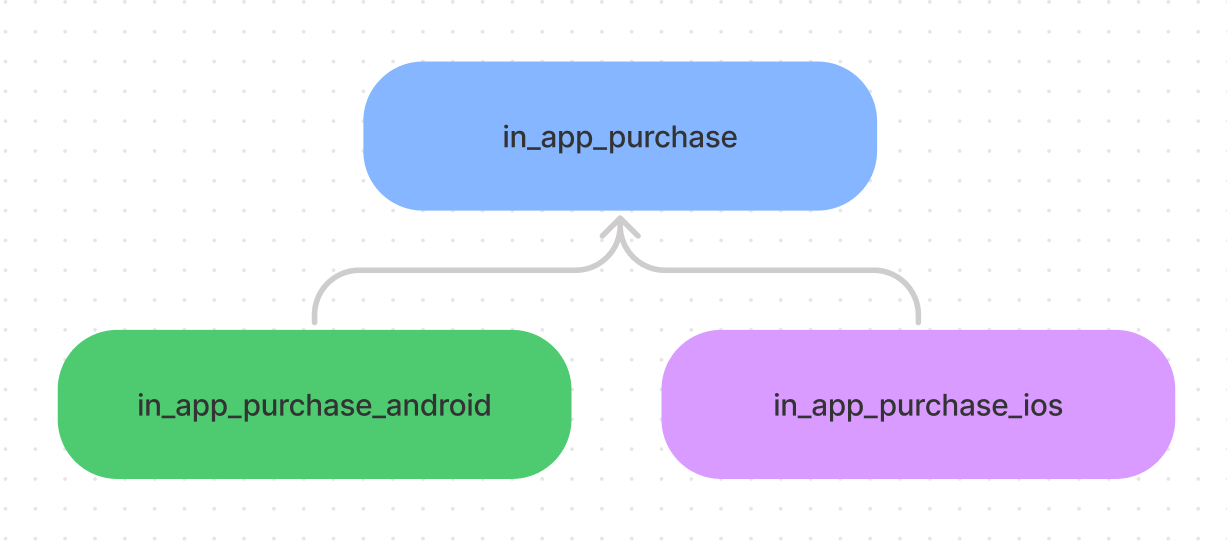
This package is federated. Instead of having all the code for support platforms in a single package, federated plugins split different platforms into separate packages. in_app_purchase specifies a unified API to be used by the Flutter app. This relies on the in_app_purchase_android and in_app_purchase_ios packages, which implement platform-specific code for StoreKit and Google Play Billing and expose Dart endpoints, which can be called directly. Read more on this below.
Getting started
Step by step, we will help you gain an understanding of APIs for a fully functioning in-app store. Firstly, we must enable pending purchases for Android only, as it enables BillingClientWrapper to handle pending purchases, while iOS doesn’t require setup. This can be done by calling enablePendingPurchases from the platform-specific package for Android, in_app_purchase_android.

Since the app initialization in Flutter happens in the main function, that’s where we’ll be calling enablePendingPurchases by first checking if the app is running on Android. We need to import in_app_purchase_android to access Android platform-specific in-app purchase APIs.
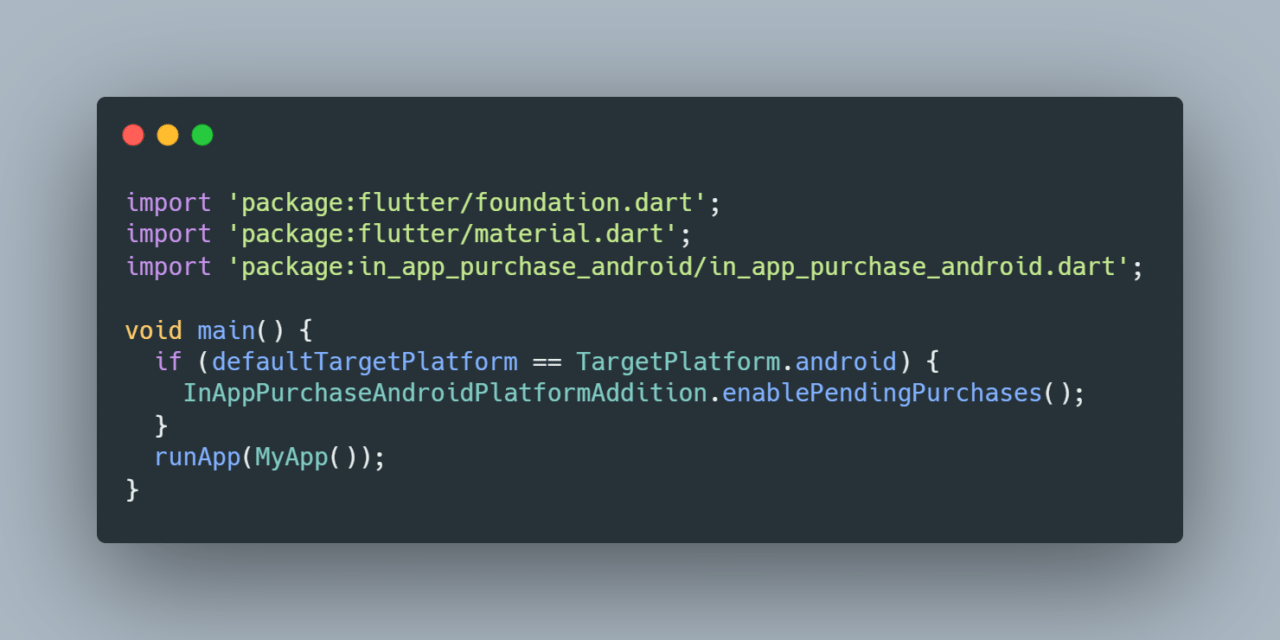
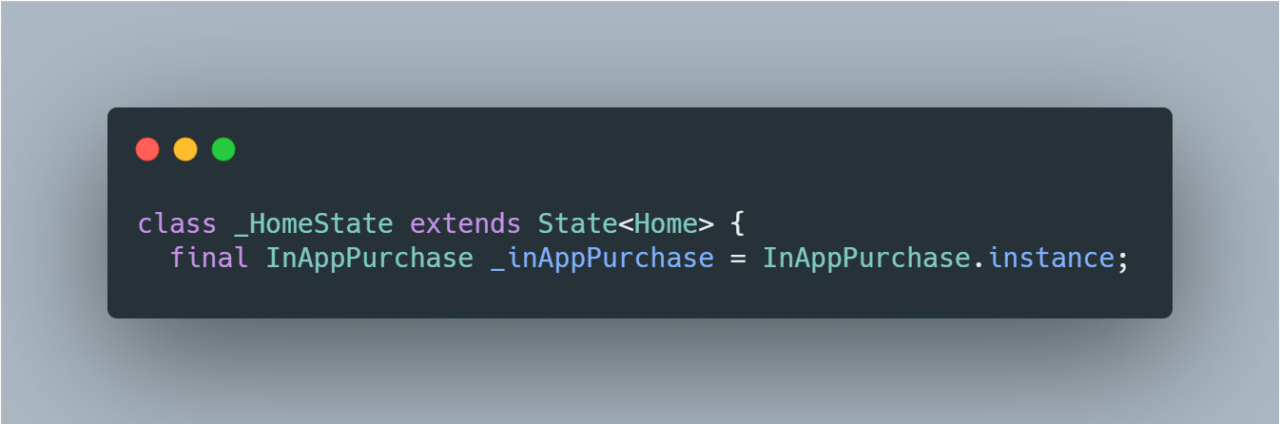
Next up, we need to create an instance of InAppPurchase. We will be invoking a bunch of APIs throughout the app using this instance.
Add the following line in your StatefulWidget class.
As soon as the app launches, we need to get the latest stream of in-app products to show the user loading of the products, list the available products, complete any pending purchases, restore previous purchases and inform the user of any invalid purchases.
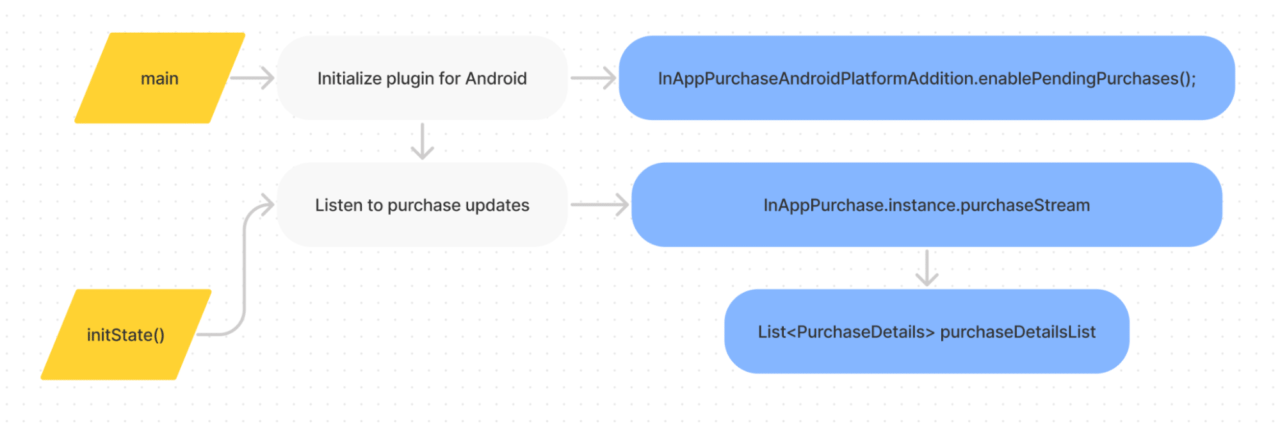
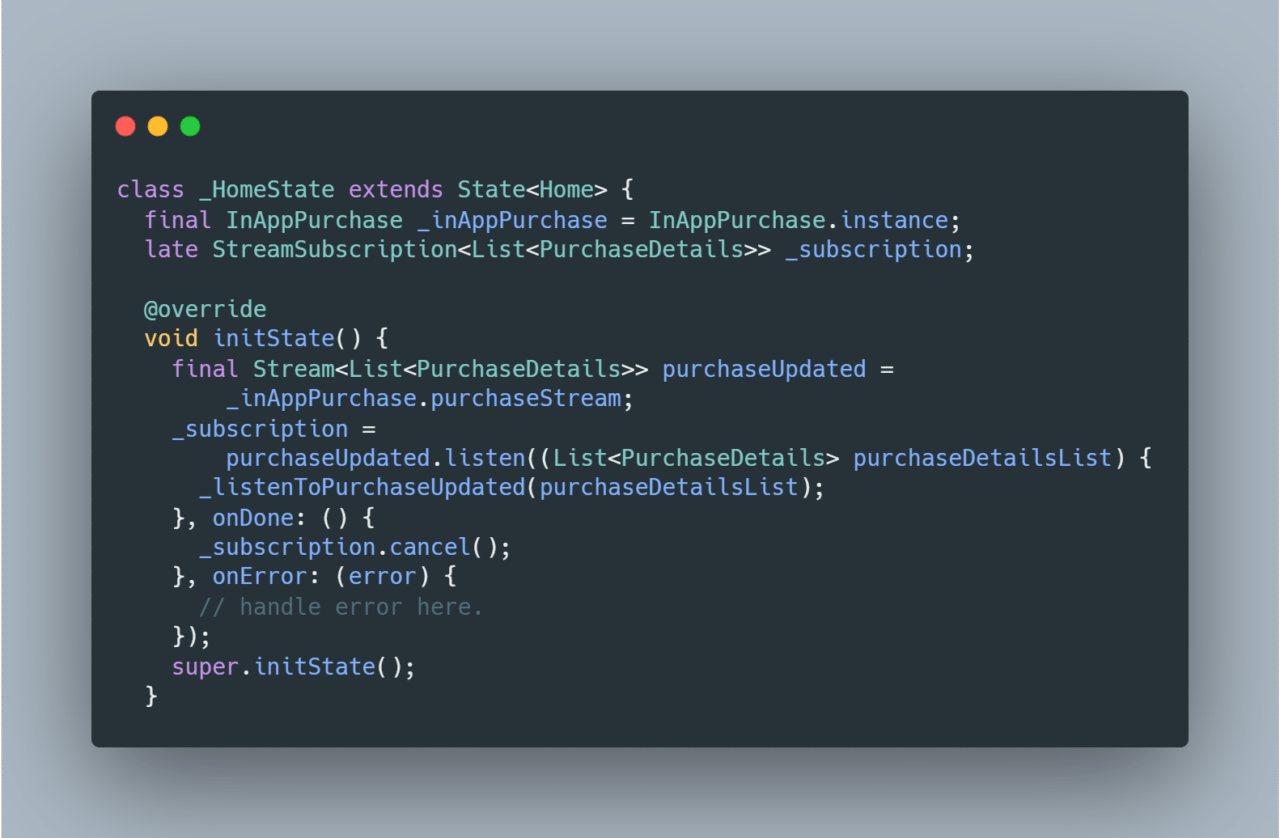
In our simple example, we’re listening to purchase updates in the initState function of a StatefulWidget class. To get real-time updates on the purchases, call _inAppPurchase.purchaseStream, which returns a list of PurchaseDetails. Subscribe to this stream with the StreamSubscription of the same type List<PurchaseDetails>, and add a listener.
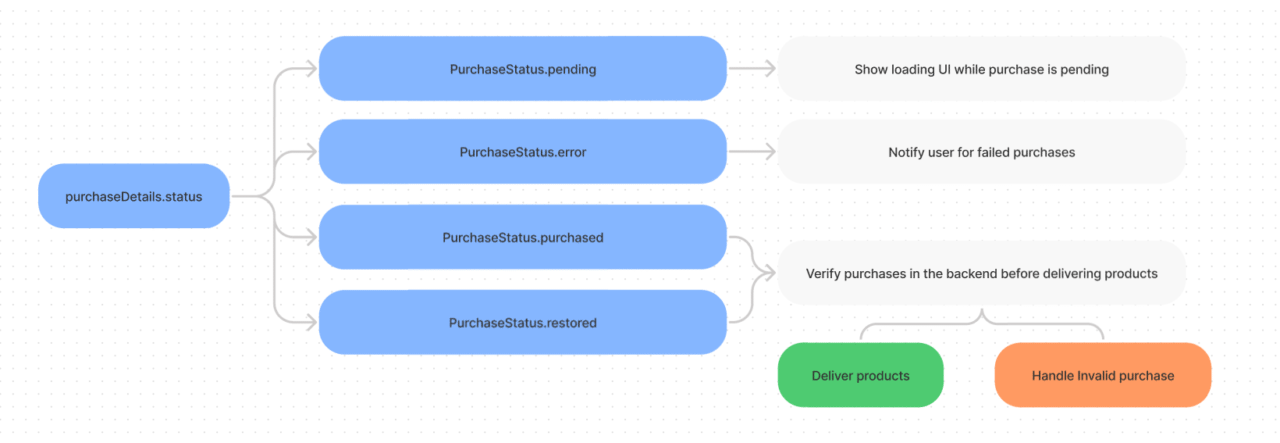
Process the list of ProductDetails under the listener based on purchaseDetails.status. If the status is PurchaseStatus.pending, show a loading UI. Present an error message if the purchase status is PurchaseStatus.error. If the status is PurchaseStatus.purchased or PurchaseStatus.restored, deliver or restore products by verifying previous purchases.
This is an example of how to handle purchaseDetails data in your _listenToPurchaseUpdated(purchaseDetailsList), which is called every time products are purchased or restored.
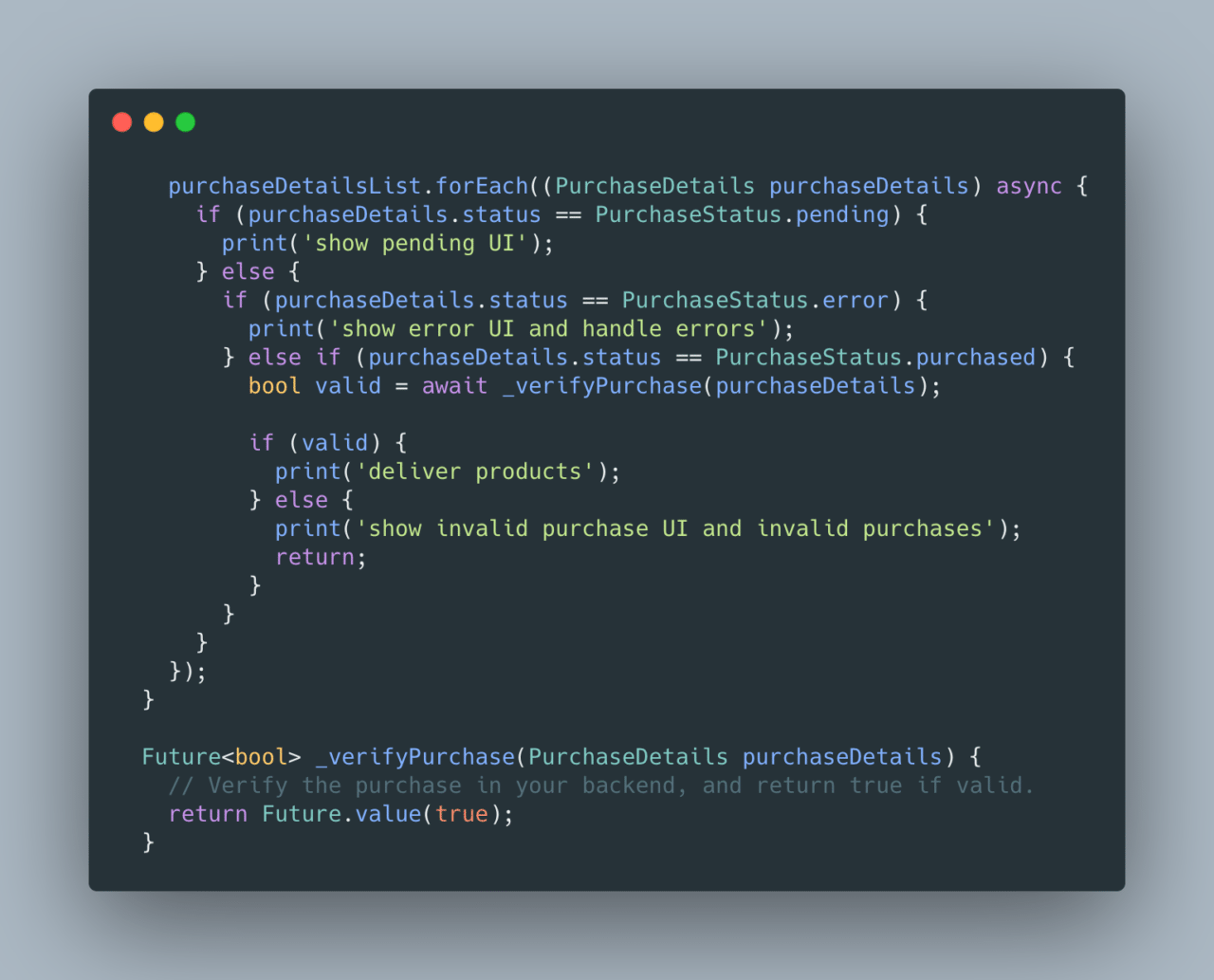
Note: The package doesn’t verify purchases, so you need to implement your backend, record every purchase and handle receipts. Always verify the purchases in the backend before delivering products or restoring purchases. You can refer to the following links:
Connecting to the store and loading in-app products
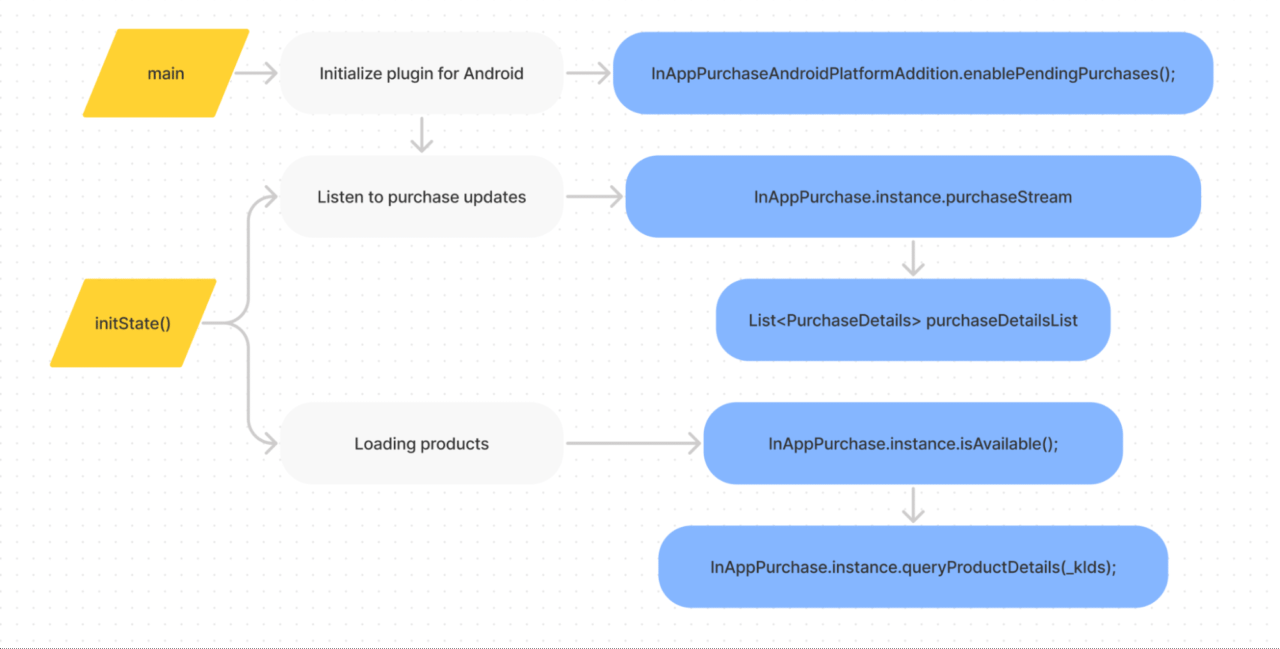
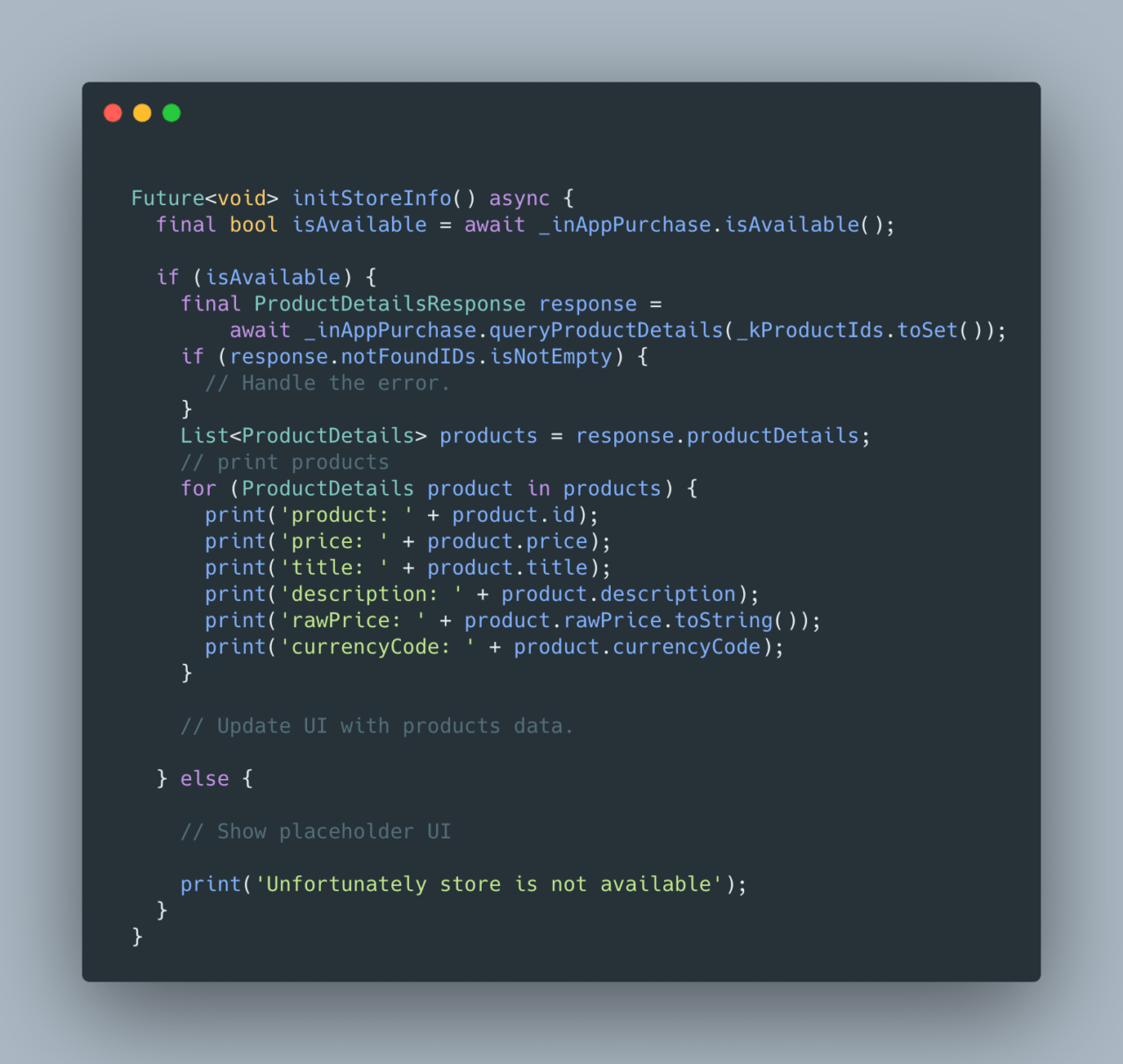
Before attempting to load products, we need to make sure the store (Google Play/App Store) is available to query products, make purchases and verify receipts. Since we need to query products and present them in the UI as soon as the app launches, we need to call InAppPurchase.Instance.isAvailable, which returns a boolean. If it returns a value of true, load the products and update the UI. If the value is false, present a placeholder message or icons for products that are not available.
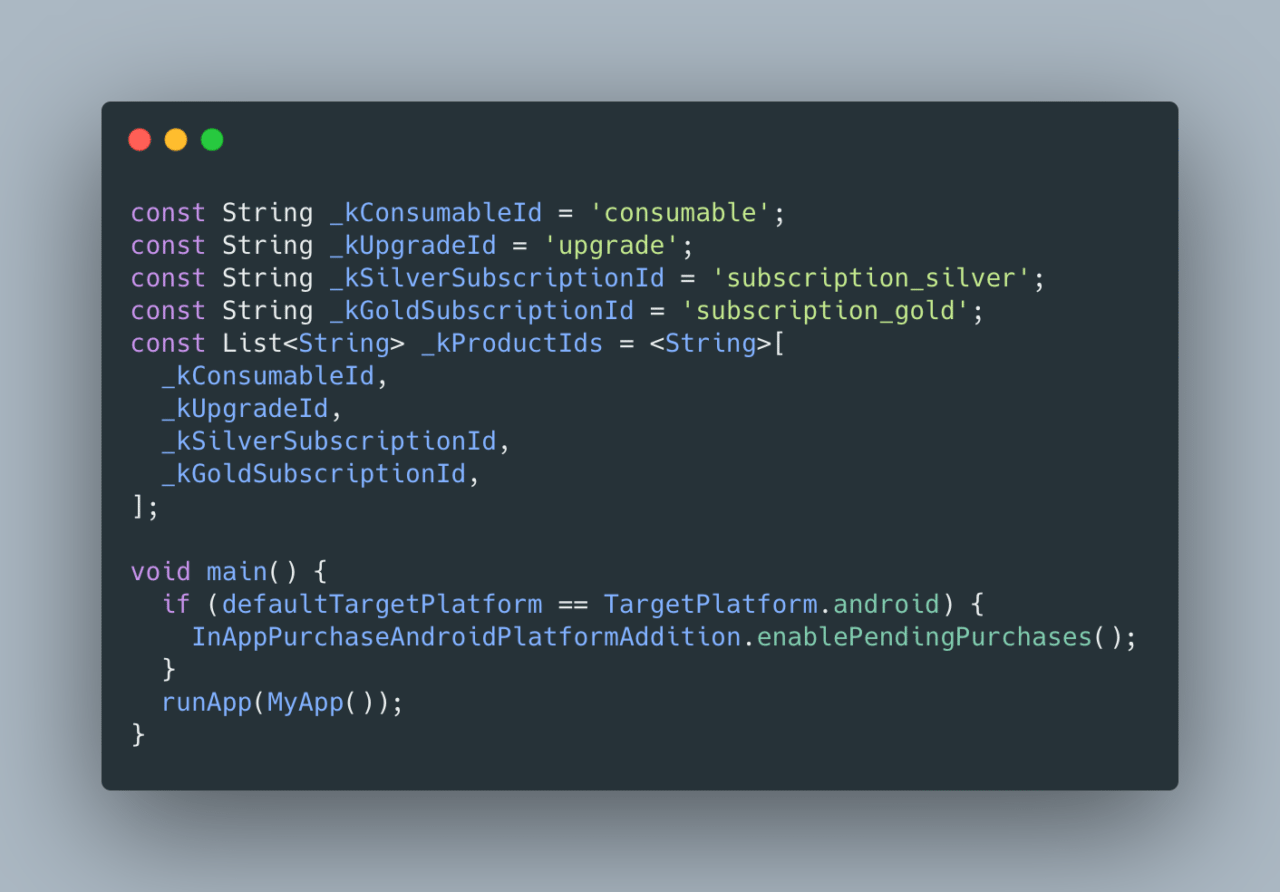
In our example, we first define product IDs as top-level variables and list them before the main function.
Then, in a function inside initState(), we can check the store’s availability. If it is available, load the products by calling _inAppPurchase.queryProductDetails(_kProductIds.toSet()).
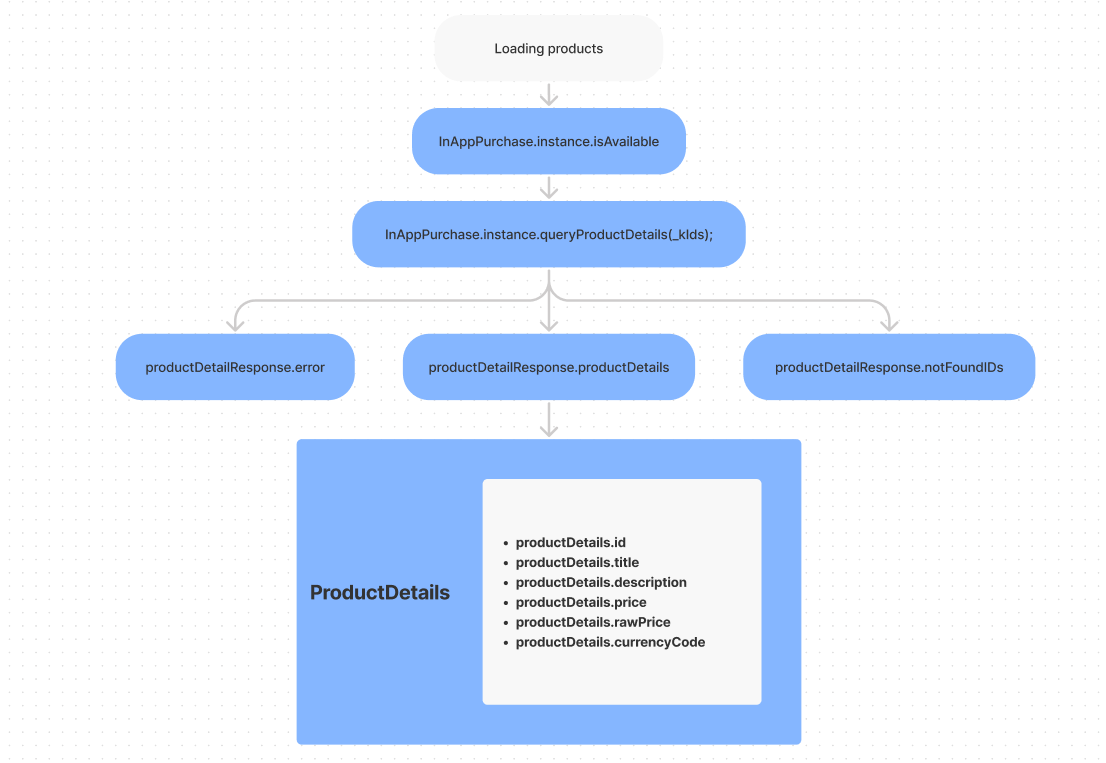
_inAppPurchase.queryProductDetails returns ProductDetailsResponse. This object contains the results of our query. If the product IDs were valid and found to be present in the store, the available products will be found under the ProductDetailsResponse.productDetails list. Product IDs that do not match products in the store will be returned in ProductDetailsResponse.notFoundIDs. ProductDetailsResponse.error contains a non-null value when querying products and results in an error.
Making purchases
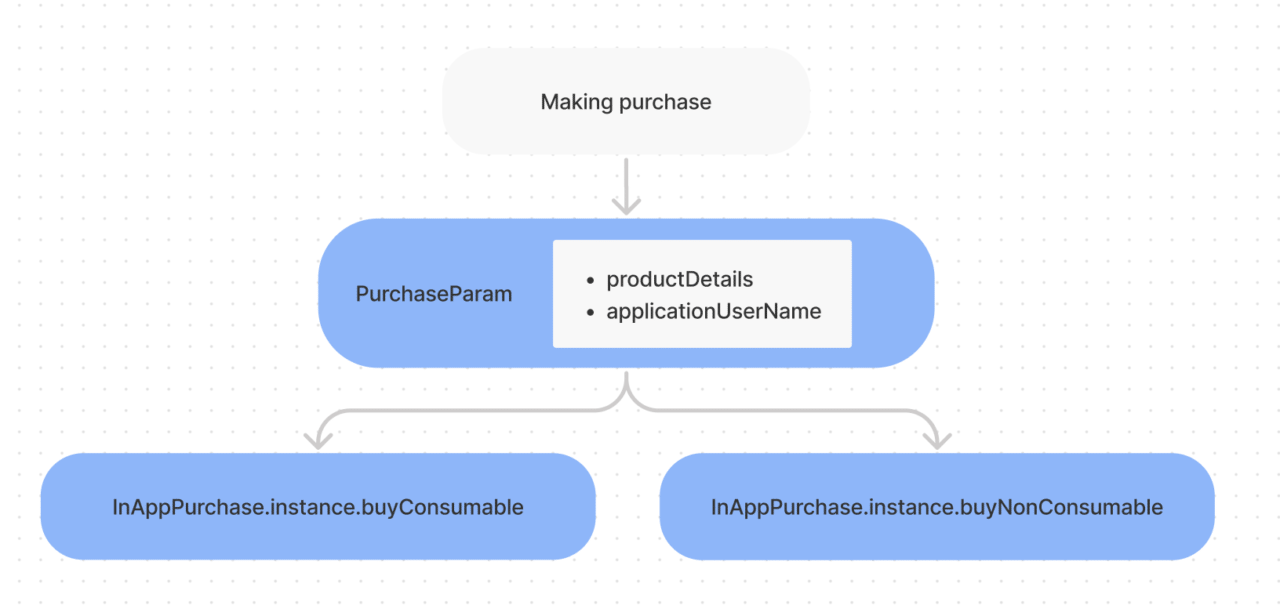
To make a purchase, we need to create a PurchaseParam object, which takes productDetails as a parameter. PurchaseParam is then provided to the buyConsumable or buyNonConsumable method, based on whether a product is a consumable or a subscription.
When the user makes purchases, you need to save these purchases in your app as well as in your backend to verify each purchase and delivery. This can get very complex based on the size of the app, number of products and UI structure. Here, we will only focus on the APIs that will be triggered when you make a purchase.
Whenever the user tries to buy products, InAppPurchase.purchaseStream is updated with the new purchase status of your products. If the purchase is completed (i.e., the user has confirmed the payment using the App Store or Google Play purchase dialog), the purchase status of the product changes to PurchaseStatus.purchased. Here, you need to verify the purchase in your backend, verify receipts and then deliver the products to the user. This means updating the UI with the products that have purchase IDs. If there is a PurchaseStatus.error or PurchaseStatus.invalid, you need to handle those errors, let the user know what went wrong and provide an option to try again.
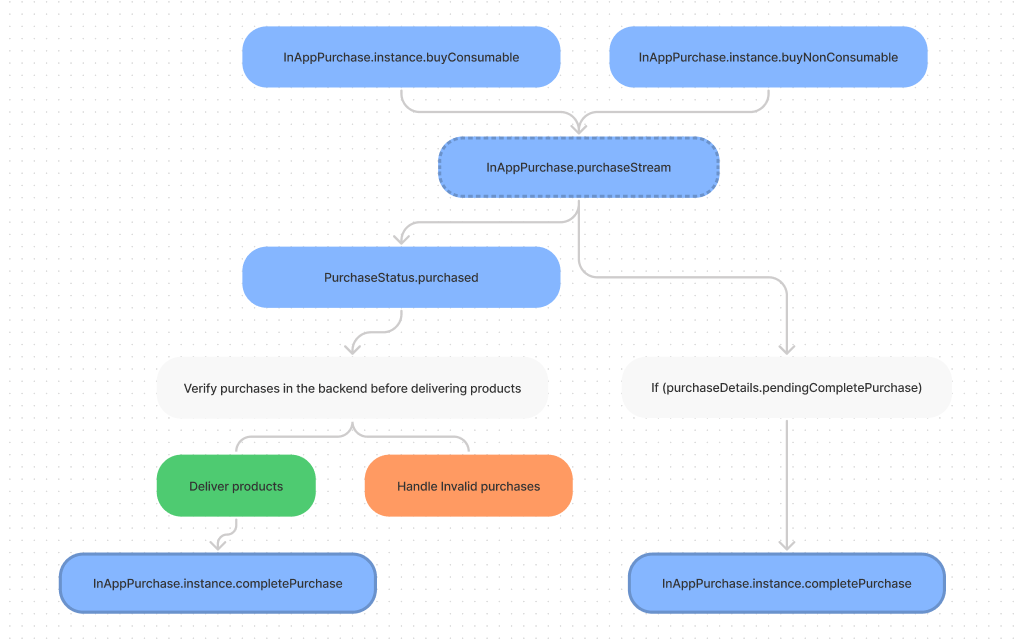
When the purchases are verified and the products are delivered, complete the purchasing process with InAppPurchase.instance.completePurchase. If you still have some products that are delivered but not completed, make sure to call InAppPurchase.instance.completePurchase on these products as soon as the app launches if productDetails.pendingCompletePurchase returns true.
Restoring purchases
If the user has purchased products in the past, developers can allow users to restore previously purchased products by calling InAppPurchase.instance.restorePurchases, which triggers similar events to those that are triggered when making purchases. Whenever restorePurchases is called, InAppPurchase.purchaseStream is updated with the new purchase status of your products. If the product has already been purchased, purchase streams return the items with a PurchaseStatus.restored status. Always verify the products are still valid and haven’t expired or already been consumed. In this case, we don’t call completePurchase since the products have already been purchased.
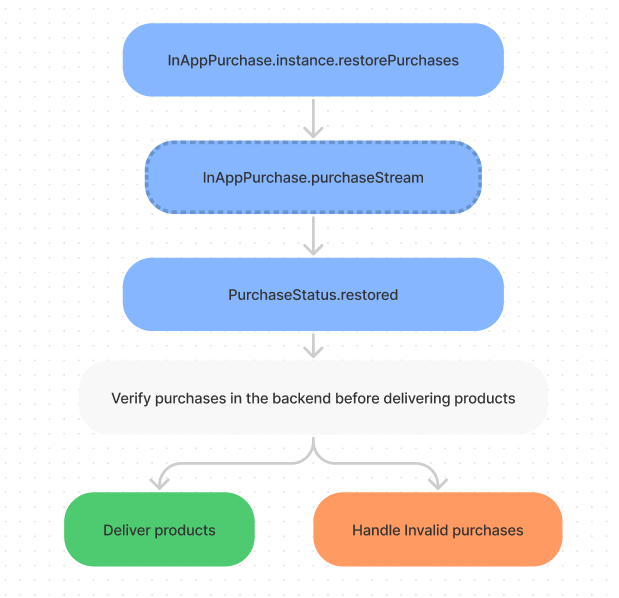
Note: The iOS App Store doesn’t support querying consumables, and Google Play doesn’t return consumables marked as consumed. It is best to verify the purchases in your database and then deliver the products or let the user know if the purchase needs to be completed
Platform-specific in_app_purchase APIs
While there are similarities between the two stores (App Store and Google Play), there are also some differences. For better control over platform-specific properties, we can directly use platform packages, which are also used by in_app_purchase itself.
For instance, to upgrade or downgrade an existing subscription on Google Play, you need to add import 'package:in_app_purchase_android/in_app_purchase_android.dart', create a PurchaseParam, assign GooglePlayPurchaseParam, provide a ChangeSubscriptionParam object to the changeSubscriptionParam property and provide prorationMode. Finally, call InAppPurchase.instance.buyNonConsumable with a new purchaseParam to update the subscription.
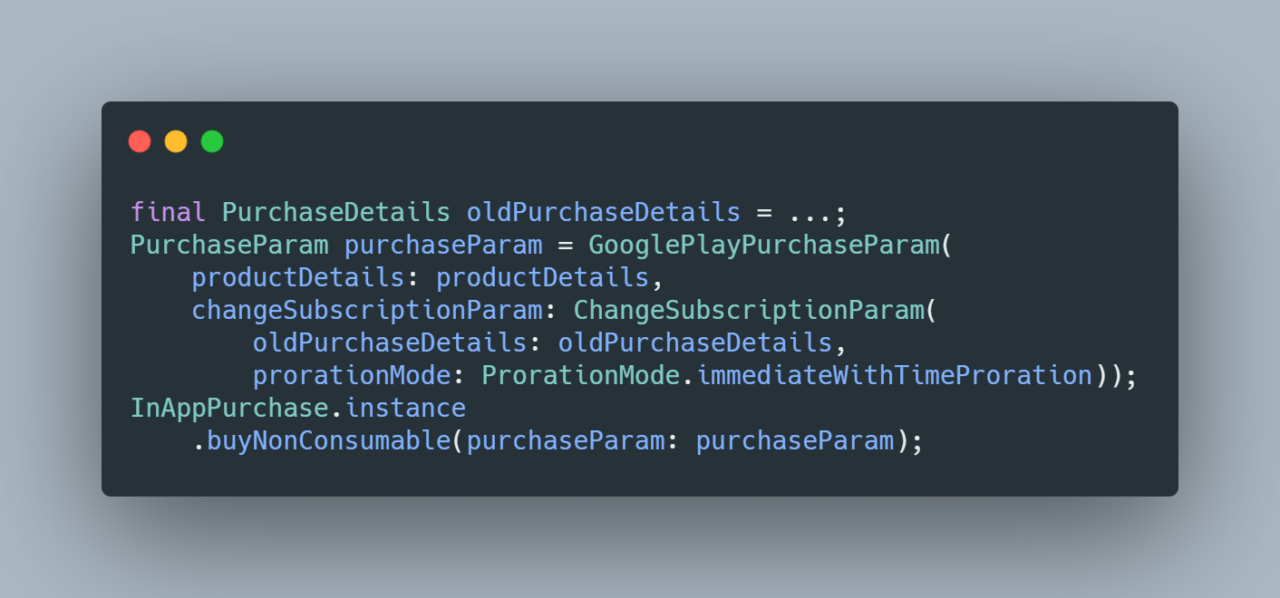
Note: When you have different tiers of subscriptions, you should compare the user’s previously purchased subscription with subscription tiers in your logic, and only then proceed with the above process. iOS’s App Store doesn’t require this since the App Store handles this itself using subscription groups.
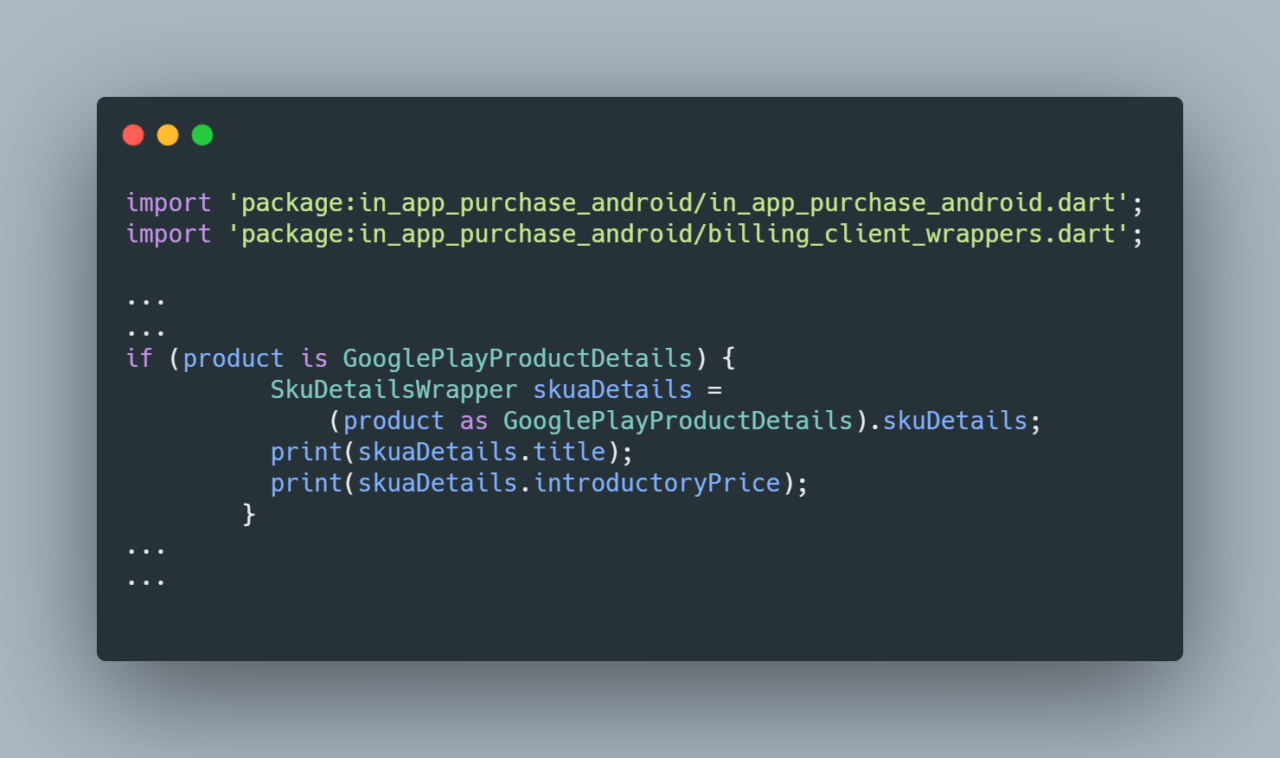
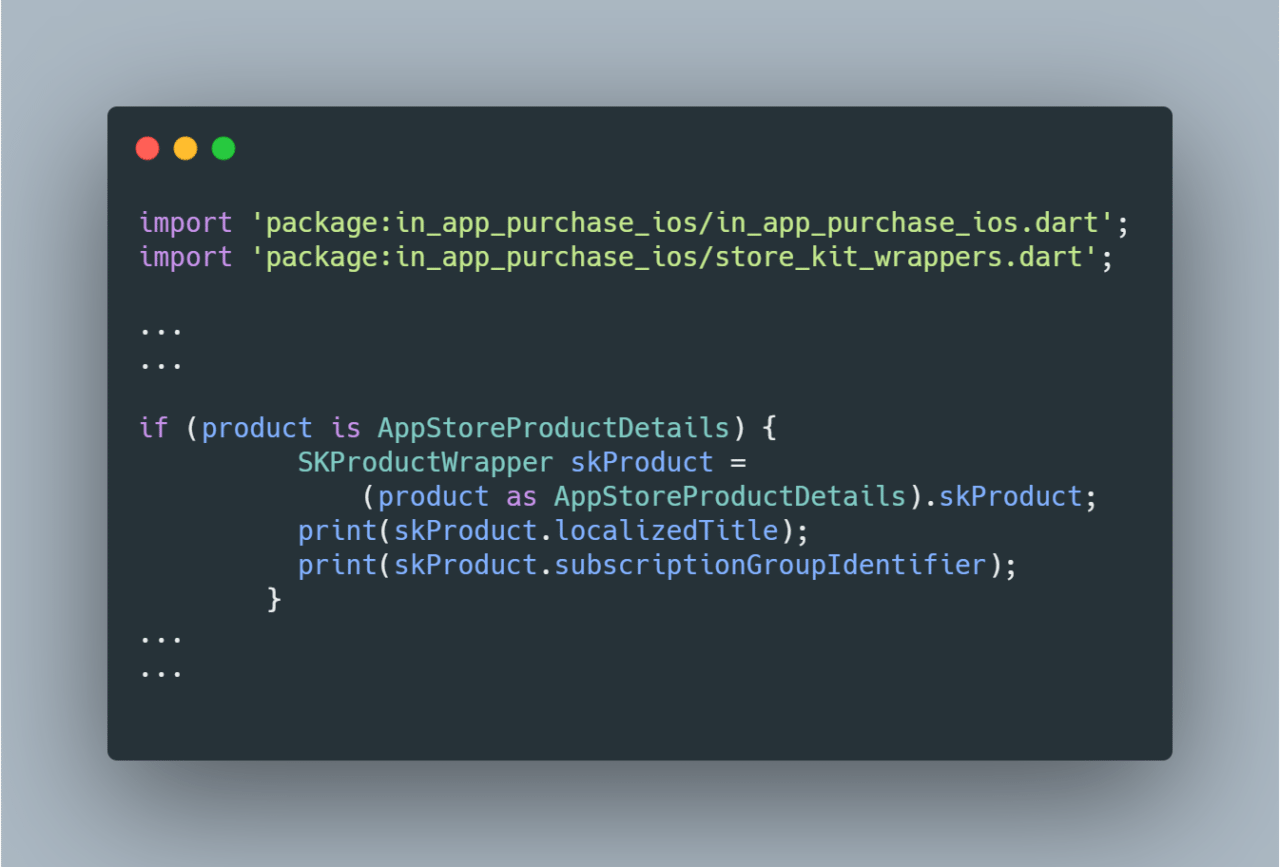
Sometimes you need to load products with all the store-specific properties from a platform (which are not returned when using common in_app_purchase API). To do this, you need to query products of a particular type using a platform package API. We already know that when querying products, ProductsDetailsResponse returns a list of ProductDetails (which is a subtype of GooglePlayProductDetails) when querying on Android and AppStoreProductsProductDetails on iOS. When querying on Android, to access platform product objects, you need to retrieve a Dart wrapper for skuDetails from GooglePlayProductDetails and skProduct from AppStoreProductsProductDetails. Similarly, retrieve the platform-specific purchase property billingClientPurchase when running on Android and skPaymentTransactionwhen running on iOS.
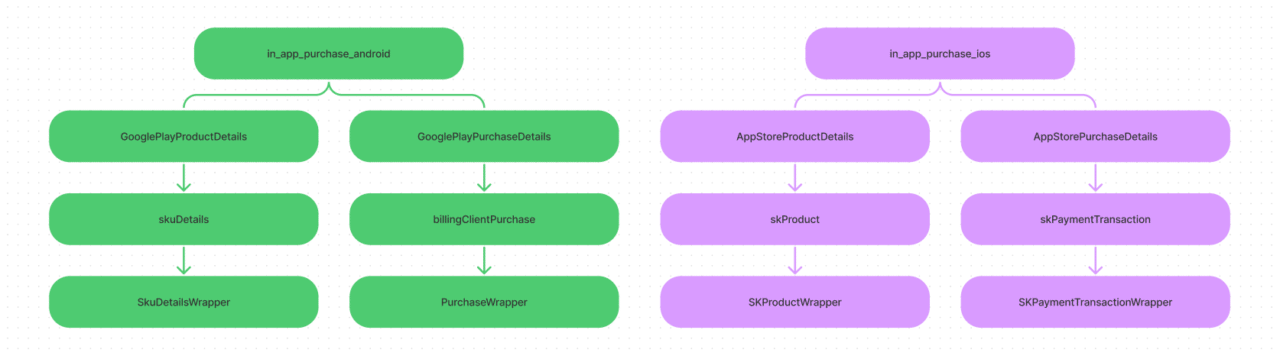
Make sure to import platform packages and wrapper classes for each platform.
in_app_purchase API example for Android
in_app_purchase API example for iOS
Conclusion
We hope this helps you to understand the complex structure of the APIs in in_app_purchase. To make the most of this package, we highly recommend that you try the Google Codelab for Flutter in-app purchases. Take some time to try these APIs yourself in your app, and read the documentation of the APIs for more details.
Taha Tesser loves testing Flutter on various platforms. His day job involves triaging Flutter issues filed on Flutter GitHub repository. He does contribution for Flutter repositories such as for Flutter tools, website, plugins. Currently he is learning C++ and Objective-C in his free time and watches MCU movies.


Discussion about this post