










Since watchOS 9 was announced at WWDC 2022, I have been excited to try it on my wrist. The new fitness tracking features seemed to be the upgrade the Apple Watch was missing for fitness fans, while some minor tweaks to the UI of the device gave us all some overdue quality-of-life improvements to Apple’s wearable. Of course, I wore my Apple Watch through the entire beta period, but now watchOS 9 is officially released.
In the wonderful words of the incredibly talented Lizzo, “it’s about damn time.”
This is the upgrade to the Apple Watch I’ve been dreaming about for the past few years. Everything from Custom Workouts to a surprise addition of the Low Power Mode right before the release of the software, watchOS 9has made me love the Apple Watch again. But more importantly, watchOS 9 has made my Apple Watch feel like my Apple Watch.
Custom workouts offer a ton of flexibility for your workouts
I said earlier that watchOS 9 pushes the Apple Watch into the conversation of top-tier fitness trackers (opens in new tab), and I realize that may seem confusing to people. Surely, the Apple Watch is already a top-tier fitness tracker, right? Well, talk to really hardcore fitness enthusiasts and athletes. You’ll see that the Apple Watch — yes, even the powerful Apple Watch Series 8 (opens in new tab)— has traditionally fallen short of its use cases on many occasions. The good news is that watchOS 9 tries its hardest to address this. The addition of Custom Workouts is probably the greatest example of this.
Before watchOS 9, you and your best Apple Watch were at the mercy of the workouts Apple included on its’ Apple Watch. Granted, there are many different types of activities in the Workout app, and you could change the goals of your workouts to be more focused on what you are trying to achieve, but it never gave you any real flexibility in how you work out. Custom Workouts is changing all that.

You can create a Custom Workout for any workout type in the Workout app. Inside a Custom Workout, you can have multiple intervals for work and recovery periods, which means you can easily set up sets. For example, say you want to go for a run, but you’re doing interval training because you suck at running like me; you can create a Custom Run Workout that will allow you to set up a two-minute work period and a 45-second recovery period. Or, you can set it so that you run for 1km and then rest for half a kilometer. Plus, you can put that to repeat if you want. So, if you’re going to run 5km, repeat that five times and boom, you have a Custom Outdoor Run Workout that you can use anytime you want. You can even put a warm-up and cooldown into a custom workout, meaning you don’t need to jump out of the training you’re in to start a separate cooldown.
That’s just one example. Every workout type can utilize Custom Workouts, and you can even have more than one for each workout, meaning you now have a ton more flexibility to work out how you want, when you want.
I’ve been loving using Custom Workouts at the gym, at home, or working out outdoors. It’s one of those features that you need to get your hands on to understand just how beneficial it will be to your workout routine, but once you figure that out, you’ll wonder how you ever used your Apple Watch without custom workouts.
Get in the zone — the heart rate zone

People often talk about “getting in the zone” during a workout, but some people mean that quite literally. Heart rate zones have long been used to help people train and illustrate improvements in their overall fitness level. If you’re running a marathon, you can’t be in your max heart rate zone the whole time; you’ll burn out before you finish the race. Instead, you likely want to be in a moderate heart rate zone for most of the time, trying to maintain a comfortable pace for most of the race.
Many sports, like hockey (sorry, I’m Canadian), rely on short bursts of intense activity. So, for example, when a hockey player skates off the bench to take their shift, they will likely be in or near the maximum target rate for the 45-90 seconds they are on the ice. So, when they train, they need to train for those short bursts of energy, meaning they need to know when they’re hitting those heart rate zones.
In watchOS 9, you can set any type of workout to show your heart rate zones directly on your Apple Watch (opens in new tab). So, if you’re out for a run, you’ll be able to check your watch and see what heart rate zone you’re in. It’s a pretty handy metric, and it’s even customizable.

Your Apple Watch will default use the data it already has to calculate your heart rate zones and label them one through five, one being the lowest. This is super awesome for anyone who doesn’t want to take the time to calculate their absolute perfect heart rate zones (as it varies from person to person). Still, if you want more control, you can manually set them to any value you want.
I’ve loved using Custom Workouts for everything — even just a walk.
So how do you see heart rate zones during a workout? Well, it’s part of something new that Apple calls Workout Views. When you customize training in watchOS 9, whether a pre-set workout or a Custom Workout you’ve created, you can select which Workout Views are available for you to see during a particular activity. So, once you’ve enabled the heart rate zone Workout View for your Custom Outdoor Run Workout (as an example), you can swipe up or down during the workout to see the different views you have enabled.
In my experience, Workout Views are super helpful on the smaller Apple Watch models because it makes you feel like you have access to so many metrics even though you may only see four on the screen at a time. Not that a 45mm Apple Watch Series 8 won’t be able to use the feature, there’s just something that felt so novel about swiping through the different Workout Views during my morning walks on my 40mm Apple Watch SE.
Of course, you can have multiple views enabled, and this is where Apple has placed Elevation and Power Views, so you can keep an eye on how you’ve climbed during your run and your running power. These are important metrics for serious runners — and watchOS 9 will help you track so much more.
Sleep stages

Two years after the Sleep app was brought onto the Apple Watch, it’s finally got an update many people have been clamoring for: the ability to track Sleep Stages. In the Health app, you can now see how long you’ve been in four different Sleep Stages: Awake, REM, Core, and Deep.

You can see all the data graphed for you and even highlight the specific Sleep Stages to get a better look. While it’s not amongst the most in-depth sleep trackers, it’s the sleep-tracking feature I’ve been the most excited to get on the Apple Watch. As you can see by the sample in the screenshot above, I struggle to sleep and often don’t get a ton each night, and I have found it quite helpful to go back through my sleep data each night and see what sleep stages I managed to be in and for how long. Usually, that data will help me understand why I’m more tired one day and less.
It’s not a perfect feature by any means, and I’m hopeful that Apple will continue to improve on it in the future, but if you’re at all interested in some data on your restless or restful night, watchOS 9 will give you a hand with that.
Take the battery to the next level with Low Power Mode
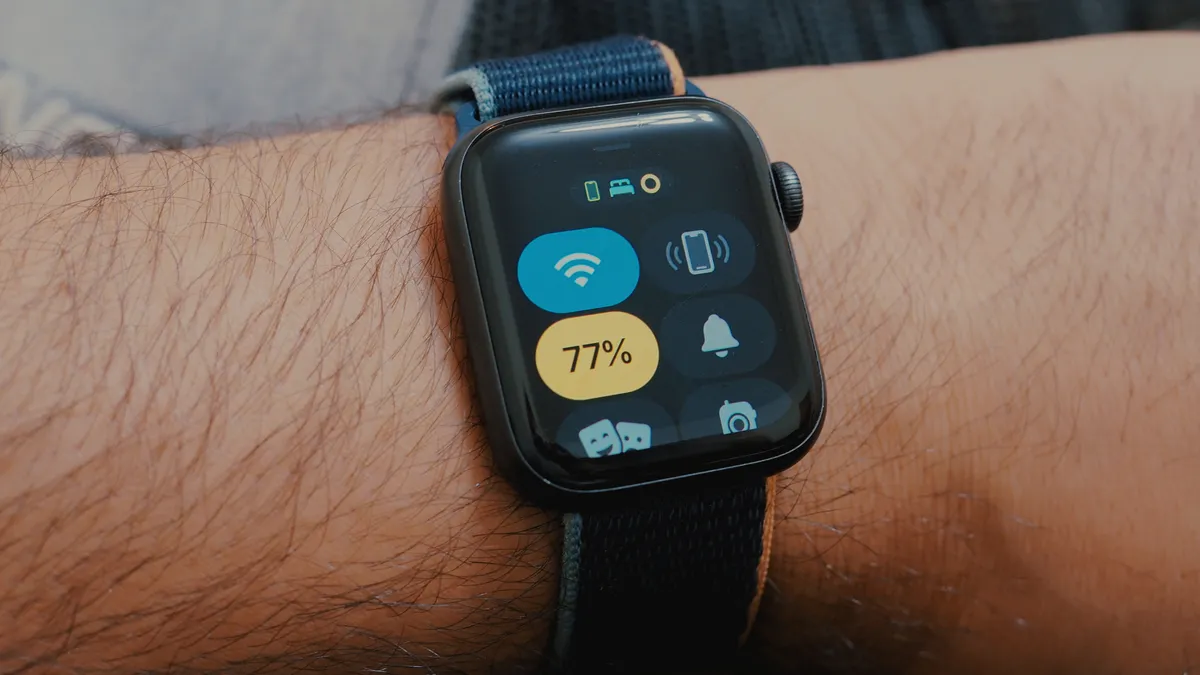
While many people were expecting a Low Power Mode on the new Apple Watch Ultra (opens in new tab) and Apple Watch Series 8, I was surprised when Apple announced they would roll out the feature to all watches compatible with watchOS 9.
I’ve been calling for Apple to give more battery life to the Apple Watch in any way it can for a couple of years. The 18 hours that most Apple Watch models typically get can be slightly frustrating, especially when you’re away for a weekend or know you’re going to be without a power outlet for the day.
Low Power Mode is an absolute game changer
I’ve been testing out Low Power Mode since I got my hands on it, and overall it will give you significantly more power-on time than you’re used to. Apple has said it can double the battery life up to 36 hours, and in my testing, I would say that’s pretty accurate if you don’t track a bunch of workouts during that time.
I first tried it on my Apple Watch SE (first-gen), which did very little. I used the timer a few times for cooking and laundry, activated Siri several times for messaging, tracked one 30-minute outdoor walk, and used sleep tracking for one night. All that netted me about 36-37 hours of battery life. I also tested it on my Apple Watch Series7, but I used my watch a bit more heavily, tracking multiple workouts and even playing some music, and I still got to about 32-33 hours. So, in practice, I say that Low Power Mode is a huge success. It gives you much more time to do more things between charging, but it has some serious trade-offs, as you might expect.
When you use Low Power Mode on your Apple Watch (opens in new tab), it turns off the Always-On display, turns off heart rate monitoring in the background (meaning you have to use an app to get your heart rate reading), and can overall make the Apple Watch responds a tad slower to Siri requests. It also shuts off more stuff if you’re away from your iPhone. So, at the end of the day, Low Power Mode is not likely something you will want to use all the time, but rather when you know you need it.
It’s not a substitute for a bigger battery, but watchOS 9 does its absolute best to give you more time, even if sacrificing some of its functionality. Is that trade-off worth it? I think it’s worth having the option, and many people will like not having to run to an outlet as often.
Track your Medications

This is definitely one of those Apple Watch features that isn’t for everyone, and that’s okay. Over the years, Apple has made it clear that not every feature has to be for every user; everyone uses their devices differently.
That being said, if you take multiple medications and you worry about taking them correctly or on time, the Medications app is a handy tool.
Setting up medication in the Health app on the iPhone is simple enough, and once you set up one or more drugs, you can quickly view your schedule on your Apple Watch at a moment’s notice. You can even log in when you’ve taken a medication with just a tap.
New watch faces and small UI improvements

Of course, the Apple Watch wouldn’t be an Apple Watch without a plethora of Apple Watch faces. Apple has a habit of releasing new watch faces with every major software release, and watchOS 9 is no exception.
Honestly, when you get watchOS 9, I’d highly encourage you to check out all the new and redesigned watch faces because beauty truly is in the eye of the beholder. Maybe you’ll love the newly redesigned Astronomy watch face, which shows the earth front and center and even peaks in front of the time, much like the new iOS 16 (opens in new tab) Lock Screens. Or maybe the Lunar watch face, which depicts the relation between our regular calendar (Gregorian calendar) and the lunar calendar, will tickle your fancy. Playtime is a wacky and interactive art watch face created in collaboration with Chicago-based illustrator and artist Joi Fulton; perfect for any time you’re feeling a little zany. And, of course, the new Metropolitan watch face is as classy as can be. Plus, there’s even an update to some older Apple Watch faces, like the gradient backgrounds you can add to the popular Modular watch face. You can even get the Nike watch faces that used to be exclusive to the Nike models on any model of Apple Watch now.
The main takeaway is more watch faces mean more personality you can eject into watchOS 9.

On top of some new watch faces, watchOS 9 has minor UI improvements that will make the Apple Watch experience a tad smoother than it already feels. When actively using an app, notifications will be smaller and relegated to just a small banner at the top of your screen. You can tap it to enlarge it and see the entire notification, but it’s fantastic that an incoming message doesn’t just take over your screen. Plus, the Dock is much more intuitive because it promotes the apps you have most recently used over all the other apps in the Dock. This makes it much easier to switch between apps when you want.
The future of Apple Watch is bright
This year, Apple has shown us what the Apple Watch can do. Whether its making a super rugged version like the Apple Watch Ultra or the significant updates in watchOS 9, the future of the wearable has never been brighter. Especially since watchOS 9 offers so many improvements to older devices.
The newest software proves that Apple is committed to giving us more. More fitness tracking, more sleep tracking, more watch faces, more customization, more battery life, and more of everything that makes the Apple Watch so delightful to slap on your wrist.
This is a worthy update for any Apple Watch that can install it — Series 4 or later —and it really breathes new life into the wearable, unlike we’ve seen in the past couple of years.










Discussion about this post