

Learn how to integrate APIs, fetch data from a public API, and use it in your Flutter app. Our guest writer Abhishek Doshi wrote a great guide about working with REST APIs when you’re using Flutter.
Data, data, and data. Everything we see in today’s world is just data. So how can we get data into our app? How can we integrate APIs into our app? Let’s find out!
There are a lot of ways we show data in our app, such as:
The most common method is to show data from a database or public APIs. Even loading data from a database involves using APIs, though these can be private. So, let’s see how you can integrate APIs, fetch data from a public API, and use it in your Flutter app!
How do APIs Work?
A user application can make GET, POST, PUT, or DELETE HTTP requests to a database. In return, the database sends us data, results, or responses in the form of JSON, HTML, or XML (with the JSON format being the most widely used). We then parse the JSON into a proper model class and use it in our app.
Integrating an API into a Flutter app
There are a few steps that we can follow to easily integrate an API into our Flutter app:
Step 1: Get the API URL and endpoints.
Step 2: Add relevant packages into the app (http, dio, chopper, etc.).
Step 3: Create a constant file that stores URLs and endpoints.
Step 4: Create a model class to parse the JSON.
Step 5: Create a file that handles the API call, and write specific methods to fetch and parse data.
Step 6: Use the data in your app.
In this article, we will use an example to learn how to integrate an API into a Flutter app. We will use the JSONPlaceholder API, which provides fake APIs, so that we can practice.
So, let’s get to work!
Step 1: Get the API URL and endpoints
To get the API URL (referred to as the base URL) and endpoints, go to the JSONPlaceholder website. There, you will find the different APIs that they provide. Today, we’re going to use their users API. Hence, the base URL and API endpoint will be:
Base URL: https://jsonplaceholder.typicode.com
API endpoint: /users
The base URL for all APIs from a given database or API provider always remains the same; however, the endpoint changes depending on the API. Many API providers require you to obtain a private key (API key or access key), either by simply creating an account or by purchasing a key. The API key will be appended to the base URL. So, the new base URL will be:
New base URL = BaseUrl/apiKey
Example: https://jsonplaceholder.typicode.com/abcdefghijklmnopqrxyz
Step 2: Add relevant packages into the app (http, dio, chopper, etc.)
There are many packages available on pub.dev that we can use to integrate APIs in Flutter. The most widely used packages are:
There are many more packages, though http is the most basic and easy to use. The other packages mostly act as wrappers for the http package and provide additional functionalities.
Now, once you have created a new Flutter project, go to the pubspec.yaml file, and add the http package into it. Your pubspec.yaml file should look something like the following:
name: rest_api_example
description: A new Flutter project.
publish_to: 'none' # Remove this line if you wish to publish to pub.dev
version: 1.0.0+1

environment:
  sdk: ">=2.15.1 <3.0.0"

dependencies:
  cupertino_icons: ^1.0.2
  flutter:
    sdk: flutter
  http: ^0.13.4

dev_dependencies:
  flutter_lints: ^1.0.0
  flutter_test:
    sdk: flutter

flutter:
  uses-material-design: true
Step 3: Create a constant file that stores URLs and endpoints
Now, it’s time to create a simple file named constants.dart that will hold all your URLs and endpoints. In our case, we only have one endpoint, but it’s a good practice to have a separate file. Your constants.dart file will look something like the following:
class ApiConstants {
  static String baseUrl="https://jsonplaceholder.typicode.com";
  static String usersEndpoint="/users";
}
Here, we have created a class called ApiConstants and two static variables so that we can access them without creating an instance of the class like ApiConstants.baseUrl.
Step 4: Create a model class to parse the JSON
One way to access the data is by using the key directly. However, it’s an effective and easy approach to create a model class, parse the JSON, and get an object out of that JSON response.
Use this to access the data directly:
final data = json[0]['id'];
Here, we try to access the ID of the 0th record of the JSON response. This is only easy to do when you have limited records and entries.
Now, to create a model class, you will first need the entire JSON response you are getting from the API. To get that, just go to https://jsonplaceholder.typicode.com/users, and you will be able to obtain the entire JSON response, as this is a public API. In the case of a private API or custom back-end APIs, either it will be available in the documentation, or you can use Postman to hit the API and get the response.
Once you have the response, you can create the model class using a simple method. Go to https://app.quicktype.io and paste the JSON response on the left side. In the options on the right side, select Dart, and your model class will be generated! You can then change the name of the class.
Your model class file will look something like here.
Step 5: Create a file that handles the API call, and write specific methods to fetch and parse data
Now, create a file called api_service.dart that will handle the API calls.
import 'dart:developer';

import 'package:http/http.dart' as http;
import 'package:rest_api_example/constants.dart';
import 'package:rest_api_example/model/user_model.dart';

class ApiService {
  Future<List<UserModel>?> getUsers() async {
    try {
      var url = Uri.parse(ApiConstants.baseUrl + ApiConstants.usersEndpoint);
      var response = await http.get(url);
      if (response.statusCode == 200) {
        List<UserModel> _model = userModelFromJson(response.body);
        return _model;
      }
    } catch (e) {
      log(e.toString());
    }
  }
}
In the above file, we create a function called getUsers that returns a ListuserModelFromJson, which is available in the model class that we created, and then return the model object.
Step 6: Use the data in your app
We have created all the required files and methods for the API, which we can call from our app’s back end. Now it’s time to load this data on our UI. We don’t have to do much, just make a method call and load that result onto the UI.
import 'package:flutter/material.dart';
import 'package:rest_api_example/model/user_model.dart';
import 'package:rest_api_example/services/api_service.dart';

class Home extends StatefulWidget {
  const Home({Key? key}) : super(key: key);

  @override
  _HomeState createState() => _HomeState();
}

class _HomeState extends State<Home> {
  late List<UserModel>? _userModel = [];
  @override
  void initState() {
    super.initState();
    _getData();
  }

  void _getData() async {
    _userModel = (await ApiService().getUsers())!;
    Future.delayed(const Duration(seconds: 1)).then((value) => setState(() {}));
  }

  @override
  Widget build(BuildContext context) {
    return Scaffold(
      appBar: AppBar(
        title: const Text('REST API Example'),
      ),
      body: _userModel == null || _userModel!.isEmpty
          ? const Center(
              child: CircularProgressIndicator(),
            )
          : ListView.builder(
              itemCount: _userModel!.length,
              itemBuilder: (context, index) {
                return Card(
                  child: Column(
                    children: [
                      Row(
                        mainAxisAlignment: MainAxisAlignment.spaceEvenly,
                        children: [
                          Text(_userModel![index].id.toString()),
                          Text(_userModel![index].username),
                        ],
                      ),
                      const SizedBox(
                        height: 20.0,
                      ),
                      Row(
                        mainAxisAlignment: MainAxisAlignment.spaceEvenly,
                        children: [
                          Text(_userModel![index].email),
                          Text(_userModel![index].website),
                        ],
                      ),
                    ],
                  ),
                );
              },
            ),
    );
  }
}
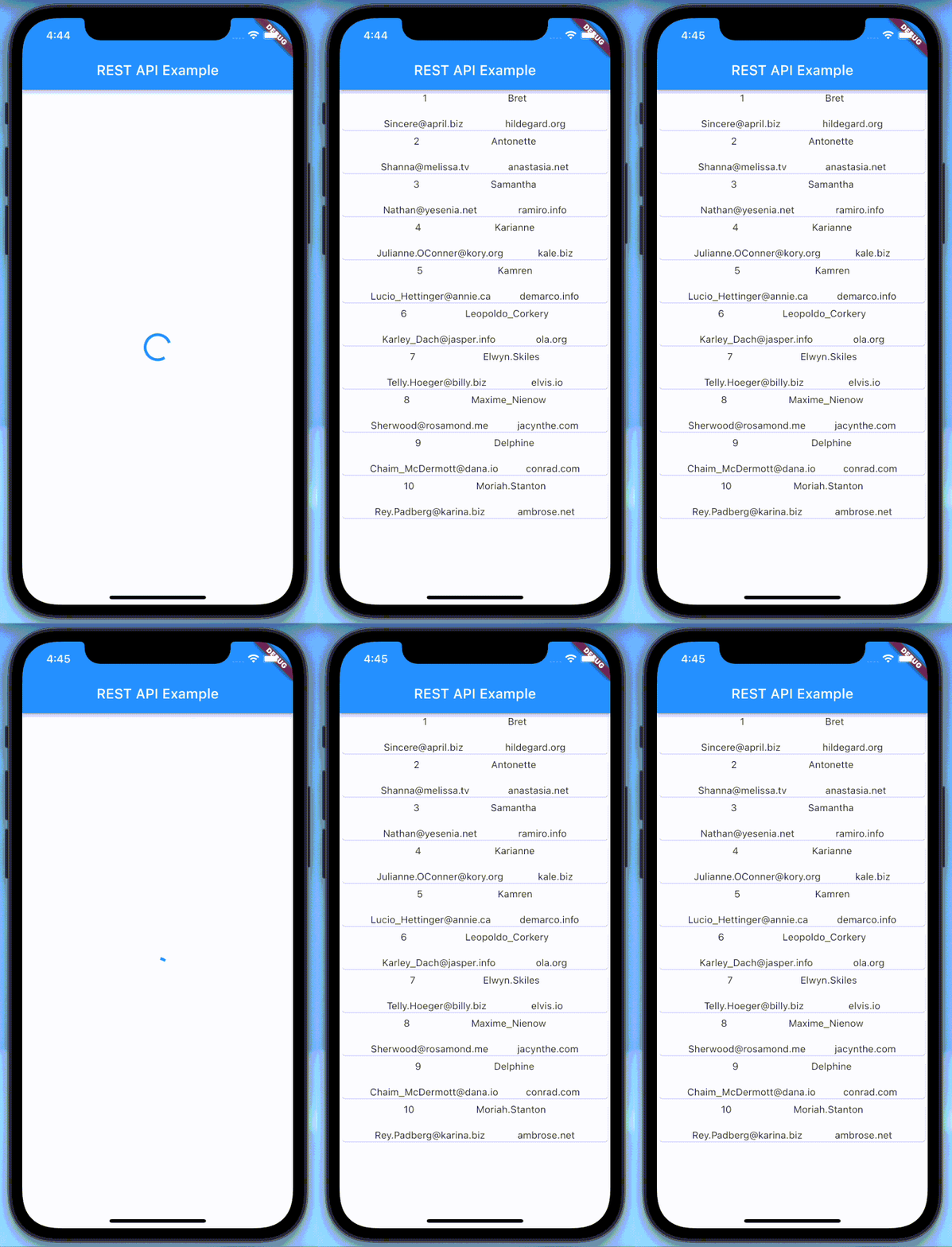
In the above code, we create an object of the type ListinitState, we call a method to get the data from our API. I have added Future.delayed in the method just so that we can simulate the API time response. The API we are using is a fake one; hence, it’s pretty fast. However, real APIs aren’t that quick. So it becomes our duty to show a loader until the API response is available. Once the response is available, we rebuild the UI to show the data. Here, I have just shown a bit of data from the model class.
Output:
Want to try it by yourself? Feel free to clone the GitHub repository!
Codemagic is the developer’s favourite CI/CD tool for mobile app projects. Build your Flutter projects on Codemagic.
Abhishek Doshi is Google Developer Expert for Dart & Flutter. He is also one of the Google Mentors. Currently, he works as a Senior Flutter Engineer at Somnio Software. Along with this, he is also the Organiser of Flutter Valsad and Co-Organiser of Flutter India. He loves to help people to achieve their goals! You can find him in Twitter.


Discussion about this post