









Earlier in June this year, I reviewed a wireless router for Synology, the RT6600ax, and it was quite an excellent product as a Tri-band Wi-Fi 6 router. In this review, we are going to check out Synology’s latest addition to their Wi-Fi 6 Mesh Router line, the WRX560.
Hardware and design
The WRX560 comes with a slightly less powerful CPU and RAM compared to the top-tier RT6600ax; this is reflected in a relatively lower price as well. For starters, the WRX560 is a Wi-Fi 6 mesh-supported router. It has a quad-core 1.4GHz CPU and 512 MB of DDR4 RAM. As for the antennas, there is a 4×4 MIMO high-performance for 5GHz bandwidth, and a 2×2 MIMO for 2.4GHz, all are internally installed.
A full list of hardware specs
| CPU | Quad-core 1.4GHz |
| Hardware Acceleration Engine | Layer 4 / Layer 7 |
| Memory | 512 MB DDR4 |
| Antenna Type | 4×4 MIMO high-performance internal antenna (5 GHz)2×2 MIMO high-performance internal antenna (2.4 GHz) |
| LAN Port | 2.5GbE (RJ-45) x 1Gigabit (RJ-45) x 3 |
| WAN Port | Gigabit (RJ-45) x 12.5 GbE (RJ-45) x 1 (Dual WAN) |
| External Ports | USB 3.2 Gen 1 x 1 (5V, 0.9A power output) |
| IEEE 802.11ax | IEEE 802.11a/b/g/n/ac/ax2.4GHz: 600Mbps5GHz: 2400MbpsSimultaneous dual-band Wi-Fi |
| Wi-Fi Encryption | WPA/WPA2-Personal, WPA/WPA2-Enterprise, WPA2/WPA3-Personal, WPA3-Personal/Enterprise, Wi-Fi Enhanced Open (OWE) |
| Button and Switch | WPS, Power, Reset, Wi-Fi On/Off |
| Size (Height x Width x Depth) | 233 mm x 194 mm x 66 mm |
| Weight | 1.35 kg |
| Environment | RoHS Compliant |
| AC Input Power Voltage | 100 V to 240 V AC |
| Power Consumption | 10.80 W (Access)
7.94 W (Idle) |
| Warranty | 2 Years
Notes: The warranty period starts from the purchase date as stated on your purchase receipt. Synology will provide software updates until Dec 2027, and extended support may be provided. |
| Temperature | Operating Temperature: 5°C to 40°C
Storage Temperature: -20°C to 60°C Relative Humidity: 5% to 95% RH |
| Packaging Content | Main Unit X 1
AC Power Adapter X 1 RJ-45 LAN Cable X 1 Quick Installation Guide X 1 |
What’s in the box
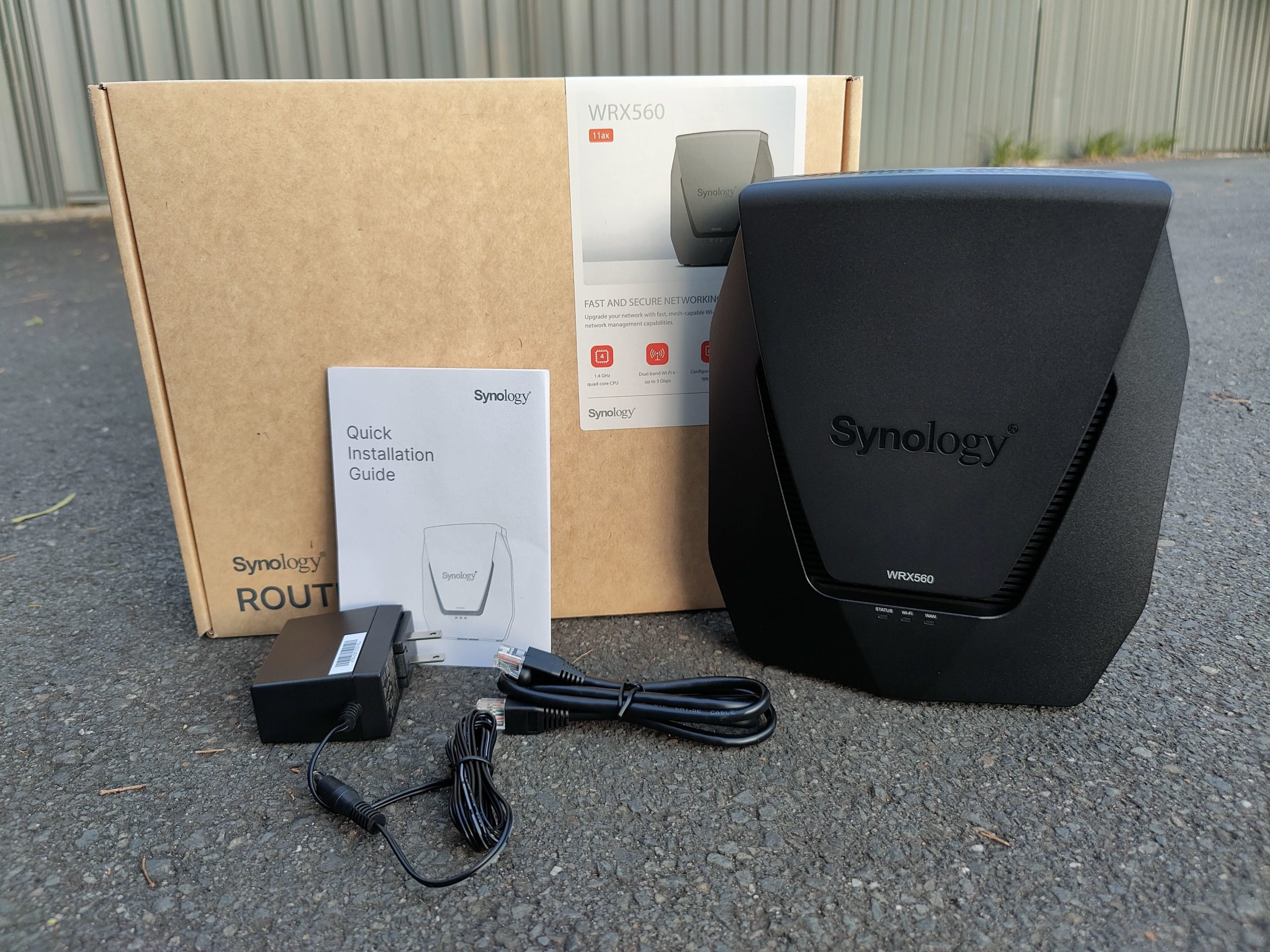
I like how Synology packed this router and the presentation in the box – simple and straightforward. There is a Cat 5E network cable and a power adapter with a clip-on design for use in different countries. It doesn’t seem Synology has included an AU plug for this review unit, but I am sure Australian consumers would not need to worry about it for the retail units.


My first impression of the WRX560 is that this thing is actually quite big, much bigger than what I would imagine. I wonder if this is related to the internally placed antenna. This router has a stand built into the design, which means Synology expects you to place it vertically. There are large air vents on the top and bottom, which seemingly are very helpful to maintain a good working temperature for the hardware.
It should be pointed out that the WRX560 does not have a wall mount point, which means you can only use it standing on a flat surface. This also implies that the product is designed for domestic use, rather than deploying for the business environment. I am not saying you can’t use them for business purposes, though. It’s just going to be picky when making decisions for the best location in your office.
Connection and coverage
Based on my previous experience with their network attached storage, also known as “NAS”, and other routers I have tried, Synology is able to offer consistent performance for their products; the same rule applies to WRX560. Throughout the whole time of testing, the WRX560 has been reliable and able to maintain a stable wireless connection 24/7. It perfectly meets my expectation.
The room where I normally spend most of the time is about 20 metres aware from the access point, and it can be challenging to gain a quality wireless connection. Previously, I used Synology RT6000ax as the main and only wireless router at home. I usually get 60-65% in terms of signal strength from my desk. That’s not a terrible reading, but I was also not able to fully utilise the best possible link speed the router is capable of. I was a little bit shocked when seeing the signal reading after switching to WRX560. I mean, I wasn’t expecting a better signal gain with a router that has internally designed antennae. Not to mention the router is actually cheaper than the other. It just shows how silly it can be when you make any sort of prejudgment on things you haven’t seen. With WRX560 being placed in the exact same environment, my desk is in the coverage with a stable 70% signal strength. It may not seem to be a significant increase, however, considering the lower cost of the router and the design of the antennae, I was very surprised.

RT6600ax: 20m from the router / 2 walls (both double brick)

WRX560: 20m from the router / 2 walls (both double brick)
Synology Mesh
The mesh system is one of the key features I am interested in. Synology does not allow establishing a mesh system with third-party devices, which is a bit of a shame but understandable. I just happen to have two Synology devices now, so why not give it a try?

WRX560 (left) / RT6600ax (right)
After following this official guide, I was able to easily set up the environment for a mesh network using two Synology wireless routers. If you plan to create a Synology-based mesh system, it is highly recommended to upgrade the SRM (Synology Router Manager) to 1.3.1 or above for better support for the mixed-use of different models.
Some may wonder whether it is necessary to deploy a mesh system instead of using extenders. Well, it is true that the drawback of a mesh system, when compared to an extender, is the cost. However, the benefit of mesh is overwhelming and cannot be neglected. I have been using extenders as my solution in the house for the past 5 years, and I can tell you immediately how satisfied I am after switching to Synology mesh.
The biggest difference is the seamless connection. Given that they are less expensive, Wi-Fi extenders are frequently chosen by consumers to fill in dead spots, although they may not always be the most effective solution. Multiple extenders will lead to different networks, which might be annoying. As you travel from room to room in your home, you will need to switch manually to the closest networks.
On the other side, mesh networks are smooth and trouble-free. Your wireless device will automatically connect to the nearest node, so you don’t have to bother about remembering to change networks every time you go from the living room to the bedroom. Additionally, installing a mesh network may be less expensive overall than buying several extenders, if you have a really big house.
After switching from extenders to a mesh system, I have never seen a signal strength going below 80% in locations where I normally use electronic devices.

Significant improvement with the mesh system
SRM, the secret weapon
Synology’s SRM is the key that makes their router so unique. It is by far the best management system I have ever known.

Control Panel – System – Login Style

Control Panel – System – SRM Settings

Control Panel – Notification

Control Panel – File Services – WebDAV

Control Panel – File Services – FTP

Control Panel – File Services – Win/Mac

Control Panel – Storage

Control Panel – User – LDAP

Control Panel – User – Domain

Control Panel – User – Advanced
Security is a priority
Synology takes security quite seriously. We can make use of the Security Advisor to check the current safety status and provide recommendations accordingly. Another great thing about SRM is the well-polished Safe Access. This module allows the administrator to oversee the network activity of every single device connected. You can also create a profile for a family member and register whatever devices belong to him or her. I have been heavily relying on this feature since a few months ago with RT6600ax. As a parent who is raising a 12-year-old, I need to be extremely cautious when deciding what Internet content she has access to, and what time, how long she can use it. Assigning all the devices she has access to under her one profile just makes my life so much easier, and so less stressful.

Security status at a glance

Setting up security baseline

Assessment of current security level

Safe Access gives the admin a clear idea about Internet usage

Built-in database and Google Safe Browsing supported

Activity shows a list of blocking history
If there are children using the network and you want to make sure they have good protection, there is Safe Access; if you like enjoying videos or moments captured and share with family and friends, there is Media Server; if privacy is your priority and you would like to make sure VPN is always enabled via a router, there is VPN Plus Server; or, if you are into downloading large files off the Internet and you do not want to keep the computer always on just for that reason, there is Download Station.

Those features serve as downloadable packages directly from Synology’s repository. There are other features not included in my list, but will also give you great conveniences, such as DNS Server, RADIUS Server, and Threat Prevention. I am sure that those who do have a demand will find it very useful when managing through the SRM.
The mobile app, DS Router
Synology developed a mobile app named “DS Router” which is available on iOS and Android. I tested this app when writing the review for RT6600ax a while ago. If you are interested, check this out.
Pros
- Nice integrity thanks to the internal antennae
- Reliable and excellent performance
- SRM is the best in the industry
- Security features
- Well-polished Parental management
Cons
- Not budget-friendly
- Only has one 2.5Gbps LAN port
Should you buy one?
WRX560 is an excellent mesh Wi-Fi router, that is for sure. It delivers a fast and stable connection, and exceptional wireless coverage. SRM is a killer feature that makes it stand out crowd. If you have a main focus on security and privacy, you can’t go wrong with WRX560. However, if you are looking to build a mesh system and do not want to go wild at cost, other options such as AiMesh and OneMesh are available on the market. But still, the management system from Synology is by far the best I have seen on the market. The cost is not the selling point for Synology, but that extra is definitely worth it when you take SRM into account for what it has to offer.









Discussion about this post